Marketo Partner Webinar
December 2015
Marketo integrations
Ivan Pinto – ipinto@market.com
Why Integrate?
1. Marketing & Sales Alignment
2. Visibility
Without integration, how can we properly align our revenue cycle?
• Have required criteria for target group selection
• Data updates (e.g. unsubscribes / interesting moments)
• Opportunity information, Custom Objects
• Analytics
• ROI
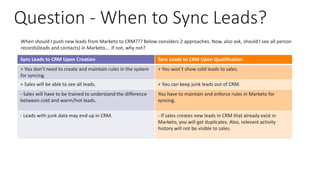
Question - When to Sync Leads?
Sync Leads to CRM Upon Creation Sync Leads to CRM Upon Qualification
+ You don’t need to create and maintain rules in the system
for syncing.
+ You won’t show cold leads to sales.
+ Sales will be able to see all leads. + You can keep junk leads out of CRM.
- Sales will have to be trained to understand the difference
between cold and warm/hot leads.
You have to maintain and enforce rules in Marketo for
syncing.
- Leads with junk data may end up in CRM. - If sales creates new leads in CRM that already exist in
Marketo, you will get duplicates. Also, relevant activity
history will not be visible to sales.
When should I push new leads from Marketo to CRM??? Below considers 2 approaches. Now, also ask, should I see all person
records(leads and contacts) in Marketo…. If not, why not?
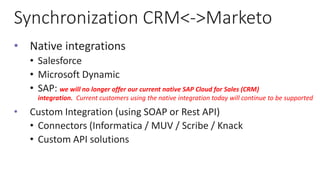
Synchronization CRM<->Marketo
• Native integrations
• Salesforce
• Microsoft Dynamic
• SAP: we will no longer offer our current native SAP Cloud for Sales (CRM)
integration. Current customers using the native integration today will continue to be supported
• Custom Integration (using SOAP or Rest API)
• Connectors (Informatica / MUV / Scribe / Knack
• Custom API solutions
Native Integrations
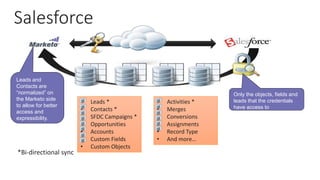
Salesforce
• Leads *
• Contacts *
• SFDC Campaigns *
• Opportunities
• Accounts
• Custom Fields
• Custom Objects
• Activities *
• Merges
• Conversions
• Assignments
• Record Type
• And more…
Only the objects, fields and
leads that the credentials
have access to
Leads and
Contacts are
“normalized” on
the Marketo side
to allow for better
access and
expressibility.
*Bi-directional sync
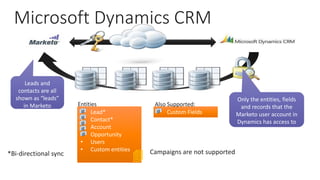
Microsoft Dynamics CRM
• Lead*
• Contact*
• Account
• Opportunity
• Users
• Custom entities
• Custom Fields
Only the entities, fields
and records that the
Marketo user account in
Dynamics has access to
Leads and
contacts are all
shown as “leads”
in Marketo Entities Also Supported:
Campaigns are not supported*Bi-directional sync 
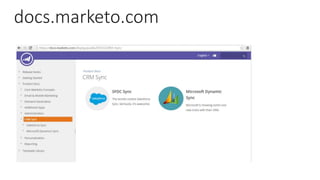
docs.marketo.com
Custom integrations
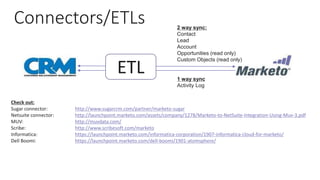
Connectors/ETLs
ETL
2 way sync:
Contact
Lead
Account
Opportunities (read only)
Custom Objects (read only)
1 way sync
Activity Log
Check out:
Sugar connector: http://www.sugarcrm.com/partner/marketo-sugar
Netsuite connector: http://launchpoint.marketo.com/assets/company/1278/Marketo-to-NetSuite-Integration-Using-Muv-3.pdf
MUV: http://muvdata.com/
Scribe: http://www.scribesoft.com/marketo
Informatica: https://launchpoint.marketo.com/informatica-corporation/1907-informatica-cloud-for-marketo/
Dell Boomi: https://launchpoint.marketo.com/dell-boomi/1901-atomsphere/
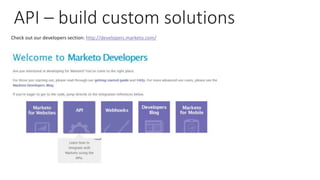
API – build custom solutions
Check out our developers section: http://developers.marketo.com/
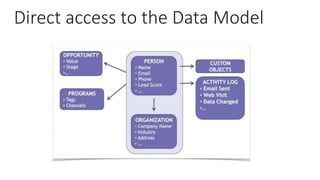
Direct access to the Data Model
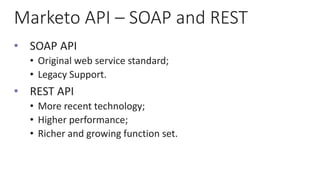
Marketo API – SOAP and REST
• SOAP API
• Original web service standard;
• Legacy Support.
• REST API
• More recent technology;
• Higher performance;
• Richer and growing function set.
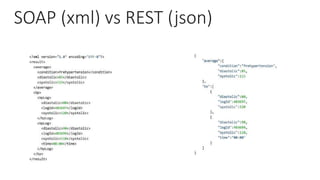
SOAP (xml) vs REST (json)
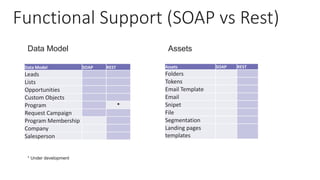
Functional Support (SOAP vs Rest)
Assets SOAP REST
Folders
Tokens
Email Template
Email
Snipet
File
Segmentation
Landing pages
templates
Data Model SOAP REST
Leads
Lists
Opportunities
Custom Objects
Program *
Request Campaign
Program Membership
Company
Salesperson
Data Model Assets
* Under development
Best Practices
• Reduce security exposure by giving the interface user
the bare minimum access required to execute the
interface;
• Be aware of natural constraints of a Cloud Integration:
• Latency;
• Governor limits;
• Batching multiple operations;
• Decide on data ownership, and rules for concurrent
change of data
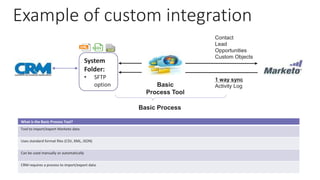
Example of custom integration
Basic
Process Tool
System
Folder:
• SFTP
option
Contact
Lead
Opportunities
Custom Objects
1 way sync
Activity Log
Basic Process
What is the Basic Process Tool?
Tool to import/export Marketo data
Uses standard format files (CSV, XML, JSON)
Can be used manually or automatically
CRM requires a process to import/export data.
Thank You & Questions Please

Marketo Partner Engagement webinar - API Integration

  • 1.
    Marketo Partner Webinar December2015 Marketo integrations Ivan Pinto – ipinto@market.com
  • 2.
    Why Integrate? 1. Marketing& Sales Alignment 2. Visibility Without integration, how can we properly align our revenue cycle? • Have required criteria for target group selection • Data updates (e.g. unsubscribes / interesting moments) • Opportunity information, Custom Objects • Analytics • ROI
  • 3.
    Question - Whento Sync Leads? Sync Leads to CRM Upon Creation Sync Leads to CRM Upon Qualification + You don’t need to create and maintain rules in the system for syncing. + You won’t show cold leads to sales. + Sales will be able to see all leads. + You can keep junk leads out of CRM. - Sales will have to be trained to understand the difference between cold and warm/hot leads. You have to maintain and enforce rules in Marketo for syncing. - Leads with junk data may end up in CRM. - If sales creates new leads in CRM that already exist in Marketo, you will get duplicates. Also, relevant activity history will not be visible to sales. When should I push new leads from Marketo to CRM??? Below considers 2 approaches. Now, also ask, should I see all person records(leads and contacts) in Marketo…. If not, why not?
  • 4.
    Synchronization CRM<->Marketo • Nativeintegrations • Salesforce • Microsoft Dynamic • SAP: we will no longer offer our current native SAP Cloud for Sales (CRM) integration. Current customers using the native integration today will continue to be supported • Custom Integration (using SOAP or Rest API) • Connectors (Informatica / MUV / Scribe / Knack • Custom API solutions
  • 5.
  • 6.
    Salesforce • Leads * •Contacts * • SFDC Campaigns * • Opportunities • Accounts • Custom Fields • Custom Objects • Activities * • Merges • Conversions • Assignments • Record Type • And more… Only the objects, fields and leads that the credentials have access to Leads and Contacts are “normalized” on the Marketo side to allow for better access and expressibility. *Bi-directional sync
  • 7.
    Microsoft Dynamics CRM •Lead* • Contact* • Account • Opportunity • Users • Custom entities • Custom Fields Only the entities, fields and records that the Marketo user account in Dynamics has access to Leads and contacts are all shown as “leads” in Marketo Entities Also Supported: Campaigns are not supported*Bi-directional sync 
  • 8.
  • 9.
  • 10.
    Connectors/ETLs ETL 2 way sync: Contact Lead Account Opportunities(read only) Custom Objects (read only) 1 way sync Activity Log Check out: Sugar connector: http://www.sugarcrm.com/partner/marketo-sugar Netsuite connector: http://launchpoint.marketo.com/assets/company/1278/Marketo-to-NetSuite-Integration-Using-Muv-3.pdf MUV: http://muvdata.com/ Scribe: http://www.scribesoft.com/marketo Informatica: https://launchpoint.marketo.com/informatica-corporation/1907-informatica-cloud-for-marketo/ Dell Boomi: https://launchpoint.marketo.com/dell-boomi/1901-atomsphere/
  • 11.
    API – buildcustom solutions Check out our developers section: http://developers.marketo.com/
  • 12.
    Direct access tothe Data Model
  • 13.
    Marketo API –SOAP and REST • SOAP API • Original web service standard; • Legacy Support. • REST API • More recent technology; • Higher performance; • Richer and growing function set.
  • 14.
    SOAP (xml) vsREST (json)
  • 15.
    Functional Support (SOAPvs Rest) Assets SOAP REST Folders Tokens Email Template Email Snipet File Segmentation Landing pages templates Data Model SOAP REST Leads Lists Opportunities Custom Objects Program * Request Campaign Program Membership Company Salesperson Data Model Assets * Under development
  • 16.
    Best Practices • Reducesecurity exposure by giving the interface user the bare minimum access required to execute the interface; • Be aware of natural constraints of a Cloud Integration: • Latency; • Governor limits; • Batching multiple operations; • Decide on data ownership, and rules for concurrent change of data
  • 17.
    Example of customintegration Basic Process Tool System Folder: • SFTP option Contact Lead Opportunities Custom Objects 1 way sync Activity Log Basic Process What is the Basic Process Tool? Tool to import/export Marketo data Uses standard format files (CSV, XML, JSON) Can be used manually or automatically CRM requires a process to import/export data.
  • 18.
    Thank You &Questions Please

Editor's Notes

  • #2 Update with new cover from visual brand deck.
  • #3 List isnt exhaustive. Key points: Seemless connectivity, visibility, access to all required data for marketing, operational and reporting goals.
  • #4 Recommended Slide Objectives: Explain that there are two primary approaches for deciding when to sync new leads from Marketo to CRM. Both have pros and cons, so they will need to choose the approach that works best for them. Key Points: You can choose to sync records to Dynamics as soon as they are created in Marketo. You may choose to do this if sales is concerned about not having visibility into all of leads, may do cold calling, or if you have a lot of concerns over duplicates. You can choose to wait and sync records when they become qualified. You may choose to do so if you are concerned about having junk data in CRM or about sales being confused about having unqualified leads in the system.
  • #6 Update with new cover from visual brand deck.
  • #8 Get martin to validate this slide
  • #10 Update with new cover from visual brand deck.
  • #11 3rd party tools. They completely manage the process and the integration. We are currently working on an enhanced SAP integration with Informatica.  The Informatica-based solution will provide joint SAP and Marketo customers with a powerful and flexible integration option to better satisfy the often sophisticated needs of SAP’s Enterprise customers.
  • #12 Marketo is a marketing automation platform that enables marketers to manage personalized multi-channel programs and campaigns to prospects and customers.  The Marketo platform can be extended using our API
  • #18 Marketo can push lists of data (leads or activities) to a server in the form of files (csv/saml) This data can then be uploaded into CRM by the customer as they see fit Marketo can also inport files into Marketo. Data updates, new records etc….. While this is a “ 2 way sync”, all we are doing is passing files back and forth via a secure location. It’s a very simple way to connect 2 systems together.