www.dageop.com
Managing Memory and locks
Managing
Memory & Locks
®
ML-01: Memory Management
DR. SUBRAMANI
PARAMASIVAM
(MANI)
About
me
Dr. SubraMANI Paramasivam
PhD., MCT, MCSE, MCITP, MCP, MCTS, MCSA
CEO, Principal Consultant & Trainer
@ DAGEOP (UK)
Email: mani@dageop.com
Blog: http://dataap.org/blog
Follow
Us
https://www.facebook.com/pages/YOUR-SQL-MAN-LTD/
http://www.youtube.com/user/YourSQLMAN
https://twitter.com/dageop
https://uk.linkedin.com/in/dageop
Proud Sponsor
• SQLBits
• SQL Saturdays
• MCT Summit
• SQL Server Geeks
Summit
• Data Awareness
Programme
• Dageop’s Data Day
®
www.DataAP.org
SPEAKER
Contents
ML-01: Memory Management
• Buffer pool (Data, Plan & Log cache)
• Buffer manager
• Lazy Writer
• Checkpoint (Automatic, Indirect, Internet & Manual)
• Log writer
www.dageop.com
Managing Memory and locks
www.dageop.com
Managing Memory and locks
ML -01 Managing Memory
Buffer Pool
www.dageop.com
Managing Memory and locks
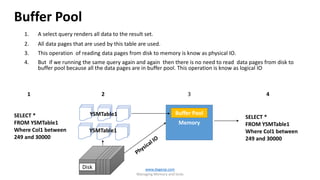
1. A select query renders all data to the result set.
2. All data pages that are used by this table are used.
3. This operation of reading data pages from disk to memory is know as physical IO.
4. But if we running the same query again and again then there is no need to read data pages from disk to
buffer pool because all the data pages are in buffer pool. This operation is know as logical IO
www.dageop.com
Managing Memory and locks
Buffer Pool
SELECT *
FROM YSMTable1
Where Col1 between
249 and 30000
Disk
Memory
YSMTable1
YSMTable1
1 2 3 4
SELECT *
FROM YSMTable1
Where Col1 between
249 and 30000
Buffer Pool
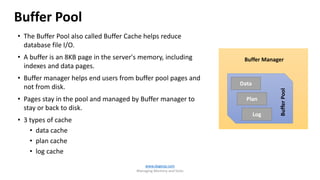
• The Buffer Pool also called Buffer Cache helps reduce
database file I/O.
• A buffer is an 8KB page in the server's memory, including
indexes and data pages.
• Buffer manager helps end users from buffer pool pages and
not from disk.
• Pages stay in the pool and managed by Buffer manager to
stay or back to disk.
• 3 types of cache
• data cache
• plan cache
• log cache
www.dageop.com
Managing Memory and locks
Data
Plan
Log
Buffer Manager
BufferPool
Buffer Pool
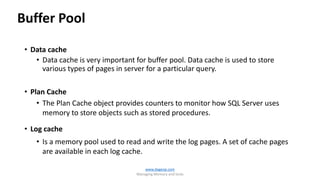
• Data cache
• Data cache is very important for buffer pool. Data cache is used to store
various types of pages in server for a particular query.
• Plan Cache
• The Plan Cache object provides counters to monitor how SQL Server uses
memory to store objects such as stored procedures.
• Log cache
• Is a memory pool used to read and write the log pages. A set of cache pages
are available in each log cache.
www.dageop.com
Managing Memory and locks
Buffer Pool
Measuring the Buffer pool in memory
select * from
sys.dm_os_buffer_descriptors
www.dageop.com
Managing Memory and locks
Buffer Pool
CAUTION:
• Memory is Limited.
• Unwanted database objects may occupy buffer space.
• Keep checking it regularly with the below DMV
• sys.dm_os_buffer_descriptors
www.dageop.com
Managing Memory and locks
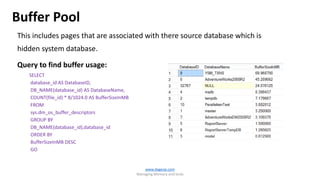
Buffer Pool
This includes pages that are associated with there source database which is
hidden system database.
Query to find buffer usage:
SELECT
database_id AS DatabaseID,
DB_NAME(database_id) AS DatabaseName,
COUNT(file_id) * 8/1024.0 AS BufferSizeInMB
FROM
sys.dm_os_buffer_descriptors
GROUP BY
DB_NAME(database_id),database_id
ORDER BY
BufferSizeInMB DESC
GO
www.dageop.com
Managing Memory and locks
Buffer Pool
DEMO
www.dageop.com
Managing Memory and locks
Buffer Manager
Data
Plan
Log
Buffer Manager
BufferPool
www.dageop.com
Managing Memory and locks
Buffer manager
• Provides counters to monitor
• Memory to store data pages, internal data structures, and procedural cache.
• Physical I/O (Reading from & Writing to Disk)
• What does it really help?
• To add more memory or make more memory available.
• How often SQL Server needs to read from disk.
• Retrieve data from disk when bottleneck exist due to lack of memory.
www.dageop.com
Managing Memory and locks
Buffer management is a key component in achieving efficiency. The
buffer management component consists of two mechanisms:
• The buffer manager to access and update database pages
• buffer cache (also called the buffer pool), to reduce database file I/O.
www.dageop.com
Managing Memory and locks
Buffer manager
www.dageop.com
Managing Memory and locks
Buffer manager
SQL Server Buffer
Manager counters
Description
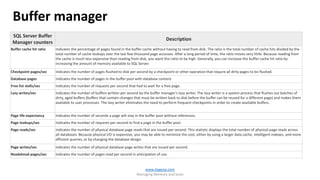
Buffer cache hit ratio Indicates the percentage of pages found in the buffer cache without having to read from disk. The ratio is the total number of cache hits divided by the
total number of cache lookups over the last few thousand page accesses. After a long period of time, the ratio moves very little. Because reading from
the cache is much less expensive than reading from disk, you want this ratio to be high. Generally, you can increase the buffer cache hit ratio by
increasing the amount of memory available to SQL Server.
Checkpoint pages/sec Indicates the number of pages flushed to disk per second by a checkpoint or other operation that require all dirty pages to be flushed.
Database pages Indicates the number of pages in the buffer pool with database content.
Free list stalls/sec Indicates the number of requests per second that had to wait for a free page.
Lazy writes/sec Indicates the number of buffers written per second by the buffer manager's lazy writer. The lazy writer is a system process that flushes out batches of
dirty, aged buffers (buffers that contain changes that must be written back to disk before the buffer can be reused for a different page) and makes them
available to user processes. The lazy writer eliminates the need to perform frequent checkpoints in order to create available buffers.
Page life expectancy Indicates the number of seconds a page will stay in the buffer pool without references.
Page lookups/sec Indicates the number of requests per second to find a page in the buffer pool.
Page reads/sec Indicates the number of physical database page reads that are issued per second. This statistic displays the total number of physical page reads across
all databases. Because physical I/O is expensive, you may be able to minimize the cost, either by using a larger data cache, intelligent indexes, and more
efficient queries, or by changing the database design.
Page writes/sec Indicates the number of physical database page writes that are issued per second.
Readahead pages/sec Indicates the number of pages read per second in anticipation of use.
www.dageop.com
Managing Memory and locks
Data
Plan
Log
Buffer Manager
BufferPool
DISK
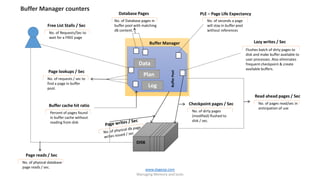
No. of Requests/Sec to
wait for a FREE page
Free List Stalls / Sec
No. of Database pages in
buffer pool with matching
db content.
Database Pages
No. of seconds a page
will stay in buffer pool
without references
PLE – Page Life Expectancy
Flushes batch of dirty pages to
disk and make buffer available to
user processes. Also eliminates
frequent checkpoint & create
available buffers.
Lazy writes / Sec
No. of pages read/sec in
anticipation of use
Read ahead pages / Sec
No. of physical database
page reads / sec.
Page reads / Sec
No. of dirty pages
(modified) flushed to
disk / sec.
Checkpoint pages / Sec
No. of requests / sec to
find a page in buffer
pool.
Page lookups / Sec
Percent of pages found
in buffer cache without
reading from disk
Buffer cache hit ratio
Buffer Manager counters
www.dageop.com
Managing Memory and locks
Buffer manager
Data
Plan
Log
BufferPool
1. Physical read from disk to Buffer
2. Data modified and marked as dirty page.
3. Log record is created in log cache and
written in log file
4. Flush (Page is written back to data file.)
1
2
3
4
mdf
ldf
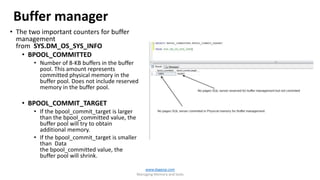
• The two important counters for buffer
management
from SYS.DM_OS_SYS_INFO
• BPOOL_COMMITTED
• Number of 8-KB buffers in the buffer
pool. This amount represents
committed physical memory in the
buffer pool. Does not include reserved
memory in the buffer pool.
• BPOOL_COMMIT_TARGET
• If the bpool_commit_target is larger
than the bpool_committed value, the
buffer pool will try to obtain
additional memory.
• If the bpool_commit_target is smaller
than Data
the bpool_committed value, the
buffer pool will shrink.
Buffer manager
www.dageop.com
Managing Memory and locks
www.dageop.com
Managing Memory and locks
DEMO
www.dageop.com
Managing Memory and locks
Lazy Writer
Lazy Writer
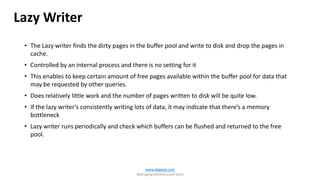
• The Lazy writer finds the dirty pages in the buffer pool and write to disk and drop the pages in
cache.
• Controlled by an internal process and there is no setting for it
• This enables to keep certain amount of free pages available within the buffer pool for data that
may be requested by other queries.
• Does relatively little work and the number of pages written to disk will be quite low.
• If the lazy writer’s consistently writing lots of data, it may indicate that there’s a memory
bottleneck
• Lazy writer runs periodically and check which buffers can be flushed and returned to the free
pool.
www.dageop.com
Managing Memory and locks
Lazy Writer
Data File
Buffer Pool
Log
Buffer
Worker threads
Check Point
Lazy Writer
Log Writer
C P U
MEMORY
Transaction log file
SQL Server
Client Application
Backup media
NetworkASYNC Network IO
Sequential ASYNC IO 8KASYNCIO
SectorSize(512)SYNCIO
DISK
www.dageop.com
Managing Memory and locks
• The Lazy writer can adjust the number of buffers in the buffer pool if
dynamic memory management is enabled.
• SQL Server estimates the number of necessary Buffer Pool buffers
based on system activity and based on the number of stalls
• A stall occurs when a request for memory has to wait on a free buffer
page.
www.dageop.com
Managing Memory and locks
Lazy Writer
www.dageop.com
Managing Memory and locks
DEMO
www.dageop.com
Managing Memory and locks
Checkpoint
Checkpoint
• The checkpoint process also writes dirty pages to disk, but it has no interest in keeping available
buffers or memory pressure and does at a specified interval.
• The pages need to be written to disk regularly in order to ensure that when SQL SERVER restarts,
that crash recovery will not take so long.
• The timing can be changed with ‘recovery interval (min)’ of sp_configure option.
• A checkpoint can be issued manually.
• Step 1: issue a Checkpoint
• Step 2: issue a DBCC DROPCLEANBUFFERS (Not advisable to do in Production environment)
www.dageop.com
Managing Memory and locks
Checkpoint
www.dageop.com
Managing Memory and locks
Types T-SQL Commands Description
Automatic EXEC sp_configure'recovery
interval','seconds'
Automatic checkpoints run to completion. Issued
automatically in the background by the recovery
interval server configuration option
Indirect ALTER DATABASE … SET
TARGET_RECOVERY_TIME =target_re
covery_time{ SECONDS | MINUTES }
User-specified target recovery time . If ALTER DATABASE
to set TARGET_RECOVERY_TIME to >0 is used, this takes
over the recovery interval specified for the server
instance.
Manual CHECKPOINT [ checkpoint_duration ] T-SQL CHECKPOINT command issued for the current
database in the current connection.
Internal None Backup and Database-snapshot and various other server
operations issue Checkpoint internally.
Without MANUAL CHECKPOINT Vs With MANUAL CHECKPOINT
www.dageop.com
Managing Memory and locks
Checkpoint
DEMO
www.dageop.com
Managing Memory and locks
Log Writer
www.dageop.com
Managing Memory and locks
• The Log writer is responsible for writing to the transaction log file.
• Checkpoint is responsible for writing dirty data pages from memory
to disk and processes data periodically .
• Depending on memory pressure and frequent changes made to the
database, Log Writer will run less often, and hence it is very quick, so
you're unlikely to see it change from suspended.
www.dageop.com
Managing Memory and locks
Log Writer
DEMO
www.dageop.com
Managing Memory and locks
Review
Memory Management
 Buffer pool (Data, Plan & Log cache)
 Buffer manager
 Lazy Writer
 Checkpoint (Automatic, Indirect, Internet & Manual)
 Log writer
www.dageop.com
Introduction to T-SQL
Q & A
www.dageop.com
Managing Memory and locks
®
www.dageop.com

Managing Memory & Locks - Series 1 Memory Management

  • 1.
    www.dageop.com Managing Memory andlocks Managing Memory & Locks ® ML-01: Memory Management DR. SUBRAMANI PARAMASIVAM (MANI)
  • 2.
    About me Dr. SubraMANI Paramasivam PhD.,MCT, MCSE, MCITP, MCP, MCTS, MCSA CEO, Principal Consultant & Trainer @ DAGEOP (UK) Email: mani@dageop.com Blog: http://dataap.org/blog Follow Us https://www.facebook.com/pages/YOUR-SQL-MAN-LTD/ http://www.youtube.com/user/YourSQLMAN https://twitter.com/dageop https://uk.linkedin.com/in/dageop Proud Sponsor • SQLBits • SQL Saturdays • MCT Summit • SQL Server Geeks Summit • Data Awareness Programme • Dageop’s Data Day ® www.DataAP.org SPEAKER
  • 3.
    Contents ML-01: Memory Management •Buffer pool (Data, Plan & Log cache) • Buffer manager • Lazy Writer • Checkpoint (Automatic, Indirect, Internet & Manual) • Log writer www.dageop.com Managing Memory and locks
  • 4.
    www.dageop.com Managing Memory andlocks ML -01 Managing Memory
  • 5.
  • 6.
    1. A selectquery renders all data to the result set. 2. All data pages that are used by this table are used. 3. This operation of reading data pages from disk to memory is know as physical IO. 4. But if we running the same query again and again then there is no need to read data pages from disk to buffer pool because all the data pages are in buffer pool. This operation is know as logical IO www.dageop.com Managing Memory and locks Buffer Pool SELECT * FROM YSMTable1 Where Col1 between 249 and 30000 Disk Memory YSMTable1 YSMTable1 1 2 3 4 SELECT * FROM YSMTable1 Where Col1 between 249 and 30000 Buffer Pool
  • 7.
    • The BufferPool also called Buffer Cache helps reduce database file I/O. • A buffer is an 8KB page in the server's memory, including indexes and data pages. • Buffer manager helps end users from buffer pool pages and not from disk. • Pages stay in the pool and managed by Buffer manager to stay or back to disk. • 3 types of cache • data cache • plan cache • log cache www.dageop.com Managing Memory and locks Data Plan Log Buffer Manager BufferPool Buffer Pool
  • 8.
    • Data cache •Data cache is very important for buffer pool. Data cache is used to store various types of pages in server for a particular query. • Plan Cache • The Plan Cache object provides counters to monitor how SQL Server uses memory to store objects such as stored procedures. • Log cache • Is a memory pool used to read and write the log pages. A set of cache pages are available in each log cache. www.dageop.com Managing Memory and locks Buffer Pool
  • 9.
    Measuring the Bufferpool in memory select * from sys.dm_os_buffer_descriptors www.dageop.com Managing Memory and locks Buffer Pool
  • 10.
    CAUTION: • Memory isLimited. • Unwanted database objects may occupy buffer space. • Keep checking it regularly with the below DMV • sys.dm_os_buffer_descriptors www.dageop.com Managing Memory and locks Buffer Pool
  • 11.
    This includes pagesthat are associated with there source database which is hidden system database. Query to find buffer usage: SELECT database_id AS DatabaseID, DB_NAME(database_id) AS DatabaseName, COUNT(file_id) * 8/1024.0 AS BufferSizeInMB FROM sys.dm_os_buffer_descriptors GROUP BY DB_NAME(database_id),database_id ORDER BY BufferSizeInMB DESC GO www.dageop.com Managing Memory and locks Buffer Pool
  • 12.
  • 13.
  • 14.
    Buffer manager • Providescounters to monitor • Memory to store data pages, internal data structures, and procedural cache. • Physical I/O (Reading from & Writing to Disk) • What does it really help? • To add more memory or make more memory available. • How often SQL Server needs to read from disk. • Retrieve data from disk when bottleneck exist due to lack of memory. www.dageop.com Managing Memory and locks
  • 15.
    Buffer management isa key component in achieving efficiency. The buffer management component consists of two mechanisms: • The buffer manager to access and update database pages • buffer cache (also called the buffer pool), to reduce database file I/O. www.dageop.com Managing Memory and locks Buffer manager
  • 16.
    www.dageop.com Managing Memory andlocks Buffer manager SQL Server Buffer Manager counters Description Buffer cache hit ratio Indicates the percentage of pages found in the buffer cache without having to read from disk. The ratio is the total number of cache hits divided by the total number of cache lookups over the last few thousand page accesses. After a long period of time, the ratio moves very little. Because reading from the cache is much less expensive than reading from disk, you want this ratio to be high. Generally, you can increase the buffer cache hit ratio by increasing the amount of memory available to SQL Server. Checkpoint pages/sec Indicates the number of pages flushed to disk per second by a checkpoint or other operation that require all dirty pages to be flushed. Database pages Indicates the number of pages in the buffer pool with database content. Free list stalls/sec Indicates the number of requests per second that had to wait for a free page. Lazy writes/sec Indicates the number of buffers written per second by the buffer manager's lazy writer. The lazy writer is a system process that flushes out batches of dirty, aged buffers (buffers that contain changes that must be written back to disk before the buffer can be reused for a different page) and makes them available to user processes. The lazy writer eliminates the need to perform frequent checkpoints in order to create available buffers. Page life expectancy Indicates the number of seconds a page will stay in the buffer pool without references. Page lookups/sec Indicates the number of requests per second to find a page in the buffer pool. Page reads/sec Indicates the number of physical database page reads that are issued per second. This statistic displays the total number of physical page reads across all databases. Because physical I/O is expensive, you may be able to minimize the cost, either by using a larger data cache, intelligent indexes, and more efficient queries, or by changing the database design. Page writes/sec Indicates the number of physical database page writes that are issued per second. Readahead pages/sec Indicates the number of pages read per second in anticipation of use.
  • 17.
    www.dageop.com Managing Memory andlocks Data Plan Log Buffer Manager BufferPool DISK No. of Requests/Sec to wait for a FREE page Free List Stalls / Sec No. of Database pages in buffer pool with matching db content. Database Pages No. of seconds a page will stay in buffer pool without references PLE – Page Life Expectancy Flushes batch of dirty pages to disk and make buffer available to user processes. Also eliminates frequent checkpoint & create available buffers. Lazy writes / Sec No. of pages read/sec in anticipation of use Read ahead pages / Sec No. of physical database page reads / sec. Page reads / Sec No. of dirty pages (modified) flushed to disk / sec. Checkpoint pages / Sec No. of requests / sec to find a page in buffer pool. Page lookups / Sec Percent of pages found in buffer cache without reading from disk Buffer cache hit ratio Buffer Manager counters
  • 18.
    www.dageop.com Managing Memory andlocks Buffer manager Data Plan Log BufferPool 1. Physical read from disk to Buffer 2. Data modified and marked as dirty page. 3. Log record is created in log cache and written in log file 4. Flush (Page is written back to data file.) 1 2 3 4 mdf ldf
  • 19.
    • The twoimportant counters for buffer management from SYS.DM_OS_SYS_INFO • BPOOL_COMMITTED • Number of 8-KB buffers in the buffer pool. This amount represents committed physical memory in the buffer pool. Does not include reserved memory in the buffer pool. • BPOOL_COMMIT_TARGET • If the bpool_commit_target is larger than the bpool_committed value, the buffer pool will try to obtain additional memory. • If the bpool_commit_target is smaller than Data the bpool_committed value, the buffer pool will shrink. Buffer manager www.dageop.com Managing Memory and locks
  • 20.
  • 21.
  • 22.
    Lazy Writer • TheLazy writer finds the dirty pages in the buffer pool and write to disk and drop the pages in cache. • Controlled by an internal process and there is no setting for it • This enables to keep certain amount of free pages available within the buffer pool for data that may be requested by other queries. • Does relatively little work and the number of pages written to disk will be quite low. • If the lazy writer’s consistently writing lots of data, it may indicate that there’s a memory bottleneck • Lazy writer runs periodically and check which buffers can be flushed and returned to the free pool. www.dageop.com Managing Memory and locks
  • 23.
    Lazy Writer Data File BufferPool Log Buffer Worker threads Check Point Lazy Writer Log Writer C P U MEMORY Transaction log file SQL Server Client Application Backup media NetworkASYNC Network IO Sequential ASYNC IO 8KASYNCIO SectorSize(512)SYNCIO DISK www.dageop.com Managing Memory and locks
  • 24.
    • The Lazywriter can adjust the number of buffers in the buffer pool if dynamic memory management is enabled. • SQL Server estimates the number of necessary Buffer Pool buffers based on system activity and based on the number of stalls • A stall occurs when a request for memory has to wait on a free buffer page. www.dageop.com Managing Memory and locks Lazy Writer
  • 25.
  • 26.
  • 27.
    Checkpoint • The checkpointprocess also writes dirty pages to disk, but it has no interest in keeping available buffers or memory pressure and does at a specified interval. • The pages need to be written to disk regularly in order to ensure that when SQL SERVER restarts, that crash recovery will not take so long. • The timing can be changed with ‘recovery interval (min)’ of sp_configure option. • A checkpoint can be issued manually. • Step 1: issue a Checkpoint • Step 2: issue a DBCC DROPCLEANBUFFERS (Not advisable to do in Production environment) www.dageop.com Managing Memory and locks
  • 28.
    Checkpoint www.dageop.com Managing Memory andlocks Types T-SQL Commands Description Automatic EXEC sp_configure'recovery interval','seconds' Automatic checkpoints run to completion. Issued automatically in the background by the recovery interval server configuration option Indirect ALTER DATABASE … SET TARGET_RECOVERY_TIME =target_re covery_time{ SECONDS | MINUTES } User-specified target recovery time . If ALTER DATABASE to set TARGET_RECOVERY_TIME to >0 is used, this takes over the recovery interval specified for the server instance. Manual CHECKPOINT [ checkpoint_duration ] T-SQL CHECKPOINT command issued for the current database in the current connection. Internal None Backup and Database-snapshot and various other server operations issue Checkpoint internally.
  • 29.
    Without MANUAL CHECKPOINTVs With MANUAL CHECKPOINT www.dageop.com Managing Memory and locks Checkpoint
  • 30.
  • 31.
  • 32.
    • The Logwriter is responsible for writing to the transaction log file. • Checkpoint is responsible for writing dirty data pages from memory to disk and processes data periodically . • Depending on memory pressure and frequent changes made to the database, Log Writer will run less often, and hence it is very quick, so you're unlikely to see it change from suspended. www.dageop.com Managing Memory and locks Log Writer
  • 33.
  • 34.
    Review Memory Management  Bufferpool (Data, Plan & Log cache)  Buffer manager  Lazy Writer  Checkpoint (Automatic, Indirect, Internet & Manual)  Log writer www.dageop.com Introduction to T-SQL
  • 35.
  • 36.