The Linux Kernel Internal
Writing your own Operating System
Tools
• Virtual Machine:
– Qemu
– Virtual Box
• Build System:
make (Makefile)
• Compiler:
– GCC (C lang)
– Nasm (Assambly)
– LD (Linker)
• Programming Languages:
– C
– Assembly (Inline Assambly)
– High Level Language (Python, Perl)
• Host Operation System:
– Ubuntu 16.X
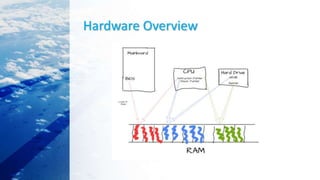
Hardware Overview
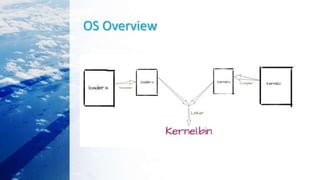
OS Overview
BornaOS Overview
• https://github.com/raminfp/BornaOS
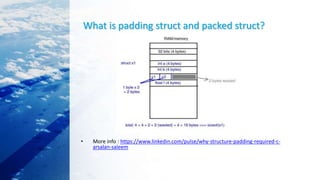
What is padding struct and packed struct?
• More info : https://www.linkedin.com/pulse/why-structure-padding-required-c-
arsalan-saleem
Calling C Code From Assembly
• There are many different conventions for how to call C
code from assembly code
• https://gist.github.com/hibariya/d7fab1b5b0ca9ca2c6000bb
dc396849e
Inline Assembly
• Windows 32 bit:
• https://github.com/Cr4sh/WindowsRegistryRootkit/blo
b/master/src/meterpreter/dllmain.cpp
• Windows 64 bit/ARM:
• https://github.com/SinaKarvandi/x64-Driver-Inline-
Assembly/
• Linux :
• https://0xax.gitbooks.io/linux-
insides/content/Theory/linux-theory-3.html
Interacting with the Hardware
• Memory-mapped I/O:
• memory-mapped I/O then you can write to a specific memory
address and the hardware will be updated with the new data.
Example : (framebuffer, which will be discussed in more detail later.
For example, if you write the value 0x410F to address 0x000B8000,
you will see the letter A in white color on a black background)
• I/O ports :
• I/O ports then the assembly code instructions out and in must be used to
communicate with the hardware.
• https://github.com/raminfp/BornaOS/blob/master
/kernel/ports.c
The Framebuffer
• The framebuffer is a hardware device that is capable of
displaying a buffer of memory on the screen,
• Source :
• https://github.com/raminfp/BornaOS/blob/master/kernel/ke
rnel.c
How to create an OS from scratch?
• Source Code:
• https://github.com/cfenollosa/os-tutorial
• https://github.com/AlgorithMan-de/wyoos
• Books:
• https://littleosbook.github.io
• http://createyourownos.blogspot.com/
• Videos:
• https://www.youtube.com/watch?v=1rnA6wpF0o4&list=PLHh55M_Kq4OApWS
cZyPl5HhgsTJS9MZ6M
• https://youtu.be/l2wZf45ZcAg
The End
Demo

Make own you kernel os

  • 1.
    The Linux KernelInternal Writing your own Operating System
  • 2.
    Tools • Virtual Machine: –Qemu – Virtual Box • Build System: make (Makefile) • Compiler: – GCC (C lang) – Nasm (Assambly) – LD (Linker) • Programming Languages: – C – Assembly (Inline Assambly) – High Level Language (Python, Perl) • Host Operation System: – Ubuntu 16.X
  • 3.
  • 4.
  • 5.
  • 6.
    What is paddingstruct and packed struct? • More info : https://www.linkedin.com/pulse/why-structure-padding-required-c- arsalan-saleem
  • 7.
    Calling C CodeFrom Assembly • There are many different conventions for how to call C code from assembly code • https://gist.github.com/hibariya/d7fab1b5b0ca9ca2c6000bb dc396849e
  • 8.
    Inline Assembly • Windows32 bit: • https://github.com/Cr4sh/WindowsRegistryRootkit/blo b/master/src/meterpreter/dllmain.cpp • Windows 64 bit/ARM: • https://github.com/SinaKarvandi/x64-Driver-Inline- Assembly/ • Linux : • https://0xax.gitbooks.io/linux- insides/content/Theory/linux-theory-3.html
  • 9.
    Interacting with theHardware • Memory-mapped I/O: • memory-mapped I/O then you can write to a specific memory address and the hardware will be updated with the new data. Example : (framebuffer, which will be discussed in more detail later. For example, if you write the value 0x410F to address 0x000B8000, you will see the letter A in white color on a black background) • I/O ports : • I/O ports then the assembly code instructions out and in must be used to communicate with the hardware. • https://github.com/raminfp/BornaOS/blob/master /kernel/ports.c
  • 10.
    The Framebuffer • Theframebuffer is a hardware device that is capable of displaying a buffer of memory on the screen, • Source : • https://github.com/raminfp/BornaOS/blob/master/kernel/ke rnel.c
  • 11.
    How to createan OS from scratch? • Source Code: • https://github.com/cfenollosa/os-tutorial • https://github.com/AlgorithMan-de/wyoos • Books: • https://littleosbook.github.io • http://createyourownos.blogspot.com/ • Videos: • https://www.youtube.com/watch?v=1rnA6wpF0o4&list=PLHh55M_Kq4OApWS cZyPl5HhgsTJS9MZ6M • https://youtu.be/l2wZf45ZcAg
  • 12.