Conducting a Municipal
Census
Best Practices
22
To be covered:
• Planning
• Execution
• Delivery and Evaluation
• Results and Analysis
33
Planning Stage
44
Creating your master address list
• Map out your landbase
– Dedicated census landbase OR
– Census inclusion flag in your master address
database
• Modify based on feedback from
enumerators
• If you can’t map it you can’t enumerate it!
55
Polygons vs Points
• How do you want to use the resultant
data?
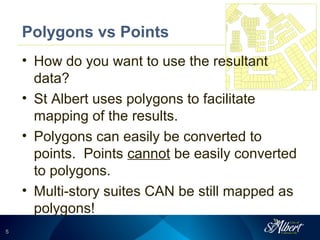
• St Albert uses polygons to facilitate
mapping of the results.
• Polygons can easily be converted to
points. Points cannot be easily converted
to polygons.
• Multi-story suites CAN be still mapped as
polygons!
66
Enumeration Boundaries
• Pick a target number of residences per
enumerator.
• Use GIS to analyze and refine
enumeration boundaries.
• Match boundaries to your
neighbourhoods
• Make your enumeration areas walkable.
• Take into consideration the census
technology used
77
Design Your Deliverable Database
• Pre-identify your known census analysis
questions.
• Include the address information in the
template database. Parse it out. Make it
properly sortable.
• Include stratification information (e.g.
neighbourhood) with each record.
• Consider including person summary
information in dwelling table.
88
Database Design
• Dwelling table
• Person table
• Linked via Residence ID
• Ensure GIS table includes Residence ID
or dwelling table includes GIS ID
99
Execution Stage
1010
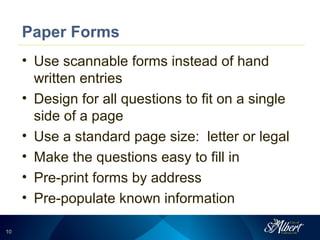
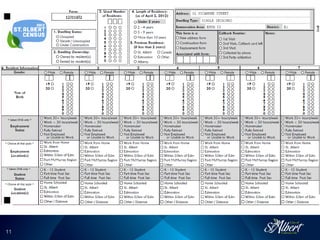
Paper Forms
• Use scannable forms instead of hand
written entries
• Design for all questions to fit on a single
side of a page
• Use a standard page size: letter or legal
• Make the questions easy to fill in
• Pre-print forms by address
• Pre-populate known information
1111
1212
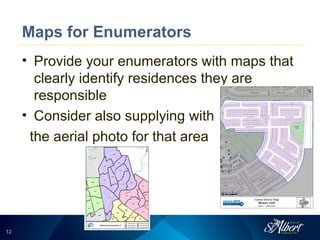
Maps for Enumerators
• Provide your enumerators with maps that
clearly identify residences they are
responsible
• Consider also supplying with
the aerial photo for that area
1313
Automate Your Processes
• PIN number generation
• Use something like FME
• Map production
• Table generation:
– Blank census database
– Mail merge table (for PIN letter mailout)
– PIN letter hand delivery
– Institutional enumerations
1414
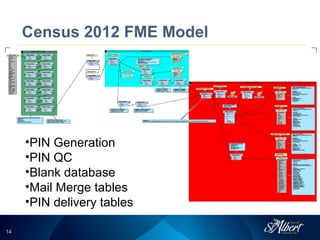
Census 2012 FME Model
•PIN Generation
•PIN QC
•Blank database
•Mail Merge tables
•PIN delivery tables
1515
On-Line Enumeration
• Make it secure – use unique PIN access
• Use pick lists
• Avoid free text entry (except for
comments)
• Include date/time stamps with each
record entry
• Incorporate logic rules to control data
entry irregularities
1616
PIN Numbers
• Use all characters or all numbers: don’t
mix!
• Check for duplicates
• Check for offensive phrases
• Don’t make them case sensitive
• Generate backup PINs in case the original
PIN is lost, doesn’t work, etc.
• Consider PIN generation on the fly or a pre-
generated spare PIN list
1717
Using Mobile Technology
• To store or not to store on mobile devices
• Ensure processes to deal with
connectivity issues
• Pick a cost effective solution
• Leasing vs buying
• Who runs the backend receiving the
data?
1818
Monitor (and Control) Your Progress
• Monitor on-line enumeration uptake
• Monitor mobile enumeration patterns
• Provide control parameters for in person
enumeration
• Communicate completion status via maps
1919
Communicate!
• Advertise widely and via different media
• Do reinforce why the census is important
• Don’t advertise that it’s optional
• Mailouts, banners, TV ads, cash register dividers,
billboards, newspapers, bus advertising…
2020
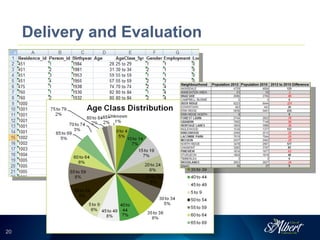
Delivery and Evaluation
2121
Final Database Delivery
• Ask for interim deliveries if you are
concerned
• If doing an On-Line / In Person split, get
an interim On-Line delivery
• An easy-to-use format – don’t be afraid of
Excel (Pivot tables are your friend!)
• Check, check and check again!
2222
Quality Checks
• Check and recheck your numbers
• Compare to previous census numbers
• Compare municipal census trends to
federal census trends
• Spatially compare census population
results
• Compare trends to other municipalities
• Understand what you are seeing!
2323
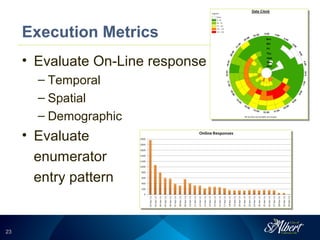
Execution Metrics
• Evaluate On-Line response
– Temporal
– Spatial
– Demographic
• Evaluate
enumerator
entry pattern
2424
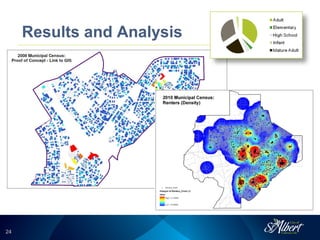
Results and Analysis
2525
Basic Uses
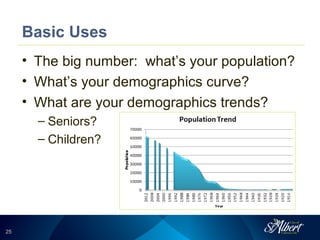
• The big number: what’s your population?
• What’s your demographics curve?
• What are your demographics trends?
– Seniors?
– Children?
2626
Creative Display
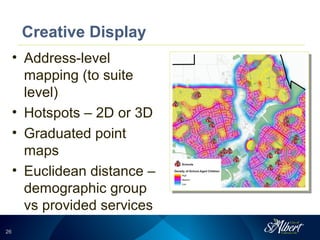
• Address-level
mapping (to suite
level)
• Hotspots – 2D or 3D
• Graduated point
maps
• Euclidean distance –
demographic group
vs provided services
2727
Advanced Analysis
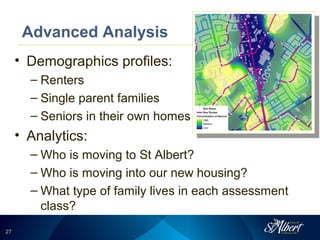
• Demographics profiles:
– Renters
– Single parent families
– Seniors in their own homes
• Analytics:
– Who is moving to St Albert?
– Who is moving into our new housing?
– What type of family lives in each assessment
class?
2828
Wrapping Up...
• A census is expensive to conduct.
• You census is a goldmine of valuable
information!
2929
QUESTIONS?
Tammy Kobliuk
GIS Coordinator
City of St Albert
780-459-1730
tkobliuk@st-albert.net

MAGG 2012 - Municipal Census Best Practices

  • 1.
  • 2.
    22 To be covered: •Planning • Execution • Delivery and Evaluation • Results and Analysis
  • 3.
  • 4.
    44 Creating your masteraddress list • Map out your landbase – Dedicated census landbase OR – Census inclusion flag in your master address database • Modify based on feedback from enumerators • If you can’t map it you can’t enumerate it!
  • 5.
    55 Polygons vs Points •How do you want to use the resultant data? • St Albert uses polygons to facilitate mapping of the results. • Polygons can easily be converted to points. Points cannot be easily converted to polygons. • Multi-story suites CAN be still mapped as polygons!
  • 6.
    66 Enumeration Boundaries • Picka target number of residences per enumerator. • Use GIS to analyze and refine enumeration boundaries. • Match boundaries to your neighbourhoods • Make your enumeration areas walkable. • Take into consideration the census technology used
  • 7.
    77 Design Your DeliverableDatabase • Pre-identify your known census analysis questions. • Include the address information in the template database. Parse it out. Make it properly sortable. • Include stratification information (e.g. neighbourhood) with each record. • Consider including person summary information in dwelling table.
  • 8.
    88 Database Design • Dwellingtable • Person table • Linked via Residence ID • Ensure GIS table includes Residence ID or dwelling table includes GIS ID
  • 9.
  • 10.
    1010 Paper Forms • Usescannable forms instead of hand written entries • Design for all questions to fit on a single side of a page • Use a standard page size: letter or legal • Make the questions easy to fill in • Pre-print forms by address • Pre-populate known information
  • 11.
  • 12.
    1212 Maps for Enumerators •Provide your enumerators with maps that clearly identify residences they are responsible • Consider also supplying with the aerial photo for that area
  • 13.
    1313 Automate Your Processes •PIN number generation • Use something like FME • Map production • Table generation: – Blank census database – Mail merge table (for PIN letter mailout) – PIN letter hand delivery – Institutional enumerations
  • 14.
    1414 Census 2012 FMEModel •PIN Generation •PIN QC •Blank database •Mail Merge tables •PIN delivery tables
  • 15.
    1515 On-Line Enumeration • Makeit secure – use unique PIN access • Use pick lists • Avoid free text entry (except for comments) • Include date/time stamps with each record entry • Incorporate logic rules to control data entry irregularities
  • 16.
    1616 PIN Numbers • Useall characters or all numbers: don’t mix! • Check for duplicates • Check for offensive phrases • Don’t make them case sensitive • Generate backup PINs in case the original PIN is lost, doesn’t work, etc. • Consider PIN generation on the fly or a pre- generated spare PIN list
  • 17.
    1717 Using Mobile Technology •To store or not to store on mobile devices • Ensure processes to deal with connectivity issues • Pick a cost effective solution • Leasing vs buying • Who runs the backend receiving the data?
  • 18.
    1818 Monitor (and Control)Your Progress • Monitor on-line enumeration uptake • Monitor mobile enumeration patterns • Provide control parameters for in person enumeration • Communicate completion status via maps
  • 19.
    1919 Communicate! • Advertise widelyand via different media • Do reinforce why the census is important • Don’t advertise that it’s optional • Mailouts, banners, TV ads, cash register dividers, billboards, newspapers, bus advertising…
  • 20.
  • 21.
    2121 Final Database Delivery •Ask for interim deliveries if you are concerned • If doing an On-Line / In Person split, get an interim On-Line delivery • An easy-to-use format – don’t be afraid of Excel (Pivot tables are your friend!) • Check, check and check again!
  • 22.
    2222 Quality Checks • Checkand recheck your numbers • Compare to previous census numbers • Compare municipal census trends to federal census trends • Spatially compare census population results • Compare trends to other municipalities • Understand what you are seeing!
  • 23.
    2323 Execution Metrics • EvaluateOn-Line response – Temporal – Spatial – Demographic • Evaluate enumerator entry pattern
  • 24.
  • 25.
    2525 Basic Uses • Thebig number: what’s your population? • What’s your demographics curve? • What are your demographics trends? – Seniors? – Children?
  • 26.
    2626 Creative Display • Address-level mapping(to suite level) • Hotspots – 2D or 3D • Graduated point maps • Euclidean distance – demographic group vs provided services
  • 27.
    2727 Advanced Analysis • Demographicsprofiles: – Renters – Single parent families – Seniors in their own homes • Analytics: – Who is moving to St Albert? – Who is moving into our new housing? – What type of family lives in each assessment class?
  • 28.
    2828 Wrapping Up... • Acensus is expensive to conduct. • You census is a goldmine of valuable information!
  • 29.
    2929 QUESTIONS? Tammy Kobliuk GIS Coordinator Cityof St Albert 780-459-1730 tkobliuk@st-albert.net