Machine Learning (ML):
From Scratch to
Production
Instructor: Amitabha Banerjee
What are we trying to do here?
Aka How to learn ML?
• Pick an interesting problem to solve
• Not something off a Kaggle dataset.
• Something that sounds like fun for you.
• Measurable outcome
• In terms of improving performance over time.
• Convince yourself that you need ML
• ML should be the last resort
• See if any algorithm/ heuristic works better.
• Understand what it takes to do good ML
• Data (high quality)
• Algorithms/Models
• User Feedback
• Measurability
• Continuous Improvement
• Deploy ML in production
What tools will we use?
• Two Vector Robots
• Roboflow
• A Linux machine such as Raspberry Pi to control Vector
Introducing Vector
• Introduced by Anki in October
2018
• Anki went bankrupt in May
2019
• Digital Dream Labs (DDL)
bought Anki assets in 2020
• DDL releases Vector 2.0 in
2022
• https://
www.digitaldreamlabs.com/
products/vector-robot
Goal: Provide Ability for Vector to see another Vector
Upload images
Datasets
Annotate
Train, Test,
Validate
Trained
Model(s)
MLOps Lifecycle
ML Operations
Model Repository + Manager
Data
Repository
Image Transformations
Pre-processing
Augmentation
Ready
Datasets
Provide Best
Model
(c) Amitabha Banerjee, 2022
Creating a Dataset
Steps
●
Step 1: Uploading Raw Images
●
Step 2: Annotate (Label) the Images
●
Step 3: Image Pre-Processing and Augmentation
●
Step 4: Check dataset health and improve
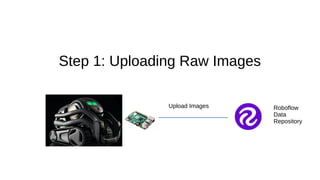
Step 1: Uploading Raw Images
Roboflow
Data
Repository
Upload Images
Remember
●
Choose a good sampling frequency
●
Choose diverse deployment settings
●
Cleaner data is better than no data
Step 2: Annotate (Label) the images
3 ways to Annotate Images
●
Annotate of desktop using tools such as labelImg
– Then upload manually
●
Annotate directly at Roboflow
●
Annotate using power of Machine Learning
– Roboflow Label Assist
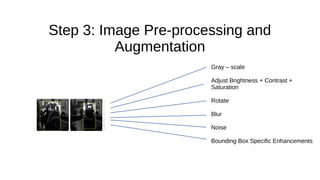
Step 3: Image Pre-processing and
Augmentation
Gray – scale
Adjust Brightness + Contrast +
Saturation
Rotate
Blur
Noise
Bounding Box Specific Enhancements
Step 4: Check Dataset Health
●
Do you have enough null images?
●
Are all images the same size?
●
Do you have sufficient representation for all your classes?
●
How do you keep correcting and improving?
Training a Machine Learning Model
Training Options
●
Train and Deploy at Roboflow
●
Train Using Cloud Service
– AWS Sagemaker Studio
– Google Colab
●
Train in your local environment
Deployment Options
●
Deploy in a Cloud Service
– Roboflow
– AWS Lambda Service
●
Deploy in your local environment
– Build docker images (to keep track of models)
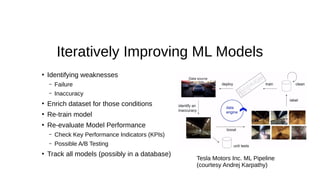
Improving Your ML Models
●
Identifying weaknesses
– Failure
– Inaccuracy
●
Enrich dataset for those conditions
●
Re-train model
●
Re-evaluate Model Performance
– Check Key Performance Indicators (KPIs)
– Possible A/B Testing
●
Track all models (possibly in a database)
Iteratively Improving ML Models
Tesla Motors Inc. ML Pipeline
(courtesy Andrej Karpathy)
Conclusion
●
ML Operations Pipeline separates success from failure
●
Success in ML depends on:
– Quickly testing ML model performance in real-life
– Gathering feedback and improving labeled data
– Re-training and Re-measuring Performance wrt KPIs

Machine Learning - From Scratch to Production

  • 1.
    Machine Learning (ML): FromScratch to Production Instructor: Amitabha Banerjee
  • 2.
    What are wetrying to do here? Aka How to learn ML? • Pick an interesting problem to solve • Not something off a Kaggle dataset. • Something that sounds like fun for you. • Measurable outcome • In terms of improving performance over time. • Convince yourself that you need ML • ML should be the last resort • See if any algorithm/ heuristic works better. • Understand what it takes to do good ML • Data (high quality) • Algorithms/Models • User Feedback • Measurability • Continuous Improvement • Deploy ML in production
  • 3.
    What tools willwe use? • Two Vector Robots • Roboflow • A Linux machine such as Raspberry Pi to control Vector
  • 4.
    Introducing Vector • Introducedby Anki in October 2018 • Anki went bankrupt in May 2019 • Digital Dream Labs (DDL) bought Anki assets in 2020 • DDL releases Vector 2.0 in 2022 • https:// www.digitaldreamlabs.com/ products/vector-robot
  • 5.
    Goal: Provide Abilityfor Vector to see another Vector
  • 6.
    Upload images Datasets Annotate Train, Test, Validate Trained Model(s) MLOpsLifecycle ML Operations Model Repository + Manager Data Repository Image Transformations Pre-processing Augmentation Ready Datasets Provide Best Model (c) Amitabha Banerjee, 2022
  • 7.
  • 8.
    Steps ● Step 1: UploadingRaw Images ● Step 2: Annotate (Label) the Images ● Step 3: Image Pre-Processing and Augmentation ● Step 4: Check dataset health and improve
  • 9.
    Step 1: UploadingRaw Images Roboflow Data Repository Upload Images
  • 10.
    Remember ● Choose a goodsampling frequency ● Choose diverse deployment settings ● Cleaner data is better than no data
  • 11.
    Step 2: Annotate(Label) the images
  • 12.
    3 ways toAnnotate Images ● Annotate of desktop using tools such as labelImg – Then upload manually ● Annotate directly at Roboflow ● Annotate using power of Machine Learning – Roboflow Label Assist
  • 13.
    Step 3: ImagePre-processing and Augmentation Gray – scale Adjust Brightness + Contrast + Saturation Rotate Blur Noise Bounding Box Specific Enhancements
  • 14.
    Step 4: CheckDataset Health ● Do you have enough null images? ● Are all images the same size? ● Do you have sufficient representation for all your classes? ● How do you keep correcting and improving?
  • 15.
    Training a MachineLearning Model
  • 16.
    Training Options ● Train andDeploy at Roboflow ● Train Using Cloud Service – AWS Sagemaker Studio – Google Colab ● Train in your local environment
  • 17.
    Deployment Options ● Deploy ina Cloud Service – Roboflow – AWS Lambda Service ● Deploy in your local environment – Build docker images (to keep track of models)
  • 18.
  • 19.
    ● Identifying weaknesses – Failure –Inaccuracy ● Enrich dataset for those conditions ● Re-train model ● Re-evaluate Model Performance – Check Key Performance Indicators (KPIs) – Possible A/B Testing ● Track all models (possibly in a database) Iteratively Improving ML Models Tesla Motors Inc. ML Pipeline (courtesy Andrej Karpathy)
  • 20.
    Conclusion ● ML Operations Pipelineseparates success from failure ● Success in ML depends on: – Quickly testing ML model performance in real-life – Gathering feedback and improving labeled data – Re-training and Re-measuring Performance wrt KPIs