This document is the property of SEEinfobiz Pvt Ltd , who owns the copyright thereof. The information in this document is given in confidence and without the written consent of SEEinfobiz Pvt Ltd ,
given by contract or otherwise, this document must not be copied, reprinted or reproduced in any material form, either wholly or in part. Also the contents ofthis document or any methods or
techniques available there from, must not be disclosed or shared to any third party whomsoever.
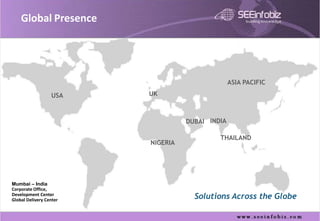
Global Presence


                                                 ASIA PACIFIC

                  USA    UK


                                   DUBAI INDIA

                                            THAILAND
                         NIGERIA


Mumbai – India
Corporate Office,
Development Center
Global Delivery Center
                                     Solutions Across the Globe
SEEinfobiz - Areas Of Focus


   Customer Communication Management / Consolidated Statement Delivery

   Customer Self Service

   Mobile Communication Applications

   Customer Relationship Management (CRM)

   Web based Enterprise Reporting & Analysis

   Executive Dashboard Management

   Business Intelligence (Data Warehousing & Mining)

   Web Enterprise Application Integration (EAI)

   ASP services of the above and SaaS ( Software as a Service )

   Custom development

   Outsourcing Services

   Staffing Services

                                                                          www.seeinfobiz.com
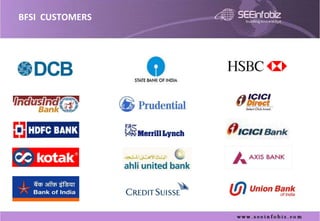
BFSI CUSTOMERS
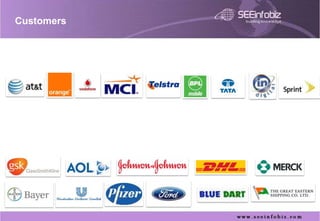
Customers
m-CLICK™ Modules / Features


      Mini Statement

      Transaction Search

      Cheque Deposits

      Cheque Cleared

      Stop Cheque

      ATM Search

      Statement Request

      Cheque Book Request

      Fixed Deposits

      View And Pay Bill

      Third Party Transfers


7
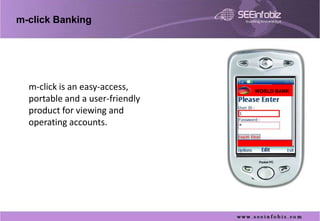
m-click Banking


  m-click is an easy-access,     WORLD BANK
  portable and a user-friendly
  product for viewing and
  operating accounts.
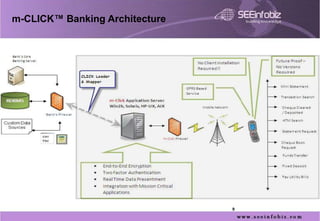
m-CLICK™ Banking Architecture


                                9
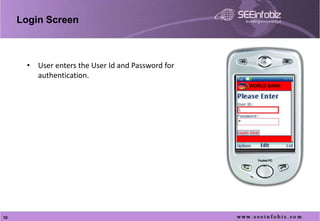
Login Screen


       • User enters the User Id and Password for
         authentication.
                                                    WORLD BANK


10
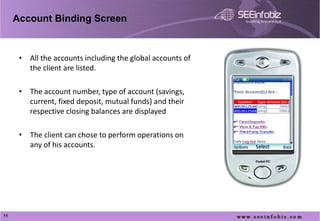
Account Binding Screen


      • All the accounts including the global accounts of
        the client are listed.

      • The account number, type of account (savings,
        current, fixed deposit, mutual funds) and their
        respective closing balances are displayed

      • The client can chose to perform operations on
        any of his accounts.


11
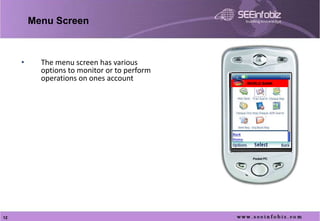
Menu Screen


     •     The menu screen has various
           options to monitor or to perform
           operations on ones account         WORLD BANK


12
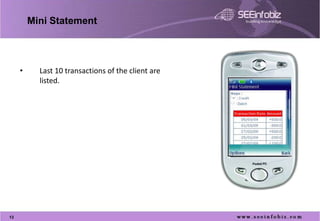
Mini Statement


     •     Last 10 transactions of the client are
           listed.


13
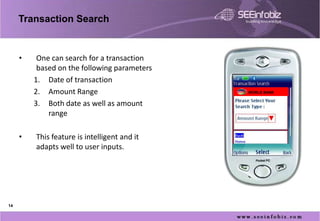
Transaction Search


     •    One can search for a transaction
          based on the following parameters
         1. Date of transaction
         2. Amount Range                      WORLD BANK


         3. Both date as well as amount
             range

     •   This feature is intelligent and it
         adapts well to user inputs.


14
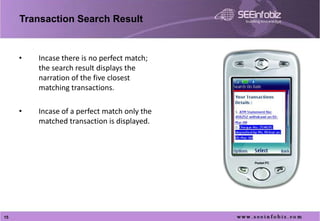
Transaction Search Result


     •   Incase there is no perfect match;
         the search result displays the
         narration of the five closest
         matching transactions.

     •   Incase of a perfect match only the
         matched transaction is displayed.


15
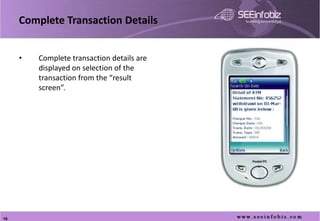
Complete Transaction Details


     •   Complete transaction details are
         displayed on selection of the
         transaction from the “result
         screen”.


16
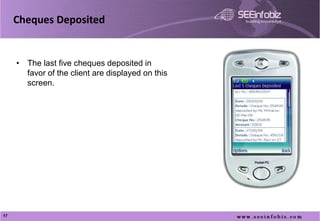
Cheques Deposited


     • The last five cheques deposited in
       favor of the client are displayed on this
       screen.


17
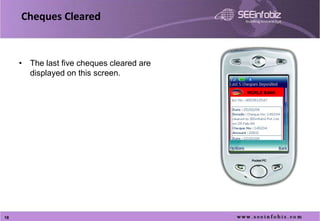
Cheques Cleared


     • The last five cheques cleared are
       displayed on this screen.

                                           WORLD BANK


18
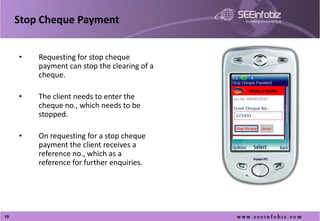
Stop Cheque Payment


     •   Requesting for stop cheque
         payment can stop the clearing of a
         cheque.
                                              WORLD BANK
     •   The client needs to enter the
         cheque no., which needs to be
         stopped.

     •   On requesting for a stop cheque
         payment the client receives a
         reference no., which as a
         reference for further enquiries.
     •


19
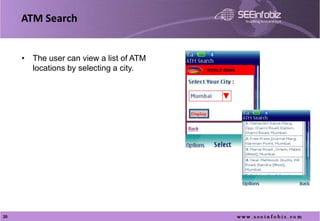
ATM Search


     • The user can view a list of ATM
       locations by selecting a city.    WORLD BANK


20
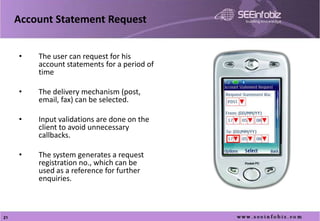
Account Statement Request


     •   The user can request for his
         account statements for a period of
         time

     •   The delivery mechanism (post,
         email, fax) can be selected.

     •   Input validations are done on the
         client to avoid unnecessary
         callbacks.

     •   The system generates a request
         registration no., which can be
         used as a reference for further
         enquiries.

     •

21
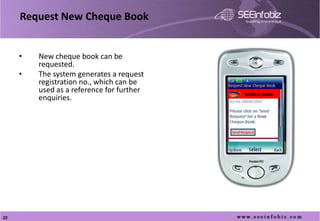
Request New Cheque Book


     •   New cheque book can be
         requested.
     •   The system generates a request
         registration no., which can be
         used as a reference for further   WORLD BANK
         enquiries.


22
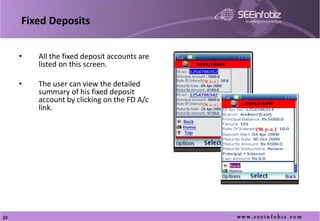
Fixed Deposits


     •   All the fixed deposit accounts are
         listed on this screen.               WORLD BANK


     •   The user can view the detailed
         summary of his fixed deposit
         account by clicking on the FD A/c                 WORLD BANK
         link.
     •


23
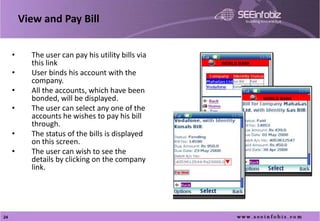
View and Pay Bill


     •     The user can pay his utility bills via
           this link                                WORLD BANK

     •     User binds his account with the
           company.
     •     All the accounts, which have been
           bonded, will be displayed.                            WORLD BANK

     •     The user can select any one of the
           accounts he wishes to pay his bill
           through.
     •     The status of the bills is displayed
           on this screen.
     •     The user can wish to see the
           details by clicking on the company
           link.

     •


24
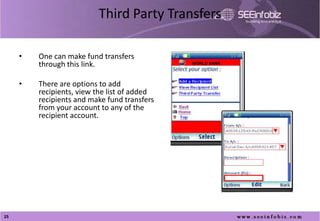
Third Party Transfers

     •   One can make fund transfers
         through this link.                   WORLD BANK


     •   There are options to add
         recipients, view the list of added
         recipients and make fund transfers
         from your account to any of the
         recipient account.
     •


25
Benefits
   Browser based
       easy to upgrade
       available on all hand held devices
   Customer Value
       Easy adaptability
       Enhanced Customer Service
       Convenient anytime anywhere access
       Access important account information quickly and reliably
       Customer Satisfaction and therefore customer retention
   Increase Revenue
       Customers have easy access to services, hence use them more often
       Cross sell / up sell


                                                                      26
Benefits
   Reduce Cost
       Operational cost savings
            Eliminate the costs of sending bill on paper i.e. outbound cost of paper, printing, collation and
             postage
            Reduce your billing costs by $0.75 to $3.00 per bill


       Reductions in customer support costs
            Billing inquiries are estimated to be reduced by 30% at a cost of $2.50 - $5 per call
            Enables “customer self-care” leading to fewer inquiries and complaints


   Return on Investment
       Based on conservative estimates obtain a 42% return on investment based on after tax
        cash flow impacts
       The break-even period based on the above estimates is 12-18 months


                                                                                   27
Contact Us


                              Our Solution

    presales@seeinfobiz.com


                              Your Success

M click in-banking

  • 1.
    This document isthe property of SEEinfobiz Pvt Ltd , who owns the copyright thereof. The information in this document is given in confidence and without the written consent of SEEinfobiz Pvt Ltd , given by contract or otherwise, this document must not be copied, reprinted or reproduced in any material form, either wholly or in part. Also the contents ofthis document or any methods or techniques available there from, must not be disclosed or shared to any third party whomsoever.
  • 2.
    Global Presence ASIA PACIFIC USA UK DUBAI INDIA THAILAND NIGERIA Mumbai – India Corporate Office, Development Center Global Delivery Center Solutions Across the Globe
  • 3.
    SEEinfobiz - AreasOf Focus  Customer Communication Management / Consolidated Statement Delivery  Customer Self Service  Mobile Communication Applications  Customer Relationship Management (CRM)  Web based Enterprise Reporting & Analysis  Executive Dashboard Management  Business Intelligence (Data Warehousing & Mining)  Web Enterprise Application Integration (EAI)  ASP services of the above and SaaS ( Software as a Service )  Custom development  Outsourcing Services  Staffing Services www.seeinfobiz.com
  • 4.
  • 5.
  • 7.
    m-CLICK™ Modules /Features  Mini Statement  Transaction Search  Cheque Deposits  Cheque Cleared  Stop Cheque  ATM Search  Statement Request  Cheque Book Request  Fixed Deposits  View And Pay Bill  Third Party Transfers 7
  • 8.
    m-click Banking m-click is an easy-access, WORLD BANK portable and a user-friendly product for viewing and operating accounts.
  • 9.
  • 10.
    Login Screen • User enters the User Id and Password for authentication. WORLD BANK 10
  • 11.
    Account Binding Screen • All the accounts including the global accounts of the client are listed. • The account number, type of account (savings, current, fixed deposit, mutual funds) and their respective closing balances are displayed • The client can chose to perform operations on any of his accounts. 11
  • 12.
    Menu Screen • The menu screen has various options to monitor or to perform operations on ones account WORLD BANK 12
  • 13.
    Mini Statement • Last 10 transactions of the client are listed. 13
  • 14.
    Transaction Search • One can search for a transaction based on the following parameters 1. Date of transaction 2. Amount Range WORLD BANK 3. Both date as well as amount range • This feature is intelligent and it adapts well to user inputs. 14
  • 15.
    Transaction Search Result • Incase there is no perfect match; the search result displays the narration of the five closest matching transactions. • Incase of a perfect match only the matched transaction is displayed. 15
  • 16.
    Complete Transaction Details • Complete transaction details are displayed on selection of the transaction from the “result screen”. 16
  • 17.
    Cheques Deposited • The last five cheques deposited in favor of the client are displayed on this screen. 17
  • 18.
    Cheques Cleared • The last five cheques cleared are displayed on this screen. WORLD BANK 18
  • 19.
    Stop Cheque Payment • Requesting for stop cheque payment can stop the clearing of a cheque. WORLD BANK • The client needs to enter the cheque no., which needs to be stopped. • On requesting for a stop cheque payment the client receives a reference no., which as a reference for further enquiries. • 19
  • 20.
    ATM Search • The user can view a list of ATM locations by selecting a city. WORLD BANK 20
  • 21.
    Account Statement Request • The user can request for his account statements for a period of time • The delivery mechanism (post, email, fax) can be selected. • Input validations are done on the client to avoid unnecessary callbacks. • The system generates a request registration no., which can be used as a reference for further enquiries. • 21
  • 22.
    Request New ChequeBook • New cheque book can be requested. • The system generates a request registration no., which can be used as a reference for further WORLD BANK enquiries. 22
  • 23.
    Fixed Deposits • All the fixed deposit accounts are listed on this screen. WORLD BANK • The user can view the detailed summary of his fixed deposit account by clicking on the FD A/c WORLD BANK link. • 23
  • 24.
    View and PayBill • The user can pay his utility bills via this link WORLD BANK • User binds his account with the company. • All the accounts, which have been bonded, will be displayed. WORLD BANK • The user can select any one of the accounts he wishes to pay his bill through. • The status of the bills is displayed on this screen. • The user can wish to see the details by clicking on the company link. • 24
  • 25.
    Third Party Transfers • One can make fund transfers through this link. WORLD BANK • There are options to add recipients, view the list of added recipients and make fund transfers from your account to any of the recipient account. • 25
  • 26.
    Benefits  Browser based  easy to upgrade  available on all hand held devices  Customer Value  Easy adaptability  Enhanced Customer Service  Convenient anytime anywhere access  Access important account information quickly and reliably  Customer Satisfaction and therefore customer retention  Increase Revenue  Customers have easy access to services, hence use them more often  Cross sell / up sell 26
  • 27.
    Benefits  Reduce Cost  Operational cost savings  Eliminate the costs of sending bill on paper i.e. outbound cost of paper, printing, collation and postage  Reduce your billing costs by $0.75 to $3.00 per bill  Reductions in customer support costs  Billing inquiries are estimated to be reduced by 30% at a cost of $2.50 - $5 per call  Enables “customer self-care” leading to fewer inquiries and complaints  Return on Investment  Based on conservative estimates obtain a 42% return on investment based on after tax cash flow impacts  The break-even period based on the above estimates is 12-18 months 27
  • 28.
    Contact Us Our Solution presales@seeinfobiz.com Your Success