Lync – 6 toptips toavoid a Lync disaster
© Copyright2015 Modrus
BetterTechnology, Less Pain, More Profit
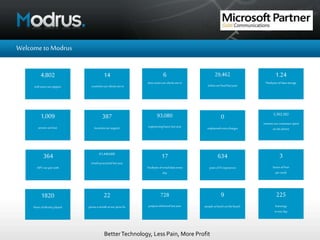
Welcometo Modrus
4,802
end-users we support
14
countriesour clientsarein
6
timezonesour clientsare in
387
locationswe support
1.24
Petebytesof data storage
1,009
serverswe host
29,462
ticketswe fixedlastyear
728
projectsdelivered lastyear
93,080
engineering hours lastyear
5,392,382
minutesour customersspent
on the phone
364
ISP’s we pairwith
61,440,000
emailsprocessed lastyear
17
Terabytes of emaildata every
day
634
yearsof IT experience
3
boxes offruit
perweek
1820
hours ofdestiny played
22
pizzasa monthat our pizza fix
9
people at lunch on the beach
0
unplanned extracharges
225
hotwings
inone day
BetterTechnology, Less Pain, More Profit
Whatwedo
• Complete IT Outsourcing
• Fullymanaged service 24x7
• Fixedcostper user per month
BetterTechnology, Less Pain, More Profit
SoaboutLync
• Unified communications
• Instant Messaging
• Presence
• Telephony
• Email
• Voice and video conferencing
• It’s now Skype for Business
– Which means the same as before but
• Broader HDVideo integration
• Call via work integration with PBX
• Cloud, on premises or hybrid
BetterTechnology, Less Pain, More Profit
Pitfall1
• Lync isn’t a phone system
– And if that is primarily what you need, then Lync might not be the
best option
• Lync works best through the Lync applicationGraphical User Interface on
your computer screen
– It doesn’t behave like a traditional phone system with “one incoming
main number and onward transfer”
– It is designed primarily for working without switchboards where
everyone has their own DDI.
• That means things like general numbers, hunt groups, pickup groups,
single button transfer etc are often not as straight forwards as they used
to be on your old phone system
BetterTechnology, Less Pain, More Profit
Tip1
Get your supplierto give youan earlylive demo involving
a mix of bothchampionsandsceptics.
Before you commit, you need to get user groups at least
willingto thinkaboutworking differentlywithtelephony
and comms
BetterTechnology, Less Pain, More Profit
Pitfall2
• Lync isn’t stand-alone
– It needs to integrate with your existing IT systems – Active Directory,
Firewall, Network, Internet Connection etc
• A typical Lync installation including most features would include
configuration and integration of 8 servers and at least 8 critical
interdependencies with your existing infrastructure – and that’s excluding
failover
• That means that what seems straight forwards can run into installation
difficulties and cost to remedy things like:
– Needing to upgrade Exchange first
– Needing to re-IP or reconfigure yourVLANs
BetterTechnology, Less Pain, More Profit
Tip2
Before you commit, get your supplierto do a Lync
ReadinessAssessment andto identifyany corrective
actionto be ableto implement the solutionwith the cost
of that.
BetterTechnology, Less Pain, More Profit
Pitfall3
• Different handset manufacturers claim Lync compatibility, but they don’t
all work the same when it comes to Lync
– You need to be very careful about things like firmware and the way
the phone model tethers (or not) to the owner’s PC
– Some handsets need additional desktop software on the local
machines besides the Lync application itself
– Lync integration can be highly complex – and if you were cynical, you
might even postulate that manufacturers who often provide
alternative phone systems don’t necessarily invest their best work in
Microsoft integration….
BetterTechnology, Less Pain, More Profit
Tip3
Test handsetsextremely thoroughlybefore you get to full
roll out.
Make sure you have the skills,applicationsand platforms
to manage group policyfaultlessly
BetterTechnology, Less Pain, More Profit
Pitfall4
• Lync mobile is brilliant, but 3G/4G mobiles and standard wireless
networks are not yet best friends
• Standard network wireless is not optimised forVoice and we would advise
never relying on that to work flawlessly.
• If you want to run 3G/4G phones with Lync client over your wireless
network, you are highly likely to have to significantly review and enhance
your wireless network configuration
• Different handset OS – iOS,Android,Windows Mobile - deal with Lync
integration in different ways.
• Again, call me cynical, but if you were a mobile phone operator, would
you make it really easy for people to make calls “not on your network?”
• You could try Lync compatible DECT phones instead – but beware, these
are pricy – and can have similar signal issues
BetterTechnology, Less Pain, More Profit
Tip4
Builda test labto thoroughlytest mobilesbefore you roll
outmobile Lync.
Make sure you have anticipatedthe factthatdifferent
users willhave different OS ontheir mobileswhich all
work differently
BetterTechnology, Less Pain, More Profit
Pitfall5
• Handsets are “ergonomic things” which some members of staff use
constantly. Once their old familiar handset is taken away they might find
it hard to adjust.
• If they don’t like the handset – “lightweight”, “plastic”, buttons too small,
too confusing etc – they won’t buy in to the vision
BetterTechnology, Less Pain, More Profit
Tip5
Test multiple handset types with key earlyadopters
If whatthey’re moving to “feels” and “looks” better, they
willfind iteasier toget on board.
BetterTechnology, Less Pain, More Profit
Pitfall6
• Lync is an integrated system – hence if you can get your active directory
and address books well managed so that everyone can see everyone and
“click to message” or “click to dial”, the productivity and ease of use will
be great
• If each user has to manage their own address books, that will be a waste
of time and negative incentive to use Lync in the way it should be used
• So you may find that you need to review how core outlook and use of
address books is configured – and appoint someone to make sure that all
contact details are fully up to date onAD and regularly reviewed
BetterTechnology, Less Pain, More Profit
Tip6
Get your AD and contactinformationcorrect before you
start.
Thatway you can trainin productivityaspart of the
inductionfor Lync.
BetterTechnology, Less Pain, More Profit
If you found these slides useful and would
like further advice, contact the Modrus
team on
020 3371 6666
iam@Modrus.com

Lync – 6 top tips to avoid disaster

  • 1.
    Lync – 6toptips toavoid a Lync disaster © Copyright2015 Modrus
  • 2.
    BetterTechnology, Less Pain,More Profit Welcometo Modrus 4,802 end-users we support 14 countriesour clientsarein 6 timezonesour clientsare in 387 locationswe support 1.24 Petebytesof data storage 1,009 serverswe host 29,462 ticketswe fixedlastyear 728 projectsdelivered lastyear 93,080 engineering hours lastyear 5,392,382 minutesour customersspent on the phone 364 ISP’s we pairwith 61,440,000 emailsprocessed lastyear 17 Terabytes of emaildata every day 634 yearsof IT experience 3 boxes offruit perweek 1820 hours ofdestiny played 22 pizzasa monthat our pizza fix 9 people at lunch on the beach 0 unplanned extracharges 225 hotwings inone day
  • 3.
    BetterTechnology, Less Pain,More Profit Whatwedo • Complete IT Outsourcing • Fullymanaged service 24x7 • Fixedcostper user per month
  • 4.
    BetterTechnology, Less Pain,More Profit SoaboutLync • Unified communications • Instant Messaging • Presence • Telephony • Email • Voice and video conferencing • It’s now Skype for Business – Which means the same as before but • Broader HDVideo integration • Call via work integration with PBX • Cloud, on premises or hybrid
  • 5.
    BetterTechnology, Less Pain,More Profit Pitfall1 • Lync isn’t a phone system – And if that is primarily what you need, then Lync might not be the best option • Lync works best through the Lync applicationGraphical User Interface on your computer screen – It doesn’t behave like a traditional phone system with “one incoming main number and onward transfer” – It is designed primarily for working without switchboards where everyone has their own DDI. • That means things like general numbers, hunt groups, pickup groups, single button transfer etc are often not as straight forwards as they used to be on your old phone system
  • 6.
    BetterTechnology, Less Pain,More Profit Tip1 Get your supplierto give youan earlylive demo involving a mix of bothchampionsandsceptics. Before you commit, you need to get user groups at least willingto thinkaboutworking differentlywithtelephony and comms
  • 7.
    BetterTechnology, Less Pain,More Profit Pitfall2 • Lync isn’t stand-alone – It needs to integrate with your existing IT systems – Active Directory, Firewall, Network, Internet Connection etc • A typical Lync installation including most features would include configuration and integration of 8 servers and at least 8 critical interdependencies with your existing infrastructure – and that’s excluding failover • That means that what seems straight forwards can run into installation difficulties and cost to remedy things like: – Needing to upgrade Exchange first – Needing to re-IP or reconfigure yourVLANs
  • 8.
    BetterTechnology, Less Pain,More Profit Tip2 Before you commit, get your supplierto do a Lync ReadinessAssessment andto identifyany corrective actionto be ableto implement the solutionwith the cost of that.
  • 9.
    BetterTechnology, Less Pain,More Profit Pitfall3 • Different handset manufacturers claim Lync compatibility, but they don’t all work the same when it comes to Lync – You need to be very careful about things like firmware and the way the phone model tethers (or not) to the owner’s PC – Some handsets need additional desktop software on the local machines besides the Lync application itself – Lync integration can be highly complex – and if you were cynical, you might even postulate that manufacturers who often provide alternative phone systems don’t necessarily invest their best work in Microsoft integration….
  • 10.
    BetterTechnology, Less Pain,More Profit Tip3 Test handsetsextremely thoroughlybefore you get to full roll out. Make sure you have the skills,applicationsand platforms to manage group policyfaultlessly
  • 11.
    BetterTechnology, Less Pain,More Profit Pitfall4 • Lync mobile is brilliant, but 3G/4G mobiles and standard wireless networks are not yet best friends • Standard network wireless is not optimised forVoice and we would advise never relying on that to work flawlessly. • If you want to run 3G/4G phones with Lync client over your wireless network, you are highly likely to have to significantly review and enhance your wireless network configuration • Different handset OS – iOS,Android,Windows Mobile - deal with Lync integration in different ways. • Again, call me cynical, but if you were a mobile phone operator, would you make it really easy for people to make calls “not on your network?” • You could try Lync compatible DECT phones instead – but beware, these are pricy – and can have similar signal issues
  • 12.
    BetterTechnology, Less Pain,More Profit Tip4 Builda test labto thoroughlytest mobilesbefore you roll outmobile Lync. Make sure you have anticipatedthe factthatdifferent users willhave different OS ontheir mobileswhich all work differently
  • 13.
    BetterTechnology, Less Pain,More Profit Pitfall5 • Handsets are “ergonomic things” which some members of staff use constantly. Once their old familiar handset is taken away they might find it hard to adjust. • If they don’t like the handset – “lightweight”, “plastic”, buttons too small, too confusing etc – they won’t buy in to the vision
  • 14.
    BetterTechnology, Less Pain,More Profit Tip5 Test multiple handset types with key earlyadopters If whatthey’re moving to “feels” and “looks” better, they willfind iteasier toget on board.
  • 15.
    BetterTechnology, Less Pain,More Profit Pitfall6 • Lync is an integrated system – hence if you can get your active directory and address books well managed so that everyone can see everyone and “click to message” or “click to dial”, the productivity and ease of use will be great • If each user has to manage their own address books, that will be a waste of time and negative incentive to use Lync in the way it should be used • So you may find that you need to review how core outlook and use of address books is configured – and appoint someone to make sure that all contact details are fully up to date onAD and regularly reviewed
  • 16.
    BetterTechnology, Less Pain,More Profit Tip6 Get your AD and contactinformationcorrect before you start. Thatway you can trainin productivityaspart of the inductionfor Lync.
  • 17.
    BetterTechnology, Less Pain,More Profit If you found these slides useful and would like further advice, contact the Modrus team on 020 3371 6666 iam@Modrus.com