DrMeter
Digital Illuminance Meter
    Model: LX1330B

  Instruction Manual


      www.drmeter.com
Table of Contents


I. Instruction…………………………………….……………1


II. Features……………………………………………………1


III. Specification…………….…………………………………1


IV. Name of Parts & Positions……………….………………3


V. Operating Instructions…………………….………………4


VI. Battery Check & Replacement…………….….…………5


VII. Spectral Sensitivity Characteristic………...…….……6


VIII. Maintenance……………….……………….……...……6


IX. Recommended Illumination. …………………….………7


                                     http://www.histest.com
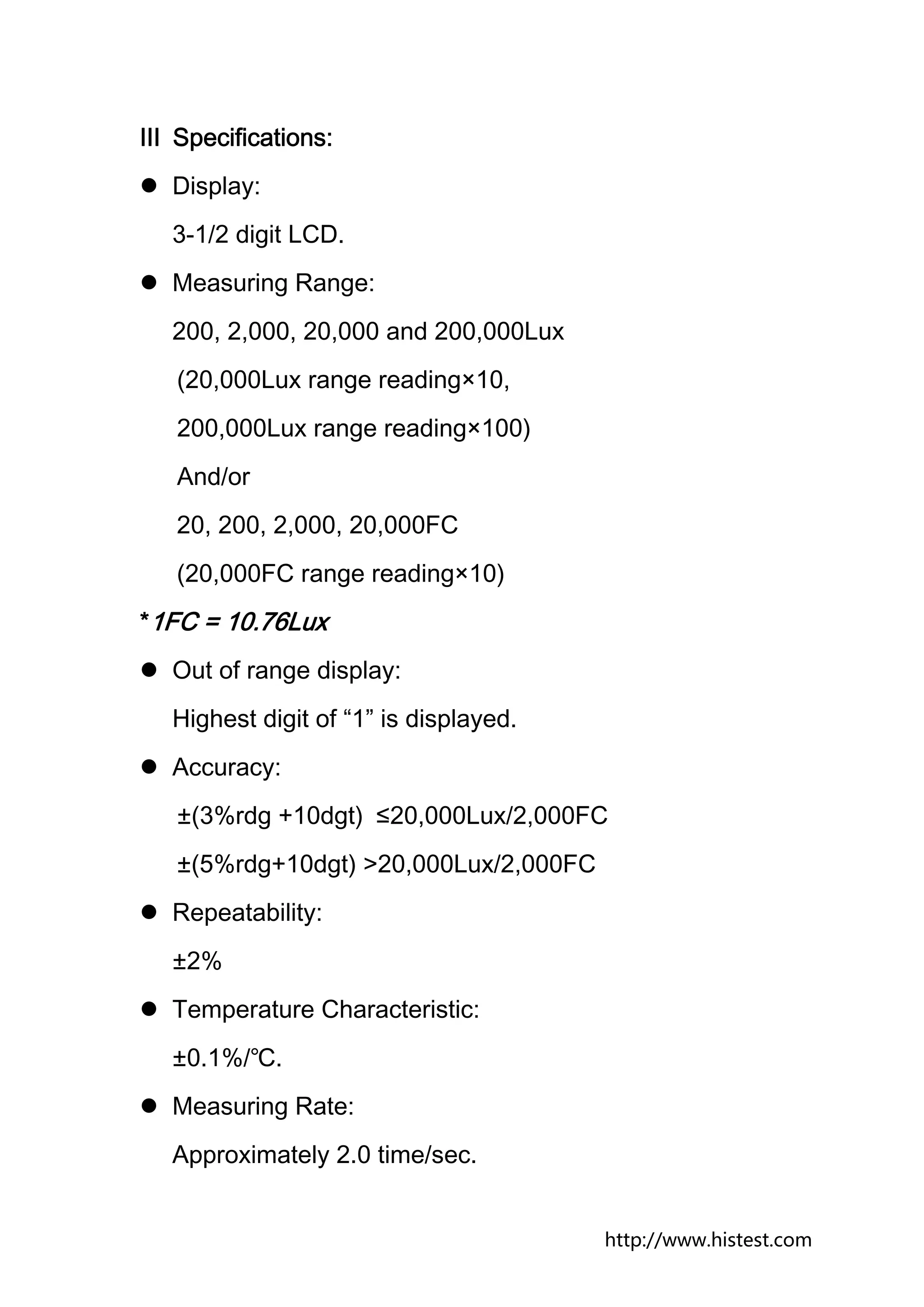
Ⅰ. Instruction:
The Digital Illuminance Meter is a precision instrument
used to measure illuminance in the special field such as
construction, inspection, photography, greenhouse
gardening and etc. It is fully cosine corrected for the
angular incidence of light.


The illuminance meter is compact, tough and easy to
handle because of its construction. The light sensitive
component uses a very stable and long life silicon diode to
ensure stability with spectral response filter and fully
corrected for the angular incidence of light.


Ⅱ Features:
   Light-measuring levels ranging from 0.1Lux to
   200,000Lux, 0.01FC to 20,000FC repeatedly.
   Highly accurate with precise and rapid response even in
   high ambient light.
   Data-Hold function for holding measuring values.
   Units and signs display are arranged logically and
   clearly for ease and comfort of reading results
   Automatic zeroing.


                                             http://www.histest.com
Meter corrected for Luminous Efficiency function.
Correction factor need to be manually calculated for
nonstandard light sources.
Short rise and fall times.
Accessories:
Carry case, instruction manual, battery.


                                           http://www.histest.com
Ⅲ Specifications:
  Display:
  3-1/2 digit LCD.
  Measuring Range:
  200, 2,000, 20,000 and 200,000Lux
   (20,000Lux range reading×10,
   200,000Lux range reading×100)
   And/or
   20, 200, 2,000, 20,000FC
   (20,000FC range reading×10)
*1FC = 10.76Lux
  Out of range display:
  Highest digit of “1” is displayed.
  Accuracy:
   ±(3%rdg +10dgt) ≤20,000Lux/2,000FC
   ±(5%rdg+10dgt) >20,000Lux/2,000FC
  Repeatability:
  ±2%
  Temperature Characteristic:
  ±0.1%/℃.
  Measuring Rate:
  Approximately 2.0 time/sec.


                                       http://www.histest.com
Photo detector:
One silicon photo diode with filter.
Operating Temperature and Humidity:
0℃ to 40℃ (32℉ to 104℉)
0 to 80% RH
Storage Temperature and Humidity:
-10℃to 60℃(14℉ to 140℉)
0 to 80% RH
Power Source:
One 9Volt Battery
(NEDA 1604 or JLS 006P or IEC6F22)
Battery life (typical):
200hours (Alkaline Battery).
Photo Detector Lead Length:
150cm (approx).
Photo Detector Dimensions:
100mm(H) ×60mm(w) ×28mm(D).
Dimensions:
149mm(H) ×71mm(w) ×41mm(D).
Weight:
250g (5.8oz).


                                       http://www.histest.com
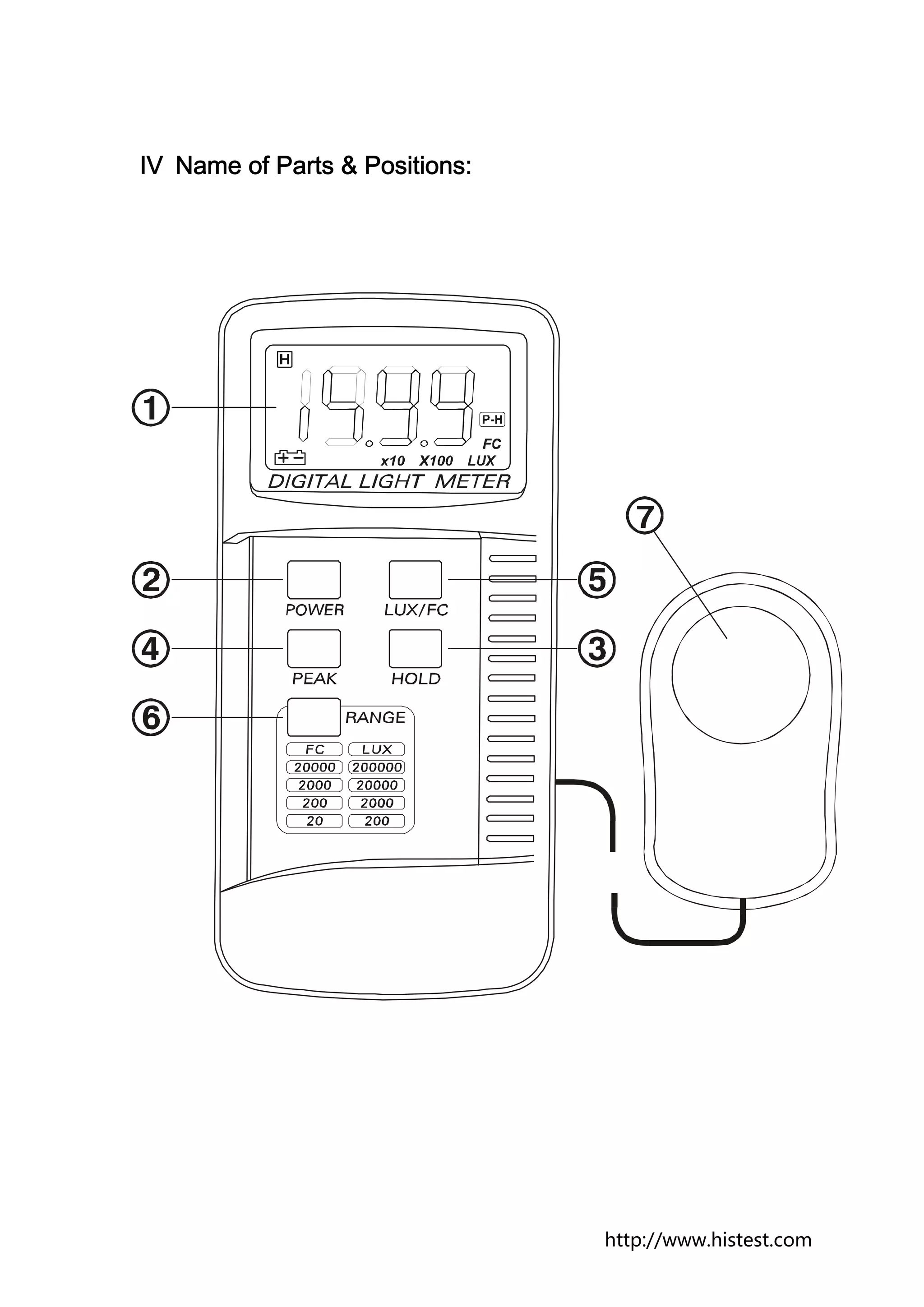
Ⅳ Name of Parts & Positions:


                               http://www.histest.com
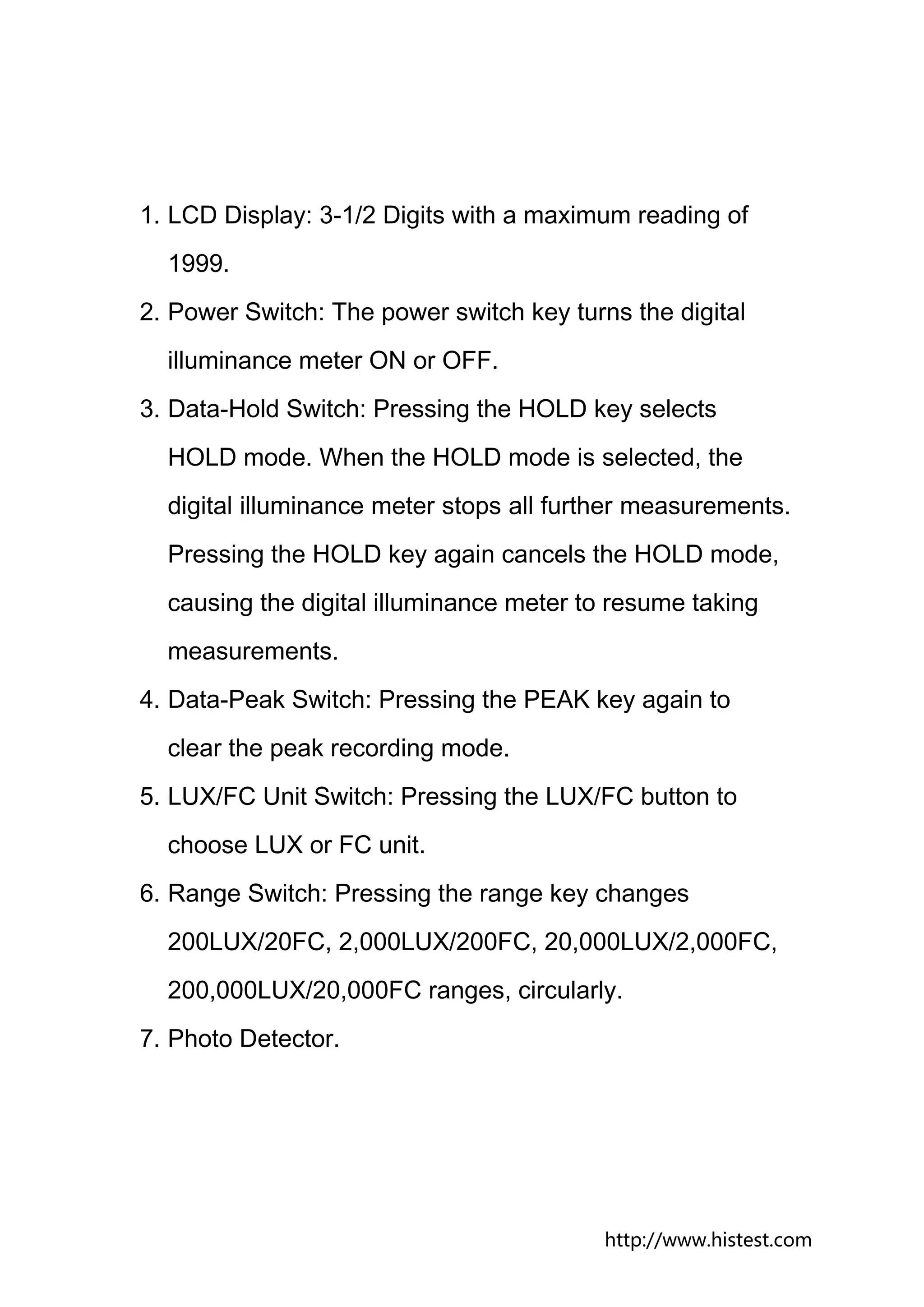
1. LCD Display: 3-1/2 Digits with a maximum reading of
  1999.
2. Power Switch: The power switch key turns the digital
  illuminance meter ON or OFF.
3. Data-Hold Switch: Pressing the HOLD key selects
  HOLD mode. When the HOLD mode is selected, the
  digital illuminance meter stops all further measurements.
  Pressing the HOLD key again cancels the HOLD mode,
  causing the digital illuminance meter to resume taking
  measurements.
4. Data-Peak Switch: Pressing the PEAK key again to
  clear the peak recording mode.
5. LUX/FC Unit Switch: Pressing the LUX/FC button to
  choose LUX or FC unit.
6. Range Switch: Pressing the range key changes
  200LUX/20FC, 2,000LUX/200FC, 20,000LUX/2,000FC,
  200,000LUX/20,000FC ranges, circularly.
7. Photo Detector.


                                          http://www.histest.com
Ⅴ Operating Instructions:
1. Power-up: Press the power key to turn the meter ON or
  OFF.
2. Selecting the LUX/FC scale: Set the range selection
  switch to desired LUX/FC range.
3. Open the photo detector cap and face it to light source in
  a horizontal position.
4. Read the illuminance result from the LCD display.
5. Out of Range: If the instrument only display one “1” in
  the M.S.D., that means the input signal is too strong, so
  a higher range should be selected.
6. Data-Hold mode: Press the HOLD key to select Hold
  mode. When the mode is selected, the illuminance
  meter stops all further measurements. Press the HOLD
  key again to cancel HOLD mode. Then it resumes
  normal operation and you can do the measurement
  again.
7. Data-Peak mode: Press the PEAK key to select PEAK
  mode. When PEAK mode is selected, the illuminance
  meter stops all further measurements. Press the HOLD


                                            http://www.histest.com
key again to cancel HOLD mode. Then it resumes
  normal operation.
8. When the measurement is completed, place the photo
  detector cap back and turn the power selector OFF.


Ⅵ Battery Check-up & Replacement:
1. When the battery power is not sufficient, LCD will
  display “      ”; therefore a new battery type 9V is
  required.
2. After turning off the meter, press the battery cover and
  push in the direction of the arrow to open.
3. Disconnect the battery from the instrument and replace
  it with a standard 9-volt transistor battery and go for the
  cover.


                                            http://www.histest.com
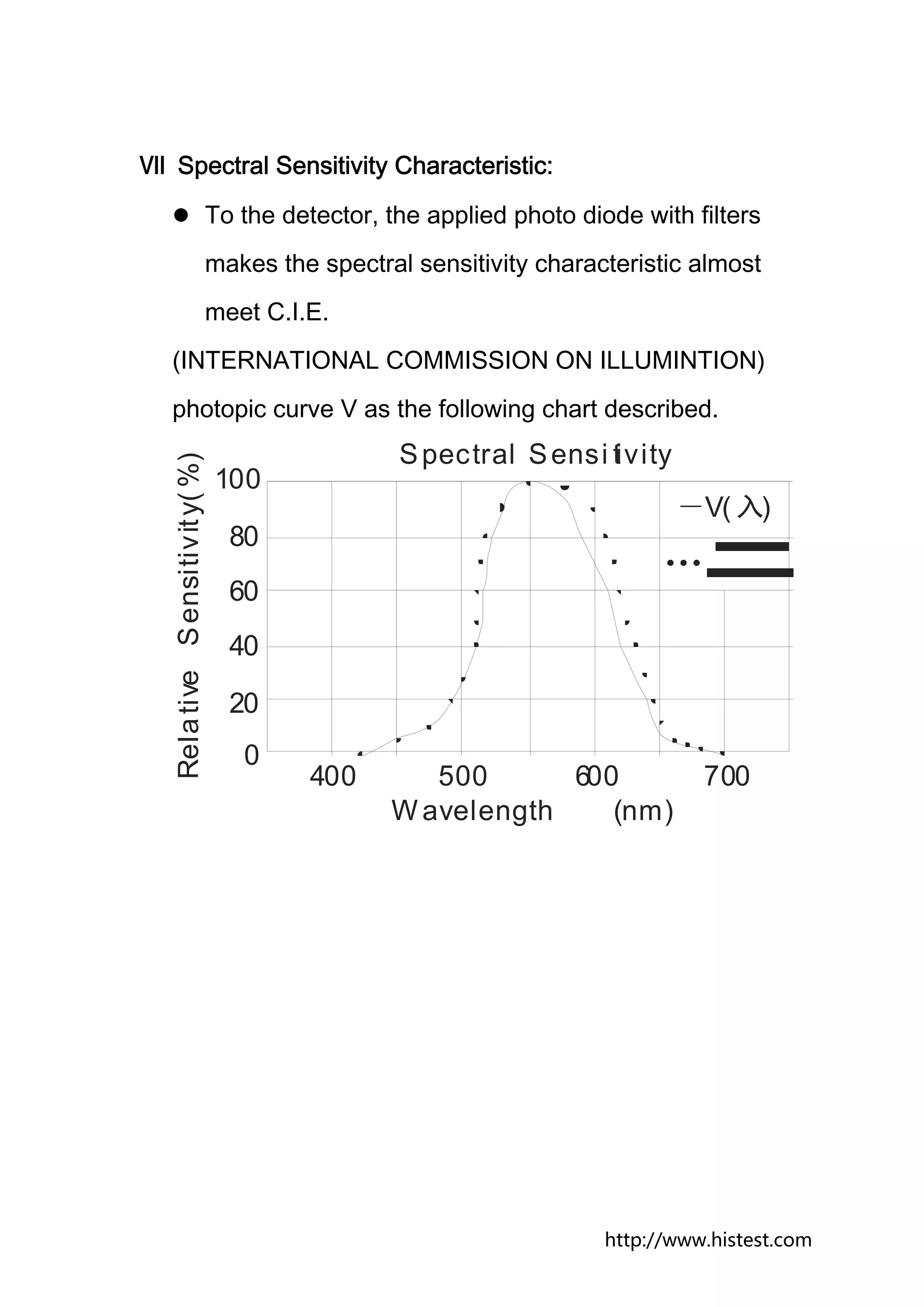
Ⅶ Spectral Sensitivity Characteristic:
                                  To the detector, the applied photo diode with filters
                                  makes the spectral sensitivity characteristic almost
                                  meet C.I.E.
  (INTERNATIONAL COMMISSION ON ILLUMINTION)
  photopic curve V as the following chart described.
                                                    S pectral S ensi tivity
   Rela tive S ensitiv it y( %)


                                  100
                                                                               -V( 入)
                                    80
                                                                              …
                                    60
                                    40

                                    20
                                     0
                                            400       500      600                700
                                                   W avelength    (nm)


                                                                        http://www.histest.com
Ⅷ Maintenance:
1. The white plastic disc on the top of the detector should
be cleaned with a damp cloth when necessary.
2. Do not store the instrument where temperature or

  humidity is excessively high.
3. The reference level, as marker on the face plate, is the

  tip of the photo detector globe.
4. The calibration interval for the photo detector will vary

  according to operational conditions, but generally the
  sensitivity decreases in direct proportion to the product
  of luminous intensity by the operational time. In order to
  maintain the basic accuracy of the instrument, periodic
  calibration is recommended.


                                             http://www.histest.com
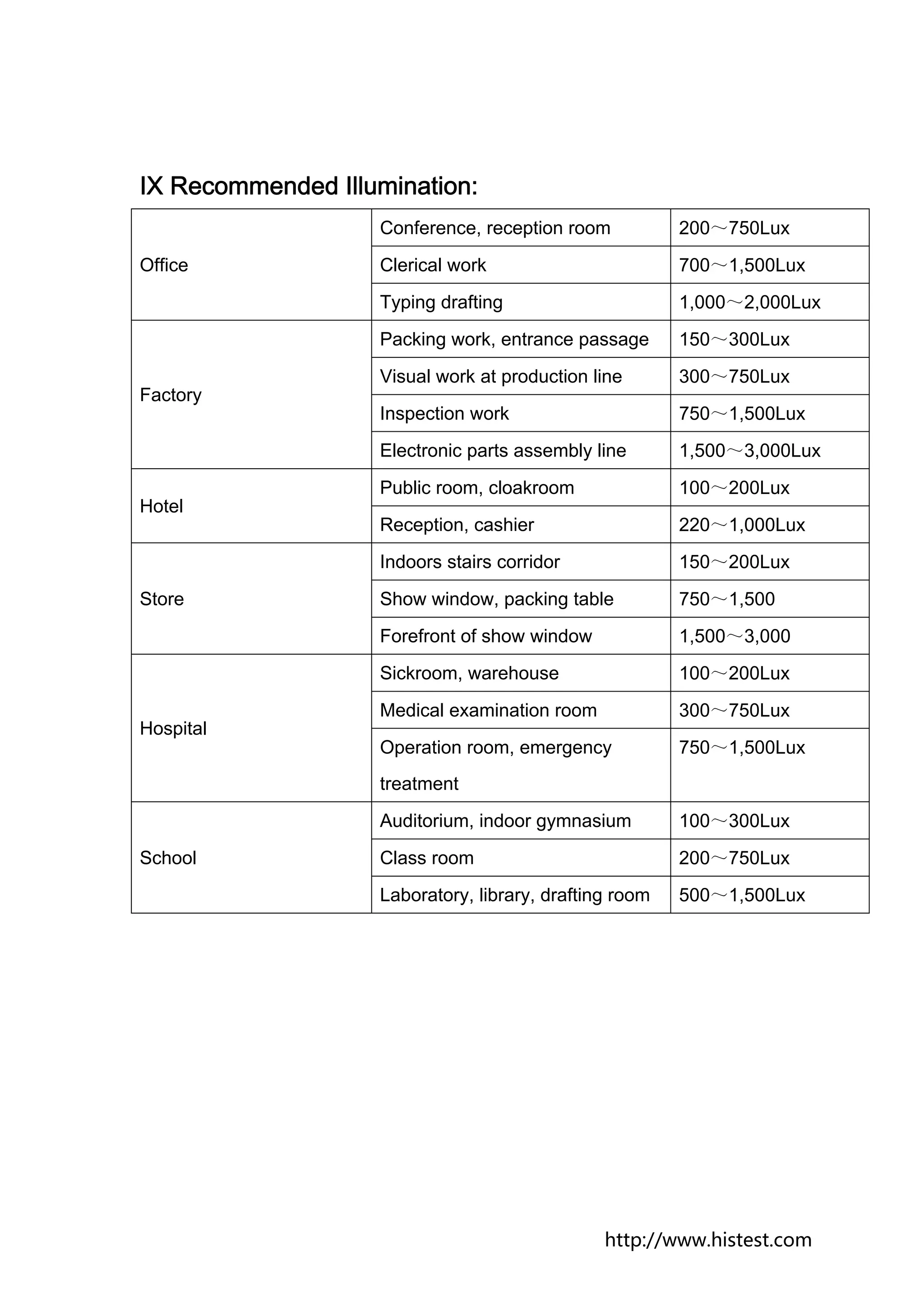
IX Recommended Illumination:
                   Conference, reception room           200~750Lux
Office             Clerical work                        700~1,500Lux
                   Typing drafting                      1,000~2,000Lux
                   Packing work, entrance passage       150~300Lux
                   Visual work at production line       300~750Lux
Factory
                   Inspection work                      750~1,500Lux
                   Electronic parts assembly line       1,500~3,000Lux
                   Public room, cloakroom               100~200Lux
Hotel
                   Reception, cashier                   220~1,000Lux
                   Indoors stairs corridor              150~200Lux
Store              Show window, packing table           750~1,500
                   Forefront of show window             1,500~3,000
                   Sickroom, warehouse                  100~200Lux
                   Medical examination room             300~750Lux
Hospital
                   Operation room, emergency            750~1,500Lux
                   treatment
                   Auditorium, indoor gymnasium         100~300Lux
School             Class room                           200~750Lux
                   Laboratory, library, drafting room   500~1,500Lux


                                               http://www.histest.com
Contact US


DrMeter


Address: 30075 Ahern Ave, Union City, CA 94587
Tel: 510-477-0249
Fax: 510-477-0749
E-mail:service@drmeter.com
Website: www.drmeter.com


                                      http://www.histest.com

Lx1330b manual-new-version

  • 1.
    DrMeter Digital Illuminance Meter Model: LX1330B Instruction Manual www.drmeter.com
  • 2.
    Table of Contents I.Instruction…………………………………….……………1 II. Features……………………………………………………1 III. Specification…………….…………………………………1 IV. Name of Parts & Positions……………….………………3 V. Operating Instructions…………………….………………4 VI. Battery Check & Replacement…………….….…………5 VII. Spectral Sensitivity Characteristic………...…….……6 VIII. Maintenance……………….……………….……...……6 IX. Recommended Illumination. …………………….………7     http://www.histest.com
  • 3.
    Ⅰ. Instruction: The DigitalIlluminance Meter is a precision instrument used to measure illuminance in the special field such as construction, inspection, photography, greenhouse gardening and etc. It is fully cosine corrected for the angular incidence of light. The illuminance meter is compact, tough and easy to handle because of its construction. The light sensitive component uses a very stable and long life silicon diode to ensure stability with spectral response filter and fully corrected for the angular incidence of light. Ⅱ Features: Light-measuring levels ranging from 0.1Lux to 200,000Lux, 0.01FC to 20,000FC repeatedly. Highly accurate with precise and rapid response even in high ambient light. Data-Hold function for holding measuring values. Units and signs display are arranged logically and clearly for ease and comfort of reading results Automatic zeroing. http://www.histest.com
  • 4.
    Meter corrected forLuminous Efficiency function. Correction factor need to be manually calculated for nonstandard light sources. Short rise and fall times. Accessories: Carry case, instruction manual, battery. http://www.histest.com
  • 5.
    Ⅲ Specifications: Display: 3-1/2 digit LCD. Measuring Range: 200, 2,000, 20,000 and 200,000Lux (20,000Lux range reading×10, 200,000Lux range reading×100) And/or 20, 200, 2,000, 20,000FC (20,000FC range reading×10) *1FC = 10.76Lux Out of range display: Highest digit of “1” is displayed. Accuracy: ±(3%rdg +10dgt) ≤20,000Lux/2,000FC ±(5%rdg+10dgt) >20,000Lux/2,000FC Repeatability: ±2% Temperature Characteristic: ±0.1%/℃. Measuring Rate: Approximately 2.0 time/sec. http://www.histest.com
  • 6.
    Photo detector: One siliconphoto diode with filter. Operating Temperature and Humidity: 0℃ to 40℃ (32℉ to 104℉) 0 to 80% RH Storage Temperature and Humidity: -10℃to 60℃(14℉ to 140℉) 0 to 80% RH Power Source: One 9Volt Battery (NEDA 1604 or JLS 006P or IEC6F22) Battery life (typical): 200hours (Alkaline Battery). Photo Detector Lead Length: 150cm (approx). Photo Detector Dimensions: 100mm(H) ×60mm(w) ×28mm(D). Dimensions: 149mm(H) ×71mm(w) ×41mm(D). Weight: 250g (5.8oz). http://www.histest.com
  • 7.
    Ⅳ Name ofParts & Positions: http://www.histest.com
  • 8.
    1. LCD Display:3-1/2 Digits with a maximum reading of 1999. 2. Power Switch: The power switch key turns the digital illuminance meter ON or OFF. 3. Data-Hold Switch: Pressing the HOLD key selects HOLD mode. When the HOLD mode is selected, the digital illuminance meter stops all further measurements. Pressing the HOLD key again cancels the HOLD mode, causing the digital illuminance meter to resume taking measurements. 4. Data-Peak Switch: Pressing the PEAK key again to clear the peak recording mode. 5. LUX/FC Unit Switch: Pressing the LUX/FC button to choose LUX or FC unit. 6. Range Switch: Pressing the range key changes 200LUX/20FC, 2,000LUX/200FC, 20,000LUX/2,000FC, 200,000LUX/20,000FC ranges, circularly. 7. Photo Detector. http://www.histest.com
  • 9.
    Ⅴ Operating Instructions: 1.Power-up: Press the power key to turn the meter ON or OFF. 2. Selecting the LUX/FC scale: Set the range selection switch to desired LUX/FC range. 3. Open the photo detector cap and face it to light source in a horizontal position. 4. Read the illuminance result from the LCD display. 5. Out of Range: If the instrument only display one “1” in the M.S.D., that means the input signal is too strong, so a higher range should be selected. 6. Data-Hold mode: Press the HOLD key to select Hold mode. When the mode is selected, the illuminance meter stops all further measurements. Press the HOLD key again to cancel HOLD mode. Then it resumes normal operation and you can do the measurement again. 7. Data-Peak mode: Press the PEAK key to select PEAK mode. When PEAK mode is selected, the illuminance meter stops all further measurements. Press the HOLD http://www.histest.com
  • 10.
    key again tocancel HOLD mode. Then it resumes normal operation. 8. When the measurement is completed, place the photo detector cap back and turn the power selector OFF. Ⅵ Battery Check-up & Replacement: 1. When the battery power is not sufficient, LCD will display “ ”; therefore a new battery type 9V is required. 2. After turning off the meter, press the battery cover and push in the direction of the arrow to open. 3. Disconnect the battery from the instrument and replace it with a standard 9-volt transistor battery and go for the cover. http://www.histest.com
  • 11.
    Ⅶ Spectral SensitivityCharacteristic: To the detector, the applied photo diode with filters makes the spectral sensitivity characteristic almost meet C.I.E. (INTERNATIONAL COMMISSION ON ILLUMINTION) photopic curve V as the following chart described. S pectral S ensi tivity Rela tive S ensitiv it y( %) 100 -V( 入) 80 … 60 40 20 0 400 500 600 700 W avelength (nm) http://www.histest.com
  • 12.
    Ⅷ Maintenance: 1. Thewhite plastic disc on the top of the detector should be cleaned with a damp cloth when necessary. 2. Do not store the instrument where temperature or humidity is excessively high. 3. The reference level, as marker on the face plate, is the tip of the photo detector globe. 4. The calibration interval for the photo detector will vary according to operational conditions, but generally the sensitivity decreases in direct proportion to the product of luminous intensity by the operational time. In order to maintain the basic accuracy of the instrument, periodic calibration is recommended. http://www.histest.com
  • 13.
    IX Recommended Illumination: Conference, reception room 200~750Lux Office Clerical work 700~1,500Lux Typing drafting 1,000~2,000Lux Packing work, entrance passage 150~300Lux Visual work at production line 300~750Lux Factory Inspection work 750~1,500Lux Electronic parts assembly line 1,500~3,000Lux Public room, cloakroom 100~200Lux Hotel Reception, cashier 220~1,000Lux Indoors stairs corridor 150~200Lux Store Show window, packing table 750~1,500 Forefront of show window 1,500~3,000 Sickroom, warehouse 100~200Lux Medical examination room 300~750Lux Hospital Operation room, emergency 750~1,500Lux treatment Auditorium, indoor gymnasium 100~300Lux School Class room 200~750Lux Laboratory, library, drafting room 500~1,500Lux http://www.histest.com
  • 14.
    Contact US DrMeter Address: 30075Ahern Ave, Union City, CA 94587 Tel: 510-477-0249 Fax: 510-477-0749 E-mail:service@drmeter.com Website: www.drmeter.com http://www.histest.com