• Cognizant 20-20 Insights


Lotus Notes Mobile Application
Development Using XPages
For migrating Lotus Notes apps to Web or mobile, XPages is an ideal
software development platform, allowing developers to readily tackle
testing and deployment challenges.

      Executive Summary                                      •	 Mobile application using XPages Mobile
                                                               Controls:
      The world is becoming more wireless every day
      and programmers have been forced to respond              The application, developed using XPages
      by developing applications that will work in many        Mobile Controls, is also a browser-based appli-
      wireless scenarios and with a variety of mobile          cation; however, it offers a very rich native
      devices.                                                 mobile application look. The Mobile Controls
                                                               come with the XPages Extended Library. It
      Many Lotus Notes clients are ready to migrate their      requires Lotus Notes and Domino version 8.5.3
      client base applications to mobile or Web applica-       or above. For developing the application using
      tions. In the past, it was very difficult to migrate     XPages Mobile Controls, go through the IBM
      the client application to Web or mobile because of       tutorial available on the following Web site.
      the technology limitation and the effort it takes
                                                               http://www-10.lotus.com/ldd/ddwiki.nsf/dx/
      for migration. But with the launching of XPages
                                                               XPages_Mobile_Controls_Tutorial_
      by IBM, this scenario has been changed. XPages is
      a rapid Web and mobile application development           It gives the basic knowledge on how to build a
      platform. Its programming model is based on              simple XPages mobile application in an existing
      standards and common Web development skills              Domino database. It covers the basic function-
      like JavaScript, Ajax, the Dojo Toolkit, server-side     alities like display a list of views, display the
      JavaScript and JavaServer Faces.1                        contents of a view, open a document from that
                                                               view and then perform all the typical actions
      How to Build the Mobile Application                      like create, read, update and delete on a
      All the mobile applications developed in Lotus           sample document.
      Notes are browser-based applications. This can         •	 Normal Web-based mobile application:
      be classified further into two categories — mobile
                                                               Many normal functions of the Web-based
      applications using XPages Mobile Controls, and
                                                               (Domino) application work as they do on the
      normal Web-based mobile applications.
                                                               mobile devices too. There is no guideline


      cognizant 20-20 insights | january 2013
available indicating which function/code works          the actual device is necessary before launching
   for mobile and which does not work. However,            an application into production. However, from
   most of the Web design elements work on the             the simulators the developers can at least get a
   mobile devices. Developers need to consider             good idea of size and alignment. For an iPhone
   the following two points while designing the            simulator, go to http://testiphone.com.
   application for mobile.
                                                       •	 Device available but connectivity is an issue:
   >> Size:   The mobile and iPad devices come             If the development application is within a
       with different screen sizes. So while design-       firewall (as with an intranet), then the developer
       ing the application developers must test the        can request the client to put the development
       application on the different devices. Devel-        application outside the firewall so that it can be
       opers also need to make sure that the ap-           accessed from mobile devices.
       plication is easy to navigate and the user
       should not have to scroll too much.
                                                       •	 Web browser: The developer can even test the
                                                           application functionality on the system’s Web
   >> Speed: Mobile/iPad devices have slower               browser. This, again, is not foolproof, so testing
      Internet speeds compared to PCs. So the              on the actual device is still necessary.
      content should be very concise. For exam-
      ple, avoid creating unnecessary fields in the    Deployment of Mobile Application
      forms and remove unnecessary columns             In Lotus Notes, most of the applications are
      from the views for mobile.                       hosted on the intranet server. So while converting
Another point developers should keep in mind is        the Notes application to mobile, the developer
the login page and authorization. Almost all the       has to come up with the deployment plan before
companies use a single sign-on for the Internet        starting the designing phase. Most clients do not
application. So developers must verify that the        agree to move the application outside the firewall.
single sign-on works on the mobile devices as well.    So the developer has to decide well in advance
                                                       how to deploy the application. There are several
Testing                                                possible approaches:
Testing a mobile application is sometimes a            •	 Move    the entire application outside the
challenge for developers. The primary reasons              firewall (DMZ environment): This opens the
are unavailability of devices and connectivity.            application over the Internet; hence, most
If one or both of these factors is an issue, then          clients don’t abide this option for security
developers can use the following methods.                  reasons.

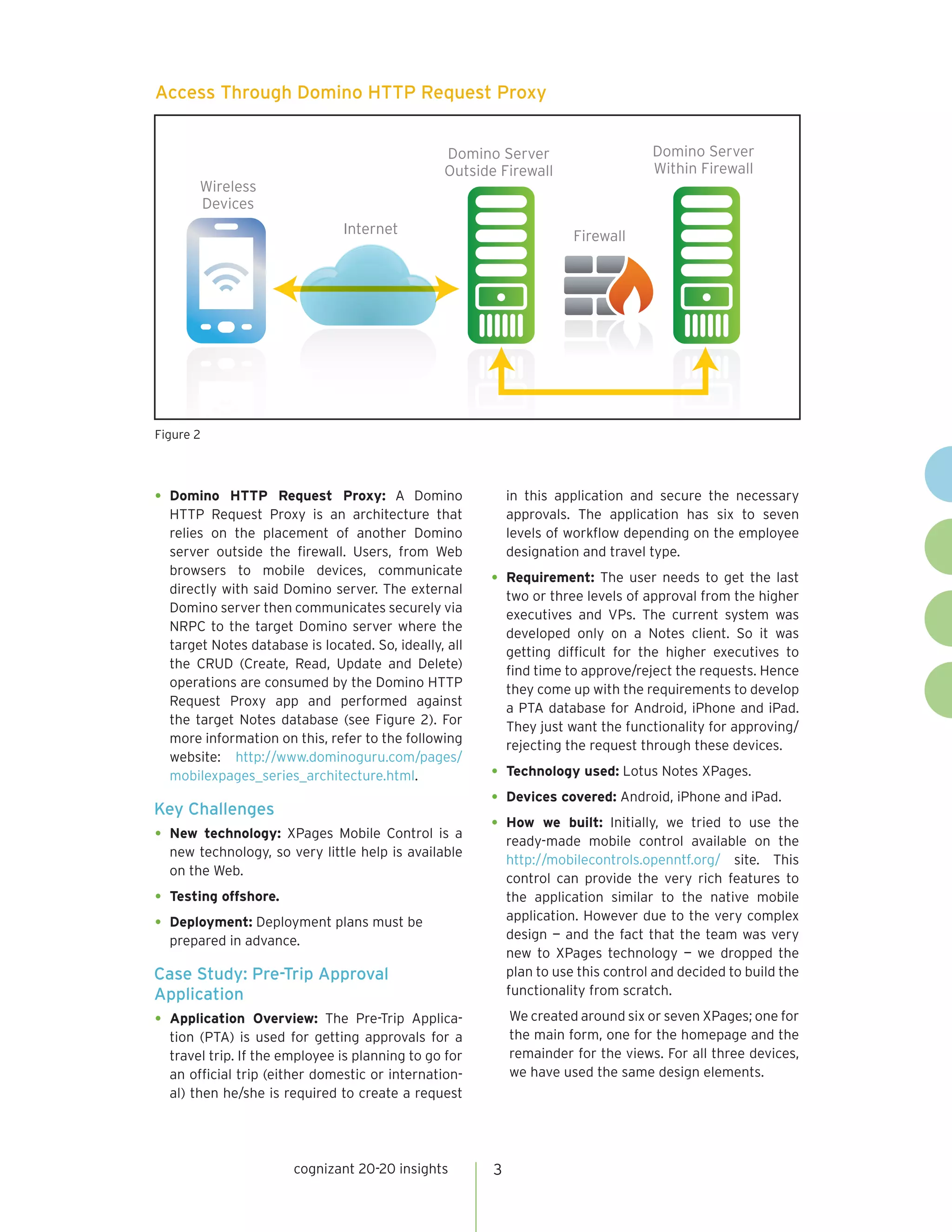
•	 Simulators:    Many mobile simulators are           •	 Access the intranet through VPN: This is a
   available on the Internet. Developers can use the       secured option. The developer just needs to
   simulator for testing mobile applications. The          make sure that the client’s mobile devices have
   simulators are not 100% reliable so testing on          VPN connectivity (see Figure 1).


Access Through VPN

                                                                              Domino Server
                                                                              Within Firewall
                 Wireless
                 Devices
                                         Internet
                                                             Firewall


Figure 1


                        cognizant 20-20 insights       2
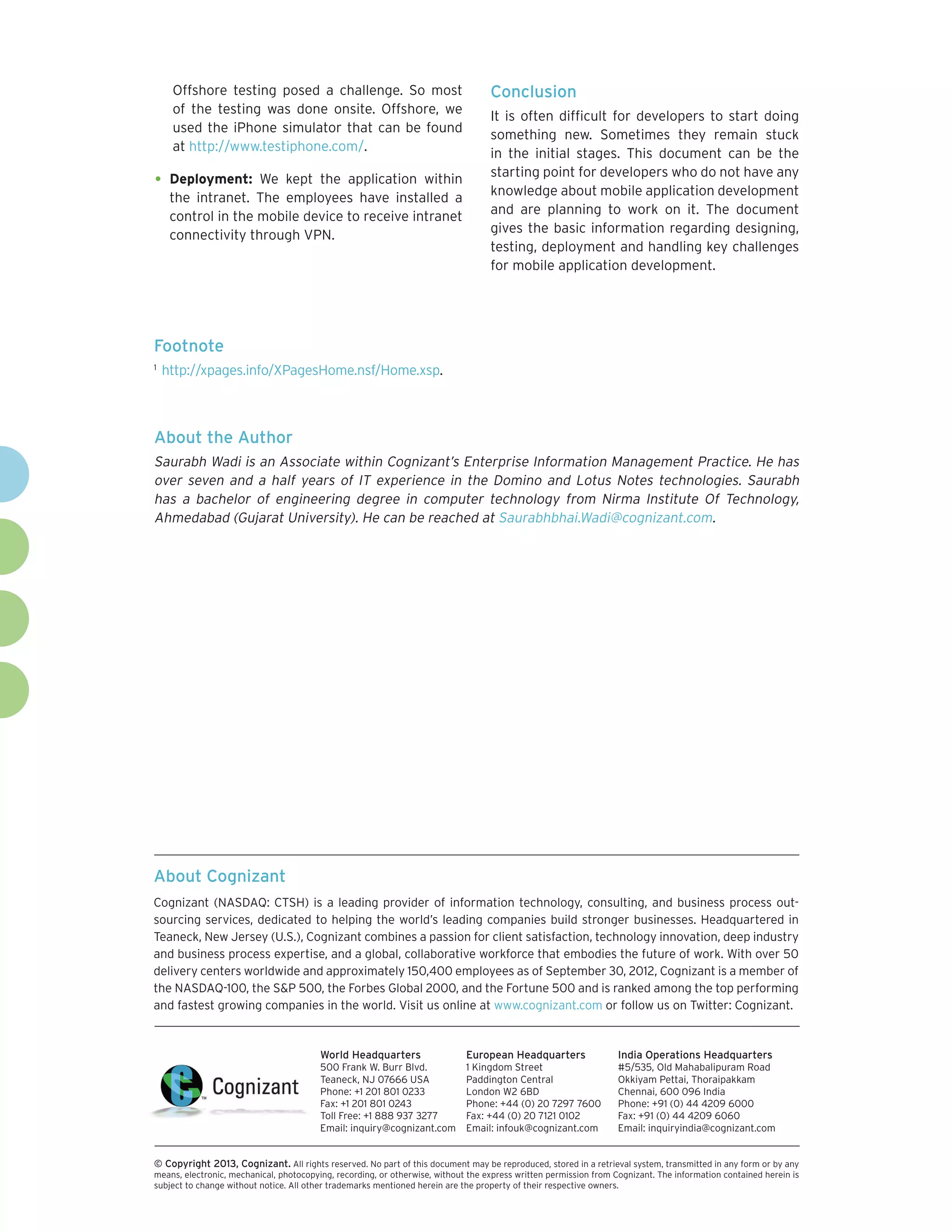
Access Through Domino HTTP Request Proxy


                                                Domino Server                      Domino Server
                                                Outside Firewall                   Within Firewall
         Wireless
         Devices
                               Internet                               Firewall


Figure 2


•	 Domino   HTTP Request Proxy: A Domino                   in this application and secure the necessary
  HTTP Request Proxy is an architecture that               approvals. The application has six to seven
  relies on the placement of another Domino                levels of workflow depending on the employee
  server outside the firewall. Users, from Web             designation and travel type.
  browsers to mobile devices, communicate
  directly with said Domino server. The external
                                                       •	 Requirement: The user needs to get the last
                                                           two or three levels of approval from the higher
  Domino server then communicates securely via
                                                           executives and VPs. The current system was
  NRPC to the target Domino server where the
                                                           developed only on a Notes client. So it was
  target Notes database is located. So, ideally, all
                                                           getting difficult for the higher executives to
  the CRUD (Create, Read, Update and Delete)
                                                           find time to approve/reject the requests. Hence
  operations are consumed by the Domino HTTP
                                                           they come up with the requirements to develop
  Request Proxy app and performed against
                                                           a PTA database for Android, iPhone and iPad.
  the target Notes database (see Figure 2). For
                                                           They just want the functionality for approving/
  more information on this, refer to the following
                                                           rejecting the request through these devices.
  website: http://www.dominoguru.com/pages/
  mobilexpages_series_architecture.html.               •	 Technology used: Lotus Notes XPages.
Key Challenges
                                                       •	 Devices covered: Android, iPhone and iPad.
                                                       •	 How we built: Initially, we tried to use the
•	 New technology: XPages Mobile Control is a
                                                           ready-made mobile control available on the
  new technology, so very little help is available
                                                           http://mobilecontrols.openntf.org/ site. This
  on the Web.
                                                           control can provide the very rich features to
•	 Testing offshore.                                       the application similar to the native mobile
                                                           application. However due to the very complex
•	 Deployment: Deployment plans must be                    design — and the fact that the team was very
  prepared in advance.
                                                           new to XPages technology — we dropped the
Case Study: Pre-Trip Approval                              plan to use this control and decided to build the
Application                                                functionality from scratch.

•	 Application     Overview: The Pre-Trip Applica-         We created around six or seven XPages; one for
  tion (PTA) is used for getting approvals for a           the main form, one for the homepage and the
  travel trip. If the employee is planning to go for       remainder for the views. For all three devices,
  an official trip (either domestic or internation-        we have used the same design elements.
  al) then he/she is required to create a request


                       cognizant 20-20 insights        3
Offshore testing posed a challenge. So most                                  Conclusion
      of the testing was done onsite. Offshore, we
                                                                                   It is often difficult for developers to start doing
      used the iPhone simulator that can be found
                                                                                   something new. Sometimes they remain stuck
      at http://www.testiphone.com/.
                                                                                   in the initial stages. This document can be the
                                                                                   starting point for developers who do not have any
•	 Deployment:       We kept the application within
                                                                                   knowledge about mobile application development
      the intranet. The employees have installed a
      control in the mobile device to receive intranet                             and are planning to work on it. The document
      connectivity through VPN.                                                    gives the basic information regarding designing,
                                                                                   testing, deployment and handling key challenges
                                                                                   for mobile application development.


Footnote
1	
     http://xpages.info/XPagesHome.nsf/Home.xsp.


About the Author
Saurabh Wadi is an Associate within Cognizant’s Enterprise Information Management Practice. He has
over seven and a half years of IT experience in the Domino and Lotus Notes technologies. Saurabh
has a bachelor of engineering degree in computer technology from Nirma Institute Of Technology,
Ahmedabad (Gujarat University). He can be reached at Saurabhbhai.Wadi@cognizant.com.


About Cognizant
Cognizant (NASDAQ: CTSH) is a leading provider of information technology, consulting, and business process out-
sourcing services, dedicated to helping the world’s leading companies build stronger businesses. Headquartered in
Teaneck, New Jersey (U.S.), Cognizant combines a passion for client satisfaction, technology innovation, deep industry
and business process expertise, and a global, collaborative workforce that embodies the future of work. With over 50
delivery centers worldwide and approximately 150,400 employees as of September 30, 2012, Cognizant is a member of
the NASDAQ-100, the S&P 500, the Forbes Global 2000, and the Fortune 500 and is ranked among the top performing
and fastest growing companies in the world. Visit us online at www.cognizant.com or follow us on Twitter: Cognizant.


                                         World Headquarters                  European Headquarters                 India Operations Headquarters
                                         500 Frank W. Burr Blvd.             1 Kingdom Street                      #5/535, Old Mahabalipuram Road
                                         Teaneck, NJ 07666 USA               Paddington Central                    Okkiyam Pettai, Thoraipakkam
                                         Phone: +1 201 801 0233              London W2 6BD                         Chennai, 600 096 India
                                         Fax: +1 201 801 0243                Phone: +44 (0) 20 7297 7600           Phone: +91 (0) 44 4209 6000
                                         Toll Free: +1 888 937 3277          Fax: +44 (0) 20 7121 0102             Fax: +91 (0) 44 4209 6060
                                         Email: inquiry@cognizant.com        Email: infouk@cognizant.com           Email: inquiryindia@cognizant.com


©
­­ Copyright 2013, Cognizant. All rights reserved. No part of this document may be reproduced, stored in a retrieval system, transmitted in any form or by any
means, electronic, mechanical, photocopying, recording, or otherwise, without the express written permission from Cognizant. The information contained herein is
subject to change without notice. All other trademarks mentioned herein are the property of their respective owners.

Lotus Notes Mobile Application Development Using XPages

  • 1.
    • Cognizant 20-20Insights Lotus Notes Mobile Application Development Using XPages For migrating Lotus Notes apps to Web or mobile, XPages is an ideal software development platform, allowing developers to readily tackle testing and deployment challenges. Executive Summary • Mobile application using XPages Mobile Controls: The world is becoming more wireless every day and programmers have been forced to respond The application, developed using XPages by developing applications that will work in many Mobile Controls, is also a browser-based appli- wireless scenarios and with a variety of mobile cation; however, it offers a very rich native devices. mobile application look. The Mobile Controls come with the XPages Extended Library. It Many Lotus Notes clients are ready to migrate their requires Lotus Notes and Domino version 8.5.3 client base applications to mobile or Web applica- or above. For developing the application using tions. In the past, it was very difficult to migrate XPages Mobile Controls, go through the IBM the client application to Web or mobile because of tutorial available on the following Web site. the technology limitation and the effort it takes http://www-10.lotus.com/ldd/ddwiki.nsf/dx/ for migration. But with the launching of XPages XPages_Mobile_Controls_Tutorial_ by IBM, this scenario has been changed. XPages is a rapid Web and mobile application development It gives the basic knowledge on how to build a platform. Its programming model is based on simple XPages mobile application in an existing standards and common Web development skills Domino database. It covers the basic function- like JavaScript, Ajax, the Dojo Toolkit, server-side alities like display a list of views, display the JavaScript and JavaServer Faces.1 contents of a view, open a document from that view and then perform all the typical actions How to Build the Mobile Application like create, read, update and delete on a All the mobile applications developed in Lotus sample document. Notes are browser-based applications. This can • Normal Web-based mobile application: be classified further into two categories — mobile Many normal functions of the Web-based applications using XPages Mobile Controls, and (Domino) application work as they do on the normal Web-based mobile applications. mobile devices too. There is no guideline cognizant 20-20 insights | january 2013
  • 2.
    available indicating whichfunction/code works the actual device is necessary before launching for mobile and which does not work. However, an application into production. However, from most of the Web design elements work on the the simulators the developers can at least get a mobile devices. Developers need to consider good idea of size and alignment. For an iPhone the following two points while designing the simulator, go to http://testiphone.com. application for mobile. • Device available but connectivity is an issue: >> Size: The mobile and iPad devices come If the development application is within a with different screen sizes. So while design- firewall (as with an intranet), then the developer ing the application developers must test the can request the client to put the development application on the different devices. Devel- application outside the firewall so that it can be opers also need to make sure that the ap- accessed from mobile devices. plication is easy to navigate and the user should not have to scroll too much. • Web browser: The developer can even test the application functionality on the system’s Web >> Speed: Mobile/iPad devices have slower browser. This, again, is not foolproof, so testing Internet speeds compared to PCs. So the on the actual device is still necessary. content should be very concise. For exam- ple, avoid creating unnecessary fields in the Deployment of Mobile Application forms and remove unnecessary columns In Lotus Notes, most of the applications are from the views for mobile. hosted on the intranet server. So while converting Another point developers should keep in mind is the Notes application to mobile, the developer the login page and authorization. Almost all the has to come up with the deployment plan before companies use a single sign-on for the Internet starting the designing phase. Most clients do not application. So developers must verify that the agree to move the application outside the firewall. single sign-on works on the mobile devices as well. So the developer has to decide well in advance how to deploy the application. There are several Testing possible approaches: Testing a mobile application is sometimes a • Move the entire application outside the challenge for developers. The primary reasons firewall (DMZ environment): This opens the are unavailability of devices and connectivity. application over the Internet; hence, most If one or both of these factors is an issue, then clients don’t abide this option for security developers can use the following methods. reasons. • Simulators: Many mobile simulators are • Access the intranet through VPN: This is a available on the Internet. Developers can use the secured option. The developer just needs to simulator for testing mobile applications. The make sure that the client’s mobile devices have simulators are not 100% reliable so testing on VPN connectivity (see Figure 1). Access Through VPN Domino Server Within Firewall Wireless Devices Internet Firewall Figure 1 cognizant 20-20 insights 2
  • 3.
    Access Through DominoHTTP Request Proxy Domino Server Domino Server Outside Firewall Within Firewall Wireless Devices Internet Firewall Figure 2 • Domino HTTP Request Proxy: A Domino in this application and secure the necessary HTTP Request Proxy is an architecture that approvals. The application has six to seven relies on the placement of another Domino levels of workflow depending on the employee server outside the firewall. Users, from Web designation and travel type. browsers to mobile devices, communicate directly with said Domino server. The external • Requirement: The user needs to get the last two or three levels of approval from the higher Domino server then communicates securely via executives and VPs. The current system was NRPC to the target Domino server where the developed only on a Notes client. So it was target Notes database is located. So, ideally, all getting difficult for the higher executives to the CRUD (Create, Read, Update and Delete) find time to approve/reject the requests. Hence operations are consumed by the Domino HTTP they come up with the requirements to develop Request Proxy app and performed against a PTA database for Android, iPhone and iPad. the target Notes database (see Figure 2). For They just want the functionality for approving/ more information on this, refer to the following rejecting the request through these devices. website: http://www.dominoguru.com/pages/ mobilexpages_series_architecture.html. • Technology used: Lotus Notes XPages. Key Challenges • Devices covered: Android, iPhone and iPad. • How we built: Initially, we tried to use the • New technology: XPages Mobile Control is a ready-made mobile control available on the new technology, so very little help is available http://mobilecontrols.openntf.org/ site. This on the Web. control can provide the very rich features to • Testing offshore. the application similar to the native mobile application. However due to the very complex • Deployment: Deployment plans must be design — and the fact that the team was very prepared in advance. new to XPages technology — we dropped the Case Study: Pre-Trip Approval plan to use this control and decided to build the Application functionality from scratch. • Application Overview: The Pre-Trip Applica- We created around six or seven XPages; one for tion (PTA) is used for getting approvals for a the main form, one for the homepage and the travel trip. If the employee is planning to go for remainder for the views. For all three devices, an official trip (either domestic or internation- we have used the same design elements. al) then he/she is required to create a request cognizant 20-20 insights 3
  • 4.
    Offshore testing poseda challenge. So most Conclusion of the testing was done onsite. Offshore, we It is often difficult for developers to start doing used the iPhone simulator that can be found something new. Sometimes they remain stuck at http://www.testiphone.com/. in the initial stages. This document can be the starting point for developers who do not have any • Deployment: We kept the application within knowledge about mobile application development the intranet. The employees have installed a control in the mobile device to receive intranet and are planning to work on it. The document connectivity through VPN. gives the basic information regarding designing, testing, deployment and handling key challenges for mobile application development. Footnote 1 http://xpages.info/XPagesHome.nsf/Home.xsp. About the Author Saurabh Wadi is an Associate within Cognizant’s Enterprise Information Management Practice. He has over seven and a half years of IT experience in the Domino and Lotus Notes technologies. Saurabh has a bachelor of engineering degree in computer technology from Nirma Institute Of Technology, Ahmedabad (Gujarat University). He can be reached at Saurabhbhai.Wadi@cognizant.com. About Cognizant Cognizant (NASDAQ: CTSH) is a leading provider of information technology, consulting, and business process out- sourcing services, dedicated to helping the world’s leading companies build stronger businesses. Headquartered in Teaneck, New Jersey (U.S.), Cognizant combines a passion for client satisfaction, technology innovation, deep industry and business process expertise, and a global, collaborative workforce that embodies the future of work. With over 50 delivery centers worldwide and approximately 150,400 employees as of September 30, 2012, Cognizant is a member of the NASDAQ-100, the S&P 500, the Forbes Global 2000, and the Fortune 500 and is ranked among the top performing and fastest growing companies in the world. Visit us online at www.cognizant.com or follow us on Twitter: Cognizant. World Headquarters European Headquarters India Operations Headquarters 500 Frank W. Burr Blvd. 1 Kingdom Street #5/535, Old Mahabalipuram Road Teaneck, NJ 07666 USA Paddington Central Okkiyam Pettai, Thoraipakkam Phone: +1 201 801 0233 London W2 6BD Chennai, 600 096 India Fax: +1 201 801 0243 Phone: +44 (0) 20 7297 7600 Phone: +91 (0) 44 4209 6000 Toll Free: +1 888 937 3277 Fax: +44 (0) 20 7121 0102 Fax: +91 (0) 44 4209 6060 Email: inquiry@cognizant.com Email: infouk@cognizant.com Email: inquiryindia@cognizant.com © ­­ Copyright 2013, Cognizant. All rights reserved. No part of this document may be reproduced, stored in a retrieval system, transmitted in any form or by any means, electronic, mechanical, photocopying, recording, or otherwise, without the express written permission from Cognizant. The information contained herein is subject to change without notice. All other trademarks mentioned herein are the property of their respective owners.