© 2008 Cisco Systems, Inc. All rights reserved. Introduction 1-1CiscoWorks LMS 3.1 Tutorial
CiscoWorks LMS 3.1
Tutorial
© 2008 Cisco Systems, Inc. All rights reserved. Introduction 1-2CiscoWorks LMS 3.1 Tutorial
About This Tutorial
 Introduce CiscoWorks LMS 3.1
 Highlight the new features within
CiscoWorks LMS 3.1
 View various scenarios explaining
how to use some of the applications
in CiscoWorks LMS 3.1
 Provide guidelines for system
administration
 Provide links to documentation for
CiscoWorks LMS 3.1 and related
applications
© 2008 Cisco Systems, Inc. All rights reserved. Introduction 1-3CiscoWorks LMS 3.1 Tutorial
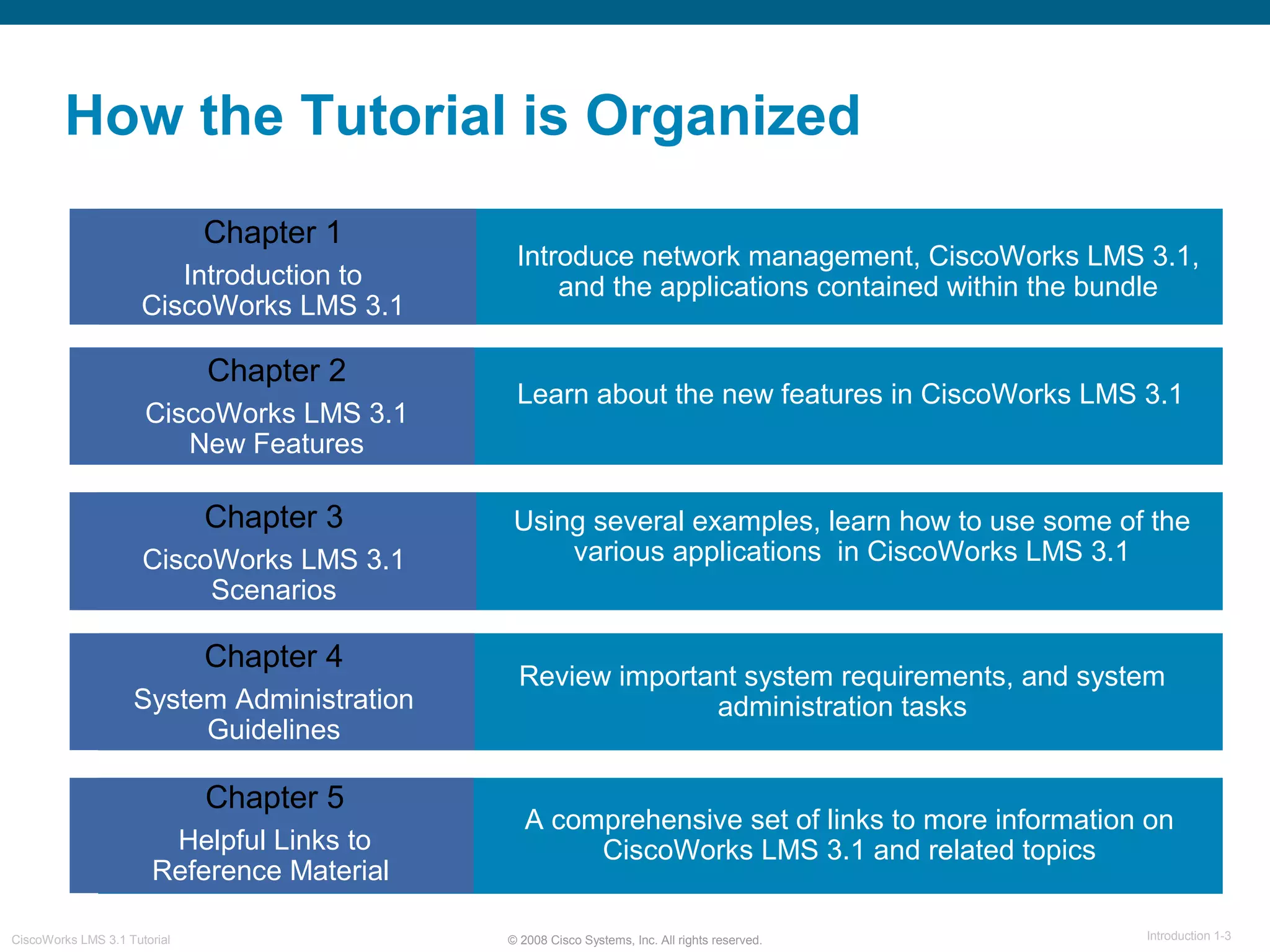
How the Tutorial is Organized
Chapter 1
Introduction to
CiscoWorks LMS 3.1
Chapter 2
CiscoWorks LMS 3.1
New Features
Chapter 3
CiscoWorks LMS 3.1
Scenarios
Chapter 4
System Administration
Guidelines
Chapter 5
Helpful Links to
Reference Material
Introduce network management, CiscoWorks LMS 3.1,
and the applications contained within the bundle
Learn about the new features in CiscoWorks LMS 3.1
Using several examples, learn how to use some of the
various applications in CiscoWorks LMS 3.1
Review important system requirements, and system
administration tasks
A comprehensive set of links to more information on
CiscoWorks LMS 3.1 and related topics
© 2008 Cisco Systems, Inc. All rights reserved. Introduction 1-4CiscoWorks LMS 3.1 Tutorial
Chapter 1
Introduction to
CiscoWorks LMS 3.1
© 2008 Cisco Systems, Inc. All rights reserved. Introduction 1-5CiscoWorks LMS 3.1 Tutorial
Chapter 1 Outline
 What is Network Management?
 What is CiscoWorks LMS?
 CiscoWorks LMS Applications
© 2008 Cisco Systems, Inc. All rights reserved. Introduction 1-6CiscoWorks LMS 3.1 Tutorial
What is Network
Management?
© 2008 Cisco Systems, Inc. All rights reserved. Introduction 1-7CiscoWorks LMS 3.1 Tutorial
What is Network Management?
Overview
Network Management
 Evolution of Networking
 Network Management Goals
 FCAPS
© 2008 Cisco Systems, Inc. All rights reserved. Introduction 1-8CiscoWorks LMS 3.1 Tutorial
What is Network Management?
Evolution of Networking
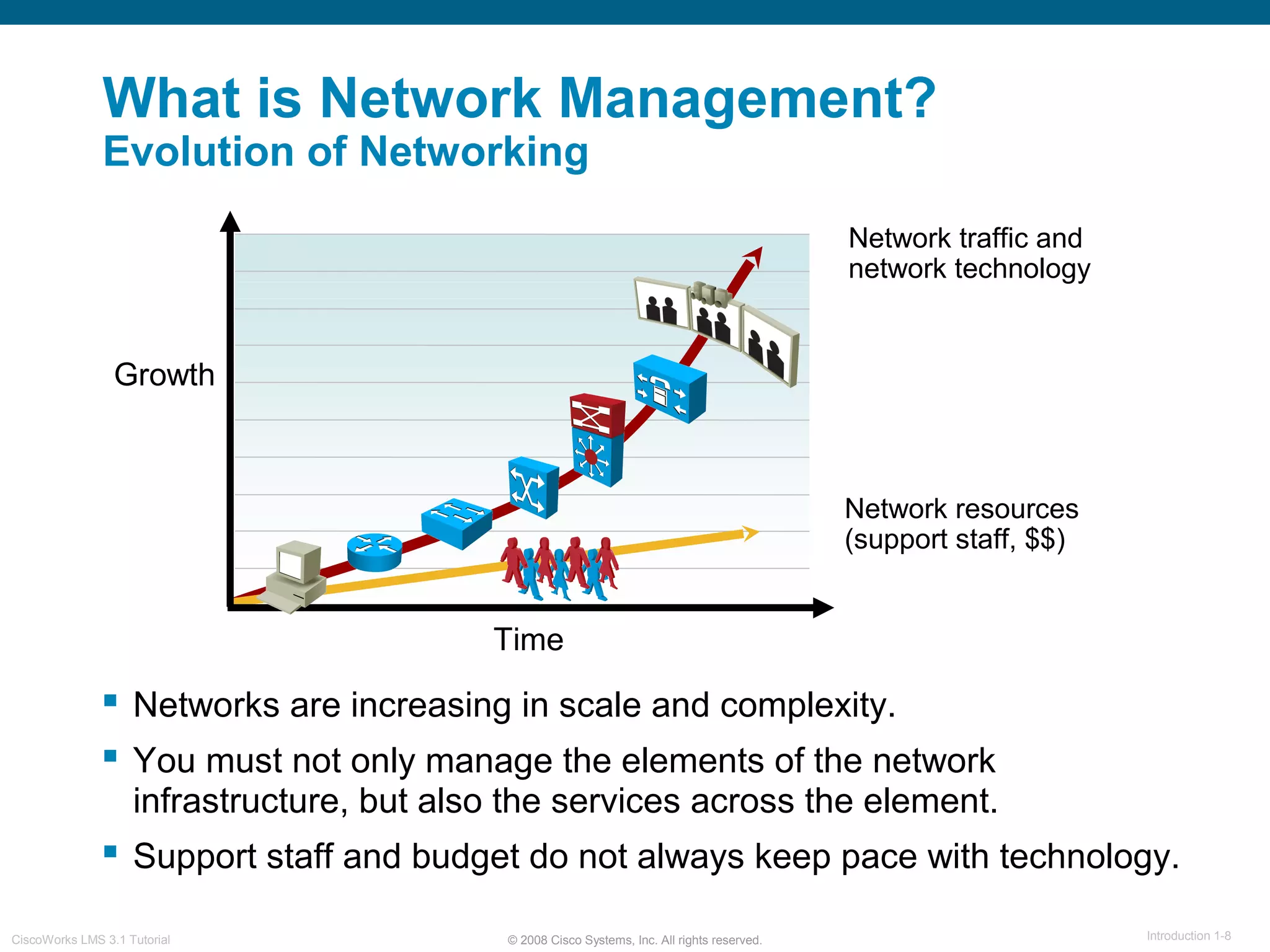
 Networks are increasing in scale and complexity.
 You must not only manage the elements of the network
infrastructure, but also the services across the element.
 Support staff and budget do not always keep pace with technology.
Network traffic and
network technology
Network resources
(support staff, $$)
Growth
Time
© 2008 Cisco Systems, Inc. All rights reserved. Introduction 1-9CiscoWorks LMS 3.1 Tutorial
What is Network Management?
Network Management Goals
The Goals:
 Ensure that users of a network
receive information technology
services with the quality of service
they expect.
 Ensure the strategic and tactical
planning of the engineering,
operations, and maintenance
of a network and its services.
 Help network engineers manage
the complexity of a data network
and ensure that data can go
across the network with maximum
efficiency and transparency.
 Prepare for disaster recovery.
© 2008 Cisco Systems, Inc. All rights reserved. Introduction 1-10CiscoWorks LMS 3.1 Tutorial
What is Network Management?
FCAPS
ISO defines five functional areas
of network management:
 Fault management
 Configuration management
 Accounting management
 Performance management
 Security management
Some management issues may span several areas.
© 2008 Cisco Systems, Inc. All rights reserved. Introduction 1-11CiscoWorks LMS 3.1 Tutorial
What is
CiscoWorks LMS 3.1?
© 2008 Cisco Systems, Inc. All rights reserved. Introduction 1-12CiscoWorks LMS 3.1 Tutorial
What is CiscoWorks LMS 3.1?
Overview
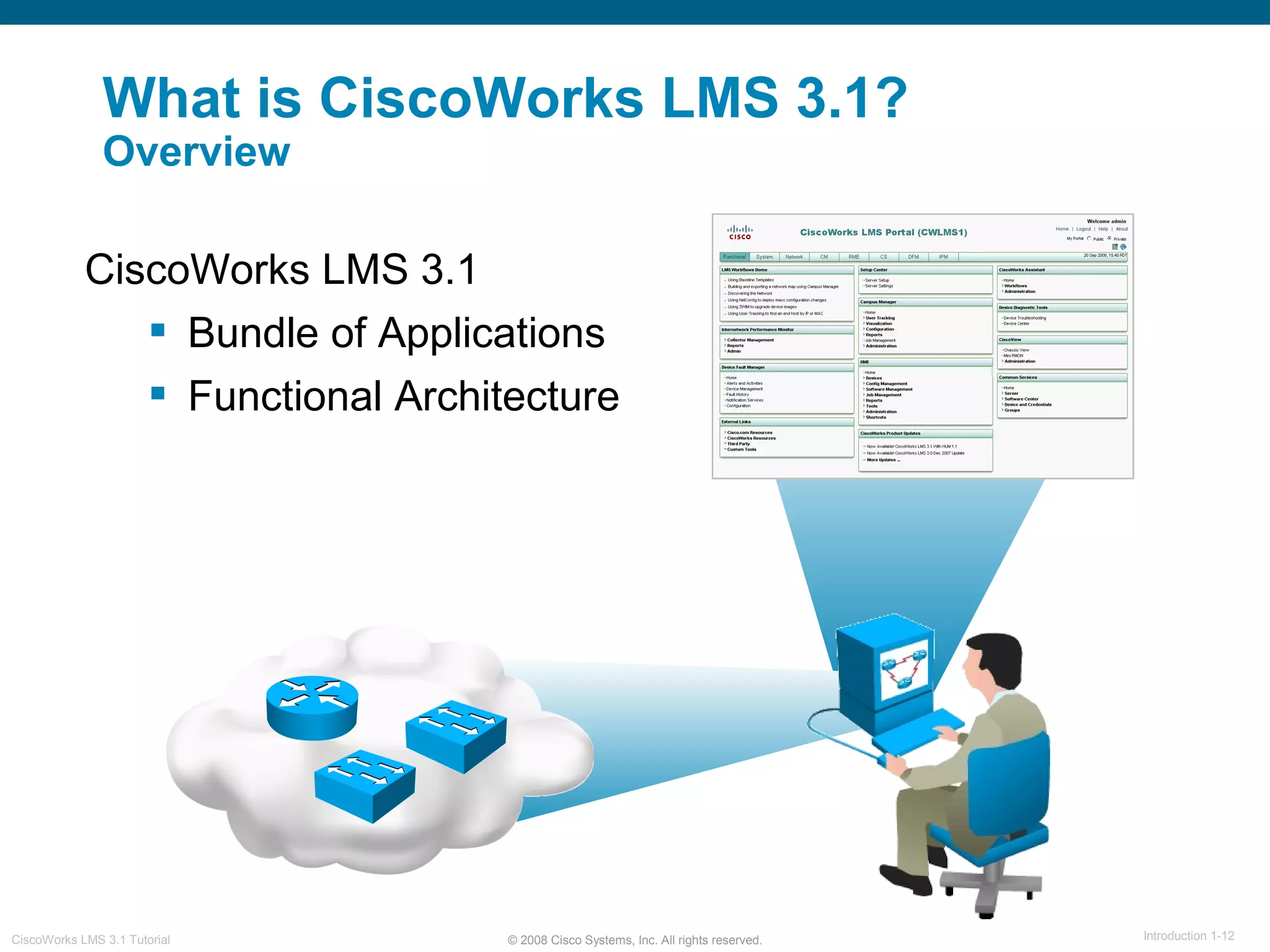
CiscoWorks LMS 3.1
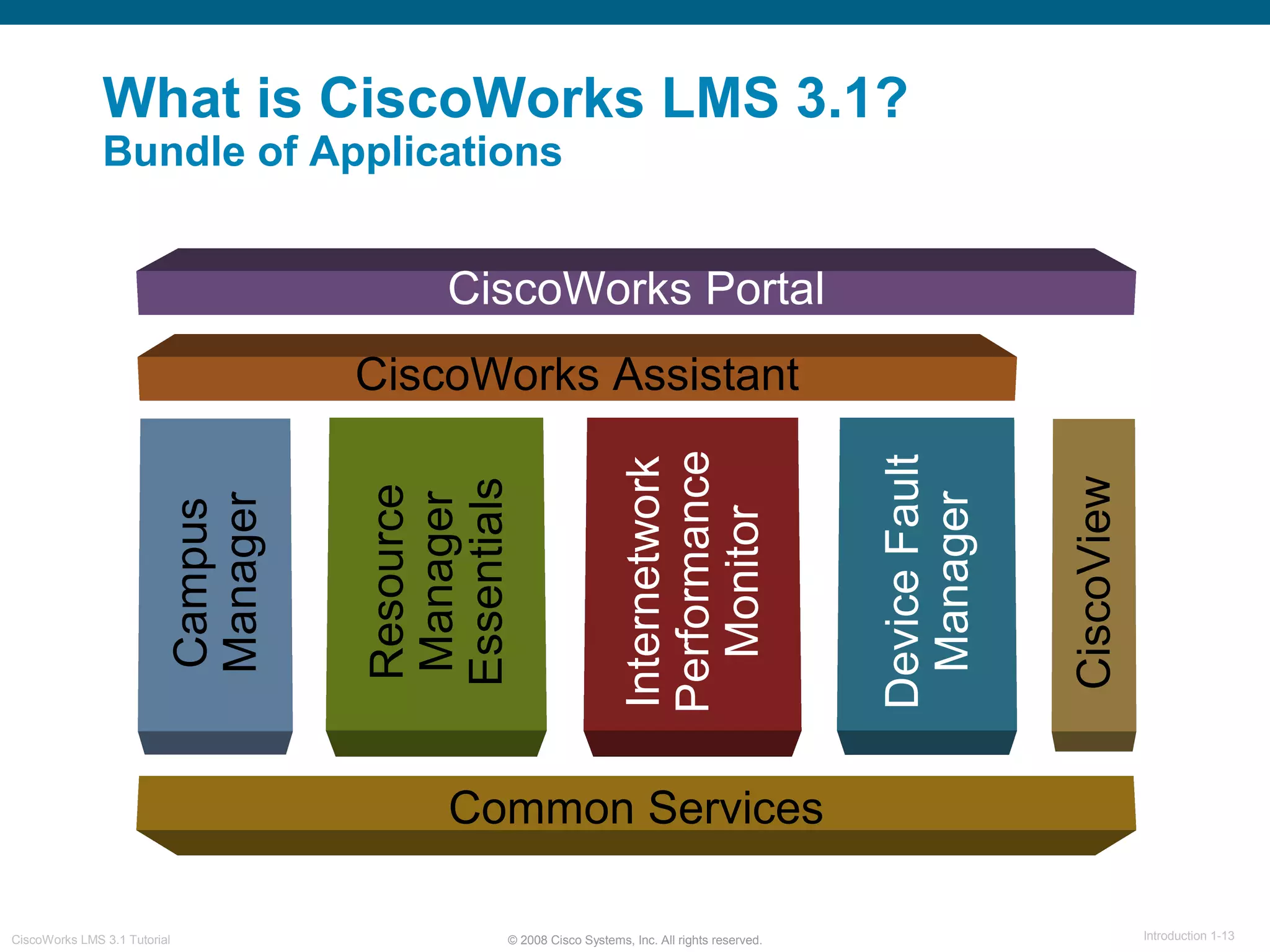
 Bundle of Applications
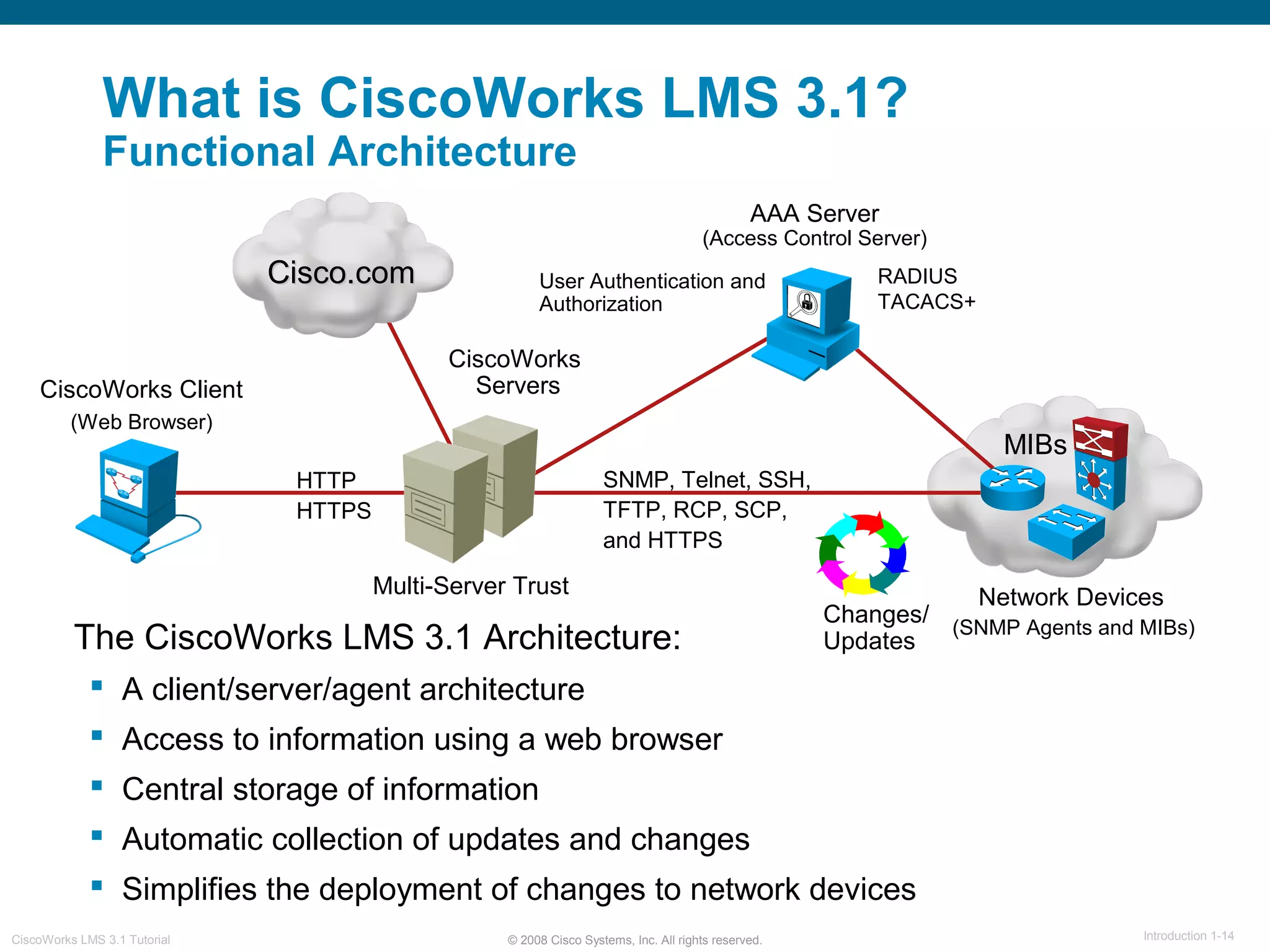
 Functional Architecture
© 2008 Cisco Systems, Inc. All rights reserved. Introduction 1-13CiscoWorks LMS 3.1 Tutorial
What is CiscoWorks LMS 3.1?
Bundle of Applications
Common Services
Resource
Manager
Essentials
Campus
Manager
CiscoView
DeviceFault
Manager
Internetwork
Performance
Monitor
CiscoWorks Portal
CiscoWorks Assistant
© 2008 Cisco Systems, Inc. All rights reserved. Introduction 1-14CiscoWorks LMS 3.1 Tutorial
What is CiscoWorks LMS 3.1?
Functional Architecture
Network Devices
(SNMP Agents and MIBs)
CiscoWorks
Servers
MIBs
SNMP, Telnet, SSH,
TFTP, RCP, SCP,
and HTTPS
HTTP
HTTPS
AAA Server
(Access Control Server)
RADIUS
TACACS+
User Authentication and
Authorization
Multi-Server Trust
Cisco.comCisco.com
The CiscoWorks LMS 3.1 Architecture:
 A client/server/agent architecture
 Access to information using a web browser
 Central storage of information
 Automatic collection of updates and changes
 Simplifies the deployment of changes to network devices
Changes/
Updates
CiscoWorks Client
(Web Browser)
© 2008 Cisco Systems, Inc. All rights reserved. Introduction 1-15CiscoWorks LMS 3.1 Tutorial
CiscoWorks
CiscoWorks LMS 3.1
Applications
© 2008 Cisco Systems, Inc. All rights reserved. Introduction 1-16CiscoWorks LMS 3.1 Tutorial
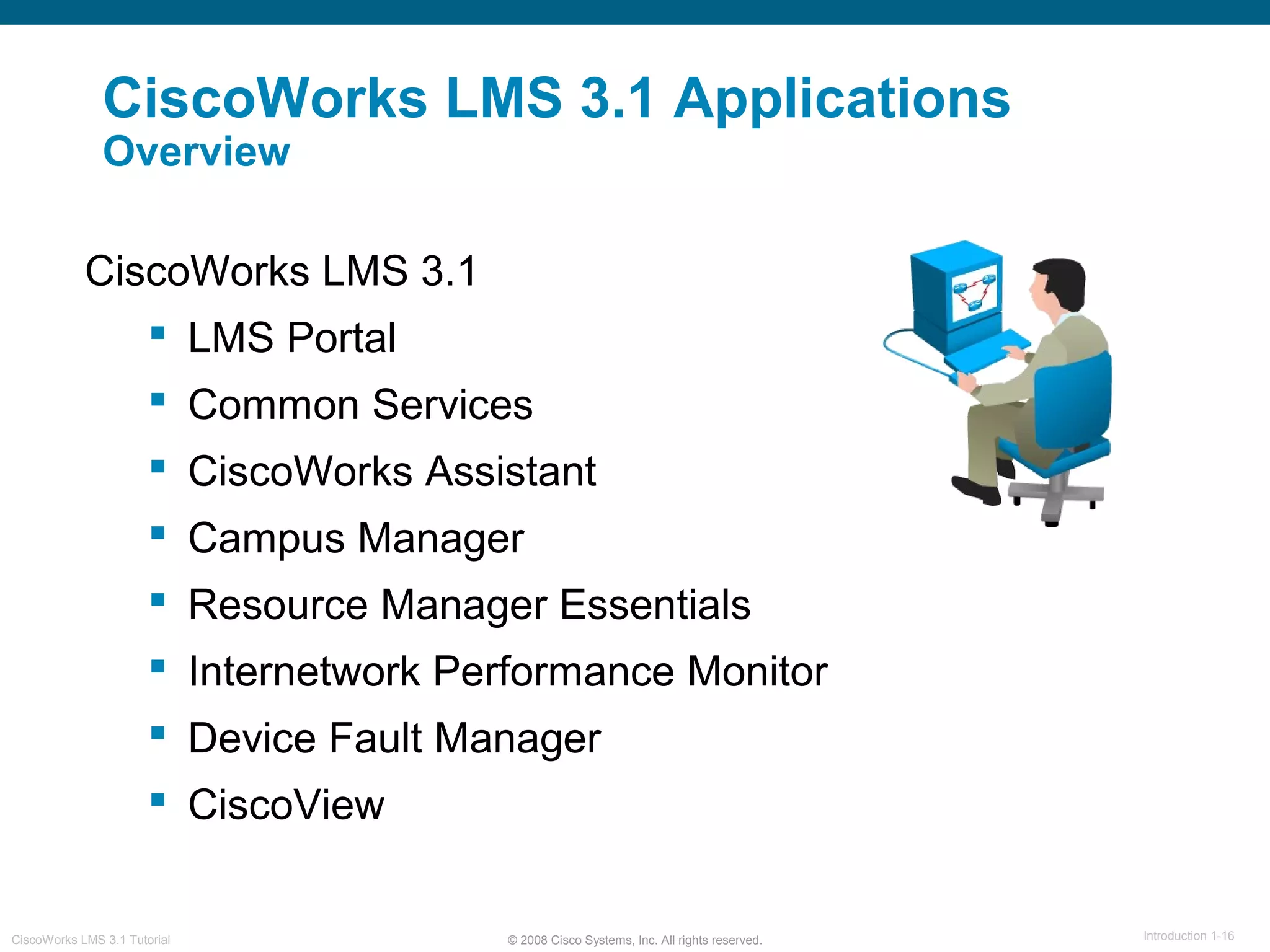
CiscoWorks LMS 3.1
 LMS Portal
 Common Services
 CiscoWorks Assistant
 Campus Manager
 Resource Manager Essentials
 Internetwork Performance Monitor
 Device Fault Manager
 CiscoView
CiscoWorks LMS 3.1 Applications
Overview
© 2008 Cisco Systems, Inc. All rights reserved. Introduction 1-17CiscoWorks LMS 3.1 Tutorial
CiscoWorks LMS 3.1 Applications
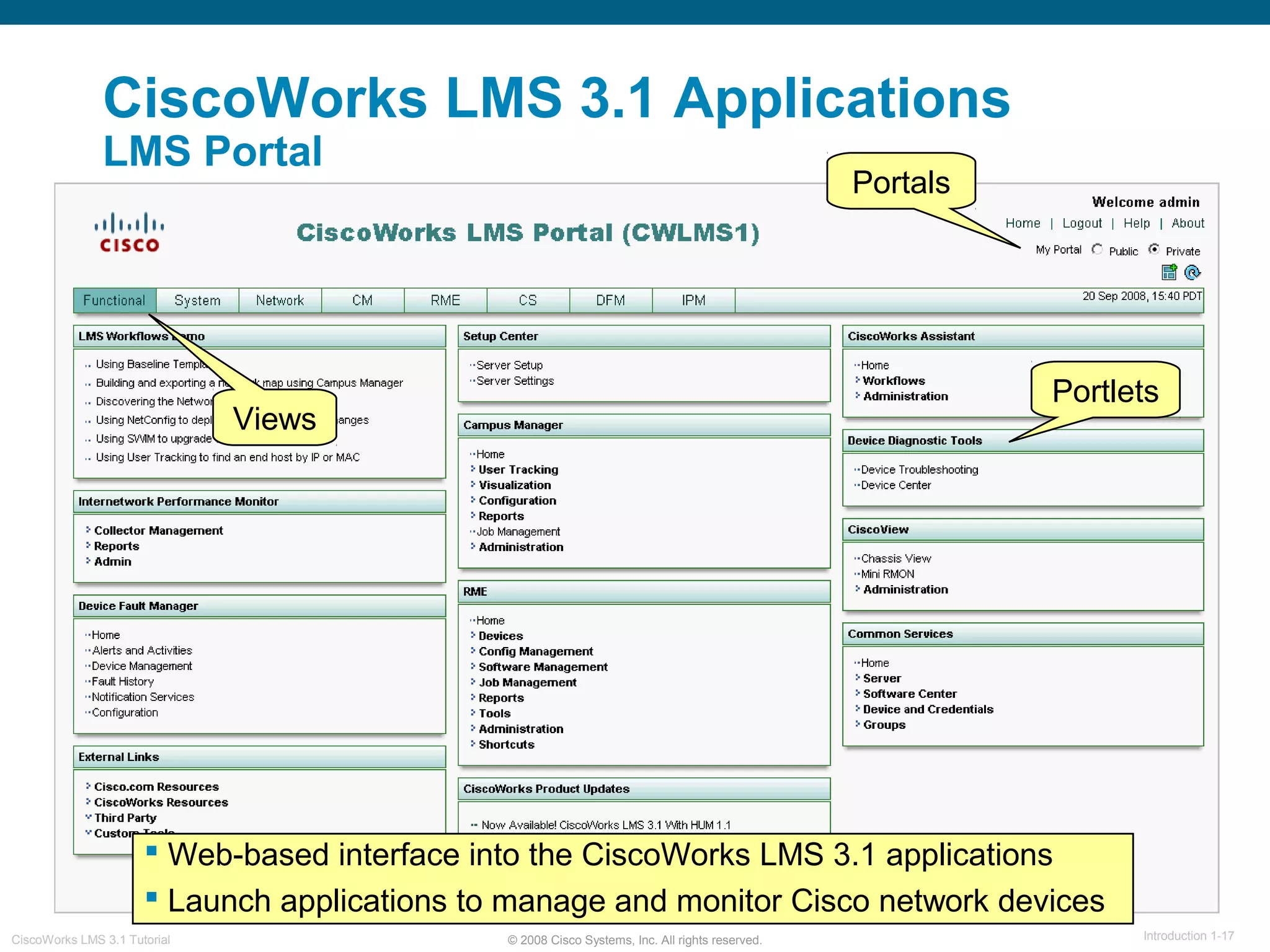
LMS Portal
 Web-based interface into the CiscoWorks LMS 3.1 applications
 Launch applications to manage and monitor Cisco network devices
Views
Portlets
Portals
© 2008 Cisco Systems, Inc. All rights reserved. Introduction 1-18CiscoWorks LMS 3.1 Tutorial
CiscoWorks LMS 3.1 Applications
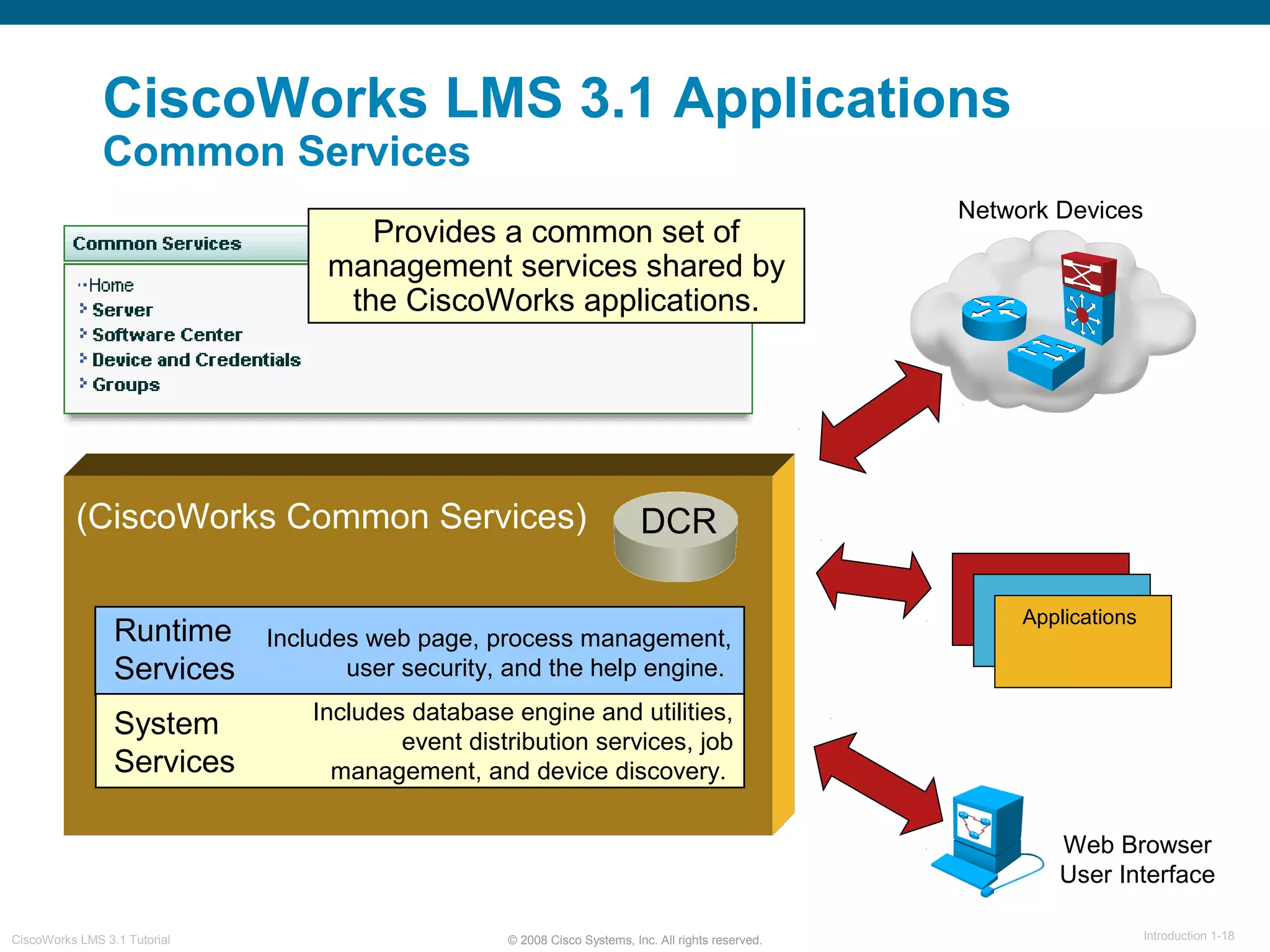
Common Services
Network Devices
(CiscoWorks Common Services)
Web Browser
User Interface
DCR
Applications
Provides a common set of
management services shared by
the CiscoWorks applications.
Includes web page, process management,
user security, and the help engine.
Includes database engine and utilities,
event distribution services, job
management, and device discovery.
Runtime
Services
System
Services
© 2008 Cisco Systems, Inc. All rights reserved. Introduction 1-19CiscoWorks LMS 3.1 Tutorial
CiscoWorks LMS 3.1 Applications
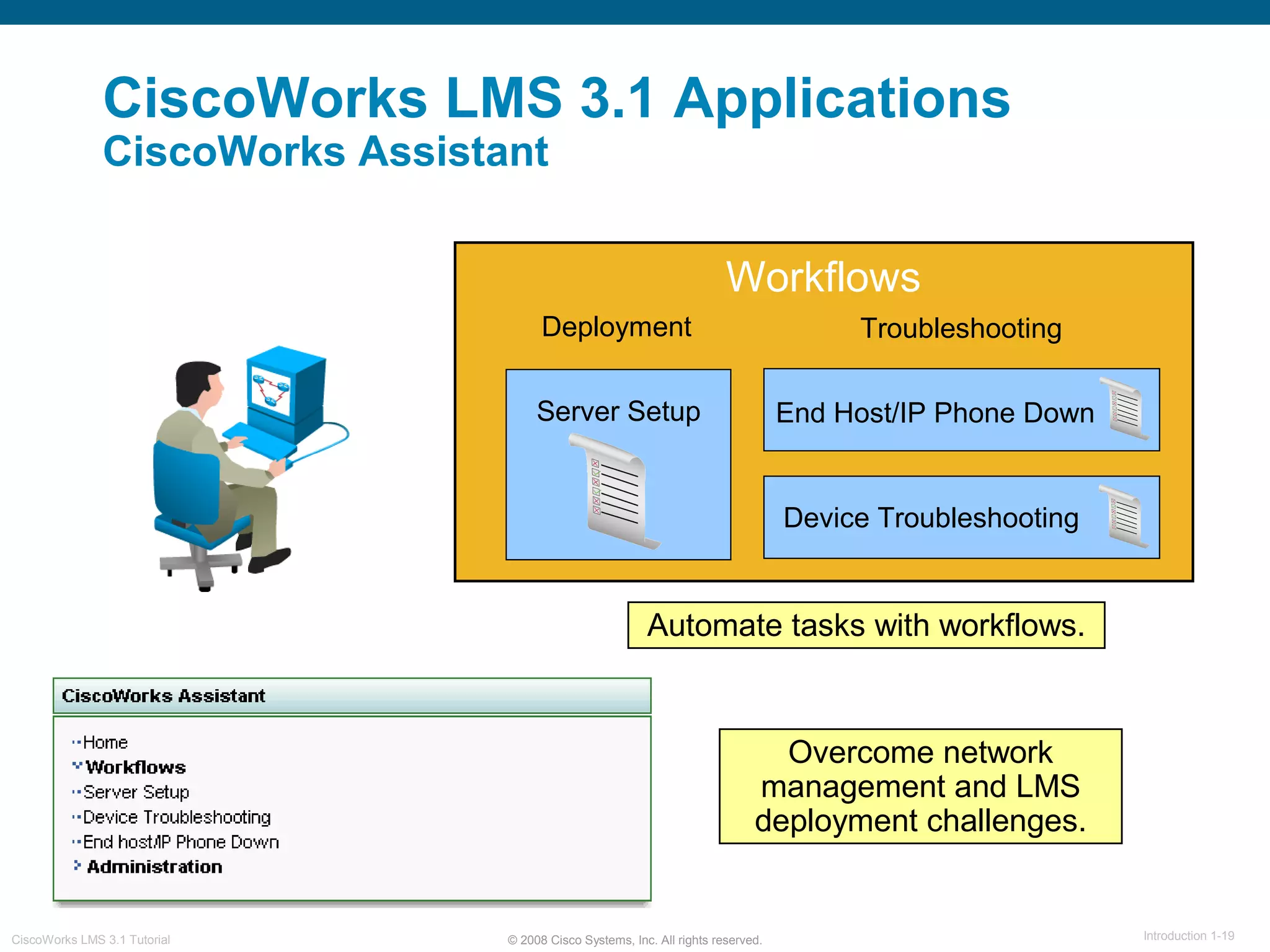
CiscoWorks Assistant
Server Setup End Host/IP Phone Down
Device Troubleshooting
Workflows
Deployment Troubleshooting
Overcome network
management and LMS
deployment challenges.
Automate tasks with workflows.
© 2008 Cisco Systems, Inc. All rights reserved. Introduction 1-20CiscoWorks LMS 3.1 Tutorial
CiscoWorks LMS 3.1 Applications
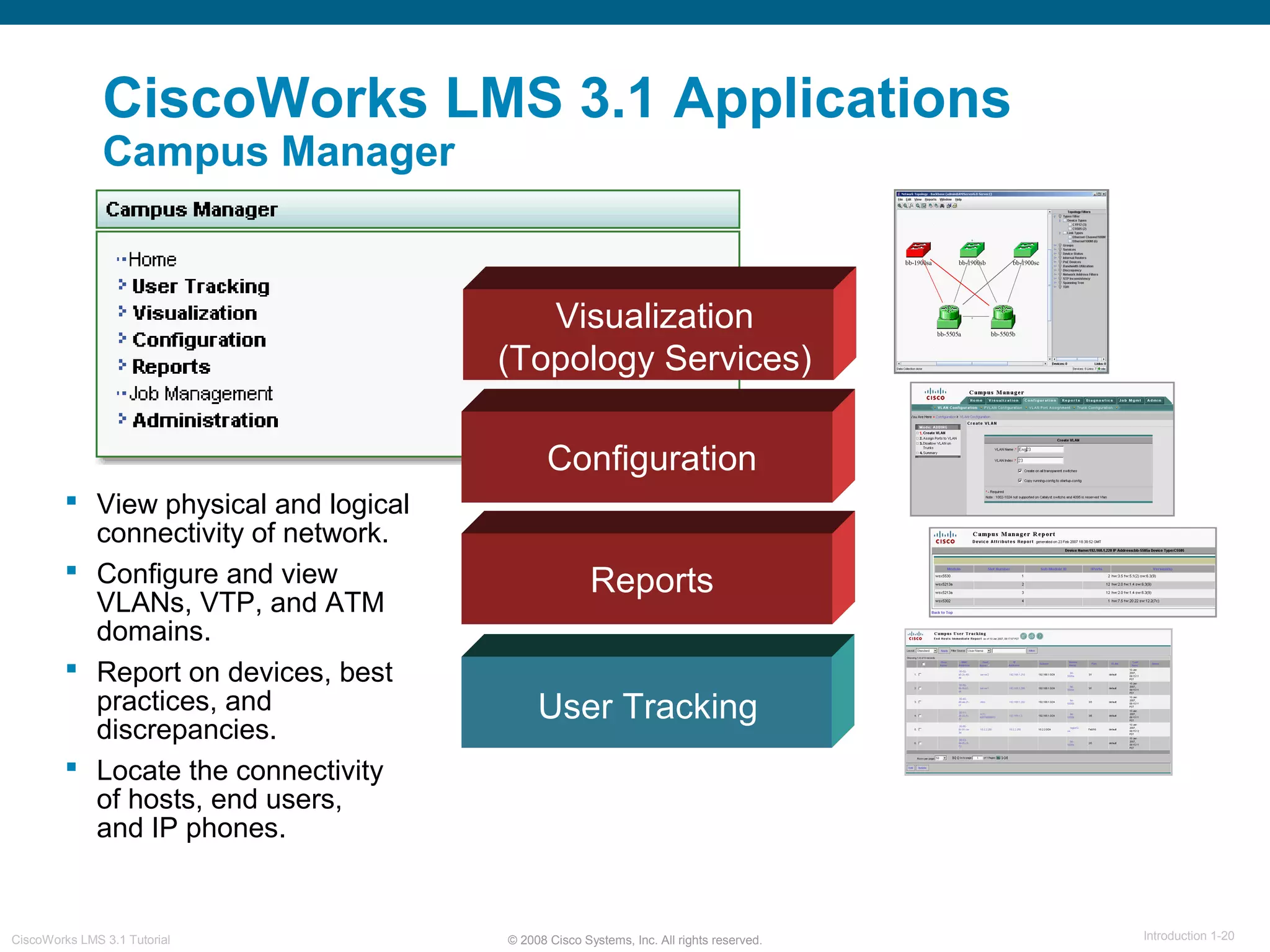
Campus Manager
Visualization
(Topology Services)
User Tracking
 View physical and logical
connectivity of network.
 Configure and view
VLANs, VTP, and ATM
domains.
 Report on devices, best
practices, and
discrepancies.
 Locate the connectivity
of hosts, end users,
and IP phones.
Configuration
Reports
© 2008 Cisco Systems, Inc. All rights reserved. Introduction 1-21CiscoWorks LMS 3.1 Tutorial
CiscoWorks LMS 3.1 Applications
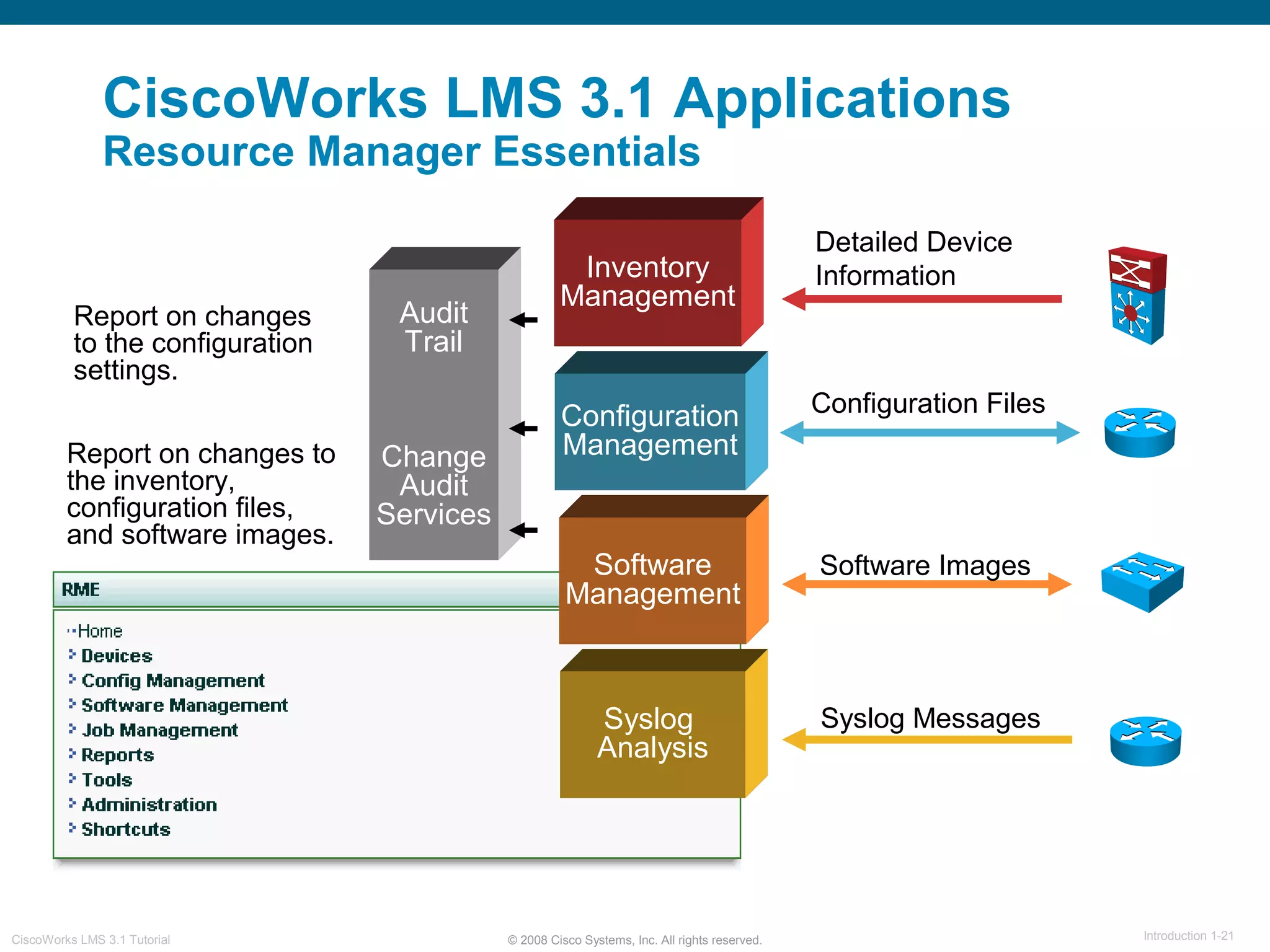
Resource Manager Essentials
Syslog
Analysis
Audit
Trail
Change
Audit
Services
Software
Management
Configuration
Management
Inventory
Management
Report on changes to
the inventory,
configuration files,
and software images.
Software Images
Configuration Files
Detailed Device
Information
Syslog Messages
Report on changes
to the configuration
settings.
© 2008 Cisco Systems, Inc. All rights reserved. Introduction 1-22CiscoWorks LMS 3.1 Tutorial
CiscoWorks LMS 3.1 Applications
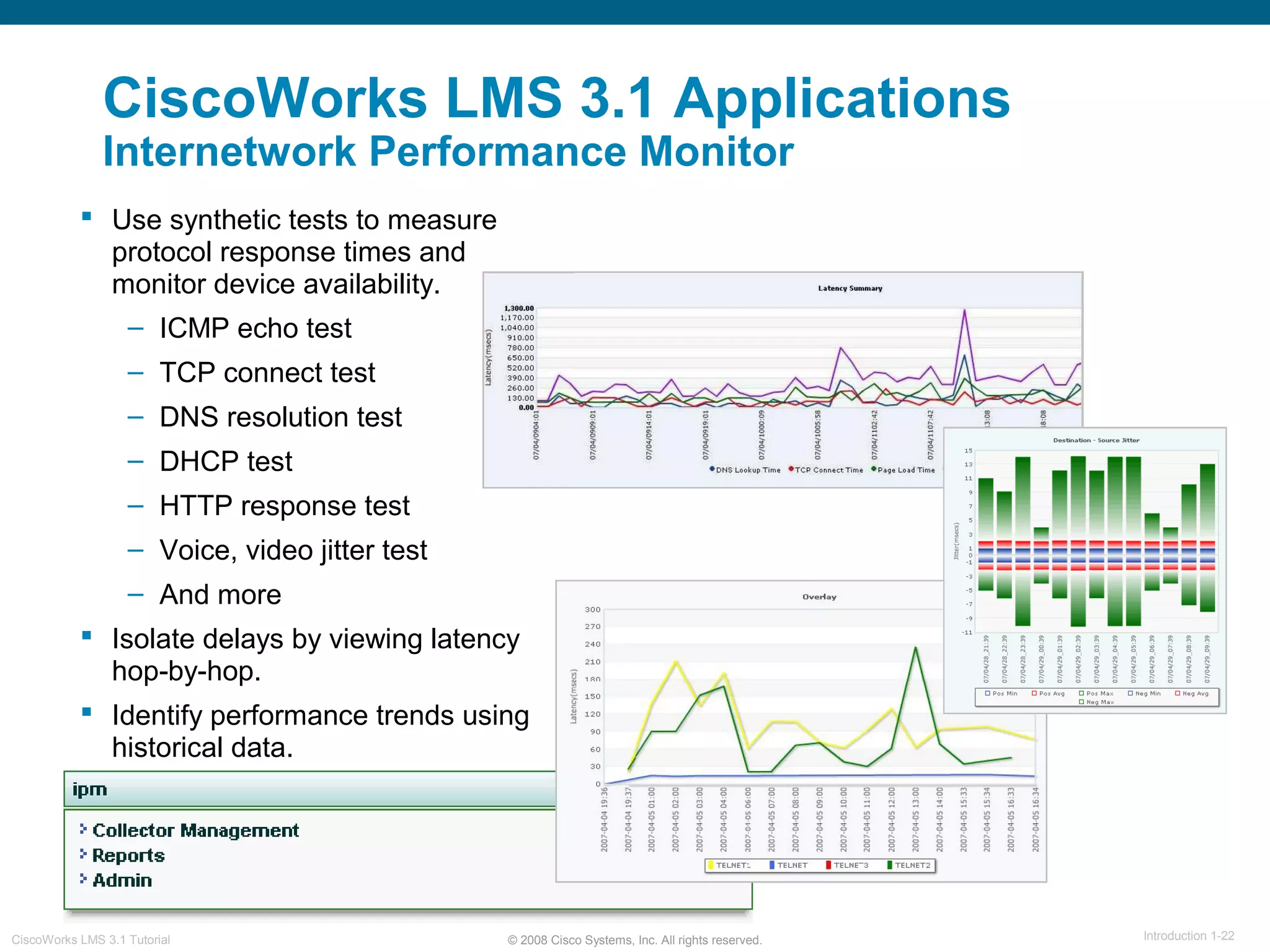
Internetwork Performance Monitor
 Use synthetic tests to measure
protocol response times and
monitor device availability.
– ICMP echo test
– TCP connect test
– DNS resolution test
– DHCP test
– HTTP response test
– Voice, video jitter test
– And more
 Isolate delays by viewing latency
hop-by-hop.
 Identify performance trends using
historical data.
© 2008 Cisco Systems, Inc. All rights reserved. Introduction 1-23CiscoWorks LMS 3.1 Tutorial
CiscoWorks LMS 3.1 Applications
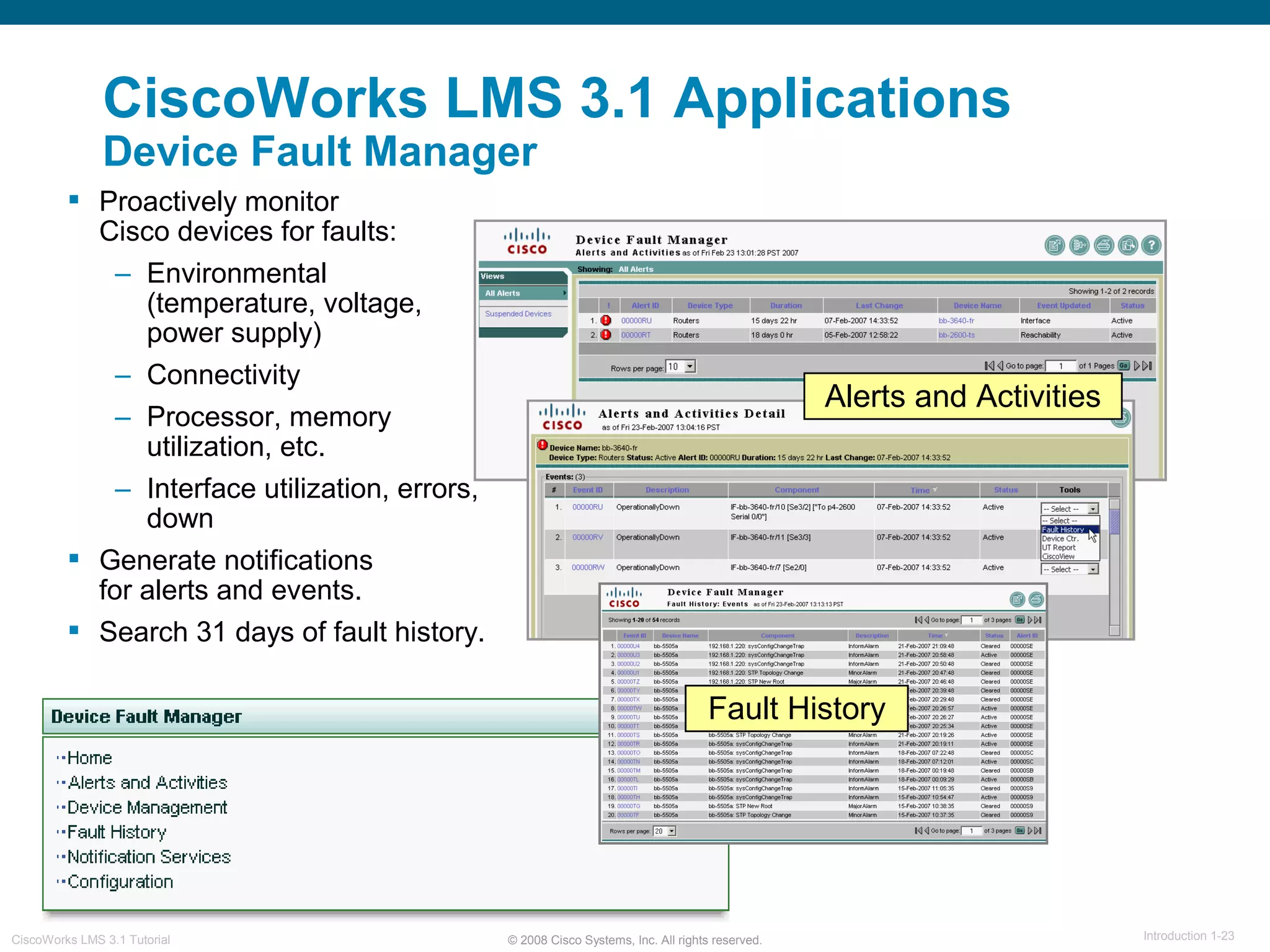
Device Fault Manager
 Proactively monitor
Cisco devices for faults:
– Environmental
(temperature, voltage,
power supply)
– Connectivity
– Processor, memory
utilization, etc.
– Interface utilization, errors,
down
 Generate notifications
for alerts and events.
 Search 31 days of fault history.
Alerts and Activities
Fault History
© 2008 Cisco Systems, Inc. All rights reserved. Introduction 1-24CiscoWorks LMS 3.1 Tutorial
CiscoWorks LMS 3.1 Applications
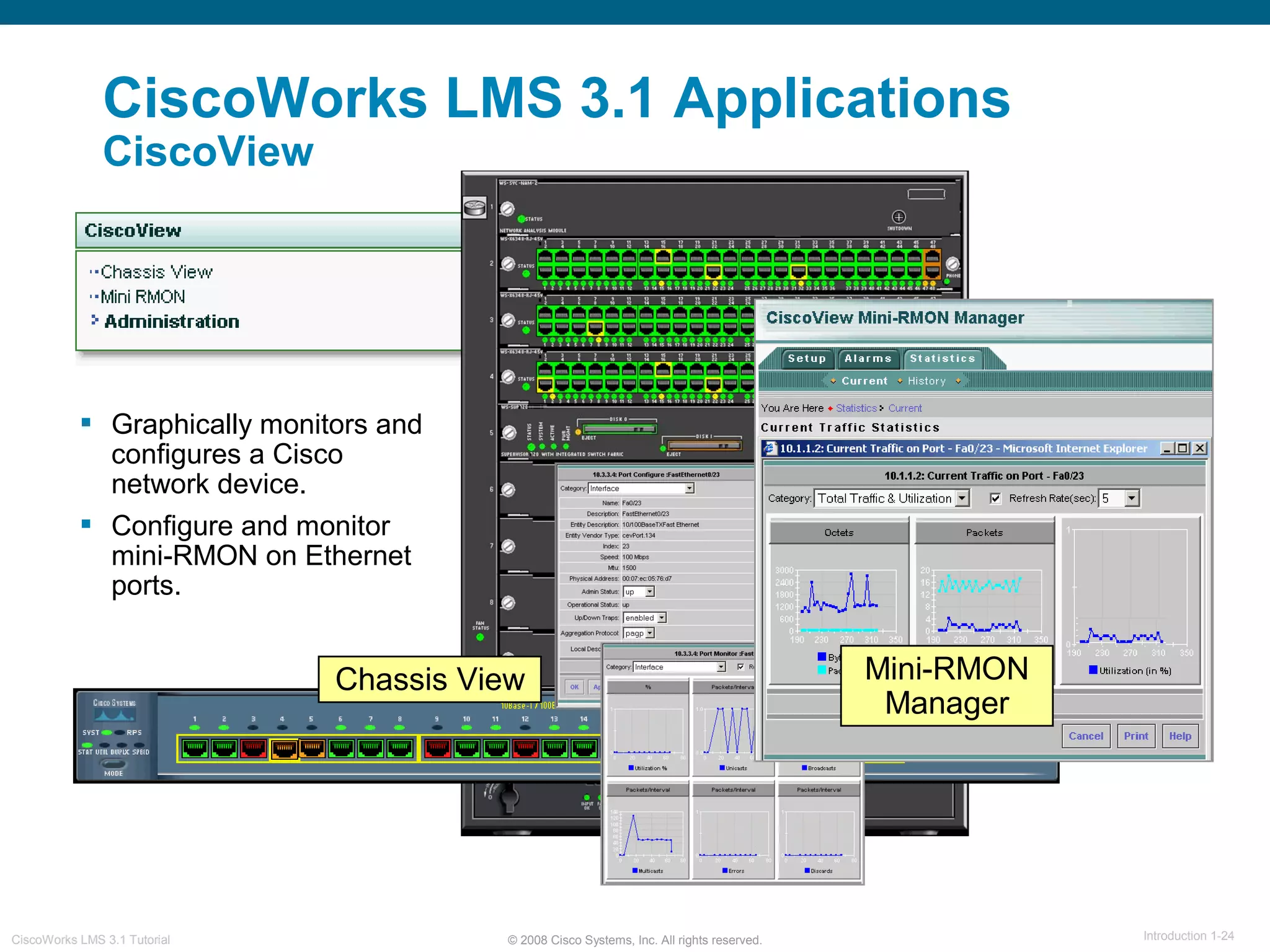
CiscoView
 Graphically monitors and
configures a Cisco
network device.
 Configure and monitor
mini-RMON on Ethernet
ports.
Chassis View Mini-RMON
Manager
© 2008 Cisco Systems, Inc. All rights reserved. Introduction 1-25CiscoWorks LMS 3.1 Tutorial

Lms31 chapter 1 intro

  • 1.
    © 2008 CiscoSystems, Inc. All rights reserved. Introduction 1-1CiscoWorks LMS 3.1 Tutorial CiscoWorks LMS 3.1 Tutorial
  • 2.
    © 2008 CiscoSystems, Inc. All rights reserved. Introduction 1-2CiscoWorks LMS 3.1 Tutorial About This Tutorial  Introduce CiscoWorks LMS 3.1  Highlight the new features within CiscoWorks LMS 3.1  View various scenarios explaining how to use some of the applications in CiscoWorks LMS 3.1  Provide guidelines for system administration  Provide links to documentation for CiscoWorks LMS 3.1 and related applications
  • 3.
    © 2008 CiscoSystems, Inc. All rights reserved. Introduction 1-3CiscoWorks LMS 3.1 Tutorial How the Tutorial is Organized Chapter 1 Introduction to CiscoWorks LMS 3.1 Chapter 2 CiscoWorks LMS 3.1 New Features Chapter 3 CiscoWorks LMS 3.1 Scenarios Chapter 4 System Administration Guidelines Chapter 5 Helpful Links to Reference Material Introduce network management, CiscoWorks LMS 3.1, and the applications contained within the bundle Learn about the new features in CiscoWorks LMS 3.1 Using several examples, learn how to use some of the various applications in CiscoWorks LMS 3.1 Review important system requirements, and system administration tasks A comprehensive set of links to more information on CiscoWorks LMS 3.1 and related topics
  • 4.
    © 2008 CiscoSystems, Inc. All rights reserved. Introduction 1-4CiscoWorks LMS 3.1 Tutorial Chapter 1 Introduction to CiscoWorks LMS 3.1
  • 5.
    © 2008 CiscoSystems, Inc. All rights reserved. Introduction 1-5CiscoWorks LMS 3.1 Tutorial Chapter 1 Outline  What is Network Management?  What is CiscoWorks LMS?  CiscoWorks LMS Applications
  • 6.
    © 2008 CiscoSystems, Inc. All rights reserved. Introduction 1-6CiscoWorks LMS 3.1 Tutorial What is Network Management?
  • 7.
    © 2008 CiscoSystems, Inc. All rights reserved. Introduction 1-7CiscoWorks LMS 3.1 Tutorial What is Network Management? Overview Network Management  Evolution of Networking  Network Management Goals  FCAPS
  • 8.
    © 2008 CiscoSystems, Inc. All rights reserved. Introduction 1-8CiscoWorks LMS 3.1 Tutorial What is Network Management? Evolution of Networking  Networks are increasing in scale and complexity.  You must not only manage the elements of the network infrastructure, but also the services across the element.  Support staff and budget do not always keep pace with technology. Network traffic and network technology Network resources (support staff, $$) Growth Time
  • 9.
    © 2008 CiscoSystems, Inc. All rights reserved. Introduction 1-9CiscoWorks LMS 3.1 Tutorial What is Network Management? Network Management Goals The Goals:  Ensure that users of a network receive information technology services with the quality of service they expect.  Ensure the strategic and tactical planning of the engineering, operations, and maintenance of a network and its services.  Help network engineers manage the complexity of a data network and ensure that data can go across the network with maximum efficiency and transparency.  Prepare for disaster recovery.
  • 10.
    © 2008 CiscoSystems, Inc. All rights reserved. Introduction 1-10CiscoWorks LMS 3.1 Tutorial What is Network Management? FCAPS ISO defines five functional areas of network management:  Fault management  Configuration management  Accounting management  Performance management  Security management Some management issues may span several areas.
  • 11.
    © 2008 CiscoSystems, Inc. All rights reserved. Introduction 1-11CiscoWorks LMS 3.1 Tutorial What is CiscoWorks LMS 3.1?
  • 12.
    © 2008 CiscoSystems, Inc. All rights reserved. Introduction 1-12CiscoWorks LMS 3.1 Tutorial What is CiscoWorks LMS 3.1? Overview CiscoWorks LMS 3.1  Bundle of Applications  Functional Architecture
  • 13.
    © 2008 CiscoSystems, Inc. All rights reserved. Introduction 1-13CiscoWorks LMS 3.1 Tutorial What is CiscoWorks LMS 3.1? Bundle of Applications Common Services Resource Manager Essentials Campus Manager CiscoView DeviceFault Manager Internetwork Performance Monitor CiscoWorks Portal CiscoWorks Assistant
  • 14.
    © 2008 CiscoSystems, Inc. All rights reserved. Introduction 1-14CiscoWorks LMS 3.1 Tutorial What is CiscoWorks LMS 3.1? Functional Architecture Network Devices (SNMP Agents and MIBs) CiscoWorks Servers MIBs SNMP, Telnet, SSH, TFTP, RCP, SCP, and HTTPS HTTP HTTPS AAA Server (Access Control Server) RADIUS TACACS+ User Authentication and Authorization Multi-Server Trust Cisco.comCisco.com The CiscoWorks LMS 3.1 Architecture:  A client/server/agent architecture  Access to information using a web browser  Central storage of information  Automatic collection of updates and changes  Simplifies the deployment of changes to network devices Changes/ Updates CiscoWorks Client (Web Browser)
  • 15.
    © 2008 CiscoSystems, Inc. All rights reserved. Introduction 1-15CiscoWorks LMS 3.1 Tutorial CiscoWorks CiscoWorks LMS 3.1 Applications
  • 16.
    © 2008 CiscoSystems, Inc. All rights reserved. Introduction 1-16CiscoWorks LMS 3.1 Tutorial CiscoWorks LMS 3.1  LMS Portal  Common Services  CiscoWorks Assistant  Campus Manager  Resource Manager Essentials  Internetwork Performance Monitor  Device Fault Manager  CiscoView CiscoWorks LMS 3.1 Applications Overview
  • 17.
    © 2008 CiscoSystems, Inc. All rights reserved. Introduction 1-17CiscoWorks LMS 3.1 Tutorial CiscoWorks LMS 3.1 Applications LMS Portal  Web-based interface into the CiscoWorks LMS 3.1 applications  Launch applications to manage and monitor Cisco network devices Views Portlets Portals
  • 18.
    © 2008 CiscoSystems, Inc. All rights reserved. Introduction 1-18CiscoWorks LMS 3.1 Tutorial CiscoWorks LMS 3.1 Applications Common Services Network Devices (CiscoWorks Common Services) Web Browser User Interface DCR Applications Provides a common set of management services shared by the CiscoWorks applications. Includes web page, process management, user security, and the help engine. Includes database engine and utilities, event distribution services, job management, and device discovery. Runtime Services System Services
  • 19.
    © 2008 CiscoSystems, Inc. All rights reserved. Introduction 1-19CiscoWorks LMS 3.1 Tutorial CiscoWorks LMS 3.1 Applications CiscoWorks Assistant Server Setup End Host/IP Phone Down Device Troubleshooting Workflows Deployment Troubleshooting Overcome network management and LMS deployment challenges. Automate tasks with workflows.
  • 20.
    © 2008 CiscoSystems, Inc. All rights reserved. Introduction 1-20CiscoWorks LMS 3.1 Tutorial CiscoWorks LMS 3.1 Applications Campus Manager Visualization (Topology Services) User Tracking  View physical and logical connectivity of network.  Configure and view VLANs, VTP, and ATM domains.  Report on devices, best practices, and discrepancies.  Locate the connectivity of hosts, end users, and IP phones. Configuration Reports
  • 21.
    © 2008 CiscoSystems, Inc. All rights reserved. Introduction 1-21CiscoWorks LMS 3.1 Tutorial CiscoWorks LMS 3.1 Applications Resource Manager Essentials Syslog Analysis Audit Trail Change Audit Services Software Management Configuration Management Inventory Management Report on changes to the inventory, configuration files, and software images. Software Images Configuration Files Detailed Device Information Syslog Messages Report on changes to the configuration settings.
  • 22.
    © 2008 CiscoSystems, Inc. All rights reserved. Introduction 1-22CiscoWorks LMS 3.1 Tutorial CiscoWorks LMS 3.1 Applications Internetwork Performance Monitor  Use synthetic tests to measure protocol response times and monitor device availability. – ICMP echo test – TCP connect test – DNS resolution test – DHCP test – HTTP response test – Voice, video jitter test – And more  Isolate delays by viewing latency hop-by-hop.  Identify performance trends using historical data.
  • 23.
    © 2008 CiscoSystems, Inc. All rights reserved. Introduction 1-23CiscoWorks LMS 3.1 Tutorial CiscoWorks LMS 3.1 Applications Device Fault Manager  Proactively monitor Cisco devices for faults: – Environmental (temperature, voltage, power supply) – Connectivity – Processor, memory utilization, etc. – Interface utilization, errors, down  Generate notifications for alerts and events.  Search 31 days of fault history. Alerts and Activities Fault History
  • 24.
    © 2008 CiscoSystems, Inc. All rights reserved. Introduction 1-24CiscoWorks LMS 3.1 Tutorial CiscoWorks LMS 3.1 Applications CiscoView  Graphically monitors and configures a Cisco network device.  Configure and monitor mini-RMON on Ethernet ports. Chassis View Mini-RMON Manager
  • 25.
    © 2008 CiscoSystems, Inc. All rights reserved. Introduction 1-25CiscoWorks LMS 3.1 Tutorial

Editor's Notes

  • #2 CiscoWorks LMS 3.1 Tutorial
  • #3 Introduction 1- About This Tutorial The CiscoWorks LAN Management Solution (LMS) 3.1 tutorial provides self-paced training focused on using the various applications within the software bundle. The tutorial is structured as a series of self-paced chapters that explore the architecture, new features, common usage scenarios, and system administration functions for the product. Also included as part of the tutorial is a helpful reference section containing links to technical documents on the product, concepts, and terminology. The tutorial material is presented through text, illustrations, hypertext links, and typical scenarios. This tutorial is an excellent resource for introducing current users of CiscoWorks to the new features found in the LMS 3.1 applications. It also contains valuable information to help jump start new users with the most common applications in the software bundle.
  • #4 How This Tutorial Is Organized The tutorial is divided into five chapters: Chapter 1: Introduction to CiscoWorks LMS 3.1 This chapter describes network management. It also outlines the architecture and applications found within the CiscoWorks LMS 3.1 bundle. Chapter 2: CiscoWorks LMS 3.1 New Features This chapter discusses the new features in CiscoWorks LMS 3.1. It is designed for current users of CiscoWorks who want to learn about the new features. The product is presented through both discussions of the major functional components and screen shots of key product features. Chapter 3: CiscoWorks LMS 3.1 Scenarios This chapter walks you through step-by-step examples to provide hands-on experience using some of the CiscoWorks LMS 3.1 applications. The focus is on jump starting new users wanting to get a basic understanding of how to use some of the most common applications in the LMS 3.1. Chapter 4: System Administration Guidelines This chapter provides information about CiscoWorks LMS 3.1 requirements and configuration tasks. The focus is on discovering the network for the first time, and configuring the numerous applications settings. Chapter 5: References This chapter contains a list of additional product information, such as links to related to user guides, release notes, white papers, and other documentation.
  • #5 Chapter 1 CiscoWorks LMS 3.1 Introduction
  • #6 Introduction 1- Chapter 1 Outline Welcome to the CiscoWorks LMS 3.1 new features tutorial. Before discussing the software, the first step is to acknowledge the importance of performing network management in today’s environment and how the rapid growth of technology created an urgent need to automate the process. CiscoWorks LMS 3.1 is a suite of network management applications designed to manage Cisco networks. It is part of the CiscoWorks Family of products that provide comprehensive network management solutions to improve IT organizational effectiveness through task automation, simplification, and integration. CiscoWorks LMS 3.1 is a component of the Cisco Proactive Automation of Change Execution (PACE) solution. PACE provides an integrated suite of Cisco products and services for centralizing configuration, change, and compliance management. This chapter addresses the following topics: What is Network Management What is CiscoWorks LMS? CiscoWorks LMS Applications
  • #7 What is Network Management? What is Network Management? What is CiscoWorks LMS? CiscoWorks LMS Applications
  • #8 Overview Network management means different things to different people. In some cases, it involves a solitary network consultant monitoring network activity with an outdated protocol analyzer. In other cases, network management involves a distributed database, auto-polling of network devices, and high-end workstations generating real-time graphical views of network topology changes and traffic. In general, network management is a service that employs a variety of tools, applications, and devices to assist human network managers in monitoring and maintaining networks. This topic describes Network Management: Evolution of Networking Network Management Goals FCAPS
  • #9 Evolution of Networking The early 1980s saw tremendous expansion in the area of network deployment. As companies realized the cost benefits and productivity gains created by network technology, they began to add networks and expand existing networks almost as rapidly as new network technologies and products were introduced. By the mid-1980s, certain companies were experiencing growing pains from deploying many different (and sometimes incompatible) network technologies. The problems associated with network expansion affect both day-to-day network operation management and strategic network growth planning. Each new network technology requires its own set of experts. In the early 1980s, the staffing requirements alone for managing large, heterogeneous networks created a crisis for many organizations. An urgent need arose for automated network management (including what is typically called network capacity planning) integrated across diverse environments. A good network management strategy must be a high priority. Because of the ever-increasing uses and complexity of networks, you must strive to keep up with network demands. Ten years ago, the main concerns of a network administrator, for the smaller, less-demanding user population, were uptime and availability. Today, uptime and availability are still important, but now more complex issues must be considered, including IP telephony, secure remote access, quality of service (QoS), and a larger, more demanding user population. You must now employ a management strategy that maximizes network efficiency and helps to reduce demands on the network administrator. Unfortunately, the growth of a support staff and budget does not always keep pace with new technologies being implemented in the network. You are often expected do more in your position with less support and staff. Having the correct tools to automate many routine tasks can make your job much more efficient.
  • #10 Network Management Goals In general, network management is a service that employs a variety of tools, applications, and devices to assist human network managers in monitoring and maintaining networks. Network management can be defined in terms of the goals a company hopes to achieve from employing a network management strategy. From the perspective of end users, the network should provide consistent, high-level services. The actual method of providing the services should be as transparent to the user as possible. The user does not care so much about the network itself, but rather that they can retrieve their e-mail quickly at any time, access application servers or network printers, transfer files, or browse web pages in a timely manner. To ensure that these needs are met, network engineers and administrators need effective network management tools to deal with network complexities, provide maximum efficiency, and minimize downtime by preparing for disaster recovery.
  • #11 FCAPS FCAPS is a conceptual model of network management developed by the International Organization for Standardization (ISO) to provide a clear focus and strategy for running a network safely and efficiently. The letters are an acronym representing the five areas a network management policy needs to consider: Fault management: Identify faults on a network quickly and efficiently. Configuration management: Track network hardware, configuration, and software versions. Accounting management: Monitor the use of a network for quota calculations and billing Performance management: Identify areas of the network that are overloaded, to improve efficiency. Security management: Control access to network resources and prevent unauthorized use. Network issues do not always fit neatly into one functional area. Functional areas are merely used to define various management issues. A well-planned and implemented network management strategy provides you with a consistently high level of network services, which helps increase productivity. A Network Management Station (NMS) typically runs software that collects valuable information from network devices. Once the network has been fully documented, polling can log changes that occur and ensure the information in the management database is accurate and up to date. The true power of a good NMS is the ability to automate the deployment of changes to many devices at the same time eliminating the need to enter repetitive commands at the CLI. When configured properly, the NMS should also be able to monitor the performance of the network and proactively respond to faults found in network devices.
  • #12 What is CiscoWorks LMS? What is Network Management? What is CiscoWorks LMS? CiscoWorks LMS Applications
  • #13 Overview CiscoWorks LAN Management Solution (LMS) 3.1 is a new minor software release that delivers improvements in scalability, performance, and application-level functionality. It provides a centralized system for sharing device information across all applications, improving manageability, and allowing the management system to adjust to changes more dynamically. CiscoWorks LMS is an integrated suite of network management tools that simplify the configuration, administration, monitoring, and troubleshooting of Cisco networks. Built upon popular Internet-based standards, the applications help enable network administrators and operators manage the network through a browser-based interface that can be accessed anytime from anywhere within the network. CiscoWorks LMS maintains a centralized database of all Cisco network devices and their credentials that serves as a single repository for all CiscoWorks applications whether they are installed on a standalone server or distributed in a multi-server deployment. The CiscoWorks LMS provides a innovative way of viewing and launching network management functionality with the added flexibility of allowing users the ability to configure and build their own homepage. This allows an organization to tailor the application to suit their needs. This topic describes the characteristics of CiscoWorks LMS 3.1: Bundle of Applications Functional Architecture
  • #14 Bundle of Applications CiscoWorks LMS 3.1 is actually a bundle of applications installed on a common management foundation and accessed through a flexible web-based interface. The following applications contained in CiscoWorks LMS are designed to help you document the network, log changes, deploy updates, monitor performance, and manage faults in a Cisco network: CiscoWorks LMS Portal 1.1: Serves as a flexible web-based interface, launch point, and top-level navigation tool for the frequently used functions in the application bundle. CiscoWorks Common Services (CS) 3.2: Provides the infrastructure for a common management desktop experience and the services for securing access to all CiscoWorks applications. It includes a common Device and Credentials Repository (DCR) for all applications as it populates the repository after running discovery over the managed network. Facilities include a foundation for integrating with other Cisco and third-party applications. CiscoWorks Assistant (CWA) 1.1: Provides workflows for improved usability by simplifying server management and network troubleshooting challenges. CiscoWorks Campus Manager (CM) 5.1: Contains a robust set of tools for device and connectivity discovery, detailed topology views, VLAN configuration, and end-station/IP phone tracking. CiscoWorks Resource Manager Essentials (RME) 4.2: Contains tools for managing Cisco inventory, device configurations, and software images. Resource Manager Essentials also has tools for Syslog analysis, and change audit tracking. CiscoWorks Internetwork Performance Monitor (IPM) 4.1: A network response-time and availability troubleshooting application. This tool empowers network engineers to proactively troubleshoot network performance using real-time and historical reports. CiscoWorks Device Fault Manager (DFM) 3.1: A real-time fault detection, analysis, and history reporting tool using device knowledge and fault rules based on Cisco best practices for each device. CiscoView (CV) 6.1.8: A GUI providing back and front-panel displays of devices in a dynamic, color-coded graphical display. Simplifies device-status monitoring, device-specific component diagnostics, application launching and Mini-RMON management.
  • #15 Functional Architecture The CiscoWorks LMS architecture is based on clients, servers, and agents. Information about the Cisco network device configurations, faults, and performance is stored in the Management Information Base (MIB) objects of the devices. The server uses Simple Network Management Protocol (SNMP), Telnet, Remote Copy Protocol (RCP), or TFTP to retrieve information from managed devices or agents located in the network. Because protecting company information and network access is a top priority, you can secure the access between the CiscoWorks server and remote devices by using Secure Shell (SSH), Secure Copy Protocol (SCP), HTTPS, and SNMP v3. The information is gathered from the network when a change is detected, and is stored on the CiscoWorks server. Clients can use a supported web browser to access the information in the CiscoWorks server. Secure Socket Layer (SSL) is used to secure user authentication. By default, authentication and authorization of users is handled locally on the CiscoWorks server. Authentication can also be handled remotely by one of several methods, including TACACS+ and RADIUS. For a more custom control of authentication and authorization on a per-device basis, you can integrate CiscoWorks with a Cisco Secure Access Control Server (ACS), on which you can create custom user defined roles for different network device groups (NDGs). Communication between multiple CiscoWorks servers is enabled by a trust model addressed by certificates and shared secrets. This trust model allows you to install applications within the CiscoWorks LMS 3.1 bundle on separate servers and still share information collected from the network. In addition, CiscoWorks is tightly integrated with Cisco.com. By using the extensive knowledge base in Cisco, you can easily locate CiscoWorks product information, device software images, software updates, and more. Undoubtedly, the most powerful feature of CiscoWorks LMS 3.1 is the ability to deploy changes to multiple network devices through easy to use application workflows. You can quickly and efficiently standardize device configuration commands and software revisions in the network. This time saving benefit achieved with CiscoWorks LMS 3.1 maximizes your Return On Investment (ROI).
  • #16 CiscoWorks LMS Applications What is Network Management? What is CiscoWorks LMS? CiscoWorks LMS Applications
  • #17 Overview CiscoWorks LAN Management Solution (LMS) 3.1 is a suite of powerful applications that simplify the configuration, administration, monitoring, and troubleshooting of Cisco networks. It Improves the accuracy, efficiency, and overall availability of the network by simplifying configuration and quickly identifying and fixing network problem. This topic describes the individual applications within the CiscoWorks LMS 3.1 bundle: LMS Portal Common Services CiscoWorks Assistant Campus Manager Resource Manager Essentials Internetwork Performance Monitor Device Fault Manager CiscoView
  • #18 LMS Portal The CiscoWorks LMS Portal is the first page that appears when you login to CiscoWorks LMS 3.1. This web-based interface allows you to view the important statistics and details of the applications installed on the server, in a single page instead of navigating through several pages to view the required data. You can also launch applications to manage and monitor Cisco network devices. The LMS Portal provides both a public and private portal. The public portal can be customized and will be seen by all CiscoWorks users. By default, each user will be logged into their own private portal which they alone can see and customize. Views and portlets are the basic units in the LMS Portal. A view is a method to display information in the portal. The views are displayed as tabs across the top of the page. When you choose a tab, the contents of that view are displayed on the page. Users have the option of defining and saving personalized views. The LMS Portal comes with the following default views: Functional View: Default view when you first login to CiscoWorks and provides a list of applications and their corresponding functions. You cannot add, delete, or configure portlets in this view. System View: Provides a system-level view into the status of various system-level attributes, including job status, backup information, system-level events, and application-related details. Network View: Allows for quick visibility into various network-level reports for faster troubleshooting of network-related problems. Application Views: Appear for each of the CiscoWorks applications installed on the local server. The content in the views is organized using portlets which are user interface components. These portlets contain the launch points for the CiscoWorks LMS 3.1 applications. Portlets can be plugged into, displayed in, and managed using the LMS Portal. You can add, remove, minimize, maximize, modify the look and feel, and configure portlets. You can also add portlets from a remote server in a multi-server trust. The LMS Portal must be installed along with CiscoWorks Assistant and Common Services.
  • #19 Common Services CiscoWorks Common Services (CS) provides the foundation of application infrastructure for all existing CiscoWorks network management solutions to share a common model for data storage, user login, user role definitions, user access privileges, and security protocols. Common Services defines a common navigation and launch model for applications that creates a standard user experience for all management functions, integration of CiscoWorks applications at multiple levels, and provides a basic infrastructure to integrate CiscoWorks with third party applications. Common Services also provides a set of features required to give the CiscoWorks applications a common look and feel. Common Services can be used to discover Cisco network devices starting with seed devices that you specify. The newly discovered network devices and their information are stored in the device and credential repository (DCR). The DCR stores all of the credentials such as SNMP community strings and device passwords for the CiscoWorks LMS applications to use when accessing network devices. Common Services provides tools for configuring the server, managing the DCR, administering groups, and downloading device and software updates. Installed along with Common Services is the LMS Setup Center and Device Center. The LMS Setup Center provides a centralized location for system, security, data collection, data collection schedule, and data purge settings. The Device Center provides a one stop place where you can see a summary for a device, and launch troubleshooting tools, management tasks, and reports for the selected device. Since Device Center is based on a device-centric navigation paradigm, it helps you to concentrate on device centric features and information from a single location. Common Services must be installed along with CiscoWorks Assistant and the LMS Portal.
  • #20 CiscoWorks Assistant CiscoWorks Assistant (CWA) is a web-based tool that provides workflows to help you to overcome network management and software deployment challenges. A workflow is a compilation of tasks that assist you to deploy CiscoWorks LMS 3.1 servers and troubleshoot hosts or devices in your network. The CWA engine, which works in the backend, executes the workflows and allows you to navigate between the various tasks. CWA workflows contain functionalities that are available across the CiscoWorks LMS applications. These functionalities are grouped logically to setup and configure the LMS server and to troubleshoot your network devices. The CiscoWorks Assistant contains the following workflows: Server Setup: Perform activities on single or multiple servers and devices. You can add servers, view server details, and add devices and manage them. End Host/IP Phone Down: Allows you to troubleshoot the End Host or IP Phone problems. Device Troubleshooting: Helps to report that the devices are non-reachable. CiscoWorks Assistant must be installed along with CiscoWorks Common Services and the LMS Portal.
  • #21 Campus Manager CiscoWorks Campus Manager (CM) is an integral component of the CiscoWorks LMS 3.1 bundle. As an enterprise solution to network management, Campus Manager provides a suite of web-based network management tools that enable administrators to obtain various types of graphical views of their network topology and end-user information. It also reports network inconsistencies, anomalies, configuration errors, and best practice deviations in the discovered network. Finally, Campus Manager provides tools that allow you to deploy changes to network devices. CiscoWorks Campus Manager contains the following tools: Topology Services: Visually manage, view, and monitor the physical and logical services on your network. Configuration: Use workflow tools to manage VLANs and PVLANs, assign VLANs to ports, and configure trunk ports. Reports: Generate discrepancies and best practices deviations reports to help resolve configuration issues in your network. User Tracking: Locate and display data about hosts and IP phones in the network, including wireless users. Dynamic updates provides the details without any time delay.
  • #22 Resource Manager Essentials CiscoWorks Resource Manager Essentials (RME) is a powerful suite of web-based applications offering network management solutions for Cisco switches, access servers, and routers. Resource Manager Essentials allows network administrators to view and update the status and configuration of all Cisco devices from anywhere on the network through a standard browser as a client. Resource Manager Essentials can be configured to periodically retrieve and update device information, such as hardware, software, and configuration files, to ensure that the most current network information is stored. Inventory Management: Maintain a database of current network information and generates a variety of reports that can be used for troubleshooting and capacity planning. Configuration Management: View and compare changes made to Cisco device configurations in your network. Tools allow you to deploy configuration changes to one or many devices simultaneously. Software Management: Build a repository of Cisco software images used in your network. You can rapidly and reliably deploy software image upgrades to devices in your network. Syslog Analysis: Centrally log and track system error messages from Cisco devices. Use the logged error message data to analyze router and network performance. Change Audit Service: Automatically record any changes made to network devices, making it easy to identify when changes are made and by whom. Audit Trail: Track changes to Resource Manager Essentials settings that occurred during a specific time period.
  • #23 Internetwork Performance Monitor CiscoWorks Internetwork Performance Monitor (IPM) allows you to monitor the performance of your network using response time. Internetwork Performance Monitor measures the network performance by configuring collectors on IP Service Level Agreement (SLA) capable source devices (routers) and collects the performance-related statistics from these devices. The Cisco router uses synthetic test operations to the various destinations to measure protocol response times and monitor device availability. Destinations can be as simple as any IP-enabled network device or as robust as a Cisco networking device such as a router or switch, which actively participates in the IP SLA operations. The numerical results of each IP SLA operation are kept internally in the Cisco device (with configurable history) and accessed using the device’s command line interface. The IP SLA results are also exposed to network management applications using the SNMP Protocol. Internetwork Performance Monitor collects and stores summarized data in the Internetwork Performance Monitor database. The data is summarized, averaged, and stored in hourly, daily, weekly, and monthly increments. If the collector polling interval is configured to store 1min, 5min, 15min, or 30min increments, then minute graphs can be displayed as well. Internetwork Performance Monitor has a consolidation facility for purging and summarizing the older data. Internetwork Performance Monitor features include: Response Time Monitoring: Measure latency, availability, jitter, packet loss, and errors between two network endpoints. Path Statistics: Discover the paths between two network endpoints and monitor performance statistics on a hop-by-hop basis. Threshold Crossing Alerts: Configure source routers to send Simple Network Management Protocol (SNMP) traps when a user-configured threshold is exceeded, a connection is lost and reestablished, or a timeout occurs. Reporting and Graphing Tools: Generate statistical reports in tabular and graphical formats to provide better monitoring control over the network. You can also generate an overlay graph to compare the latency of the collectors based on the granularity.
  • #24 Device Fault Manager CiscoWorks Device Fault Manager (DFM) offers real-time fault monitoring and management that allows network operations personnel to monitor issues which could impact network latency and performance. Through a variety of data collection and analysis techniques, Device Fault Manager provides an online graphical display of network alerts and generates intelligent traps, emails and system logs which can be forwarded to other event management systems installed in the network. Device Fault Manager is designed to work out of the box, with support for more than 100 of the most common Cisco routers, switches, access servers, and hubs already designed and included in the product. For each of these supported devices, Device Fault Manager will automatically look a for range of common problems at the device and VLAN level without requiring users to write rules or set polling and threshold values. As the network grows and changes, Device Fault Manager is engineered to detect any changes with Cisco network devices and adjust its analysis accordingly. Fault History stores and allows you to view the history of Device Fault Manager events and alerts for the past 31 days (this setting cannot be changed). The stored history includes alert information and annotations (informational text that you enter), and event information and properties. CiscoWorks Device Fault Manager features include: Alerts and Activities Monitoring: Monitor and display the operational health of the network. Notification Services: Notify users of alert conditions through an online display and through other notification services. Fault History Archive: View 31 days of events and alerts including alert information and annotations entered by Device Fault Manager users.
  • #25 CiscoView CiscoView Chassis View is a graphical SNMP-based device management tool that provides real-time views of Cisco network devices. These views deliver a continuously updated physical/logical picture of device configuration and performance conditions, with simultaneous views available for multiple device sessions. CiscoView operates in client-server mode. In this client-server mode, the device package and basic management functionality are centrally located on the CiscoWorks server. Monitor: View real-time statistics for interfaces, resource utilization, and device performance. CiscoView allows you to simultaneously monitor multiple categories. Configure: Access a device to define its characteristics, connections, and components (such as cards and ports). You can configure different categories of information for devices and components and also change multiple categories at the same time. Remote Monitoring (RMON) delivers information in nine RMON groups of monitoring elements, each providing specific sets of data to meet common network-monitoring requirements. Ports on a Cisco switch typically have mini-RMON capabilities. Mini-RMON supports four of the RMON groups for monitoring network traffic: Statistics History Alarm Events The CiscoView Mini-RMON Manager provides web-enabled, real-time, RMON information to users to facilitate troubleshooting and improve network availability. Used in conjunction with certain Cisco devices, CiscoView Mini-RMON Manager provides visibility into network issues and problems before they become critical.
  • #26 Thank You! Continue on to Chapter 2 to discover the new features in CiscoWorks LMS 3.1. Cisco Systems