VB .NET 2005 By Warawut Khangkhan


                        ตวอยาง การใช ListBox และ ComboBox Control
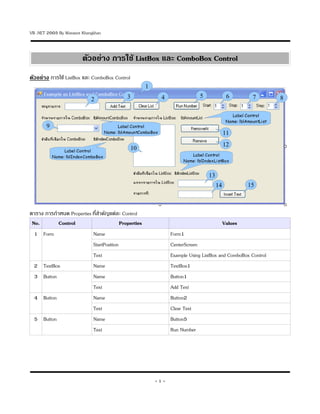
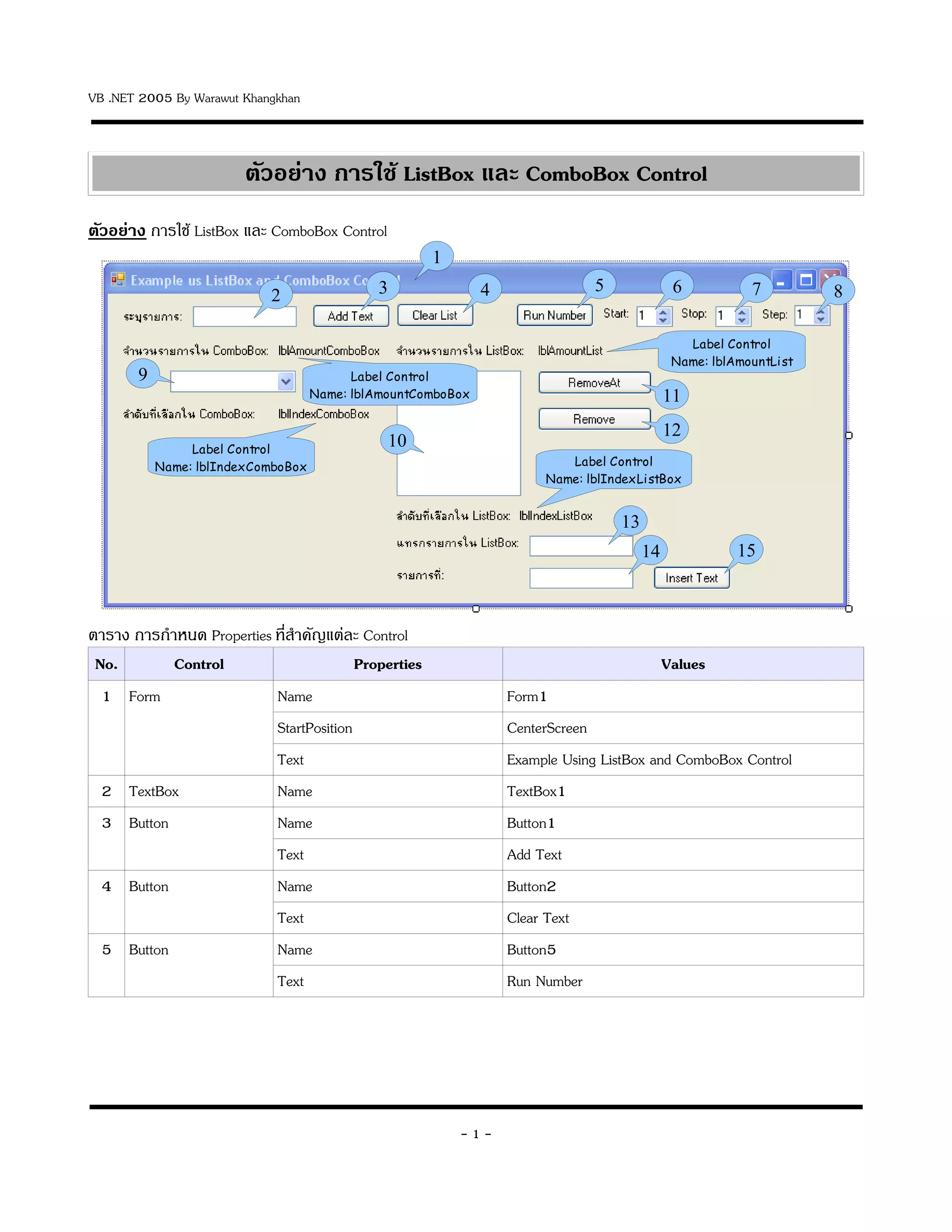
ตวอยาง การใช ListBox และ ComboBox Control
                                                      1
                                             3                4               5              6           7         8
                            2

                                                                                               Label Control
                                                                                             Name: lblAmountList
       9                                  Label Control
                                    Name: lblAmountComboBox                                 11
                                                                                            12
                Label Control
                                               10
           Name: lblIndexComboBox                                         Label Control
                                                                       Name: lblIndexListBox


                                                                                  13
                                                                                       14              15


ตาราง การก,าหนด Properties ท45สาค8ญแต:ละ Control
                               ,
 No.        Control                      Properties                                         Values
  1 Form                   Name                                   Form1
                           StartPosition                          CenterScreen
                           Text                                   Example Using ListBox and ComboBox Control
  2 TextBox                Name                                   TextBox1
  3 Button                 Name                                   Button1
                           Text                                   Add Text
  4 Button                 Name                                   Button2
                           Text                                   Clear Text
  5 Button                 Name                                   Button5
                           Text                                   Run Number


                                                          -1-
VB .NET 2005 By Warawut Khangkhan


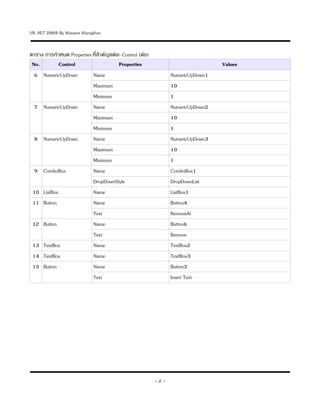
ตาราง การก,าหนด Properties ท45สาค8ญแต:ละ Control (ต:อ)
                               ,
 No.        Control                    Properties                               Values
  6 NumericUpDown          Name                                NumericUpDown1
                           Maximum                             10
                           Minimum                             1
  7 NumericUpDown          Name                                NumericUpDown2
                           Maximum                             10
                           Minimum                             1
  8 NumericUpDown          Name                                NumericUpDown3
                           Maximum                             10
                           Minimum                             1
  9 ComboBox               Name                                ComboBox1
                           DropDownStyle                       DropDownList
 10 ListBox                Name                                ListBox1
 11 Button                 Name                                Button4
                           Text                                RemoveAt
 12 Button                 Name                                Button6
                           Text                                Remove
 13 TextBox                Name                                TextBox2
 14 TextBox                Name                                TextBox3
 15 Button                 Name                                Button3
                           Text                                Insert Text


                                                         -2-
VB .NET 2005 By Warawut Khangkhan


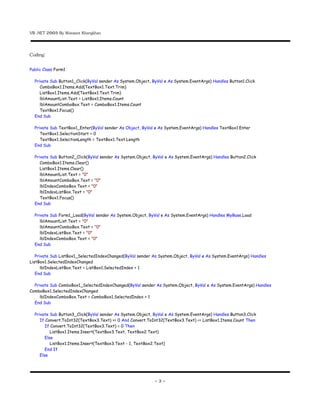
Coding:
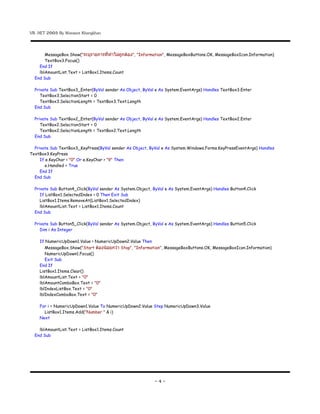
Public Class Form1

  Private Sub Button1_Click(ByVal sender As System.Object, ByVal e As System.EventArgs) Handles Button1.Click
     ComboBox1.Items.Add(TextBox1.Text.Trim)
     ListBox1.Items.Add(TextBox1.Text.Trim)
     lblAmountList.Text = ListBox1.Items.Count
     lblAmountComboBox.Text = ComboBox1.Items.Count
     TextBox1.Focus()
  End Sub

  Private Sub TextBox1_Enter(ByVal sender As Object, ByVal e As System.EventArgs) Handles TextBox1.Enter
     TextBox1.SelectionStart = 0
     TextBox1.SelectionLength = TextBox1.Text.Length
  End Sub

  Private Sub Button2_Click(ByVal sender As System.Object, ByVal e As System.EventArgs) Handles Button2.Click
     ComboBox1.Items.Clear()
     ListBox1.Items.Clear()
     lblAmountList.Text = "0"
     lblAmountComboBox.Text = "0"
     lblIndexComboBox.Text = "0"
     lblIndexListBox.Text = "0"
     TextBox1.Focus()
  End Sub

  Private Sub Form1_Load(ByVal sender As System.Object, ByVal e As System.EventArgs) Handles MyBase.Load
     lblAmountList.Text = "0"
     lblAmountComboBox.Text = "0"
     lblIndexListBox.Text = "0"
     lblIndexComboBox.Text = "0"
  End Sub

   Private Sub ListBox1_SelectedIndexChanged(ByVal sender As System.Object, ByVal e As System.EventArgs) Handles
ListBox1.SelectedIndexChanged
      lblIndexListBox.Text = ListBox1.SelectedIndex + 1
   End Sub

  Private Sub ComboBox1_SelectedIndexChanged(ByVal sender As System.Object, ByVal e As System.EventArgs) Handles
ComboBox1.SelectedIndexChanged
     lblIndexComboBox.Text = ComboBox1.SelectedIndex + 1
  End Sub

  Private Sub Button3_Click(ByVal sender As System.Object, ByVal e As System.EventArgs) Handles Button3.Click
     If Convert.ToInt32(TextBox3.Text) >= 0 And Convert.ToInt32(TextBox3.Text) <= ListBox1.Items.Count Then
        If Convert.ToInt32(TextBox3.Text) = 0 Then
           ListBox1.Items.Insert(TextBox3.Text, TextBox2.Text)
        Else
           ListBox1.Items.Insert(TextBox3.Text - 1, TextBox2.Text)
        End If
     Else


                                                            -3-
VB .NET 2005 By Warawut Khangkhan


       MessageBox.Show("ระบรายการททาไมถกตอง", "Information", MessageBoxButtons.OK, MessageBoxIcon.Information)
       TextBox3.Focus()
    End If
    lblAmountList.Text = ListBox1.Items.Count
  End Sub

  Private Sub TextBox3_Enter(ByVal sender As Object, ByVal e As System.EventArgs) Handles TextBox3.Enter
     TextBox3.SelectionStart = 0
     TextBox3.SelectionLength = TextBox3.Text.Length
  End Sub

  Private Sub TextBox2_Enter(ByVal sender As Object, ByVal e As System.EventArgs) Handles TextBox2.Enter
     TextBox2.SelectionStart = 0
     TextBox2.SelectionLength = TextBox2.Text.Length
  End Sub

  Private Sub TextBox3_KeyPress(ByVal sender As Object, ByVal e As System.Windows.Forms.KeyPressEventArgs) Handles
TextBox3.KeyPress
     If e.KeyChar < "0" Or e.KeyChar > "9" Then
       e.Handled = True
     End If
  End Sub

  Private Sub Button4_Click(ByVal sender As System.Object, ByVal e As System.EventArgs) Handles Button4.Click
     If ListBox1.SelectedIndex < 0 Then Exit Sub
     ListBox1.Items.RemoveAt(ListBox1.SelectedIndex)
     lblAmountList.Text = ListBox1.Items.Count
  End Sub

  Private Sub Button5_Click(ByVal sender As System.Object, ByVal e As System.EventArgs) Handles Button5.Click
     Dim i As Integer

    If NumericUpDown1.Value > NumericUpDown2.Value Then
       MessageBox.Show("Start ตองนอยกวา Stop", "Information", MessageBoxButtons.OK, MessageBoxIcon.Information)
       NumericUpDown1.Focus()
       Exit Sub
    End If
    ListBox1.Items.Clear()
    lblAmountList.Text = "0"
    lblAmountComboBox.Text = "0"
    lblIndexListBox.Text = "0"
    lblIndexComboBox.Text = "0"

    For i = NumericUpDown1.Value To NumericUpDown2.Value Step NumericUpDown3.Value
      ListBox1.Items.Add("Number " & i)
    Next

    lblAmountList.Text = ListBox1.Items.Count
  End Sub


                                                            -4-
VB .NET 2005 By Warawut Khangkhan


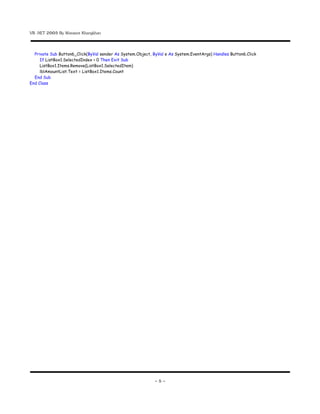
  Private Sub Button6_Click(ByVal sender As System.Object, ByVal e As System.EventArgs) Handles Button6.Click
     If ListBox1.SelectedIndex < 0 Then Exit Sub
     ListBox1.Items.Remove(ListBox1.SelectedItem)
     lblAmountList.Text = ListBox1.Items.Count
  End Sub
End Class


                                                            -5-

การใช้ ListBox และ ComboBox Control

  • 1.
    VB .NET 2005By Warawut Khangkhan ตวอยาง การใช ListBox และ ComboBox Control ตวอยาง การใช ListBox และ ComboBox Control 1 3 4 5 6 7 8 2 Label Control Name: lblAmountList 9 Label Control Name: lblAmountComboBox 11 12 Label Control 10 Name: lblIndexComboBox Label Control Name: lblIndexListBox 13 14 15 ตาราง การก,าหนด Properties ท45สาค8ญแต:ละ Control , No. Control Properties Values 1 Form Name Form1 StartPosition CenterScreen Text Example Using ListBox and ComboBox Control 2 TextBox Name TextBox1 3 Button Name Button1 Text Add Text 4 Button Name Button2 Text Clear Text 5 Button Name Button5 Text Run Number -1-
  • 2.
    VB .NET 2005By Warawut Khangkhan ตาราง การก,าหนด Properties ท45สาค8ญแต:ละ Control (ต:อ) , No. Control Properties Values 6 NumericUpDown Name NumericUpDown1 Maximum 10 Minimum 1 7 NumericUpDown Name NumericUpDown2 Maximum 10 Minimum 1 8 NumericUpDown Name NumericUpDown3 Maximum 10 Minimum 1 9 ComboBox Name ComboBox1 DropDownStyle DropDownList 10 ListBox Name ListBox1 11 Button Name Button4 Text RemoveAt 12 Button Name Button6 Text Remove 13 TextBox Name TextBox2 14 TextBox Name TextBox3 15 Button Name Button3 Text Insert Text -2-
  • 3.
    VB .NET 2005By Warawut Khangkhan Coding: Public Class Form1 Private Sub Button1_Click(ByVal sender As System.Object, ByVal e As System.EventArgs) Handles Button1.Click ComboBox1.Items.Add(TextBox1.Text.Trim) ListBox1.Items.Add(TextBox1.Text.Trim) lblAmountList.Text = ListBox1.Items.Count lblAmountComboBox.Text = ComboBox1.Items.Count TextBox1.Focus() End Sub Private Sub TextBox1_Enter(ByVal sender As Object, ByVal e As System.EventArgs) Handles TextBox1.Enter TextBox1.SelectionStart = 0 TextBox1.SelectionLength = TextBox1.Text.Length End Sub Private Sub Button2_Click(ByVal sender As System.Object, ByVal e As System.EventArgs) Handles Button2.Click ComboBox1.Items.Clear() ListBox1.Items.Clear() lblAmountList.Text = "0" lblAmountComboBox.Text = "0" lblIndexComboBox.Text = "0" lblIndexListBox.Text = "0" TextBox1.Focus() End Sub Private Sub Form1_Load(ByVal sender As System.Object, ByVal e As System.EventArgs) Handles MyBase.Load lblAmountList.Text = "0" lblAmountComboBox.Text = "0" lblIndexListBox.Text = "0" lblIndexComboBox.Text = "0" End Sub Private Sub ListBox1_SelectedIndexChanged(ByVal sender As System.Object, ByVal e As System.EventArgs) Handles ListBox1.SelectedIndexChanged lblIndexListBox.Text = ListBox1.SelectedIndex + 1 End Sub Private Sub ComboBox1_SelectedIndexChanged(ByVal sender As System.Object, ByVal e As System.EventArgs) Handles ComboBox1.SelectedIndexChanged lblIndexComboBox.Text = ComboBox1.SelectedIndex + 1 End Sub Private Sub Button3_Click(ByVal sender As System.Object, ByVal e As System.EventArgs) Handles Button3.Click If Convert.ToInt32(TextBox3.Text) >= 0 And Convert.ToInt32(TextBox3.Text) <= ListBox1.Items.Count Then If Convert.ToInt32(TextBox3.Text) = 0 Then ListBox1.Items.Insert(TextBox3.Text, TextBox2.Text) Else ListBox1.Items.Insert(TextBox3.Text - 1, TextBox2.Text) End If Else -3-
  • 4.
    VB .NET 2005By Warawut Khangkhan MessageBox.Show("ระบรายการททาไมถกตอง", "Information", MessageBoxButtons.OK, MessageBoxIcon.Information) TextBox3.Focus() End If lblAmountList.Text = ListBox1.Items.Count End Sub Private Sub TextBox3_Enter(ByVal sender As Object, ByVal e As System.EventArgs) Handles TextBox3.Enter TextBox3.SelectionStart = 0 TextBox3.SelectionLength = TextBox3.Text.Length End Sub Private Sub TextBox2_Enter(ByVal sender As Object, ByVal e As System.EventArgs) Handles TextBox2.Enter TextBox2.SelectionStart = 0 TextBox2.SelectionLength = TextBox2.Text.Length End Sub Private Sub TextBox3_KeyPress(ByVal sender As Object, ByVal e As System.Windows.Forms.KeyPressEventArgs) Handles TextBox3.KeyPress If e.KeyChar < "0" Or e.KeyChar > "9" Then e.Handled = True End If End Sub Private Sub Button4_Click(ByVal sender As System.Object, ByVal e As System.EventArgs) Handles Button4.Click If ListBox1.SelectedIndex < 0 Then Exit Sub ListBox1.Items.RemoveAt(ListBox1.SelectedIndex) lblAmountList.Text = ListBox1.Items.Count End Sub Private Sub Button5_Click(ByVal sender As System.Object, ByVal e As System.EventArgs) Handles Button5.Click Dim i As Integer If NumericUpDown1.Value > NumericUpDown2.Value Then MessageBox.Show("Start ตองนอยกวา Stop", "Information", MessageBoxButtons.OK, MessageBoxIcon.Information) NumericUpDown1.Focus() Exit Sub End If ListBox1.Items.Clear() lblAmountList.Text = "0" lblAmountComboBox.Text = "0" lblIndexListBox.Text = "0" lblIndexComboBox.Text = "0" For i = NumericUpDown1.Value To NumericUpDown2.Value Step NumericUpDown3.Value ListBox1.Items.Add("Number " & i) Next lblAmountList.Text = ListBox1.Items.Count End Sub -4-
  • 5.
    VB .NET 2005By Warawut Khangkhan Private Sub Button6_Click(ByVal sender As System.Object, ByVal e As System.EventArgs) Handles Button6.Click If ListBox1.SelectedIndex < 0 Then Exit Sub ListBox1.Items.Remove(ListBox1.SelectedItem) lblAmountList.Text = ListBox1.Items.Count End Sub End Class -5-