Data Science. 2020, July 6. | GNU/Linux: Introduction and Administration | Xavier de Pedro Puente
Data Science
(ciencia de los datos):
Aplicaciones a la biología y a la
medicina con Python y R
(2ª edición 2020)
Curso de Experto Universitario
Universidad de Barcelona (UB)
Con el soporte de:https://www.ub.edu
Data Science. 2020, July 6. | GNU/Linux: Introduction and Administration | Xavier de Pedro Puente
2
GNU/Linux OS
Introduction
Administration
Xavier de Pedro, PhD.
July 6, 2020
Course «Data Science» UB
Image source: http://tekopsglobal.com
Data Science. 2020, July 6. | GNU/Linux: Introduction and Administration | Xavier de Pedro Puente
3
Xavier de Pedro Puente, Ph.D.
xdepedro@bcn.cat
Academics:

Degree in Biology
(University of Barcelona - UB)

Ph.D. in Ecology
(University of Barcelona - UB)

Postgraduate in Bioinformatics
(Open University of Catalonia – UOC)
Current Work:

Senior technician at Municipal Data Office
(Barcelona City Council)
Past (related) Work:

Bioinformatics technician (UEB, VHIR)

Systems administrator (UEB, VHIR)
Data Science. 2020, July 6. | GNU/Linux: Introduction and Administration | Xavier de Pedro Puente
4
(1) GNU/Linux Introduction
– Concepts, History, "Distributions”,
Ubuntu
– Basic Differences compared with:
●
MS Windows
●
Mac OSX
– Command line runs
– Aliases
Session Outline
(2) GNU/Linux Administration
– Installation
– Package Management
– User Management
– Permission Management
– Device Management
– Backup Management
– Security
– Computer Client Management
Data Science. 2020, July 6. | GNU/Linux: Introduction and Administration | Xavier de Pedro Puente
5
Tool: Virtual Machine (VM) with Lubuntu GNU/Linux
See: https://www.virtualbox.org
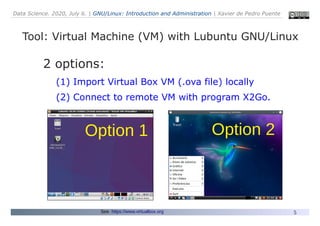
2 options:
(1) Import Virtual Box VM (.ova file) locally
(2) Connect to remote VM with program X2Go.
Option 1 Option 2
Data Science. 2020, July 6. | GNU/Linux: Introduction and Administration | Xavier de Pedro Puente
6
Option 1: Import VirtualBox VM (.ova file)
●
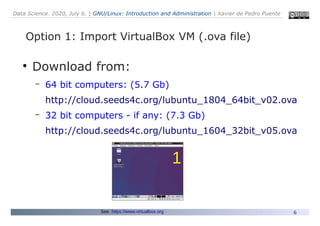
Download from:
– 64 bit computers: (5.7 Gb)
http://cloud.seeds4c.org/lubuntu_1804_64bit_v02.ova
– 32 bit computers - if any: (7.3 Gb)
http://cloud.seeds4c.org/lubuntu_1604_32bit_v05.ova
See: https://www.virtualbox.org
1
Data Science. 2020, July 6. | GNU/Linux: Introduction and Administration | Xavier de Pedro Puente
7
Option 1: VirtualBox VM with Lubuntu GNU/Linux
See: https://www.virtualbox.org
●
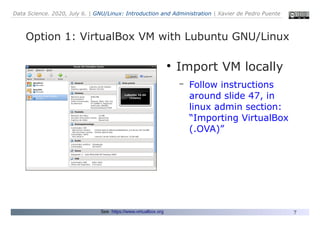
Import VM locally
– Follow instructions
around slide 47, in
linux admin section:
“Importing VirtualBox
(.OVA)”
Data Science. 2020, July 6. | GNU/Linux: Introduction and Administration | Xavier de Pedro Puente
8
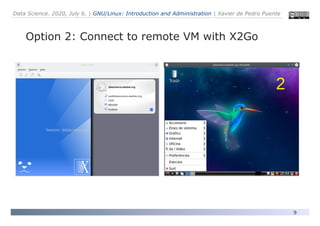
Option 2: Connect to remote VM with X2Go
See: https://wiki.x2go.org/doku.php/doc:installation:x2goclient
●
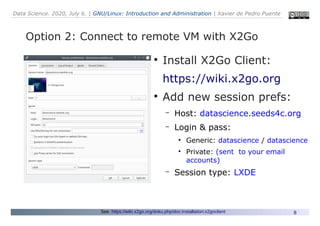
Install X2Go Client:
https://wiki.x2go.org
●
Add new session prefs:
– Host: datascience.seeds4c.org
– Login & pass:
●
Generic: datascience / datascience
●
Private: (sent to your email
accounts)
– Session type: LXDE
Data Science. 2020, July 6. | GNU/Linux: Introduction and Administration | Xavier de Pedro Puente
9
Option 2: Connect to remote VM with X2Go
2
Data Science. 2020, July 6. | GNU/Linux: Introduction and Administration | Xavier de Pedro Puente
10
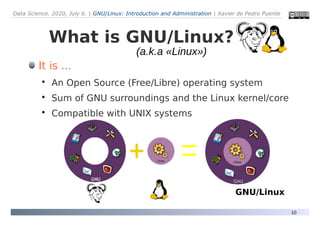
What is GNU/Linux?
It is ...

An Open Source (Free/Libre) operating system

Sum of GNU surroundings and the Linux kernel/core

Compatible with UNIX systems
GNU/Linux
(a.k.a «Linux»)
Data Science. 2020, July 6. | GNU/Linux: Introduction and Administration | Xavier de Pedro Puente
11
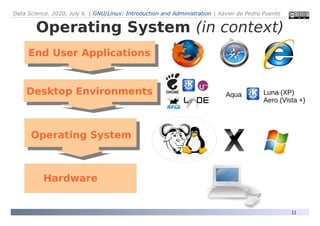
Operating System (in context)
Desktop Environments
Operating System
Hardware
End User Applications
Aqua Luna (XP)
Aero (Vista +)
Data Science. 2020, July 6. | GNU/Linux: Introduction and Administration | Xavier de Pedro Puente
12
GNU/Linux
Some basic concepts

GNU Project

Hardware vs software

Open Source & Free software (as in «free» seats)
●
FLOSS: Free/Libre Open Source Software

Free Software Foundation (FSF)

Free Operating Systems
●
GNU/Linux, GNU/Hurd, [Open,Free,Net]-BSD,
OpenSolaris, ReactOS...

Open Source Hardware
Data Science. 2020, July 6. | GNU/Linux: Introduction and Administration | Xavier de Pedro Puente
13
Historical Evolution
Source: A. G. Stankevicius. Departarmento de Ciencias e Ingeniería de la Computación. Universidad Nacional del Sur. http://cs.uns.edu.ar/~ags/linux/
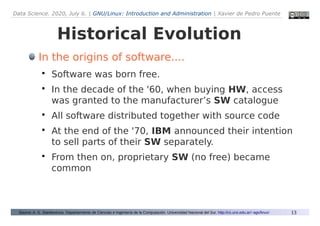
In the origins of software....

Software was born free.

In the decade of the '60, when buying HW, access
was granted to the manufacturer’s SW catalogue

All software distributed together with source code

At the end of the '70, IBM announced their intention
to sell parts of their SW separately.

From then on, proprietary SW (no free) became
common
Data Science. 2020, July 6. | GNU/Linux: Introduction and Administration | Xavier de Pedro Puente
14
Historical Evolution
Source: A. G. Stankevicius. Departarmento de Ciencias e Ingeniería de la Computación. Universidad Nacional del Sur. http://cs.uns.edu.ar/~ags/linux/
GNU/Linux History

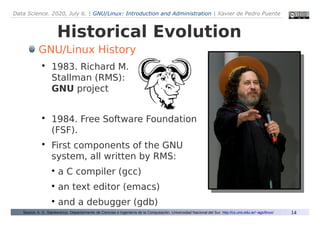
1983. Richard M.
Stallman (RMS):
GNU project

1984. Free Software Foundation
(FSF).

First components of the GNU
system, all written by RMS:
●
a C compiler (gcc)
●
an text editor (emacs)
●
and a debugger (gdb)
Data Science. 2020, July 6. | GNU/Linux: Introduction and Administration | Xavier de Pedro Puente
15
Historical Evolution
Derived from: A. G. Stankevicius. Departarmento de Ciencias e Ingeniería de la Computación. Universidad Nacional del Sur. http://cs.uns.edu.ar/~ags/linux/
GNU/Linux History

To guarantee the four freedoms,
RMS invented the concept of
copy-left (reverse of copy-right).

1990: GNU system was almost
complete, only missing to finish
an ambitious kernel (core).

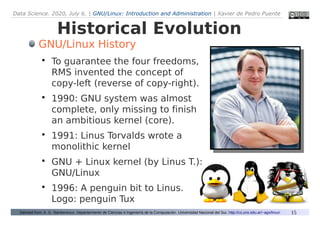
1991: Linus Torvalds wrote a
monolithic kernel

GNU + Linux kernel (by Linus T.):
GNU/Linux

1996: A penguin bit to Linus.
Logo: penguin Tux
Data Science. 2020, July 6. | GNU/Linux: Introduction and Administration | Xavier de Pedro Puente
16
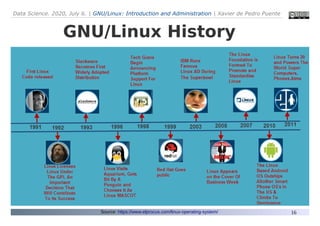
GNU/Linux History
Source: https://www.elprocus.com/linux-operating-system/
Data Science. 2020, July 6. | GNU/Linux: Introduction and Administration | Xavier de Pedro Puente
17
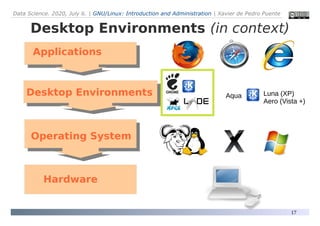
Desktop Environments (in context)
Desktop Environments
Operating System
Hardware
Applications
Aqua Luna (XP)
Aero (Vista +)
Data Science. 2020, July 6. | GNU/Linux: Introduction and Administration | Xavier de Pedro Puente
18
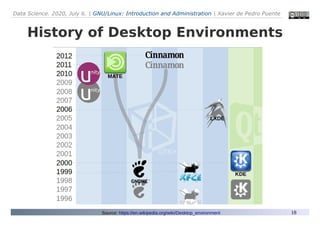
History of Desktop Environments
Source: https://en.wikipedia.org/wiki/Desktop_environment
Data Science. 2020, July 6. | GNU/Linux: Introduction and Administration | Xavier de Pedro Puente
19
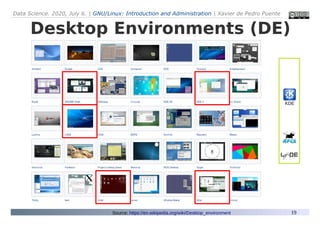
Desktop Environments (DE)
Desktop Environments

...
KDE
Source: https://en.wikipedia.org/wiki/Desktop_environment
Data Science. 2020, July 6. | GNU/Linux: Introduction and Administration | Xavier de Pedro Puente
20
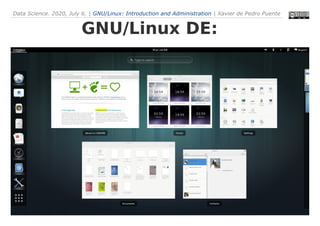
GNU/Linux DE:
Desktop Environments

...
Data Science. 2020, July 6. | GNU/Linux: Introduction and Administration | Xavier de Pedro Puente
21
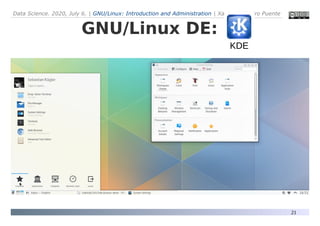
GNU/Linux DE:
Desktop Environments

...
KDE
Data Science. 2020, July 6. | GNU/Linux: Introduction and Administration | Xavier de Pedro Puente
22
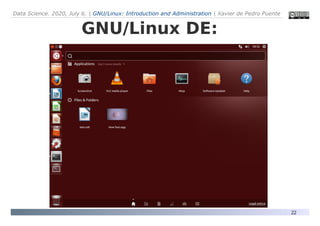
GNU/Linux DE:
Data Science. 2020, July 6. | GNU/Linux: Introduction and Administration | Xavier de Pedro Puente
23
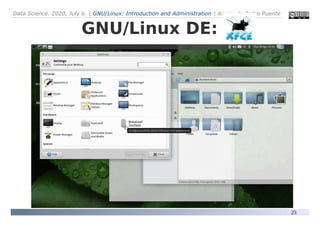
GNU/Linux DE:
Data Science. 2020, July 6. | GNU/Linux: Introduction and Administration | Xavier de Pedro Puente
24
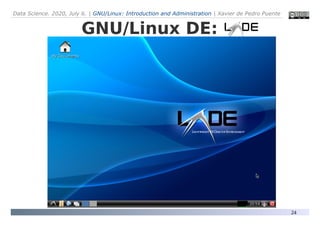
GNU/Linux DE:
Data Science. 2020, July 6. | GNU/Linux: Introduction and Administration | Xavier de Pedro Puente
25
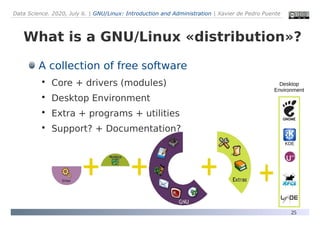
What is a GNU/Linux «distribution»?
A collection of free software

Core + drivers (modules)

Desktop Environment

Extra + programs + utilities

Support? + Documentation?
KDE
Desktop
Environment
Data Science. 2020, July 6. | GNU/Linux: Introduction and Administration | Xavier de Pedro Puente
26
Distributions of GNU/Linux
UbuntuDebian Slackware Gentoo
RedhatFedora Mandriva Suse
Data Science. 2020, July 6. | GNU/Linux: Introduction and Administration | Xavier de Pedro Puente
27
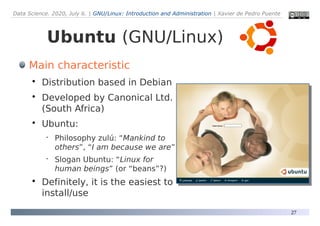
Ubuntu (GNU/Linux)
Main characteristic

Distribution based in Debian

Developed by Canonical Ltd.
(South Africa)

Ubuntu:
 Philosophy zulú: “Mankind to
others”, “I am because we are”
 Slogan Ubuntu: “Linux for
human beings” (or “beans”?)

Definitely, it is the easiest to
install/use
Data Science. 2020, July 6. | GNU/Linux: Introduction and Administration | Xavier de Pedro Puente
28
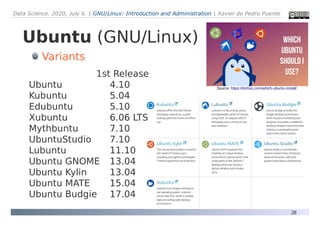
Variants
1st Release
Ubuntu 4.10
Kubuntu 5.04
Edubuntu 5.10
Xubuntu 6.06 LTS
Mythbuntu 7.10
UbuntuStudio 7.10
Lubuntu 11.10
Ubuntu GNOME 13.04
Ubuntu Kylin 13.04
Ubuntu MATE 15.04
Ubuntu Budgie 17.04
Source: https://itsfoss.com/which-ubuntu-install/
Ubuntu (GNU/Linux)
Data Science. 2020, July 6. | GNU/Linux: Introduction and Administration | Xavier de Pedro Puente
29
●
Technical differences
– User: root vs. administrator
– Case sensitive vs. Case insensitive
●
"MyFile != myfile" vs. "MyFile = myfile"
– "Symbolic or Hard Links" vs. "Shortcuts"
– Paths: Slash ("/") vs. Backslash ("")
– Main harddrive/partition: "/" vs. "C:"
– Partition formats (file systems): ext2, ext3, ext4, ... vs. fat16/fat32/ntfs
– User default folder: /home/username vs. "C:Documents and Settings" or
"C:UsersusernameMyDocuments"
– USBdisk default folder: /media/username/usbdiskname vs. "X:usbdiskname"
– Secure (Viruses???) vs. Insecure (viruses, bots, worms, trojans, backdoors, ...)
– It can extend computer useful life vs. Planned & perceived obsolescence
– Performance, with same hardware: Faster vs. Slower (Antivirus, antispyware,...)
– Run as admin: "sudo program" in console vs. "Run program as administrator"
GNU/Linux vs. Windows
Data Science. 2020, July 6. | GNU/Linux: Introduction and Administration | Xavier de Pedro Puente
30
●
Phylosophical differences
– Freedom: "Free/Libre Open Source Software
(FLOSS)" vs. "Closed Source/Propietary software"
●
Software Sustainability: High vs. Low
– Usually: product given for free (at no Cost) vs.
product for (excessive?) profit
– Money comes through: customizations and
training vs. Selling Software
– FLOSS Fosters local economies as well as big
companies vs. Big & remote Corporations growth.
GNU/Linux vs. Windows
Data Science. 2020, July 6. | GNU/Linux: Introduction and Administration | Xavier de Pedro Puente
31
●
Technical differences
– Users:
– Case:
– Links:
– Paths:
– Main harddrive/partition
– Partition formats: ext2, ext3, ext4, ... vs. HFS+
– User default folder: /home/username vs. "/Users/Username"
– USBdisk default folder:
– Secure (Viruses???) vs. Secure (Viruses?)
– It can extend computer useful life vs. Planned & perceived obsolescence
– Performance, with same hardware: Faster??? vs. Extremely Fast
– Run as admin:
GNU/Linux vs. Mac OS X
Data Science. 2020, July 6. | GNU/Linux: Introduction and Administration | Xavier de Pedro Puente
32
●
Phylosophical differences
– Freedom: "Free/Libre Open Source Software
(FLOSS)" vs. "Closed Source/Propietary software"
●
Software Sustainability: High vs. Low
– Usually: product given for free (at no Cost) vs.
product for (excessive?) profit
– Money comes through: customizations and
training vs. Selling Software & Hardware
– FLOSS Fosters local economies as well as big
companies vs. Big & remote Corporations growth.
GNU/Linux vs. Mac OS X
Data Science. 2020, July 6. | GNU/Linux: Introduction and Administration | Xavier de Pedro Puente
33
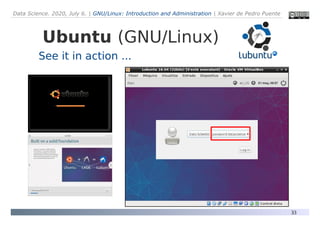
Ubuntu (GNU/Linux)
See it in action ...
Data Science. 2020, July 6. | GNU/Linux: Introduction and Administration | Xavier de Pedro Puente
34
Command line runs (i)
●
Shell = Terminal = Console ("Black" text screen to run
commands)s
– Secure Shell = ssh = a safe way to connect to remote
computers or servers (encrypted)
– ftp: File Transfer Protocol
●
to transfer files between computers or servers
●
you can NOT run commands (other than listings)
– sftp: like FTP but "secure" (best: using ssh libraries)
●
Local terminal window
– > whoami
Data Science. 2020, July 6. | GNU/Linux: Introduction and Administration | Xavier de Pedro Puente
35
Command line runs (ii)
●
Example of simple local commands:
> ps -e
> ls -l
> df -h
> top
> tree . | head
> du . -h | grep G
●
Example of simple editors:
> nano (simple editor: press "Ctrl + X" to eXit)
Data Science. 2020, July 6. | GNU/Linux: Introduction and Administration | Xavier de Pedro Puente
36
Command line runs (iii)
●
Example of network-related commands:
> ping google.com
> ifconfig
●
Example of system administration (sysadmin) commands:
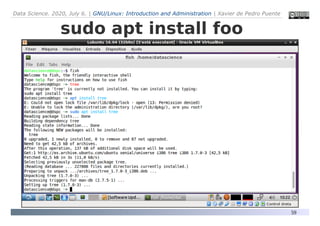
> sudo apt update & sudo apt install tree
> sudo adduser foo
> sudo passwd foo
> sudo service apache restart
> sudo kill -9 java
●
Example of simple editors:
> nano (simple editor: press "Ctrl + X" to eXit)
Data Science. 2020, July 6. | GNU/Linux: Introduction and Administration | Xavier de Pedro Puente
37
Command line runs (iv)
●
Example of other shell-based programs:
> htop (type "q" to quit/exit)
> mc (Midnight Commander).
Click on F10 (with mouse or trackpad) to quit
> R ( Type "q()" to quit)
●
Serial vs. Parallel tasks
– https://www.datascienceatthecommandline.com/chapter-8-parallel-
pipelines.html
Data Science. 2020, July 6. | GNU/Linux: Introduction and Administration | Xavier de Pedro Puente
38
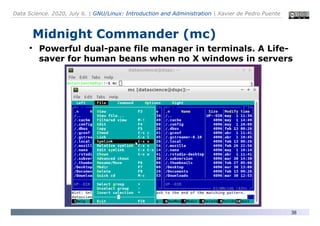
Midnight Commander (mc)
●
Powerful dual-pane file manager in terminals. A Life-
saver for human beans when no X windows in servers
Data Science. 2020, July 6. | GNU/Linux: Introduction and Administration | Xavier de Pedro Puente
39
More information...
●
Linux intro (short version):
– http://applied-r.com/linux-intro/
●
Linux OS Basics:
– http://applied-r.com/linux-os-basics/
●
Linux File Management:
– http://applied-r.com/linux-file-management/
●
Linux help:
http://applied-r.com/linux-help/
●
Linux aliases:
– http://applied-r.com/linux-aliases/
●
Linux Utilities:
– http://applied-r.com/linux-utilities/
●
Package management (console based):
– http://applied-r.com/linux-apt/
Data Science. 2020, July 6. | GNU/Linux: Introduction and Administration | Xavier de Pedro Puente
40
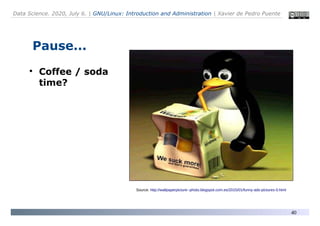
Pause...
●
Coffee / soda
time?
Source: http://wallpaperpicture--photo.blogspot.com.es/2015/01/funny-ads-pictures-0.html
Data Science. 2020, July 6. | GNU/Linux: Introduction and Administration | Xavier de Pedro Puente
41
(2) GNU/Linux Administration
Installation
Package Management
User Management
Permission Management
Device Management
Backup Management
Security
Computer Client Management
Computer Clusters
Data Science. 2020, July 6. | GNU/Linux: Introduction and Administration | Xavier de Pedro Puente
42
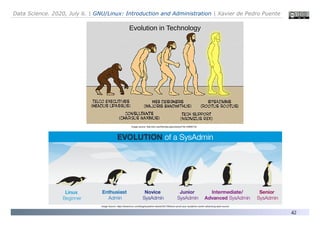
Image Source: https://www.linux.com/blog/sysadmin-ebook/2017/9/future-proof-your-sysadmin-career-advancing-open-source
Evolution in Technology
Image source: http://ars.userfriendly.org/cartoons/?id=19990718
Data Science. 2020, July 6. | GNU/Linux: Introduction and Administration | Xavier de Pedro Puente
43
Installation
How to use or install GNU/Linux?

LiveCD/LiveUSB: Without installing it in the hard disk

Install in the hard disk
 More efficient using your hardware, and you can install next
to your other installed OS. You choose OS at booting time.

Install in a disk USB or pendrive

Install in a local virtual machine (or in the cloud)
 From scratch (from .iso file), or from a previously
exported virtual machine (.ova file or equivalent)

Windows + andLinux/CoLinux

Win10 + «WSL» (Windows Subsystem for Linux)
Data Science. 2020, July 6. | GNU/Linux: Introduction and Administration | Xavier de Pedro Puente
44
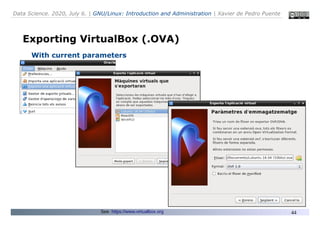
Exporting VirtualBox (.OVA)
With current parameters
See: https://www.virtualbox.org
Data Science. 2020, July 6. | GNU/Linux: Introduction and Administration | Xavier de Pedro Puente
45
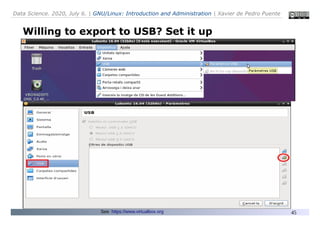
Willing to export to USB? Set it up
...
See: https://www.virtualbox.org
Data Science. 2020, July 6. | GNU/Linux: Introduction and Administration | Xavier de Pedro Puente
46
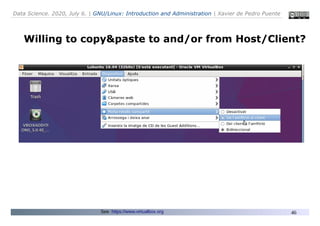
Willing to copy&paste to and/or from Host/Client?
...
See: https://www.virtualbox.org
Data Science. 2020, July 6. | GNU/Linux: Introduction and Administration | Xavier de Pedro Puente
47
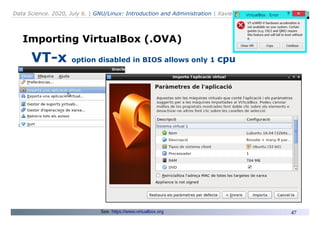
Importing VirtualBox (.OVA)
VT-x option disabled in BIOS allows only 1 cpu
See: https://www.virtualbox.org
Data Science. 2020, July 6. | GNU/Linux: Introduction and Administration | Xavier de Pedro Puente
48
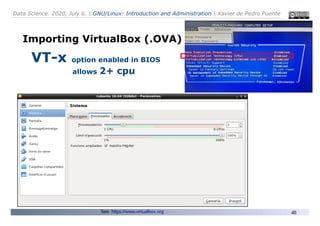
Importing VirtualBox (.OVA)
VT-x option enabled in BIOS
allows 2+ cpu
See: https://www.virtualbox.org
Data Science. 2020, July 6. | GNU/Linux: Introduction and Administration | Xavier de Pedro Puente
49
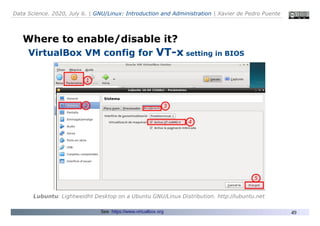
Where to enable/disable it?
VirtualBox VM config for VT-x setting in BIOS
Lubuntu: Lightweidht Desktop on a Ubuntu GNU/Linux Distribution. http://lubuntu.net
See: https://www.virtualbox.org
Data Science. 2020, July 6. | GNU/Linux: Introduction and Administration | Xavier de Pedro Puente
50
Other Options to use VirtualBox VM
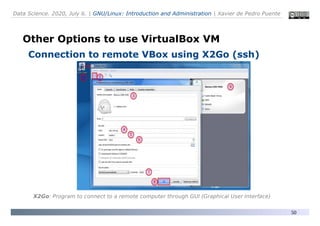
Connection to remote VBox using X2Go (ssh)
X2Go: Program to connect to a remote computer through GUI (Graphical User Interface)
Data Science. 2020, July 6. | GNU/Linux: Introduction and Administration | Xavier de Pedro Puente
51
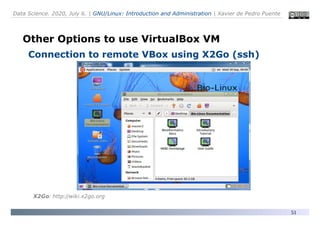
Other Options to use VirtualBox VM
Connection to remote VBox using X2Go (ssh)
X2Go: http://wiki.x2go.org
Data Science. 2020, July 6. | GNU/Linux: Introduction and Administration | Xavier de Pedro Puente
52
Other Options
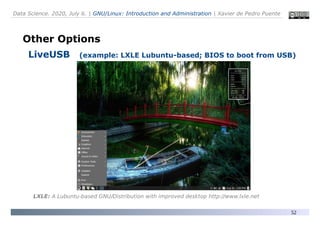
LiveUSB (example: LXLE Lubuntu-based; BIOS to boot from USB)
LXLE: A Lubuntu-based GNU/Distribution with improved desktop http://www.lxle.net
Data Science. 2020, July 6. | GNU/Linux: Introduction and Administration | Xavier de Pedro Puente
53
Other Options
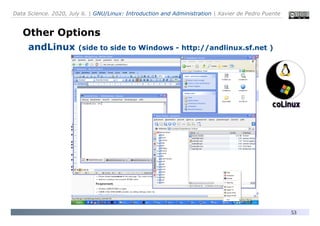
andLinux (side to side to Windows - http://andlinux.sf.net )
Data Science. 2020, July 6. | GNU/Linux: Introduction and Administration | Xavier de Pedro Puente
54
Other Options
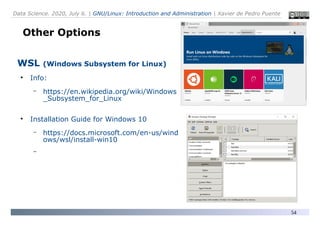
WSL (Windows Subsystem for Linux)
●
Info:
– https://en.wikipedia.org/wiki/Windows
_Subsystem_for_Linux
●
Installation Guide for Windows 10
– https://docs.microsoft.com/en-us/wind
ows/wsl/install-win10
–
Data Science. 2020, July 6. | GNU/Linux: Introduction and Administration | Xavier de Pedro Puente
55
●
GNU/Linux Installation
– Dual/Multi-boot
●
Ubuntu (GNU/Linux) + Windows (or Mac OSX, ...)
●
From USB or CD/DVD
– Requirements
●
Desfrag Hard Drive (in Windows) – if needed
●
Backup Data in external device (usb, network drive, ...)
●
Identify Partitions in your hard drive
– You may have 4 primary partitions (maximum)
– You need 1 free partition (minimum)
●
To make (preferably) 3 logic partitions inside
Installation on Hard Disk
(non WSL but native)
Data Science. 2020, July 6. | GNU/Linux: Introduction and Administration | Xavier de Pedro Puente
56
Using Live USB/CD/DVD
Start from a Live USB or CD/DVD for inspecting
& safer partition management
Required: setup computer BIOS to allow booting
from USB or CD/DVD

Press a key to enter configuration
 Usually: DEL, F2, ESC, ....

Once there, look for the start sequence (Boot, Boot
device, ...)
Data Science. 2020, July 6. | GNU/Linux: Introduction and Administration | Xavier de Pedro Puente
57
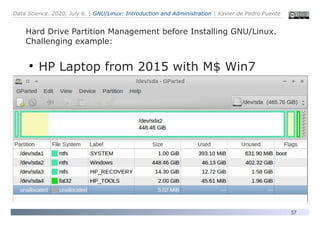
Hard Drive Partition Management before Installing GNU/Linux.
Challenging example:
●
HP Laptop from 2015 with M$ Win7
Data Science. 2020, July 6. | GNU/Linux: Introduction and Administration | Xavier de Pedro Puente
58
Package Management
(installing «programs»)
Standard Package Management
●
Console based:
●
APT (Debian/Ubuntu/Mint/LXLE)
●
YUM (Redhat/CentOS/Fedora Core)
●
YAST2 (SUSE)
●
Portage (Gentoo)
●
GUI based
●
Synaptic (Debian-based)
●
Many others (distro-specific)
Data Science. 2020, July 6. | GNU/Linux: Introduction and Administration | Xavier de Pedro Puente
59
sudo apt install foo
Data Science. 2020, July 6. | GNU/Linux: Introduction and Administration | Xavier de Pedro Puente
60
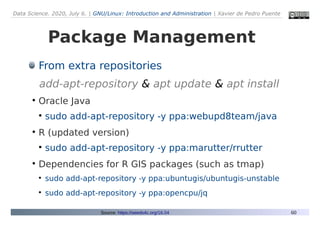
Package Management
From extra repositories
add-apt-repository & apt update & apt install
●
Oracle Java
●
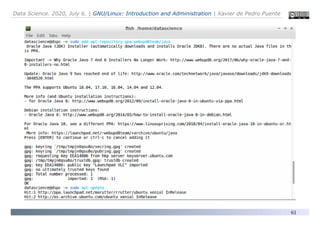
sudo add-apt-repository -y ppa:webupd8team/java
●
R (updated version)
●
sudo add-apt-repository -y ppa:marutter/rrutter
●
Dependencies for R GIS packages (such as tmap)
●
sudo add-apt-repository -y ppa:ubuntugis/ubuntugis-unstable
●
sudo add-apt-repository -y ppa:opencpu/jq
Source: https://seeds4c.org/16.04
Data Science. 2020, July 6. | GNU/Linux: Introduction and Administration | Xavier de Pedro Puente
61
Oracle Java
Data Science. 2020, July 6. | GNU/Linux: Introduction and Administration | Xavier de Pedro Puente
62
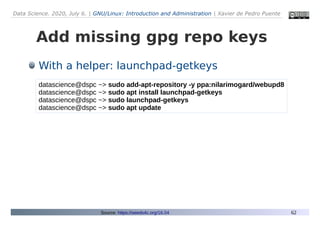
Add missing gpg repo keys
datascience@dspc ~> sudo add-apt-repository -y ppa:nilarimogard/webupd8
datascience@dspc ~> sudo apt install launchpad-getkeys
datascience@dspc ~> sudo launchpad-getkeys
datascience@dspc ~> sudo apt update
With a helper: launchpad-getkeys
Source: https://seeds4c.org/16.04
Data Science. 2020, July 6. | GNU/Linux: Introduction and Administration | Xavier de Pedro Puente
63
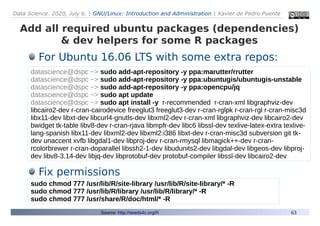
Add all required ubuntu packages (dependencies)
& dev helpers for some R packages
datascience@dspc ~> sudo add-apt-repository -y ppa:marutter/rrutter
datascience@dspc ~> sudo add-apt-repository -y ppa:ubuntugis/ubuntugis-unstable
datascience@dspc ~> sudo add-apt-repository -y ppa:opencpu/jq
datascience@dspc ~> sudo apt update
datascience@dspc ~> sudo apt install -y r-recommended r-cran-xml libgraphviz-dev
libcairo2-dev r-cran-cairodevice freeglut3 freeglut3-dev r-cran-rglpk r-cran-rgl r-cran-misc3d
libx11-dev libxt-dev libcurl4-gnutls-dev libxml2-dev r-cran-xml libgraphviz-dev libcairo2-dev
bwidget tk-table libv8-dev r-cran-rjava libmpfr-dev libc6 libssl-dev texlive-latex-extra texlive-
lang-spanish libx11-dev libxml2-dev libxml2:i386 libxt-dev r-cran-misc3d subversion git tk-
dev unaccent xvfb libgdal1-dev libproj-dev r-cran-rmysql libmagick++-dev r-cran-
rcolorbrewer r-cran-doparallel libssh2-1-dev libudunits2-dev libgdal-dev libgeos-dev libproj-
dev libv8-3.14-dev libjq-dev libprotobuf-dev protobuf-compiler libssl-dev libcairo2-dev
For Ubuntu 16.06 LTS with some extra repos:
Fix permissions
sudo chmod 777 /usr/lib/R/site-library /usr/lib/R/site-library/* -R
sudo chmod 777 /usr/lib/R/library /usr/lib/R/library/* -R
sudo chmod 777 /usr/share/R/doc/html/* -R
Source: http://seeds4c.org/R
Data Science. 2020, July 6. | GNU/Linux: Introduction and Administration | Xavier de Pedro Puente
64
Package Management
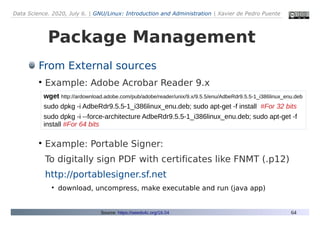
From External sources
●
Example: Adobe Acrobar Reader 9.x
●
Example: Portable Signer:
To digitally sign PDF with certificates like FNMT (.p12)
http://portablesigner.sf.net
●
download, uncompress, make executable and run (java app)
Source: https://seeds4c.org/16.04
wget http://ardownload.adobe.com/pub/adobe/reader/unix/9.x/9.5.5/enu/AdbeRdr9.5.5-1_i386linux_enu.deb
sudo dpkg -i AdbeRdr9.5.5-1_i386linux_enu.deb; sudo apt-get -f install #For 32 bits
sudo dpkg -i --force-architecture AdbeRdr9.5.5-1_i386linux_enu.deb; sudo apt-get -f
install #For 64 bits
Data Science. 2020, July 6. | GNU/Linux: Introduction and Administration | Xavier de Pedro Puente
65
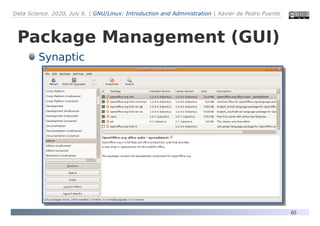
Package Management (GUI)
Synaptic
Data Science. 2020, July 6. | GNU/Linux: Introduction and Administration | Xavier de Pedro Puente
66
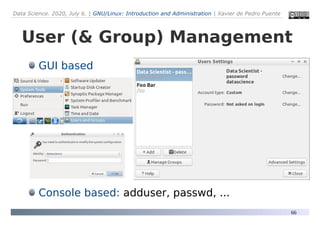
User (& Group) Management
GUI based
Console based: adduser, passwd, ...
Data Science. 2020, July 6. | GNU/Linux: Introduction and Administration | Xavier de Pedro Puente
67
datascience@dspc ~> sudo su #become root user («Switch User»)
[sudo] password for datascience:
root@dspc:/home/datascience# adduser foo
Adding user `foo' ...
Adding new group `foo' (1001) ...
Adding new user `foo' (1001) with group `foo' ...
Creating home directory `/home/foo' ...
Copying files from `/etc/skel' ...
Enter new UNIX password: (new-user password typed here)
Retype new UNIX password: (new-user password typed again)
passwd: password updated successfully
Changing the user information for foo
Enter the new value, or press ENTER for the default
Full Name []: Foo Bar
Room Number []:
Work Phone []:
Home Phone []:
Other []:
Is the information correct? [Y/n] Y
root@dspc:/home/datascience# exit
exit
datascience@dspc ~>
Data Science. 2020, July 6. | GNU/Linux: Introduction and Administration | Xavier de Pedro Puente
68
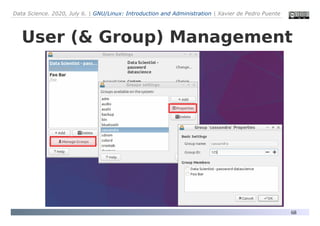
User (& Group) Management
Data Science. 2020, July 6. | GNU/Linux: Introduction and Administration | Xavier de Pedro Puente
69
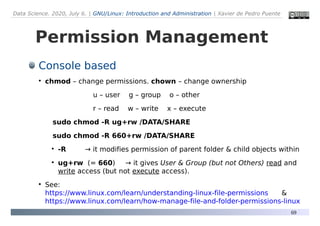
Permission Management
Console based
●
chmod – change permissions. chown – change ownership
u – user g – group o – other
r – read w – write x – execute
sudo chmod -R ug+rw /DATA/SHARE
sudo chmod -R 660+rw /DATA/SHARE
●
-R → it modifies permission of parent folder & child objects within
●
ug+rw (= 660) → it gives User & Group (but not Others) read and
write access (but not execute access).
●
See:
https://www.linux.com/learn/understanding-linux-file-permissions &
https://www.linux.com/learn/how-manage-file-and-folder-permissions-linux
Data Science. 2020, July 6. | GNU/Linux: Introduction and Administration | Xavier de Pedro Puente
70
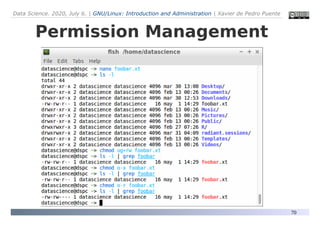
Permission Management
Data Science. 2020, July 6. | GNU/Linux: Introduction and Administration | Xavier de Pedro Puente
71
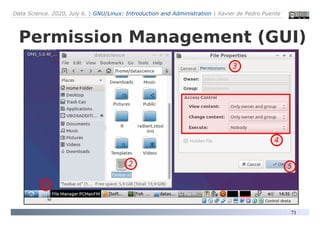
Permission Management (GUI)
Data Science. 2020, July 6. | GNU/Linux: Introduction and Administration | Xavier de Pedro Puente
72
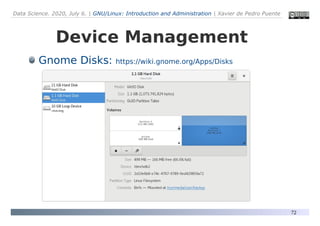
Device Management
Gnome Disks: https://wiki.gnome.org/Apps/Disks
Data Science. 2020, July 6. | GNU/Linux: Introduction and Administration | Xavier de Pedro Puente
73
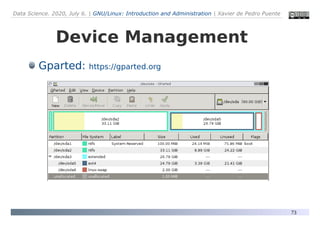
Device Management
Gparted: https://gparted.org
Data Science. 2020, July 6. | GNU/Linux: Introduction and Administration | Xavier de Pedro Puente
74
Backup Management: tips
Keep copies elsewhere than same computer

«Elsewhere»: different hardware, different device, different room,
different building, ...
Automatic (regular) backups
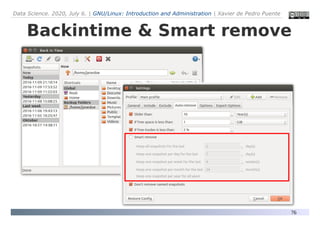
«Smart remove» even more important
Efficiency vs. resilience

Simple enough so that some team mates can restore them?

Complex RAID disk setups vs redundant external hard drives
elsewhere?

Encrypted vs unencrypted?

Advice: Use your team crowd wisdom; stay away from single-man
freaks with too-techie solutions
Data Science. 2020, July 6. | GNU/Linux: Introduction and Administration | Xavier de Pedro Puente
75
Backup Management: tools
Déjà Dup (Duplicity GUI)

https://wiki.gnome.org/Apps/DejaDup/
Backintime (GUI & console; rsync & hard link based)

https://github.com/bit-team/backintime
Luckybackup (rsync-based GU)

http://luckybackup.sourceforge.net/
Backup Ninja (console-based)

https://0xacab.org/riseuplabs/backupninja
Custom Bash Scripts
Some examples at: https://github.com/xavidp/bashscripts
Data Science. 2020, July 6. | GNU/Linux: Introduction and Administration | Xavier de Pedro Puente
76
Backintime & Smart remove
Data Science. 2020, July 6. | GNU/Linux: Introduction and Administration | Xavier de Pedro Puente
77
Security
http > https, ftp > sftp, root > sudo, root ssh,
jailkit, rootkit hunter, fail2ban, AppArmor/SELinux
Firewalls. UFW (Uncomplicated Firewall)
●
https://help.ubuntu.com/community/Gufw
Mail tweaks (postfix) & Spamassassin ...
Antivirus (dual boots)?: amavis + GUI (clamTk, Klamav)
Monitoring: logwatch, swatch, munin, monit, nagios, zabbix, ...
Password management: keepass2, ...
sudo apt-get dist-upgrade
Data Science. 2020, July 6. | GNU/Linux: Introduction and Administration | Xavier de Pedro Puente
78
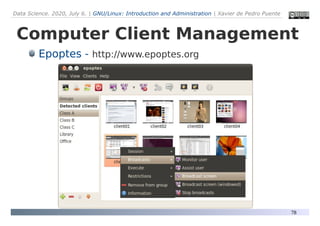
Computer Client Management
Epoptes - http://www.epoptes.org
Data Science. 2020, July 6. | GNU/Linux: Introduction and Administration | Xavier de Pedro Puente
79
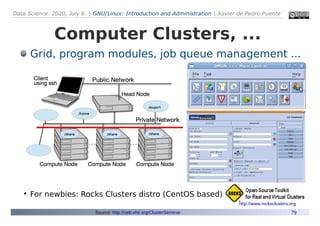
Computer Clusters, ...
Grid, program modules, job queue management ...
●
For newbies: Rocks Clusters distro (CentOS based)
Source: http://ueb.vhir.org/ClusterSeminar
http://www.rocksclusters.org
Data Science. 2020, July 6. | GNU/Linux: Introduction and Administration | Xavier de Pedro Puente
80
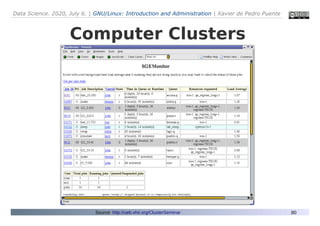
Computer Clusters
Source: http://ueb.vhir.org/ClusterSeminar
Data Science. 2020, July 6. | GNU/Linux: Introduction and Administration | Xavier de Pedro Puente
81
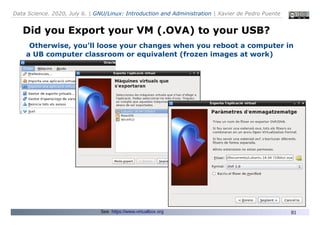
Did you Export your VM (.OVA) to your USB?
Otherwise, you’ll loose your changes when you reboot a computer in
a UB computer classroom or equivalent (frozen images at work)
See: https://www.virtualbox.org
Data Science. 2020, July 6. | GNU/Linux: Introduction and Administration | Xavier de Pedro Puente
82
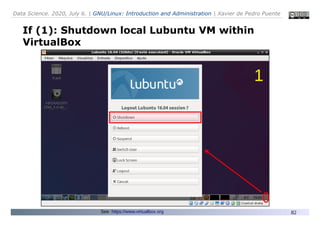
If (1): Shutdown local Lubuntu VM within
VirtualBox
See: https://www.virtualbox.org
1
Data Science. 2020, July 6. | GNU/Linux: Introduction and Administration | Xavier de Pedro Puente
83
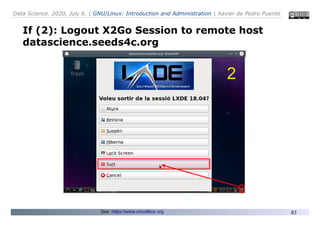
If (2): Logout X2Go Session to remote host
datascience.seeds4c.org
See: https://www.virtualbox.org
2
Data Science. 2020, July 6. | GNU/Linux: Introduction and Administration | Xavier de Pedro Puente
84
More information
●
Ubuntu GNU/Linux:
– http://www.ubuntu.com
●
Data Science Virtual Machine for Linux (Ubuntu)
– https://azuremarketplace.microsoft.com/en-us/marketplace/apps/microsoft-
ads.linux-data-science-vm-ubuntu
●
Linkat (Ubuntu):
– Manual Installation with custom partitions (advanced, or for servers):
http://linkat.xtec.cat/portal_linkat/wikilinkat/index.php/Wiki_Linkat_edu_14.04
●
Forums for help and support:
– Ubuntu-es Forums: https://www.ubuntu-es.org/forum
– Ubuntu (Catalan LoCo Team): http://ubuntuforums.org/forumdisplay.php?f=206
●
Data Science Toolbox (to run locally or in the cloud with AWS):
– http://datasciencetoolbox.org/
– https://www.datascienceatthecommandline.com

Linux Introduction & Administration

  • 1.
    Data Science. 2020,July 6. | GNU/Linux: Introduction and Administration | Xavier de Pedro Puente Data Science (ciencia de los datos): Aplicaciones a la biología y a la medicina con Python y R (2ª edición 2020) Curso de Experto Universitario Universidad de Barcelona (UB) Con el soporte de:https://www.ub.edu
  • 2.
    Data Science. 2020,July 6. | GNU/Linux: Introduction and Administration | Xavier de Pedro Puente 2 GNU/Linux OS Introduction Administration Xavier de Pedro, PhD. July 6, 2020 Course «Data Science» UB Image source: http://tekopsglobal.com
  • 3.
    Data Science. 2020,July 6. | GNU/Linux: Introduction and Administration | Xavier de Pedro Puente 3 Xavier de Pedro Puente, Ph.D. xdepedro@bcn.cat Academics:  Degree in Biology (University of Barcelona - UB)  Ph.D. in Ecology (University of Barcelona - UB)  Postgraduate in Bioinformatics (Open University of Catalonia – UOC) Current Work:  Senior technician at Municipal Data Office (Barcelona City Council) Past (related) Work:  Bioinformatics technician (UEB, VHIR)  Systems administrator (UEB, VHIR)
  • 4.
    Data Science. 2020,July 6. | GNU/Linux: Introduction and Administration | Xavier de Pedro Puente 4 (1) GNU/Linux Introduction – Concepts, History, "Distributions”, Ubuntu – Basic Differences compared with: ● MS Windows ● Mac OSX – Command line runs – Aliases Session Outline (2) GNU/Linux Administration – Installation – Package Management – User Management – Permission Management – Device Management – Backup Management – Security – Computer Client Management
  • 5.
    Data Science. 2020,July 6. | GNU/Linux: Introduction and Administration | Xavier de Pedro Puente 5 Tool: Virtual Machine (VM) with Lubuntu GNU/Linux See: https://www.virtualbox.org 2 options: (1) Import Virtual Box VM (.ova file) locally (2) Connect to remote VM with program X2Go. Option 1 Option 2
  • 6.
    Data Science. 2020,July 6. | GNU/Linux: Introduction and Administration | Xavier de Pedro Puente 6 Option 1: Import VirtualBox VM (.ova file) ● Download from: – 64 bit computers: (5.7 Gb) http://cloud.seeds4c.org/lubuntu_1804_64bit_v02.ova – 32 bit computers - if any: (7.3 Gb) http://cloud.seeds4c.org/lubuntu_1604_32bit_v05.ova See: https://www.virtualbox.org 1
  • 7.
    Data Science. 2020,July 6. | GNU/Linux: Introduction and Administration | Xavier de Pedro Puente 7 Option 1: VirtualBox VM with Lubuntu GNU/Linux See: https://www.virtualbox.org ● Import VM locally – Follow instructions around slide 47, in linux admin section: “Importing VirtualBox (.OVA)”
  • 8.
    Data Science. 2020,July 6. | GNU/Linux: Introduction and Administration | Xavier de Pedro Puente 8 Option 2: Connect to remote VM with X2Go See: https://wiki.x2go.org/doku.php/doc:installation:x2goclient ● Install X2Go Client: https://wiki.x2go.org ● Add new session prefs: – Host: datascience.seeds4c.org – Login & pass: ● Generic: datascience / datascience ● Private: (sent to your email accounts) – Session type: LXDE
  • 9.
    Data Science. 2020,July 6. | GNU/Linux: Introduction and Administration | Xavier de Pedro Puente 9 Option 2: Connect to remote VM with X2Go 2
  • 10.
    Data Science. 2020,July 6. | GNU/Linux: Introduction and Administration | Xavier de Pedro Puente 10 What is GNU/Linux? It is ...  An Open Source (Free/Libre) operating system  Sum of GNU surroundings and the Linux kernel/core  Compatible with UNIX systems GNU/Linux (a.k.a «Linux»)
  • 11.
    Data Science. 2020,July 6. | GNU/Linux: Introduction and Administration | Xavier de Pedro Puente 11 Operating System (in context) Desktop Environments Operating System Hardware End User Applications Aqua Luna (XP) Aero (Vista +)
  • 12.
    Data Science. 2020,July 6. | GNU/Linux: Introduction and Administration | Xavier de Pedro Puente 12 GNU/Linux Some basic concepts  GNU Project  Hardware vs software  Open Source & Free software (as in «free» seats) ● FLOSS: Free/Libre Open Source Software  Free Software Foundation (FSF)  Free Operating Systems ● GNU/Linux, GNU/Hurd, [Open,Free,Net]-BSD, OpenSolaris, ReactOS...  Open Source Hardware
  • 13.
    Data Science. 2020,July 6. | GNU/Linux: Introduction and Administration | Xavier de Pedro Puente 13 Historical Evolution Source: A. G. Stankevicius. Departarmento de Ciencias e Ingeniería de la Computación. Universidad Nacional del Sur. http://cs.uns.edu.ar/~ags/linux/ In the origins of software....  Software was born free.  In the decade of the '60, when buying HW, access was granted to the manufacturer’s SW catalogue  All software distributed together with source code  At the end of the '70, IBM announced their intention to sell parts of their SW separately.  From then on, proprietary SW (no free) became common
  • 14.
    Data Science. 2020,July 6. | GNU/Linux: Introduction and Administration | Xavier de Pedro Puente 14 Historical Evolution Source: A. G. Stankevicius. Departarmento de Ciencias e Ingeniería de la Computación. Universidad Nacional del Sur. http://cs.uns.edu.ar/~ags/linux/ GNU/Linux History  1983. Richard M. Stallman (RMS): GNU project  1984. Free Software Foundation (FSF).  First components of the GNU system, all written by RMS: ● a C compiler (gcc) ● an text editor (emacs) ● and a debugger (gdb)
  • 15.
    Data Science. 2020,July 6. | GNU/Linux: Introduction and Administration | Xavier de Pedro Puente 15 Historical Evolution Derived from: A. G. Stankevicius. Departarmento de Ciencias e Ingeniería de la Computación. Universidad Nacional del Sur. http://cs.uns.edu.ar/~ags/linux/ GNU/Linux History  To guarantee the four freedoms, RMS invented the concept of copy-left (reverse of copy-right).  1990: GNU system was almost complete, only missing to finish an ambitious kernel (core).  1991: Linus Torvalds wrote a monolithic kernel  GNU + Linux kernel (by Linus T.): GNU/Linux  1996: A penguin bit to Linus. Logo: penguin Tux
  • 16.
    Data Science. 2020,July 6. | GNU/Linux: Introduction and Administration | Xavier de Pedro Puente 16 GNU/Linux History Source: https://www.elprocus.com/linux-operating-system/
  • 17.
    Data Science. 2020,July 6. | GNU/Linux: Introduction and Administration | Xavier de Pedro Puente 17 Desktop Environments (in context) Desktop Environments Operating System Hardware Applications Aqua Luna (XP) Aero (Vista +)
  • 18.
    Data Science. 2020,July 6. | GNU/Linux: Introduction and Administration | Xavier de Pedro Puente 18 History of Desktop Environments Source: https://en.wikipedia.org/wiki/Desktop_environment
  • 19.
    Data Science. 2020,July 6. | GNU/Linux: Introduction and Administration | Xavier de Pedro Puente 19 Desktop Environments (DE) Desktop Environments  ... KDE Source: https://en.wikipedia.org/wiki/Desktop_environment
  • 20.
    Data Science. 2020,July 6. | GNU/Linux: Introduction and Administration | Xavier de Pedro Puente 20 GNU/Linux DE: Desktop Environments  ...
  • 21.
    Data Science. 2020,July 6. | GNU/Linux: Introduction and Administration | Xavier de Pedro Puente 21 GNU/Linux DE: Desktop Environments  ... KDE
  • 22.
    Data Science. 2020,July 6. | GNU/Linux: Introduction and Administration | Xavier de Pedro Puente 22 GNU/Linux DE:
  • 23.
    Data Science. 2020,July 6. | GNU/Linux: Introduction and Administration | Xavier de Pedro Puente 23 GNU/Linux DE:
  • 24.
    Data Science. 2020,July 6. | GNU/Linux: Introduction and Administration | Xavier de Pedro Puente 24 GNU/Linux DE:
  • 25.
    Data Science. 2020,July 6. | GNU/Linux: Introduction and Administration | Xavier de Pedro Puente 25 What is a GNU/Linux «distribution»? A collection of free software  Core + drivers (modules)  Desktop Environment  Extra + programs + utilities  Support? + Documentation? KDE Desktop Environment
  • 26.
    Data Science. 2020,July 6. | GNU/Linux: Introduction and Administration | Xavier de Pedro Puente 26 Distributions of GNU/Linux UbuntuDebian Slackware Gentoo RedhatFedora Mandriva Suse
  • 27.
    Data Science. 2020,July 6. | GNU/Linux: Introduction and Administration | Xavier de Pedro Puente 27 Ubuntu (GNU/Linux) Main characteristic  Distribution based in Debian  Developed by Canonical Ltd. (South Africa)  Ubuntu:  Philosophy zulú: “Mankind to others”, “I am because we are”  Slogan Ubuntu: “Linux for human beings” (or “beans”?)  Definitely, it is the easiest to install/use
  • 28.
    Data Science. 2020,July 6. | GNU/Linux: Introduction and Administration | Xavier de Pedro Puente 28 Variants 1st Release Ubuntu 4.10 Kubuntu 5.04 Edubuntu 5.10 Xubuntu 6.06 LTS Mythbuntu 7.10 UbuntuStudio 7.10 Lubuntu 11.10 Ubuntu GNOME 13.04 Ubuntu Kylin 13.04 Ubuntu MATE 15.04 Ubuntu Budgie 17.04 Source: https://itsfoss.com/which-ubuntu-install/ Ubuntu (GNU/Linux)
  • 29.
    Data Science. 2020,July 6. | GNU/Linux: Introduction and Administration | Xavier de Pedro Puente 29 ● Technical differences – User: root vs. administrator – Case sensitive vs. Case insensitive ● "MyFile != myfile" vs. "MyFile = myfile" – "Symbolic or Hard Links" vs. "Shortcuts" – Paths: Slash ("/") vs. Backslash ("") – Main harddrive/partition: "/" vs. "C:" – Partition formats (file systems): ext2, ext3, ext4, ... vs. fat16/fat32/ntfs – User default folder: /home/username vs. "C:Documents and Settings" or "C:UsersusernameMyDocuments" – USBdisk default folder: /media/username/usbdiskname vs. "X:usbdiskname" – Secure (Viruses???) vs. Insecure (viruses, bots, worms, trojans, backdoors, ...) – It can extend computer useful life vs. Planned & perceived obsolescence – Performance, with same hardware: Faster vs. Slower (Antivirus, antispyware,...) – Run as admin: "sudo program" in console vs. "Run program as administrator" GNU/Linux vs. Windows
  • 30.
    Data Science. 2020,July 6. | GNU/Linux: Introduction and Administration | Xavier de Pedro Puente 30 ● Phylosophical differences – Freedom: "Free/Libre Open Source Software (FLOSS)" vs. "Closed Source/Propietary software" ● Software Sustainability: High vs. Low – Usually: product given for free (at no Cost) vs. product for (excessive?) profit – Money comes through: customizations and training vs. Selling Software – FLOSS Fosters local economies as well as big companies vs. Big & remote Corporations growth. GNU/Linux vs. Windows
  • 31.
    Data Science. 2020,July 6. | GNU/Linux: Introduction and Administration | Xavier de Pedro Puente 31 ● Technical differences – Users: – Case: – Links: – Paths: – Main harddrive/partition – Partition formats: ext2, ext3, ext4, ... vs. HFS+ – User default folder: /home/username vs. "/Users/Username" – USBdisk default folder: – Secure (Viruses???) vs. Secure (Viruses?) – It can extend computer useful life vs. Planned & perceived obsolescence – Performance, with same hardware: Faster??? vs. Extremely Fast – Run as admin: GNU/Linux vs. Mac OS X
  • 32.
    Data Science. 2020,July 6. | GNU/Linux: Introduction and Administration | Xavier de Pedro Puente 32 ● Phylosophical differences – Freedom: "Free/Libre Open Source Software (FLOSS)" vs. "Closed Source/Propietary software" ● Software Sustainability: High vs. Low – Usually: product given for free (at no Cost) vs. product for (excessive?) profit – Money comes through: customizations and training vs. Selling Software & Hardware – FLOSS Fosters local economies as well as big companies vs. Big & remote Corporations growth. GNU/Linux vs. Mac OS X
  • 33.
    Data Science. 2020,July 6. | GNU/Linux: Introduction and Administration | Xavier de Pedro Puente 33 Ubuntu (GNU/Linux) See it in action ...
  • 34.
    Data Science. 2020,July 6. | GNU/Linux: Introduction and Administration | Xavier de Pedro Puente 34 Command line runs (i) ● Shell = Terminal = Console ("Black" text screen to run commands)s – Secure Shell = ssh = a safe way to connect to remote computers or servers (encrypted) – ftp: File Transfer Protocol ● to transfer files between computers or servers ● you can NOT run commands (other than listings) – sftp: like FTP but "secure" (best: using ssh libraries) ● Local terminal window – > whoami
  • 35.
    Data Science. 2020,July 6. | GNU/Linux: Introduction and Administration | Xavier de Pedro Puente 35 Command line runs (ii) ● Example of simple local commands: > ps -e > ls -l > df -h > top > tree . | head > du . -h | grep G ● Example of simple editors: > nano (simple editor: press "Ctrl + X" to eXit)
  • 36.
    Data Science. 2020,July 6. | GNU/Linux: Introduction and Administration | Xavier de Pedro Puente 36 Command line runs (iii) ● Example of network-related commands: > ping google.com > ifconfig ● Example of system administration (sysadmin) commands: > sudo apt update & sudo apt install tree > sudo adduser foo > sudo passwd foo > sudo service apache restart > sudo kill -9 java ● Example of simple editors: > nano (simple editor: press "Ctrl + X" to eXit)
  • 37.
    Data Science. 2020,July 6. | GNU/Linux: Introduction and Administration | Xavier de Pedro Puente 37 Command line runs (iv) ● Example of other shell-based programs: > htop (type "q" to quit/exit) > mc (Midnight Commander). Click on F10 (with mouse or trackpad) to quit > R ( Type "q()" to quit) ● Serial vs. Parallel tasks – https://www.datascienceatthecommandline.com/chapter-8-parallel- pipelines.html
  • 38.
    Data Science. 2020,July 6. | GNU/Linux: Introduction and Administration | Xavier de Pedro Puente 38 Midnight Commander (mc) ● Powerful dual-pane file manager in terminals. A Life- saver for human beans when no X windows in servers
  • 39.
    Data Science. 2020,July 6. | GNU/Linux: Introduction and Administration | Xavier de Pedro Puente 39 More information... ● Linux intro (short version): – http://applied-r.com/linux-intro/ ● Linux OS Basics: – http://applied-r.com/linux-os-basics/ ● Linux File Management: – http://applied-r.com/linux-file-management/ ● Linux help: http://applied-r.com/linux-help/ ● Linux aliases: – http://applied-r.com/linux-aliases/ ● Linux Utilities: – http://applied-r.com/linux-utilities/ ● Package management (console based): – http://applied-r.com/linux-apt/
  • 40.
    Data Science. 2020,July 6. | GNU/Linux: Introduction and Administration | Xavier de Pedro Puente 40 Pause... ● Coffee / soda time? Source: http://wallpaperpicture--photo.blogspot.com.es/2015/01/funny-ads-pictures-0.html
  • 41.
    Data Science. 2020,July 6. | GNU/Linux: Introduction and Administration | Xavier de Pedro Puente 41 (2) GNU/Linux Administration Installation Package Management User Management Permission Management Device Management Backup Management Security Computer Client Management Computer Clusters
  • 42.
    Data Science. 2020,July 6. | GNU/Linux: Introduction and Administration | Xavier de Pedro Puente 42 Image Source: https://www.linux.com/blog/sysadmin-ebook/2017/9/future-proof-your-sysadmin-career-advancing-open-source Evolution in Technology Image source: http://ars.userfriendly.org/cartoons/?id=19990718
  • 43.
    Data Science. 2020,July 6. | GNU/Linux: Introduction and Administration | Xavier de Pedro Puente 43 Installation How to use or install GNU/Linux?  LiveCD/LiveUSB: Without installing it in the hard disk  Install in the hard disk  More efficient using your hardware, and you can install next to your other installed OS. You choose OS at booting time.  Install in a disk USB or pendrive  Install in a local virtual machine (or in the cloud)  From scratch (from .iso file), or from a previously exported virtual machine (.ova file or equivalent)  Windows + andLinux/CoLinux  Win10 + «WSL» (Windows Subsystem for Linux)
  • 44.
    Data Science. 2020,July 6. | GNU/Linux: Introduction and Administration | Xavier de Pedro Puente 44 Exporting VirtualBox (.OVA) With current parameters See: https://www.virtualbox.org
  • 45.
    Data Science. 2020,July 6. | GNU/Linux: Introduction and Administration | Xavier de Pedro Puente 45 Willing to export to USB? Set it up ... See: https://www.virtualbox.org
  • 46.
    Data Science. 2020,July 6. | GNU/Linux: Introduction and Administration | Xavier de Pedro Puente 46 Willing to copy&paste to and/or from Host/Client? ... See: https://www.virtualbox.org
  • 47.
    Data Science. 2020,July 6. | GNU/Linux: Introduction and Administration | Xavier de Pedro Puente 47 Importing VirtualBox (.OVA) VT-x option disabled in BIOS allows only 1 cpu See: https://www.virtualbox.org
  • 48.
    Data Science. 2020,July 6. | GNU/Linux: Introduction and Administration | Xavier de Pedro Puente 48 Importing VirtualBox (.OVA) VT-x option enabled in BIOS allows 2+ cpu See: https://www.virtualbox.org
  • 49.
    Data Science. 2020,July 6. | GNU/Linux: Introduction and Administration | Xavier de Pedro Puente 49 Where to enable/disable it? VirtualBox VM config for VT-x setting in BIOS Lubuntu: Lightweidht Desktop on a Ubuntu GNU/Linux Distribution. http://lubuntu.net See: https://www.virtualbox.org
  • 50.
    Data Science. 2020,July 6. | GNU/Linux: Introduction and Administration | Xavier de Pedro Puente 50 Other Options to use VirtualBox VM Connection to remote VBox using X2Go (ssh) X2Go: Program to connect to a remote computer through GUI (Graphical User Interface)
  • 51.
    Data Science. 2020,July 6. | GNU/Linux: Introduction and Administration | Xavier de Pedro Puente 51 Other Options to use VirtualBox VM Connection to remote VBox using X2Go (ssh) X2Go: http://wiki.x2go.org
  • 52.
    Data Science. 2020,July 6. | GNU/Linux: Introduction and Administration | Xavier de Pedro Puente 52 Other Options LiveUSB (example: LXLE Lubuntu-based; BIOS to boot from USB) LXLE: A Lubuntu-based GNU/Distribution with improved desktop http://www.lxle.net
  • 53.
    Data Science. 2020,July 6. | GNU/Linux: Introduction and Administration | Xavier de Pedro Puente 53 Other Options andLinux (side to side to Windows - http://andlinux.sf.net )
  • 54.
    Data Science. 2020,July 6. | GNU/Linux: Introduction and Administration | Xavier de Pedro Puente 54 Other Options WSL (Windows Subsystem for Linux) ● Info: – https://en.wikipedia.org/wiki/Windows _Subsystem_for_Linux ● Installation Guide for Windows 10 – https://docs.microsoft.com/en-us/wind ows/wsl/install-win10 –
  • 55.
    Data Science. 2020,July 6. | GNU/Linux: Introduction and Administration | Xavier de Pedro Puente 55 ● GNU/Linux Installation – Dual/Multi-boot ● Ubuntu (GNU/Linux) + Windows (or Mac OSX, ...) ● From USB or CD/DVD – Requirements ● Desfrag Hard Drive (in Windows) – if needed ● Backup Data in external device (usb, network drive, ...) ● Identify Partitions in your hard drive – You may have 4 primary partitions (maximum) – You need 1 free partition (minimum) ● To make (preferably) 3 logic partitions inside Installation on Hard Disk (non WSL but native)
  • 56.
    Data Science. 2020,July 6. | GNU/Linux: Introduction and Administration | Xavier de Pedro Puente 56 Using Live USB/CD/DVD Start from a Live USB or CD/DVD for inspecting & safer partition management Required: setup computer BIOS to allow booting from USB or CD/DVD  Press a key to enter configuration  Usually: DEL, F2, ESC, ....  Once there, look for the start sequence (Boot, Boot device, ...)
  • 57.
    Data Science. 2020,July 6. | GNU/Linux: Introduction and Administration | Xavier de Pedro Puente 57 Hard Drive Partition Management before Installing GNU/Linux. Challenging example: ● HP Laptop from 2015 with M$ Win7
  • 58.
    Data Science. 2020,July 6. | GNU/Linux: Introduction and Administration | Xavier de Pedro Puente 58 Package Management (installing «programs») Standard Package Management ● Console based: ● APT (Debian/Ubuntu/Mint/LXLE) ● YUM (Redhat/CentOS/Fedora Core) ● YAST2 (SUSE) ● Portage (Gentoo) ● GUI based ● Synaptic (Debian-based) ● Many others (distro-specific)
  • 59.
    Data Science. 2020,July 6. | GNU/Linux: Introduction and Administration | Xavier de Pedro Puente 59 sudo apt install foo
  • 60.
    Data Science. 2020,July 6. | GNU/Linux: Introduction and Administration | Xavier de Pedro Puente 60 Package Management From extra repositories add-apt-repository & apt update & apt install ● Oracle Java ● sudo add-apt-repository -y ppa:webupd8team/java ● R (updated version) ● sudo add-apt-repository -y ppa:marutter/rrutter ● Dependencies for R GIS packages (such as tmap) ● sudo add-apt-repository -y ppa:ubuntugis/ubuntugis-unstable ● sudo add-apt-repository -y ppa:opencpu/jq Source: https://seeds4c.org/16.04
  • 61.
    Data Science. 2020,July 6. | GNU/Linux: Introduction and Administration | Xavier de Pedro Puente 61 Oracle Java
  • 62.
    Data Science. 2020,July 6. | GNU/Linux: Introduction and Administration | Xavier de Pedro Puente 62 Add missing gpg repo keys datascience@dspc ~> sudo add-apt-repository -y ppa:nilarimogard/webupd8 datascience@dspc ~> sudo apt install launchpad-getkeys datascience@dspc ~> sudo launchpad-getkeys datascience@dspc ~> sudo apt update With a helper: launchpad-getkeys Source: https://seeds4c.org/16.04
  • 63.
    Data Science. 2020,July 6. | GNU/Linux: Introduction and Administration | Xavier de Pedro Puente 63 Add all required ubuntu packages (dependencies) & dev helpers for some R packages datascience@dspc ~> sudo add-apt-repository -y ppa:marutter/rrutter datascience@dspc ~> sudo add-apt-repository -y ppa:ubuntugis/ubuntugis-unstable datascience@dspc ~> sudo add-apt-repository -y ppa:opencpu/jq datascience@dspc ~> sudo apt update datascience@dspc ~> sudo apt install -y r-recommended r-cran-xml libgraphviz-dev libcairo2-dev r-cran-cairodevice freeglut3 freeglut3-dev r-cran-rglpk r-cran-rgl r-cran-misc3d libx11-dev libxt-dev libcurl4-gnutls-dev libxml2-dev r-cran-xml libgraphviz-dev libcairo2-dev bwidget tk-table libv8-dev r-cran-rjava libmpfr-dev libc6 libssl-dev texlive-latex-extra texlive- lang-spanish libx11-dev libxml2-dev libxml2:i386 libxt-dev r-cran-misc3d subversion git tk- dev unaccent xvfb libgdal1-dev libproj-dev r-cran-rmysql libmagick++-dev r-cran- rcolorbrewer r-cran-doparallel libssh2-1-dev libudunits2-dev libgdal-dev libgeos-dev libproj- dev libv8-3.14-dev libjq-dev libprotobuf-dev protobuf-compiler libssl-dev libcairo2-dev For Ubuntu 16.06 LTS with some extra repos: Fix permissions sudo chmod 777 /usr/lib/R/site-library /usr/lib/R/site-library/* -R sudo chmod 777 /usr/lib/R/library /usr/lib/R/library/* -R sudo chmod 777 /usr/share/R/doc/html/* -R Source: http://seeds4c.org/R
  • 64.
    Data Science. 2020,July 6. | GNU/Linux: Introduction and Administration | Xavier de Pedro Puente 64 Package Management From External sources ● Example: Adobe Acrobar Reader 9.x ● Example: Portable Signer: To digitally sign PDF with certificates like FNMT (.p12) http://portablesigner.sf.net ● download, uncompress, make executable and run (java app) Source: https://seeds4c.org/16.04 wget http://ardownload.adobe.com/pub/adobe/reader/unix/9.x/9.5.5/enu/AdbeRdr9.5.5-1_i386linux_enu.deb sudo dpkg -i AdbeRdr9.5.5-1_i386linux_enu.deb; sudo apt-get -f install #For 32 bits sudo dpkg -i --force-architecture AdbeRdr9.5.5-1_i386linux_enu.deb; sudo apt-get -f install #For 64 bits
  • 65.
    Data Science. 2020,July 6. | GNU/Linux: Introduction and Administration | Xavier de Pedro Puente 65 Package Management (GUI) Synaptic
  • 66.
    Data Science. 2020,July 6. | GNU/Linux: Introduction and Administration | Xavier de Pedro Puente 66 User (& Group) Management GUI based Console based: adduser, passwd, ...
  • 67.
    Data Science. 2020,July 6. | GNU/Linux: Introduction and Administration | Xavier de Pedro Puente 67 datascience@dspc ~> sudo su #become root user («Switch User») [sudo] password for datascience: root@dspc:/home/datascience# adduser foo Adding user `foo' ... Adding new group `foo' (1001) ... Adding new user `foo' (1001) with group `foo' ... Creating home directory `/home/foo' ... Copying files from `/etc/skel' ... Enter new UNIX password: (new-user password typed here) Retype new UNIX password: (new-user password typed again) passwd: password updated successfully Changing the user information for foo Enter the new value, or press ENTER for the default Full Name []: Foo Bar Room Number []: Work Phone []: Home Phone []: Other []: Is the information correct? [Y/n] Y root@dspc:/home/datascience# exit exit datascience@dspc ~>
  • 68.
    Data Science. 2020,July 6. | GNU/Linux: Introduction and Administration | Xavier de Pedro Puente 68 User (& Group) Management
  • 69.
    Data Science. 2020,July 6. | GNU/Linux: Introduction and Administration | Xavier de Pedro Puente 69 Permission Management Console based ● chmod – change permissions. chown – change ownership u – user g – group o – other r – read w – write x – execute sudo chmod -R ug+rw /DATA/SHARE sudo chmod -R 660+rw /DATA/SHARE ● -R → it modifies permission of parent folder & child objects within ● ug+rw (= 660) → it gives User & Group (but not Others) read and write access (but not execute access). ● See: https://www.linux.com/learn/understanding-linux-file-permissions & https://www.linux.com/learn/how-manage-file-and-folder-permissions-linux
  • 70.
    Data Science. 2020,July 6. | GNU/Linux: Introduction and Administration | Xavier de Pedro Puente 70 Permission Management
  • 71.
    Data Science. 2020,July 6. | GNU/Linux: Introduction and Administration | Xavier de Pedro Puente 71 Permission Management (GUI)
  • 72.
    Data Science. 2020,July 6. | GNU/Linux: Introduction and Administration | Xavier de Pedro Puente 72 Device Management Gnome Disks: https://wiki.gnome.org/Apps/Disks
  • 73.
    Data Science. 2020,July 6. | GNU/Linux: Introduction and Administration | Xavier de Pedro Puente 73 Device Management Gparted: https://gparted.org
  • 74.
    Data Science. 2020,July 6. | GNU/Linux: Introduction and Administration | Xavier de Pedro Puente 74 Backup Management: tips Keep copies elsewhere than same computer  «Elsewhere»: different hardware, different device, different room, different building, ... Automatic (regular) backups «Smart remove» even more important Efficiency vs. resilience  Simple enough so that some team mates can restore them?  Complex RAID disk setups vs redundant external hard drives elsewhere?  Encrypted vs unencrypted?  Advice: Use your team crowd wisdom; stay away from single-man freaks with too-techie solutions
  • 75.
    Data Science. 2020,July 6. | GNU/Linux: Introduction and Administration | Xavier de Pedro Puente 75 Backup Management: tools Déjà Dup (Duplicity GUI)  https://wiki.gnome.org/Apps/DejaDup/ https://wiki.gnome.org/Apps/DejaDup/ Backintime (GUI & console; rsync & hard link based)  https://github.com/bit-team/backintime Luckybackup (rsync-based GU)  http://luckybackup.sourceforge.net/ Backup Ninja (console-based)  https://0xacab.org/riseuplabs/backupninja Custom Bash Scripts Some examples at: https://github.com/xavidp/bashscripts
  • 76.
    Data Science. 2020,July 6. | GNU/Linux: Introduction and Administration | Xavier de Pedro Puente 76 Backintime & Smart remove
  • 77.
    Data Science. 2020,July 6. | GNU/Linux: Introduction and Administration | Xavier de Pedro Puente 77 Security http > https, ftp > sftp, root > sudo, root ssh, jailkit, rootkit hunter, fail2ban, AppArmor/SELinux Firewalls. UFW (Uncomplicated Firewall) ● https://help.ubuntu.com/community/Gufw Mail tweaks (postfix) & Spamassassin ... Antivirus (dual boots)?: amavis + GUI (clamTk, Klamav) Monitoring: logwatch, swatch, munin, monit, nagios, zabbix, ... Password management: keepass2, ... sudo apt-get dist-upgrade
  • 78.
    Data Science. 2020,July 6. | GNU/Linux: Introduction and Administration | Xavier de Pedro Puente 78 Computer Client Management Epoptes - http://www.epoptes.org
  • 79.
    Data Science. 2020,July 6. | GNU/Linux: Introduction and Administration | Xavier de Pedro Puente 79 Computer Clusters, ... Grid, program modules, job queue management ... ● For newbies: Rocks Clusters distro (CentOS based) Source: http://ueb.vhir.org/ClusterSeminar http://www.rocksclusters.org
  • 80.
    Data Science. 2020,July 6. | GNU/Linux: Introduction and Administration | Xavier de Pedro Puente 80 Computer Clusters Source: http://ueb.vhir.org/ClusterSeminar
  • 81.
    Data Science. 2020,July 6. | GNU/Linux: Introduction and Administration | Xavier de Pedro Puente 81 Did you Export your VM (.OVA) to your USB? Otherwise, you’ll loose your changes when you reboot a computer in a UB computer classroom or equivalent (frozen images at work) See: https://www.virtualbox.org
  • 82.
    Data Science. 2020,July 6. | GNU/Linux: Introduction and Administration | Xavier de Pedro Puente 82 If (1): Shutdown local Lubuntu VM within VirtualBox See: https://www.virtualbox.org 1
  • 83.
    Data Science. 2020,July 6. | GNU/Linux: Introduction and Administration | Xavier de Pedro Puente 83 If (2): Logout X2Go Session to remote host datascience.seeds4c.org See: https://www.virtualbox.org 2
  • 84.
    Data Science. 2020,July 6. | GNU/Linux: Introduction and Administration | Xavier de Pedro Puente 84 More information ● Ubuntu GNU/Linux: – http://www.ubuntu.com ● Data Science Virtual Machine for Linux (Ubuntu) – https://azuremarketplace.microsoft.com/en-us/marketplace/apps/microsoft- ads.linux-data-science-vm-ubuntu ● Linkat (Ubuntu): – Manual Installation with custom partitions (advanced, or for servers): http://linkat.xtec.cat/portal_linkat/wikilinkat/index.php/Wiki_Linkat_edu_14.04 ● Forums for help and support: – Ubuntu-es Forums: https://www.ubuntu-es.org/forum – Ubuntu (Catalan LoCo Team): http://ubuntuforums.org/forumdisplay.php?f=206 ● Data Science Toolbox (to run locally or in the cloud with AWS): – http://datasciencetoolbox.org/ – https://www.datascienceatthecommandline.com