Chapter 5
Link Layer
Computer
Networking: A Top
Down Approach
6th
edition
Jim Kurose, Keith Ross
Addison-Wesley
March 2012
A note on the use of these ppt slides:
We’re making these slides freely available to all (faculty, students, readers).
They’re in PowerPoint form so you see the animations; and can add, modify,
and delete slides (including this one) and slide content to suit your needs.
They obviously represent a lot of work on our part. In return for use, we only
ask the following:
 If you use these slides (e.g., in a class) that you mention their source
(after all, we’d like people to use our book!)
 If you post any slides on a www site, that you note that they are adapted
from (or perhaps identical to) our slides, and note our copyright of this
material.
Thanks and enjoy! JFK/KWR
All material copyright 1996-2012
J.F Kurose and K.W. Ross, All Rights Reserved
Link Layer 5-1
Link Layer 5-2
Chapter 5: Link layer
our goals:
 understand principles behind link layer
services:
 error detection, correction
 sharing a broadcast channel: multiple access
 link layer addressing
 local area networks: Ethernet, VLANs
 instantiation, implementation of various link
layer technologies
Link Layer 5-3
Link layer, LANs: outline
5.1 introduction, services
5.2 error detection,
correction
5.3 multiple access
protocols
5.4 LANs
 addressing, ARP
 Ethernet
 switches
 VLANS
5.5 link virtualization:
MPLS
5.6 data center
networking
5.7 a day in the life of a
web request
Link Layer 5-4
Link layer: introduction
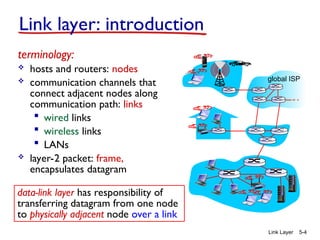
terminology:
 hosts and routers: nodes
 communication channels that
connect adjacent nodes along
communication path: links
 wired links
 wireless links
 LANs
 layer-2 packet: frame,
encapsulates datagram
data-link layer has responsibility of
transferring datagram from one node
to physically adjacent node over a link
global ISP
Link Layer 5-5
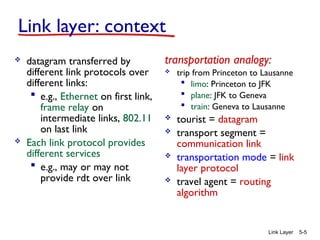
Link layer: context
 datagram transferred by
different link protocols over
different links:
 e.g., Ethernet on first link,
frame relay on
intermediate links, 802.11
on last link
 Each link protocol provides
different services
 e.g., may or may not
provide rdt over link
transportation analogy:
 trip from Princeton to Lausanne
 limo: Princeton to JFK
 plane: JFK to Geneva
 train: Geneva to Lausanne
 tourist = datagram
 transport segment =
communication link
 transportation mode = link
layer protocol
 travel agent = routing
algorithm
Link Layer 5-6
Link layer services
 framing, link access:
 encapsulate datagram into frame, adding header, trailer
 channel access if shared medium
 “MAC” addresses used in frame headers to identify
source, dest
• different from IP address!
 reliable delivery between adjacent nodes
 we learned how to do this already (chapter 3)!
 seldom used on low bit-error link (fiber, some twisted
pair)
 wireless links: high error rates
• Q: why both link-level and end-end reliability?
A: correcting errors locally, rather than end-end
Link Layer 5-7
 flow control:
 pacing between adjacent sending and receiving nodes
 error detection:
 errors caused by signal attenuation, noise.
 receiver detects presence of errors:
• signals sender for retransmission or drops frame
 error correction:
 receiver identifies and corrects bit error(s) without resorting to
retransmission
 half-duplex and full-duplex
 with half duplex, nodes at both ends of link can transmit, but not
at same time
Link layer services (more)
Link Layer 5-8
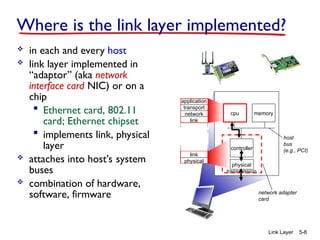
Where is the link layer implemented?
 in each and every host
 link layer implemented in
“adaptor” (aka network
interface card NIC) or on a
chip
 Ethernet card, 802.11
card; Ethernet chipset
 implements link, physical
layer
 attaches into host’s system
buses
 combination of hardware,
software, firmware
controller
physical
transmission
cpu memory
host
bus
(e.g., PCI)
network adapter
card
application
transport
network
link
link
physical
Link Layer 5-9
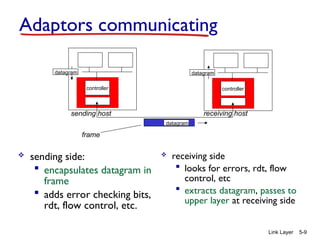
Adaptors communicating
 sending side:
 encapsulates datagram in
frame
 adds error checking bits,
rdt, flow control, etc.
 receiving side
 looks for errors, rdt, flow
control, etc
 extracts datagram, passes to
upper layer at receiving side
controller controller
sending host receiving host
datagram datagram
datagram
frame
Link Layer 5-10
Link layer, LANs: outline
5.1 introduction, services
5.2 error detection,
correction
5.3 multiple access
protocols
5.4 LANs
 addressing, ARP
 Ethernet
 switches
 VLANS
5.5 link virtualization:
MPLS
5.6 data center
networking
5.7 a day in the life of a
web request
Link Layer 5-11
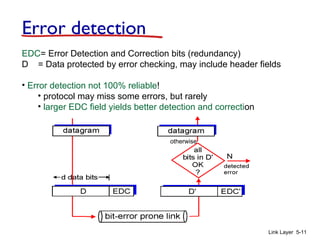
Error detection
EDC= Error Detection and Correction bits (redundancy)
D = Data protected by error checking, may include header fields
• Error detection not 100% reliable!
• protocol may miss some errors, but rarely
• larger EDC field yields better detection and correction
otherwise
Link Layer 5-12
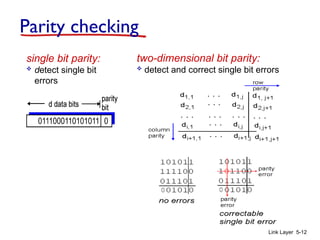
Parity checking
single bit parity:
 detect single bit
errors
two-dimensional bit parity:
 detect and correct single bit errors
0 0
Link Layer 5-13
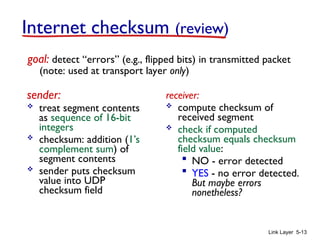
Internet checksum (review)
sender:
 treat segment contents
as sequence of 16-bit
integers
 checksum: addition (1’s
complement sum) of
segment contents
 sender puts checksum
value into UDP
checksum field
receiver:
 compute checksum of
received segment
 check if computed
checksum equals checksum
field value:
 NO - error detected
 YES - no error detected.
But maybe errors
nonetheless?
goal: detect “errors” (e.g., flipped bits) in transmitted packet
(note: used at transport layer only)
Link Layer 5-14
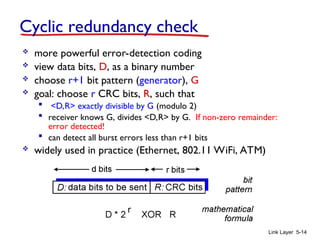
Cyclic redundancy check
 more powerful error-detection coding
 view data bits, D, as a binary number
 choose r+1 bit pattern (generator), G
 goal: choose r CRC bits, R, such that
 <D,R> exactly divisible by G (modulo 2)
 receiver knows G, divides <D,R> by G. If non-zero remainder:
error detected!
 can detect all burst errors less than r+1 bits
 widely used in practice (Ethernet, 802.11 WiFi, ATM)
Link Layer 5-15
CRC example
want:
D.2r
XOR R = nG
equivalently:
D.2r
= nG XOR R
equivalently:
if we divide D.2r
by
G, want remainder R
to satisfy:
R = remainder[ ]
D.2r
G
Modulo-2 arithmetic
without carries in
addition or borrows in
subtraction
r=3
Link Layer 5-16
Link layer, LANs: outline
5.1 introduction, services
5.2 error detection,
correction
5.3 multiple access
protocols
5.4 LANs
 addressing, ARP
 Ethernet
 switches
 VLANS
5.5 link virtualization:
MPLS
5.6 data center
networking
5.7 a day in the life of a
web request
Link Layer 5-17
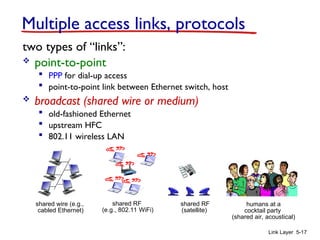
Multiple access links, protocols
two types of “links”:
 point-to-point
 PPP for dial-up access
 point-to-point link between Ethernet switch, host
 broadcast (shared wire or medium)
 old-fashioned Ethernet
 upstream HFC
 802.11 wireless LAN
shared wire (e.g.,
cabled Ethernet)
shared RF
(e.g., 802.11 WiFi)
shared RF
(satellite)
humans at a
cocktail party
(shared air, acoustical)
Link Layer 5-18
Multiple access protocols
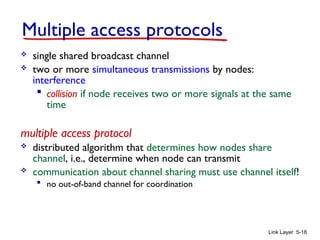
 single shared broadcast channel
 two or more simultaneous transmissions by nodes:
interference
 collision if node receives two or more signals at the same
time
multiple access protocol
 distributed algorithm that determines how nodes share
channel, i.e., determine when node can transmit
 communication about channel sharing must use channel itself!
 no out-of-band channel for coordination
Link Layer 5-19
An ideal multiple access protocol
given: broadcast channel of rate R bps
desiderata:
1. when one node wants to transmit, it can send at rate R.
2. when M nodes want to transmit, each can send at average
rate R/M
3. fully decentralized:
• no special node to coordinate transmissions
• no synchronization of clocks, slots
4. Simple
MAC: Media Access Control
Link Layer 5-20
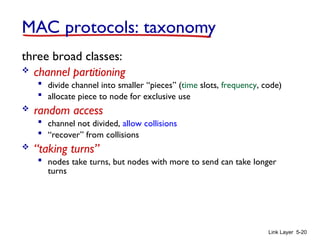
MAC protocols: taxonomy
three broad classes:
 channel partitioning
 divide channel into smaller “pieces” (time slots, frequency, code)
 allocate piece to node for exclusive use
 random access
 channel not divided, allow collisions
 “recover” from collisions
 “taking turns”
 nodes take turns, but nodes with more to send can take longer
turns
Link Layer 5-21
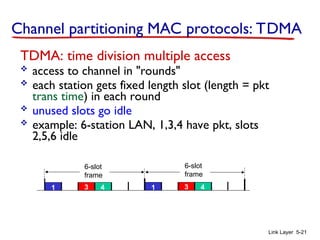
Channel partitioning MAC protocols: TDMA
TDMA: time division multiple access
 access to channel in "rounds"
 each station gets fixed length slot (length = pkt
trans time) in each round
 unused slots go idle
 example: 6-station LAN, 1,3,4 have pkt, slots
2,5,6 idle
1 3 4 1 3 4
6-slot
frame
6-slot
frame
Link Layer 5-22
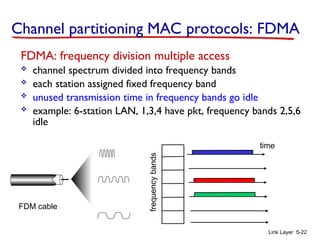
FDMA: frequency division multiple access
 channel spectrum divided into frequency bands
 each station assigned fixed frequency band
 unused transmission time in frequency bands go idle
 example: 6-station LAN, 1,3,4 have pkt, frequency bands 2,5,6
idle
frequency
bands
time
FDM cable
Channel partitioning MAC protocols: FDMA
Link Layer 5-23
Random access protocols
 when node has packet to send
 transmit at full channel data rate R.
 no a priori coordination among nodes
 two or more transmitting nodes ➜ “collision”,
 random access MAC protocol specifies:
 how to detect collisions
 how to recover from collisions (e.g., via delayed
retransmissions)
 examples of random access MAC protocols:
 slotted ALOHA
 ALOHA
 CSMA, CSMA/CD, CSMA/CA
Link Layer 5-24
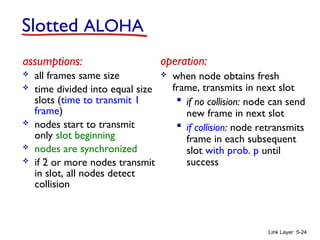
Slotted ALOHA
assumptions:
 all frames same size
 time divided into equal size
slots (time to transmit 1
frame)
 nodes start to transmit
only slot beginning
 nodes are synchronized
 if 2 or more nodes transmit
in slot, all nodes detect
collision
operation:
 when node obtains fresh
frame, transmits in next slot
 if no collision: node can send
new frame in next slot
 if collision: node retransmits
frame in each subsequent
slot with prob. p until
success
Link Layer 5-25
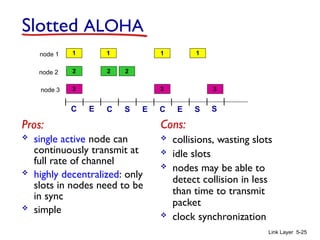
Pros:
 single active node can
continuously transmit at
full rate of channel
 highly decentralized: only
slots in nodes need to be
in sync
 simple
Cons:
 collisions, wasting slots
 idle slots
 nodes may be able to
detect collision in less
than time to transmit
packet
 clock synchronization
Slotted ALOHA
1 1 1 1
2
3
2 2
3 3
node 1
node 2
node 3
C C C
S S S
E E E
Link Layer 5-26
 suppose: N nodes with
many frames to send,
each transmits in slot with
probability p
 prob that given node has
success in a slot = p(1-
p)N-1
 prob that any node has a
success = Np(1-p)N-1
 max efficiency: find p* that
maximizes
Np(1-p)N-1
 for many nodes, take limit
of Np*(1-p*)N-1
as N goes
to infinity, gives:
max efficiency = 1/e = .37
efficiency: long-run
fraction of successful slots
(many nodes, all with many
frames to send)
at best: channel
used for useful
transmissions 37%
of time! !
Slotted ALOHA: efficiency
Link Layer 5-27
Pure (unslotted) ALOHA
 unslotted Aloha: simpler, no synchronization
 when frame first arrives
 transmit immediately
 collision probability increases:
 frame sent at t0 collides with other frames sent in [t0-
1,t0+1]
Link Layer 5-28
Pure ALOHA efficiency
P(success by given node) = P(node transmits) .
P(no other node transmits in [t0-1,t0] .
P(no other node transmits in [t0-1,t0]
= p . (1-p)N-1 . (1-p)N-1
= p . (1-p)2(N-1)
… choosing optimum p and then letting n
= 1/(2e) = .18
even worse than slotted Aloha!
Link Layer 5-29
CSMA (carrier sense multiple access)
CSMA: listen before transmit:
if channel sensed idle: transmit entire frame
 if channel sensed busy, defer transmission
 human analogy: don’t interrupt others!
Link Layer 5-30
CSMA collisions
 collisions can still occur:
propagation delay means
two nodes may not
hear each other’s
transmission
 collision: entire packet
transmission time
wasted
 distance & propagation
delay play role in in
determining collision
probability
spatial layout of nodes
A B
Link Layer 5-31
CSMA/CD (collision detection)
CSMA/CD: carrier sensing, deferral as in CSMA
 collisions detected within short time
 colliding transmissions aborted, reducing channel wastage
 collision detection:
 easy in wired LANs: measure signal strengths, compare
transmitted, received signals
 difficult in wireless LANs: received signal strength
overwhelmed by local transmission strength
 human analogy: the polite conversationalist
Link Layer 5-32
CSMA/CD (collision detection)
spatial layout of nodes
Link Layer 5-33
Ethernet CSMA/CD algorithm
1. NIC receives datagram
from network layer,
creates frame
2. If NIC senses channel
idle, starts frame
transmission. If NIC
senses channel busy,
waits until channel idle,
then transmits.
3. If NIC transmits entire
frame without detecting
another transmission,
NIC is done with frame !
4. If NIC detects another
transmission while
transmitting, aborts and
sends jam signal
5. After aborting, NIC enters
binary (exponential) backoff:
 after mth
collision, NIC
chooses K at random from
{0,1,2, …, 2m
-1}. NIC
waits K·512 bit times,
returns to Step 2
 longer backoff interval
with more collisions
Link Layer 5-34
CSMA/CD efficiency
 Tprop = max prop delay between 2 nodes in LAN
 ttrans = time to transmit max-size frame
 efficiency goes to 1
 as tprop goes to 0
 as ttrans goes to infinity
 better performance than ALOHA: and simple, cheap, decentralized!
trans
prop /t
t
efficiency
5
1
1


Link Layer 5-35
“Taking turns” MAC protocols
channel partitioning MAC protocols:
 share channel efficiently and fairly at high load
 inefficient at low load: delay in channel access, 1/N
bandwidth allocated even if only 1 active node!
random access MAC protocols
 efficient at low load: single node can fully utilize
channel
 high load: collision overhead
“taking turns” protocols
look for best of both worlds!
Link Layer 5-36
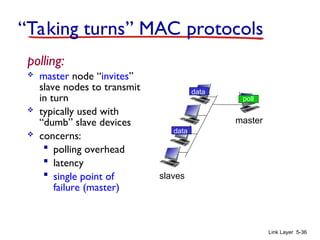
polling:
 master node “invites”
slave nodes to transmit
in turn
 typically used with
“dumb” slave devices
 concerns:
 polling overhead
 latency
 single point of
failure (master)
master
slaves
poll
data
data
“Taking turns” MAC protocols
Link Layer 5-37
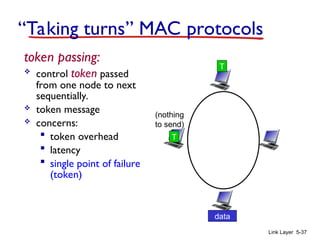
token passing:
 control token passed
from one node to next
sequentially.
 token message
 concerns:
 token overhead
 latency
 single point of failure
(token)
T
data
(nothing
to send)
T
“Taking turns” MAC protocols
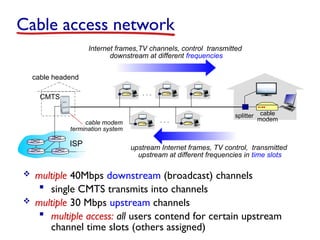
cable headend
CMTS
ISP
cable modem
termination system
 multiple 40Mbps downstream (broadcast) channels
 single CMTS transmits into channels
 multiple 30 Mbps upstream channels
 multiple access: all users contend for certain upstream
channel time slots (others assigned)
Cable access network
cable
modem
splitter
…
…
Internet frames,TV channels, control transmitted
downstream at different frequencies
upstream Internet frames, TV control, transmitted
upstream at different frequencies in time slots
Link Layer 5-39
DOCSIS: data over cable service interface spec
 FDM over upstream, downstream frequency channels
 TDM upstream: some slots assigned, some have
contention
 downstream MAP (bandwidth allocation map) frame:
assigns upstream slots
 request for upstream slots (and data) transmitted
MAP frame for
Interval [t1, t2]
Residences with cable modems
Downstream channel i
Upstream channel j
t1 t2
Assigned minislots containing cable modem
upstream data frames
Minislots containing
minislots request frames
cable headend
CMTS
Cable access network
Link Layer 5-40
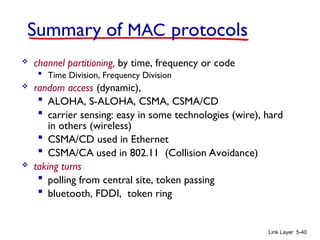
Summary of MAC protocols
 channel partitioning, by time, frequency or code
 Time Division, Frequency Division
 random access (dynamic),
 ALOHA, S-ALOHA, CSMA, CSMA/CD
 carrier sensing: easy in some technologies (wire), hard
in others (wireless)
 CSMA/CD used in Ethernet
 CSMA/CA used in 802.11 (Collision Avoidance)
 taking turns
 polling from central site, token passing
 bluetooth, FDDI, token ring
Link Layer 5-41
Link layer, LANs: outline
5.1 introduction, services
5.2 error detection,
correction
5.3 multiple access
protocols
5.4 LANs
 addressing, ARP
 Ethernet
 switches
 VLANS
5.5 link virtualization:
MPLS
5.6 data center
networking
5.7 a day in the life of a
web request
Link Layer 5-42
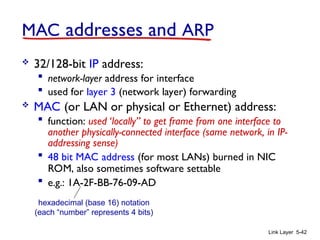
MAC addresses and ARP
 32/128-bit IP address:
 network-layer address for interface
 used for layer 3 (network layer) forwarding
 MAC (or LAN or physical or Ethernet) address:
 function: used ‘locally” to get frame from one interface to
another physically-connected interface (same network, in IP-
addressing sense)
 48 bit MAC address (for most LANs) burned in NIC
ROM, also sometimes software settable
 e.g.: 1A-2F-BB-76-09-AD
hexadecimal (base 16) notation
(each “number” represents 4 bits)
Link Layer 5-43
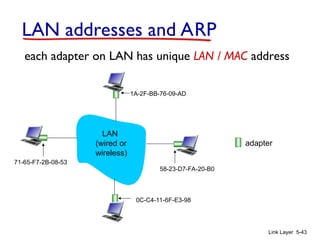
LAN addresses and ARP
each adapter on LAN has unique LAN / MAC address
adapter
1A-2F-BB-76-09-AD
58-23-D7-FA-20-B0
0C-C4-11-6F-E3-98
71-65-F7-2B-08-53
LAN
(wired or
wireless)
Link Layer 5-44
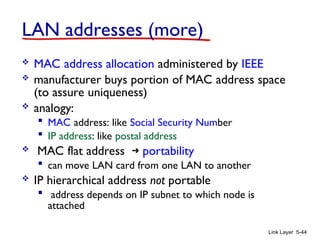
LAN addresses (more)
 MAC address allocation administered by IEEE
 manufacturer buys portion of MAC address space
(to assure uniqueness)
 analogy:
 MAC address: like Social Security Number
 IP address: like postal address
 MAC flat address ➜ portability
 can move LAN card from one LAN to another
 IP hierarchical address not portable
 address depends on IP subnet to which node is
attached
Link Layer 5-45
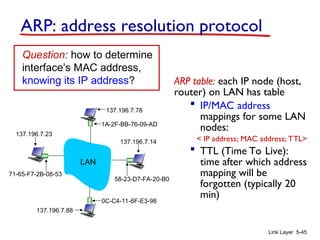
ARP: address resolution protocol
ARP table: each IP node (host,
router) on LAN has table
 IP/MAC address
mappings for some LAN
nodes:
< IP address; MAC address; TTL>
 TTL (Time To Live):
time after which address
mapping will be
forgotten (typically 20
min)
Question: how to determine
interface’s MAC address,
knowing its IP address?
1A-2F-BB-76-09-AD
58-23-D7-FA-20-B0
0C-C4-11-6F-E3-98
71-65-F7-2B-08-53
LAN
137.196.7.23
137.196.7.78
137.196.7.14
137.196.7.88
Link Layer 5-46
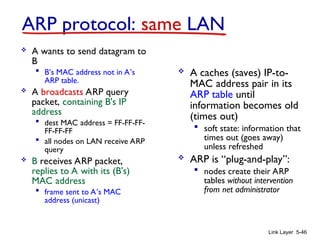
ARP protocol: same LAN
 A wants to send datagram to
B
 B’s MAC address not in A’s
ARP table.
 A broadcasts ARP query
packet, containing B's IP
address
 dest MAC address = FF-FF-FF-
FF-FF-FF
 all nodes on LAN receive ARP
query
 B receives ARP packet,
replies to A with its (B's)
MAC address
 frame sent to A’s MAC
address (unicast)
 A caches (saves) IP-to-
MAC address pair in its
ARP table until
information becomes old
(times out)
 soft state: information that
times out (goes away)
unless refreshed
 ARP is “plug-and-play”:
 nodes create their ARP
tables without intervention
from net administrator
Link Layer 5-47
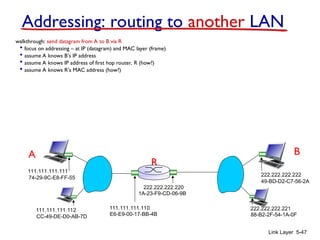
walkthrough: send datagram from A to B via R
 focus on addressing – at IP (datagram) and MAC layer (frame)
 assume A knows B’s IP address
 assume A knows IP address of first hop router, R (how?)
 assume A knows R’s MAC address (how?)
Addressing: routing to another LAN
R
1A-23-F9-CD-06-9B
222.222.222.220
111.111.111.110
E6-E9-00-17-BB-4B
CC-49-DE-D0-AB-7D
111.111.111.112
111.111.111.111
74-29-9C-E8-FF-55
A
222.222.222.222
49-BD-D2-C7-56-2A
222.222.222.221
88-B2-2F-54-1A-0F
B
R
1A-23-F9-CD-06-9B
222.222.222.220
111.111.111.110
E6-E9-00-17-BB-4B
CC-49-DE-D0-AB-7D
111.111.111.112
111.111.111.111
74-29-9C-E8-FF-55
A
222.222.222.222
49-BD-D2-C7-56-2A
222.222.222.221
88-B2-2F-54-1A-0F
B
Link Layer 5-48
Addressing: routing to another LAN
IP
Eth
Phy
IP src: 111.111.111.111
IP dest: 222.222.222.222
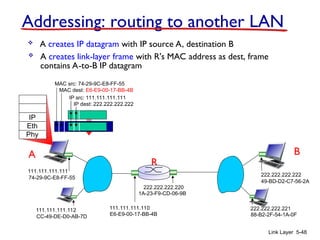
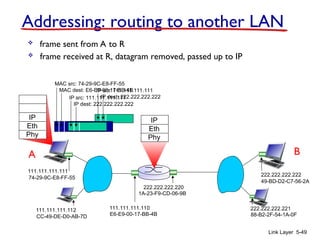
 A creates IP datagram with IP source A, destination B
 A creates link-layer frame with R's MAC address as dest, frame
contains A-to-B IP datagram
MAC src: 74-29-9C-E8-FF-55
MAC dest: E6-E9-00-17-BB-4B
R
1A-23-F9-CD-06-9B
222.222.222.220
111.111.111.110
E6-E9-00-17-BB-4B
CC-49-DE-D0-AB-7D
111.111.111.112
111.111.111.111
74-29-9C-E8-FF-55
A
222.222.222.222
49-BD-D2-C7-56-2A
222.222.222.221
88-B2-2F-54-1A-0F
B
Link Layer 5-49
Addressing: routing to another LAN
IP
Eth
Phy
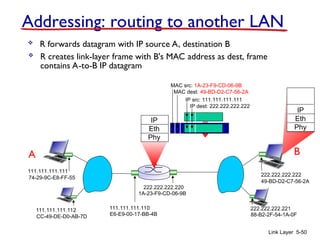
 frame sent from A to R
IP
Eth
Phy
 frame received at R, datagram removed, passed up to IP
MAC src: 74-29-9C-E8-FF-55
MAC dest: E6-E9-00-17-BB-4B
IP src: 111.111.111.111
IP dest: 222.222.222.222
IP src: 111.111.111.111
IP dest: 222.222.222.222
R
1A-23-F9-CD-06-9B
222.222.222.220
111.111.111.110
E6-E9-00-17-BB-4B
CC-49-DE-D0-AB-7D
111.111.111.112
111.111.111.111
74-29-9C-E8-FF-55
A
222.222.222.222
49-BD-D2-C7-56-2A
222.222.222.221
88-B2-2F-54-1A-0F
B
Link Layer 5-50
Addressing: routing to another LAN
IP src: 111.111.111.111
IP dest: 222.222.222.222
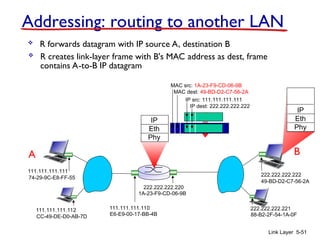
 R forwards datagram with IP source A, destination B
 R creates link-layer frame with B's MAC address as dest, frame
contains A-to-B IP datagram
MAC src: 1A-23-F9-CD-06-9B
MAC dest: 49-BD-D2-C7-56-2A
IP
Eth
Phy
IP
Eth
Phy
R
1A-23-F9-CD-06-9B
222.222.222.220
111.111.111.110
E6-E9-00-17-BB-4B
CC-49-DE-D0-AB-7D
111.111.111.112
111.111.111.111
74-29-9C-E8-FF-55
A
222.222.222.222
49-BD-D2-C7-56-2A
222.222.222.221
88-B2-2F-54-1A-0F
B
Link Layer 5-51
Addressing: routing to another LAN
 R forwards datagram with IP source A, destination B
 R creates link-layer frame with B's MAC address as dest, frame
contains A-to-B IP datagram
IP src: 111.111.111.111
IP dest: 222.222.222.222
MAC src: 1A-23-F9-CD-06-9B
MAC dest: 49-BD-D2-C7-56-2A
IP
Eth
Phy
IP
Eth
Phy
R
1A-23-F9-CD-06-9B
222.222.222.220
111.111.111.110
E6-E9-00-17-BB-4B
CC-49-DE-D0-AB-7D
111.111.111.112
111.111.111.111
74-29-9C-E8-FF-55
A
222.222.222.222
49-BD-D2-C7-56-2A
222.222.222.221
88-B2-2F-54-1A-0F
B
Link Layer 5-52
Addressing: routing to another LAN
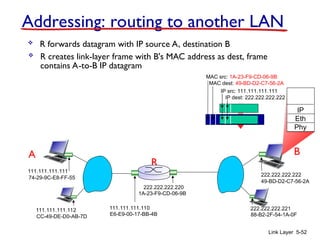
 R forwards datagram with IP source A, destination B
 R creates link-layer frame with B's MAC address as dest, frame
contains A-to-B IP datagram
IP src: 111.111.111.111
IP dest: 222.222.222.222
MAC src: 1A-23-F9-CD-06-9B
MAC dest: 49-BD-D2-C7-56-2A
IP
Eth
Phy
Link Layer 5-53
Link layer, LANs: outline
5.1 introduction, services
5.2 error detection,
correction
5.3 multiple access
protocols
5.4 LANs
 addressing, ARP
 Ethernet
 switches
 VLANS
5.5 link virtualization:
MPLS
5.6 data center
networking
5.7 a day in the life of a
web request
Link Layer 5-54
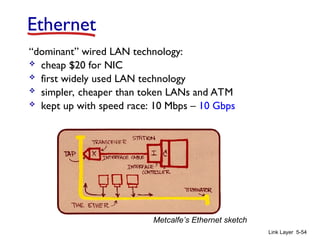
Ethernet
“dominant” wired LAN technology:
 cheap $20 for NIC
 first widely used LAN technology
 simpler, cheaper than token LANs and ATM
 kept up with speed race: 10 Mbps – 10 Gbps
Metcalfe’s Ethernet sketch
Link Layer 5-55
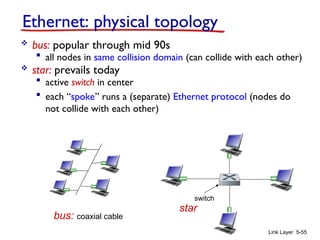
Ethernet: physical topology
 bus: popular through mid 90s
 all nodes in same collision domain (can collide with each other)
 star: prevails today
 active switch in center
 each “spoke” runs a (separate) Ethernet protocol (nodes do
not collide with each other)
switch
bus: coaxial cable
star
Link Layer 5-56
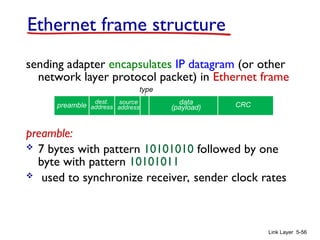
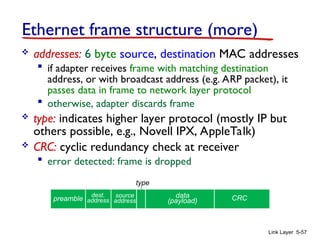
Ethernet frame structure
sending adapter encapsulates IP datagram (or other
network layer protocol packet) in Ethernet frame
preamble:
 7 bytes with pattern 10101010 followed by one
byte with pattern 10101011
 used to synchronize receiver, sender clock rates
dest.
address
source
address
data
(payload) CRC
preamble
type
Link Layer 5-57
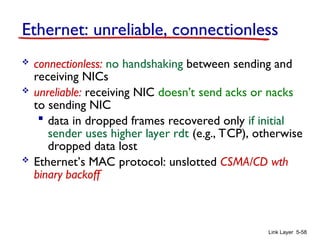
Ethernet frame structure (more)
 addresses: 6 byte source, destination MAC addresses
 if adapter receives frame with matching destination
address, or with broadcast address (e.g. ARP packet), it
passes data in frame to network layer protocol
 otherwise, adapter discards frame
 type: indicates higher layer protocol (mostly IP but
others possible, e.g., Novell IPX, AppleTalk)
 CRC: cyclic redundancy check at receiver
 error detected: frame is dropped
dest.
address
source
address
data
(payload) CRC
preamble
type
Link Layer 5-58
Ethernet: unreliable, connectionless
 connectionless: no handshaking between sending and
receiving NICs
 unreliable: receiving NIC doesn’t send acks or nacks
to sending NIC
 data in dropped frames recovered only if initial
sender uses higher layer rdt (e.g., TCP), otherwise
dropped data lost
 Ethernet’s MAC protocol: unslotted CSMA/CD wth
binary backoff
Link Layer 5-59
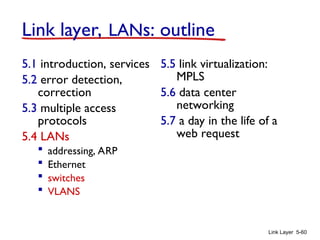
802.3 Ethernet standards: link & physical layers
 many different Ethernet standards
 common MAC protocol and frame format
 different speeds: 2 Mbps, 10 Mbps, 100 Mbps, 1Gbps,
10G bps
 different physical layer media: fiber, cable
application
transport
network
link
physical
MAC protocol
and frame format
100BASE-TX
100BASE-T4
100BASE-FX
100BASE-T2
100BASE-SX 100BASE-BX
fiber physical layer
copper (twister
pair) physical layer
Link Layer 5-60
Link layer, LANs: outline
5.1 introduction, services
5.2 error detection,
correction
5.3 multiple access
protocols
5.4 LANs
 addressing, ARP
 Ethernet
 switches
 VLANS
5.5 link virtualization:
MPLS
5.6 data center
networking
5.7 a day in the life of a
web request
Link Layer 5-61
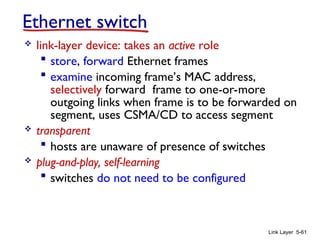
Ethernet switch
 link-layer device: takes an active role
 store, forward Ethernet frames
 examine incoming frame’s MAC address,
selectively forward frame to one-or-more
outgoing links when frame is to be forwarded on
segment, uses CSMA/CD to access segment
 transparent
 hosts are unaware of presence of switches
 plug-and-play, self-learning
 switches do not need to be configured
Link Layer 5-62
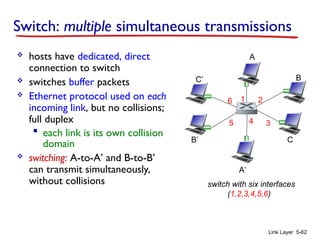
Switch: multiple simultaneous transmissions
 hosts have dedicated, direct
connection to switch
 switches buffer packets
 Ethernet protocol used on each
incoming link, but no collisions;
full duplex
 each link is its own collision
domain
 switching: A-to-A’ and B-to-B’
can transmit simultaneously,
without collisions switch with six interfaces
(1,2,3,4,5,6)
A
A’
B
B’ C
C’
1 2
3
4
5
6
Link Layer 5-63
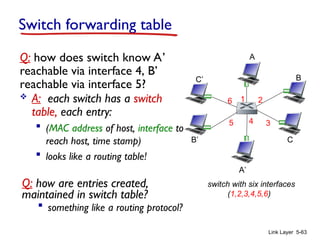
Switch forwarding table
Q: how does switch know A’
reachable via interface 4, B’
reachable via interface 5?
switch with six interfaces
(1,2,3,4,5,6)
A
A’
B
B’ C
C’
1 2
3
4
5
6
 A: each switch has a switch
table, each entry:
 (MAC address of host, interface to
reach host, time stamp)
 looks like a routing table!
Q: how are entries created,
maintained in switch table?
 something like a routing protocol?
A
A’
B
B’ C
C’
1 2
3
4
5
6
Link Layer 5-64
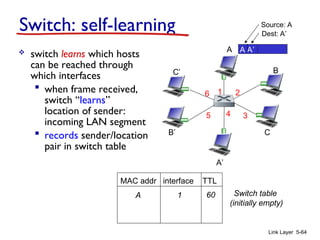
Switch: self-learning
 switch learns which hosts
can be reached through
which interfaces
 when frame received,
switch “learns”
location of sender:
incoming LAN segment
 records sender/location
pair in switch table
A A’
Source: A
Dest: A’
MAC addr interface TTL
Switch table
(initially empty)
A 1 60
Link Layer 5-65
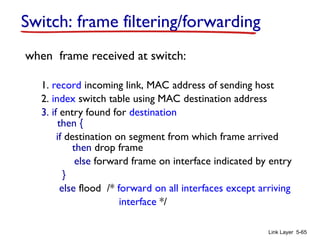
Switch: frame filtering/forwarding
when frame received at switch:
1. record incoming link, MAC address of sending host
2. index switch table using MAC destination address
3. if entry found for destination
then {
if destination on segment from which frame arrived
then drop frame
else forward frame on interface indicated by entry
}
else flood /* forward on all interfaces except arriving
interface */
A
A’
B
B’ C
C’
1 2
3
4
5
6
Link Layer 5-66
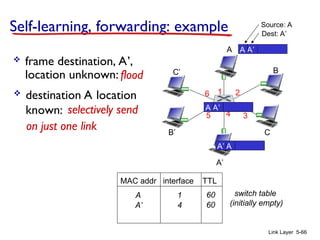
Self-learning, forwarding: example
A A’
Source: A
Dest: A’
MAC addr interface TTL
switch table
(initially empty)
A 1 60
A A’
A A’
A A’
A A’
A A’
 frame destination, A’,
location unknown: flood
A’ A
 destination A location
known:
A’ 4 60
selectively send
on just one link
Link Layer 5-67
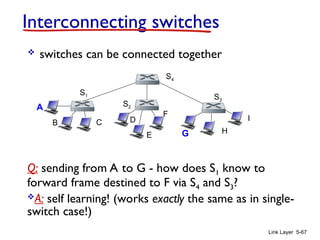
Interconnecting switches
 switches can be connected together
Q: sending from A to G - how does S1 know to
forward frame destined to F via S4 and S3?
A: self learning! (works exactly the same as in single-
switch case!)
A
B
S1
C D
E
F
S2
S4
S3
H
I
G
Link Layer 5-68
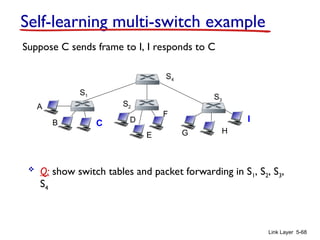
Self-learning multi-switch example
Suppose C sends frame to I, I responds to C
 Q: show switch tables and packet forwarding in S1, S2, S3,
S4
A
B
S1
C D
E
F
S2
S4
S3
H
I
G
Link Layer 5-69
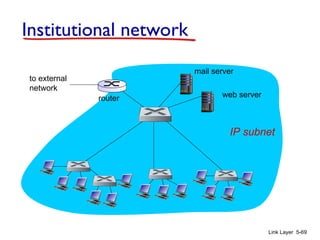
Institutional network
to external
network
router
IP subnet
mail server
web server
Link Layer 5-70
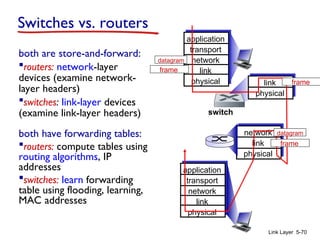
Switches vs. routers
both are store-and-forward:
routers: network-layer
devices (examine network-
layer headers)
switches: link-layer devices
(examine link-layer headers)
both have forwarding tables:
routers: compute tables using
routing algorithms, IP
addresses
switches: learn forwarding
table using flooding, learning,
MAC addresses
application
transport
network
link
physical
network
link
physical
link
physical
switch
datagram
application
transport
network
link
physical
frame
frame
frame
datagram
Link Layer 5-71
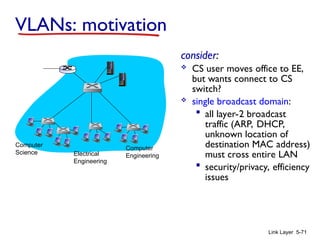
VLANs: motivation
consider:
 CS user moves office to EE,
but wants connect to CS
switch?
 single broadcast domain:
 all layer-2 broadcast
traffic (ARP, DHCP,
unknown location of
destination MAC address)
must cross entire LAN
 security/privacy, efficiency
issues
Computer
Science Electrical
Engineering
Computer
Engineering
Link Layer 5-72
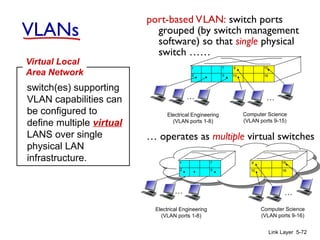
VLANs
port-based VLAN: switch ports
grouped (by switch management
software) so that single physical
switch ……
switch(es) supporting
VLAN capabilities can
be configured to
define multiple virtual
LANS over single
physical LAN
infrastructure.
Virtual Local
Area Network
1
8
9
16
10
2
7
…
Electrical Engineering
(VLAN ports 1-8)
Computer Science
(VLAN ports 9-15)
15
…
Electrical Engineering
(VLAN ports 1-8)
…
1
8
2
7 9
16
10
15
…
Computer Science
(VLAN ports 9-16)
… operates as multiple virtual switches
Link Layer 5-73
Port-based VLAN
1
8
9
16
10
2
7
…
Electrical Engineering
(VLAN ports 1-8)
Computer Science
(VLAN ports 9-15)
15
…
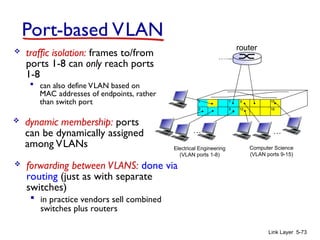
 traffic isolation: frames to/from
ports 1-8 can only reach ports
1-8
 can also define VLAN based on
MAC addresses of endpoints, rather
than switch port
 dynamic membership: ports
can be dynamically assigned
among VLANs
router
 forwarding between VLANS: done via
routing (just as with separate
switches)
 in practice vendors sell combined
switches plus routers
Link Layer 5-74
VLANS spanning multiple switches
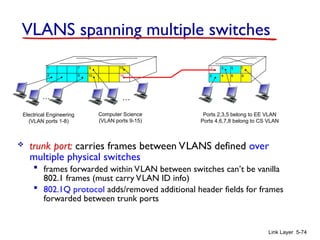
 trunk port: carries frames between VLANS defined over
multiple physical switches
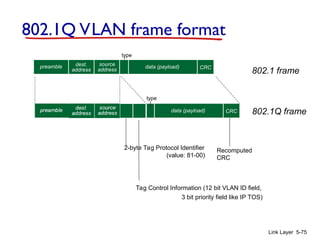
 frames forwarded within VLAN between switches can’t be vanilla
802.1 frames (must carry VLAN ID info)
 802.1Q protocol adds/removed additional header fields for frames
forwarded between trunk ports
1
8
9
10
2
7
…
Electrical Engineering
(VLAN ports 1-8)
Computer Science
(VLAN ports 9-15)
15
…
2
7
3
Ports 2,3,5 belong to EE VLAN
Ports 4,6,7,8 belong to CS VLAN
5
4 6 8
16
1
Link Layer 5-75
type
2-byte Tag Protocol Identifier
(value: 81-00)
Tag Control Information (12 bit VLAN ID field,
3 bit priority field like IP TOS)
Recomputed
CRC
802.1Q VLAN frame format
802.1 frame
802.1Q frame
dest.
address
source
address
data (payload) CRC
preamble
data (payload) CRC
type
Link Layer 5-76
Link layer, LANs: outline
5.1 introduction, services
5.2 error detection,
correction
5.3 multiple access
protocols
5.4 LANs
 addressing, ARP
 Ethernet
 switches
 VLANS
5.5 link virtualization:
MPLS
5.6 data center
networking
5.7 a day in the life of a
web request
Link Layer 5-77
Multiprotocol label switching (MPLS)
 initial goal: high-speed IP forwarding using fixed
length label (instead of IP address)
 fast lookup using fixed length identifier (rather than
shortest prefix matching)
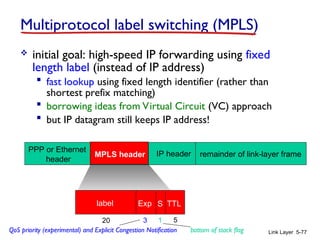
 borrowing ideas from Virtual Circuit (VC) approach
 but IP datagram still keeps IP address!
PPP or Ethernet
header
IP header remainder of link-layer frame
MPLS header
label Exp S TTL
20 3 1 5
QoS priority (experimental) and Explicit Congestion Notification bottom of stack flag
Link Layer 5-78
MPLS capable routers
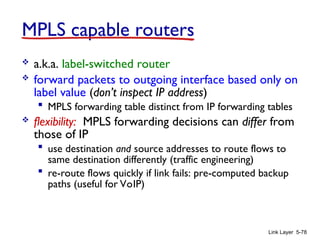
 a.k.a. label-switched router
 forward packets to outgoing interface based only on
label value (don’t inspect IP address)
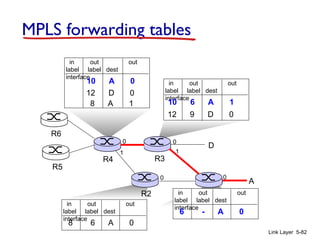
 MPLS forwarding table distinct from IP forwarding tables
 flexibility: MPLS forwarding decisions can differ from
those of IP
 use destination and source addresses to route flows to
same destination differently (traffic engineering)
 re-route flows quickly if link fails: pre-computed backup
paths (useful for VoIP)
Link Layer 5-79
R2
D
R3
R5
A
R6
MPLS versus IP paths
IP router
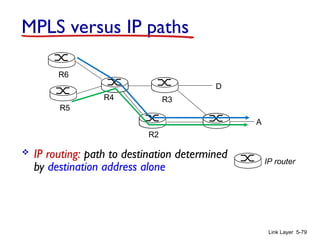
 IP routing: path to destination determined
by destination address alone
R4
Link Layer 5-80
R2
D
R3
R4
R5
A
R6
MPLS versus IP paths
IP-only
router
 IP routing: path to destination determined
by destination address alone
MPLS and
IP router
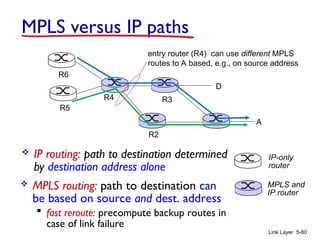
 MPLS routing: path to destination can
be based on source and dest. address
 fast reroute: precompute backup routes in
case of link failure
entry router (R4) can use different MPLS
routes to A based, e.g., on source address
Link Layer 5-81
MPLS signaling
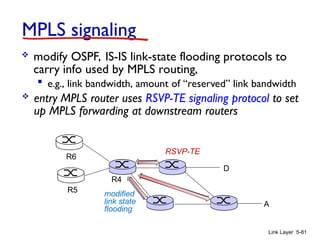
 modify OSPF, IS-IS link-state flooding protocols to
carry info used by MPLS routing,
 e.g., link bandwidth, amount of “reserved” link bandwidth
D
R4
R5
A
R6
 entry MPLS router uses RSVP-TE signaling protocol to set
up MPLS forwarding at downstream routers
modified
link state
flooding
RSVP-TE
Link Layer 5-82
R1
R2
D
R3
R4
R5
0
1
0
0
A
R6
in out out
label label dest
interface
6 - A 0
in out out
label label dest
interface
10 6 A 1
12 9 D 0
in out out
label label dest
interface
10 A 0
12 D 0
1
in out out
label label dest
interface
8 6 A 0
0
8 A 1
MPLS forwarding tables
Link Layer 5-83
Link layer, LANs: outline
5.1 introduction, services
5.2 error detection,
correction
5.3 multiple access
protocols
5.4 LANs
 addressing, ARP
 Ethernet
 switches
 VLANS
5.5 link virtualization:
MPLS
5.6 data center
networking
5.7 a day in the life of a
web request
Link Layer 5-84
Data center networks
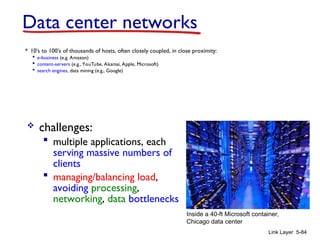
 10’s to 100’s of thousands of hosts, often closely coupled, in close proximity:
 e-business (e.g. Amazon)
 content-servers (e.g., YouTube, Akamai, Apple, Microsoft)
 search engines, data mining (e.g., Google)
 challenges:
 multiple applications, each
serving massive numbers of
clients
 managing/balancing load,
avoiding processing,
networking, data bottlenecks
Inside a 40-ft Microsoft container,
Chicago data center
Link Layer 5-85
Server racks
TOR (top-of-rack) switches
Tier-1 switches
Tier-2 switches
Load
balancer
Load
balancer
B
1 2 3 4 5 6 7 8
A C
Border router
Access router
Internet
Data center networks
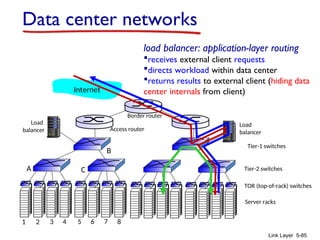
load balancer: application-layer routing
receives external client requests
directs workload within data center
returns results to external client (hiding data
center internals from client)
Server racks
TOR
switches
Tier-1 switches
Tier-2 switches
1 2 3 4 5 6 7 8
Data center networks
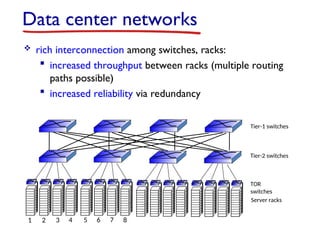
 rich interconnection among switches, racks:
 increased throughput between racks (multiple routing
paths possible)
 increased reliability via redundancy
Link Layer 5-87
Link layer, LANs: outline
5.1 introduction, services
5.2 error detection,
correction
5.3 multiple access
protocols
5.4 LANs
 addressing, ARP
 Ethernet
 switches
 VLANS
5.5 link virtualization:
MPLS
5.6 data center
networking
5.7 a day in the life of a
web request
Link Layer 5-88
Synthesis: a day in the life of a web request
 journey down protocol stack complete!
 application, transport, network, link
 putting-it-all-together: synthesis!
 goal: identify, review, understand protocols (at all
layers) involved in seemingly simple scenario:
requesting www page
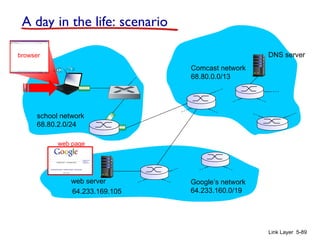
 scenario: student attaches laptop to campus network,
requests/receives www.google.com
Link Layer 5-89
A day in the life: scenario
Comcast network
68.80.0.0/13
Google’s network
64.233.160.0/19
64.233.169.105
web server
DNS server
school network
68.80.2.0/24
web page
browser
router
(runs DHCP)
Link Layer 5-90
A day in the life… connecting to the Internet
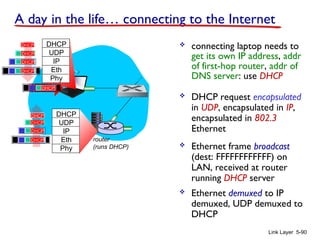
 connecting laptop needs to
get its own IP address, addr
of first-hop router, addr of
DNS server: use DHCP
DHCP
UDP
IP
Eth
Phy
DHCP
DHCP
DHCP
DHCP
DHCP
DHCP
UDP
IP
Eth
Phy
DHCP
DHCP
DHCP
DHCP
DHCP
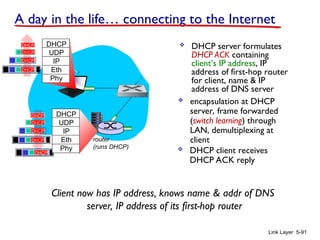
 DHCP request encapsulated
in UDP, encapsulated in IP,
encapsulated in 802.3
Ethernet
 Ethernet frame broadcast
(dest: FFFFFFFFFFFF) on
LAN, received at router
running DHCP server
 Ethernet demuxed to IP
demuxed, UDP demuxed to
DHCP
router
(runs DHCP)
Link Layer 5-91
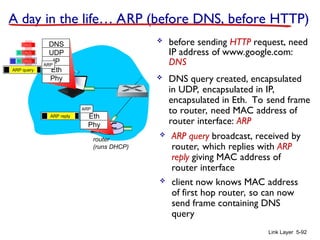
 DHCP server formulates
DHCP ACK containing
client’s IP address, IP
address of first-hop router
for client, name & IP
address of DNS server
DHCP
UDP
IP
Eth
Phy
DHCP
DHCP
DHCP
DHCP
DHCP
UDP
IP
Eth
Phy
DHCP
DHCP
DHCP
DHCP
DHCP
 encapsulation at DHCP
server, frame forwarded
(switch learning) through
LAN, demultiplexing at
client
Client now has IP address, knows name & addr of DNS
server, IP address of its first-hop router
 DHCP client receives
DHCP ACK reply
A day in the life… connecting to the Internet
router
(runs DHCP)
Link Layer 5-92
A day in the life… ARP (before DNS, before HTTP)
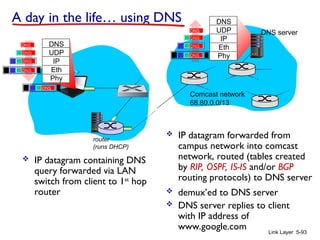
 before sending HTTP request, need
IP address of www.google.com:
DNS
DNS
UDP
IP
Eth
Phy
DNS
DNS
DNS
 DNS query created, encapsulated
in UDP, encapsulated in IP,
encapsulated in Eth. To send frame
to router, need MAC address of
router interface: ARP
 ARP query broadcast, received by
router, which replies with ARP
reply giving MAC address of
router interface
 client now knows MAC address
of first hop router, so can now
send frame containing DNS
query
ARP query
Eth
Phy
ARP
ARP
ARP reply
router
(runs DHCP)
Link Layer 5-93
DNS
UDP
IP
Eth
Phy
DNS
DNS
DNS
DNS
DNS
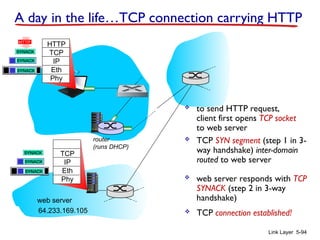
 IP datagram containing DNS
query forwarded via LAN
switch from client to 1st
hop
router
 IP datagram forwarded from
campus network into comcast
network, routed (tables created
by RIP, OSPF, IS-IS and/or BGP
routing protocols) to DNS server
 demux’ed to DNS server
 DNS server replies to client
with IP address of
www.google.com
Comcast network
68.80.0.0/13
DNS server
DNS
UDP
IP
Eth
Phy
DNS
DNS
DNS
DNS
A day in the life… using DNS
router
(runs DHCP)
Link Layer 5-94
A day in the life…TCP connection carrying HTTP
HTTP
TCP
IP
Eth
Phy
HTTP
 to send HTTP request,
client first opens TCP socket
to web server
 TCP SYN segment (step 1 in 3-
way handshake) inter-domain
routed to web server
 TCP connection established!
64.233.169.105
web server
SYN
SYN
SYN
SYN
TCP
IP
Eth
Phy
SYN
SYN
SYN
SYNACK
SYNACK
SYNACK
SYNACK
SYNACK
SYNACK
SYNACK
 web server responds with TCP
SYNACK (step 2 in 3-way
handshake)
router
(runs DHCP)
Link Layer 5-95
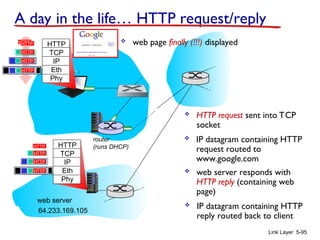
A day in the life… HTTP request/reply
HTTP
TCP
IP
Eth
Phy
HTTP
 HTTP request sent into TCP
socket
 IP datagram containing HTTP
request routed to
www.google.com
 IP datagram containing HTTP
reply routed back to client
64.233.169.105
web server
HTTP
TCP
IP
Eth
Phy
 web server responds with
HTTP reply (containing web
page)
HTTP
HTTP
HTTP
HTTP
HTTP
HTTP
HTTP
HTTP
HTTP
HTTP
HTTP
HTTP
HTTP
 web page finally (!!!) displayed
Link Layer 5-96
Chapter 5: Summary
 principles behind data link layer services:
 error detection, correction
 sharing a broadcast channel: multiple access
 link layer addressing
 instantiation and implementation of various link
layer technologies
 Ethernet
 switched LANS, VLANs
 virtualized networks as a link layer: MPLS
 synthesis: a day in the life of a web request
Link Layer 5-97
Chapter 5: let’s take a breath
 journey down protocol stack complete (except
PHY)
 solid understanding of networking principles,
practice
 ….. could stop here …. but lots of interesting
topics!
 wireless
 multimedia
 security
 network management

LINK LAYER Computer networks engineering

  • 1.
    Chapter 5 Link Layer Computer Networking:A Top Down Approach 6th edition Jim Kurose, Keith Ross Addison-Wesley March 2012 A note on the use of these ppt slides: We’re making these slides freely available to all (faculty, students, readers). They’re in PowerPoint form so you see the animations; and can add, modify, and delete slides (including this one) and slide content to suit your needs. They obviously represent a lot of work on our part. In return for use, we only ask the following:  If you use these slides (e.g., in a class) that you mention their source (after all, we’d like people to use our book!)  If you post any slides on a www site, that you note that they are adapted from (or perhaps identical to) our slides, and note our copyright of this material. Thanks and enjoy! JFK/KWR All material copyright 1996-2012 J.F Kurose and K.W. Ross, All Rights Reserved Link Layer 5-1
  • 2.
    Link Layer 5-2 Chapter5: Link layer our goals:  understand principles behind link layer services:  error detection, correction  sharing a broadcast channel: multiple access  link layer addressing  local area networks: Ethernet, VLANs  instantiation, implementation of various link layer technologies
  • 3.
    Link Layer 5-3 Linklayer, LANs: outline 5.1 introduction, services 5.2 error detection, correction 5.3 multiple access protocols 5.4 LANs  addressing, ARP  Ethernet  switches  VLANS 5.5 link virtualization: MPLS 5.6 data center networking 5.7 a day in the life of a web request
  • 4.
    Link Layer 5-4 Linklayer: introduction terminology:  hosts and routers: nodes  communication channels that connect adjacent nodes along communication path: links  wired links  wireless links  LANs  layer-2 packet: frame, encapsulates datagram data-link layer has responsibility of transferring datagram from one node to physically adjacent node over a link global ISP
  • 5.
    Link Layer 5-5 Linklayer: context  datagram transferred by different link protocols over different links:  e.g., Ethernet on first link, frame relay on intermediate links, 802.11 on last link  Each link protocol provides different services  e.g., may or may not provide rdt over link transportation analogy:  trip from Princeton to Lausanne  limo: Princeton to JFK  plane: JFK to Geneva  train: Geneva to Lausanne  tourist = datagram  transport segment = communication link  transportation mode = link layer protocol  travel agent = routing algorithm
  • 6.
    Link Layer 5-6 Linklayer services  framing, link access:  encapsulate datagram into frame, adding header, trailer  channel access if shared medium  “MAC” addresses used in frame headers to identify source, dest • different from IP address!  reliable delivery between adjacent nodes  we learned how to do this already (chapter 3)!  seldom used on low bit-error link (fiber, some twisted pair)  wireless links: high error rates • Q: why both link-level and end-end reliability? A: correcting errors locally, rather than end-end
  • 7.
    Link Layer 5-7 flow control:  pacing between adjacent sending and receiving nodes  error detection:  errors caused by signal attenuation, noise.  receiver detects presence of errors: • signals sender for retransmission or drops frame  error correction:  receiver identifies and corrects bit error(s) without resorting to retransmission  half-duplex and full-duplex  with half duplex, nodes at both ends of link can transmit, but not at same time Link layer services (more)
  • 8.
    Link Layer 5-8 Whereis the link layer implemented?  in each and every host  link layer implemented in “adaptor” (aka network interface card NIC) or on a chip  Ethernet card, 802.11 card; Ethernet chipset  implements link, physical layer  attaches into host’s system buses  combination of hardware, software, firmware controller physical transmission cpu memory host bus (e.g., PCI) network adapter card application transport network link link physical
  • 9.
    Link Layer 5-9 Adaptorscommunicating  sending side:  encapsulates datagram in frame  adds error checking bits, rdt, flow control, etc.  receiving side  looks for errors, rdt, flow control, etc  extracts datagram, passes to upper layer at receiving side controller controller sending host receiving host datagram datagram datagram frame
  • 10.
    Link Layer 5-10 Linklayer, LANs: outline 5.1 introduction, services 5.2 error detection, correction 5.3 multiple access protocols 5.4 LANs  addressing, ARP  Ethernet  switches  VLANS 5.5 link virtualization: MPLS 5.6 data center networking 5.7 a day in the life of a web request
  • 11.
    Link Layer 5-11 Errordetection EDC= Error Detection and Correction bits (redundancy) D = Data protected by error checking, may include header fields • Error detection not 100% reliable! • protocol may miss some errors, but rarely • larger EDC field yields better detection and correction otherwise
  • 12.
    Link Layer 5-12 Paritychecking single bit parity:  detect single bit errors two-dimensional bit parity:  detect and correct single bit errors 0 0
  • 13.
    Link Layer 5-13 Internetchecksum (review) sender:  treat segment contents as sequence of 16-bit integers  checksum: addition (1’s complement sum) of segment contents  sender puts checksum value into UDP checksum field receiver:  compute checksum of received segment  check if computed checksum equals checksum field value:  NO - error detected  YES - no error detected. But maybe errors nonetheless? goal: detect “errors” (e.g., flipped bits) in transmitted packet (note: used at transport layer only)
  • 14.
    Link Layer 5-14 Cyclicredundancy check  more powerful error-detection coding  view data bits, D, as a binary number  choose r+1 bit pattern (generator), G  goal: choose r CRC bits, R, such that  <D,R> exactly divisible by G (modulo 2)  receiver knows G, divides <D,R> by G. If non-zero remainder: error detected!  can detect all burst errors less than r+1 bits  widely used in practice (Ethernet, 802.11 WiFi, ATM)
  • 15.
    Link Layer 5-15 CRCexample want: D.2r XOR R = nG equivalently: D.2r = nG XOR R equivalently: if we divide D.2r by G, want remainder R to satisfy: R = remainder[ ] D.2r G Modulo-2 arithmetic without carries in addition or borrows in subtraction r=3
  • 16.
    Link Layer 5-16 Linklayer, LANs: outline 5.1 introduction, services 5.2 error detection, correction 5.3 multiple access protocols 5.4 LANs  addressing, ARP  Ethernet  switches  VLANS 5.5 link virtualization: MPLS 5.6 data center networking 5.7 a day in the life of a web request
  • 17.
    Link Layer 5-17 Multipleaccess links, protocols two types of “links”:  point-to-point  PPP for dial-up access  point-to-point link between Ethernet switch, host  broadcast (shared wire or medium)  old-fashioned Ethernet  upstream HFC  802.11 wireless LAN shared wire (e.g., cabled Ethernet) shared RF (e.g., 802.11 WiFi) shared RF (satellite) humans at a cocktail party (shared air, acoustical)
  • 18.
    Link Layer 5-18 Multipleaccess protocols  single shared broadcast channel  two or more simultaneous transmissions by nodes: interference  collision if node receives two or more signals at the same time multiple access protocol  distributed algorithm that determines how nodes share channel, i.e., determine when node can transmit  communication about channel sharing must use channel itself!  no out-of-band channel for coordination
  • 19.
    Link Layer 5-19 Anideal multiple access protocol given: broadcast channel of rate R bps desiderata: 1. when one node wants to transmit, it can send at rate R. 2. when M nodes want to transmit, each can send at average rate R/M 3. fully decentralized: • no special node to coordinate transmissions • no synchronization of clocks, slots 4. Simple MAC: Media Access Control
  • 20.
    Link Layer 5-20 MACprotocols: taxonomy three broad classes:  channel partitioning  divide channel into smaller “pieces” (time slots, frequency, code)  allocate piece to node for exclusive use  random access  channel not divided, allow collisions  “recover” from collisions  “taking turns”  nodes take turns, but nodes with more to send can take longer turns
  • 21.
    Link Layer 5-21 Channelpartitioning MAC protocols: TDMA TDMA: time division multiple access  access to channel in "rounds"  each station gets fixed length slot (length = pkt trans time) in each round  unused slots go idle  example: 6-station LAN, 1,3,4 have pkt, slots 2,5,6 idle 1 3 4 1 3 4 6-slot frame 6-slot frame
  • 22.
    Link Layer 5-22 FDMA:frequency division multiple access  channel spectrum divided into frequency bands  each station assigned fixed frequency band  unused transmission time in frequency bands go idle  example: 6-station LAN, 1,3,4 have pkt, frequency bands 2,5,6 idle frequency bands time FDM cable Channel partitioning MAC protocols: FDMA
  • 23.
    Link Layer 5-23 Randomaccess protocols  when node has packet to send  transmit at full channel data rate R.  no a priori coordination among nodes  two or more transmitting nodes ➜ “collision”,  random access MAC protocol specifies:  how to detect collisions  how to recover from collisions (e.g., via delayed retransmissions)  examples of random access MAC protocols:  slotted ALOHA  ALOHA  CSMA, CSMA/CD, CSMA/CA
  • 24.
    Link Layer 5-24 SlottedALOHA assumptions:  all frames same size  time divided into equal size slots (time to transmit 1 frame)  nodes start to transmit only slot beginning  nodes are synchronized  if 2 or more nodes transmit in slot, all nodes detect collision operation:  when node obtains fresh frame, transmits in next slot  if no collision: node can send new frame in next slot  if collision: node retransmits frame in each subsequent slot with prob. p until success
  • 25.
    Link Layer 5-25 Pros: single active node can continuously transmit at full rate of channel  highly decentralized: only slots in nodes need to be in sync  simple Cons:  collisions, wasting slots  idle slots  nodes may be able to detect collision in less than time to transmit packet  clock synchronization Slotted ALOHA 1 1 1 1 2 3 2 2 3 3 node 1 node 2 node 3 C C C S S S E E E
  • 26.
    Link Layer 5-26 suppose: N nodes with many frames to send, each transmits in slot with probability p  prob that given node has success in a slot = p(1- p)N-1  prob that any node has a success = Np(1-p)N-1  max efficiency: find p* that maximizes Np(1-p)N-1  for many nodes, take limit of Np*(1-p*)N-1 as N goes to infinity, gives: max efficiency = 1/e = .37 efficiency: long-run fraction of successful slots (many nodes, all with many frames to send) at best: channel used for useful transmissions 37% of time! ! Slotted ALOHA: efficiency
  • 27.
    Link Layer 5-27 Pure(unslotted) ALOHA  unslotted Aloha: simpler, no synchronization  when frame first arrives  transmit immediately  collision probability increases:  frame sent at t0 collides with other frames sent in [t0- 1,t0+1]
  • 28.
    Link Layer 5-28 PureALOHA efficiency P(success by given node) = P(node transmits) . P(no other node transmits in [t0-1,t0] . P(no other node transmits in [t0-1,t0] = p . (1-p)N-1 . (1-p)N-1 = p . (1-p)2(N-1) … choosing optimum p and then letting n = 1/(2e) = .18 even worse than slotted Aloha!
  • 29.
    Link Layer 5-29 CSMA(carrier sense multiple access) CSMA: listen before transmit: if channel sensed idle: transmit entire frame  if channel sensed busy, defer transmission  human analogy: don’t interrupt others!
  • 30.
    Link Layer 5-30 CSMAcollisions  collisions can still occur: propagation delay means two nodes may not hear each other’s transmission  collision: entire packet transmission time wasted  distance & propagation delay play role in in determining collision probability spatial layout of nodes A B
  • 31.
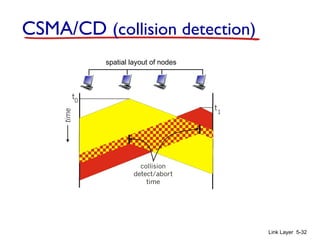
    Link Layer 5-31 CSMA/CD(collision detection) CSMA/CD: carrier sensing, deferral as in CSMA  collisions detected within short time  colliding transmissions aborted, reducing channel wastage  collision detection:  easy in wired LANs: measure signal strengths, compare transmitted, received signals  difficult in wireless LANs: received signal strength overwhelmed by local transmission strength  human analogy: the polite conversationalist
  • 32.
    Link Layer 5-32 CSMA/CD(collision detection) spatial layout of nodes
  • 33.
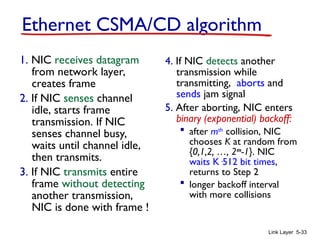
    Link Layer 5-33 EthernetCSMA/CD algorithm 1. NIC receives datagram from network layer, creates frame 2. If NIC senses channel idle, starts frame transmission. If NIC senses channel busy, waits until channel idle, then transmits. 3. If NIC transmits entire frame without detecting another transmission, NIC is done with frame ! 4. If NIC detects another transmission while transmitting, aborts and sends jam signal 5. After aborting, NIC enters binary (exponential) backoff:  after mth collision, NIC chooses K at random from {0,1,2, …, 2m -1}. NIC waits K·512 bit times, returns to Step 2  longer backoff interval with more collisions
  • 34.
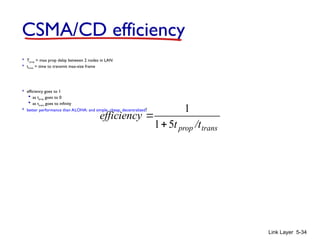
    Link Layer 5-34 CSMA/CDefficiency  Tprop = max prop delay between 2 nodes in LAN  ttrans = time to transmit max-size frame  efficiency goes to 1  as tprop goes to 0  as ttrans goes to infinity  better performance than ALOHA: and simple, cheap, decentralized! trans prop /t t efficiency 5 1 1  
  • 35.
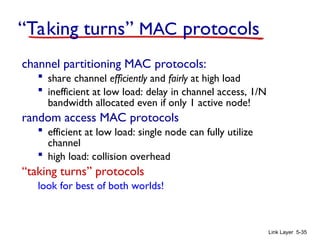
    Link Layer 5-35 “Takingturns” MAC protocols channel partitioning MAC protocols:  share channel efficiently and fairly at high load  inefficient at low load: delay in channel access, 1/N bandwidth allocated even if only 1 active node! random access MAC protocols  efficient at low load: single node can fully utilize channel  high load: collision overhead “taking turns” protocols look for best of both worlds!
  • 36.
    Link Layer 5-36 polling: master node “invites” slave nodes to transmit in turn  typically used with “dumb” slave devices  concerns:  polling overhead  latency  single point of failure (master) master slaves poll data data “Taking turns” MAC protocols
  • 37.
    Link Layer 5-37 tokenpassing:  control token passed from one node to next sequentially.  token message  concerns:  token overhead  latency  single point of failure (token) T data (nothing to send) T “Taking turns” MAC protocols
  • 38.
    cable headend CMTS ISP cable modem terminationsystem  multiple 40Mbps downstream (broadcast) channels  single CMTS transmits into channels  multiple 30 Mbps upstream channels  multiple access: all users contend for certain upstream channel time slots (others assigned) Cable access network cable modem splitter … … Internet frames,TV channels, control transmitted downstream at different frequencies upstream Internet frames, TV control, transmitted upstream at different frequencies in time slots
  • 39.
    Link Layer 5-39 DOCSIS:data over cable service interface spec  FDM over upstream, downstream frequency channels  TDM upstream: some slots assigned, some have contention  downstream MAP (bandwidth allocation map) frame: assigns upstream slots  request for upstream slots (and data) transmitted MAP frame for Interval [t1, t2] Residences with cable modems Downstream channel i Upstream channel j t1 t2 Assigned minislots containing cable modem upstream data frames Minislots containing minislots request frames cable headend CMTS Cable access network
  • 40.
    Link Layer 5-40 Summaryof MAC protocols  channel partitioning, by time, frequency or code  Time Division, Frequency Division  random access (dynamic),  ALOHA, S-ALOHA, CSMA, CSMA/CD  carrier sensing: easy in some technologies (wire), hard in others (wireless)  CSMA/CD used in Ethernet  CSMA/CA used in 802.11 (Collision Avoidance)  taking turns  polling from central site, token passing  bluetooth, FDDI, token ring
  • 41.
    Link Layer 5-41 Linklayer, LANs: outline 5.1 introduction, services 5.2 error detection, correction 5.3 multiple access protocols 5.4 LANs  addressing, ARP  Ethernet  switches  VLANS 5.5 link virtualization: MPLS 5.6 data center networking 5.7 a day in the life of a web request
  • 42.
    Link Layer 5-42 MACaddresses and ARP  32/128-bit IP address:  network-layer address for interface  used for layer 3 (network layer) forwarding  MAC (or LAN or physical or Ethernet) address:  function: used ‘locally” to get frame from one interface to another physically-connected interface (same network, in IP- addressing sense)  48 bit MAC address (for most LANs) burned in NIC ROM, also sometimes software settable  e.g.: 1A-2F-BB-76-09-AD hexadecimal (base 16) notation (each “number” represents 4 bits)
  • 43.
    Link Layer 5-43 LANaddresses and ARP each adapter on LAN has unique LAN / MAC address adapter 1A-2F-BB-76-09-AD 58-23-D7-FA-20-B0 0C-C4-11-6F-E3-98 71-65-F7-2B-08-53 LAN (wired or wireless)
  • 44.
    Link Layer 5-44 LANaddresses (more)  MAC address allocation administered by IEEE  manufacturer buys portion of MAC address space (to assure uniqueness)  analogy:  MAC address: like Social Security Number  IP address: like postal address  MAC flat address ➜ portability  can move LAN card from one LAN to another  IP hierarchical address not portable  address depends on IP subnet to which node is attached
  • 45.
    Link Layer 5-45 ARP:address resolution protocol ARP table: each IP node (host, router) on LAN has table  IP/MAC address mappings for some LAN nodes: < IP address; MAC address; TTL>  TTL (Time To Live): time after which address mapping will be forgotten (typically 20 min) Question: how to determine interface’s MAC address, knowing its IP address? 1A-2F-BB-76-09-AD 58-23-D7-FA-20-B0 0C-C4-11-6F-E3-98 71-65-F7-2B-08-53 LAN 137.196.7.23 137.196.7.78 137.196.7.14 137.196.7.88
  • 46.
    Link Layer 5-46 ARPprotocol: same LAN  A wants to send datagram to B  B’s MAC address not in A’s ARP table.  A broadcasts ARP query packet, containing B's IP address  dest MAC address = FF-FF-FF- FF-FF-FF  all nodes on LAN receive ARP query  B receives ARP packet, replies to A with its (B's) MAC address  frame sent to A’s MAC address (unicast)  A caches (saves) IP-to- MAC address pair in its ARP table until information becomes old (times out)  soft state: information that times out (goes away) unless refreshed  ARP is “plug-and-play”:  nodes create their ARP tables without intervention from net administrator
  • 47.
    Link Layer 5-47 walkthrough:send datagram from A to B via R  focus on addressing – at IP (datagram) and MAC layer (frame)  assume A knows B’s IP address  assume A knows IP address of first hop router, R (how?)  assume A knows R’s MAC address (how?) Addressing: routing to another LAN R 1A-23-F9-CD-06-9B 222.222.222.220 111.111.111.110 E6-E9-00-17-BB-4B CC-49-DE-D0-AB-7D 111.111.111.112 111.111.111.111 74-29-9C-E8-FF-55 A 222.222.222.222 49-BD-D2-C7-56-2A 222.222.222.221 88-B2-2F-54-1A-0F B
  • 48.
    R 1A-23-F9-CD-06-9B 222.222.222.220 111.111.111.110 E6-E9-00-17-BB-4B CC-49-DE-D0-AB-7D 111.111.111.112 111.111.111.111 74-29-9C-E8-FF-55 A 222.222.222.222 49-BD-D2-C7-56-2A 222.222.222.221 88-B2-2F-54-1A-0F B Link Layer 5-48 Addressing:routing to another LAN IP Eth Phy IP src: 111.111.111.111 IP dest: 222.222.222.222  A creates IP datagram with IP source A, destination B  A creates link-layer frame with R's MAC address as dest, frame contains A-to-B IP datagram MAC src: 74-29-9C-E8-FF-55 MAC dest: E6-E9-00-17-BB-4B
  • 49.
    R 1A-23-F9-CD-06-9B 222.222.222.220 111.111.111.110 E6-E9-00-17-BB-4B CC-49-DE-D0-AB-7D 111.111.111.112 111.111.111.111 74-29-9C-E8-FF-55 A 222.222.222.222 49-BD-D2-C7-56-2A 222.222.222.221 88-B2-2F-54-1A-0F B Link Layer 5-49 Addressing:routing to another LAN IP Eth Phy  frame sent from A to R IP Eth Phy  frame received at R, datagram removed, passed up to IP MAC src: 74-29-9C-E8-FF-55 MAC dest: E6-E9-00-17-BB-4B IP src: 111.111.111.111 IP dest: 222.222.222.222 IP src: 111.111.111.111 IP dest: 222.222.222.222
  • 50.
    R 1A-23-F9-CD-06-9B 222.222.222.220 111.111.111.110 E6-E9-00-17-BB-4B CC-49-DE-D0-AB-7D 111.111.111.112 111.111.111.111 74-29-9C-E8-FF-55 A 222.222.222.222 49-BD-D2-C7-56-2A 222.222.222.221 88-B2-2F-54-1A-0F B Link Layer 5-50 Addressing:routing to another LAN IP src: 111.111.111.111 IP dest: 222.222.222.222  R forwards datagram with IP source A, destination B  R creates link-layer frame with B's MAC address as dest, frame contains A-to-B IP datagram MAC src: 1A-23-F9-CD-06-9B MAC dest: 49-BD-D2-C7-56-2A IP Eth Phy IP Eth Phy
  • 51.
    R 1A-23-F9-CD-06-9B 222.222.222.220 111.111.111.110 E6-E9-00-17-BB-4B CC-49-DE-D0-AB-7D 111.111.111.112 111.111.111.111 74-29-9C-E8-FF-55 A 222.222.222.222 49-BD-D2-C7-56-2A 222.222.222.221 88-B2-2F-54-1A-0F B Link Layer 5-51 Addressing:routing to another LAN  R forwards datagram with IP source A, destination B  R creates link-layer frame with B's MAC address as dest, frame contains A-to-B IP datagram IP src: 111.111.111.111 IP dest: 222.222.222.222 MAC src: 1A-23-F9-CD-06-9B MAC dest: 49-BD-D2-C7-56-2A IP Eth Phy IP Eth Phy
  • 52.
    R 1A-23-F9-CD-06-9B 222.222.222.220 111.111.111.110 E6-E9-00-17-BB-4B CC-49-DE-D0-AB-7D 111.111.111.112 111.111.111.111 74-29-9C-E8-FF-55 A 222.222.222.222 49-BD-D2-C7-56-2A 222.222.222.221 88-B2-2F-54-1A-0F B Link Layer 5-52 Addressing:routing to another LAN  R forwards datagram with IP source A, destination B  R creates link-layer frame with B's MAC address as dest, frame contains A-to-B IP datagram IP src: 111.111.111.111 IP dest: 222.222.222.222 MAC src: 1A-23-F9-CD-06-9B MAC dest: 49-BD-D2-C7-56-2A IP Eth Phy
  • 53.
    Link Layer 5-53 Linklayer, LANs: outline 5.1 introduction, services 5.2 error detection, correction 5.3 multiple access protocols 5.4 LANs  addressing, ARP  Ethernet  switches  VLANS 5.5 link virtualization: MPLS 5.6 data center networking 5.7 a day in the life of a web request
  • 54.
    Link Layer 5-54 Ethernet “dominant”wired LAN technology:  cheap $20 for NIC  first widely used LAN technology  simpler, cheaper than token LANs and ATM  kept up with speed race: 10 Mbps – 10 Gbps Metcalfe’s Ethernet sketch
  • 55.
    Link Layer 5-55 Ethernet:physical topology  bus: popular through mid 90s  all nodes in same collision domain (can collide with each other)  star: prevails today  active switch in center  each “spoke” runs a (separate) Ethernet protocol (nodes do not collide with each other) switch bus: coaxial cable star
  • 56.
    Link Layer 5-56 Ethernetframe structure sending adapter encapsulates IP datagram (or other network layer protocol packet) in Ethernet frame preamble:  7 bytes with pattern 10101010 followed by one byte with pattern 10101011  used to synchronize receiver, sender clock rates dest. address source address data (payload) CRC preamble type
  • 57.
    Link Layer 5-57 Ethernetframe structure (more)  addresses: 6 byte source, destination MAC addresses  if adapter receives frame with matching destination address, or with broadcast address (e.g. ARP packet), it passes data in frame to network layer protocol  otherwise, adapter discards frame  type: indicates higher layer protocol (mostly IP but others possible, e.g., Novell IPX, AppleTalk)  CRC: cyclic redundancy check at receiver  error detected: frame is dropped dest. address source address data (payload) CRC preamble type
  • 58.
    Link Layer 5-58 Ethernet:unreliable, connectionless  connectionless: no handshaking between sending and receiving NICs  unreliable: receiving NIC doesn’t send acks or nacks to sending NIC  data in dropped frames recovered only if initial sender uses higher layer rdt (e.g., TCP), otherwise dropped data lost  Ethernet’s MAC protocol: unslotted CSMA/CD wth binary backoff
  • 59.
    Link Layer 5-59 802.3Ethernet standards: link & physical layers  many different Ethernet standards  common MAC protocol and frame format  different speeds: 2 Mbps, 10 Mbps, 100 Mbps, 1Gbps, 10G bps  different physical layer media: fiber, cable application transport network link physical MAC protocol and frame format 100BASE-TX 100BASE-T4 100BASE-FX 100BASE-T2 100BASE-SX 100BASE-BX fiber physical layer copper (twister pair) physical layer
  • 60.
    Link Layer 5-60 Linklayer, LANs: outline 5.1 introduction, services 5.2 error detection, correction 5.3 multiple access protocols 5.4 LANs  addressing, ARP  Ethernet  switches  VLANS 5.5 link virtualization: MPLS 5.6 data center networking 5.7 a day in the life of a web request
  • 61.
    Link Layer 5-61 Ethernetswitch  link-layer device: takes an active role  store, forward Ethernet frames  examine incoming frame’s MAC address, selectively forward frame to one-or-more outgoing links when frame is to be forwarded on segment, uses CSMA/CD to access segment  transparent  hosts are unaware of presence of switches  plug-and-play, self-learning  switches do not need to be configured
  • 62.
    Link Layer 5-62 Switch:multiple simultaneous transmissions  hosts have dedicated, direct connection to switch  switches buffer packets  Ethernet protocol used on each incoming link, but no collisions; full duplex  each link is its own collision domain  switching: A-to-A’ and B-to-B’ can transmit simultaneously, without collisions switch with six interfaces (1,2,3,4,5,6) A A’ B B’ C C’ 1 2 3 4 5 6
  • 63.
    Link Layer 5-63 Switchforwarding table Q: how does switch know A’ reachable via interface 4, B’ reachable via interface 5? switch with six interfaces (1,2,3,4,5,6) A A’ B B’ C C’ 1 2 3 4 5 6  A: each switch has a switch table, each entry:  (MAC address of host, interface to reach host, time stamp)  looks like a routing table! Q: how are entries created, maintained in switch table?  something like a routing protocol?
  • 64.
    A A’ B B’ C C’ 1 2 3 4 5 6 LinkLayer 5-64 Switch: self-learning  switch learns which hosts can be reached through which interfaces  when frame received, switch “learns” location of sender: incoming LAN segment  records sender/location pair in switch table A A’ Source: A Dest: A’ MAC addr interface TTL Switch table (initially empty) A 1 60
  • 65.
    Link Layer 5-65 Switch:frame filtering/forwarding when frame received at switch: 1. record incoming link, MAC address of sending host 2. index switch table using MAC destination address 3. if entry found for destination then { if destination on segment from which frame arrived then drop frame else forward frame on interface indicated by entry } else flood /* forward on all interfaces except arriving interface */
  • 66.
    A A’ B B’ C C’ 1 2 3 4 5 6 LinkLayer 5-66 Self-learning, forwarding: example A A’ Source: A Dest: A’ MAC addr interface TTL switch table (initially empty) A 1 60 A A’ A A’ A A’ A A’ A A’  frame destination, A’, location unknown: flood A’ A  destination A location known: A’ 4 60 selectively send on just one link
  • 67.
    Link Layer 5-67 Interconnectingswitches  switches can be connected together Q: sending from A to G - how does S1 know to forward frame destined to F via S4 and S3? A: self learning! (works exactly the same as in single- switch case!) A B S1 C D E F S2 S4 S3 H I G
  • 68.
    Link Layer 5-68 Self-learningmulti-switch example Suppose C sends frame to I, I responds to C  Q: show switch tables and packet forwarding in S1, S2, S3, S4 A B S1 C D E F S2 S4 S3 H I G
  • 69.
    Link Layer 5-69 Institutionalnetwork to external network router IP subnet mail server web server
  • 70.
    Link Layer 5-70 Switchesvs. routers both are store-and-forward: routers: network-layer devices (examine network- layer headers) switches: link-layer devices (examine link-layer headers) both have forwarding tables: routers: compute tables using routing algorithms, IP addresses switches: learn forwarding table using flooding, learning, MAC addresses application transport network link physical network link physical link physical switch datagram application transport network link physical frame frame frame datagram
  • 71.
    Link Layer 5-71 VLANs:motivation consider:  CS user moves office to EE, but wants connect to CS switch?  single broadcast domain:  all layer-2 broadcast traffic (ARP, DHCP, unknown location of destination MAC address) must cross entire LAN  security/privacy, efficiency issues Computer Science Electrical Engineering Computer Engineering
  • 72.
    Link Layer 5-72 VLANs port-basedVLAN: switch ports grouped (by switch management software) so that single physical switch …… switch(es) supporting VLAN capabilities can be configured to define multiple virtual LANS over single physical LAN infrastructure. Virtual Local Area Network 1 8 9 16 10 2 7 … Electrical Engineering (VLAN ports 1-8) Computer Science (VLAN ports 9-15) 15 … Electrical Engineering (VLAN ports 1-8) … 1 8 2 7 9 16 10 15 … Computer Science (VLAN ports 9-16) … operates as multiple virtual switches
  • 73.
    Link Layer 5-73 Port-basedVLAN 1 8 9 16 10 2 7 … Electrical Engineering (VLAN ports 1-8) Computer Science (VLAN ports 9-15) 15 …  traffic isolation: frames to/from ports 1-8 can only reach ports 1-8  can also define VLAN based on MAC addresses of endpoints, rather than switch port  dynamic membership: ports can be dynamically assigned among VLANs router  forwarding between VLANS: done via routing (just as with separate switches)  in practice vendors sell combined switches plus routers
  • 74.
    Link Layer 5-74 VLANSspanning multiple switches  trunk port: carries frames between VLANS defined over multiple physical switches  frames forwarded within VLAN between switches can’t be vanilla 802.1 frames (must carry VLAN ID info)  802.1Q protocol adds/removed additional header fields for frames forwarded between trunk ports 1 8 9 10 2 7 … Electrical Engineering (VLAN ports 1-8) Computer Science (VLAN ports 9-15) 15 … 2 7 3 Ports 2,3,5 belong to EE VLAN Ports 4,6,7,8 belong to CS VLAN 5 4 6 8 16 1
  • 75.
    Link Layer 5-75 type 2-byteTag Protocol Identifier (value: 81-00) Tag Control Information (12 bit VLAN ID field, 3 bit priority field like IP TOS) Recomputed CRC 802.1Q VLAN frame format 802.1 frame 802.1Q frame dest. address source address data (payload) CRC preamble data (payload) CRC type
  • 76.
    Link Layer 5-76 Linklayer, LANs: outline 5.1 introduction, services 5.2 error detection, correction 5.3 multiple access protocols 5.4 LANs  addressing, ARP  Ethernet  switches  VLANS 5.5 link virtualization: MPLS 5.6 data center networking 5.7 a day in the life of a web request
  • 77.
    Link Layer 5-77 Multiprotocollabel switching (MPLS)  initial goal: high-speed IP forwarding using fixed length label (instead of IP address)  fast lookup using fixed length identifier (rather than shortest prefix matching)  borrowing ideas from Virtual Circuit (VC) approach  but IP datagram still keeps IP address! PPP or Ethernet header IP header remainder of link-layer frame MPLS header label Exp S TTL 20 3 1 5 QoS priority (experimental) and Explicit Congestion Notification bottom of stack flag
  • 78.
    Link Layer 5-78 MPLScapable routers  a.k.a. label-switched router  forward packets to outgoing interface based only on label value (don’t inspect IP address)  MPLS forwarding table distinct from IP forwarding tables  flexibility: MPLS forwarding decisions can differ from those of IP  use destination and source addresses to route flows to same destination differently (traffic engineering)  re-route flows quickly if link fails: pre-computed backup paths (useful for VoIP)
  • 79.
    Link Layer 5-79 R2 D R3 R5 A R6 MPLSversus IP paths IP router  IP routing: path to destination determined by destination address alone R4
  • 80.
    Link Layer 5-80 R2 D R3 R4 R5 A R6 MPLSversus IP paths IP-only router  IP routing: path to destination determined by destination address alone MPLS and IP router  MPLS routing: path to destination can be based on source and dest. address  fast reroute: precompute backup routes in case of link failure entry router (R4) can use different MPLS routes to A based, e.g., on source address
  • 81.
    Link Layer 5-81 MPLSsignaling  modify OSPF, IS-IS link-state flooding protocols to carry info used by MPLS routing,  e.g., link bandwidth, amount of “reserved” link bandwidth D R4 R5 A R6  entry MPLS router uses RSVP-TE signaling protocol to set up MPLS forwarding at downstream routers modified link state flooding RSVP-TE
  • 82.
    Link Layer 5-82 R1 R2 D R3 R4 R5 0 1 0 0 A R6 inout out label label dest interface 6 - A 0 in out out label label dest interface 10 6 A 1 12 9 D 0 in out out label label dest interface 10 A 0 12 D 0 1 in out out label label dest interface 8 6 A 0 0 8 A 1 MPLS forwarding tables
  • 83.
    Link Layer 5-83 Linklayer, LANs: outline 5.1 introduction, services 5.2 error detection, correction 5.3 multiple access protocols 5.4 LANs  addressing, ARP  Ethernet  switches  VLANS 5.5 link virtualization: MPLS 5.6 data center networking 5.7 a day in the life of a web request
  • 84.
    Link Layer 5-84 Datacenter networks  10’s to 100’s of thousands of hosts, often closely coupled, in close proximity:  e-business (e.g. Amazon)  content-servers (e.g., YouTube, Akamai, Apple, Microsoft)  search engines, data mining (e.g., Google)  challenges:  multiple applications, each serving massive numbers of clients  managing/balancing load, avoiding processing, networking, data bottlenecks Inside a 40-ft Microsoft container, Chicago data center
  • 85.
    Link Layer 5-85 Serverracks TOR (top-of-rack) switches Tier-1 switches Tier-2 switches Load balancer Load balancer B 1 2 3 4 5 6 7 8 A C Border router Access router Internet Data center networks load balancer: application-layer routing receives external client requests directs workload within data center returns results to external client (hiding data center internals from client)
  • 86.
    Server racks TOR switches Tier-1 switches Tier-2switches 1 2 3 4 5 6 7 8 Data center networks  rich interconnection among switches, racks:  increased throughput between racks (multiple routing paths possible)  increased reliability via redundancy
  • 87.
    Link Layer 5-87 Linklayer, LANs: outline 5.1 introduction, services 5.2 error detection, correction 5.3 multiple access protocols 5.4 LANs  addressing, ARP  Ethernet  switches  VLANS 5.5 link virtualization: MPLS 5.6 data center networking 5.7 a day in the life of a web request
  • 88.
    Link Layer 5-88 Synthesis:a day in the life of a web request  journey down protocol stack complete!  application, transport, network, link  putting-it-all-together: synthesis!  goal: identify, review, understand protocols (at all layers) involved in seemingly simple scenario: requesting www page  scenario: student attaches laptop to campus network, requests/receives www.google.com
  • 89.
    Link Layer 5-89 Aday in the life: scenario Comcast network 68.80.0.0/13 Google’s network 64.233.160.0/19 64.233.169.105 web server DNS server school network 68.80.2.0/24 web page browser
  • 90.
    router (runs DHCP) Link Layer5-90 A day in the life… connecting to the Internet  connecting laptop needs to get its own IP address, addr of first-hop router, addr of DNS server: use DHCP DHCP UDP IP Eth Phy DHCP DHCP DHCP DHCP DHCP DHCP UDP IP Eth Phy DHCP DHCP DHCP DHCP DHCP  DHCP request encapsulated in UDP, encapsulated in IP, encapsulated in 802.3 Ethernet  Ethernet frame broadcast (dest: FFFFFFFFFFFF) on LAN, received at router running DHCP server  Ethernet demuxed to IP demuxed, UDP demuxed to DHCP
  • 91.
    router (runs DHCP) Link Layer5-91  DHCP server formulates DHCP ACK containing client’s IP address, IP address of first-hop router for client, name & IP address of DNS server DHCP UDP IP Eth Phy DHCP DHCP DHCP DHCP DHCP UDP IP Eth Phy DHCP DHCP DHCP DHCP DHCP  encapsulation at DHCP server, frame forwarded (switch learning) through LAN, demultiplexing at client Client now has IP address, knows name & addr of DNS server, IP address of its first-hop router  DHCP client receives DHCP ACK reply A day in the life… connecting to the Internet
  • 92.
    router (runs DHCP) Link Layer5-92 A day in the life… ARP (before DNS, before HTTP)  before sending HTTP request, need IP address of www.google.com: DNS DNS UDP IP Eth Phy DNS DNS DNS  DNS query created, encapsulated in UDP, encapsulated in IP, encapsulated in Eth. To send frame to router, need MAC address of router interface: ARP  ARP query broadcast, received by router, which replies with ARP reply giving MAC address of router interface  client now knows MAC address of first hop router, so can now send frame containing DNS query ARP query Eth Phy ARP ARP ARP reply
  • 93.
    router (runs DHCP) Link Layer5-93 DNS UDP IP Eth Phy DNS DNS DNS DNS DNS  IP datagram containing DNS query forwarded via LAN switch from client to 1st hop router  IP datagram forwarded from campus network into comcast network, routed (tables created by RIP, OSPF, IS-IS and/or BGP routing protocols) to DNS server  demux’ed to DNS server  DNS server replies to client with IP address of www.google.com Comcast network 68.80.0.0/13 DNS server DNS UDP IP Eth Phy DNS DNS DNS DNS A day in the life… using DNS
  • 94.
    router (runs DHCP) Link Layer5-94 A day in the life…TCP connection carrying HTTP HTTP TCP IP Eth Phy HTTP  to send HTTP request, client first opens TCP socket to web server  TCP SYN segment (step 1 in 3- way handshake) inter-domain routed to web server  TCP connection established! 64.233.169.105 web server SYN SYN SYN SYN TCP IP Eth Phy SYN SYN SYN SYNACK SYNACK SYNACK SYNACK SYNACK SYNACK SYNACK  web server responds with TCP SYNACK (step 2 in 3-way handshake)
  • 95.
    router (runs DHCP) Link Layer5-95 A day in the life… HTTP request/reply HTTP TCP IP Eth Phy HTTP  HTTP request sent into TCP socket  IP datagram containing HTTP request routed to www.google.com  IP datagram containing HTTP reply routed back to client 64.233.169.105 web server HTTP TCP IP Eth Phy  web server responds with HTTP reply (containing web page) HTTP HTTP HTTP HTTP HTTP HTTP HTTP HTTP HTTP HTTP HTTP HTTP HTTP  web page finally (!!!) displayed
  • 96.
    Link Layer 5-96 Chapter5: Summary  principles behind data link layer services:  error detection, correction  sharing a broadcast channel: multiple access  link layer addressing  instantiation and implementation of various link layer technologies  Ethernet  switched LANS, VLANs  virtualized networks as a link layer: MPLS  synthesis: a day in the life of a web request
  • 97.
    Link Layer 5-97 Chapter5: let’s take a breath  journey down protocol stack complete (except PHY)  solid understanding of networking principles, practice  ….. could stop here …. but lots of interesting topics!  wireless  multimedia  security  network management