Implementing a Content Management System Jonathan M. Smith [email_address] The Catholic University of America Long Island Library Resources Council August 16, 2010
By the end of this session you will... Be familiar with the current landscape of CMS solutions Have an understanding of CMS administration Have a process for implementing a CMS Be familiar with common technical requirements of CMS Have an understanding of design and evaluation methods This session will describe the entire process of implementing a CMS; from requirements gathering to post-launch evaluation.
Systems Development Life Cycle
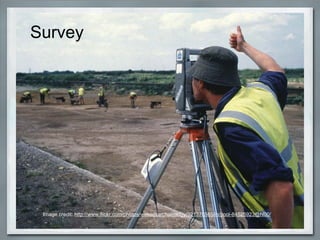
Survey Image credit:  http://www.flickr.com/photos/wessexarchaeology/321370565/in/pool-84525923@N00/
Platforms used by CUA Libraries Mambo (open source) intranet (2005-06) Joomla! (open source) intranet (2006-present) Wordpress (open source) blog LibGuides (proprietary) research guides Topaz (in-house developed CMS) public site
Planning Image Credit:  http://www.flickr.com/photos/justindc/819823101/
Why use a CMS? Distributed content creation Separation of content and presentation Integration with Web 2.0 tools forums, RSS, comments, videos, calendars Web based administration limits need for VPN, FTP, SSH 
Project document Begin with a mission statement Mission objectives Cost estimate Anticipated timeline Tips Document everything! Involve stakeholders Just Enough Project Management  by Curtis Cook
Analysis Image credit:  http://www.flickr.com/photos/gsfc/4662884851/
Establishing needs Desired functionality User management Content ownership Accessibility Customization Standards compliance Existing content ?
Get feedback from staff and patrons Image credit:  http://www.flickr.com/photos/iain/2548951967/
Hosting options Local most flexible need local expertise Organization (city, university) possible limitations? level of support Commercial $$$$ experience with CMS similar customers?
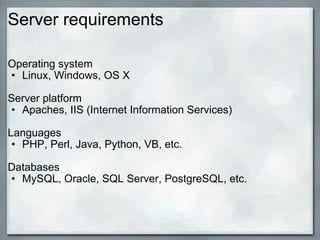
Server requirements Operating system Linux, Windows, OS X Server platform Apaches, IIS ( Internet Information Services) Languages PHP, Perl, Java, Python, VB, etc. Databases MySQL, Oracle, SQL Server, PostgreSQL, etc.
Software stacks LAMP - Common open source platform: Linux (os) Apache (web server) MySQL (dbms) PHP (scripting language) WINS Windows Server (os) IIS (web server) .NET (programming language) SQL Server (dbms)
License  Proprietary Requires least expertise Cost $$$$ http://www.cmswatch.com/ Open Source Requires some expertise Potential for $ savings In-house Requires most expertise Most custom
Evaluation of potential solutions Version number Year introduced  Price Stability, ongoing development  Active user community (critical for open source) Documentation Create a requirements comparison document Assign a weight to each requirement
Feature list CMS Matrix  http://www.cmsmatrix.org/ Migration tools Incoming and outgoing RSS feeds WYSIWYG text editors Spell checker Display media (flash, audio, video, etc.) Template editor Workflow - review and publish, messaging, status Versioning Reporting - clicks, searches, performance Built-in backup Security Mobile access Taxonomy
Use the right tool Alternatives to a full fledged CMS: Wordpress (blogging platform, CMS lite) http://wordpress.org/ LibGuides, CommunityGuides (proprietary, hosted)   http://springshare.com/ Omeka (digital collections, exhibits) http://omeka.org/
Open source CMS Resources Demos -  http://php.opensourcecms.com/ CMS Design Resource -  http://www.cmsdesignresource.com/ CMS Critic -  http://www.cmscritic.com/ LibSuccess Wiki -  http://www.libsuccess.org/index.php?title=Content_Management_Systems_(CMS)
Open source CMS focus Wordpress Joomla! Drupal Plone Other popular CMS MODx  http://modxcms.com/ Typo3  http://typo3.com/ Xoops  http://www.xoops.org Squarespace   http://www.squarespace.com DotNetNuke  http://www.dotnetnuke.com/
Wordpress http://wordpress.org/ Current version:  3.0.1 Min. server requirements: Apache MySQL 4.1.2 PHP 4.3 Version 3.2 will require MySQL 5.0.15+ and PHP 5.2+ Planned release first half of 2011


Joomla! http://www.joomla.org/ http://www.joomlainlibrary.com/ Current Version: 1.5.20 Min. server requirements: Apache 1.3 or IIS 6 MySQL 3.23 PHP 4.3.10 Version 1.6 will require MySQL 5.0.4+  and PHP 5.2+ Planned release late summer 2010


Drupal http://drupal.org/ http://drupalib.interoperating.info/ Current version:  6.19 Min. server requirements: Apache 1.3 or IIS 5 MySQL 4.1 or PostgreSQL 7.1 PHP 4.4 Version 7 will require MySQL 5.0.15 or PostgreSQL 8.3, and PHP 5.2 Planned release fall 2010


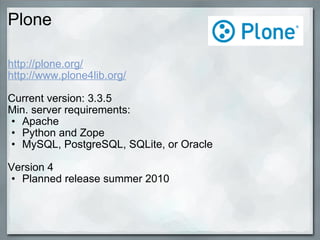
Plone http://plone.org/ http://www.plone4lib.org/ Current version: 3.3.5 Min. server requirements: Apache Python and Zope MySQL, PostgreSQL, SQLite, or Oracle Version 4 Planned release summer 2010


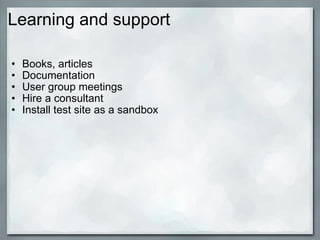
Learning and support Books, articles Documentation User group meetings Hire a consultant Install test site as a sandbox
Design Image credit: Dan Skrobak  http://www.flickr.com/photos/daniel-skrobak/2258608480/
User centered design Card sorting exercise Google Analytics
Taxonomy Navigation doesn't need to reflect file structure For intranet, function over department For public site, a secondary taxonomy based on user group
Visual design Sketch Photoshop mock-up Working example Templates, themes  
Content Use existing content How will it be transferred? Develop new content Who will write the content?
Enforcing security Use robot.txt to block indexing by search engines   http://www.robotstxt.org/   Google Webmaster Tools:  http://is.gd/ehyEU Use noindex meta tag to block individual pages   Google Webmaster Tools:  http://is.gd/ehyHS CMS may have built in controls for public/private content
Implementation Image credit: Jake Brewer  http://www.flickr.com/photos/integralfocus/83966554/
Server setup Development server For testing new features, upgrades Production server Live server Backup server Backup procedures for site and database Keep relevant server configurations in sync
Deployment Install the CMS Configure to your specifications Apply the visual design
Content migration Intranet  Manually transferred the existing content A lot of new content was planned Public site 1,400+ html pages Univ. IT wrote scripts to import content To 3 people a couple of weeks to clean up  Many CMS have plugins to aid migration from DB
User testing Image credit: Terri Miller  http://www.flickr.com/photos/terriem/59397745/
Training Image credit:  http://www.flickr.com/photos/mjzitek/475244661/
Launch! Image credit: Chris Christner  http://www.flickr.com/photos/toptechwriter/364206324/
Maintenance Image credit: Emir Jones  http://www.flickr.com/photos/47557199@N03/4493925470/
Thank you! Jonathan M. Smith twitter.com/l1br4r14n [email_address] Slides available at:   http://faculty.cua.edu/smithjm/lilrc-cms.html

How To Implement a CMS

  • 1.
    Implementing a ContentManagement System Jonathan M. Smith [email_address] The Catholic University of America Long Island Library Resources Council August 16, 2010
  • 2.
    By the endof this session you will... Be familiar with the current landscape of CMS solutions Have an understanding of CMS administration Have a process for implementing a CMS Be familiar with common technical requirements of CMS Have an understanding of design and evaluation methods This session will describe the entire process of implementing a CMS; from requirements gathering to post-launch evaluation.
  • 3.
  • 4.
    Survey Image credit: http://www.flickr.com/photos/wessexarchaeology/321370565/in/pool-84525923@N00/
  • 5.
    Platforms used byCUA Libraries Mambo (open source) intranet (2005-06) Joomla! (open source) intranet (2006-present) Wordpress (open source) blog LibGuides (proprietary) research guides Topaz (in-house developed CMS) public site
  • 6.
    Planning Image Credit: http://www.flickr.com/photos/justindc/819823101/
  • 7.
    Why use aCMS? Distributed content creation Separation of content and presentation Integration with Web 2.0 tools forums, RSS, comments, videos, calendars Web based administration limits need for VPN, FTP, SSH 
  • 8.
    Project document Beginwith a mission statement Mission objectives Cost estimate Anticipated timeline Tips Document everything! Involve stakeholders Just Enough Project Management by Curtis Cook
  • 9.
    Analysis Image credit: http://www.flickr.com/photos/gsfc/4662884851/
  • 10.
    Establishing needs Desiredfunctionality User management Content ownership Accessibility Customization Standards compliance Existing content ?
  • 11.
    Get feedback fromstaff and patrons Image credit:  http://www.flickr.com/photos/iain/2548951967/
  • 12.
    Hosting options Localmost flexible need local expertise Organization (city, university) possible limitations? level of support Commercial $$$$ experience with CMS similar customers?
  • 13.
    Server requirements Operatingsystem Linux, Windows, OS X Server platform Apaches, IIS ( Internet Information Services) Languages PHP, Perl, Java, Python, VB, etc. Databases MySQL, Oracle, SQL Server, PostgreSQL, etc.
  • 14.
    Software stacks LAMP- Common open source platform: Linux (os) Apache (web server) MySQL (dbms) PHP (scripting language) WINS Windows Server (os) IIS (web server) .NET (programming language) SQL Server (dbms)
  • 15.
    License  Proprietary Requiresleast expertise Cost $$$$ http://www.cmswatch.com/ Open Source Requires some expertise Potential for $ savings In-house Requires most expertise Most custom
  • 16.
    Evaluation of potentialsolutions Version number Year introduced  Price Stability, ongoing development  Active user community (critical for open source) Documentation Create a requirements comparison document Assign a weight to each requirement
  • 17.
    Feature list CMSMatrix  http://www.cmsmatrix.org/ Migration tools Incoming and outgoing RSS feeds WYSIWYG text editors Spell checker Display media (flash, audio, video, etc.) Template editor Workflow - review and publish, messaging, status Versioning Reporting - clicks, searches, performance Built-in backup Security Mobile access Taxonomy
  • 18.
    Use the righttool Alternatives to a full fledged CMS: Wordpress (blogging platform, CMS lite) http://wordpress.org/ LibGuides, CommunityGuides (proprietary, hosted)   http://springshare.com/ Omeka (digital collections, exhibits) http://omeka.org/
  • 19.
    Open source CMSResources Demos -  http://php.opensourcecms.com/ CMS Design Resource -  http://www.cmsdesignresource.com/ CMS Critic -  http://www.cmscritic.com/ LibSuccess Wiki -  http://www.libsuccess.org/index.php?title=Content_Management_Systems_(CMS)
  • 20.
    Open source CMSfocus Wordpress Joomla! Drupal Plone Other popular CMS MODx  http://modxcms.com/ Typo3  http://typo3.com/ Xoops  http://www.xoops.org Squarespace   http://www.squarespace.com DotNetNuke  http://www.dotnetnuke.com/
  • 21.
    Wordpress http://wordpress.org/ Currentversion:  3.0.1 Min. server requirements: Apache MySQL 4.1.2 PHP 4.3 Version 3.2 will require MySQL 5.0.15+ and PHP 5.2+ Planned release first half of 2011
  • 22.
  • 23.
  • 24.
  • 25.
  • 26.
  • 27.
    Joomla! http://www.joomla.org/ http://www.joomlainlibrary.com/Current Version: 1.5.20 Min. server requirements: Apache 1.3 or IIS 6 MySQL 3.23 PHP 4.3.10 Version 1.6 will require MySQL 5.0.4+  and PHP 5.2+ Planned release late summer 2010
  • 28.
  • 29.
  • 30.
  • 31.
  • 32.
  • 33.
    Drupal http://drupal.org/ http://drupalib.interoperating.info/Current version:  6.19 Min. server requirements: Apache 1.3 or IIS 5 MySQL 4.1 or PostgreSQL 7.1 PHP 4.4 Version 7 will require MySQL 5.0.15 or PostgreSQL 8.3, and PHP 5.2 Planned release fall 2010
  • 34.
  • 35.
  • 36.
  • 37.
  • 38.
  • 39.
    Plone http://plone.org/ http://www.plone4lib.org/Current version: 3.3.5 Min. server requirements: Apache Python and Zope MySQL, PostgreSQL, SQLite, or Oracle Version 4 Planned release summer 2010
  • 40.
  • 41.
  • 42.
  • 43.
    Learning and supportBooks, articles Documentation User group meetings Hire a consultant Install test site as a sandbox
  • 44.
    Design Image credit:Dan Skrobak  http://www.flickr.com/photos/daniel-skrobak/2258608480/
  • 45.
    User centered designCard sorting exercise Google Analytics
  • 46.
    Taxonomy Navigation doesn'tneed to reflect file structure For intranet, function over department For public site, a secondary taxonomy based on user group
  • 47.
    Visual design SketchPhotoshop mock-up Working example Templates, themes  
  • 48.
    Content Use existingcontent How will it be transferred? Develop new content Who will write the content?
  • 49.
    Enforcing security Userobot.txt to block indexing by search engines   http://www.robotstxt.org/   Google Webmaster Tools:  http://is.gd/ehyEU Use noindex meta tag to block individual pages   Google Webmaster Tools:  http://is.gd/ehyHS CMS may have built in controls for public/private content
  • 50.
    Implementation Image credit:Jake Brewer  http://www.flickr.com/photos/integralfocus/83966554/
  • 51.
    Server setup Developmentserver For testing new features, upgrades Production server Live server Backup server Backup procedures for site and database Keep relevant server configurations in sync
  • 52.
    Deployment Install theCMS Configure to your specifications Apply the visual design
  • 53.
    Content migration Intranet Manually transferred the existing content A lot of new content was planned Public site 1,400+ html pages Univ. IT wrote scripts to import content To 3 people a couple of weeks to clean up  Many CMS have plugins to aid migration from DB
  • 54.
    User testing Imagecredit: Terri Miller  http://www.flickr.com/photos/terriem/59397745/
  • 55.
    Training Image credit: http://www.flickr.com/photos/mjzitek/475244661/
  • 56.
    Launch! Image credit:Chris Christner  http://www.flickr.com/photos/toptechwriter/364206324/
  • 57.
    Maintenance Image credit:Emir Jones  http://www.flickr.com/photos/47557199@N03/4493925470/
  • 58.
    Thank you! JonathanM. Smith twitter.com/l1br4r14n [email_address] Slides available at:   http://faculty.cua.edu/smithjm/lilrc-cms.html

Editor's Notes