Lessons Learned when Integrating with
Dynamics 365
1
Senior Consultant
Hi, I’m Pim Simons
2
Agenda
| Architecture
| Common Integration Patterns
| Integration Capabilities
| Integration Platforms
| Choosing Your Platform and Method
3
The Cause and Challenge
4
| Dynamics 365 is introduced at a customer
| New technical possibilities and challenges
| Integration architecture transition
| Declaration for a transition to the cloud
| Business transition
| How to choose the right solution?
Architecture
5
| The integration strategy as a critical success factor
| Integration architecture
| Implementation guidelines
| Avoid a ‘technical driven’ integration solution
| Define a target architecture
Common Integration Patterns
6
| Providing Data
| Retrieving Data
| Receiving Data
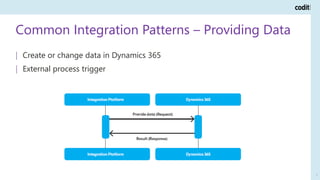
Common Integration Patterns – Providing Data
7
| Create or change data in Dynamics 365
| External process trigger
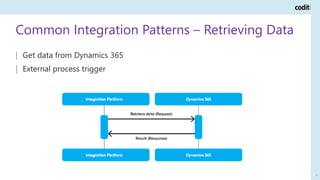
Common Integration Patterns – Retrieving Data
8
| Get data from Dynamics 365
| External process trigger
Common Integration Patterns – Receiving Data
9
| Get data from Dynamics 365
| Trigger in Dynamics 365
Integration Capabilities of Dynamics 365
10
| Web API
| Event Pipeline & Webhooks
| Common Data Service & Data Integration
| Recurring Integrations
| Custom Service
Integration Capabilities of Dynamics 365
11
Web API
| Pros
| Available out of the box
| Easy to use
| Cons
| Operations on entity level
| Supported patterns
| Providing data to Dynamics 365
| Retrieving data from Dynamics 365
Integration Capabilities of Dynamics 365
12
Event Pipeline & Webhooks
| Pros
| Call endpoint on trigger
| Cons
| Webhooks are only available on Dynamics 365 CE
| Event Pipeline needs custom component
| Supported patterns
| Receiving data from Dynamics 365
Integration Capabilities of Dynamics 365
13
Common Data Service & Data Integration
| Pros
| One data store for multiple applications
| Cons
| Point to point integrator tool needed
| Supported patterns
| Providing data to Dynamics 365
| Retrieving data from Dynamics 365
Integration Capabilities of Dynamics 365
14
Recurring Integrations
| Pros
| Process large datasets
| Cons
| Only available in Dynamics 365 Finance and Operations
| Only meant for batch like interfaces
| Supported patterns
| Providing data to Dynamics 365
| Retrieving data from Dynamics 365
Integration Capabilities of Dynamics 365
15
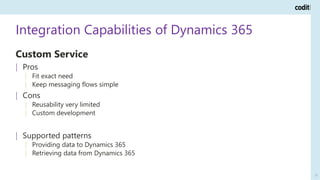
Custom Service
| Pros
| Fit exact need
| Keep messaging flows simple
| Cons
| Reusability very limited
| Custom development
| Supported patterns
| Providing data to Dynamics 365
| Retrieving data from Dynamics 365
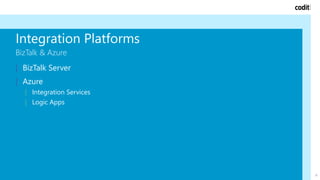
Integration Platforms
BizTalk & Azure
16
| BizTalk Server
| Azure
| Integration Services
| Logic Apps
Integration Platforms
Hybrid Implementations
17
| Combine BizTalk with Azure Integration Services and Logic Apps
| BizTalk handles on-premise
| Azure components handle Dynamics 365
| Minimize need for high availability in BizTalk
Integration Platforms
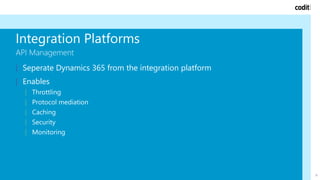
API Management
18
| Seperate Dynamics 365 from the integration platform
| Enables
| Throttling
| Protocol mediation
| Caching
| Security
| Monitoring
Choosing Your Platform and Method
19
The Platform
1. Is an integration platform in place?
2. Am I willing to place custom code in Dynamics 365?
Choosing Your Platform and Method
20
Is there an integration platform in place?
No
Am I willing to place custom code
in Dynamics 365?
Yes
API Management +
Azure Integration
Services + Logic Apps
No
Logic Apps + Azure
Integration Services
My main integration platform is
BizTalk Server
Am I willing to place custom code
in Dynamics 365?
Yes
API Management +
Azure Integration
Services + BizTalk Server
No
BizTalk Server
My main integration platform is
Azure Integration Serices
Am I willing to place custom code
in Dynamics 365?
Yes
API Management +
Azure Integration
Services + Logic Apps
No
Logic Apps + Azure
Integration Services
The Platform
Choosing Your Platform and Method
21
Is there an integration platform in place?
No
Am I willing to place custom code
in Dynamics 365?
Yes
API Management +
Azure Integration
Services + Logic Apps
No
Logic Apps + Azure
Integration Services
My main integration platform is
BizTalk Server
Am I willing to place custom code
in Dynamics 365?
Yes
API Management +
Azure Integration
Services + BizTalk Server
No
BizTalk Server
My main integration platform is
Azure Integration Serices
Am I willing to place custom code
in Dynamics 365?
Yes
API Management +
Azure Integration
Services + Logic Apps
No
Logic Apps + Azure
Integration Services
The Platform
Choosing Your Platform and Method
22
The Method
| Architecture Level
1. Am I only integrating data between different Dynamics 365 modules?
2. Am I using more than one module in Dynamics 365?
| Per Service Level
1. Where is the trigger for my process?
2. Am I using large datasets?
Choosing Your Platform and Method
23
Am I only integrating data between different Dynamics 365 modules?
No
Am I willing to place custom code in Dynamics 365?
No
Am I using more than one module in Dynamics 365?
Yes
Web API + Common Data Service & Data
Integration + Recurring Integrations
No
Web API
Yes
Am I using more than one module in Dynamics 365?
Yes
Web API + Custom Service + Event
Pipeline / Webhooks + Common Data
Service & Data Integration + Recurring
Integrations
No
Web API + Custom Service + Event
Pipeline / Webhooks
Yes
Common Data Service &
Data Integration
The Method – Global Architecture
Choosing Your Platform and Method
24
Am I only integrating data between different Dynamics 365 modules?
No
Am I willing to place custom code in Dynamics 365?
No
Am I using more than one module in Dynamics 365?
Yes
Web API + Common Data Service & Data
Integration + Recurring Integrations
No
Web API
Yes
Am I using more than one module in Dynamics 365?
Yes
Web API + Custom Service + Event
Pipeline / Webhooks + Common Data
Service & Data Integration + Recurring
Integrations
No
Web API + Custom Service + Event
Pipeline / Webhooks
Yes
Common Data Service &
Data Integration
The Method – Global Architecture
Choosing Your Platform and Method
25
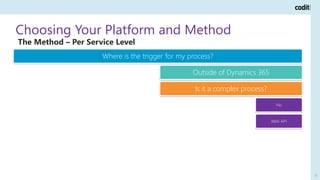
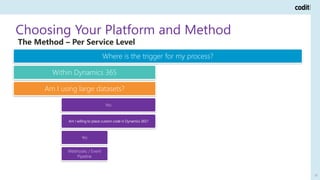
Where is the trigger for my process?
Within Dynamics 365
Am I using large datasets?
Yes
Recurring Integrations
No
Am I willing to place custom code in Dynamics 365?
Yes
Webhooks / Event
Pipeline
No
Web API
Outside of Dynamics 365
Is it a complex process?
Yes
Am I willing to place custom code in Dynamics 365?
Yes
Custom Service
No
Web API
No
Web API
The Method – Per Service Level
Choosing Your Platform and Method
26
Where is the trigger for my process?
Within Dynamics 365
Am I using large datasets?
Yes
Recurring Integrations
No
Am I willing to place custom code in Dynamics 365?
Yes
Webhooks / Event
Pipeline
No
Web API
Outside of Dynamics 365
Is it a complex process?
Yes
Am I willing to place custom code in Dynamics 365?
Yes
Custom Service
No
Web API
No
Web API
The Method – Per Service Level
Conclusion
27
| Dynamics 365 introduces many new integration opportunities!
| Define your architecture
| Choose your platform and method
Whitepaper
September 2019 Lessons Learned when Integrating with D365 28
Connecting is Everything
29

Lessons learned when integrating with Dynamics 365

  • 1.
    Lessons Learned whenIntegrating with Dynamics 365 1
  • 2.
  • 3.
    Agenda | Architecture | CommonIntegration Patterns | Integration Capabilities | Integration Platforms | Choosing Your Platform and Method 3
  • 4.
    The Cause andChallenge 4 | Dynamics 365 is introduced at a customer | New technical possibilities and challenges | Integration architecture transition | Declaration for a transition to the cloud | Business transition | How to choose the right solution?
  • 5.
    Architecture 5 | The integrationstrategy as a critical success factor | Integration architecture | Implementation guidelines | Avoid a ‘technical driven’ integration solution | Define a target architecture
  • 6.
    Common Integration Patterns 6 |Providing Data | Retrieving Data | Receiving Data
  • 7.
    Common Integration Patterns– Providing Data 7 | Create or change data in Dynamics 365 | External process trigger
  • 8.
    Common Integration Patterns– Retrieving Data 8 | Get data from Dynamics 365 | External process trigger
  • 9.
    Common Integration Patterns– Receiving Data 9 | Get data from Dynamics 365 | Trigger in Dynamics 365
  • 10.
    Integration Capabilities ofDynamics 365 10 | Web API | Event Pipeline & Webhooks | Common Data Service & Data Integration | Recurring Integrations | Custom Service
  • 11.
    Integration Capabilities ofDynamics 365 11 Web API | Pros | Available out of the box | Easy to use | Cons | Operations on entity level | Supported patterns | Providing data to Dynamics 365 | Retrieving data from Dynamics 365
  • 12.
    Integration Capabilities ofDynamics 365 12 Event Pipeline & Webhooks | Pros | Call endpoint on trigger | Cons | Webhooks are only available on Dynamics 365 CE | Event Pipeline needs custom component | Supported patterns | Receiving data from Dynamics 365
  • 13.
    Integration Capabilities ofDynamics 365 13 Common Data Service & Data Integration | Pros | One data store for multiple applications | Cons | Point to point integrator tool needed | Supported patterns | Providing data to Dynamics 365 | Retrieving data from Dynamics 365
  • 14.
    Integration Capabilities ofDynamics 365 14 Recurring Integrations | Pros | Process large datasets | Cons | Only available in Dynamics 365 Finance and Operations | Only meant for batch like interfaces | Supported patterns | Providing data to Dynamics 365 | Retrieving data from Dynamics 365
  • 15.
    Integration Capabilities ofDynamics 365 15 Custom Service | Pros | Fit exact need | Keep messaging flows simple | Cons | Reusability very limited | Custom development | Supported patterns | Providing data to Dynamics 365 | Retrieving data from Dynamics 365
  • 16.
    Integration Platforms BizTalk &Azure 16 | BizTalk Server | Azure | Integration Services | Logic Apps
  • 17.
    Integration Platforms Hybrid Implementations 17 |Combine BizTalk with Azure Integration Services and Logic Apps | BizTalk handles on-premise | Azure components handle Dynamics 365 | Minimize need for high availability in BizTalk
  • 18.
    Integration Platforms API Management 18 |Seperate Dynamics 365 from the integration platform | Enables | Throttling | Protocol mediation | Caching | Security | Monitoring
  • 19.
    Choosing Your Platformand Method 19 The Platform 1. Is an integration platform in place? 2. Am I willing to place custom code in Dynamics 365?
  • 20.
    Choosing Your Platformand Method 20 Is there an integration platform in place? No Am I willing to place custom code in Dynamics 365? Yes API Management + Azure Integration Services + Logic Apps No Logic Apps + Azure Integration Services My main integration platform is BizTalk Server Am I willing to place custom code in Dynamics 365? Yes API Management + Azure Integration Services + BizTalk Server No BizTalk Server My main integration platform is Azure Integration Serices Am I willing to place custom code in Dynamics 365? Yes API Management + Azure Integration Services + Logic Apps No Logic Apps + Azure Integration Services The Platform
  • 21.
    Choosing Your Platformand Method 21 Is there an integration platform in place? No Am I willing to place custom code in Dynamics 365? Yes API Management + Azure Integration Services + Logic Apps No Logic Apps + Azure Integration Services My main integration platform is BizTalk Server Am I willing to place custom code in Dynamics 365? Yes API Management + Azure Integration Services + BizTalk Server No BizTalk Server My main integration platform is Azure Integration Serices Am I willing to place custom code in Dynamics 365? Yes API Management + Azure Integration Services + Logic Apps No Logic Apps + Azure Integration Services The Platform
  • 22.
    Choosing Your Platformand Method 22 The Method | Architecture Level 1. Am I only integrating data between different Dynamics 365 modules? 2. Am I using more than one module in Dynamics 365? | Per Service Level 1. Where is the trigger for my process? 2. Am I using large datasets?
  • 23.
    Choosing Your Platformand Method 23 Am I only integrating data between different Dynamics 365 modules? No Am I willing to place custom code in Dynamics 365? No Am I using more than one module in Dynamics 365? Yes Web API + Common Data Service & Data Integration + Recurring Integrations No Web API Yes Am I using more than one module in Dynamics 365? Yes Web API + Custom Service + Event Pipeline / Webhooks + Common Data Service & Data Integration + Recurring Integrations No Web API + Custom Service + Event Pipeline / Webhooks Yes Common Data Service & Data Integration The Method – Global Architecture
  • 24.
    Choosing Your Platformand Method 24 Am I only integrating data between different Dynamics 365 modules? No Am I willing to place custom code in Dynamics 365? No Am I using more than one module in Dynamics 365? Yes Web API + Common Data Service & Data Integration + Recurring Integrations No Web API Yes Am I using more than one module in Dynamics 365? Yes Web API + Custom Service + Event Pipeline / Webhooks + Common Data Service & Data Integration + Recurring Integrations No Web API + Custom Service + Event Pipeline / Webhooks Yes Common Data Service & Data Integration The Method – Global Architecture
  • 25.
    Choosing Your Platformand Method 25 Where is the trigger for my process? Within Dynamics 365 Am I using large datasets? Yes Recurring Integrations No Am I willing to place custom code in Dynamics 365? Yes Webhooks / Event Pipeline No Web API Outside of Dynamics 365 Is it a complex process? Yes Am I willing to place custom code in Dynamics 365? Yes Custom Service No Web API No Web API The Method – Per Service Level
  • 26.
    Choosing Your Platformand Method 26 Where is the trigger for my process? Within Dynamics 365 Am I using large datasets? Yes Recurring Integrations No Am I willing to place custom code in Dynamics 365? Yes Webhooks / Event Pipeline No Web API Outside of Dynamics 365 Is it a complex process? Yes Am I willing to place custom code in Dynamics 365? Yes Custom Service No Web API No Web API The Method – Per Service Level
  • 27.
    Conclusion 27 | Dynamics 365introduces many new integration opportunities! | Define your architecture | Choose your platform and method
  • 28.
    Whitepaper September 2019 LessonsLearned when Integrating with D365 28
  • 29.