ISAD253SL - Databases
Lesson 6
Relational Algebra
Dileeka Alwis
Lecturer, School of Computing, NSBM
1
Relational Algebra (Relational Operations)
• A procedural query language, which takes instances of
relations as input and yields instances of relations as
output.
• A collection of operations that are used to manipulate
queries from relations.
– Restriction
– Projection
– Union
– Intersection
– Difference
– Product
– Join
– Division
2
Restriction
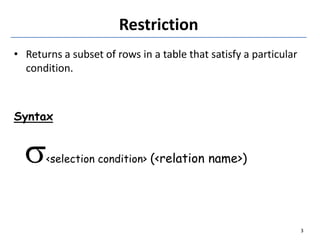
• Returns a subset of rows in a table that satisfy a particular
condition.
Syntax
<selection condition> (<relation name>)
3
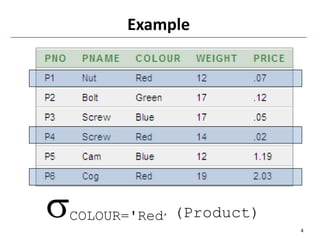
Example
COLOUR='Red’ (Product)
4
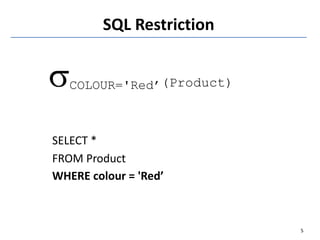
SQL Restriction
COLOUR='Red’(Product)
SELECT *
FROM Product
WHERE colour = 'Red’
5
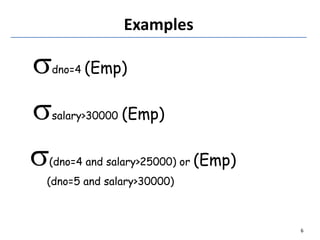
Examples
dno=4 (Emp)
salary>30000 (Emp)
(dno=4 and salary>25000) or (Emp)
(dno=5 and salary>30000)
6
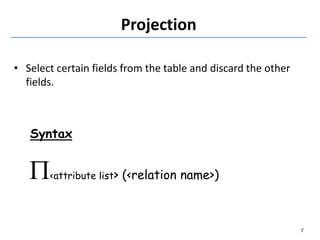
Projection
• Select certain fields from the table and discard the other
fields.
Syntax
<attribute list> (<relation name>)
7
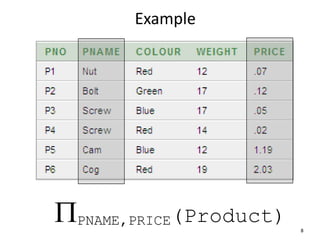
PNAME,PRICE(Product)
Example
8
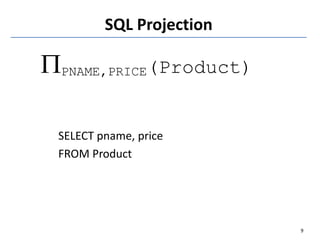
SQL Projection
PNAME,PRICE(Product)
SELECT pname, price
FROM Product
9
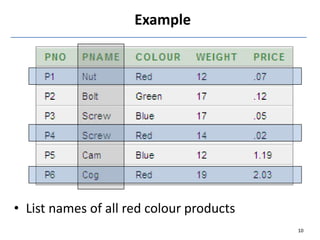
• List names of all red colour products
Example
10
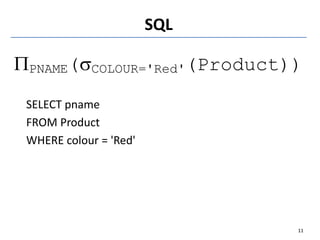
SQL
PNAME(COLOUR='Red'(Product))
SELECT pname
FROM Product
WHERE colour = 'Red'
11
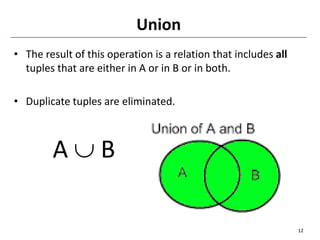
Union
• The result of this operation is a relation that includes all
tuples that are either in A or in B or in both.
• Duplicate tuples are eliminated.
A  B
12
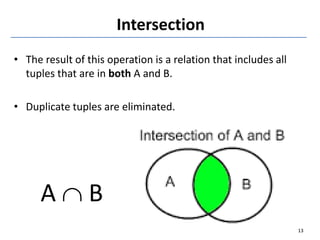
Intersection
• The result of this operation is a relation that includes all
tuples that are in both A and B.
• Duplicate tuples are eliminated.
A  B
13
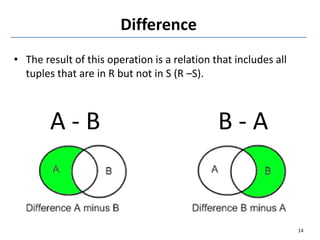
Difference
• The result of this operation is a relation that includes all
tuples that are in R but not in S (R –S).
A - B B - A
14
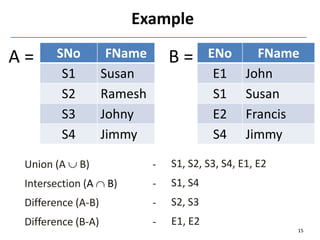
Union (A  B) -
Intersection (A  B) -
Difference (A-B) -
Difference (B-A) -
SNo FName
S1 Susan
S2 Ramesh
S3 Johny
S4 Jimmy
ENo FName
E1 John
S1 Susan
E2 Francis
S4 Jimmy
Example
A = B =
15
S1, S2, S3, S4, E1, E2
S1, S4
S2, S3
E1, E2
SQL
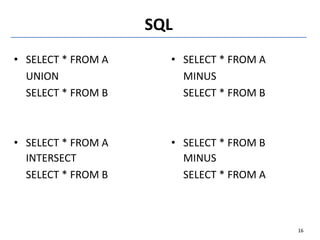
• SELECT * FROM A
UNION
SELECT * FROM B
• SELECT * FROM A
INTERSECT
SELECT * FROM B
• SELECT * FROM A
MINUS
SELECT * FROM B
• SELECT * FROM B
MINUS
SELECT * FROM A
16
Exercise
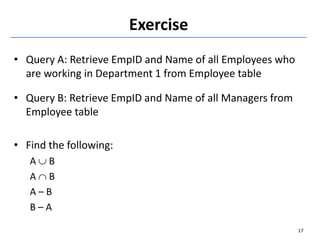
• Query A: Retrieve EmpID and Name of all Employees who
are working in Department 1 from Employee table
• Query B: Retrieve EmpID and Name of all Managers from
Employee table
• Find the following:
A  B
A  B
A – B
B – A
17
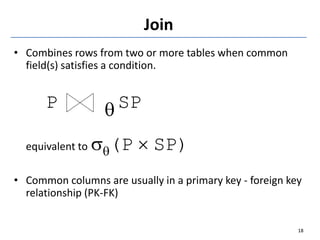
Join
• Combines rows from two or more tables when common
field(s) satisfies a condition.
P q SP
equivalent to q(P  SP)
• Common columns are usually in a primary key - foreign key
relationship (PK-FK)
18
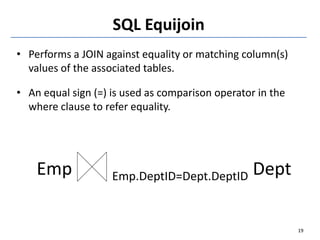
SQL Equijoin
• Performs a JOIN against equality or matching column(s)
values of the associated tables.
• An equal sign (=) is used as comparison operator in the
where clause to refer equality.
Emp Emp.DeptID=Dept.DeptID Dept
19
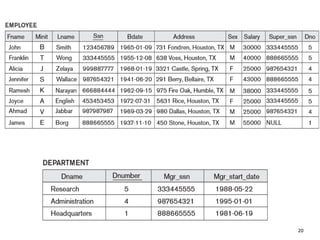
20
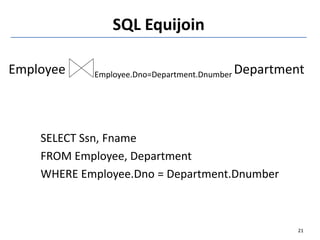
SQL Equijoin
Employee Employee.Dno=Department.Dnumber Department
SELECT Ssn, Fname
FROM Employee, Department
WHERE Employee.Dno = Department.Dnumber
21
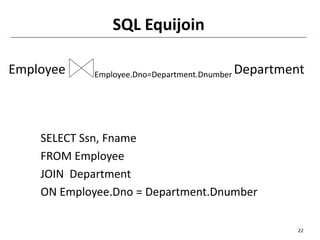
SQL Equijoin
Employee Employee.Dno=Department.Dnumber Department
SELECT Ssn, Fname
FROM Employee
JOIN Department
ON Employee.Dno = Department.Dnumber
22
SQL Natural Join
• A type of EQUI JOIN and is structured in such a way that,
columns with the same name of associated tables will
appear once only.
Guidelines
 The associated tables have one or more pairs of
identically named columns.
 The columns must be the same data type.
 Don’t use ON clause in a natural join.
23
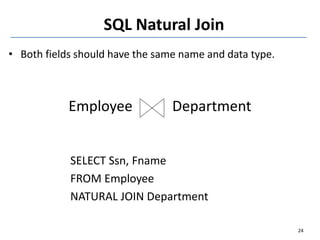
• Both fields should have the same name and data type.
Employee Department
SELECT Ssn, Fname
FROM Employee
NATURAL JOIN Department
24
SQL Natural Join
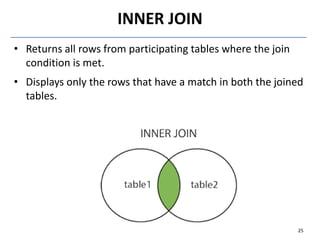
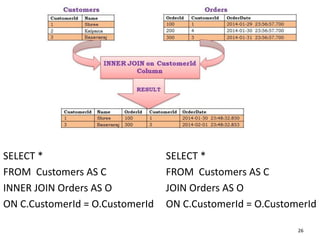
INNER JOIN
• Returns all rows from participating tables where the join
condition is met.
• Displays only the rows that have a match in both the joined
tables.
25
26
SELECT *
FROM Customers AS C
INNER JOIN Orders AS O
ON C.CustomerId = O.CustomerId
SELECT *
FROM Customers AS C
JOIN Orders AS O
ON C.CustomerId = O.CustomerId
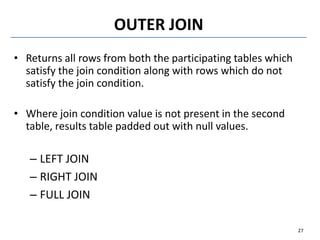
OUTER JOIN
• Returns all rows from both the participating tables which
satisfy the join condition along with rows which do not
satisfy the join condition.
• Where join condition value is not present in the second
table, results table padded out with null values.
– LEFT JOIN
– RIGHT JOIN
– FULL JOIN
27
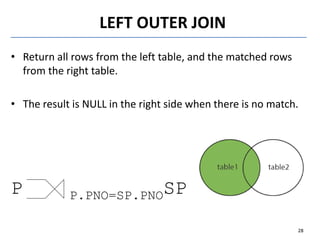
LEFT OUTER JOIN
• Return all rows from the left table, and the matched rows
from the right table.
• The result is NULL in the right side when there is no match.
P P.PNO=SP.PNOSP
28
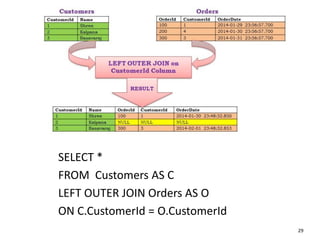
29
SELECT *
FROM Customers AS C
LEFT OUTER JOIN Orders AS O
ON C.CustomerId = O.CustomerId
RIGHT OUTER JOIN
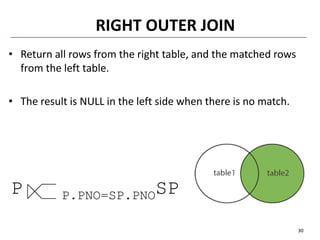
• Return all rows from the right table, and the matched rows
from the left table.
• The result is NULL in the left side when there is no match.
P P.PNO=SP.PNOSP
30
31
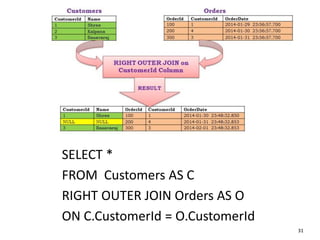
SELECT *
FROM Customers AS C
RIGHT OUTER JOIN Orders AS O
ON C.CustomerId = O.CustomerId
FULL OUTER JOIN
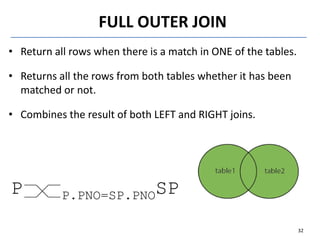
• Return all rows when there is a match in ONE of the tables.
• Returns all the rows from both tables whether it has been
matched or not.
• Combines the result of both LEFT and RIGHT joins.
P P.PNO=SP.PNOSP
32
33
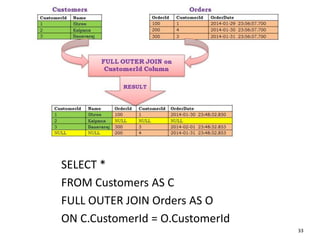
SELECT *
FROM Customers AS C
FULL OUTER JOIN Orders AS O
ON C.CustomerId = O.CustomerId
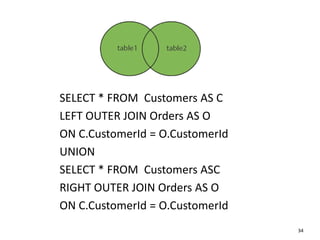
34
SELECT * FROM Customers AS C
LEFT OUTER JOIN Orders AS O
ON C.CustomerId = O.CustomerId
UNION
SELECT * FROM Customers ASC
RIGHT OUTER JOIN Orders AS O
ON C.CustomerId = O.CustomerId
• A table is joined to itself (Unary relationships), especially
when the table has a foreign key which references its own
primary key.
• Can be viewed as a join of two copies of the same table.
• Self join is used to retrieve the records having some
relation or similarity with other records in the same table.
• Used where the same table needs to be visited twice.
SELF JOIN
35
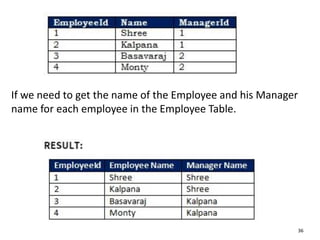
If we need to get the name of the Employee and his Manager
name for each employee in the Employee Table.
36
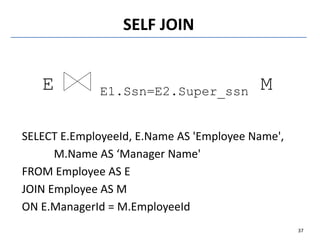
SELF JOIN
E E1.Ssn=E2.Super_ssn M
37
SELECT E.EmployeeId, E.Name AS 'Employee Name',
M.Name AS ‘Manager Name'
FROM Employee AS E
JOIN Employee AS M
ON E.ManagerId = M.EmployeeId
Product
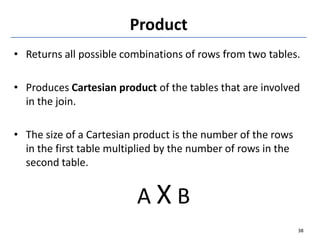
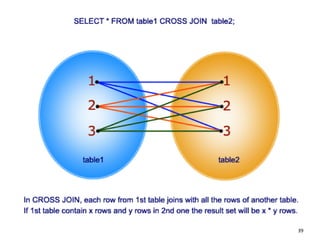
• Returns all possible combinations of rows from two tables.
• Produces Cartesian product of the tables that are involved
in the join.
• The size of a Cartesian product is the number of the rows
in the first table multiplied by the number of rows in the
second table.
A X B
38
39
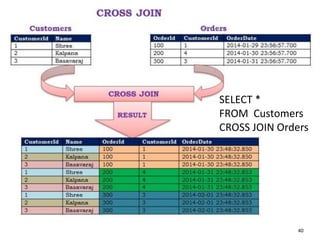
SELECT *
FROM Customers
CROSS JOIN Orders
40
Thank You
41

Lesson 6 - Relational Algebra.pdf

  • 1.
    ISAD253SL - Databases Lesson6 Relational Algebra Dileeka Alwis Lecturer, School of Computing, NSBM 1
  • 2.
    Relational Algebra (RelationalOperations) • A procedural query language, which takes instances of relations as input and yields instances of relations as output. • A collection of operations that are used to manipulate queries from relations. – Restriction – Projection – Union – Intersection – Difference – Product – Join – Division 2
  • 3.
    Restriction • Returns asubset of rows in a table that satisfy a particular condition. Syntax <selection condition> (<relation name>) 3
  • 4.
  • 5.
  • 6.
    Examples dno=4 (Emp) salary>30000 (Emp) (dno=4and salary>25000) or (Emp) (dno=5 and salary>30000) 6
  • 7.
    Projection • Select certainfields from the table and discard the other fields. Syntax <attribute list> (<relation name>) 7
  • 8.
  • 9.
  • 10.
    • List namesof all red colour products Example 10
  • 11.
  • 12.
    Union • The resultof this operation is a relation that includes all tuples that are either in A or in B or in both. • Duplicate tuples are eliminated. A  B 12
  • 13.
    Intersection • The resultof this operation is a relation that includes all tuples that are in both A and B. • Duplicate tuples are eliminated. A  B 13
  • 14.
    Difference • The resultof this operation is a relation that includes all tuples that are in R but not in S (R –S). A - B B - A 14
  • 15.
    Union (A B) - Intersection (A  B) - Difference (A-B) - Difference (B-A) - SNo FName S1 Susan S2 Ramesh S3 Johny S4 Jimmy ENo FName E1 John S1 Susan E2 Francis S4 Jimmy Example A = B = 15 S1, S2, S3, S4, E1, E2 S1, S4 S2, S3 E1, E2
  • 16.
    SQL • SELECT *FROM A UNION SELECT * FROM B • SELECT * FROM A INTERSECT SELECT * FROM B • SELECT * FROM A MINUS SELECT * FROM B • SELECT * FROM B MINUS SELECT * FROM A 16
  • 17.
    Exercise • Query A:Retrieve EmpID and Name of all Employees who are working in Department 1 from Employee table • Query B: Retrieve EmpID and Name of all Managers from Employee table • Find the following: A  B A  B A – B B – A 17
  • 18.
    Join • Combines rowsfrom two or more tables when common field(s) satisfies a condition. P q SP equivalent to q(P  SP) • Common columns are usually in a primary key - foreign key relationship (PK-FK) 18
  • 19.
    SQL Equijoin • Performsa JOIN against equality or matching column(s) values of the associated tables. • An equal sign (=) is used as comparison operator in the where clause to refer equality. Emp Emp.DeptID=Dept.DeptID Dept 19
  • 20.
  • 21.
    SQL Equijoin Employee Employee.Dno=Department.DnumberDepartment SELECT Ssn, Fname FROM Employee, Department WHERE Employee.Dno = Department.Dnumber 21
  • 22.
    SQL Equijoin Employee Employee.Dno=Department.DnumberDepartment SELECT Ssn, Fname FROM Employee JOIN Department ON Employee.Dno = Department.Dnumber 22
  • 23.
    SQL Natural Join •A type of EQUI JOIN and is structured in such a way that, columns with the same name of associated tables will appear once only. Guidelines  The associated tables have one or more pairs of identically named columns.  The columns must be the same data type.  Don’t use ON clause in a natural join. 23
  • 24.
    • Both fieldsshould have the same name and data type. Employee Department SELECT Ssn, Fname FROM Employee NATURAL JOIN Department 24 SQL Natural Join
  • 25.
    INNER JOIN • Returnsall rows from participating tables where the join condition is met. • Displays only the rows that have a match in both the joined tables. 25
  • 26.
    26 SELECT * FROM CustomersAS C INNER JOIN Orders AS O ON C.CustomerId = O.CustomerId SELECT * FROM Customers AS C JOIN Orders AS O ON C.CustomerId = O.CustomerId
  • 27.
    OUTER JOIN • Returnsall rows from both the participating tables which satisfy the join condition along with rows which do not satisfy the join condition. • Where join condition value is not present in the second table, results table padded out with null values. – LEFT JOIN – RIGHT JOIN – FULL JOIN 27
  • 28.
    LEFT OUTER JOIN •Return all rows from the left table, and the matched rows from the right table. • The result is NULL in the right side when there is no match. P P.PNO=SP.PNOSP 28
  • 29.
    29 SELECT * FROM CustomersAS C LEFT OUTER JOIN Orders AS O ON C.CustomerId = O.CustomerId
  • 30.
    RIGHT OUTER JOIN •Return all rows from the right table, and the matched rows from the left table. • The result is NULL in the left side when there is no match. P P.PNO=SP.PNOSP 30
  • 31.
    31 SELECT * FROM CustomersAS C RIGHT OUTER JOIN Orders AS O ON C.CustomerId = O.CustomerId
  • 32.
    FULL OUTER JOIN •Return all rows when there is a match in ONE of the tables. • Returns all the rows from both tables whether it has been matched or not. • Combines the result of both LEFT and RIGHT joins. P P.PNO=SP.PNOSP 32
  • 33.
    33 SELECT * FROM CustomersAS C FULL OUTER JOIN Orders AS O ON C.CustomerId = O.CustomerId
  • 34.
    34 SELECT * FROMCustomers AS C LEFT OUTER JOIN Orders AS O ON C.CustomerId = O.CustomerId UNION SELECT * FROM Customers ASC RIGHT OUTER JOIN Orders AS O ON C.CustomerId = O.CustomerId
  • 35.
    • A tableis joined to itself (Unary relationships), especially when the table has a foreign key which references its own primary key. • Can be viewed as a join of two copies of the same table. • Self join is used to retrieve the records having some relation or similarity with other records in the same table. • Used where the same table needs to be visited twice. SELF JOIN 35
  • 36.
    If we needto get the name of the Employee and his Manager name for each employee in the Employee Table. 36
  • 37.
    SELF JOIN E E1.Ssn=E2.Super_ssnM 37 SELECT E.EmployeeId, E.Name AS 'Employee Name', M.Name AS ‘Manager Name' FROM Employee AS E JOIN Employee AS M ON E.ManagerId = M.EmployeeId
  • 38.
    Product • Returns allpossible combinations of rows from two tables. • Produces Cartesian product of the tables that are involved in the join. • The size of a Cartesian product is the number of the rows in the first table multiplied by the number of rows in the second table. A X B 38
  • 39.
  • 40.
  • 41.