Copyright © Oracle Corporation, 2001. All rights reserved.
Restricting and Sorting Data
2-2 Copyright © Oracle Corporation, 2001. All rights reserved.
Objectives
After completing this lesson, you should be able to
do the following:
• Limit the rows retrieved by a query
• Sort the rows retrieved by a query
2-3 Copyright © Oracle Corporation, 2001. All rights reserved.
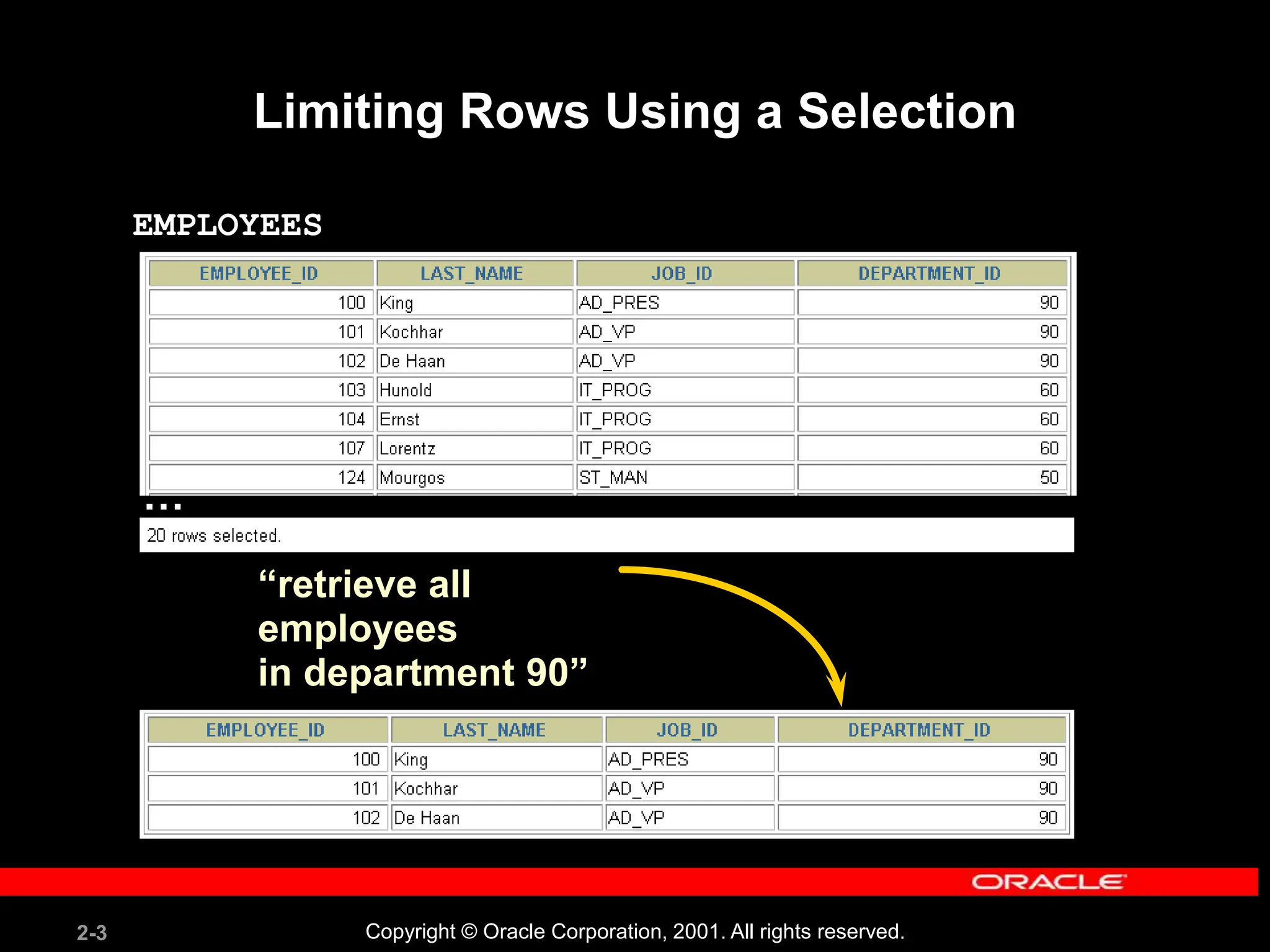
Limiting Rows Using a Selection
“retrieve all
employees
in department 90”
EMPLOYEES
…
2-4 Copyright © Oracle Corporation, 2001. All rights reserved.
Limiting the Rows Selected
• Restrict the rows returned by using the WHERE
clause.
• The WHERE clause follows the FROM clause.
SELECT *|{[DISTINCT] column|expression [alias],...}
FROM table
[WHERE condition(s)];
2-5 Copyright © Oracle Corporation, 2001. All rights reserved.
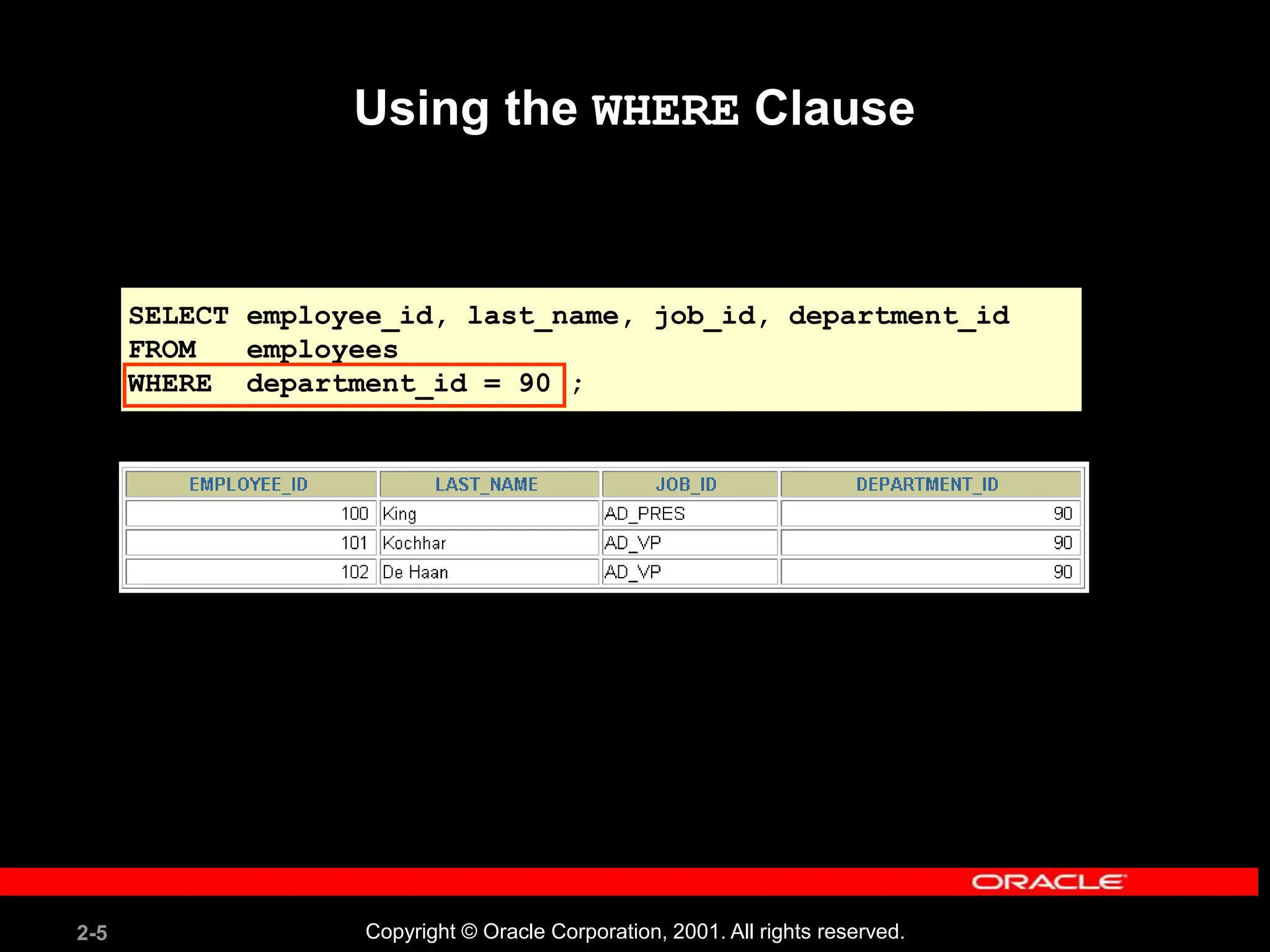
Using the WHERE Clause
SELECT employee_id, last_name, job_id, department_id
FROM employees
WHERE department_id = 90 ;
2-6 Copyright © Oracle Corporation, 2001. All rights reserved.
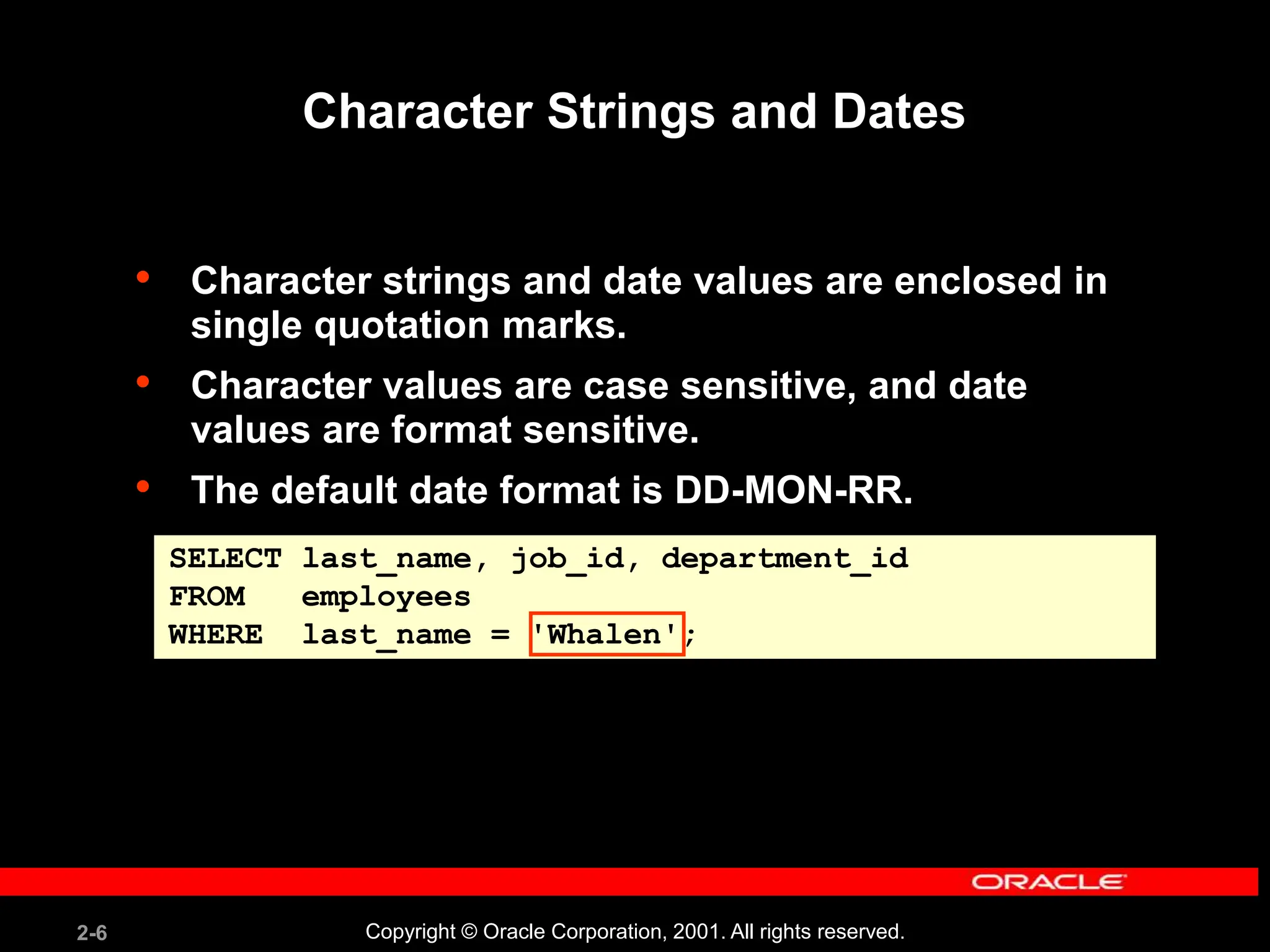
Character Strings and Dates
• Character strings and date values are enclosed in
single quotation marks.
• Character values are case sensitive, and date
values are format sensitive.
• The default date format is DD-MON-RR.
SELECT last_name, job_id, department_id
FROM employees
WHERE last_name = 'Whalen';
2-7 Copyright © Oracle Corporation, 2001. All rights reserved.
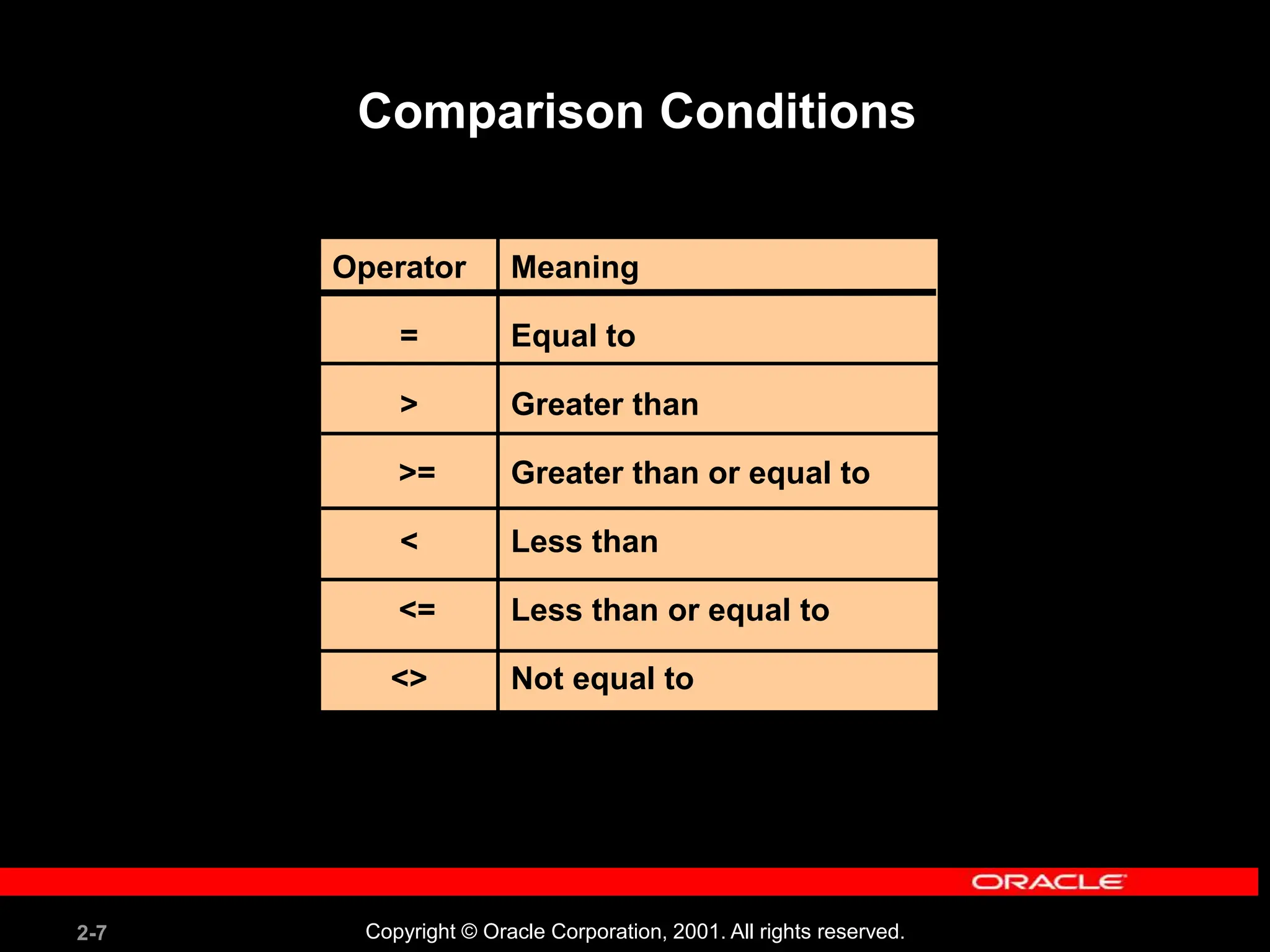
Comparison Conditions
Operator
=
>
>=
<
<=
<>
Meaning
Equal to
Greater than
Greater than or equal to
Less than
Less than or equal to
Not equal to
2-8 Copyright © Oracle Corporation, 2001. All rights reserved.
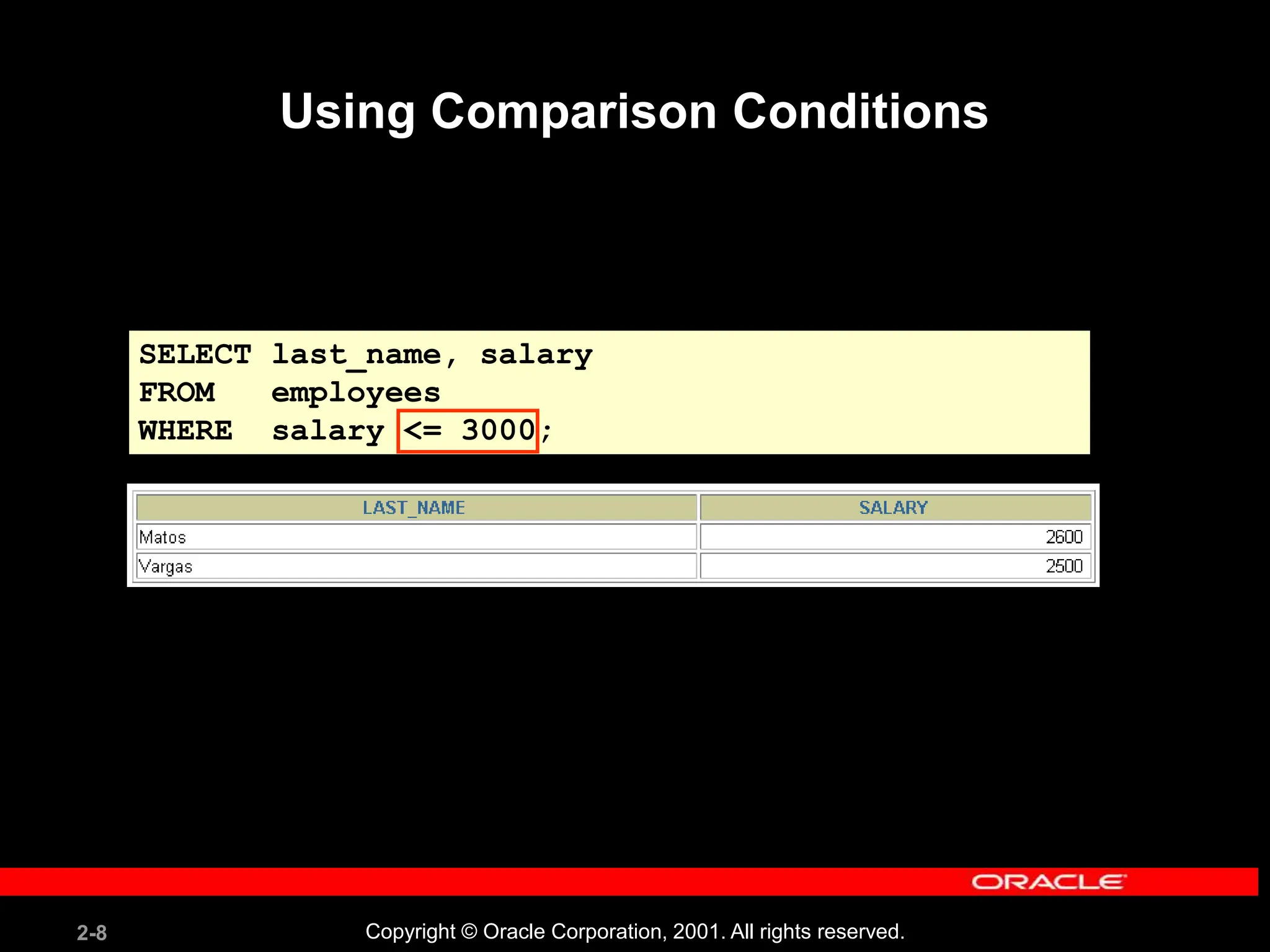
SELECT last_name, salary
FROM employees
WHERE salary <= 3000;
Using Comparison Conditions
2-9 Copyright © Oracle Corporation, 2001. All rights reserved.
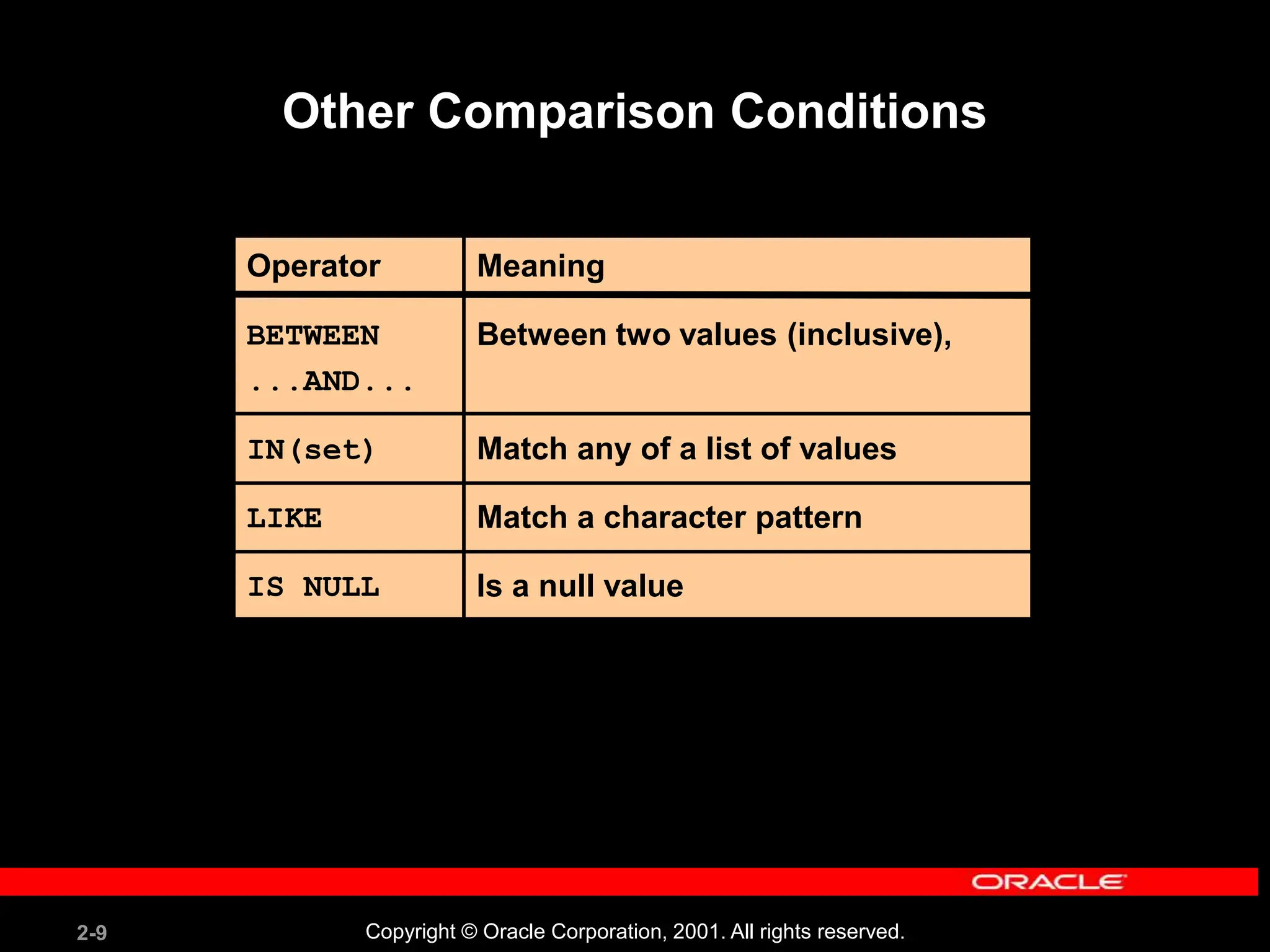
Other Comparison Conditions
Operator
BETWEEN
...AND...
IN(set)
LIKE
IS NULL
Meaning
Between two values (inclusive),
Match any of a list of values
Match a character pattern
Is a null value
2-10 Copyright © Oracle Corporation, 2001. All rights reserved.
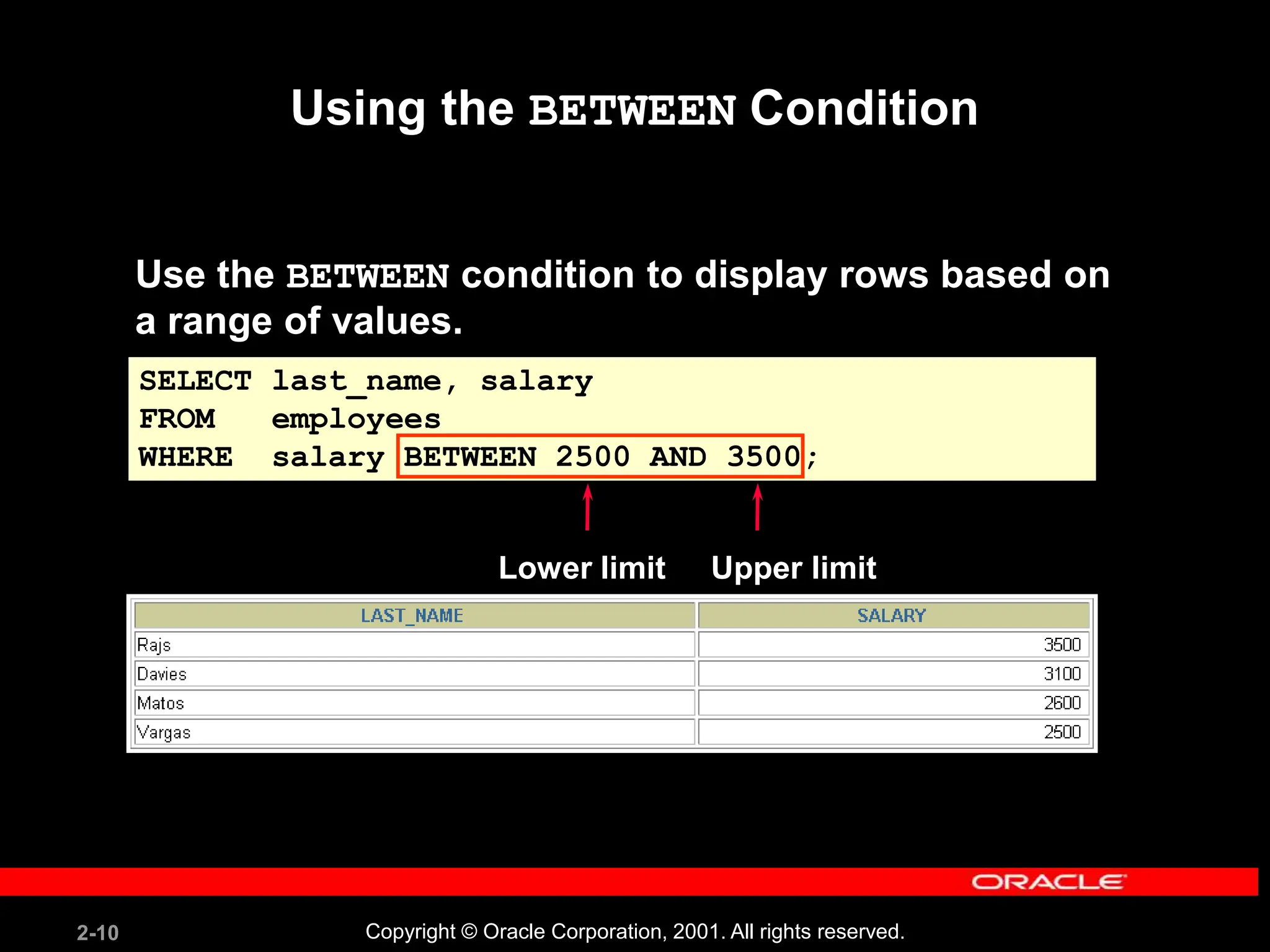
Using the BETWEEN Condition
Use the BETWEEN condition to display rows based on
a range of values.
SELECT last_name, salary
FROM employees
WHERE salary BETWEEN 2500 AND 3500;
Lower limit Upper limit
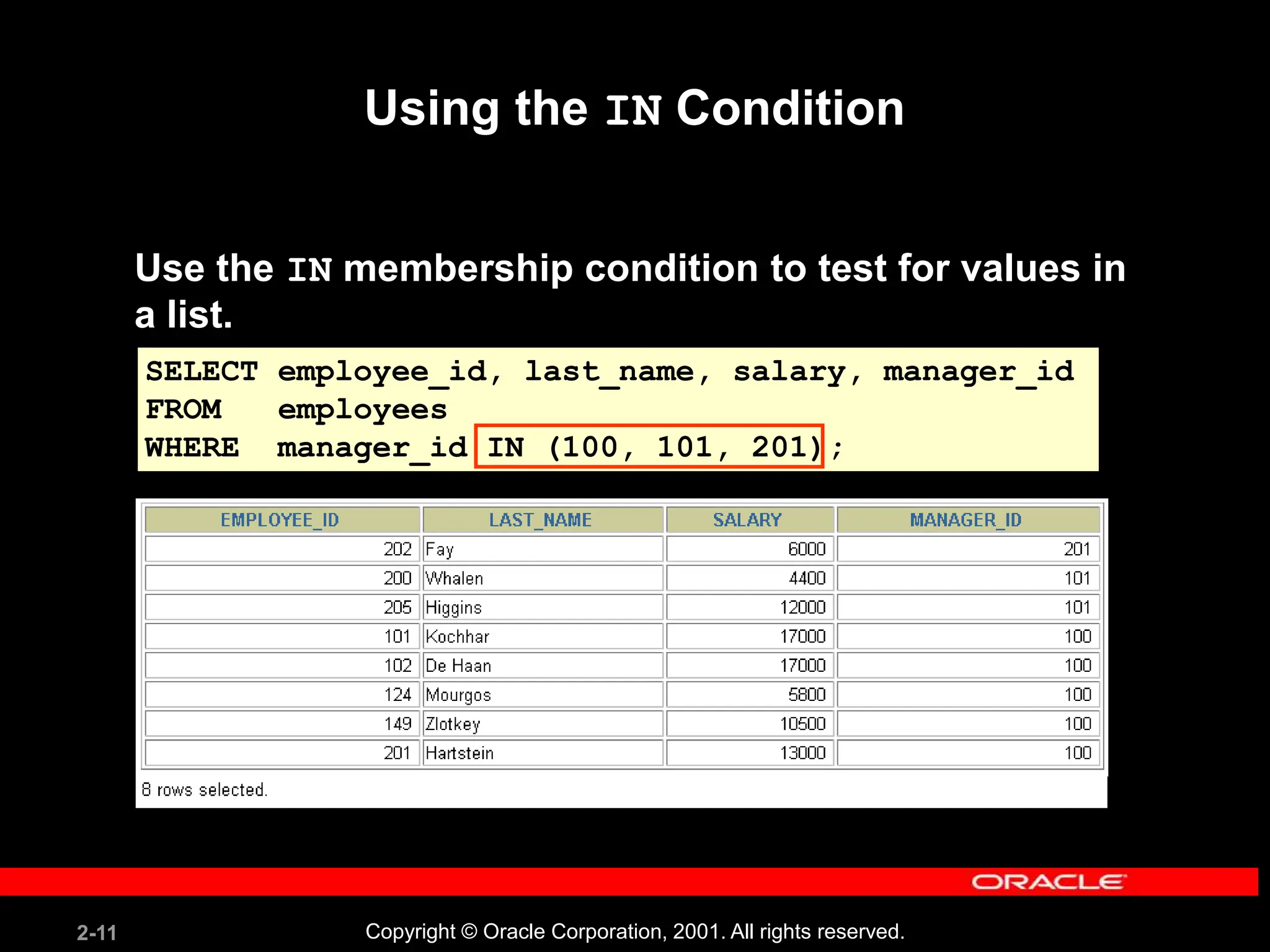
2-11 Copyright © Oracle Corporation, 2001. All rights reserved.
SELECT employee_id, last_name, salary, manager_id
FROM employees
WHERE manager_id IN (100, 101, 201);
Using the IN Condition
Use the IN membership condition to test for values in
a list.
2-12 Copyright © Oracle Corporation, 2001. All rights reserved.
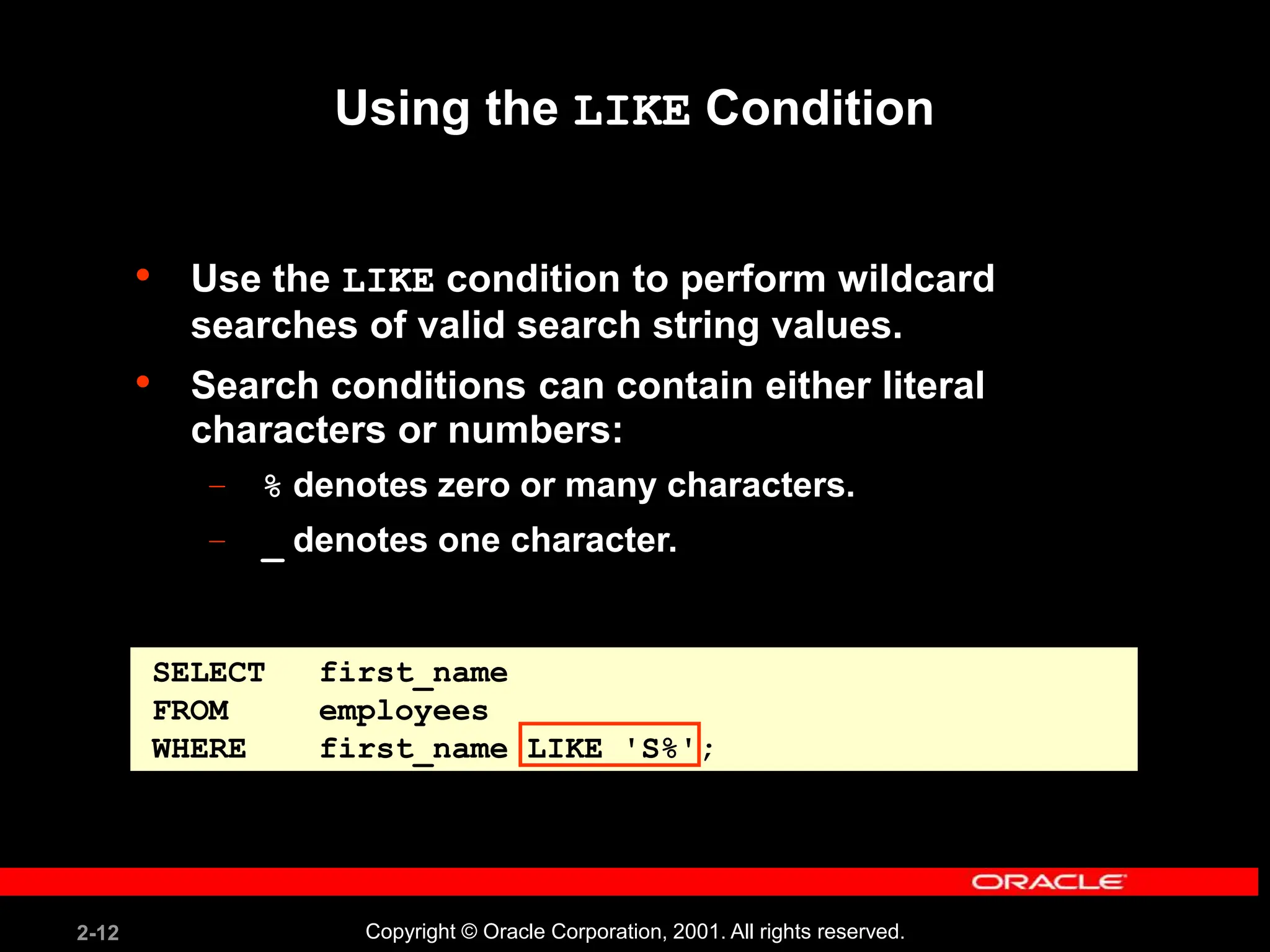
Using the LIKE Condition
• Use the LIKE condition to perform wildcard
searches of valid search string values.
• Search conditions can contain either literal
characters or numbers:
– % denotes zero or many characters.
– _ denotes one character.
SELECT first_name
FROM employees
WHERE first_name LIKE 'S%';
2-13 Copyright © Oracle Corporation, 2001. All rights reserved.
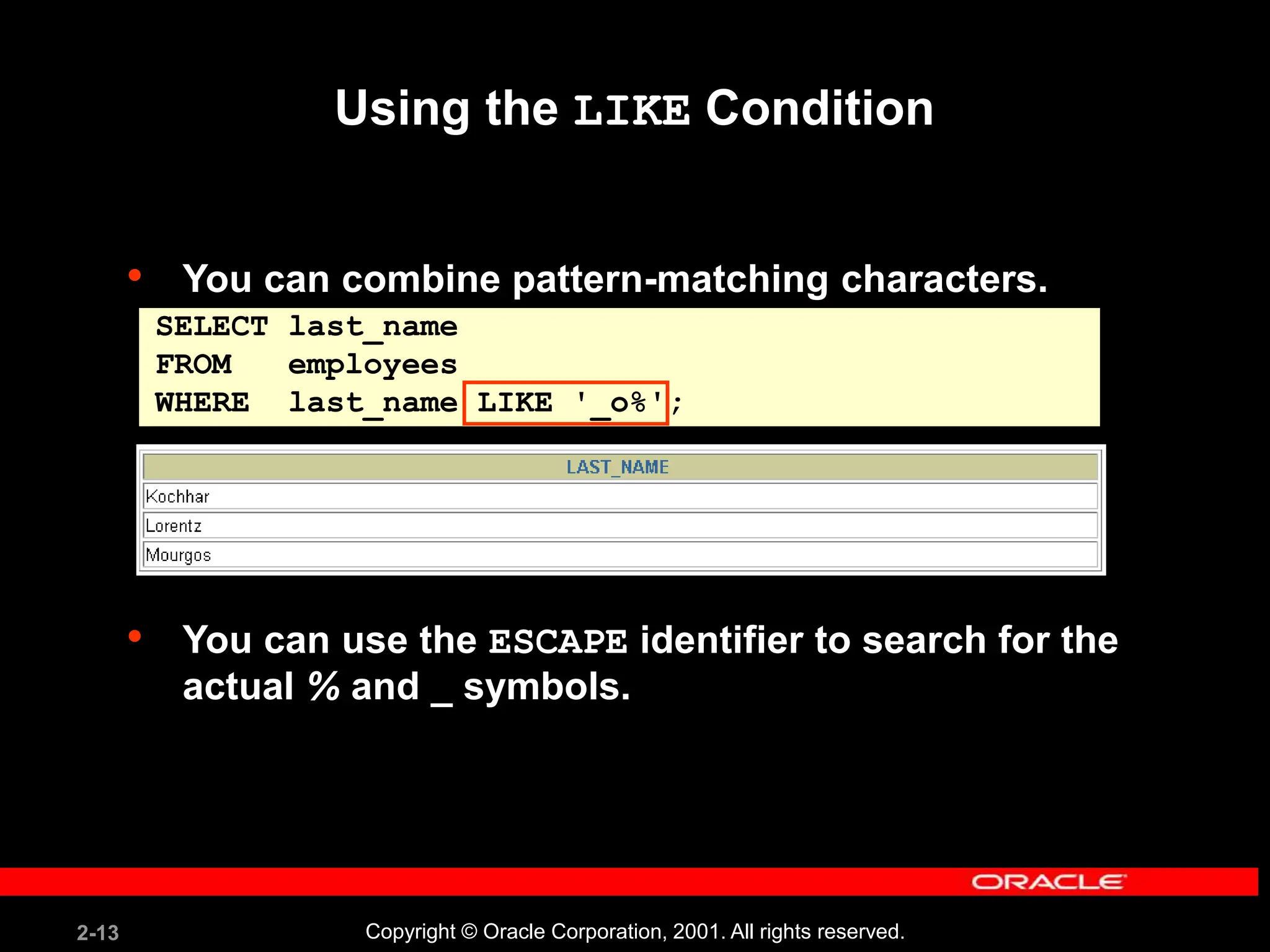
• You can combine pattern-matching characters.
• You can use the ESCAPE identifier to search for the
actual % and _ symbols.
Using the LIKE Condition
SELECT last_name
FROM employees
WHERE last_name LIKE '_o%';
2-14 Copyright © Oracle Corporation, 2001. All rights reserved.
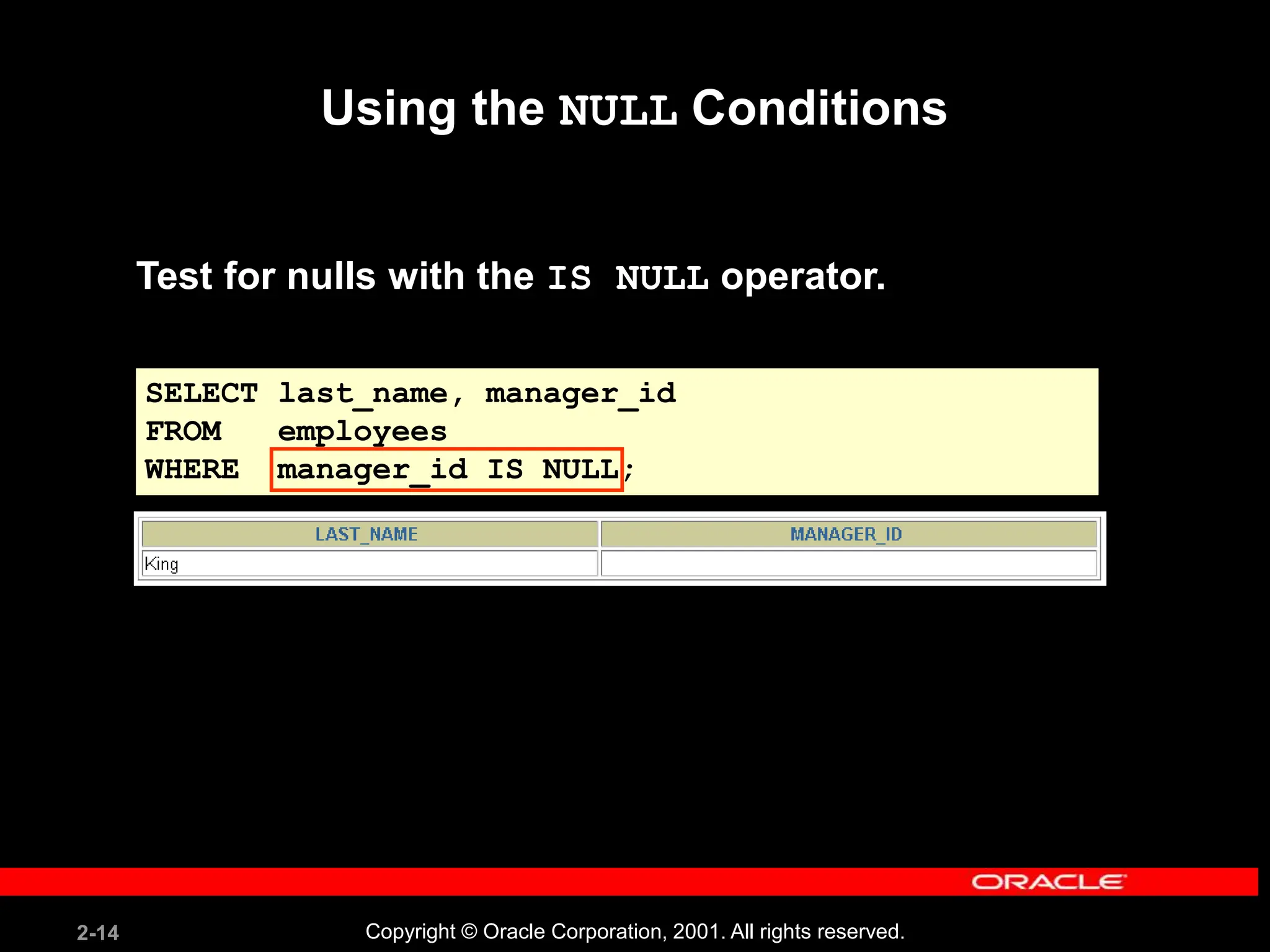
Using the NULL Conditions
Test for nulls with the IS NULL operator.
SELECT last_name, manager_id
FROM employees
WHERE manager_id IS NULL;
2-15 Copyright © Oracle Corporation, 2001. All rights reserved.
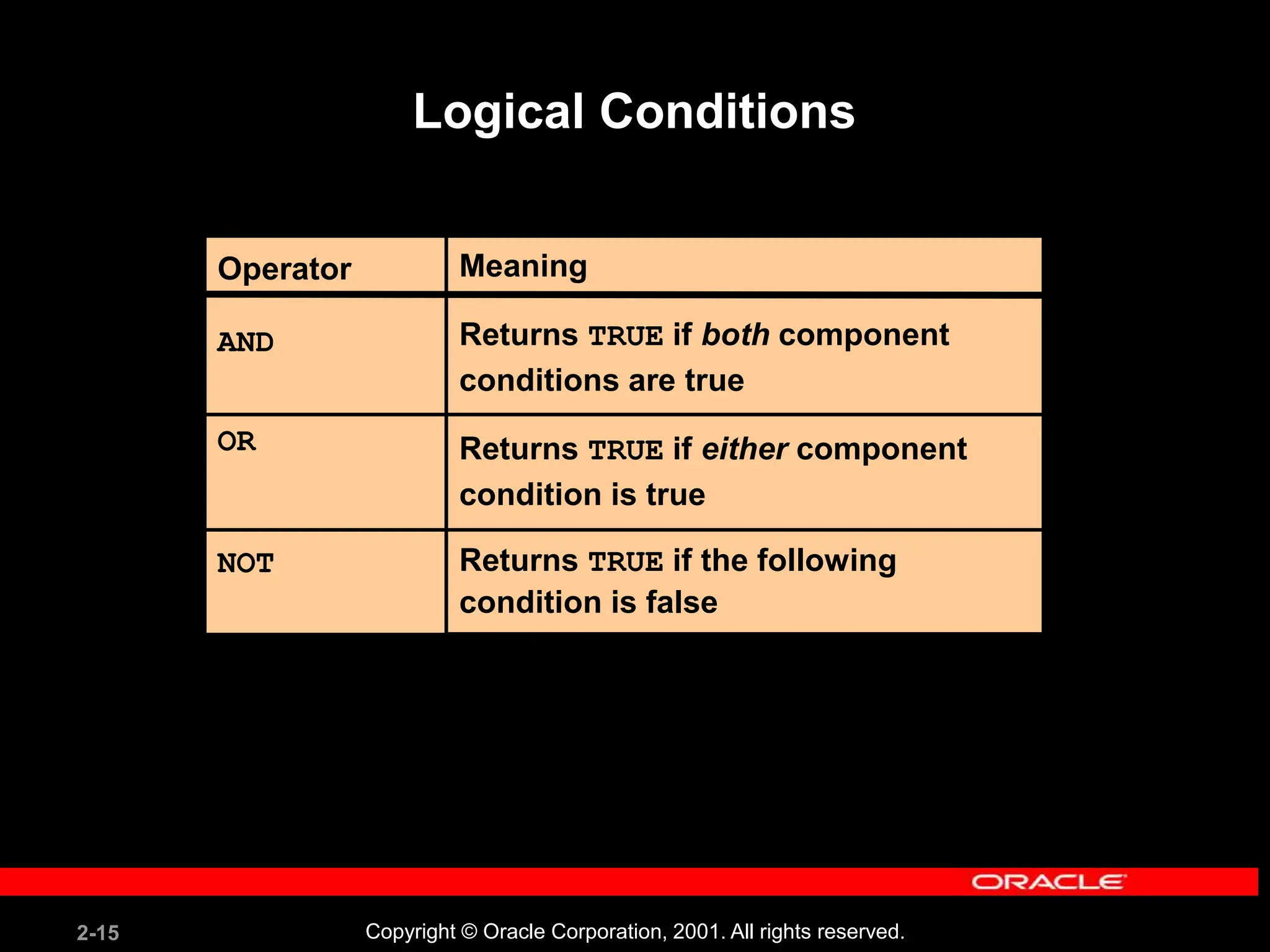
Logical Conditions
Operator
AND
OR
NOT
Meaning
Returns TRUE if both component
conditions are true
Returns TRUE if either component
condition is true
Returns TRUE if the following
condition is false
2-16 Copyright © Oracle Corporation, 2001. All rights reserved.
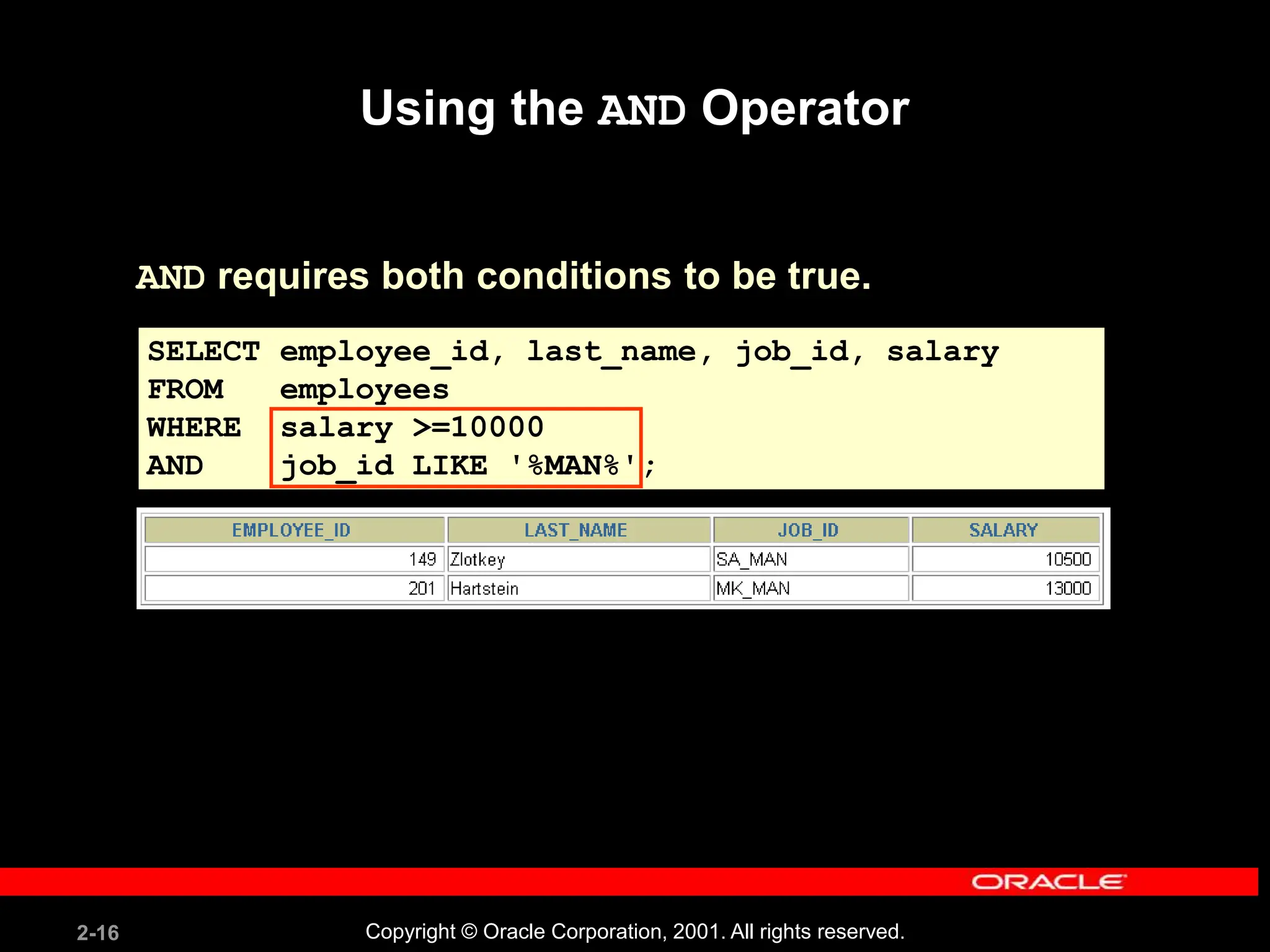
Using the AND Operator
AND requires both conditions to be true.
SELECT employee_id, last_name, job_id, salary
FROM employees
WHERE salary >=10000
AND job_id LIKE '%MAN%';
2-17 Copyright © Oracle Corporation, 2001. All rights reserved.
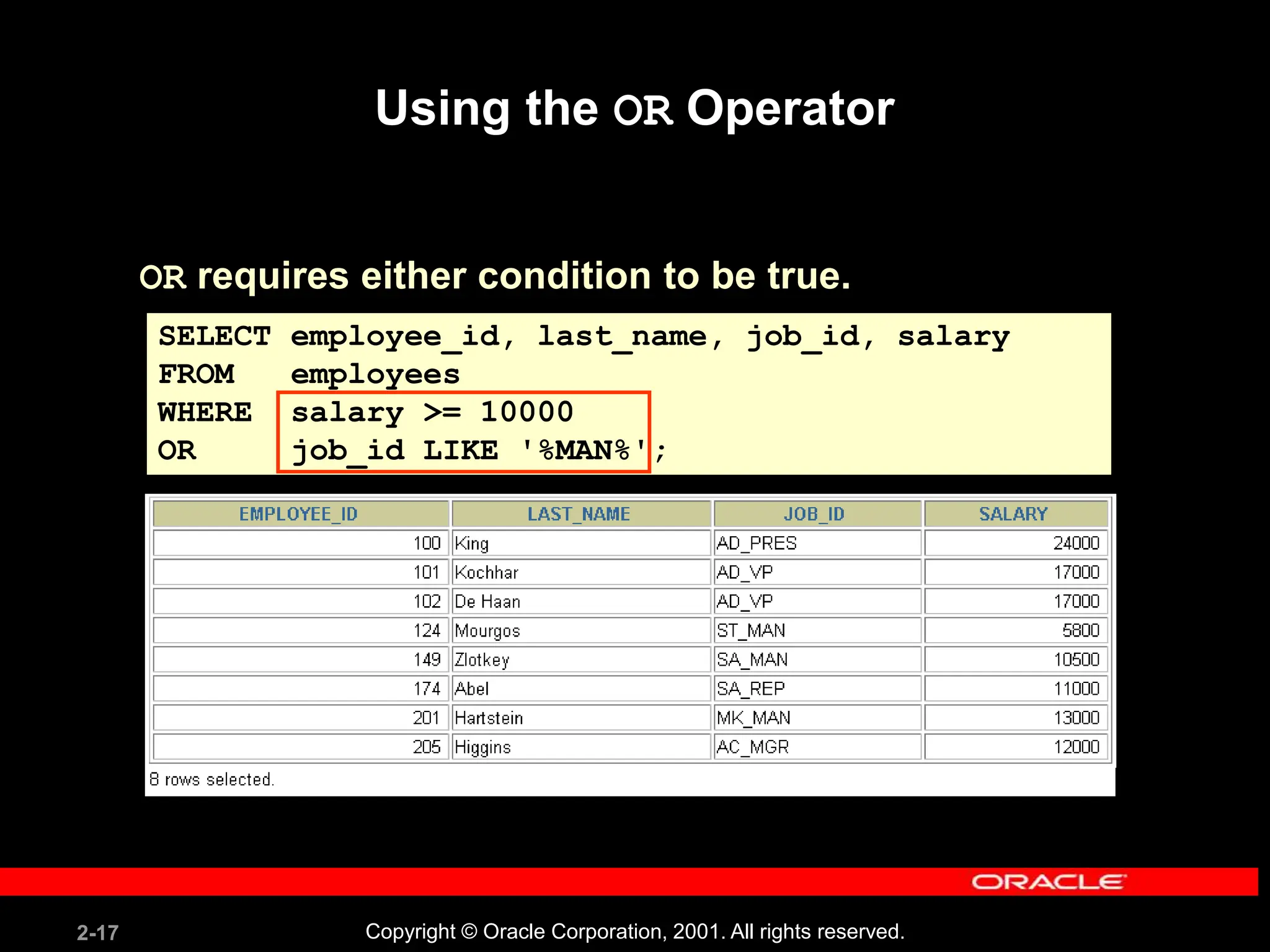
Using the OR Operator
OR requires either condition to be true.
SELECT employee_id, last_name, job_id, salary
FROM employees
WHERE salary >= 10000
OR job_id LIKE '%MAN%';
2-18 Copyright © Oracle Corporation, 2001. All rights reserved.
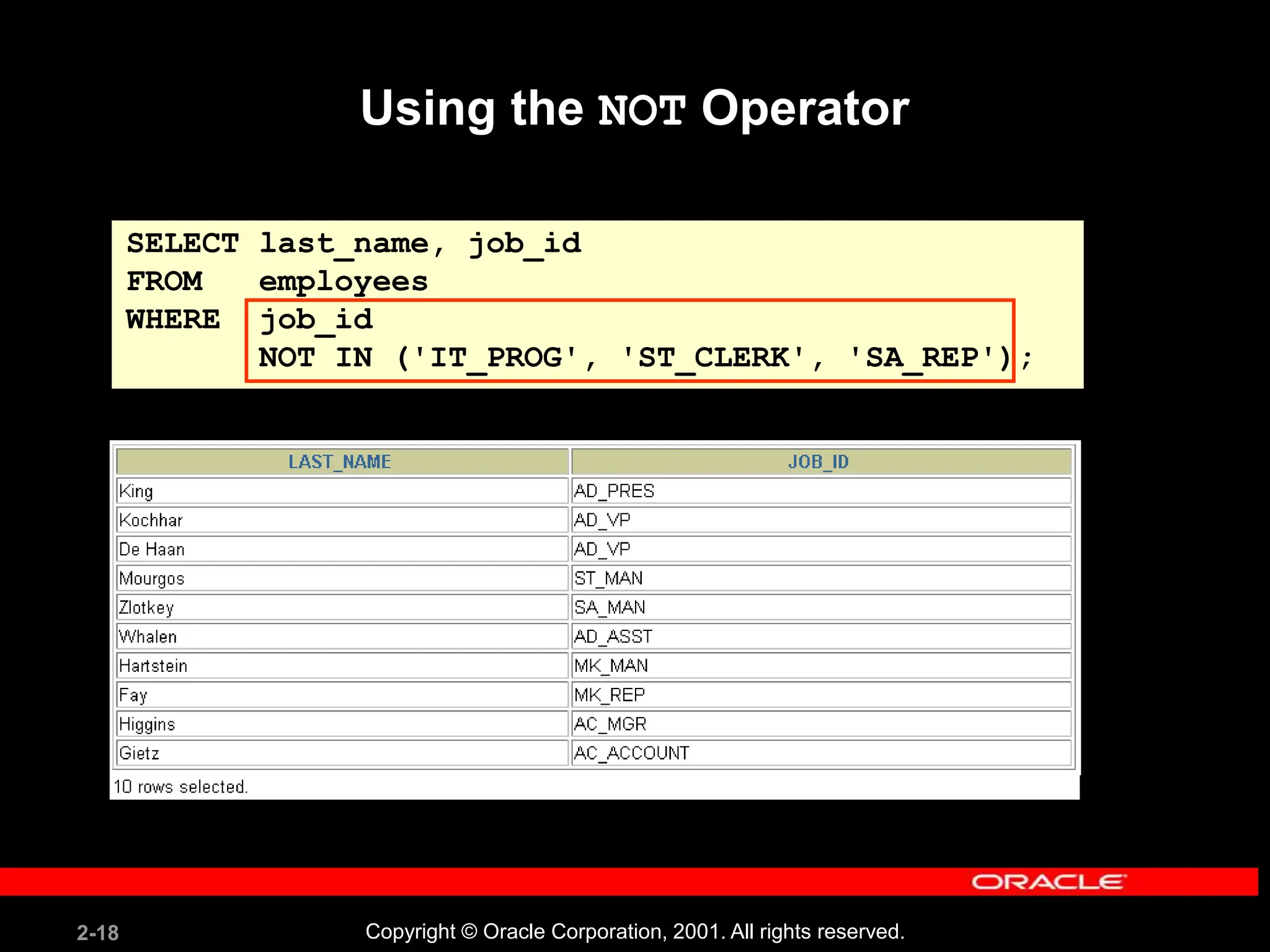
SELECT last_name, job_id
FROM employees
WHERE job_id
NOT IN ('IT_PROG', 'ST_CLERK', 'SA_REP');
Using the NOT Operator
2-19 Copyright © Oracle Corporation, 2001. All rights reserved.
Rules of Precedence
Override rules of precedence by using parentheses.
Order Evaluated Operator
1 Arithmetic operators
2 Concatenation operator
3 Comparison conditions
4 IS [NOT] NULL, LIKE, [NOT] IN
5 [NOT] BETWEEN
6 NOT logical condition
7 AND logical condition
8 OR logical condition
2-20 Copyright © Oracle Corporation, 2001. All rights reserved.
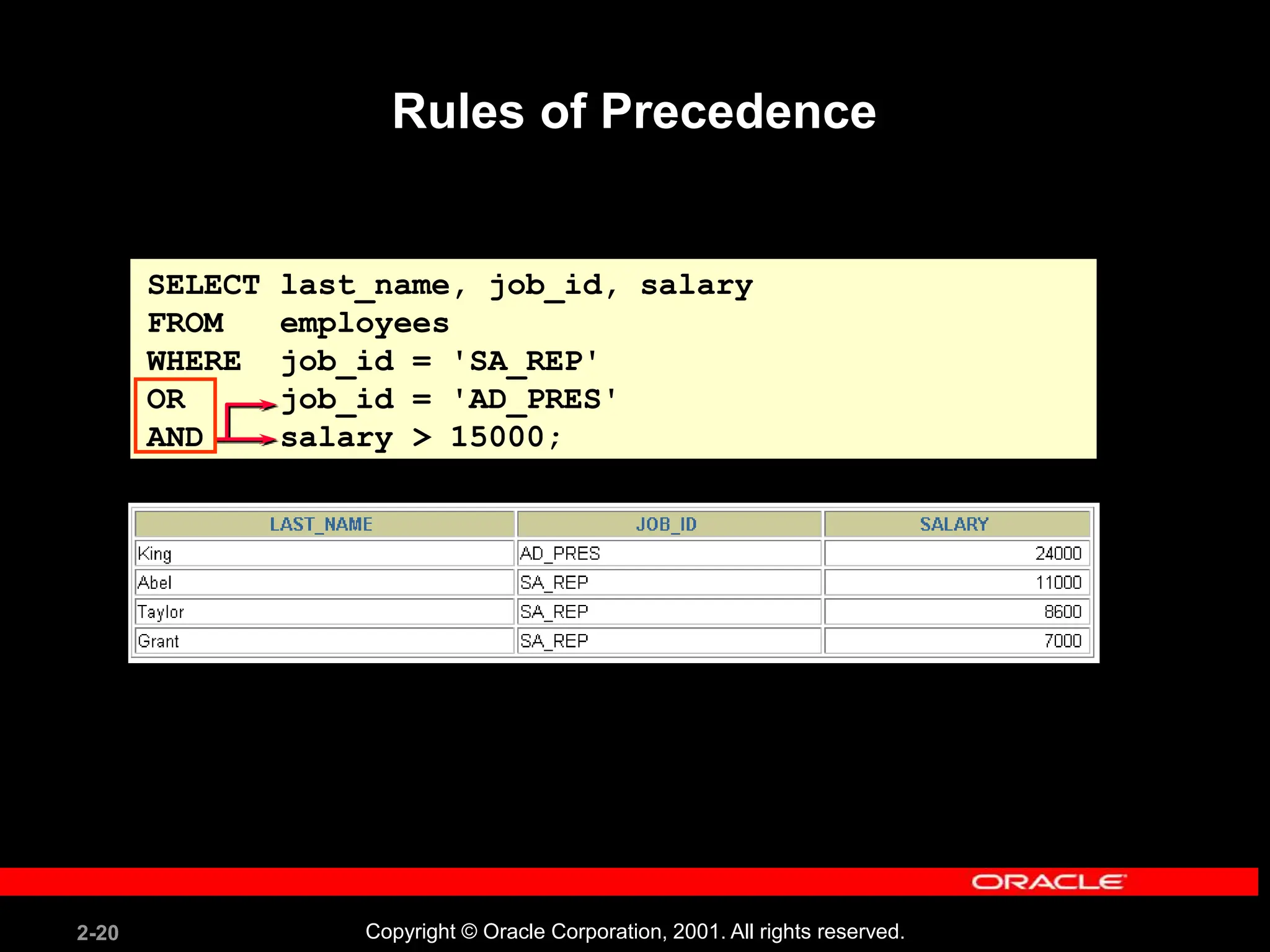
SELECT last_name, job_id, salary
FROM employees
WHERE job_id = 'SA_REP'
OR job_id = 'AD_PRES'
AND salary > 15000;
Rules of Precedence
2-21 Copyright © Oracle Corporation, 2001. All rights reserved.
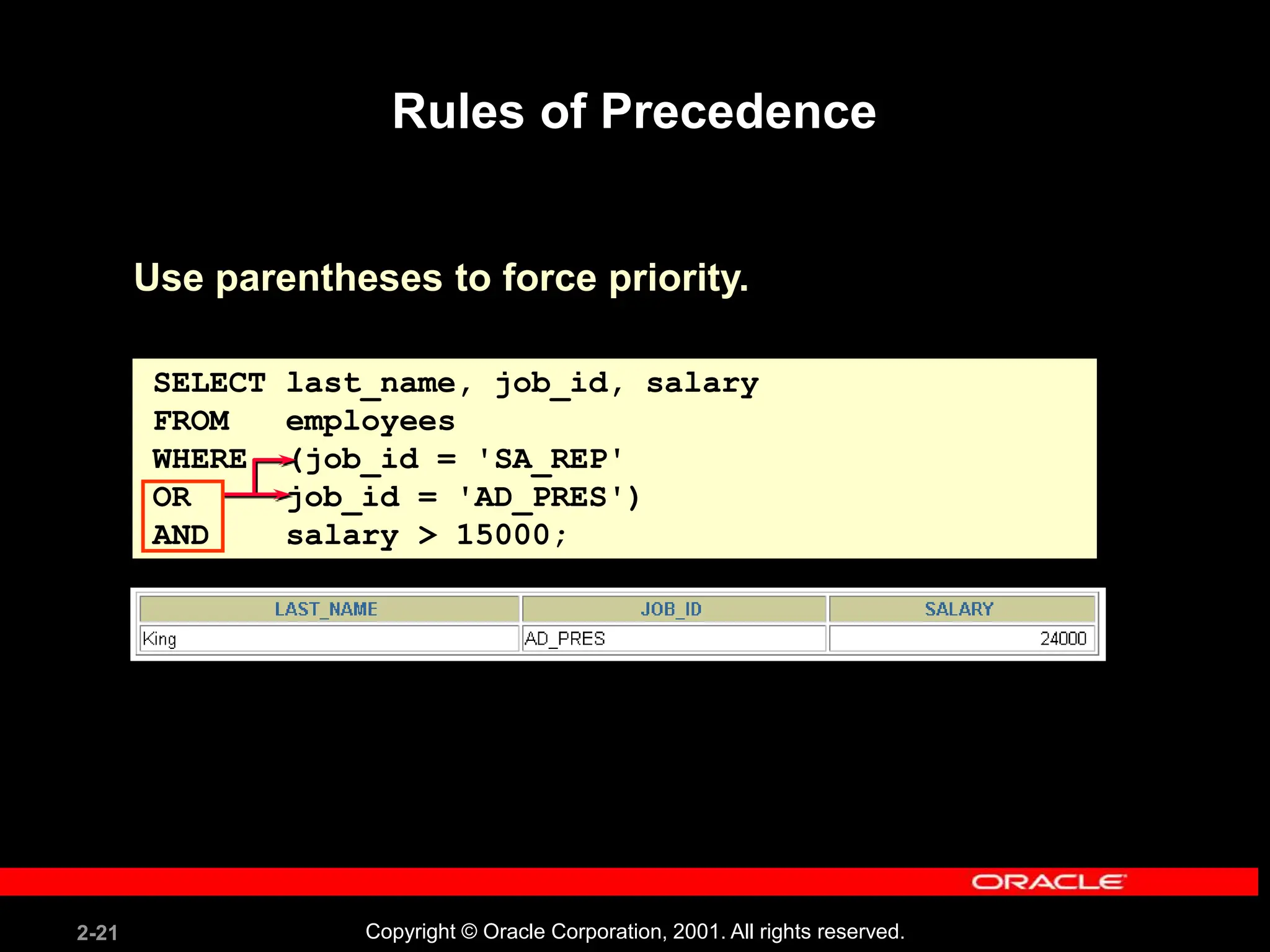
SELECT last_name, job_id, salary
FROM employees
WHERE (job_id = 'SA_REP'
OR job_id = 'AD_PRES')
AND salary > 15000;
Rules of Precedence
Use parentheses to force priority.
2-22 Copyright © Oracle Corporation, 2001. All rights reserved.
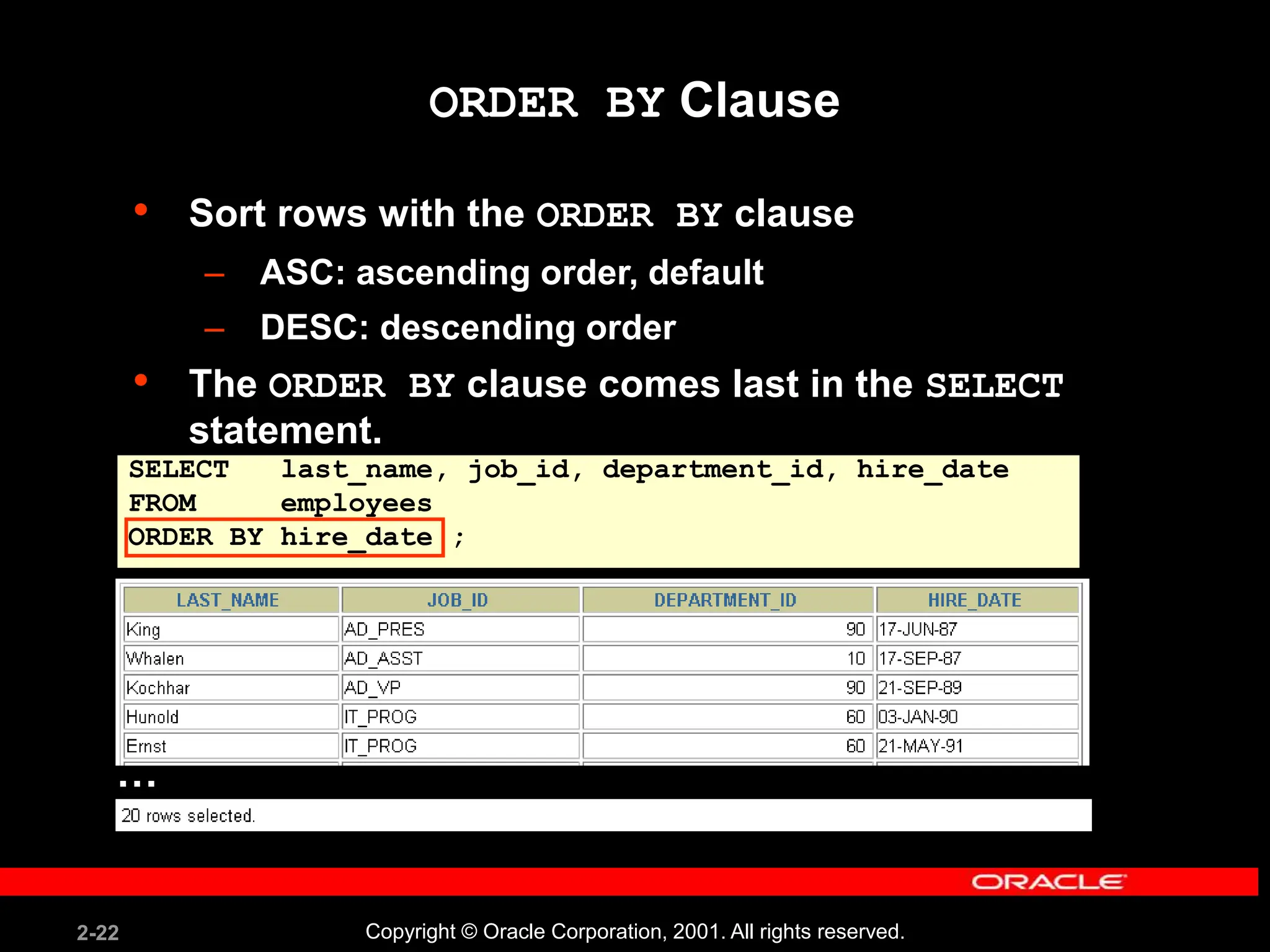
SELECT last_name, job_id, department_id, hire_date
FROM employees
ORDER BY hire_date ;
ORDER BY Clause
• Sort rows with the ORDER BY clause
– ASC: ascending order, default
– DESC: descending order
• The ORDER BY clause comes last in the SELECT
statement.
…
2-23 Copyright © Oracle Corporation, 2001. All rights reserved.
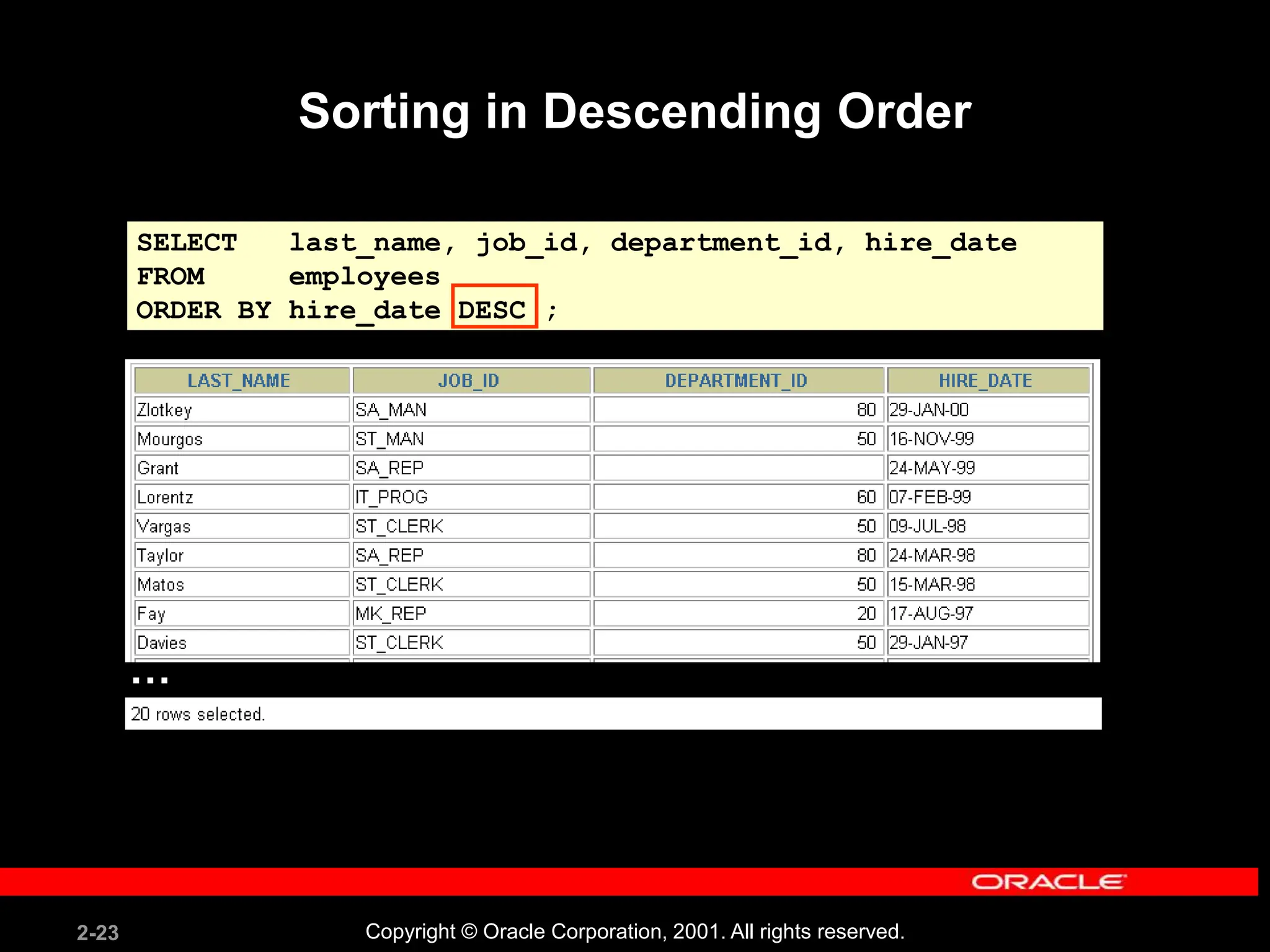
Sorting in Descending Order
SELECT last_name, job_id, department_id, hire_date
FROM employees
ORDER BY hire_date DESC ;
…
2-24 Copyright © Oracle Corporation, 2001. All rights reserved.
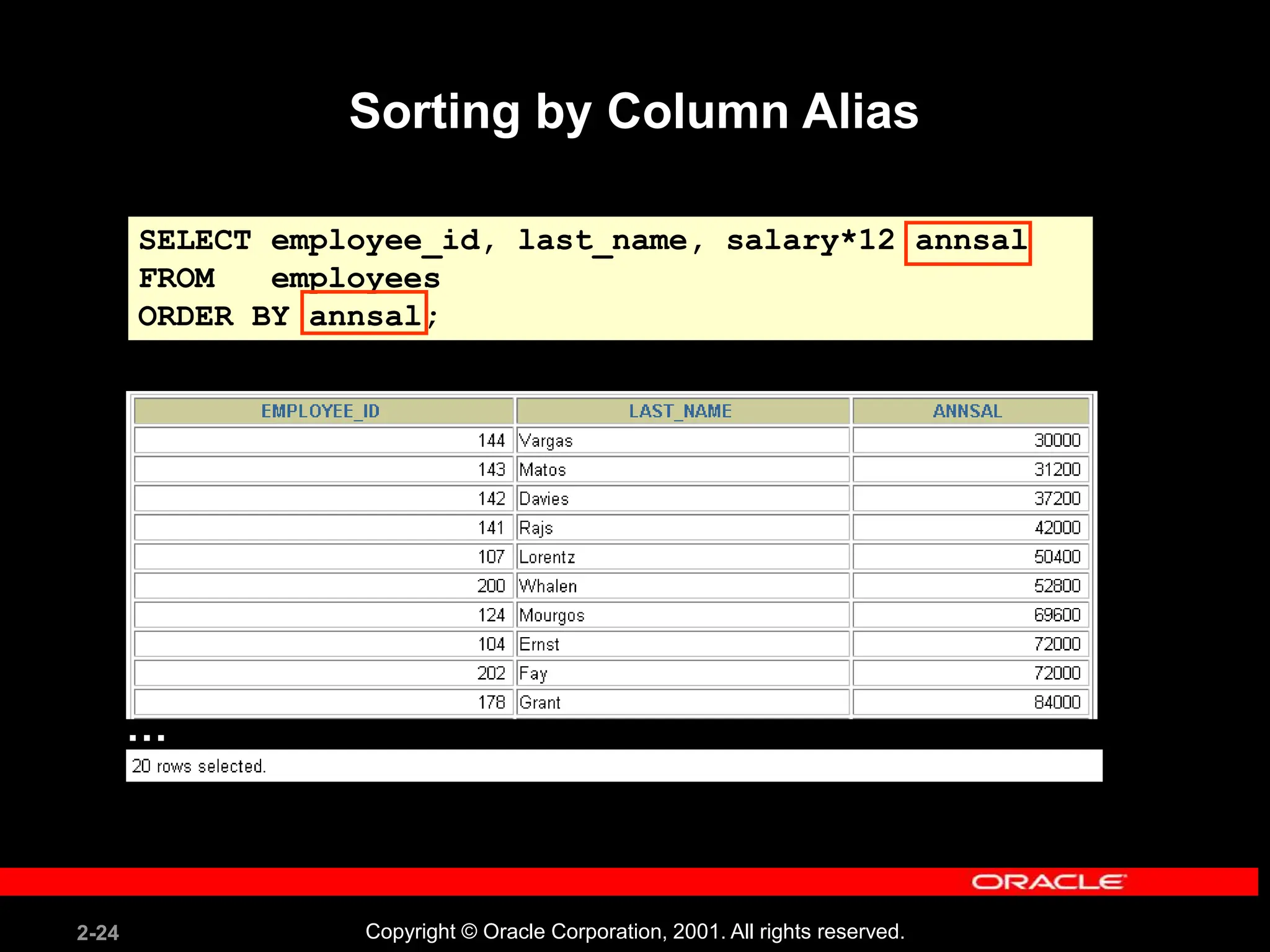
Sorting by Column Alias
SELECT employee_id, last_name, salary*12 annsal
FROM employees
ORDER BY annsal;
…
2-25 Copyright © Oracle Corporation, 2001. All rights reserved.
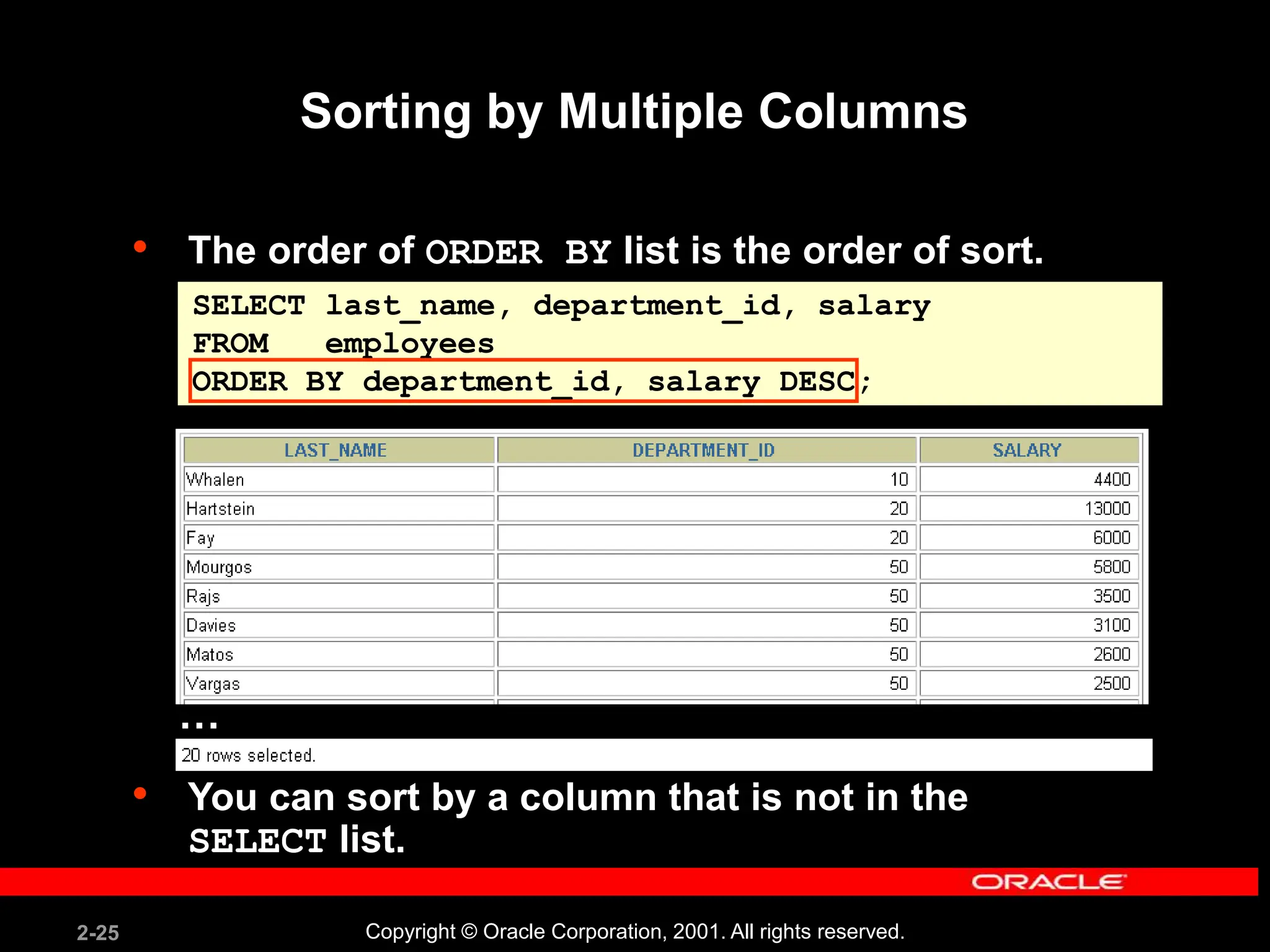
• The order of ORDER BY list is the order of sort.
• You can sort by a column that is not in the
SELECT list.
SELECT last_name, department_id, salary
FROM employees
ORDER BY department_id, salary DESC;
Sorting by Multiple Columns
…
2-26 Copyright © Oracle Corporation, 2001. All rights reserved.
Summary
SELECT *|{[DISTINCT] column|expression [alias],...}
FROM table
[WHERE condition(s)]
[ORDER BY {column, expr, alias} [ASC|DESC]];
In this lesson, you should have learned how to:
• Use the WHERE clause to restrict rows of output
– Use the comparison conditions
– Use the BETWEEN, IN, LIKE, and NULL conditions
– Apply the logical AND, OR, and NOT operators
• Use the ORDER BY clause to sort rows of output
2-27 Copyright © Oracle Corporation, 2001. All rights reserved.
Practice 2 Overview
This practice covers the following topics:
• Selecting data and changing the order of
rows displayed
• Restricting rows by using the WHERE clause
• Sorting rows by using the ORDER BY clause
2-28 Copyright © Oracle Corporation, 2001. All rights reserved.

Les02 Restricting and Sorting Data using SQL.ppt

  • 1.
    Copyright © OracleCorporation, 2001. All rights reserved. Restricting and Sorting Data
  • 2.
    2-2 Copyright ©Oracle Corporation, 2001. All rights reserved. Objectives After completing this lesson, you should be able to do the following: • Limit the rows retrieved by a query • Sort the rows retrieved by a query
  • 3.
    2-3 Copyright ©Oracle Corporation, 2001. All rights reserved. Limiting Rows Using a Selection “retrieve all employees in department 90” EMPLOYEES …
  • 4.
    2-4 Copyright ©Oracle Corporation, 2001. All rights reserved. Limiting the Rows Selected • Restrict the rows returned by using the WHERE clause. • The WHERE clause follows the FROM clause. SELECT *|{[DISTINCT] column|expression [alias],...} FROM table [WHERE condition(s)];
  • 5.
    2-5 Copyright ©Oracle Corporation, 2001. All rights reserved. Using the WHERE Clause SELECT employee_id, last_name, job_id, department_id FROM employees WHERE department_id = 90 ;
  • 6.
    2-6 Copyright ©Oracle Corporation, 2001. All rights reserved. Character Strings and Dates • Character strings and date values are enclosed in single quotation marks. • Character values are case sensitive, and date values are format sensitive. • The default date format is DD-MON-RR. SELECT last_name, job_id, department_id FROM employees WHERE last_name = 'Whalen';
  • 7.
    2-7 Copyright ©Oracle Corporation, 2001. All rights reserved. Comparison Conditions Operator = > >= < <= <> Meaning Equal to Greater than Greater than or equal to Less than Less than or equal to Not equal to
  • 8.
    2-8 Copyright ©Oracle Corporation, 2001. All rights reserved. SELECT last_name, salary FROM employees WHERE salary <= 3000; Using Comparison Conditions
  • 9.
    2-9 Copyright ©Oracle Corporation, 2001. All rights reserved. Other Comparison Conditions Operator BETWEEN ...AND... IN(set) LIKE IS NULL Meaning Between two values (inclusive), Match any of a list of values Match a character pattern Is a null value
  • 10.
    2-10 Copyright ©Oracle Corporation, 2001. All rights reserved. Using the BETWEEN Condition Use the BETWEEN condition to display rows based on a range of values. SELECT last_name, salary FROM employees WHERE salary BETWEEN 2500 AND 3500; Lower limit Upper limit
  • 11.
    2-11 Copyright ©Oracle Corporation, 2001. All rights reserved. SELECT employee_id, last_name, salary, manager_id FROM employees WHERE manager_id IN (100, 101, 201); Using the IN Condition Use the IN membership condition to test for values in a list.
  • 12.
    2-12 Copyright ©Oracle Corporation, 2001. All rights reserved. Using the LIKE Condition • Use the LIKE condition to perform wildcard searches of valid search string values. • Search conditions can contain either literal characters or numbers: – % denotes zero or many characters. – _ denotes one character. SELECT first_name FROM employees WHERE first_name LIKE 'S%';
  • 13.
    2-13 Copyright ©Oracle Corporation, 2001. All rights reserved. • You can combine pattern-matching characters. • You can use the ESCAPE identifier to search for the actual % and _ symbols. Using the LIKE Condition SELECT last_name FROM employees WHERE last_name LIKE '_o%';
  • 14.
    2-14 Copyright ©Oracle Corporation, 2001. All rights reserved. Using the NULL Conditions Test for nulls with the IS NULL operator. SELECT last_name, manager_id FROM employees WHERE manager_id IS NULL;
  • 15.
    2-15 Copyright ©Oracle Corporation, 2001. All rights reserved. Logical Conditions Operator AND OR NOT Meaning Returns TRUE if both component conditions are true Returns TRUE if either component condition is true Returns TRUE if the following condition is false
  • 16.
    2-16 Copyright ©Oracle Corporation, 2001. All rights reserved. Using the AND Operator AND requires both conditions to be true. SELECT employee_id, last_name, job_id, salary FROM employees WHERE salary >=10000 AND job_id LIKE '%MAN%';
  • 17.
    2-17 Copyright ©Oracle Corporation, 2001. All rights reserved. Using the OR Operator OR requires either condition to be true. SELECT employee_id, last_name, job_id, salary FROM employees WHERE salary >= 10000 OR job_id LIKE '%MAN%';
  • 18.
    2-18 Copyright ©Oracle Corporation, 2001. All rights reserved. SELECT last_name, job_id FROM employees WHERE job_id NOT IN ('IT_PROG', 'ST_CLERK', 'SA_REP'); Using the NOT Operator
  • 19.
    2-19 Copyright ©Oracle Corporation, 2001. All rights reserved. Rules of Precedence Override rules of precedence by using parentheses. Order Evaluated Operator 1 Arithmetic operators 2 Concatenation operator 3 Comparison conditions 4 IS [NOT] NULL, LIKE, [NOT] IN 5 [NOT] BETWEEN 6 NOT logical condition 7 AND logical condition 8 OR logical condition
  • 20.
    2-20 Copyright ©Oracle Corporation, 2001. All rights reserved. SELECT last_name, job_id, salary FROM employees WHERE job_id = 'SA_REP' OR job_id = 'AD_PRES' AND salary > 15000; Rules of Precedence
  • 21.
    2-21 Copyright ©Oracle Corporation, 2001. All rights reserved. SELECT last_name, job_id, salary FROM employees WHERE (job_id = 'SA_REP' OR job_id = 'AD_PRES') AND salary > 15000; Rules of Precedence Use parentheses to force priority.
  • 22.
    2-22 Copyright ©Oracle Corporation, 2001. All rights reserved. SELECT last_name, job_id, department_id, hire_date FROM employees ORDER BY hire_date ; ORDER BY Clause • Sort rows with the ORDER BY clause – ASC: ascending order, default – DESC: descending order • The ORDER BY clause comes last in the SELECT statement. …
  • 23.
    2-23 Copyright ©Oracle Corporation, 2001. All rights reserved. Sorting in Descending Order SELECT last_name, job_id, department_id, hire_date FROM employees ORDER BY hire_date DESC ; …
  • 24.
    2-24 Copyright ©Oracle Corporation, 2001. All rights reserved. Sorting by Column Alias SELECT employee_id, last_name, salary*12 annsal FROM employees ORDER BY annsal; …
  • 25.
    2-25 Copyright ©Oracle Corporation, 2001. All rights reserved. • The order of ORDER BY list is the order of sort. • You can sort by a column that is not in the SELECT list. SELECT last_name, department_id, salary FROM employees ORDER BY department_id, salary DESC; Sorting by Multiple Columns …
  • 26.
    2-26 Copyright ©Oracle Corporation, 2001. All rights reserved. Summary SELECT *|{[DISTINCT] column|expression [alias],...} FROM table [WHERE condition(s)] [ORDER BY {column, expr, alias} [ASC|DESC]]; In this lesson, you should have learned how to: • Use the WHERE clause to restrict rows of output – Use the comparison conditions – Use the BETWEEN, IN, LIKE, and NULL conditions – Apply the logical AND, OR, and NOT operators • Use the ORDER BY clause to sort rows of output
  • 27.
    2-27 Copyright ©Oracle Corporation, 2001. All rights reserved. Practice 2 Overview This practice covers the following topics: • Selecting data and changing the order of rows displayed • Restricting rows by using the WHERE clause • Sorting rows by using the ORDER BY clause
  • 28.
    2-28 Copyright ©Oracle Corporation, 2001. All rights reserved.