Introduction to Python
What is Python?
• Python is a popular programming language. It was created by
Guido van Rossum, and released in 1991.
• It is used for:
• web development (server-side),
• software development,
• mathematics,
• system scripting.
• Data Science
What Can Python Do?
• Python can be used on a server to create web applications.
• Python can be used alongside software to create workflows.
• Python can connect to database systems. It can also read and
modify files.
• Python can be used to handle big data and perform complex
mathematics.
• Python can be used for rapid prototyping, or for production-ready
software development.
Why Python?
• Python works on different platforms (Windows, Mac, Linux,
Raspberry Pi, etc).
• Python has a simple syntax similar to the English language.
• Python has a syntax that allows developers to write programs with
fewer lines than some other programming languages.
• Python runs on an interpreter system, meaning that code can be
executed as soon as it is written. This means that prototyping can be
very quick.
• Python can be treated in a procedural, object-oriented, or
functional way.
Python Syntax vs Other programming
Languages
• Python was designed for readability and has some similarities to the
English language with influence from mathematics.
• Python uses new lines to complete a command, as opposed to other
programming languages, which often use semicolons or parentheses.
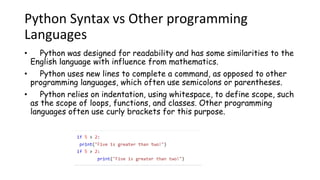
• Python relies on indentation, using whitespace, to define scope, such
as the scope of loops, functions, and classes. Other programming
languages often use curly brackets for this purpose.
Python Syntax
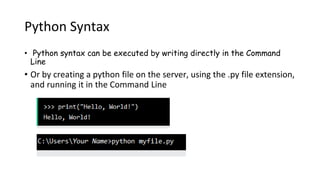
• Python syntax can be executed by writing directly in the Command
Line
• Or by creating a python file on the server, using the .py file extension,
and running it in the Command Line
Comments in Python
• Comments are an integral part of any
program
• Single-line comments: indicate what a
section of code does
• Start with # sign
• # This is a comment
7
Comments in Python
• Multi-line comments or paragraphs: serve as documentation
• Press the return key after each line, add a new hash mark and continue
your comment
# This is a pretty good example
# of how you can spread comments
# over multiple lines in Python
• Wrap multiple lines comment inside a set of tri
"""
If I really hate pressing `enter` and
typing all those hash marks, I could
just do this instead
"""
8
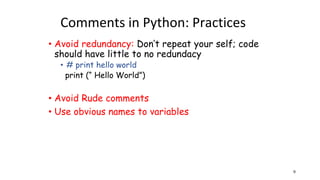
Comments in Python: Practices
• Avoid redundancy: Don’t repeat your self; code
should have little to no redundacy
• # print hello world
print (“ Hello World”)
• Avoid Rude comments
• Use obvious names to variables
9
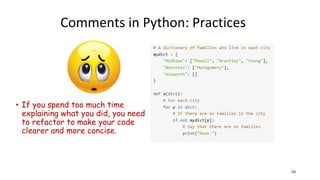
Comments in Python: Practices
• If you spend too much time
explaining what you did, you need
to refactor to make your code
clearer and more concise.
10
cosc175/data 11
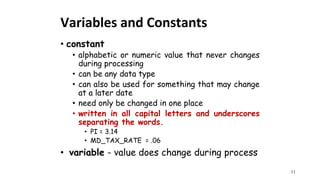
Variables and Constants
• constant
• alphabetic or numeric value that never changes
during processing
• can be any data type
• can also be used for something that may change
at a later date
• need only be changed in one place
• written in all capital letters and underscores
separating the words.
• PI = 3.14
• MD_TAX_RATE = .06
• variable - value does change during process
12
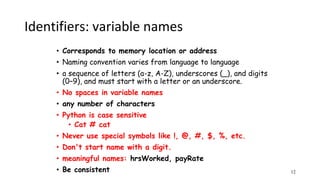
Identifiers: variable names
• Corresponds to memory location or address
• Naming convention varies from language to language
• a sequence of letters (a-z, A-Z), underscores (_), and digits
(0–9), and must start with a letter or an underscore.
• No spaces in variable names
• any number of characters
• Python is case sensitive
• Cat # cat
• Never use special symbols like !, @, #, $, %, etc.
• Don't start name with a digit.
• meaningful names: hrsWorked, payRate
• Be consistent
13
Assignment operator
=
• Value assigning differs from equality
• variable = expression
variable = expression
• variable -physical location in computer memory
• expression
• constant
x = 10;
x = PI;
• another variable to which a value has previously been assigned
y = x;
• a formula to be evaluated
y = a* x /2 + 3;
14
15
assignment
• Processor evaluates the right member of an assignment
statement to get a single value
• it places this value in the memory location (variable
name) given as the left member.
• Not a mathematical equation, can't be switched
stamp = 14 is a valid assignment statement
14 = stamp is not
• The left member of an assignment statement must
always be the name of a computer memory location
(variable name). It cannot be a constant or formula.
16
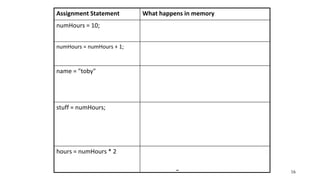
Assignment Statement What happens in memory
numHours = 10; the value 10 is placed in the memory location
numWidgets
numHours = numHours + 1; numWidget is evaluated. Contains a 10, one is
added to 10, 11 is stored at the memory location
numWidgets
name = "toby" the four characters t-o-b-y are stored in the
memory location name
(note: The single quotes are used as
delimiters and are not stored in memory.)
stuff = numHours; Assuming the value 11 in the memory
location numWidgets, this assignment
statement places the value 11 in stuff
(note: Now both stuff and numWidgets have
the same value.)
hours = numHours * 2 the ALU evaluates the expression on the right
and places the value 30 in the memory
location widget
17
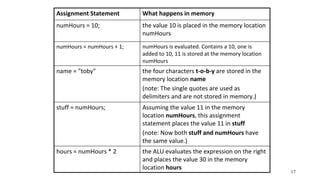
Assignment Statement What happens in memory
numHours = 10; the value 10 is placed in the memory location
numHours
numHours = numHours + 1; numHours is evaluated. Contains a 10, one is
added to 10, 11 is stored at the memory location
numHours
name = "toby" the four characters t-o-b-y are stored in the
memory location name
(note: The single quotes are used as
delimiters and are not stored in memory.)
stuff = numHours; Assuming the value 11 in the memory
location numHours, this assignment
statement places the value 11 in stuff
(note: Now both stuff and numHours have
the same value.)
hours = numHours * 2 the ALU evaluates the expression on the right
and places the value 30 in the memory
location hours
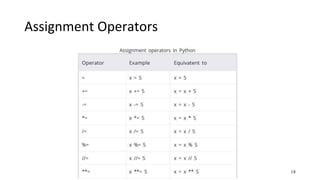
Assignment Operators
18
cosc175/operators 19
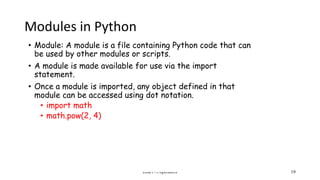
Modules in Python
• Module: A module is a file containing Python code that can
be used by other modules or scripts.
• A module is made available for use via the import
statement.
• Once a module is imported, any object defined in that
module can be accessed using dot notation.
• import math
• math.pow(2, 4)
20
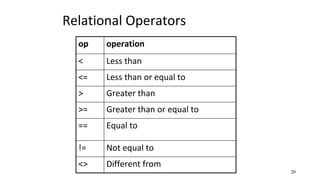
Relational Operators
op operation
< Less than
<= Less than or equal to
> Greater than
>= Greater than or equal to
== Equal to
!= Not equal to
<> Different from
21
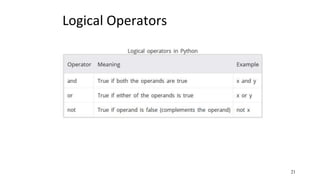
Logical Operators

Lecture Introduction to Python 2024.pptx

  • 1.
  • 2.
    What is Python? •Python is a popular programming language. It was created by Guido van Rossum, and released in 1991. • It is used for: • web development (server-side), • software development, • mathematics, • system scripting. • Data Science
  • 3.
    What Can PythonDo? • Python can be used on a server to create web applications. • Python can be used alongside software to create workflows. • Python can connect to database systems. It can also read and modify files. • Python can be used to handle big data and perform complex mathematics. • Python can be used for rapid prototyping, or for production-ready software development.
  • 4.
    Why Python? • Pythonworks on different platforms (Windows, Mac, Linux, Raspberry Pi, etc). • Python has a simple syntax similar to the English language. • Python has a syntax that allows developers to write programs with fewer lines than some other programming languages. • Python runs on an interpreter system, meaning that code can be executed as soon as it is written. This means that prototyping can be very quick. • Python can be treated in a procedural, object-oriented, or functional way.
  • 5.
    Python Syntax vsOther programming Languages • Python was designed for readability and has some similarities to the English language with influence from mathematics. • Python uses new lines to complete a command, as opposed to other programming languages, which often use semicolons or parentheses. • Python relies on indentation, using whitespace, to define scope, such as the scope of loops, functions, and classes. Other programming languages often use curly brackets for this purpose.
  • 6.
    Python Syntax • Pythonsyntax can be executed by writing directly in the Command Line • Or by creating a python file on the server, using the .py file extension, and running it in the Command Line
  • 7.
    Comments in Python •Comments are an integral part of any program • Single-line comments: indicate what a section of code does • Start with # sign • # This is a comment 7
  • 8.
    Comments in Python •Multi-line comments or paragraphs: serve as documentation • Press the return key after each line, add a new hash mark and continue your comment # This is a pretty good example # of how you can spread comments # over multiple lines in Python • Wrap multiple lines comment inside a set of tri """ If I really hate pressing `enter` and typing all those hash marks, I could just do this instead """ 8
  • 9.
    Comments in Python:Practices • Avoid redundancy: Don’t repeat your self; code should have little to no redundacy • # print hello world print (“ Hello World”) • Avoid Rude comments • Use obvious names to variables 9
  • 10.
    Comments in Python:Practices • If you spend too much time explaining what you did, you need to refactor to make your code clearer and more concise. 10
  • 11.
    cosc175/data 11 Variables andConstants • constant • alphabetic or numeric value that never changes during processing • can be any data type • can also be used for something that may change at a later date • need only be changed in one place • written in all capital letters and underscores separating the words. • PI = 3.14 • MD_TAX_RATE = .06 • variable - value does change during process
  • 12.
    12 Identifiers: variable names •Corresponds to memory location or address • Naming convention varies from language to language • a sequence of letters (a-z, A-Z), underscores (_), and digits (0–9), and must start with a letter or an underscore. • No spaces in variable names • any number of characters • Python is case sensitive • Cat # cat • Never use special symbols like !, @, #, $, %, etc. • Don't start name with a digit. • meaningful names: hrsWorked, payRate • Be consistent
  • 13.
    13 Assignment operator = • Valueassigning differs from equality • variable = expression
  • 14.
    variable = expression •variable -physical location in computer memory • expression • constant x = 10; x = PI; • another variable to which a value has previously been assigned y = x; • a formula to be evaluated y = a* x /2 + 3; 14
  • 15.
    15 assignment • Processor evaluatesthe right member of an assignment statement to get a single value • it places this value in the memory location (variable name) given as the left member. • Not a mathematical equation, can't be switched stamp = 14 is a valid assignment statement 14 = stamp is not • The left member of an assignment statement must always be the name of a computer memory location (variable name). It cannot be a constant or formula.
  • 16.
    16 Assignment Statement Whathappens in memory numHours = 10; the value 10 is placed in the memory location numWidgets numHours = numHours + 1; numWidget is evaluated. Contains a 10, one is added to 10, 11 is stored at the memory location numWidgets name = "toby" the four characters t-o-b-y are stored in the memory location name (note: The single quotes are used as delimiters and are not stored in memory.) stuff = numHours; Assuming the value 11 in the memory location numWidgets, this assignment statement places the value 11 in stuff (note: Now both stuff and numWidgets have the same value.) hours = numHours * 2 the ALU evaluates the expression on the right and places the value 30 in the memory location widget
  • 17.
    17 Assignment Statement Whathappens in memory numHours = 10; the value 10 is placed in the memory location numHours numHours = numHours + 1; numHours is evaluated. Contains a 10, one is added to 10, 11 is stored at the memory location numHours name = "toby" the four characters t-o-b-y are stored in the memory location name (note: The single quotes are used as delimiters and are not stored in memory.) stuff = numHours; Assuming the value 11 in the memory location numHours, this assignment statement places the value 11 in stuff (note: Now both stuff and numHours have the same value.) hours = numHours * 2 the ALU evaluates the expression on the right and places the value 30 in the memory location hours
  • 18.
  • 19.
    cosc175/operators 19 Modules inPython • Module: A module is a file containing Python code that can be used by other modules or scripts. • A module is made available for use via the import statement. • Once a module is imported, any object defined in that module can be accessed using dot notation. • import math • math.pow(2, 4)
  • 20.
    20 Relational Operators op operation <Less than <= Less than or equal to > Greater than >= Greater than or equal to == Equal to != Not equal to <> Different from
  • 21.