Downloaded 15 times



![let syntax
Syntax
let var_name = value_1 [, var_name2 = val_2, …..];
Example
let value_of_pi = 3.14, body_temp = 98.9; // initialization optional](https://image.slidesharecdn.com/9-170911170727/85/9-ES6-Let-And-Const-TypeScript-JavaScript-4-320.jpg)

![Const syntax
Syntax
const const_name = value_1 [, const_name2 = val_2, …..];
Example
const value_of_pi = 3.14, body_temp = 98.9;](https://image.slidesharecdn.com/9-170911170727/85/9-ES6-Let-And-Const-TypeScript-JavaScript-8-320.jpg)
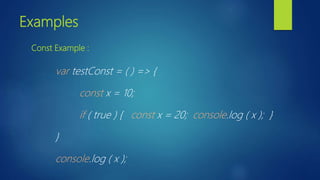



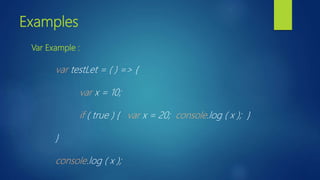
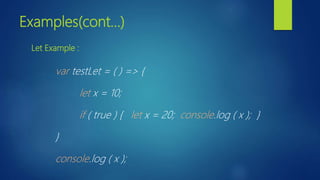
The document provides an overview of JavaScript ES6 features 'let' and 'const'. It explains that 'let' allows block-level scope for variables, preventing duplicates, while 'const' defines constants that cannot be modified and also follows block-level scope. Syntax examples for both 'let' and 'const' are included along with illustrations of their usage.


![Fundamental JavaScript [UTC, March 2014]](https://cdn.slidesharecdn.com/ss_thumbnails/fundamentaljavascriptutcmarch2014-140305104047-phpapp01-thumbnail.jpg?width=640&height=640&fit=bounds)


