IT2742
Introduction to Networking
Connecting to the Internet
IT2742 2
Objectives
The learning objectives of this topics are :
 Understand the physical connection that has to take place for a computer to
connect to the Internet.
 Recognize the components that comprise the computer.
 Install and troubleshoot network interface cards and/or modems.
 Use basic testing procedures to test the Internet connection.
 Demonstrate a basic understanding of the use of web browsers and plug-ins.
IT2742 3
Requirements for Internet
connection
 Physical connection
 The physical connection is used to transfer signals between PCs within
the local network and to remote devices on the Internet.
 Logical connection
 The logical connection uses standards called protocols. A protocol is a
formal description of a set of rules and conventions that govern how
devices on a network communicate.
 Applications that interpret the data and display the information
 Applications work with protocols to send and receive data across the
Internet. Example of such applications are web browser and FTP
application.
IT2742 4
PC Basics
Major components of a PC:
 Central processing unit (CPU)
 The brains of the computer where most calculations take place.
 Motherboard
 The main circuit board of a microcomputer
 Random-access memory (RAM)
 Also known as Read-Write memory, new data can be written to it
and stored data can be read from it. RAM requires electrical power
to maintain data storage. If the computer is turned off or loses
power, all data stored in RAM is lost.
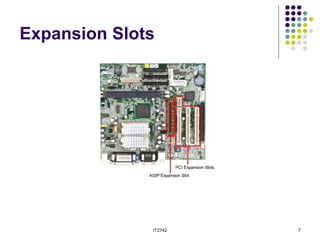
 Expansion slot
 A socket on the motherboard where a circuit board can be inserted
to add new capabilities to the computer.
 Network interface card (NIC)
 An expansion board inserted into a computer so that the computer can be
connected to a network.
IT2742 5
CPU
IT2742 6
Motherboard
IT2742 7
Expansion Slots
IT2742 8
Network Interface Card
IT2742 9
TCP/IP description and
configuration
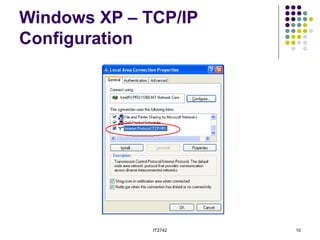
 Transmission Control Protocol/Internet Protocol
(TCP/IP) is a set of protocols or rules developed
to allow cooperating computers to share
resources across a network. To enable TCP/IP
on the workstation, it must be configured using
the operating system tools.
IT2742 10
Windows XP – TCP/IP
Configuration
IT2742 11
Testing connectivity with ping
 Ping is a utility used to verify Internet connectivity. The ping command works by
sending multiple IP packets to a specified destination. Each packet sent is a request
for a reply. The output response for a ping contains the success ratio and round-trip
time to the destination. From this information, it is possible to determine if there is
connectivity to a destination.
IT2742 12
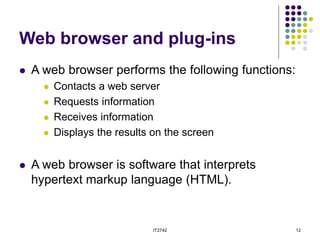
Web browser and plug-ins
 A web browser performs the following functions:
 Contacts a web server
 Requests information
 Receives information
 Displays the results on the screen
 A web browser is software that interprets
hypertext markup language (HTML).
IT2742 13
Internet Explorer
IT2742 14
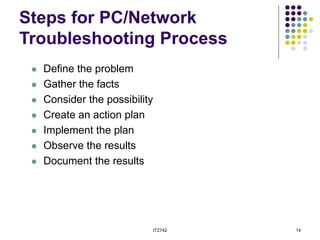
Steps for PC/Network
Troubleshooting Process
 Define the problem
 Gather the facts
 Consider the possibility
 Create an action plan
 Implement the plan
 Observe the results
 Document the results
IT2742 15
Summary
The summary this topics are :
 Understand the physical connection that has to take place for a computer to
connect to the Internet.
 Recognize the components that comprise the computer.
 Install and troubleshoot network interface cards and/or modems.
 Use basic testing procedures to test the Internet connection.
 Demonstrate a basic understanding of the use of web browsers and plug-ins.

Lecture 1.1 Introduction to Networking.ppt

  • 1.
  • 2.
    IT2742 2 Objectives The learningobjectives of this topics are :  Understand the physical connection that has to take place for a computer to connect to the Internet.  Recognize the components that comprise the computer.  Install and troubleshoot network interface cards and/or modems.  Use basic testing procedures to test the Internet connection.  Demonstrate a basic understanding of the use of web browsers and plug-ins.
  • 3.
    IT2742 3 Requirements forInternet connection  Physical connection  The physical connection is used to transfer signals between PCs within the local network and to remote devices on the Internet.  Logical connection  The logical connection uses standards called protocols. A protocol is a formal description of a set of rules and conventions that govern how devices on a network communicate.  Applications that interpret the data and display the information  Applications work with protocols to send and receive data across the Internet. Example of such applications are web browser and FTP application.
  • 4.
    IT2742 4 PC Basics Majorcomponents of a PC:  Central processing unit (CPU)  The brains of the computer where most calculations take place.  Motherboard  The main circuit board of a microcomputer  Random-access memory (RAM)  Also known as Read-Write memory, new data can be written to it and stored data can be read from it. RAM requires electrical power to maintain data storage. If the computer is turned off or loses power, all data stored in RAM is lost.  Expansion slot  A socket on the motherboard where a circuit board can be inserted to add new capabilities to the computer.  Network interface card (NIC)  An expansion board inserted into a computer so that the computer can be connected to a network.
  • 5.
  • 6.
  • 7.
  • 8.
  • 9.
    IT2742 9 TCP/IP descriptionand configuration  Transmission Control Protocol/Internet Protocol (TCP/IP) is a set of protocols or rules developed to allow cooperating computers to share resources across a network. To enable TCP/IP on the workstation, it must be configured using the operating system tools.
  • 10.
    IT2742 10 Windows XP– TCP/IP Configuration
  • 11.
    IT2742 11 Testing connectivitywith ping  Ping is a utility used to verify Internet connectivity. The ping command works by sending multiple IP packets to a specified destination. Each packet sent is a request for a reply. The output response for a ping contains the success ratio and round-trip time to the destination. From this information, it is possible to determine if there is connectivity to a destination.
  • 12.
    IT2742 12 Web browserand plug-ins  A web browser performs the following functions:  Contacts a web server  Requests information  Receives information  Displays the results on the screen  A web browser is software that interprets hypertext markup language (HTML).
  • 13.
  • 14.
    IT2742 14 Steps forPC/Network Troubleshooting Process  Define the problem  Gather the facts  Consider the possibility  Create an action plan  Implement the plan  Observe the results  Document the results
  • 15.
    IT2742 15 Summary The summarythis topics are :  Understand the physical connection that has to take place for a computer to connect to the Internet.  Recognize the components that comprise the computer.  Install and troubleshoot network interface cards and/or modems.  Use basic testing procedures to test the Internet connection.  Demonstrate a basic understanding of the use of web browsers and plug-ins.