System and Network
Administration Linux based
ITEC 3116
Server Configuration in Linux
Lecture 10
Recap of the previous Lecture
❑ What is Pipe
❑ Commands with Pipe
❑ How to use filter in Linux
❑ The concept of Grep Command
Agenda for Today’s Class
❑ Server Configuration in Linux
❑ Requirements
❑ Models
Network Model
represents the
□ A network model
architecture of computer network.
The most popular network models are
described below:
❑ Client-Server Model
❑ Peer-to-Peer Model
❑ Hybrid Model
1- Client-Server Model
❑ What is a Client?
❑ What is a Server?
□ Client
A client is a piece of hardware or
software used to communicate with a data
provider by sending a request.
□ Server
A server is a piece of hardware or
software that must be capable of providing
response to a specified request or query.
Client-Server Model …
□ A network architecture in which many clients
request and receive services from a server is
called Client-Server model.
■ User sends request to the server
■ Server receives the request from client computer
and takes proper action on it.
■ The result of the request (response from server)
is sent to the client.
□ The World Wide Web (WWW) uses this
client/server model to allow millions of users
to access Web sites all over the world.
Client-Server Model….
2- Peer-to-Peer Model
□ A network architecture in which all
computers on the network have equal
status is called Peer-to-Peer model.
□ In peer-to-peer network, there is no
central computer to control other
computers on the network.
□ Each computer can
and device (or resources)
share the data
of other
computers in the network.
3- Hybrid Network Model
□ The hybrid
combined
network model has
features of both
Client-Server and peer-2-peer
network models.
■ It also has one or more servers .
■ The users can also share data and
resources.
■ Each node can store its own data files
and programs.
Server and Web-Server
Is there any difference between
Server and Web-Server ?????
Web-Server
□ A Web server is a specific type of
server that knows how to
communicate with clients using the
Hyper Text Transfer Protocol (HTTP).
□ A protocol is just a standard set of
rules that allow a client and server to
communicate.
□ For a client and server to
the
communicate, they must speak
same protocol.
Network Connections and Ports
□ To connect to a server, the client must
be able to communicate with it over
the network.
□ Computers connected to the Internet
typically communicate using TCP/IP.
types of
at a low
□ TCP/IP allows different
computers to communicate
level; it is up to applications.
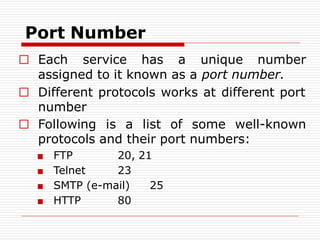
Port Number
□ Each service has a unique number
assigned to it known as a port number.
□ Different protocols works at different port
number
□ Following is a list of some well-known
protocols and their port numbers:
■ FTP
■ Telnet
20, 21
23
■ SMTP (e-mail) 25
■ HTTP 80
Linux Server Types
□ Linux Internet Servers (web,databases,ftp,DNS)
□ Linux Virtualization (VMware, user mode Linux)
□ Linux Remote Access (openVPN, SSh)
□ Linux Security (SSL/TLS encryption, network
monitoring)
□ Linux Internal Network Servers (file
server-samba, DHCP, Routing)
□ Linux Distributions (CentOS, Fedora)
Linux Web-Server
□ We know that Linux Operating System
is an Open Source operating system.
□ We use Apache as a web-server for
Linux.
□ Nginx (pronounced "engine X") is the
second most popular open source web
server .
□ Lighttpd (pronounced "lighty") is the
third most popular open source web
server.
Apache Web Server
□ Released in 1995, most popular web server
across the entire World Wide Web.
□ Currently used around 60% of web domains.
□ Common languages supported by the
Apache server include Perl, Python, and PHP
etc.
□ Core functionality of the server can be
extended with modules
□ add server-side programming language
support, authentication schemes, and other
features.
Nginx Web Server
□ Lightweight HTTP serve.
□ Serve as a reverse proxy and IMAP/POP3
proxy server.
□ Handle ten thousand clients simultaneously.
□ More scalable and uses less, and more
predictable, amounts of memory.
□ Supports name-based and IP-based virtual
servers, keep-alive and pipelined connections.
□ Reconfigured and upgraded online without
interruption of the client processing.
Lighttpd Web Server
speed-critical
remaining
secure and
□ Optimized for
environments while
standards-compliant,
flexible.
□ Handle 10,000 connections in parallel
on one server.
□ Very low memory footprint compared
to other webservers and takes care of
cpu-load.
Why Apache..??
□ An open source web server.
□ Mostly for Unix, Linux and Solaris
platforms.
□ Apache is the most popular web server
on the net.
□ It is very secure, fast, and reliable.
□ The name "Apache" derives from the
word "patchy“ that the Apache
developers used to describe early
versions of their software.
Features of Apache
Implements many frequently requested features, including:
□ DBM databases authentication
□ Password and digital certificate authentication
□ Customized responses to errors and problems
□ Support Graphical user interfaces (GUIs)
□ Support Virtual Hosts
□ Support Handling of static files, index files,
auto-indexing and content negotiation
□ It is Highly scalable (easily handles more than 10,000
simultaneous connections)
□ It has been tested thoroughly by both developers and
users.
Apache…
Apache Web-Server
□ Apache is a process-based server, unlike
many of its rivals that are event-based or
asynchronous in nature.
■ In a process-based server,
each simultaneous connection requires a separate
thread and this incurs significant overhead.
■ An asynchronous server, on the other hand, is
event-driven and handles requests in a single or
very few threads.
□ Apache is frequently compared to MS Word –
an extremely feature-rich application in which
90% of users only use about 10% of the
features on a regular basis.
□ It provides a full range of Web
server features, including
CGI(Common Gateway Interface),
SSL(Secure Socket Layer), and
virtual domains.
□ It also supports plug-in modules for
extensibility.
Apache Web-Server…
Network Model
represents the
□ A network model
architecture of computer network.
The most popular network models are
described below:
❑ Client-Server Model
❑ Peer-to-Peer Model
❑ Hybrid Model
The HTTP also includes
❑ ARP (Address Resolution Protocol)
❑ DHCP (Dynamic Host Configuration Protocol)
❑ FTP (File Transfer Protocol)
HTTP(Hyper Text Transfer
Protocol)
ARP
ARP converts an Internet Protocol
(IP) address to its corresponding
physical network address.
□ ARP is a low-level network protocol,
operating at Layer 2 of the OSI
model.
□ ARP is implemented usually in the
device drivers of network operating
systems.
□ It is most commonly seen on Ethernet
networks, Token Ring, and other
physical networks.
DHCP
□ DHCP allows a computer to join an
IP-based network without having a
pre-configured IP address.
□ DHCP is a protocol that assigns
unique IP addresses to devices, then
releases and renews these addresses
as devices leave and re-join the
network.
FTP(File Transfer Protocol)
between two computers on
□ FTP allows you to transfer files
the
Internet.
□ FTP is a simple network protocol
based on Internet Protocol.
SSL (Secure Socket Layer)
□ SSL security technology helps to improve
the safety of Internet communications.
□ SSL is
client/server communication
a standard for encrypted
between
network devices.
TCP/IP.
□ A network protocol, SSL runs on top of
□ SSL utilizes several standard network
security techniques including public keys,
symmetric keys, and certificates.
□ Web sites commonly use SSL to guard
private information such as credit card
numbers.
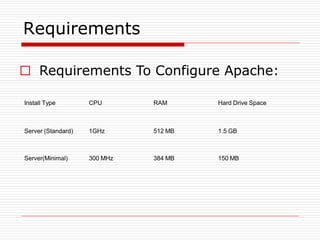
Requirements
□ Requirements To Configure Apache:
Install Type CPU RAM Hard Drive Space
Server (Standard) 1GHz 512 MB 1.5 GB
Server(Minimal) 300 MHz 384 MB 150 MB
Why Server Edition??
□ The Server Edition provides a
common base for all sorts of server
applications.
□ Simple design providing platform for
the desired services, such as file/print
services, web hosting, email hosting,
etc.
Difference b/w Server &
Desktop Edition
□ There are a few differences between the
Ubuntu Server Edition and the Ubuntu
Desktop Edition.
□ It should be noted that both editions use the
same apt repositories, making it just as easy
to install a server application on the Desktop
Edition as it is on the Server Edition.
□ The difference between the two editions are
the lack of an X window environment in the
Server Edition and the installation process.
Definition of Network
A network is a set of computers connected together for the purpose of sharing
resources. The most common resource shared today is connection to the
Internet. Other shared resources can include a printer or a file server.
Types of Networks
There are many types of computer networks, including the following:
Local-area networks (LANs): The computers are geographically close together
(that is, in the same building).
Home-area networks (HANs): A network contained within a user's home that
connects a person's digital devices.
Campus-area networks (CANs): The computers are within a limited geographic
area, such as a campus or military base.
Metropolitan-area networks MANs): A data network designed for a town or city.
Wide-area networks (WANs): The computers are farther apart and are
connected by telephone lines or radio waves.
Network Management
❑Network management is the process of administering and managing computer
networks. Various services provided by this discipline include:
❑ fault analysis,
❑ performance management,
❑ provisioning of networks,
❑ maintaining the quality of service, and so on.
Network Management Requirements
FCAPS is a Network Management Model by ISO that defines Requirements.
Fault Management
Configuration of Network
Accounting Management
Performance Management
Security Management
Reference:https://www.cisco.com/networkers/nw04/presos/docs/NMS-1N01.pdf
Fault Management
To maintain proper operation of a network, we need to resolve the faults as
soon as possible. We need to determine
▪Determine exactly where the fault is.
▪Isolate the rest of the network from the failure so that it can continue to
function without interference.
▪Reconfigure or modify the network in such a way as to minimize the impact
of operation without the failed component or components.
▪Repair or replace the failed components to restore the network to its
initial state.
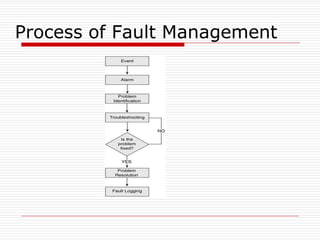
Process of Fault Management
Fault Management Software
PRTG Paessler Router Traffic Grapher.
It can monitor routers, switches, servers, hardware, software, operating
systems, applications, virtualized environments, websites, Internet & its
protocols, email servers, databases, VoIP and QoS, logs, events, performance,
NetFlow/IPFIX, sFlow, and jFlow, packet sniffing, SNMP, WMI, temperature,
humidity, and many more, using approx. 200 predefined sensor types. Network
Performance Monitor by Solarwinds.
Accounting Management
In an enterprise network, we need to manage the system resources and their
cost. We need to monitor
▪A user or group of users may be abusing their access privileges and burdening
the network at the expense of other users.
▪Users may be making inefficient use of the network, and the network manager
can assist in changing procedures to improve performance.
▪The network manager is in a better position to plan for network growth if user
activity is known in sufficient detail.
Accounting Management Software
PRTG can also monitor Server overloads and users bandwidth usage to control
system resources and cost.
OpenNMS is a free and open-source enterprise grade network monitoring and
network management platform. It is developed and supported by a community of
users and developers and by the OpenNMS Group.
The goal is for OpenNMS to be a truly distributed, scalable management application
platform for all aspects of the FCAPS network management model while remaining
100% free and open source.
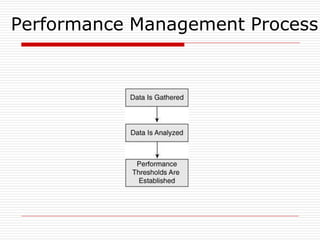
Performance Management
A network is composed of many components which must intercommunicate
and share data and resources. For their performance, we manage two functions.
“Monitoring” and “Controlling.”
Monitoring is the function that tracks activities on the network.
Controlling function enables performance management to make adjustments to
improve network performance.
Performance Management
Some of the performance issues of concern to the network manager are as
follows:
▪What is the level of capacity utilization?
▪Is there excessive traffic?
▪Has throughput been reduced to unacceptable levels?
▪Are there bottlenecks?
▪Is response time increasing?
Performance Management Process
Security Management
Security management is concerned with generating, distributing, and storing
encryption keys.
Passwords and other authorization or access control information must be
maintained and distributed.
Security management is also concerned with monitoring and controlling access
to computer networks and access to all or part of the network management
information obtained from the network nodes.
Security Management
Logs are an important security tool, and therefore security
management is very much involved with the collection,
storage, and examination of audit records and security logs,
as well as with the enabling and disabling of these logging
facilities.
Security Management Software
Log & Event Manager by Solarwinds;
Manage device configurations and track changes: Back up and restore network device
configurations, and monitor erroneous or unauthorized changes.
Automate software updates to servers and workstations: Keep Microsoft and third-party apps on servers
and workstations up to date, and avoid vulnerabilities.
Remote Monitoring & Management by Solarwinds;
The web-based console provides integrated patch management, antivirus, web content filtering, backup
and recovery, remote access, automated monitoring and maintenance.
Security Management by Checkpoint.
Spiceworks Network Monitor For Real-time monitoring, email alerts, monitor multiple devices in one
dashboard, easy-to-use for Windows and Linux servers & switches.
Installing Ubuntu Server
❑First download ubunto server I downloaded ubunto
server from the following link
❑http://mirrors.nayatel.com/ubuntu-
releases/16.04.3/ubuntu-16.04.3-server-amd64.iso
❑Go to the Virtual Box/ VMware made a new Virtual
Machine and allocate space,ram,processors for Ubunto
Server, Ubunto server needs 2.5GB space so its better
to allocate 10GB for Ubuntu server.
After that setting start the new created Virtual
machine and give the path of the server After
that the following screen will shown in Virtual
Box
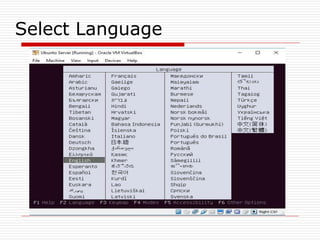
Select Language
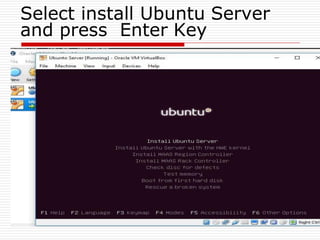
Select install Ubuntu Server
and press Enter Key
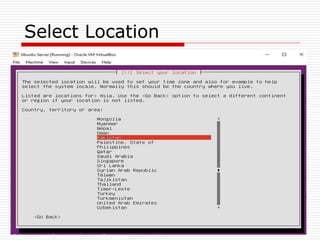
Select Location
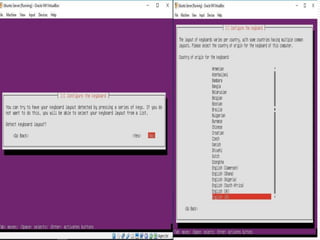
Key Board Layout
Selection
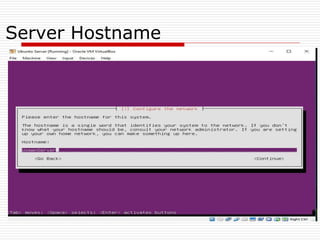
Server Hostname
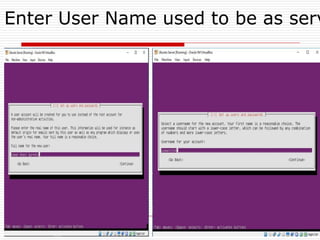
Enter User Name used to be as serv
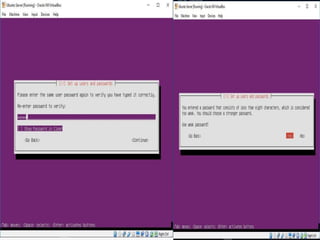
Enter
Password
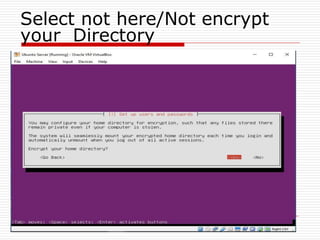
Select not here/Not encrypt
your Directory
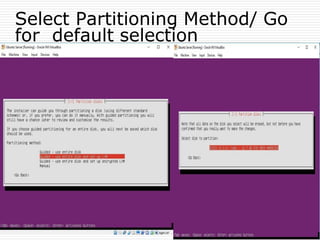
Select Partitioning Method/ Go
for default selection
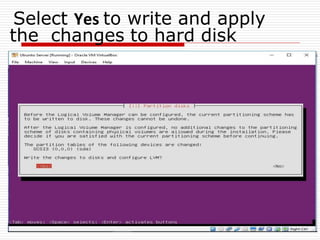
Select Yes to write and apply
the changes to hard disk
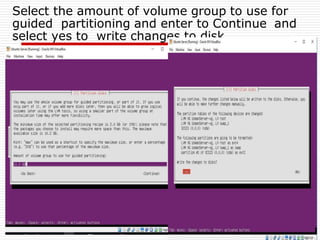
Select the amount of volume group to use for
guided partitioning and enter to Continue and
select yes to write changes to disk
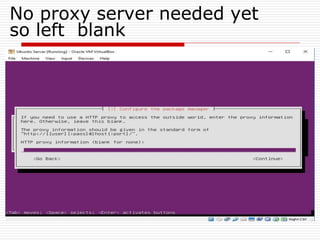
No proxy server needed yet
so left blank
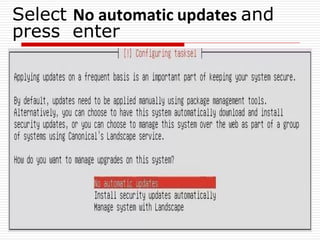
Select No automatic updates and
press enter
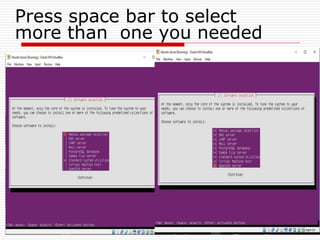
Press space bar to select
more than one you needed
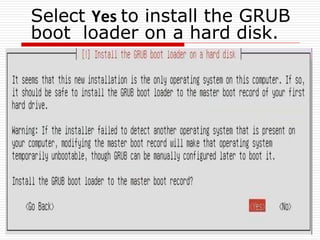
Select Yes to install the GRUB
boot loader on a hard disk.
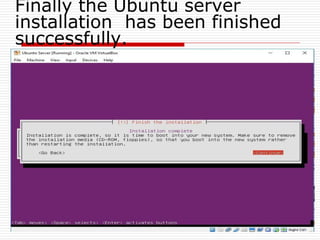
Finally the Ubuntu server
installation has been finished
successfully.
Configuration of
Ubuntu Server
Advantages of
Linux Server
Stability
LINUX SERVER Are well known for their ability to run for years
without failure; many Linux servers never seen a crash. That’s great
for users of Every Kind but its particularly valuable for small and
medium-sized business for which downtime can have disastrous
consequences.
Security
Linux is also naturally more secure than
Windows is whether on the server or an
embedded environment. That’s due
largely fact that linux which is based
on Unix was designed from the start to
be multiuser operating system.
Hardware
Whereas Windows typically requires frequent hardware upgrades to
accommodate its ever-increasing resources demand. Linux is a slim
trim flexible and scalable.
TCO
There is no beating Linux total cost and
ownership since the software is
generally free. Even an Enterprise version
purchased with corporate support will be
cheaper overall than windows or other
proprietary software which generally
involve users of license.
Freedom
WITH Linux, There is no commercial vendor trying to lock you into
certain products or protocols. Instead you are free to mix and match
and choose what works best for your business.
Vulnerable to Malware
Because most computer malware are designed to attack Windows
through Active X these odds are considerably less for linux to be
infected with a virus than Windows.
Do not Slow down
Unlike windows, Linux does not easily
become bogged down with spyware,
viruses, Trojans, which can greatly
reduce a computer Performance. Also
Linux does not have a registry like
Windows it is not plagued with registry
errors.
Disadvantages
Smaller Peripherals
There is smaller selection of Peripherals hardware drivers i.e
printers scanners, in Linux as compared to Windows.
Though many new Linux hardware drivers are constantly
added.
Less Amount of Applications
It is more Difficult to find Applications to support you needs. This is
an issue for mostly business but more programmers are developing
applications that are supported by linux.
Lecture End

LEC_10_Week_10_Server_Configuration_in_Linux.pdf

  • 1.
    System and Network AdministrationLinux based ITEC 3116 Server Configuration in Linux Lecture 10
  • 2.
    Recap of theprevious Lecture ❑ What is Pipe ❑ Commands with Pipe ❑ How to use filter in Linux ❑ The concept of Grep Command
  • 3.
    Agenda for Today’sClass ❑ Server Configuration in Linux ❑ Requirements ❑ Models
  • 4.
    Network Model represents the □A network model architecture of computer network. The most popular network models are described below: ❑ Client-Server Model ❑ Peer-to-Peer Model ❑ Hybrid Model
  • 5.
    1- Client-Server Model ❑What is a Client? ❑ What is a Server?
  • 6.
    □ Client A clientis a piece of hardware or software used to communicate with a data provider by sending a request. □ Server A server is a piece of hardware or software that must be capable of providing response to a specified request or query. Client-Server Model …
  • 7.
    □ A networkarchitecture in which many clients request and receive services from a server is called Client-Server model. ■ User sends request to the server ■ Server receives the request from client computer and takes proper action on it. ■ The result of the request (response from server) is sent to the client. □ The World Wide Web (WWW) uses this client/server model to allow millions of users to access Web sites all over the world. Client-Server Model….
  • 8.
    2- Peer-to-Peer Model □A network architecture in which all computers on the network have equal status is called Peer-to-Peer model. □ In peer-to-peer network, there is no central computer to control other computers on the network. □ Each computer can and device (or resources) share the data of other computers in the network.
  • 9.
    3- Hybrid NetworkModel □ The hybrid combined network model has features of both Client-Server and peer-2-peer network models. ■ It also has one or more servers . ■ The users can also share data and resources. ■ Each node can store its own data files and programs.
  • 10.
    Server and Web-Server Isthere any difference between Server and Web-Server ?????
  • 11.
    Web-Server □ A Webserver is a specific type of server that knows how to communicate with clients using the Hyper Text Transfer Protocol (HTTP). □ A protocol is just a standard set of rules that allow a client and server to communicate. □ For a client and server to the communicate, they must speak same protocol.
  • 12.
    Network Connections andPorts □ To connect to a server, the client must be able to communicate with it over the network. □ Computers connected to the Internet typically communicate using TCP/IP. types of at a low □ TCP/IP allows different computers to communicate level; it is up to applications.
  • 13.
    Port Number □ Eachservice has a unique number assigned to it known as a port number. □ Different protocols works at different port number □ Following is a list of some well-known protocols and their port numbers: ■ FTP ■ Telnet 20, 21 23 ■ SMTP (e-mail) 25 ■ HTTP 80
  • 14.
    Linux Server Types □Linux Internet Servers (web,databases,ftp,DNS) □ Linux Virtualization (VMware, user mode Linux) □ Linux Remote Access (openVPN, SSh) □ Linux Security (SSL/TLS encryption, network monitoring) □ Linux Internal Network Servers (file server-samba, DHCP, Routing) □ Linux Distributions (CentOS, Fedora)
  • 15.
    Linux Web-Server □ Weknow that Linux Operating System is an Open Source operating system. □ We use Apache as a web-server for Linux. □ Nginx (pronounced "engine X") is the second most popular open source web server . □ Lighttpd (pronounced "lighty") is the third most popular open source web server.
  • 16.
    Apache Web Server □Released in 1995, most popular web server across the entire World Wide Web. □ Currently used around 60% of web domains. □ Common languages supported by the Apache server include Perl, Python, and PHP etc. □ Core functionality of the server can be extended with modules □ add server-side programming language support, authentication schemes, and other features.
  • 17.
    Nginx Web Server □Lightweight HTTP serve. □ Serve as a reverse proxy and IMAP/POP3 proxy server. □ Handle ten thousand clients simultaneously. □ More scalable and uses less, and more predictable, amounts of memory. □ Supports name-based and IP-based virtual servers, keep-alive and pipelined connections. □ Reconfigured and upgraded online without interruption of the client processing.
  • 18.
    Lighttpd Web Server speed-critical remaining secureand □ Optimized for environments while standards-compliant, flexible. □ Handle 10,000 connections in parallel on one server. □ Very low memory footprint compared to other webservers and takes care of cpu-load.
  • 19.
    Why Apache..?? □ Anopen source web server. □ Mostly for Unix, Linux and Solaris platforms. □ Apache is the most popular web server on the net. □ It is very secure, fast, and reliable. □ The name "Apache" derives from the word "patchy“ that the Apache developers used to describe early versions of their software.
  • 20.
    Features of Apache Implementsmany frequently requested features, including: □ DBM databases authentication □ Password and digital certificate authentication □ Customized responses to errors and problems □ Support Graphical user interfaces (GUIs) □ Support Virtual Hosts □ Support Handling of static files, index files, auto-indexing and content negotiation □ It is Highly scalable (easily handles more than 10,000 simultaneous connections) □ It has been tested thoroughly by both developers and users. Apache…
  • 21.
    Apache Web-Server □ Apacheis a process-based server, unlike many of its rivals that are event-based or asynchronous in nature. ■ In a process-based server, each simultaneous connection requires a separate thread and this incurs significant overhead. ■ An asynchronous server, on the other hand, is event-driven and handles requests in a single or very few threads. □ Apache is frequently compared to MS Word – an extremely feature-rich application in which 90% of users only use about 10% of the features on a regular basis.
  • 22.
    □ It providesa full range of Web server features, including CGI(Common Gateway Interface), SSL(Secure Socket Layer), and virtual domains. □ It also supports plug-in modules for extensibility. Apache Web-Server…
  • 23.
    Network Model represents the □A network model architecture of computer network. The most popular network models are described below: ❑ Client-Server Model ❑ Peer-to-Peer Model ❑ Hybrid Model
  • 24.
    The HTTP alsoincludes ❑ ARP (Address Resolution Protocol) ❑ DHCP (Dynamic Host Configuration Protocol) ❑ FTP (File Transfer Protocol) HTTP(Hyper Text Transfer Protocol)
  • 25.
    ARP ARP converts anInternet Protocol (IP) address to its corresponding physical network address. □ ARP is a low-level network protocol, operating at Layer 2 of the OSI model. □ ARP is implemented usually in the device drivers of network operating systems. □ It is most commonly seen on Ethernet networks, Token Ring, and other physical networks.
  • 26.
    DHCP □ DHCP allowsa computer to join an IP-based network without having a pre-configured IP address. □ DHCP is a protocol that assigns unique IP addresses to devices, then releases and renews these addresses as devices leave and re-join the network.
  • 27.
    FTP(File Transfer Protocol) betweentwo computers on □ FTP allows you to transfer files the Internet. □ FTP is a simple network protocol based on Internet Protocol.
  • 28.
    SSL (Secure SocketLayer) □ SSL security technology helps to improve the safety of Internet communications. □ SSL is client/server communication a standard for encrypted between network devices. TCP/IP. □ A network protocol, SSL runs on top of □ SSL utilizes several standard network security techniques including public keys, symmetric keys, and certificates. □ Web sites commonly use SSL to guard private information such as credit card numbers.
  • 29.
    Requirements □ Requirements ToConfigure Apache: Install Type CPU RAM Hard Drive Space Server (Standard) 1GHz 512 MB 1.5 GB Server(Minimal) 300 MHz 384 MB 150 MB
  • 30.
    Why Server Edition?? □The Server Edition provides a common base for all sorts of server applications. □ Simple design providing platform for the desired services, such as file/print services, web hosting, email hosting, etc.
  • 31.
    Difference b/w Server& Desktop Edition □ There are a few differences between the Ubuntu Server Edition and the Ubuntu Desktop Edition. □ It should be noted that both editions use the same apt repositories, making it just as easy to install a server application on the Desktop Edition as it is on the Server Edition. □ The difference between the two editions are the lack of an X window environment in the Server Edition and the installation process.
  • 32.
    Definition of Network Anetwork is a set of computers connected together for the purpose of sharing resources. The most common resource shared today is connection to the Internet. Other shared resources can include a printer or a file server.
  • 33.
    Types of Networks Thereare many types of computer networks, including the following: Local-area networks (LANs): The computers are geographically close together (that is, in the same building). Home-area networks (HANs): A network contained within a user's home that connects a person's digital devices. Campus-area networks (CANs): The computers are within a limited geographic area, such as a campus or military base. Metropolitan-area networks MANs): A data network designed for a town or city. Wide-area networks (WANs): The computers are farther apart and are connected by telephone lines or radio waves.
  • 34.
    Network Management ❑Network managementis the process of administering and managing computer networks. Various services provided by this discipline include: ❑ fault analysis, ❑ performance management, ❑ provisioning of networks, ❑ maintaining the quality of service, and so on.
  • 35.
    Network Management Requirements FCAPSis a Network Management Model by ISO that defines Requirements. Fault Management Configuration of Network Accounting Management Performance Management Security Management Reference:https://www.cisco.com/networkers/nw04/presos/docs/NMS-1N01.pdf
  • 36.
    Fault Management To maintainproper operation of a network, we need to resolve the faults as soon as possible. We need to determine ▪Determine exactly where the fault is. ▪Isolate the rest of the network from the failure so that it can continue to function without interference. ▪Reconfigure or modify the network in such a way as to minimize the impact of operation without the failed component or components. ▪Repair or replace the failed components to restore the network to its initial state.
  • 37.
    Process of FaultManagement
  • 38.
    Fault Management Software PRTGPaessler Router Traffic Grapher. It can monitor routers, switches, servers, hardware, software, operating systems, applications, virtualized environments, websites, Internet & its protocols, email servers, databases, VoIP and QoS, logs, events, performance, NetFlow/IPFIX, sFlow, and jFlow, packet sniffing, SNMP, WMI, temperature, humidity, and many more, using approx. 200 predefined sensor types. Network Performance Monitor by Solarwinds.
  • 39.
    Accounting Management In anenterprise network, we need to manage the system resources and their cost. We need to monitor ▪A user or group of users may be abusing their access privileges and burdening the network at the expense of other users. ▪Users may be making inefficient use of the network, and the network manager can assist in changing procedures to improve performance. ▪The network manager is in a better position to plan for network growth if user activity is known in sufficient detail.
  • 40.
    Accounting Management Software PRTGcan also monitor Server overloads and users bandwidth usage to control system resources and cost. OpenNMS is a free and open-source enterprise grade network monitoring and network management platform. It is developed and supported by a community of users and developers and by the OpenNMS Group. The goal is for OpenNMS to be a truly distributed, scalable management application platform for all aspects of the FCAPS network management model while remaining 100% free and open source.
  • 41.
    Performance Management A networkis composed of many components which must intercommunicate and share data and resources. For their performance, we manage two functions. “Monitoring” and “Controlling.” Monitoring is the function that tracks activities on the network. Controlling function enables performance management to make adjustments to improve network performance.
  • 42.
    Performance Management Some ofthe performance issues of concern to the network manager are as follows: ▪What is the level of capacity utilization? ▪Is there excessive traffic? ▪Has throughput been reduced to unacceptable levels? ▪Are there bottlenecks? ▪Is response time increasing?
  • 43.
  • 44.
    Security Management Security managementis concerned with generating, distributing, and storing encryption keys. Passwords and other authorization or access control information must be maintained and distributed. Security management is also concerned with monitoring and controlling access to computer networks and access to all or part of the network management information obtained from the network nodes.
  • 45.
    Security Management Logs arean important security tool, and therefore security management is very much involved with the collection, storage, and examination of audit records and security logs, as well as with the enabling and disabling of these logging facilities.
  • 46.
    Security Management Software Log& Event Manager by Solarwinds; Manage device configurations and track changes: Back up and restore network device configurations, and monitor erroneous or unauthorized changes. Automate software updates to servers and workstations: Keep Microsoft and third-party apps on servers and workstations up to date, and avoid vulnerabilities. Remote Monitoring & Management by Solarwinds; The web-based console provides integrated patch management, antivirus, web content filtering, backup and recovery, remote access, automated monitoring and maintenance. Security Management by Checkpoint. Spiceworks Network Monitor For Real-time monitoring, email alerts, monitor multiple devices in one dashboard, easy-to-use for Windows and Linux servers & switches.
  • 47.
    Installing Ubuntu Server ❑Firstdownload ubunto server I downloaded ubunto server from the following link ❑http://mirrors.nayatel.com/ubuntu- releases/16.04.3/ubuntu-16.04.3-server-amd64.iso ❑Go to the Virtual Box/ VMware made a new Virtual Machine and allocate space,ram,processors for Ubunto Server, Ubunto server needs 2.5GB space so its better to allocate 10GB for Ubuntu server. After that setting start the new created Virtual machine and give the path of the server After that the following screen will shown in Virtual Box
  • 48.
  • 49.
    Select install UbuntuServer and press Enter Key
  • 50.
  • 51.
  • 52.
  • 53.
    Enter User Nameused to be as serv
  • 54.
  • 55.
    Select not here/Notencrypt your Directory
  • 56.
    Select Partitioning Method/Go for default selection
  • 57.
    Select Yes towrite and apply the changes to hard disk
  • 58.
    Select the amountof volume group to use for guided partitioning and enter to Continue and select yes to write changes to disk
  • 59.
    No proxy serverneeded yet so left blank
  • 60.
    Select No automaticupdates and press enter
  • 61.
    Press space barto select more than one you needed
  • 62.
    Select Yes toinstall the GRUB boot loader on a hard disk.
  • 63.
    Finally the Ubuntuserver installation has been finished successfully.
  • 64.
  • 65.
  • 66.
    Stability LINUX SERVER Arewell known for their ability to run for years without failure; many Linux servers never seen a crash. That’s great for users of Every Kind but its particularly valuable for small and medium-sized business for which downtime can have disastrous consequences.
  • 67.
    Security Linux is alsonaturally more secure than Windows is whether on the server or an embedded environment. That’s due largely fact that linux which is based on Unix was designed from the start to be multiuser operating system.
  • 68.
    Hardware Whereas Windows typicallyrequires frequent hardware upgrades to accommodate its ever-increasing resources demand. Linux is a slim trim flexible and scalable.
  • 69.
    TCO There is nobeating Linux total cost and ownership since the software is generally free. Even an Enterprise version purchased with corporate support will be cheaper overall than windows or other proprietary software which generally involve users of license.
  • 70.
    Freedom WITH Linux, Thereis no commercial vendor trying to lock you into certain products or protocols. Instead you are free to mix and match and choose what works best for your business.
  • 71.
    Vulnerable to Malware Becausemost computer malware are designed to attack Windows through Active X these odds are considerably less for linux to be infected with a virus than Windows.
  • 72.
    Do not Slowdown Unlike windows, Linux does not easily become bogged down with spyware, viruses, Trojans, which can greatly reduce a computer Performance. Also Linux does not have a registry like Windows it is not plagued with registry errors.
  • 73.
  • 74.
    Smaller Peripherals There issmaller selection of Peripherals hardware drivers i.e printers scanners, in Linux as compared to Windows. Though many new Linux hardware drivers are constantly added.
  • 75.
    Less Amount ofApplications It is more Difficult to find Applications to support you needs. This is an issue for mostly business but more programmers are developing applications that are supported by linux.
  • 76.