Advanced Computer Arch.
Lecture 14
Instruction Set Architecture
Readings
 Von Neumann Model of LC-3, and MIPS
 P&P, Chapters 4 & 5
 P&P, Appendices A and C (ISA and microarchitecture of LC-3)
 Ebook 5, Ch 1, ISA (1.2) , CISC (1.4)
2
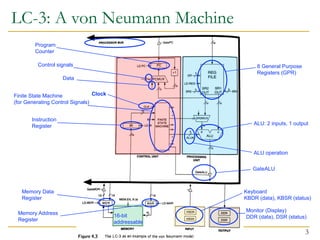
LC-3: A von Neumann Machine
3
Control signals
Data
ALU: 2 inputs, 1 output
Memory Data
Register
Memory Address
Register
16-bit
addressable
Keyboard
KBDR (data), KBSR (status)
Monitor (Display)
DDR (data), DSR (status)
8 General Purpose
Registers (GPR)
Finite State Machine
(for Generating Control Signals)
Instruction
Register
Program
Counter
ALU operation
GateALU
Clock
Stored Program & Sequential Execution
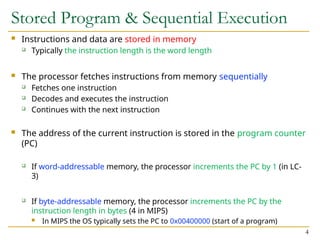
 Instructions and data are stored in memory
 Typically the instruction length is the word length
 The processor fetches instructions from memory sequentially
 Fetches one instruction
 Decodes and executes the instruction
 Continues with the next instruction
 The address of the current instruction is stored in the program counter
(PC)
 If word-addressable memory, the processor increments the PC by 1 (in LC-
3)
 If byte-addressable memory, the processor increments the PC by the
instruction length in bytes (4 in MIPS)
 In MIPS the OS typically sets the PC to 0x00400000 (start of a program)
4
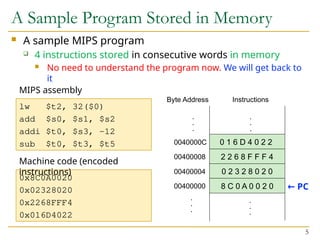
 A sample MIPS program
 4 instructions stored in consecutive words in memory
 No need to understand the program now. We will get back to
it
A Sample Program Stored in Memory
5
.
.
.
Instructions
8 C 0 A 0 0 2 0
0 2 3 2 8 0 2 0
2 2 6 8 F F F 4
0 1 6 D 4 0 2 2
.
.
.
00400000
00400004
00400008
0040000C
.
.
.
Byte Address
.
.
.
lw $t2, 32($0)
add $s0, $s1, $s2
addi $t0, $s3, -12
sub $t0, $t3, $t5
MIPS assembly
0x8C0A0020
0x02328020
0x2268FFF4
0x016D4022
Machine code (encoded
instructions)
← PC
The Instruction
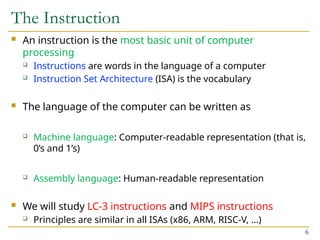
 An instruction is the most basic unit of computer
processing
 Instructions are words in the language of a computer
 Instruction Set Architecture (ISA) is the vocabulary
 The language of the computer can be written as
 Machine language: Computer-readable representation (that is,
0’s and 1’s)
 Assembly language: Human-readable representation
 We will study LC-3 instructions and MIPS instructions
 Principles are similar in all ISAs (x86, ARM, RISC-V, …)
6
The Instruction: Opcode & Operands
 An instruction is made up of two parts
 Opcode and Operands
 Opcode specifies what the instruction does
 Operands specify who the instruction is to do it to
 Both are specified in instruction format (or instr.
encoding)
 An LC-3 instruction consists of 16 bits (bits [15:0])
 Bits [15:12] specify the opcode  16 distinct opcodes in LC-
3
 Bits [11:0] are used to figure out where the operands are
7
Instruction Types
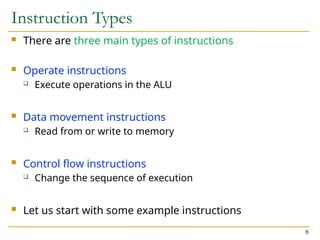
 There are three main types of instructions
 Operate instructions
 Execute operations in the ALU
 Data movement instructions
 Read from or write to memory
 Control flow instructions
 Change the sequence of execution
 Let us start with some example instructions
8
An Example Operate Instruction
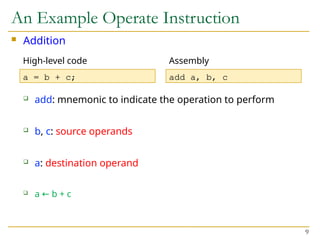
 Addition
 add: mnemonic to indicate the operation to perform
 b, c: source operands
 a: destination operand
 a b + c
←
9
a = b + c; add a, b, c
High-level code Assembly
Registers
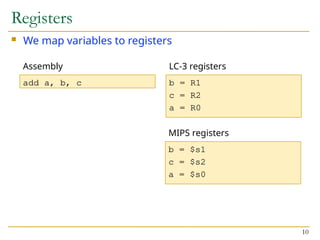
 We map variables to registers
10
add a, b, c b = R1
c = R2
a = R0
Assembly LC-3 registers
b = $s1
c = $s2
a = $s0
MIPS registers
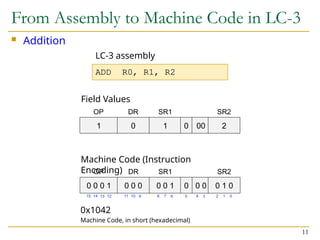
 Addition
From Assembly to Machine Code in LC-3
11
ADD R0, R1, R2
LC-3 assembly
Field Values
Machine Code (Instruction
Encoding)
0x1042
Machine Code, in short (hexadecimal)
1 0 1 0 00 2
OP DR SR1 SR2
0 0 0 1 0 0 0 0 0 1 0 0 0 0 1 0
OP DR SR1 SR2
15 14 13 12 11 10 9 8 7 6 2 1 0
5 4 3
Instruction Format (or Encoding)
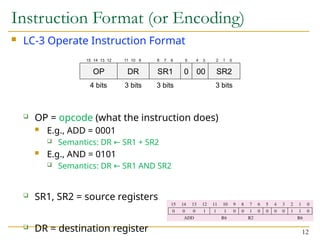
 LC-3 Operate Instruction Format
 OP = opcode (what the instruction does)
 E.g., ADD = 0001
 Semantics: DR SR1 + SR2
←
 E.g., AND = 0101
 Semantics: DR SR1 AND SR2
←
 SR1, SR2 = source registers
 DR = destination register 12
OP DR SR1 0 00 SR2
4 bits 3 bits 3 bits 3 bits
15 14 13 12 11 10 9 8 7 6 2 1 0
5 4 3
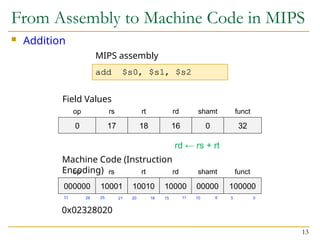
 Addition
From Assembly to Machine Code in MIPS
13
0 17 18 16 0 32
op rs rt rd shamt funct
add $s0, $s1, $s2
MIPS assembly
Field Values
0x02328020
000000 10001 10010 10000 00000 100000
op rs rt rd shamt funct
Machine Code (Instruction
Encoding)
15 11 10 6 0
5
16
20
21
25
26
31
rd ← rs + rt
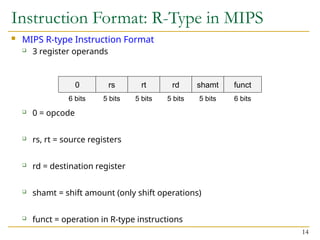
Instruction Format: R-Type in MIPS
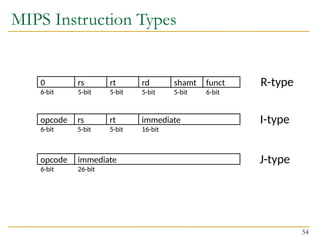
 MIPS R-type Instruction Format
 3 register operands
 0 = opcode
 rs, rt = source registers
 rd = destination register
 shamt = shift amount (only shift operations)
 funct = operation in R-type instructions
14
0 rs rt rd shamt funct
6 bits 5 bits 5 bits 5 bits 5 bits 6 bits
Reading Operands from Memory
 With operate instructions, such as addition, we tell the
computer to execute arithmetic (or logic) computations
in the ALU
 We also need instructions to access the operands from
memory
 Load them from memory to registers
 Store them from registers to memory
 Next, we see how to read (or load) from memory
 Writing (or storing) is performed in a similar way, but we
will talk about that later
15
Reading Word-Addressable Memory
 Load word
 load: mnemonic to indicate the load word operation
 A: base address
 i: offset
 E.g., immediate or literal (a constant)
 a: destination operand
 Semantics: a Memory[A + i]
← 16
a = A[i]; load a, A, i
High-level code Assembly
Load Word in LC-3 and MIPS
 LC-3 assembly
 MIPS assembly (assuming word-addressable)
17
a = A[2]; LDR R3, R0, #2
High-level code LC-3 assembly
R3 Memory[R0 + 2]
←
a = A[2]; lw $s3, 2($s0)
High-level code MIPS assembly
$s3 Memory[$s0 + 2]
←
These instructions use a particular addressing mode
(i.e., the way the address is calculated), called base+offset
Load Word in Byte-Addressable MIPS
 MIPS assembly
 Byte address is calculated as: word_address *
bytes/word
 4 bytes/word in MIPS
 If LC-3 were byte-addressable (i.e., LC-3b), 2 bytes/word
18
a = A[2]; lw $s3, 8($s0)
High-level code MIPS assembly
$s3 Memory[$s0 + 8]
←
 LC-3
 MIPS
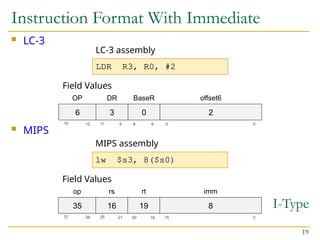
Instruction Format With Immediate
19
6 3 0 2
OP DR BaseR offset6
LDR R3, R0, #2
LC-3 assembly
Field Values
35 16 19 8
op rs rt imm
lw $s3, 8($s0)
MIPS assembly
Field Values
I-Type
15 0
16
20
21
25
26
31
5 0
6
8
9
11
12
15
Instruction (Processing) Cycle
20
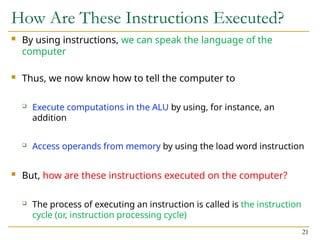
How Are These Instructions Executed?
 By using instructions, we can speak the language of the
computer
 Thus, we now know how to tell the computer to
 Execute computations in the ALU by using, for instance, an
addition
 Access operands from memory by using the load word instruction
 But, how are these instructions executed on the computer?
 The process of executing an instruction is called is the instruction
cycle (or, instruction processing cycle)
21
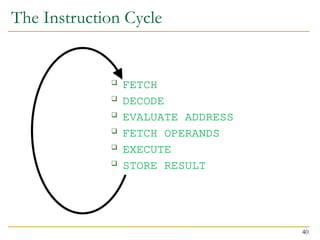
The Instruction Cycle
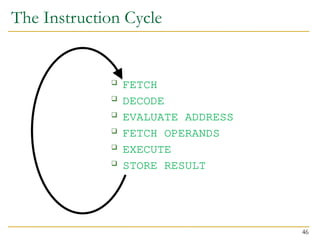
 The instruction cycle is a sequence of steps or phases, that an
instruction goes through to be executed
 FETCH
 DECODE
 EVALUATE ADDRESS
 FETCH OPERANDS
 EXECUTE
 STORE RESULT
 Not all instructions require the six phases
 LDR does not require EXECUTE
 ADD does not require EVALUATE ADDRESS
 Intel x86 instruction ADD [eax], edx is an example of instruction with
six phases
22
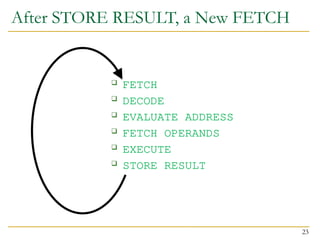
After STORE RESULT, a New FETCH
 FETCH
 DECODE
 EVALUATE ADDRESS
 FETCH OPERANDS
 EXECUTE
 STORE RESULT
23
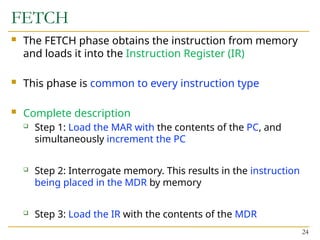
FETCH
 The FETCH phase obtains the instruction from memory
and loads it into the Instruction Register (IR)
 This phase is common to every instruction type
 Complete description
 Step 1: Load the MAR with the contents of the PC, and
simultaneously increment the PC
 Step 2: Interrogate memory. This results in the instruction
being placed in the MDR by memory
 Step 3: Load the IR with the contents of the MDR
24
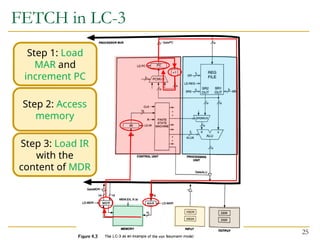
FETCH in LC-3
25
Step 1: Load
MAR and
increment PC
Step 2: Access
memory
Step 3: Load IR
with the
content of MDR
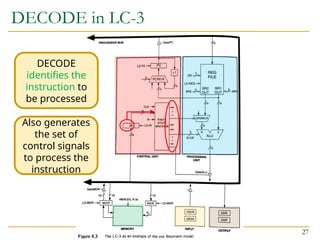
DECODE
 The DECODE phase identifies the instruction
 Also generates the set of control signals to process the
identified instruction in later phases of the instruction
cycle
 Recall the decoder (from Lecture 5)
 A 4-to-16 decoder identifies which of the 16 opcodes is
going to be processed
 The input is the four bits IR[15:12]
 The remaining 12 bits identify what else is needed to
process the instruction 26
DECODE in LC-3
27
DECODE
identifies the
instruction to
be processed
Also generates
the set of
control signals
to process the
instruction
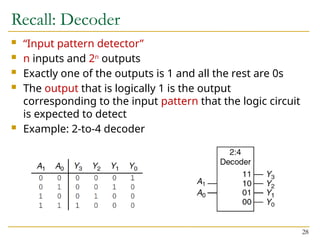
Recall: Decoder
 “Input pattern detector”
 n inputs and 2n
outputs
 Exactly one of the outputs is 1 and all the rest are 0s
 The output that is logically 1 is the output
corresponding to the input pattern that the logic circuit
is expected to detect
 Example: 2-to-4 decoder
28
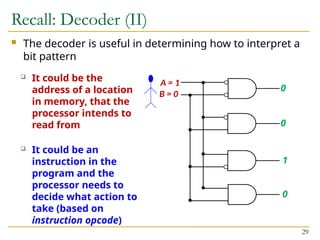
Recall: Decoder (II)
 The decoder is useful in determining how to interpret a
bit pattern
29
A = 1
0
B = 0
0
1
0
 It could be the
address of a location
in memory, that the
processor intends to
read from
 It could be an
instruction in the
program and the
processor needs to
decide what action to
take (based on
instruction opcode)
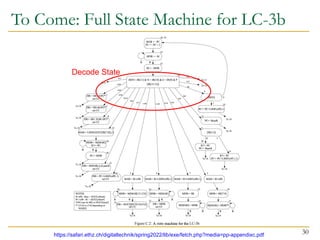
To Come: Full State Machine for LC-3b
30
https://safari.ethz.ch/digitaltechnik/spring2022/lib/exe/fetch.php?media=pp-appendixc.pdf
Decode State
EVALUATE ADDRESS
 The EVALUATE ADDRESS phase computes the address of
the memory location that is needed to process the
instruction
 This phase is necessary in LDR
 It computes the address of the data word that is to be read
from memory
 By adding an offset to the content of a register
 But not necessary in ADD
31
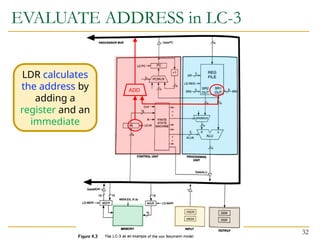
EVALUATE ADDRESS in LC-3
32
LDR calculates
the address by
adding a
register and an
immediate
ADD
FETCH OPERANDS
 The FETCH OPERANDS phase obtains the source operands
needed to process the instruction
 In LDR
 Step 1: Load MAR with the address calculated in EVALUATE
ADDRESS
 Step 2: Read memory, placing source operand in MDR
 In ADD
 Obtain the source operands from the register file
 In some microprocessors, operand fetch from register file can
be done at the same time the instruction is being decoded
33
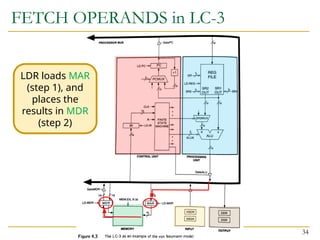
FETCH OPERANDS in LC-3
34
LDR loads MAR
(step 1), and
places the
results in MDR
(step 2)
EXECUTE
 The EXECUTE phase executes the instruction
 In ADD, it performs addition in the ALU
 In XOR, it performs bitwise XOR in the ALU
 …
35
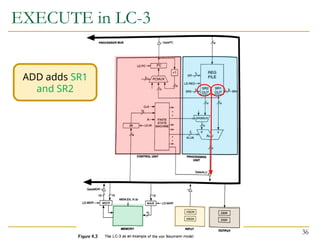
EXECUTE in LC-3
36
ADD adds SR1
and SR2
STORE RESULT
 The STORE RESULT phase writes the result to the
designated destination
 Once STORE RESULT is completed, a new instruction
cycle starts (with the FETCH phase)
37
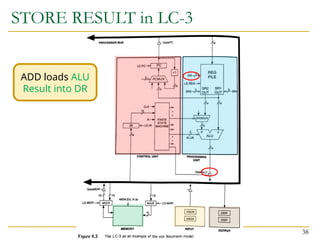
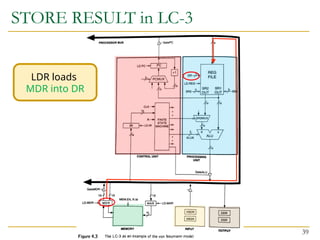
STORE RESULT in LC-3
38
ADD loads ALU
Result into DR
STORE RESULT in LC-3
39
LDR loads
MDR into DR
The Instruction Cycle
 FETCH
 DECODE
 EVALUATE ADDRESS
 FETCH OPERANDS
 EXECUTE
 STORE RESULT
40
Changing the Sequence of Execution
 A computer program executes in sequence (i.e., in
program order)
 First instruction, second instruction, third instruction and
so on
 Unless we change the sequence of execution
 Control instructions allow a program to execute out of
sequence
 They can change the PC by loading it during the EXECUTE
phase
 That wipes out the incremented PC (loaded during the
FETCH phase)
41
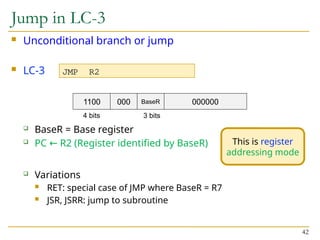
Jump in LC-3
 Unconditional branch or jump
 LC-3
 BaseR = Base register
 PC R2 (Register identified by BaseR)
←
 Variations
 RET: special case of JMP where BaseR = R7
 JSR, JSRR: jump to subroutine
42
JMP R2
1100 000 000000
4 bits
BaseR
3 bits
This is register
addressing mode
Jump in MIPS
 Unconditional branch or jump
 MIPS
 2 = opcode
 target = target address
 PC PC
← ✝
[31:28] | sign-extend(target) * 4
 Variations
 jal: jump and link (function calls)
 jr: jump register
43
2 target
6 bits 26 bits
j target
J-Type
jr $s0
j uses pseudo-
direct addressing
mode
✝
This is the incremented PC
jr uses register
addressing mode
PC UPDATE in LC-3
44
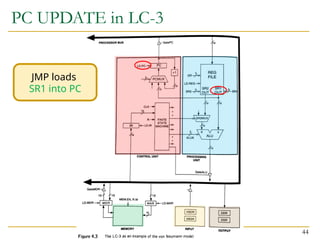
JMP loads
SR1 into PC
Control of the Instruction Cycle
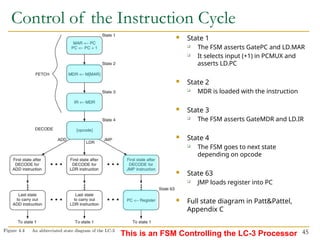
 State 1
 The FSM asserts GatePC and LD.MAR
 It selects input (+1) in PCMUX and
asserts LD.PC
 State 2
 MDR is loaded with the instruction
 State 3
 The FSM asserts GateMDR and LD.IR
 State 4
 The FSM goes to next state
depending on opcode
 State 63
 JMP loads register into PC
 Full state diagram in Patt&Pattel,
Appendix C
45
This is an FSM Controlling the LC-3 Processor
The Instruction Cycle
 FETCH
 DECODE
 EVALUATE ADDRESS
 FETCH OPERANDS
 EXECUTE
 STORE RESULT
46
LC-3 and MIPS
Instruction Set Architectures
47
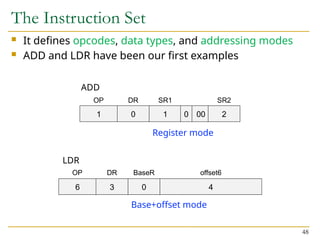
The Instruction Set
 It defines opcodes, data types, and addressing modes
 ADD and LDR have been our first examples
48
ADD
1 0 1 0 00 2
OP DR SR1 SR2
6 3 0 4
OP DR BaseR offset6
LDR
Register mode
Base+offset mode
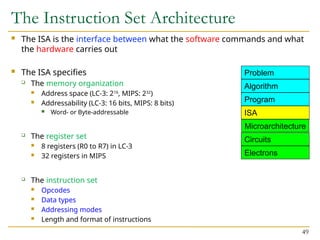
The Instruction Set Architecture
 The ISA is the interface between what the software commands and what
the hardware carries out
 The ISA specifies
 The memory organization
 Address space (LC-3: 216
, MIPS: 232
)
 Addressability (LC-3: 16 bits, MIPS: 8 bits)
 Word- or Byte-addressable
 The register set
 8 registers (R0 to R7) in LC-3
 32 registers in MIPS
 The instruction set
 Opcodes
 Data types
 Addressing modes
 Length and format of instructions
49
Microarchitecture
ISA
Program
Algorithm
Problem
Circuits
Electrons
Instructions (Opcodes)
50
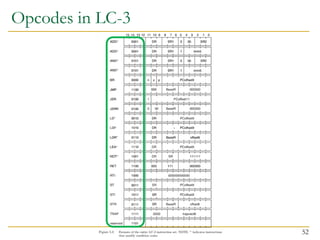
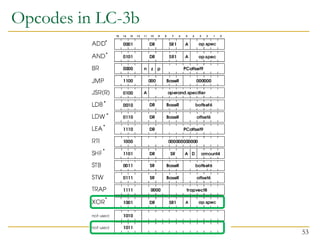
Opcodes
 A large or small set of opcodes could be defined
 E.g, HP Precision Architecture: an instruction for A*B+C
 E.g, x86 ISA: multimedia extensions (MMX), later SSE and
AVX
 E.g, VAX ISA: opcode to save all information of one program
prior to switching to another program
 Tradeoffs are involved. Examples:
 Hardware complexity vs. software complexity
 Latency of simple vs. complex instructions
 In LC-3 and in MIPS there are three types of opcodes
 Operate
 Data movement
 Control 51
Opcodes in LC-3
52
Opcodes in LC-3b
53
MIPS Instruction Types
54
opcode
6-bit
rs
5-bit
rt
5-bit
immediate
16-bit
I-type
R-type
0
6-bit
rs
5-bit
rt
5-bit
rd
5-bit
shamt
5-bit
funct
6-bit
opcode
6-bit
immediate
26-bit
J-type
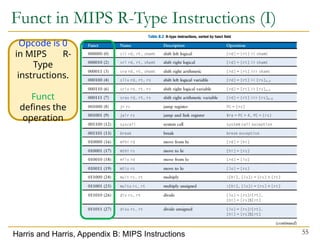
Funct in MIPS R-Type Instructions (I)
55
Harris and Harris, Appendix B: MIPS Instructions
Opcode is 0
in MIPS R-
Type
instructions.
Funct
defines the
operation
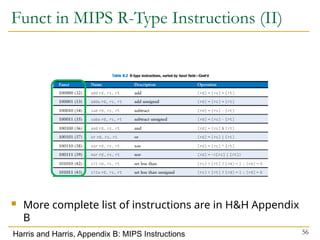
Funct in MIPS R-Type Instructions (II)
56
Harris and Harris, Appendix B: MIPS Instructions
 More complete list of instructions are in H&H Appendix
B

Lec 14-Instruction Set Architecture.pptx

  • 1.
    Advanced Computer Arch. Lecture14 Instruction Set Architecture
  • 2.
    Readings  Von NeumannModel of LC-3, and MIPS  P&P, Chapters 4 & 5  P&P, Appendices A and C (ISA and microarchitecture of LC-3)  Ebook 5, Ch 1, ISA (1.2) , CISC (1.4) 2
  • 3.
    LC-3: A vonNeumann Machine 3 Control signals Data ALU: 2 inputs, 1 output Memory Data Register Memory Address Register 16-bit addressable Keyboard KBDR (data), KBSR (status) Monitor (Display) DDR (data), DSR (status) 8 General Purpose Registers (GPR) Finite State Machine (for Generating Control Signals) Instruction Register Program Counter ALU operation GateALU Clock
  • 4.
    Stored Program &Sequential Execution  Instructions and data are stored in memory  Typically the instruction length is the word length  The processor fetches instructions from memory sequentially  Fetches one instruction  Decodes and executes the instruction  Continues with the next instruction  The address of the current instruction is stored in the program counter (PC)  If word-addressable memory, the processor increments the PC by 1 (in LC- 3)  If byte-addressable memory, the processor increments the PC by the instruction length in bytes (4 in MIPS)  In MIPS the OS typically sets the PC to 0x00400000 (start of a program) 4
  • 5.
     A sampleMIPS program  4 instructions stored in consecutive words in memory  No need to understand the program now. We will get back to it A Sample Program Stored in Memory 5 . . . Instructions 8 C 0 A 0 0 2 0 0 2 3 2 8 0 2 0 2 2 6 8 F F F 4 0 1 6 D 4 0 2 2 . . . 00400000 00400004 00400008 0040000C . . . Byte Address . . . lw $t2, 32($0) add $s0, $s1, $s2 addi $t0, $s3, -12 sub $t0, $t3, $t5 MIPS assembly 0x8C0A0020 0x02328020 0x2268FFF4 0x016D4022 Machine code (encoded instructions) ← PC
  • 6.
    The Instruction  Aninstruction is the most basic unit of computer processing  Instructions are words in the language of a computer  Instruction Set Architecture (ISA) is the vocabulary  The language of the computer can be written as  Machine language: Computer-readable representation (that is, 0’s and 1’s)  Assembly language: Human-readable representation  We will study LC-3 instructions and MIPS instructions  Principles are similar in all ISAs (x86, ARM, RISC-V, …) 6
  • 7.
    The Instruction: Opcode& Operands  An instruction is made up of two parts  Opcode and Operands  Opcode specifies what the instruction does  Operands specify who the instruction is to do it to  Both are specified in instruction format (or instr. encoding)  An LC-3 instruction consists of 16 bits (bits [15:0])  Bits [15:12] specify the opcode  16 distinct opcodes in LC- 3  Bits [11:0] are used to figure out where the operands are 7
  • 8.
    Instruction Types  Thereare three main types of instructions  Operate instructions  Execute operations in the ALU  Data movement instructions  Read from or write to memory  Control flow instructions  Change the sequence of execution  Let us start with some example instructions 8
  • 9.
    An Example OperateInstruction  Addition  add: mnemonic to indicate the operation to perform  b, c: source operands  a: destination operand  a b + c ← 9 a = b + c; add a, b, c High-level code Assembly
  • 10.
    Registers  We mapvariables to registers 10 add a, b, c b = R1 c = R2 a = R0 Assembly LC-3 registers b = $s1 c = $s2 a = $s0 MIPS registers
  • 11.
     Addition From Assemblyto Machine Code in LC-3 11 ADD R0, R1, R2 LC-3 assembly Field Values Machine Code (Instruction Encoding) 0x1042 Machine Code, in short (hexadecimal) 1 0 1 0 00 2 OP DR SR1 SR2 0 0 0 1 0 0 0 0 0 1 0 0 0 0 1 0 OP DR SR1 SR2 15 14 13 12 11 10 9 8 7 6 2 1 0 5 4 3
  • 12.
    Instruction Format (orEncoding)  LC-3 Operate Instruction Format  OP = opcode (what the instruction does)  E.g., ADD = 0001  Semantics: DR SR1 + SR2 ←  E.g., AND = 0101  Semantics: DR SR1 AND SR2 ←  SR1, SR2 = source registers  DR = destination register 12 OP DR SR1 0 00 SR2 4 bits 3 bits 3 bits 3 bits 15 14 13 12 11 10 9 8 7 6 2 1 0 5 4 3
  • 13.
     Addition From Assemblyto Machine Code in MIPS 13 0 17 18 16 0 32 op rs rt rd shamt funct add $s0, $s1, $s2 MIPS assembly Field Values 0x02328020 000000 10001 10010 10000 00000 100000 op rs rt rd shamt funct Machine Code (Instruction Encoding) 15 11 10 6 0 5 16 20 21 25 26 31 rd ← rs + rt
  • 14.
    Instruction Format: R-Typein MIPS  MIPS R-type Instruction Format  3 register operands  0 = opcode  rs, rt = source registers  rd = destination register  shamt = shift amount (only shift operations)  funct = operation in R-type instructions 14 0 rs rt rd shamt funct 6 bits 5 bits 5 bits 5 bits 5 bits 6 bits
  • 15.
    Reading Operands fromMemory  With operate instructions, such as addition, we tell the computer to execute arithmetic (or logic) computations in the ALU  We also need instructions to access the operands from memory  Load them from memory to registers  Store them from registers to memory  Next, we see how to read (or load) from memory  Writing (or storing) is performed in a similar way, but we will talk about that later 15
  • 16.
    Reading Word-Addressable Memory Load word  load: mnemonic to indicate the load word operation  A: base address  i: offset  E.g., immediate or literal (a constant)  a: destination operand  Semantics: a Memory[A + i] ← 16 a = A[i]; load a, A, i High-level code Assembly
  • 17.
    Load Word inLC-3 and MIPS  LC-3 assembly  MIPS assembly (assuming word-addressable) 17 a = A[2]; LDR R3, R0, #2 High-level code LC-3 assembly R3 Memory[R0 + 2] ← a = A[2]; lw $s3, 2($s0) High-level code MIPS assembly $s3 Memory[$s0 + 2] ← These instructions use a particular addressing mode (i.e., the way the address is calculated), called base+offset
  • 18.
    Load Word inByte-Addressable MIPS  MIPS assembly  Byte address is calculated as: word_address * bytes/word  4 bytes/word in MIPS  If LC-3 were byte-addressable (i.e., LC-3b), 2 bytes/word 18 a = A[2]; lw $s3, 8($s0) High-level code MIPS assembly $s3 Memory[$s0 + 8] ←
  • 19.
     LC-3  MIPS InstructionFormat With Immediate 19 6 3 0 2 OP DR BaseR offset6 LDR R3, R0, #2 LC-3 assembly Field Values 35 16 19 8 op rs rt imm lw $s3, 8($s0) MIPS assembly Field Values I-Type 15 0 16 20 21 25 26 31 5 0 6 8 9 11 12 15
  • 20.
  • 21.
    How Are TheseInstructions Executed?  By using instructions, we can speak the language of the computer  Thus, we now know how to tell the computer to  Execute computations in the ALU by using, for instance, an addition  Access operands from memory by using the load word instruction  But, how are these instructions executed on the computer?  The process of executing an instruction is called is the instruction cycle (or, instruction processing cycle) 21
  • 22.
    The Instruction Cycle The instruction cycle is a sequence of steps or phases, that an instruction goes through to be executed  FETCH  DECODE  EVALUATE ADDRESS  FETCH OPERANDS  EXECUTE  STORE RESULT  Not all instructions require the six phases  LDR does not require EXECUTE  ADD does not require EVALUATE ADDRESS  Intel x86 instruction ADD [eax], edx is an example of instruction with six phases 22
  • 23.
    After STORE RESULT,a New FETCH  FETCH  DECODE  EVALUATE ADDRESS  FETCH OPERANDS  EXECUTE  STORE RESULT 23
  • 24.
    FETCH  The FETCHphase obtains the instruction from memory and loads it into the Instruction Register (IR)  This phase is common to every instruction type  Complete description  Step 1: Load the MAR with the contents of the PC, and simultaneously increment the PC  Step 2: Interrogate memory. This results in the instruction being placed in the MDR by memory  Step 3: Load the IR with the contents of the MDR 24
  • 25.
    FETCH in LC-3 25 Step1: Load MAR and increment PC Step 2: Access memory Step 3: Load IR with the content of MDR
  • 26.
    DECODE  The DECODEphase identifies the instruction  Also generates the set of control signals to process the identified instruction in later phases of the instruction cycle  Recall the decoder (from Lecture 5)  A 4-to-16 decoder identifies which of the 16 opcodes is going to be processed  The input is the four bits IR[15:12]  The remaining 12 bits identify what else is needed to process the instruction 26
  • 27.
    DECODE in LC-3 27 DECODE identifiesthe instruction to be processed Also generates the set of control signals to process the instruction
  • 28.
    Recall: Decoder  “Inputpattern detector”  n inputs and 2n outputs  Exactly one of the outputs is 1 and all the rest are 0s  The output that is logically 1 is the output corresponding to the input pattern that the logic circuit is expected to detect  Example: 2-to-4 decoder 28
  • 29.
    Recall: Decoder (II) The decoder is useful in determining how to interpret a bit pattern 29 A = 1 0 B = 0 0 1 0  It could be the address of a location in memory, that the processor intends to read from  It could be an instruction in the program and the processor needs to decide what action to take (based on instruction opcode)
  • 30.
    To Come: FullState Machine for LC-3b 30 https://safari.ethz.ch/digitaltechnik/spring2022/lib/exe/fetch.php?media=pp-appendixc.pdf Decode State
  • 31.
    EVALUATE ADDRESS  TheEVALUATE ADDRESS phase computes the address of the memory location that is needed to process the instruction  This phase is necessary in LDR  It computes the address of the data word that is to be read from memory  By adding an offset to the content of a register  But not necessary in ADD 31
  • 32.
    EVALUATE ADDRESS inLC-3 32 LDR calculates the address by adding a register and an immediate ADD
  • 33.
    FETCH OPERANDS  TheFETCH OPERANDS phase obtains the source operands needed to process the instruction  In LDR  Step 1: Load MAR with the address calculated in EVALUATE ADDRESS  Step 2: Read memory, placing source operand in MDR  In ADD  Obtain the source operands from the register file  In some microprocessors, operand fetch from register file can be done at the same time the instruction is being decoded 33
  • 34.
    FETCH OPERANDS inLC-3 34 LDR loads MAR (step 1), and places the results in MDR (step 2)
  • 35.
    EXECUTE  The EXECUTEphase executes the instruction  In ADD, it performs addition in the ALU  In XOR, it performs bitwise XOR in the ALU  … 35
  • 36.
    EXECUTE in LC-3 36 ADDadds SR1 and SR2
  • 37.
    STORE RESULT  TheSTORE RESULT phase writes the result to the designated destination  Once STORE RESULT is completed, a new instruction cycle starts (with the FETCH phase) 37
  • 38.
    STORE RESULT inLC-3 38 ADD loads ALU Result into DR
  • 39.
    STORE RESULT inLC-3 39 LDR loads MDR into DR
  • 40.
    The Instruction Cycle FETCH  DECODE  EVALUATE ADDRESS  FETCH OPERANDS  EXECUTE  STORE RESULT 40
  • 41.
    Changing the Sequenceof Execution  A computer program executes in sequence (i.e., in program order)  First instruction, second instruction, third instruction and so on  Unless we change the sequence of execution  Control instructions allow a program to execute out of sequence  They can change the PC by loading it during the EXECUTE phase  That wipes out the incremented PC (loaded during the FETCH phase) 41
  • 42.
    Jump in LC-3 Unconditional branch or jump  LC-3  BaseR = Base register  PC R2 (Register identified by BaseR) ←  Variations  RET: special case of JMP where BaseR = R7  JSR, JSRR: jump to subroutine 42 JMP R2 1100 000 000000 4 bits BaseR 3 bits This is register addressing mode
  • 43.
    Jump in MIPS Unconditional branch or jump  MIPS  2 = opcode  target = target address  PC PC ← ✝ [31:28] | sign-extend(target) * 4  Variations  jal: jump and link (function calls)  jr: jump register 43 2 target 6 bits 26 bits j target J-Type jr $s0 j uses pseudo- direct addressing mode ✝ This is the incremented PC jr uses register addressing mode
  • 44.
    PC UPDATE inLC-3 44 JMP loads SR1 into PC
  • 45.
    Control of theInstruction Cycle  State 1  The FSM asserts GatePC and LD.MAR  It selects input (+1) in PCMUX and asserts LD.PC  State 2  MDR is loaded with the instruction  State 3  The FSM asserts GateMDR and LD.IR  State 4  The FSM goes to next state depending on opcode  State 63  JMP loads register into PC  Full state diagram in Patt&Pattel, Appendix C 45 This is an FSM Controlling the LC-3 Processor
  • 46.
    The Instruction Cycle FETCH  DECODE  EVALUATE ADDRESS  FETCH OPERANDS  EXECUTE  STORE RESULT 46
  • 47.
    LC-3 and MIPS InstructionSet Architectures 47
  • 48.
    The Instruction Set It defines opcodes, data types, and addressing modes  ADD and LDR have been our first examples 48 ADD 1 0 1 0 00 2 OP DR SR1 SR2 6 3 0 4 OP DR BaseR offset6 LDR Register mode Base+offset mode
  • 49.
    The Instruction SetArchitecture  The ISA is the interface between what the software commands and what the hardware carries out  The ISA specifies  The memory organization  Address space (LC-3: 216 , MIPS: 232 )  Addressability (LC-3: 16 bits, MIPS: 8 bits)  Word- or Byte-addressable  The register set  8 registers (R0 to R7) in LC-3  32 registers in MIPS  The instruction set  Opcodes  Data types  Addressing modes  Length and format of instructions 49 Microarchitecture ISA Program Algorithm Problem Circuits Electrons
  • 50.
  • 51.
    Opcodes  A largeor small set of opcodes could be defined  E.g, HP Precision Architecture: an instruction for A*B+C  E.g, x86 ISA: multimedia extensions (MMX), later SSE and AVX  E.g, VAX ISA: opcode to save all information of one program prior to switching to another program  Tradeoffs are involved. Examples:  Hardware complexity vs. software complexity  Latency of simple vs. complex instructions  In LC-3 and in MIPS there are three types of opcodes  Operate  Data movement  Control 51
  • 52.
  • 53.
  • 54.
  • 55.
    Funct in MIPSR-Type Instructions (I) 55 Harris and Harris, Appendix B: MIPS Instructions Opcode is 0 in MIPS R- Type instructions. Funct defines the operation
  • 56.
    Funct in MIPSR-Type Instructions (II) 56 Harris and Harris, Appendix B: MIPS Instructions  More complete list of instructions are in H&H Appendix B

Editor's Notes

  • #42 jr is R-Type
  • #43 jr is R-Type
  • #49 x86-64: * Memory organization: - Address space: up to 2^48. - Addressability: up to 48 bits. The actual length of the address is 64 bits, but bits 48 to 63 are sign extended. * Register set: 16 GPR, including RBP (stack base pointer) and RSP (stack pointer). + floating point, multimedia