W E B B A S E D S O F T W A R E S O L U T I O N
LMS
LEAVE MANAGEMENT
SYSTEM
OBJECTIVE
To provide for an automated leave management system that
intelligently adapts to HR policy of the organization and allows
employees and their line manager to manage leaves and
replacement for better scheduling of work load and processes.
LMS OVERVIEW
Leave Management System is a web-based system that allow
to requests & approve leave, thereby ensuring uniform leave
policy management throughout your organization.
 see your leave summary & approvals in real-time,
 get instant overview of all your leaves,
 set multi-level approvals,
 define leave types, rules, holiday list & work week, and
 view various types of leave reports.
LMS PURPOSE
 The purpose of leave management system is to
help the employee & higher management of institution
to keep the database of employee .
 This software find easily leaves and attendance of
employee in ICT division
LMS USER ROLE
Employee Role:
Request leave easily online
Check leave availability
Track leave request status online
Manager Role:
Record and monitor leaves
Establish a consistent LMS process across your Enterprise
Ensure Resource planning and timely deliverables
LMS STRUCTURE
SOFTWARE FUNCTIONALITY
 Submit leave request.
 Click “Request” icon.
 You’ll be directed to the leave request form.
 Enter your leave details:
• leave type,
• number of leave days,
• leave commencement & end day (if multiple),
 Then click “Apply” button.
SOFTWARE FUNCTIONALITY
 Submitted leave requests will:
get added in the Leave Request List
be notified to the Leave Approver in the Admin Section
SOFTWARE FUNCTIONALITY
 List of all your leave requests.
Through this List:
• Employee can track the approval status of their leave
requests, and
• Approvers can approve/decline the requests received.
SOFTWARE FUNCTIONALITY
 Approve Leave
 Approve the leave request by clicking the “Approve”
button provided, or
 Decline the leave request by clicking the “Decline” button
provided.
SOFTWARE FUNCTIONALITY
 Leave Reports
• – Generate a comprehensive list of leave reports.
• Leave Management System supports the following types of reports:
Leave reports specific to Admins
Leave reports specific to individual users
• Each of the above report types provides information such as:
Leave types,
Entitled days for each leave type,
Taken & balance days from each leave type.
LMS DATABASE STRUCTURE
User Table
Employee
Info
Leave
Category
Leave
Application
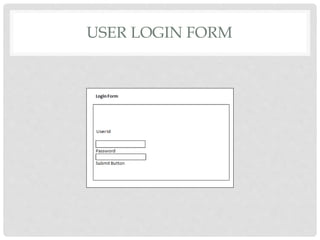
USER LOGIN FORM
USER HOME PAGE
EMPLOYEE INFO FORM
Employee or user can update
and edit his/her information in
this page.
LEAVE APPLY FORM
An employee can apply
for leave using this form.
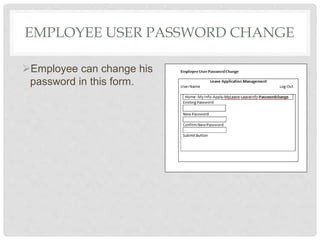
EMPLOYEE USER PASSWORD CHANGE
Employee can change his
password in this form.
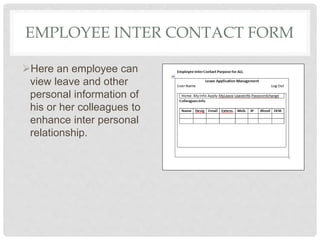
EMPLOYEE INTER CONTACT FORM
Here an employee can
view leave and other
personal information of
his or her colleagues to
enhance inter personal
relationship.
AUTHORIZER ACCESS FORM
In this form the Authorizer
can view all leave related
information of employees
at a time.
Leave managment software

Leave managment software

  • 1.
    W E BB A S E D S O F T W A R E S O L U T I O N LMS LEAVE MANAGEMENT SYSTEM
  • 2.
    OBJECTIVE To provide foran automated leave management system that intelligently adapts to HR policy of the organization and allows employees and their line manager to manage leaves and replacement for better scheduling of work load and processes.
  • 3.
    LMS OVERVIEW Leave ManagementSystem is a web-based system that allow to requests & approve leave, thereby ensuring uniform leave policy management throughout your organization.  see your leave summary & approvals in real-time,  get instant overview of all your leaves,  set multi-level approvals,  define leave types, rules, holiday list & work week, and  view various types of leave reports.
  • 4.
    LMS PURPOSE  Thepurpose of leave management system is to help the employee & higher management of institution to keep the database of employee .  This software find easily leaves and attendance of employee in ICT division
  • 5.
    LMS USER ROLE EmployeeRole: Request leave easily online Check leave availability Track leave request status online Manager Role: Record and monitor leaves Establish a consistent LMS process across your Enterprise Ensure Resource planning and timely deliverables
  • 6.
  • 7.
    SOFTWARE FUNCTIONALITY  Submitleave request.  Click “Request” icon.  You’ll be directed to the leave request form.  Enter your leave details: • leave type, • number of leave days, • leave commencement & end day (if multiple),  Then click “Apply” button.
  • 8.
    SOFTWARE FUNCTIONALITY  Submittedleave requests will: get added in the Leave Request List be notified to the Leave Approver in the Admin Section
  • 9.
    SOFTWARE FUNCTIONALITY  Listof all your leave requests. Through this List: • Employee can track the approval status of their leave requests, and • Approvers can approve/decline the requests received.
  • 10.
    SOFTWARE FUNCTIONALITY  ApproveLeave  Approve the leave request by clicking the “Approve” button provided, or  Decline the leave request by clicking the “Decline” button provided.
  • 11.
    SOFTWARE FUNCTIONALITY  LeaveReports • – Generate a comprehensive list of leave reports. • Leave Management System supports the following types of reports: Leave reports specific to Admins Leave reports specific to individual users • Each of the above report types provides information such as: Leave types, Entitled days for each leave type, Taken & balance days from each leave type.
  • 12.
    LMS DATABASE STRUCTURE UserTable Employee Info Leave Category Leave Application
  • 13.
  • 14.
  • 15.
    EMPLOYEE INFO FORM Employeeor user can update and edit his/her information in this page.
  • 16.
    LEAVE APPLY FORM Anemployee can apply for leave using this form.
  • 17.
    EMPLOYEE USER PASSWORDCHANGE Employee can change his password in this form.
  • 18.
    EMPLOYEE INTER CONTACTFORM Here an employee can view leave and other personal information of his or her colleagues to enhance inter personal relationship.
  • 19.
    AUTHORIZER ACCESS FORM Inthis form the Authorizer can view all leave related information of employees at a time.