SRI International
Center for Technology in Learning


Connected Educator Month:
Sharing Learning Resources

Presented to: Educators With Something to Say!


Marie Bienkowski, Jim Klo
August 14, 2012


                            2012 SRI International – CC-BY-3.0
Communities of Practice: Specialized Knowledge

 Learning now can take place online, with engaging and
  interactive resources
 Educators can use primary source materials from different
  online providers
 …But the resource location problem remains unsolved
 Online communities of practice are good sources of expertise
  for evaluating the quality and applicability of learning
  resources


                        2012 SRI International – CC-BY-3.0       2
Text with Graphics
Subtitle (if needed)                                         Primary Source Materials


 Text on the same
  slide as a graphic
  should be minimized
  to avoid confusion


                        2012 SRI International – CC-BY-3.0                              3
Text with Graphics
Subtitle (if needed)

 Text on the same
  slide as a graphic
  should be minimized   Engaging
  to avoid confusion    &
                        Timely
                        Lessons


                                   4
The Learning Registry Solves the Resource Location
Problem
                                                        • Who built it?
• Library Model: Catalog                                    – U.S. Department of Education
  metadata                                                  – Department of Defense
 – But no one updates it                                      Advanced Distributed
                                                              Learning Lab
• Learning Registry Model:
  Collect social data about
  the usage of learning
  resources                                      • What Kind of Data?
• Share this data in a                               – Standard metadata, any format
  common pool for                                    – Tagged, Commented, Aligned
  aggregation, amplification,                          to Standards, Rated, Clicked,
                                                       Viewed, Shared, Embedded,
  and analysis
                                                       Modified, and more

                           2012 SRI International – CC-BY-3.0                                5
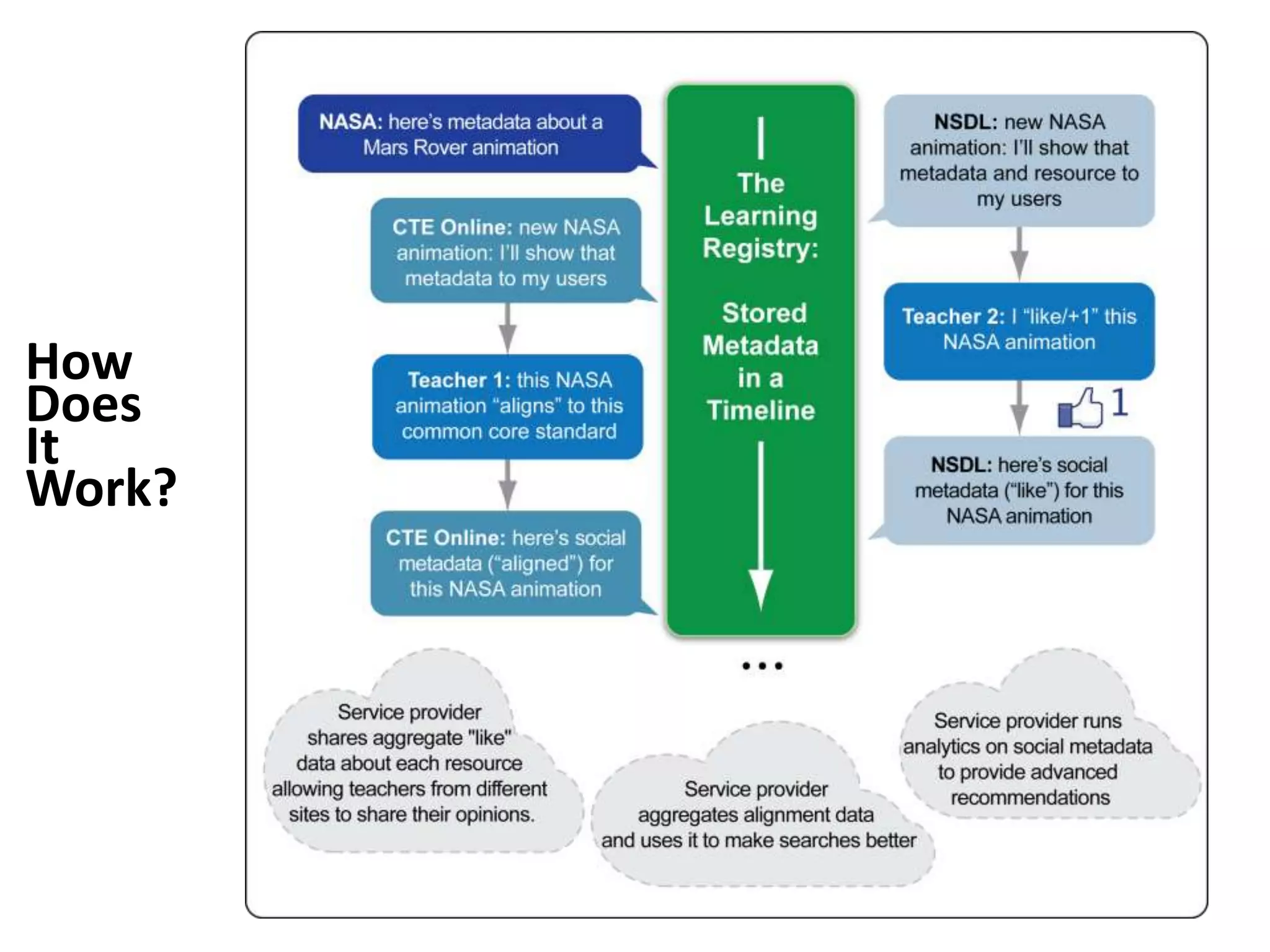
How
Does
It
Work?
What Can
It Do for
Searches?
What Can It Do For Communities of Practice?
Communities of Practice: Make Your Voice
Heard
 Community members can use the Learning Registry Collector
  to quickly add information about relevant learning resources
 The Learning Registry has resources from digital libraries and
  repositories
 Connected Educator month is our opportunity to get “big data”
  to analyze, aggregate, amplify
 Easy-to-use browser plugin
 Resource ratings based on the Achieve OER Quality Rubrics
 • http://www.achieve.org/oer-rubrics
 Common Core and State Alignment Data


                          2012 SRI International – CC-BY-3.0       9
Getting Started Adding Data to the Learning
Registry
 Requirements: Chrome Browser
  • http://www.google.com/chrome
 Download and install Chrome plugIn
  • http://bit.ly/lrcollector
 Make a Learning Registry Identity
 Navigate to web page of your favorite resource
 Align it, rate it, publish it to the Learning Registry
 Rinse and Repeat!


                                2012 SRI International – CC-BY-3.0
The Learning Registry Collector
Use Your Twitter Account For your Learning
 Registry Identity*


*Twitter Login Optional
Personalize
your identity
with some
background
information
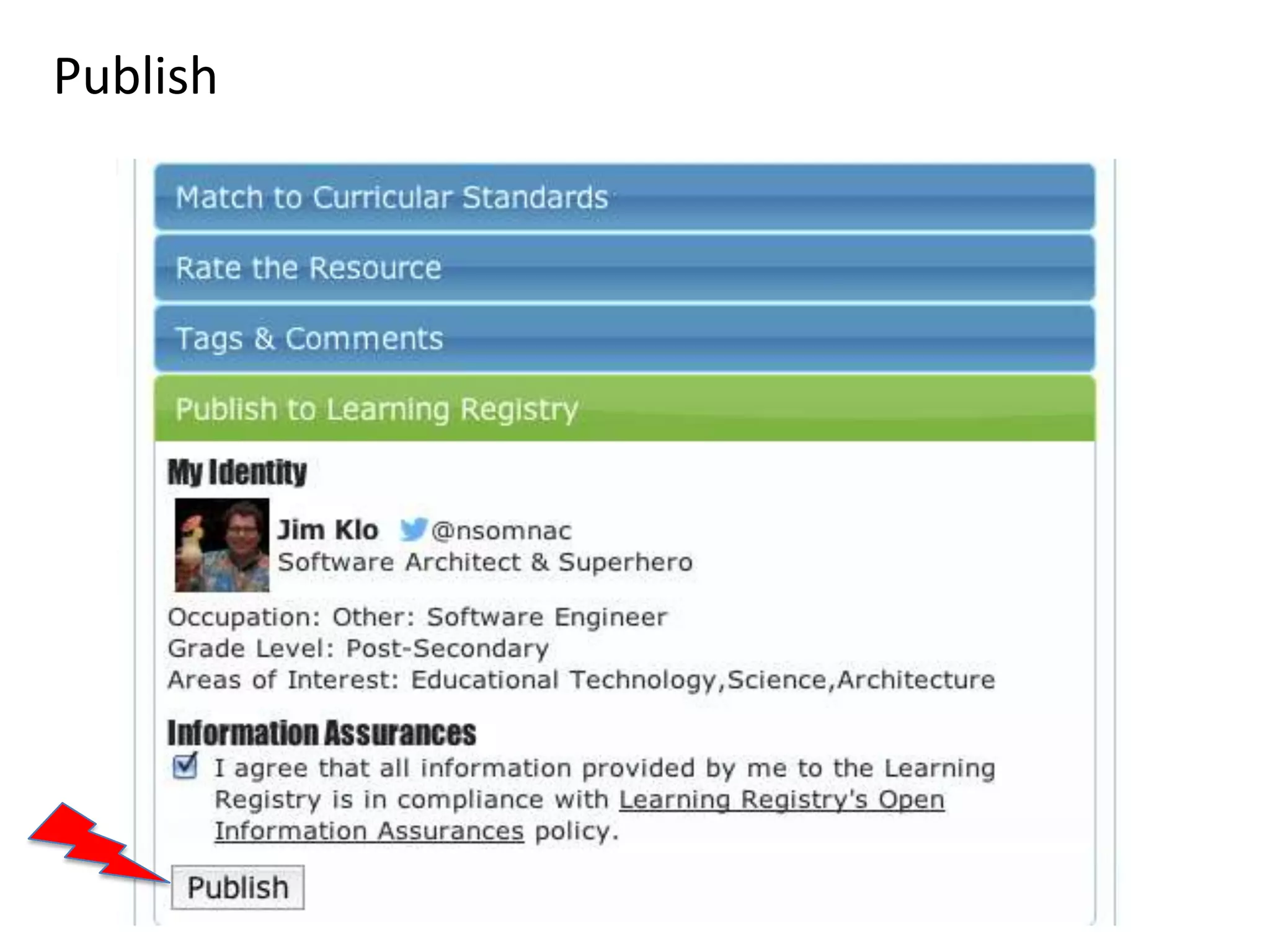
Steps: (1) Match; (2) Rate; (3) Tag & Comment,
then (4) Publish
Match with Common Core or State Standards
Rate with Achieve OER Quality Rubrics
Tag and Comment
Publish
Questions?


        Email jim.klo@learningregistry.org


                  2012 SRI International – CC-BY-3.0   19

Learning registry for Connected Educators

  • 1.
    SRI International Center forTechnology in Learning Connected Educator Month: Sharing Learning Resources Presented to: Educators With Something to Say! Marie Bienkowski, Jim Klo August 14, 2012 2012 SRI International – CC-BY-3.0
  • 2.
    Communities of Practice:Specialized Knowledge  Learning now can take place online, with engaging and interactive resources  Educators can use primary source materials from different online providers  …But the resource location problem remains unsolved  Online communities of practice are good sources of expertise for evaluating the quality and applicability of learning resources 2012 SRI International – CC-BY-3.0 2
  • 3.
    Text with Graphics Subtitle(if needed) Primary Source Materials  Text on the same slide as a graphic should be minimized to avoid confusion 2012 SRI International – CC-BY-3.0 3
  • 4.
    Text with Graphics Subtitle(if needed)  Text on the same slide as a graphic should be minimized Engaging to avoid confusion & Timely Lessons 4
  • 5.
    The Learning RegistrySolves the Resource Location Problem • Who built it? • Library Model: Catalog – U.S. Department of Education metadata – Department of Defense – But no one updates it Advanced Distributed Learning Lab • Learning Registry Model: Collect social data about the usage of learning resources • What Kind of Data? • Share this data in a – Standard metadata, any format common pool for – Tagged, Commented, Aligned aggregation, amplification, to Standards, Rated, Clicked, Viewed, Shared, Embedded, and analysis Modified, and more 2012 SRI International – CC-BY-3.0 5
  • 6.
  • 7.
    What Can It Dofor Searches?
  • 8.
    What Can ItDo For Communities of Practice?
  • 9.
    Communities of Practice:Make Your Voice Heard  Community members can use the Learning Registry Collector to quickly add information about relevant learning resources  The Learning Registry has resources from digital libraries and repositories  Connected Educator month is our opportunity to get “big data” to analyze, aggregate, amplify  Easy-to-use browser plugin  Resource ratings based on the Achieve OER Quality Rubrics • http://www.achieve.org/oer-rubrics  Common Core and State Alignment Data 2012 SRI International – CC-BY-3.0 9
  • 10.
    Getting Started AddingData to the Learning Registry  Requirements: Chrome Browser • http://www.google.com/chrome  Download and install Chrome plugIn • http://bit.ly/lrcollector  Make a Learning Registry Identity  Navigate to web page of your favorite resource  Align it, rate it, publish it to the Learning Registry  Rinse and Repeat! 2012 SRI International – CC-BY-3.0
  • 11.
  • 12.
    Use Your TwitterAccount For your Learning Registry Identity* *Twitter Login Optional
  • 13.
  • 14.
    Steps: (1) Match;(2) Rate; (3) Tag & Comment, then (4) Publish
  • 15.
    Match with CommonCore or State Standards
  • 16.
    Rate with AchieveOER Quality Rubrics
  • 17.
  • 18.
  • 19.
    Questions? Email jim.klo@learningregistry.org 2012 SRI International – CC-BY-3.0 19