

LAUNCH ITWITH DOCKER
AMAL DEV
ABOUT ME
Full stack web developer in Microsoft
technology stack
10+ years of experience
Microsoft MVP
Technical Analyst@ UST Global
Blogger@ www.techrepository.in
Contact me @amaldevv
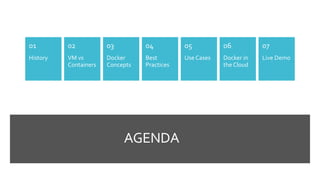
AGENDA
History
01
VM vs
Containers
02
Docker
Concepts
03
Best
Practices
04
Use Cases
05
Docker in
the Cloud
06
Live Demo
07
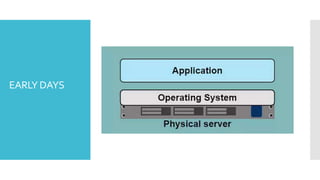
EARLY DAYS
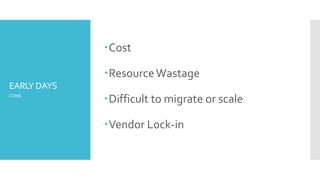
EARLY DAYS
Cost
ResourceWastage
Difficult to migrate or scale
Vendor Lock-in
CONS
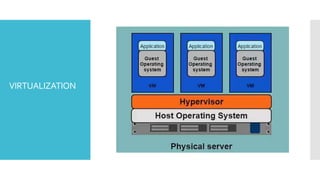
VIRTUALIZATION
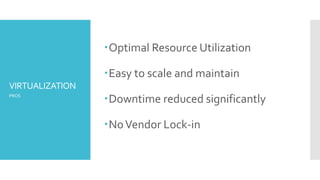
VIRTUALIZATION
Optimal Resource Utilization
Easy to scale and maintain
Downtime reduced significantly
NoVendor Lock-in
PROS
VIRTUALIZATION
It still needs CPU allocation, Storage
and RAM
A guest OS
As no ofVM’s increases, more
resources is needed
CONS
CONTAINERS
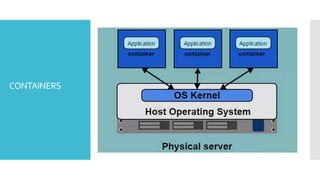
Container based virtualization
uses the kernel on the host's
operating system to run multiple
guest instances
CONTAINERS
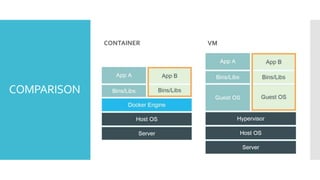
COMPARISON
CONTAINER VM
WHAT IS
DOCKER ?
Docker is an open-source engine that automates the
deployment of any application as a lightweight,
portable, self-sufficient container that will run virtually
anywhere.
Source : docker.io
WHAT
DOCKER
PROVIDES ?
Encapsulate applications into Docker
Containers
Distribute and Ship those containers
Deploy these in a data center or cloud
ARCHITECTURE
IMAGES &
CONTAINERS
IMAGES
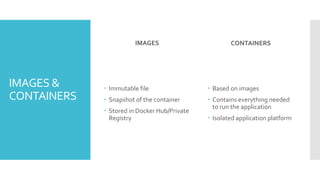
 Immutable file
 Snapshot of the container
 Stored in Docker Hub/Private
Registry
CONTAINERS
 Based on images
 Contains everything needed
to run the application
 Isolated application platform
DOCKER
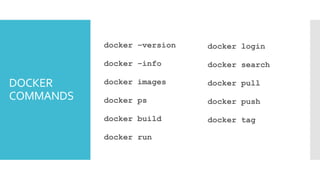
COMMANDS
docker –version
docker –info
docker images
docker ps
docker build
docker run
docker login
docker search
docker pull
docker push
docker tag
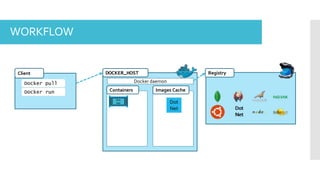
DOCKER_HOST
Images CacheContainers
RegistryClient
Docker pull Docker daemon
Docker run
Dot
Net
Dot
Net
Dot
Net
Dot
Net
WORKFLOW
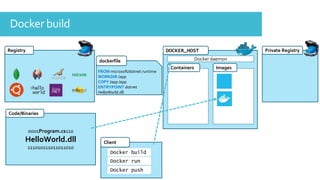
Registry DOCKER_HOST
ImagesContainers
0001Program.cs110
HelloWorld.dll
111010111011011010
Code/Binaries
Client
Docker build
Docker daemon
FROM microsoft/dotnet:runtime
WORKDIR /app
COPY /app /app
ENTRYPOINT dotnet
HelloWorld.dll
dockerfile
Private Registry
Docker run
Docker push
Docker build
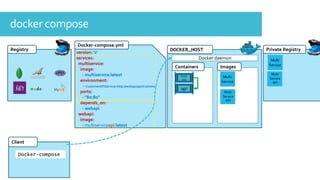
docker compose
Private Registry
Multi
Service
API
Multi
Service
DOCKER_HOST
ImagesContainers
Registry
Client
Docker-compose
Docker daemon
version: '2'
services:
multiservice:
image:
- multiservice:latest
environment:
- CustomerAPIService=http://webapi/api/Customer
ports:
- "80:80"
depends_on:
- webapi
webapi:
image:
- multiserviceapi:latest
Docker-compose.yml
Dot
Net
Multi
Service
Multi
Service
API
front
end
api
Multi
Service
Multi
Service
API
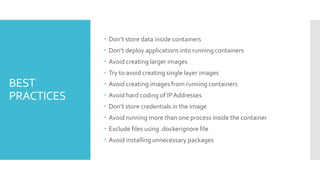
BEST
PRACTICES
 Don’t store data inside containers
 Don’t deploy applications into running containers
 Avoid creating larger images
 Try to avoid creating single layer images
 Avoid creating images from running containers
 Avoid hard coding of IPAddresses
 Don’t store credentials in the image
 Avoid running more than one process inside the container
 Exclude files using .dockerignore file
 Avoid installing unnecessary packages
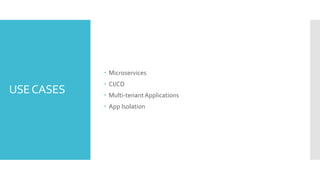
USECASES
 Microservices
 CI/CD
 Multi-tenantApplications
 App Isolation
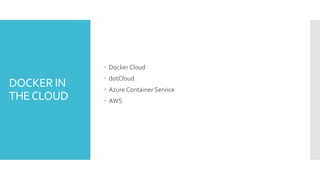
DOCKER IN
THECLOUD
 Docker Cloud
 dotCloud
 Azure Container Service
 AWS
QUESTIONS
THANKYOU

Launch It With Docker

Editor's Notes

  • #5 One application installed on one physical server Cons
  • #6 Significant downtime needed for upgrading the application or maintenance Cost factor is on the higher side Lot of resources were wasted since most of them is in idle state for a considerable amount of time It’s very difficult to migrate or scale up/down and time consuming too Vendor lock-in
  • #7 Virtualization disrupted this Allowed to host multiple applications on a physical server Each application was running inside a VM, which has got its own OS. OS can be same as the host OS or can be a different one Pros
  • #8 Virtualization disrupted this Allowed to host multiple applications on a physical server Each application was running inside a VM, which has got its own OS. OS can be same as the host OS or can be a different one Pros
  • #9 Again guest OS means resources is wasted
  • #10 Is an OS level virtualization method Method for deploying and running application without launching an entire VM for each They run on single control host and share a single kernel Each container will have its own root file system, processes, memory and network ports
  • #11 Containers runs as an isolated process, but shares OS and where appropriate Bins/Libraries Significantly faster development, less overhead, easy to migrate, faster restarts
  • #12 Containers are lightweight Guest OS is shared by all containers Meaning less CPU, RAM and storage Can create more containers with the same resources
  • #13 It’s a platform for developing, shipping and running applications using container virtualization technology. Provides the ability to package and run application in a container
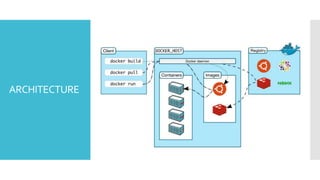
  • #15 Uses client-server architecture Client takes the input from the user and sends to the daemon which is responsible for building, running and distributing the containers Client and Daemon can run on same system, or can connect a client to remote daemon using a REST API Docker Host Client Is in the form of docker binary. Is the primary user interface. Accepts commands from the user and communicates with the daemon Registry Stores the docker images Two types of registry are there, public and private Docker Hub is a public registry
  • #16 If image is a class then container is the instance of the class https://github.com/wsargent/docker-cheat-sheet
  • #18 docker pull daemon will search for the image in the local cache If not found then it will search for it in the registry and downloads to the local cache Docker run Will create the container based on this image and executes the application