EMERGING TRENDS AND
TECHNOLOGIES
Business, People, and Technology
Tomorrow
CAN AN E-SOCIETY REPLACE OUR
REAL SOCIETY?
 Class questions…
1. How many social networking sites do you belong
to? How much time do you spend weekly at those
sites?
2. Beyond those sites, how much in total do you
spend online per week? What do you do?
3. Are we becoming a society that is disassociated
with the real environment? Is being online so
much good or bad?
INTRODUCTION
 Technological changes will be unbelievable
 You need to focus on how they will change
your personal and business life
 Don’t get caught up in only the technology
itself
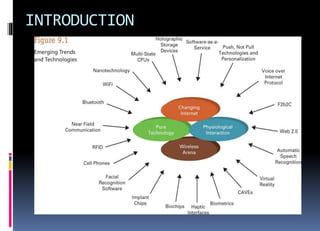
INTRODUCTION
Push, Not Pull, Technologies and
Personalization
 We live in a “pull” environment
 That is, you visitWeb sites and request
information, products, and services
 The future is a “push” environment
 Push technology – environment in which
businesses come to you with information,
services, and product offerings based on your
profile
Push, Not Pull, Technologies
and Personalization
 This isn’t spam or mass e-mail
 Businesses will know so much about you that
they can tailor and customize offerings
 Consider a GPS cell phone and a movie rental
store that monitors where you are
 A system will determine if there any movies you
like but haven’t seen
 The system will call you on your cell phone
F2b2C
 New e-commerce business model
 F2b2C, Factory-to-business-to-Consumer, a
consumer communicates through a business on
the Internet and directly provides product
specifications to a factory that makes the
customized and personalized product to the
consumer’s specifications and then ships it
directly to the consumer
F2b2C
 The business is only an intermediary between
the consumer and the factory
 A form of disintermediation
 Disintermediation – the use of the Internet as
a delivery vehicle, whereby intermediate
players in a distribution channel can be
bypassed
Voice over Internet Protocol
(VoIP)
 Voice over Internet Protocol (VoIP) – allows
you to send voice communications over the
Internet and avoid the toll charges that you
would normally receive from your long
distance carrier
 Catching on quickly in the business world
 A little slower in the personal world
 Not everyone has high-speed in-home Internet
access
Web 2.0
 Wiki – allows you (as a visitor) to create, edit,
change, and often eliminate content
 Enables crowdsourcing, when businesses provide
enabling technologies that allow people (i.e.,
crowds) – instead of paid employees – to create,
modify, and oversee the development of
products/services
 Social networking site – sites like Myspace,
Facebook, etc where you post information
about yourself, find friends, and so on
PHYSIOLOGICAL INTERACTION
 Now, you use keyboards, mice, and the like
 These are physical interfaces
 Physiological interfaces will actually capture
and use your real body characteristics
 Voice
 Iris scan
 And the like
Automatic Speech Recognition
 Automatic speech recognition (ASR) – not
only captures spoken words but also
distinguishes word groupings to form
sentences
 Becoming more a reality everyday
 Commercial systems cost less than $100
Virtual Reality
 Virtual reality – three-dimensional computer
simulation in which you actively and
physically participate
 Uses 3 unique devices
 Glove
 Headset
 Walker
Virtual Reality Devices
 Glove – input device; captures movement and
strength of your hands and fingers
 Headset (head-mounted display) – I/O
device; captures your head movement;
screen covers your field of vision
 Walker – input device; captures movement of
your feet as you walk or turn
Cave Automatic Virtual
Environment
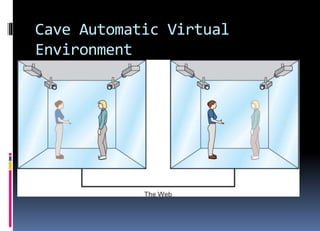
 Cave automatic virtual environment (CAVE) –
special 3-D virtual reality room that can display
images of people and objects in other CAVEs
 These are holographic devices
 Holographic device – creates, captures, and/or
displays images in 3-D form
Cave Automatic Virtual
Environment
Cave Automatic Virtual
Environment
 Visit friends and family without getting on an
airplane
 Customer service – the agent will appear next
to you when you make a call
 The possibilities are limitless
Haptic Interfaces
 Haptic interface – technology to add the
sense of touch to an environment that
previously only had visual and textual
elements
 Stationary jet ski arcade game in which the jet ski
moves and rocks
 Joysticks and game controllers that provide
feedback in the form of vibration
Biometrics
 Biometrics – the use of physiological
characteristics – fingerprint, iris, voice sound,
and even breath – to provide identification
 That’s the narrow definition
 Can also create custom-fitting clothes using
biometrics
Biometric Security
 Best security is 3-step
1. What you know (password)
2. What you have (card of some sort)
3. Who you are (biometric)
 Today’s systems (ATMs for example) use only
the first two
 One reason why identity theft is so high
Integrating Biometrics with
Transaction Processing
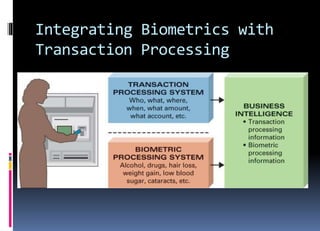
 TPS – captures events of a transaction
 Biometric processing system – captures
information about you, perhaps…
 Weight loss
 Pregnancy
 Use of drugs
 Alcohol level
 Vitamin deficiencies
Integrating Biometrics with
Transaction Processing
Integrating Biometrics with
Transaction Processing
 Is this ethical?
 Can banks use ATMs and determine if you’ve
been drinking?
 How will businesses of the future use
biometric information?
 Ethically?
 Or otherwise?
Other Biometric Devices
 Biochip – chip that can perform physiological
functions when inserted into the human body
 Implant chip – microchip implanted into the
human body that stores information about you
and can be used for tracking (GPS)
 Facial recognition software – provides
identification by evaluating facial
characteristics
RFID
 RFID (radio frequency identification) – uses a
chip in a tag or label to store information, and
information is transmitted from, or written
to, the tag or label when the chip is exposed
to the correct frequency of radio waves
 Wal-Mart is always in the business news about its
requirement that all suppliers use RFID on products
RFID
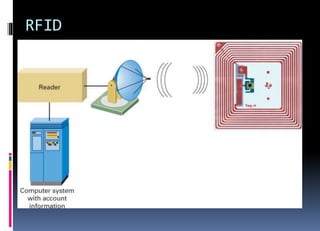
 Common RFID is passive
 No battery power
 Antenna absorbs radio waves and stores as
energy
 When enough energy is stored, the chip is
“jolted” to life and information transmissions
occur
RFID
RFID Applications
 Exxon/Mobil Speedpass – wave key ring at
reader instead of swiping card
 Anti-theft car keys
 Library book tracking (the Vatican does it)
 Livestock tracking
 Supply chain – most applications are here
MOST IMPORTANT CONSIDERATIONS
 The necessity of technology
 Closing the great digital divide
 Technology for the betterment of society
 Exchanging privacy for convenience
 Ethics, ethics, ethics
The Necessity of Technology
 It’s everywhere
 It’s inescapable
 It’s up to you how it gets used
Closing the Great Digital
Divide
 There are technology-challenged countries
and cultures
 You must take technology to those places
Technology for the Betterment
of Society
 Businesses use IT to make money and that’s
okay
 Technology can also be used when no money
is to be made; and that’s great
 Many medical applications of IT will never
make any money
Exchanging Privacy for
Convenience
 You do this everyday in small ways
 Be careful
 Don’t give up too much privacy
Ethics, Ethics, Ethics
 Ethics are essential
 Our society cannot operate without them
 Use technology wisely
 For financial gain
 But never to the detriment of other people

Last Unit Modern day Implications of Changing Technology.ppt

  • 1.
    EMERGING TRENDS AND TECHNOLOGIES Business,People, and Technology Tomorrow
  • 2.
    CAN AN E-SOCIETYREPLACE OUR REAL SOCIETY?  Class questions… 1. How many social networking sites do you belong to? How much time do you spend weekly at those sites? 2. Beyond those sites, how much in total do you spend online per week? What do you do? 3. Are we becoming a society that is disassociated with the real environment? Is being online so much good or bad?
  • 3.
    INTRODUCTION  Technological changeswill be unbelievable  You need to focus on how they will change your personal and business life  Don’t get caught up in only the technology itself
  • 4.
  • 5.
    Push, Not Pull,Technologies and Personalization  We live in a “pull” environment  That is, you visitWeb sites and request information, products, and services  The future is a “push” environment  Push technology – environment in which businesses come to you with information, services, and product offerings based on your profile
  • 6.
    Push, Not Pull,Technologies and Personalization  This isn’t spam or mass e-mail  Businesses will know so much about you that they can tailor and customize offerings  Consider a GPS cell phone and a movie rental store that monitors where you are  A system will determine if there any movies you like but haven’t seen  The system will call you on your cell phone
  • 7.
    F2b2C  New e-commercebusiness model  F2b2C, Factory-to-business-to-Consumer, a consumer communicates through a business on the Internet and directly provides product specifications to a factory that makes the customized and personalized product to the consumer’s specifications and then ships it directly to the consumer
  • 8.
    F2b2C  The businessis only an intermediary between the consumer and the factory  A form of disintermediation  Disintermediation – the use of the Internet as a delivery vehicle, whereby intermediate players in a distribution channel can be bypassed
  • 9.
    Voice over InternetProtocol (VoIP)  Voice over Internet Protocol (VoIP) – allows you to send voice communications over the Internet and avoid the toll charges that you would normally receive from your long distance carrier  Catching on quickly in the business world  A little slower in the personal world  Not everyone has high-speed in-home Internet access
  • 10.
    Web 2.0  Wiki– allows you (as a visitor) to create, edit, change, and often eliminate content  Enables crowdsourcing, when businesses provide enabling technologies that allow people (i.e., crowds) – instead of paid employees – to create, modify, and oversee the development of products/services  Social networking site – sites like Myspace, Facebook, etc where you post information about yourself, find friends, and so on
  • 11.
    PHYSIOLOGICAL INTERACTION  Now,you use keyboards, mice, and the like  These are physical interfaces  Physiological interfaces will actually capture and use your real body characteristics  Voice  Iris scan  And the like
  • 12.
    Automatic Speech Recognition Automatic speech recognition (ASR) – not only captures spoken words but also distinguishes word groupings to form sentences  Becoming more a reality everyday  Commercial systems cost less than $100
  • 13.
    Virtual Reality  Virtualreality – three-dimensional computer simulation in which you actively and physically participate  Uses 3 unique devices  Glove  Headset  Walker
  • 14.
    Virtual Reality Devices Glove – input device; captures movement and strength of your hands and fingers  Headset (head-mounted display) – I/O device; captures your head movement; screen covers your field of vision  Walker – input device; captures movement of your feet as you walk or turn
  • 15.
    Cave Automatic Virtual Environment Cave automatic virtual environment (CAVE) – special 3-D virtual reality room that can display images of people and objects in other CAVEs  These are holographic devices  Holographic device – creates, captures, and/or displays images in 3-D form
  • 16.
  • 17.
    Cave Automatic Virtual Environment Visit friends and family without getting on an airplane  Customer service – the agent will appear next to you when you make a call  The possibilities are limitless
  • 18.
    Haptic Interfaces  Hapticinterface – technology to add the sense of touch to an environment that previously only had visual and textual elements  Stationary jet ski arcade game in which the jet ski moves and rocks  Joysticks and game controllers that provide feedback in the form of vibration
  • 19.
    Biometrics  Biometrics –the use of physiological characteristics – fingerprint, iris, voice sound, and even breath – to provide identification  That’s the narrow definition  Can also create custom-fitting clothes using biometrics
  • 20.
    Biometric Security  Bestsecurity is 3-step 1. What you know (password) 2. What you have (card of some sort) 3. Who you are (biometric)  Today’s systems (ATMs for example) use only the first two  One reason why identity theft is so high
  • 21.
    Integrating Biometrics with TransactionProcessing  TPS – captures events of a transaction  Biometric processing system – captures information about you, perhaps…  Weight loss  Pregnancy  Use of drugs  Alcohol level  Vitamin deficiencies
  • 22.
  • 23.
    Integrating Biometrics with TransactionProcessing  Is this ethical?  Can banks use ATMs and determine if you’ve been drinking?  How will businesses of the future use biometric information?  Ethically?  Or otherwise?
  • 24.
    Other Biometric Devices Biochip – chip that can perform physiological functions when inserted into the human body  Implant chip – microchip implanted into the human body that stores information about you and can be used for tracking (GPS)  Facial recognition software – provides identification by evaluating facial characteristics
  • 25.
    RFID  RFID (radiofrequency identification) – uses a chip in a tag or label to store information, and information is transmitted from, or written to, the tag or label when the chip is exposed to the correct frequency of radio waves  Wal-Mart is always in the business news about its requirement that all suppliers use RFID on products
  • 26.
    RFID  Common RFIDis passive  No battery power  Antenna absorbs radio waves and stores as energy  When enough energy is stored, the chip is “jolted” to life and information transmissions occur
  • 27.
  • 28.
    RFID Applications  Exxon/MobilSpeedpass – wave key ring at reader instead of swiping card  Anti-theft car keys  Library book tracking (the Vatican does it)  Livestock tracking  Supply chain – most applications are here
  • 29.
    MOST IMPORTANT CONSIDERATIONS The necessity of technology  Closing the great digital divide  Technology for the betterment of society  Exchanging privacy for convenience  Ethics, ethics, ethics
  • 30.
    The Necessity ofTechnology  It’s everywhere  It’s inescapable  It’s up to you how it gets used
  • 31.
    Closing the GreatDigital Divide  There are technology-challenged countries and cultures  You must take technology to those places
  • 32.
    Technology for theBetterment of Society  Businesses use IT to make money and that’s okay  Technology can also be used when no money is to be made; and that’s great  Many medical applications of IT will never make any money
  • 33.
    Exchanging Privacy for Convenience You do this everyday in small ways  Be careful  Don’t give up too much privacy
  • 34.
    Ethics, Ethics, Ethics Ethics are essential  Our society cannot operate without them  Use technology wisely  For financial gain  But never to the detriment of other people