Download to read offline


![$(document).ready(function() {
// called once, called when scene finishes loading – no geometry data is guaranteed to have loaded
lapi.onSceneLoaded = function(){
var scn = lapi.getActiveScene();
var cam = scn.getCameras()[0];
cam.getProperty("Lens").getParameter("dofradius").value = 0;
cam.getProperty("Resolution").getParameter("width").value = 720;
lapi.desselectAll();
setTimeout( function(){
// now we will set all the GL meshes to not visible
var meshes = scn.getMeshes();
for( var m in meshes ){
meshes[m].getProperty("Visibility").getParameter("visible").value = false;
}
lapi.startRender()
}, 2000 );
};
});
Example of using
function
onSceneLoaded](https://image.slidesharecdn.com/lagoa-140219035500-phpapp01/85/Lagoa-10-320.jpg)
![$('.js-color-white').bind( "click", function(){
lapi.applyMaterialToMeshByName( "Realistic Carpaint White", "bodywork");
});
var uiElement = $('select[name="color-picker1"]');
uiElement.change(function(){
console.log("Color change");
Work with meshes and
materials
// read the color form the UI element
var color = lapi.utils.hexToRGB( cPicker.val() );
// this will return an array with all objects that have the part name, in Lagoa multiple parts
// can have the same name – no "name uniqueness" only object GUID uniqueness is
guaranteed.
// we will make an assumption that we are only interested in the first one, therefore the array [0]
var mat = exportMeshes[currentMesh].getMaterial();
// we are interested in changing the reflectance property
// for Velvet shader the color is called "color..."
var reflectance = mat.properties.getProperty("color");
// pow 2 is just for gamma correction
reflectance.parameters.f0.value = Math.pow( color.r * ONE_OVER_255, 2 );
reflectance.parameters.f1.value = Math.pow( color.g * ONE_OVER_255, 2 );
reflectance.parameters.f2.value = Math.pow( color.b * ONE_OVER_255, 2 );
});](https://image.slidesharecdn.com/lagoa-140219035500-phpapp01/85/Lagoa-12-320.jpg)
![function addPatterns(){
// our patterns
var scn = lapi.getActiveScene()
var textures = scn.getTextures();
// scrape all textures that start with "EXPORT_TAG".
var tmpTexture = null;
var textureName = "";
var isExport = false;
function setOnClickPattern( in_htmlElement, in_clickValue ){
$(in_htmlElement).click(function(e){
// grab the parameter that the element will handle
var mat = exportMeshes[currentMesh].getMaterial();
var param = mat.getProperty("color").parameters.texture;
param.value = in_clickValue;
})
}
// expose all textures
for( var i=0 ;i<textures.length; ++i){
tmpTexture = textures[i];
textureName = tmpTexture.properties.getParameter('name').value;
isExport = textureName.indexOf(EXPORT_TAG);
if(isExport >= 0){
// create the HTML element
var imgUrl = tmpTexture.getProperty("url").getParameter('url').value;
var img = $(document.createElement('img'));
// assign the callback
setOnClickPattern( img, tmpTexture.properties.getParameter('guid').value );
img.attr('src', imgUrl );
img.appendTo('#patterns');
}
}
}
Binding textures and
apply them on
materials](https://image.slidesharecdn.com/lagoa-140219035500-phpapp01/85/Lagoa-13-320.jpg)
![function setOnClickHdriEnv( in_htmlElement, in_clickValue ){
$(in_htmlElement).click(function(e){
// grab the parameter that the element will handle
var mat = lapi.getActiveScene().getObjectByName(DOME_LIGHT_NAME)[0];
var param = mat.getProperty("EnvironmentMap").parameters.path;
param.value = in_clickValue;
})
}
function setLightColor(in_htmlElement, in_clickValue){
$(in_htmlElement).click(function(e){
var light = lapi.getActiveScene().getObjectByName(DOME_LIGHT_NAME)[0];
light.getProperty("Color").getParameter("r").value = in_clickValue['red'];
light.getProperty("Color").getParameter("g").value = in_clickValue['green'];
light.getProperty("Color").getParameter("b").value = in_clickValue['blue'];
})
}
Play with lights](https://image.slidesharecdn.com/lagoa-140219035500-phpapp01/85/Lagoa-14-320.jpg)
![function setCamera(in_htmlElement, in_clickValue) {
$(in_htmlElement).click(function(e){
var cam = lapi.getCamera();
cam.getProperty("Position").getParameter("x").value = in_clickValue[‘x’];
cam.getProperty("Position").getParameter("y").value = in_clickValue[‘y’];
cam.getProperty("Position").getParameter("z").value = in_clickValue[‘z’];
})
}
var cam = lapi.getActiveScene().getCameras()[0];
cam.getProperty("Resolution").getParameter("width").value = 300;
cam.getProperty("Lens").getParameter("zoom").value = 5;
Play with camera
settings](https://image.slidesharecdn.com/lagoa-140219035500-phpapp01/85/Lagoa-15-320.jpg)

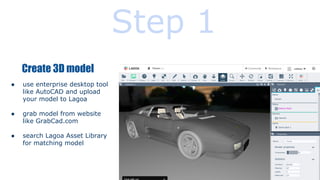
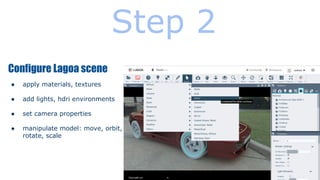
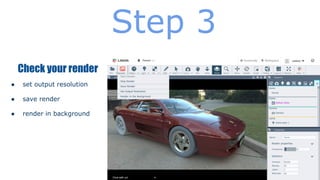
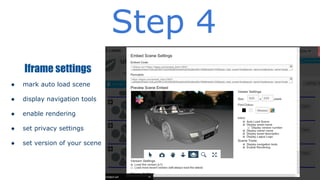
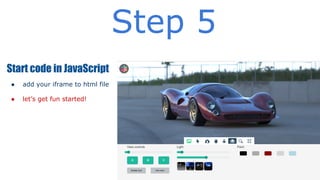
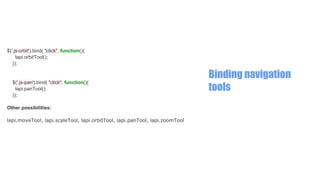
This document provides instructions for using Lagoa.com, a web-based 3D modeling solution. It outlines 5 steps: 1) creating or importing a 3D model, 2) configuring scene properties, 3) previewing renders, 4) setting iframe properties, and 5) starting code in JavaScript. It then provides code snippets and examples for interacting with 3D scenes programmatically, including applying materials and textures, manipulating lights and cameras, and binding navigation tools.


![[JS EXPERIENCE 2018] Jogos em JavaScript com WebGL - Juliana Negreiros, Codem...](https://cdn.slidesharecdn.com/ss_thumbnails/15h20-15h50-juliananegreiros-180706162350-thumbnail.jpg?width=640&height=640&fit=bounds)


