LabVIEW-Based
SRS Data Acquisition System
Riccardo de Asmundis
INFN and Università «Federico II»
Napoli, Italy
Certified LabVIEW Developer &
Certified Professional Instructor
National Instruments
Austin (TX)
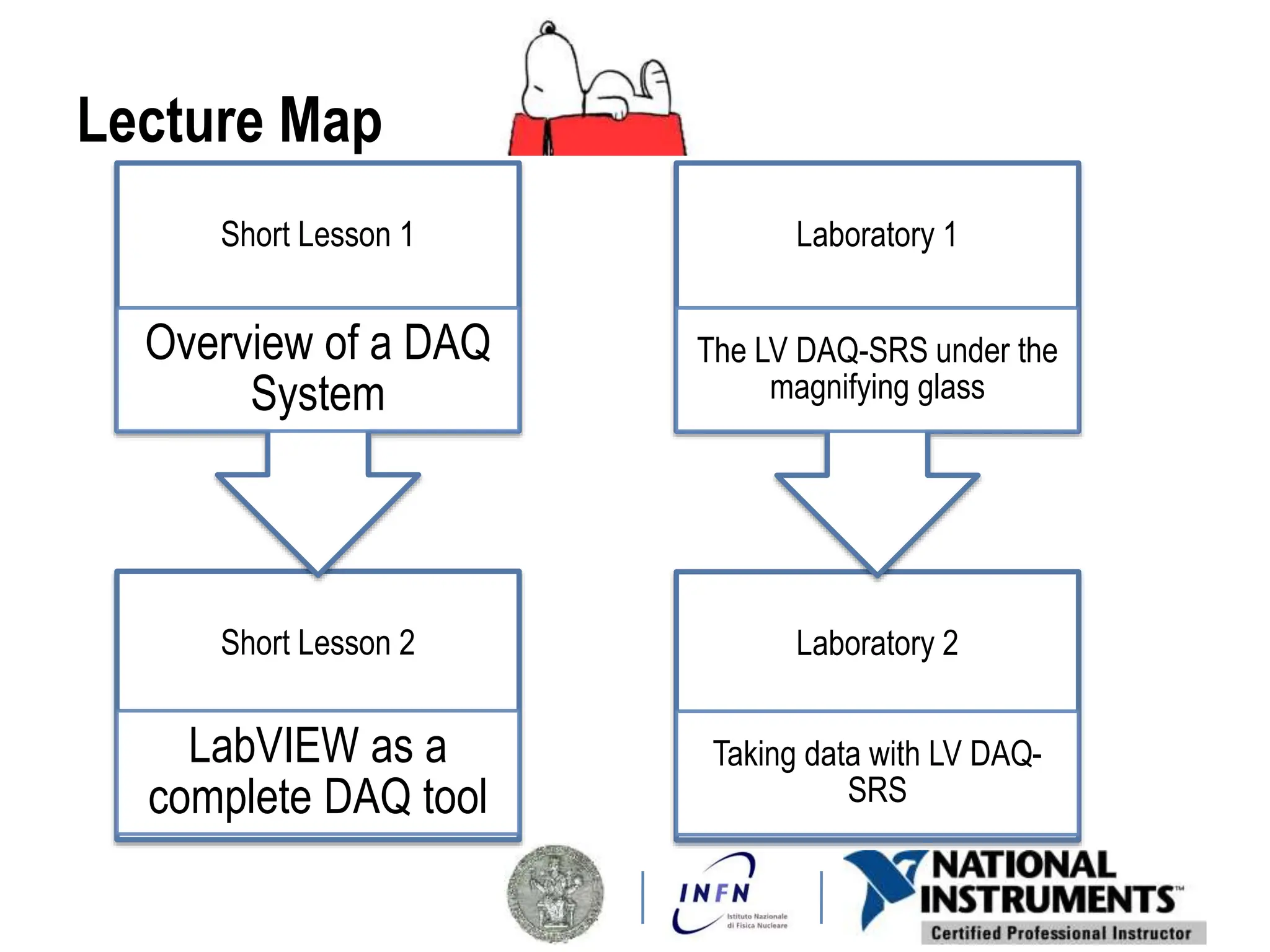
Lecture Map
Short Lesson 2
LabVIEW as a
complete DAQ tool
Short Lesson 1
Overview of a DAQ
System
Laboratory 2
Taking data with LV DAQ-
SRS
Laboratory 1
The LV DAQ-SRS under the
magnifying glass
TOPICS
Lesson 1
Overview of a Data Acquisition System
A. DAQ System Overview
B. Sensors
C. Signals
D. DAQ Hardware
E. Signal Conditioning
F. DAQ Software
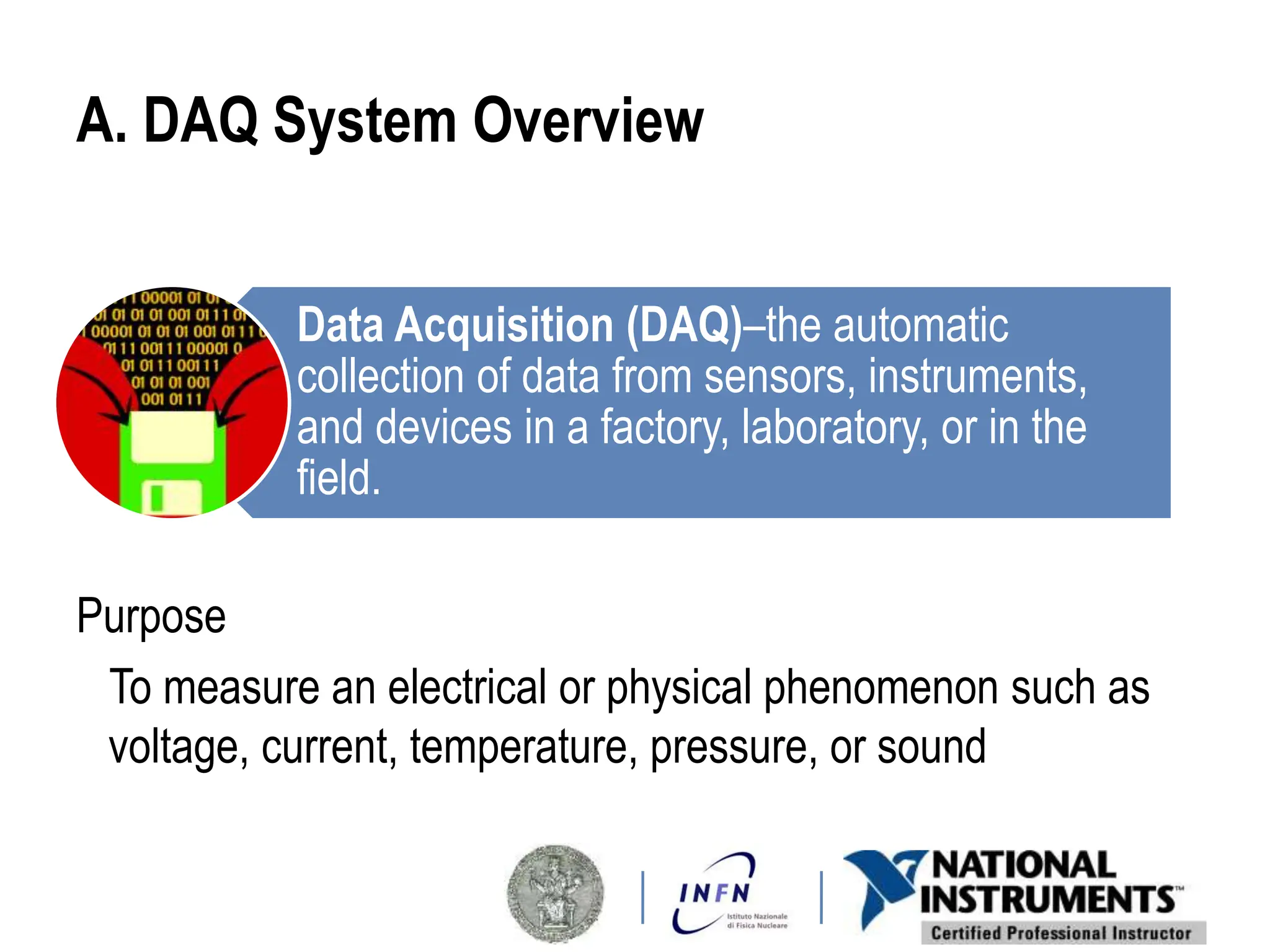
A. DAQ System Overview
Purpose
To measure an electrical or physical phenomenon such as
voltage, current, temperature, pressure, or sound
Data Acquisition (DAQ)–the automatic
collection of data from sensors, instruments,
and devices in a factory, laboratory, or in the
field.
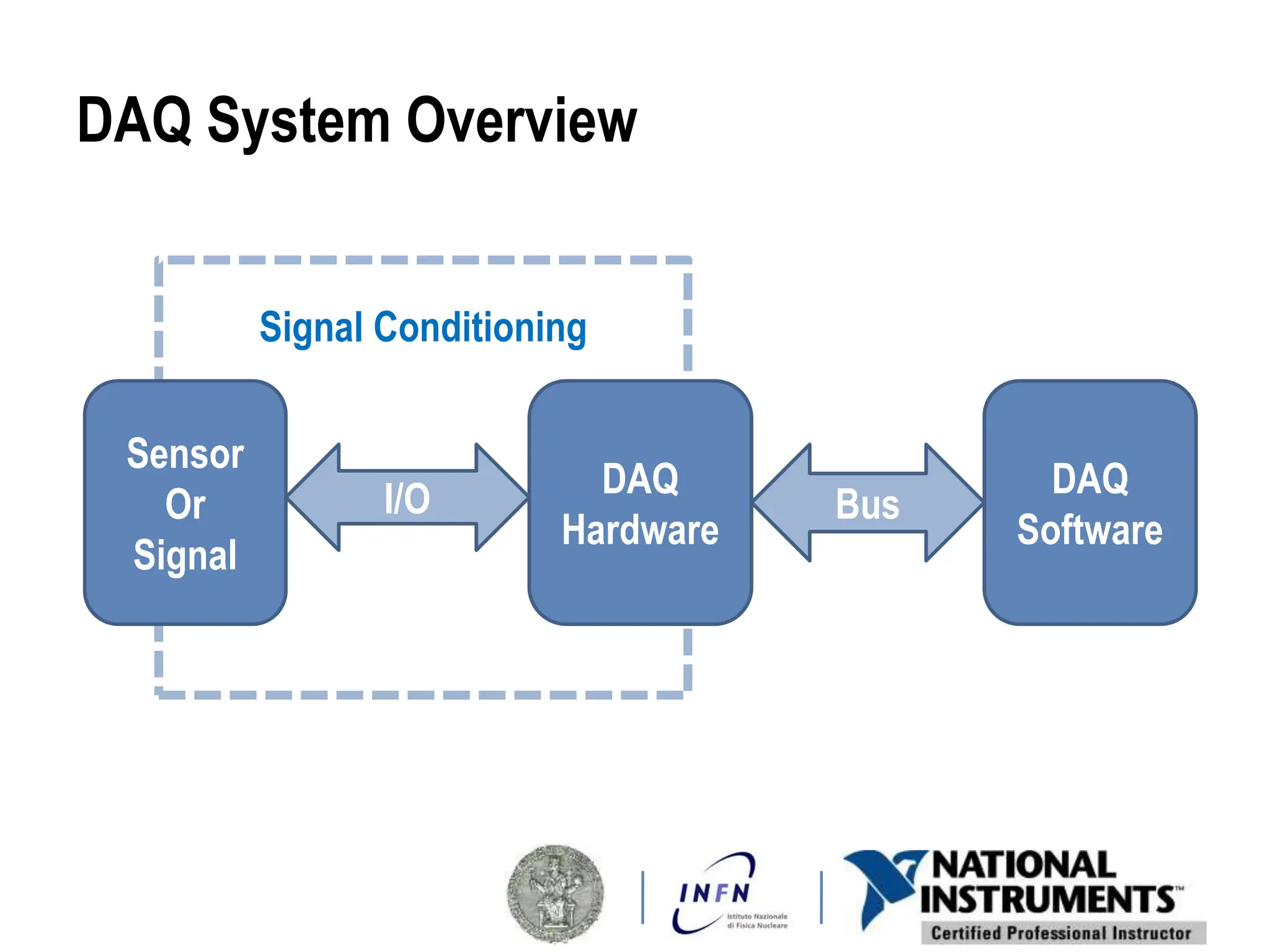
DAQ System Overview
Signal Conditioning
Sensor
Or
Signal
DAQ
Hardware
I/O DAQ
Software
Bus
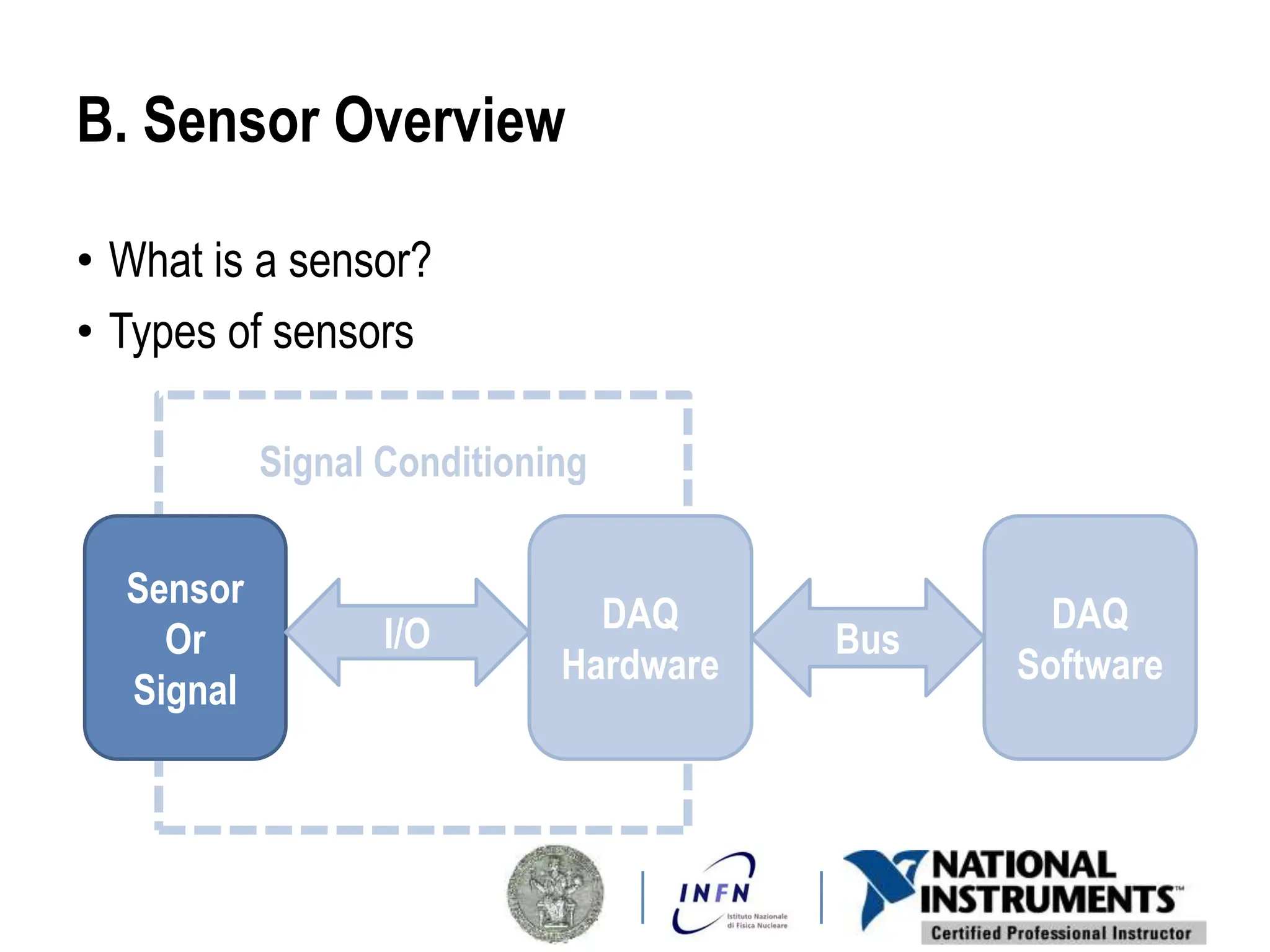
B. Sensor Overview
• What is a sensor?
• Types of sensors
Signal Conditioning
Sensor
Or
Signal
DAQ
Hardware
I/O DAQ
Software
Bus
What is a Sensor?
A sensor converts physical phenomena
into measureable electrical signals
Signal
Physical
Phenomena
Sensor
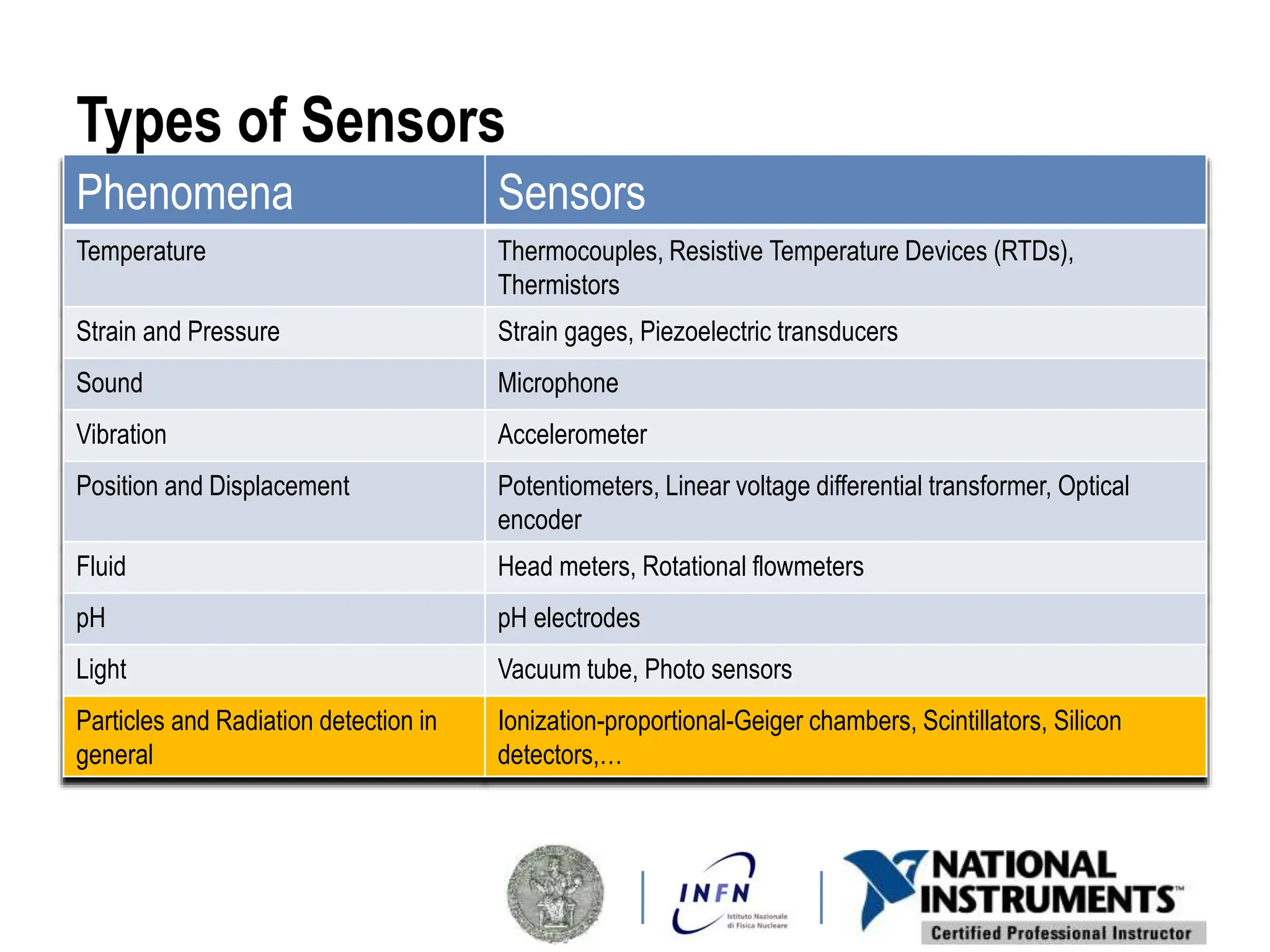
Types of Sensors
Phenomena Sensors
Temperature Thermocouples, Resistive Temperature Devices (RTDs),
Thermistors
Strain and Pressure Strain gages, Piezoelectric transducers
Sound Microphone
Vibration Accelerometer
Position and Displacement Potentiometers, Linear voltage differential transformer, Optical
encoder
Fluid Head meters, Rotational flowmeters
pH pH electrodes
Light Vacuum tube, Photo sensors
Particles and Radiation detection in
general
Ionization-proportional-Geiger chambers, Scintillators, Silicon
detectors,…
C. Signal Overview
• Signal classification
• Signal information
Signal Conditioning
Sensor
Or
Signal
DAQ
Hardware
I/O DAQ
Software
Bus
Signal Classification
Analog Digital
5 Ways to Measure the Same Signal
ANALOG Domain
DIGITAL Domain
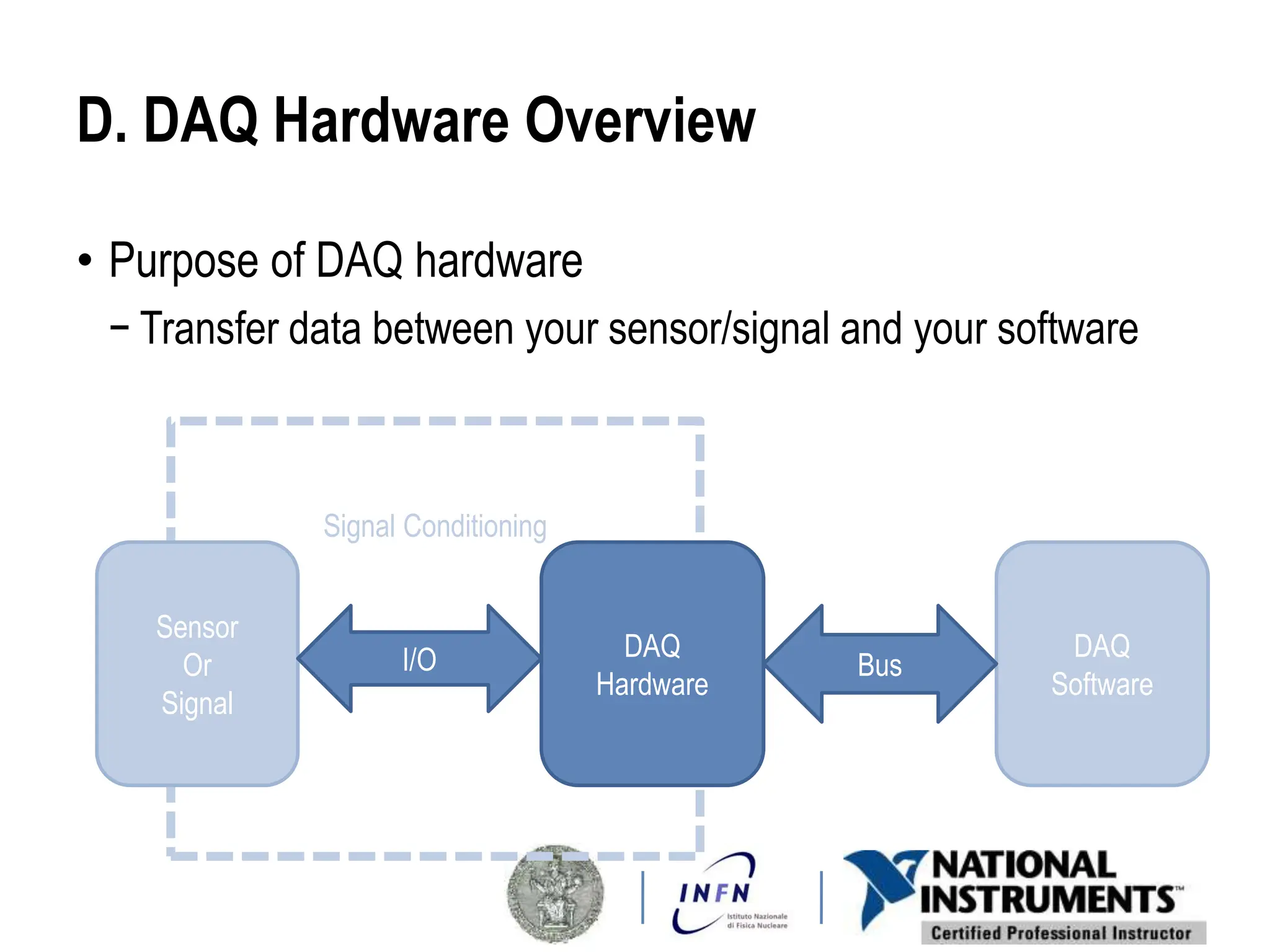
D. DAQ Hardware Overview
• Purpose of DAQ hardware
− Transfer data between your sensor/signal and your software
Signal Conditioning
Sensor
Or
Signal
DAQ
Hardware
I/O DAQ
Software
Bus
Typical General Purpose DAQ Device Architecture
Features
• Analog Input
• Analog Output
• Digital I/O
• Counter
DAQ Circuitry
− Clock&Timing, FIFO,…
Data Transfer Bus
− USB, PCI, PCI Express,
PXI, PXI Express
Synchronization Bus
• Used to synchronize multiple DAQ devices
• Allows sharing of timing and trigger signals between devices
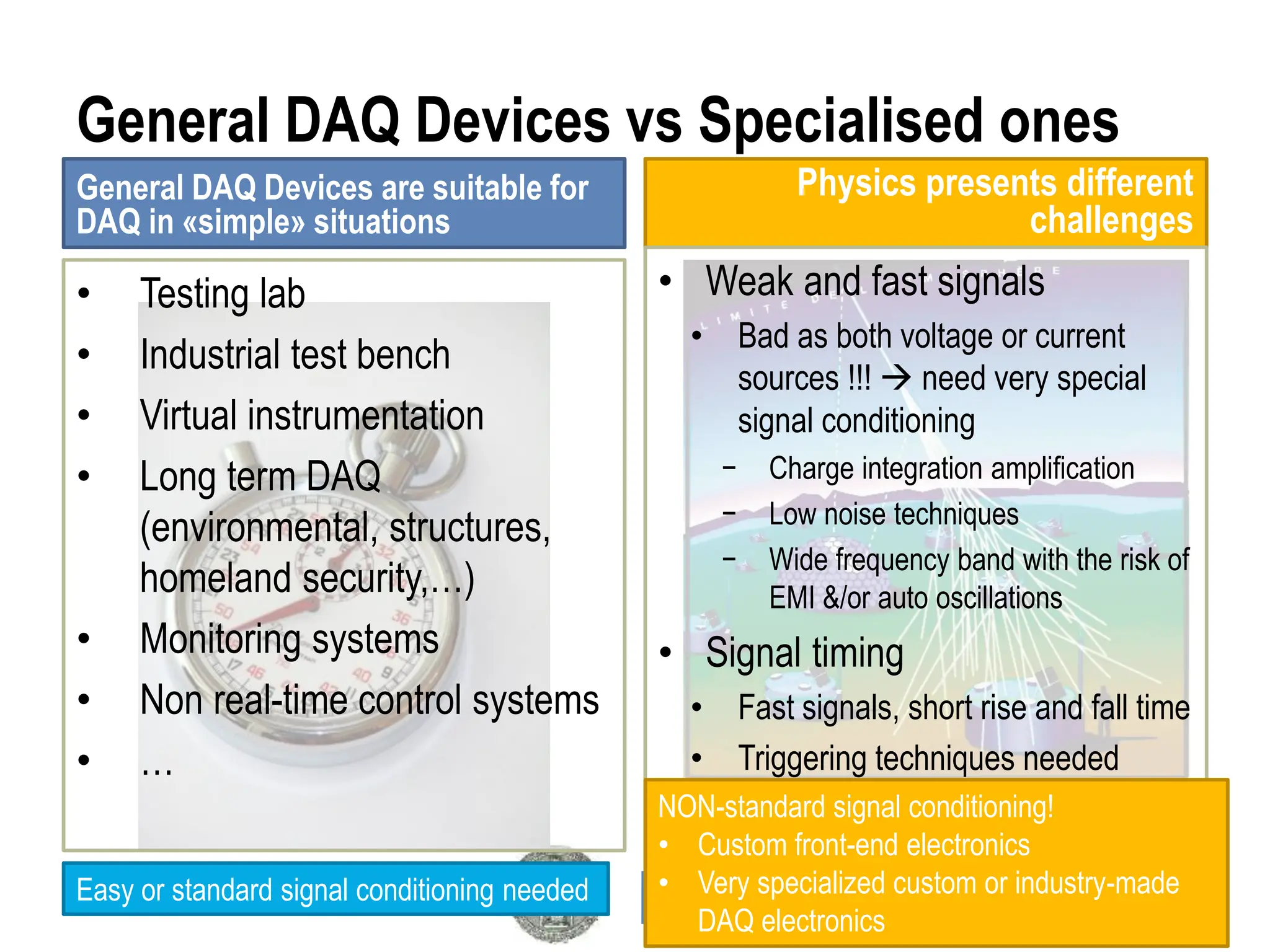
General DAQ Devices vs Specialised ones
General DAQ Devices are suitable for
DAQ in «simple» situations
Physics presents different
challenges
• Weak and fast signals
• Bad as both voltage or current
sources !!!  need very special
signal conditioning
− Charge integration amplification
− Low noise techniques
− Wide frequency band with the risk of
EMI &/or auto oscillations
• Signal timing
• Fast signals, short rise and fall time
• Triggering techniques needed
• Testing lab
• Industrial test bench
• Virtual instrumentation
• Long term DAQ
(environmental, structures,
homeland security,…)
• Monitoring systems
• Non real-time control systems
• …
Easy or standard signal conditioning needed
NON-standard signal conditioning!
• Custom front-end electronics
• Very specialized custom or industry-made
DAQ electronics
mMGas,
GEM,…
chambers
The LabVIEW DAQ-SRS
UDP connection
“RD51-srs”
LabVIEW Project
Chambers  ON Board Electronics (signalconditioning) 
DAQ System  Bus connection  PC running LV (≥ 2012)
E. Signal Conditioning
• Purpose of signal conditioning
• Signal conditioning tasks and examples
Signal Conditioning
Sensor
Or
Signal
DAQ
Hardware
I/O DAQ
Software
Bus
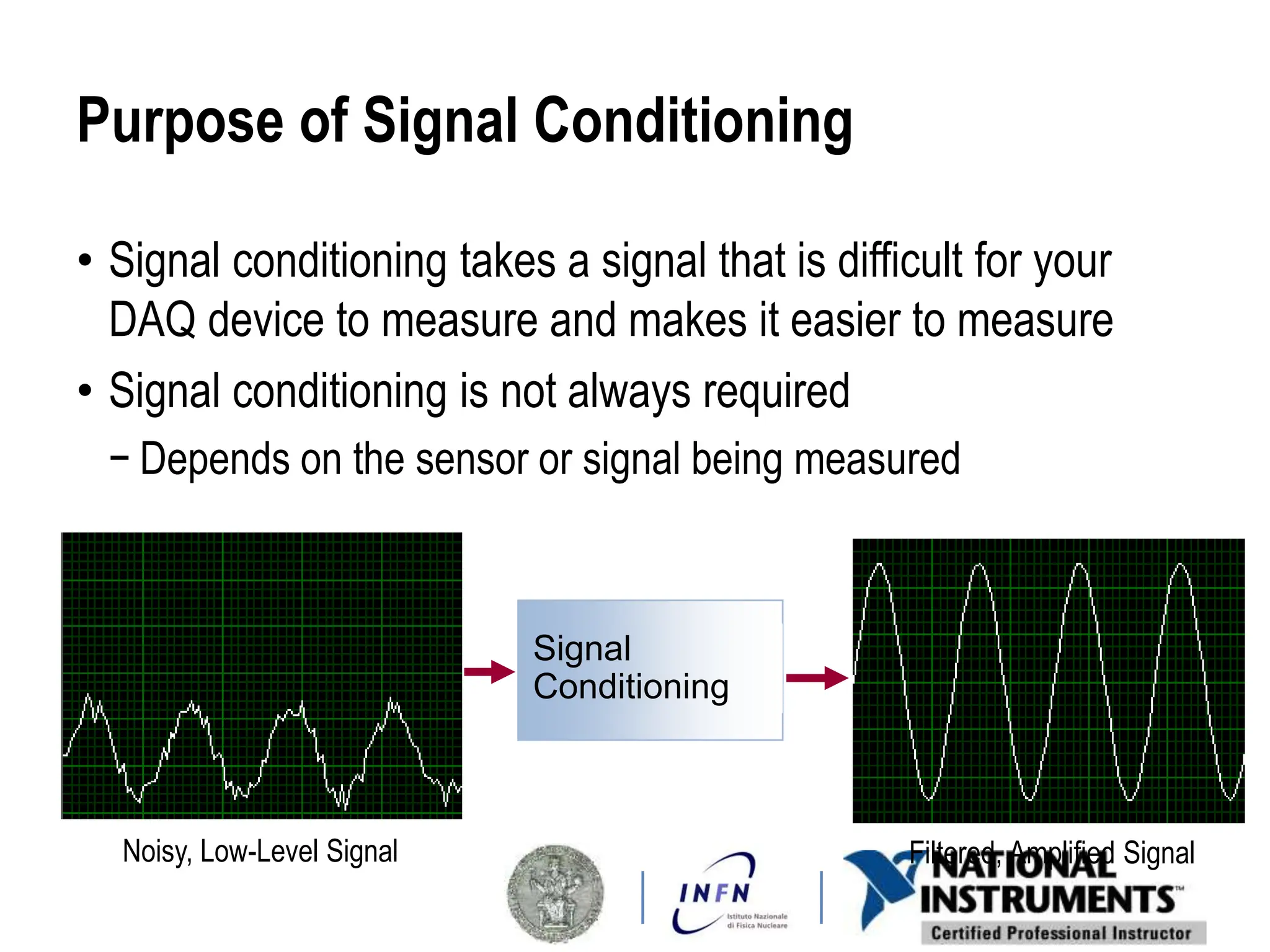
Purpose of Signal Conditioning
• Signal conditioning takes a signal that is difficult for your
DAQ device to measure and makes it easier to measure
• Signal conditioning is not always required
− Depends on the sensor or signal being measured
Noisy, Low-Level Signal Filtered, Amplified Signal
Signal
Conditioning
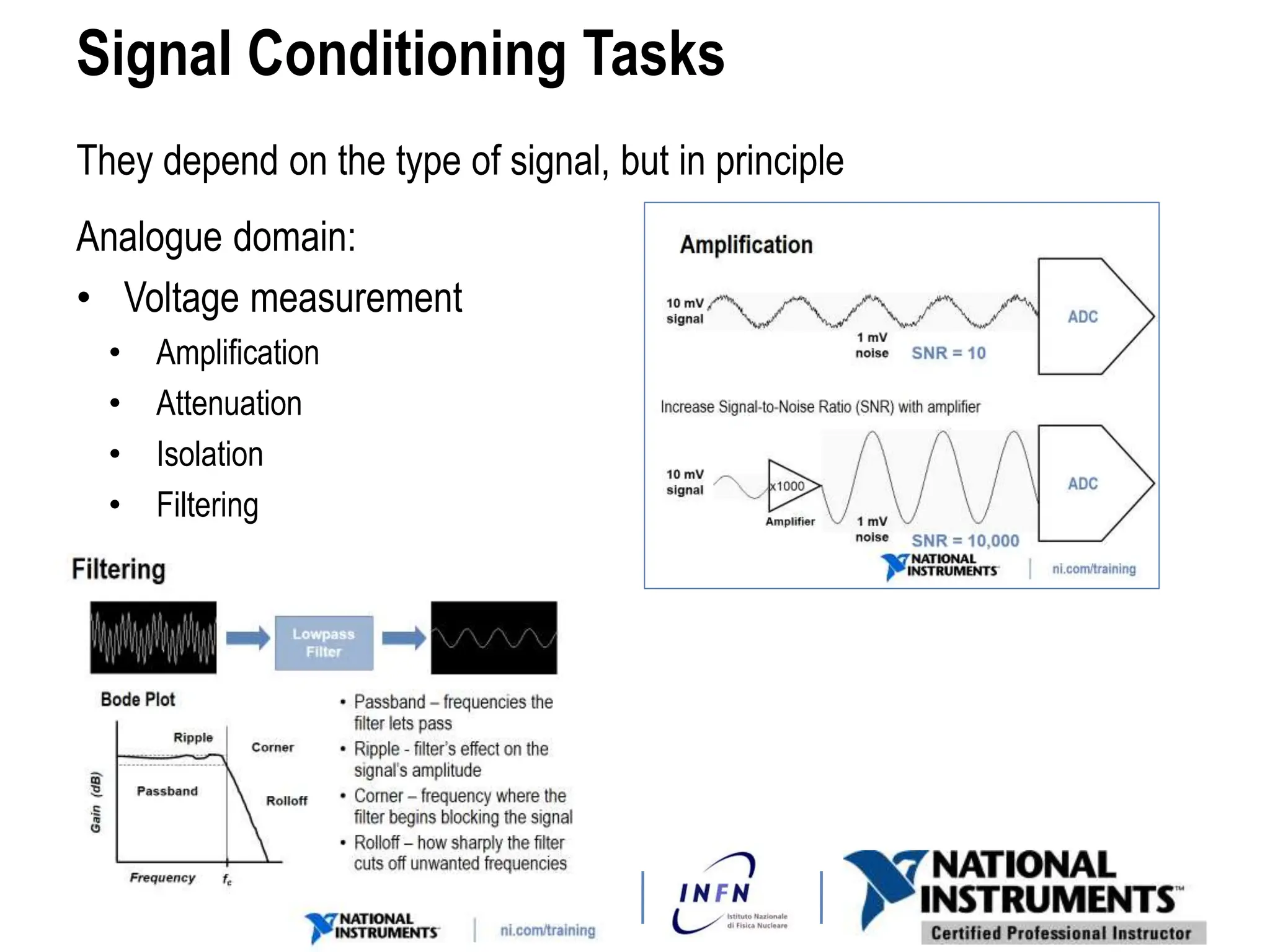
Signal Conditioning Tasks
They depend on the type of signal, but in principle
Analogue domain:
• Voltage measurement
• Amplification
• Attenuation
• Isolation
• Filtering
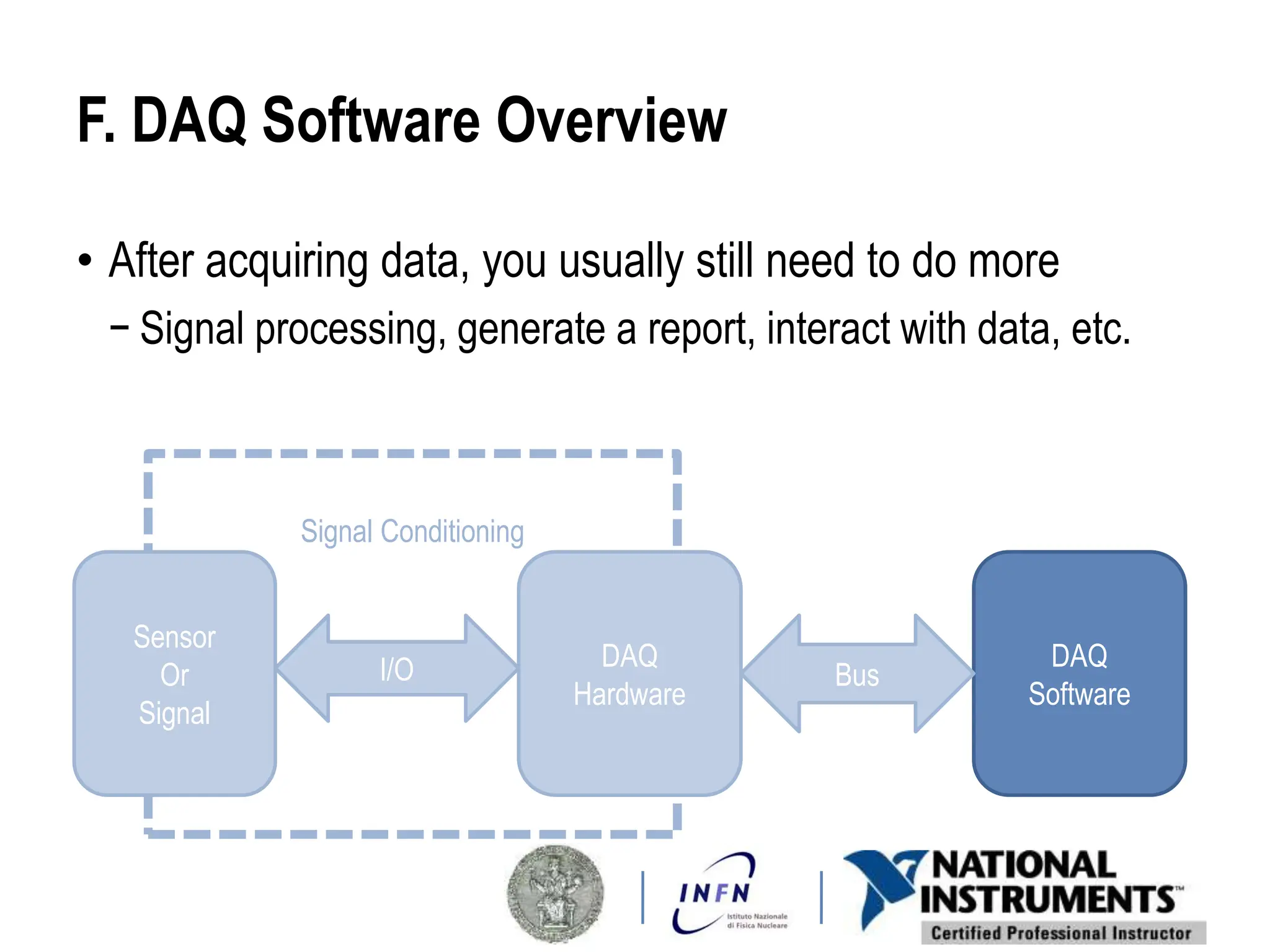
F. DAQ Software Overview
• After acquiring data, you usually still need to do more
− Signal processing, generate a report, interact with data, etc.
Signal Conditioning
Sensor
Or
Signal
DAQ
Hardware
I/O DAQ
Software
Bus
TOPICS
Lesson 2
LabVIEW as a complete DAQ tool
A. What is LabVIEW
B. Learning LabVIEW
C. LV Design Patterns
D. Event programming
E. LabVIEW SRS DAQ
program structure
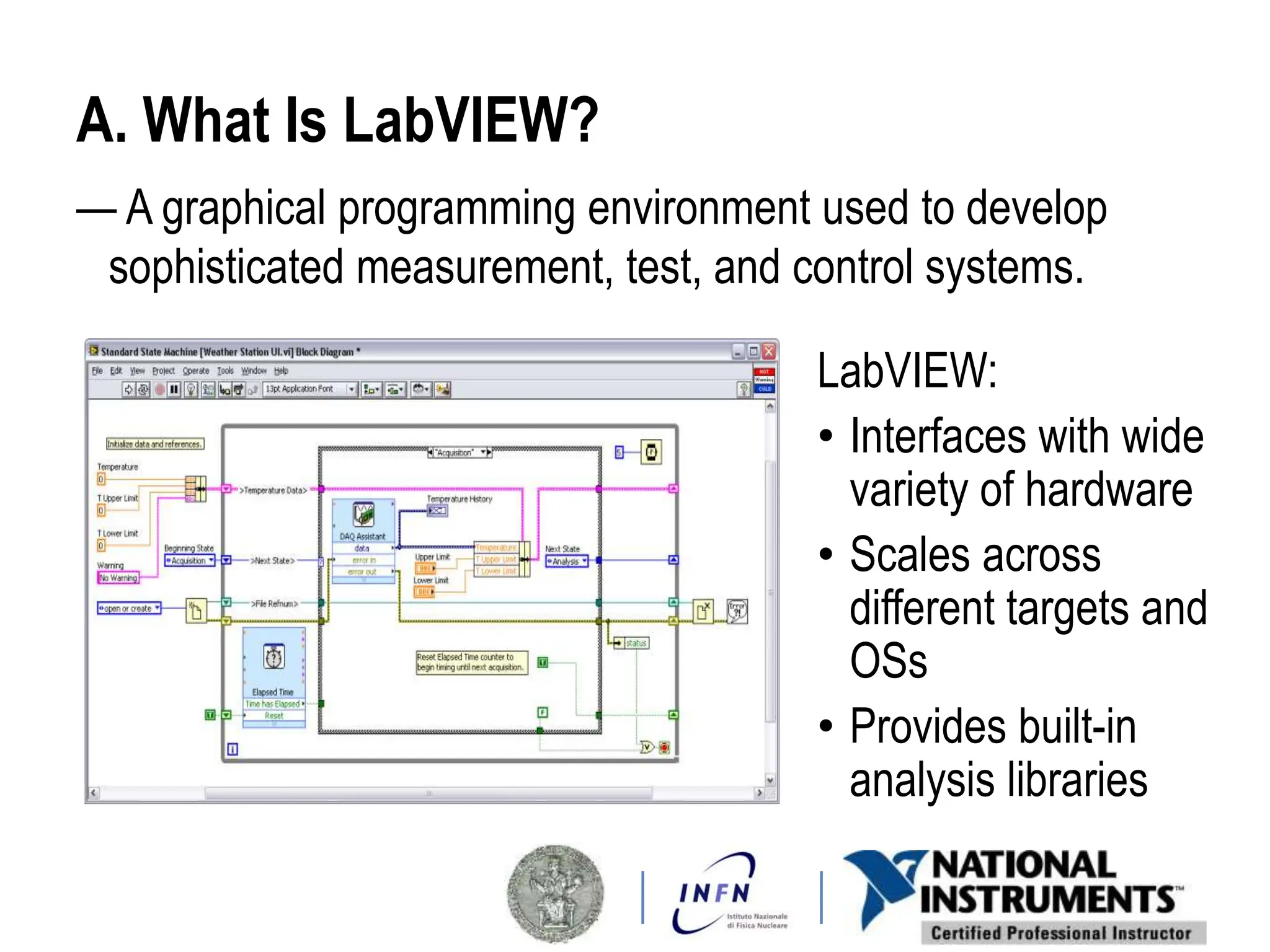
A. What Is LabVIEW?
— A graphical programming environment used to develop
sophisticated measurement, test, and control systems.
LabVIEW:
• Interfaces with wide
variety of hardware
• Scales across
different targets and
OSs
• Provides built-in
analysis libraries
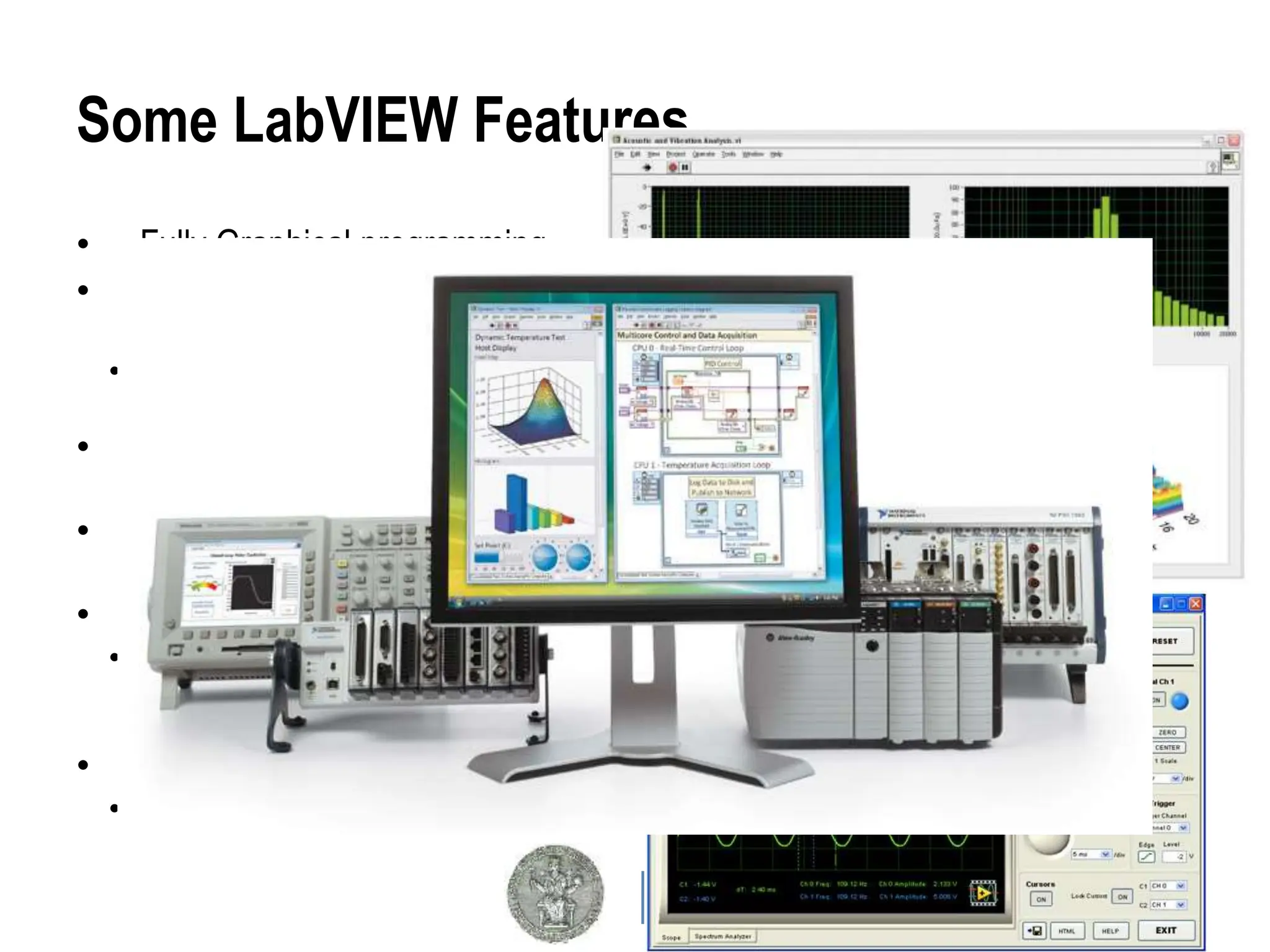
Some LabVIEW Features
• Fully Graphical programming
• Natural interface with NI
hardware
• Easy interfacing with third part
hardware
• Built in Advanced Analysis
functions
• Built in C, Matlab, Mathematica
compatibility
• Plug-ins for different processing
• Sound&Vibration, Simulation
models, Datalogging & Supervisory
Control,…
• Real Time & FPGA programming
• Xilinx families FPGA
B. Learning LabVIEW
Two main approaches:
• “Sit & go”
− Due to the graphical programming,
most people think it is simple or
even trivial to develop with
− Knowledge of few elements
induces beginners to think “all is
understood so I can do everything”
− The result can be a disaster
• Training program
• Systematic approach: allows user
to learn about available language
elements gradually
• Presents features which would be
totally ignored otherwise
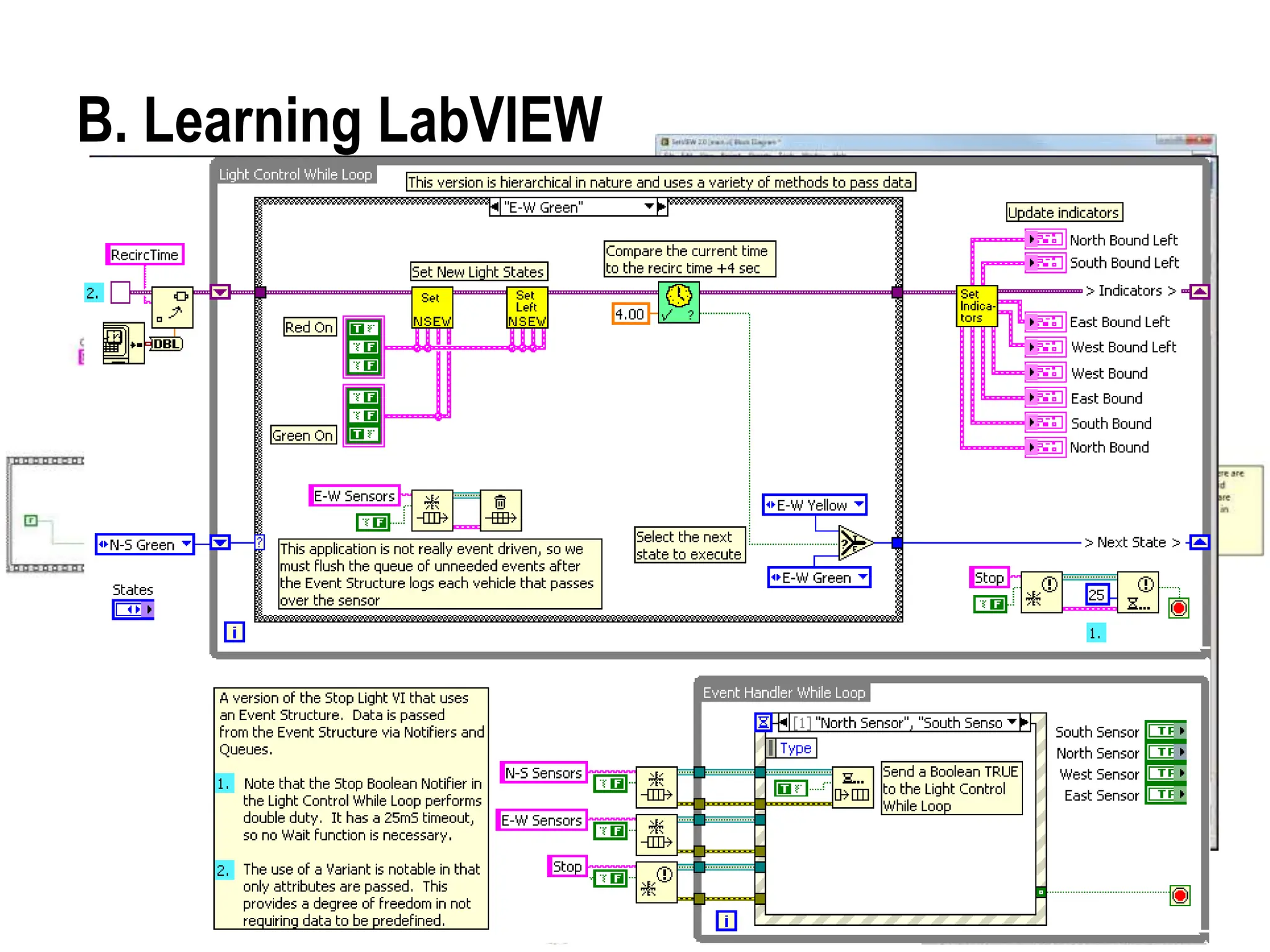
Some other “spaghetti diagram”
If you draw something like this in your past, please:
1. trash all away
2. forget everything
3. restart from beginning !
Sometime people are proud of such a job
and this is extremely dangerous.
Certifications
Certified LV Associate
Developer Exam
Certified LabVIEW
Developer Exam
Certified LabVIEW
Architect Exam
LabVIEW Core 3
LabVIEW Core 1
LabVIEW Core 2
Managing Software
Engineering in LabVIEW
Advanced Architectures in
LabVIEW
LabVIEW Connectivity
Object-Oriented Design
and Programming in LabVIEW
LabVIEW Performance
LabVIEW Real-Time 1
LabVIEW Real-Time 2
LabVIEW Instrument Control
LabVIEW Modular Instruments
LabVIEW FPGA
DAQ & Signal Conditioning
Other Courses
New User Experienced User Advanced User
Available LabVIEW courses
LabVIEW Education
• Instructor Led Training
− LabVIEW Performance
− Object-Oriented Design and Programming in LabVIEW
− Managing Software Engineering in LabVIEW
− Advanced Architectures in LabVIEW
− RealTime and FPGA
− Data Acquisition
− …
• Self-Paced Online: Accessible 24 hours a day, prerecorded video
training modules, interactive quizzes, and challenging exercises with
solutions.
• Printed Course Materials: a variety of instructional packages and tools
designed to educate you at your own pace
Take time to STUDY: time spent so, acts as a credit for the future !
C. Design Patterns
• Why use Design Patterns?
− They have proven themselves useful for developing software.
− You don’t have to start a program from scratch.
− They make it easier for others to read and modify your code.
Design Patterns – Code implementations and
techniques that are solutions to specific
problems in software design
Design patterns typically evolve through the efforts of many developers
and are fine-tuned for simplicity, maintainability, and readability.
Simple VI Pattern
• Single VI that takes a measurement, performs calculations,
and either displays the results or records them to disk.
• Usually does not require a specific start or stop action from
the user.
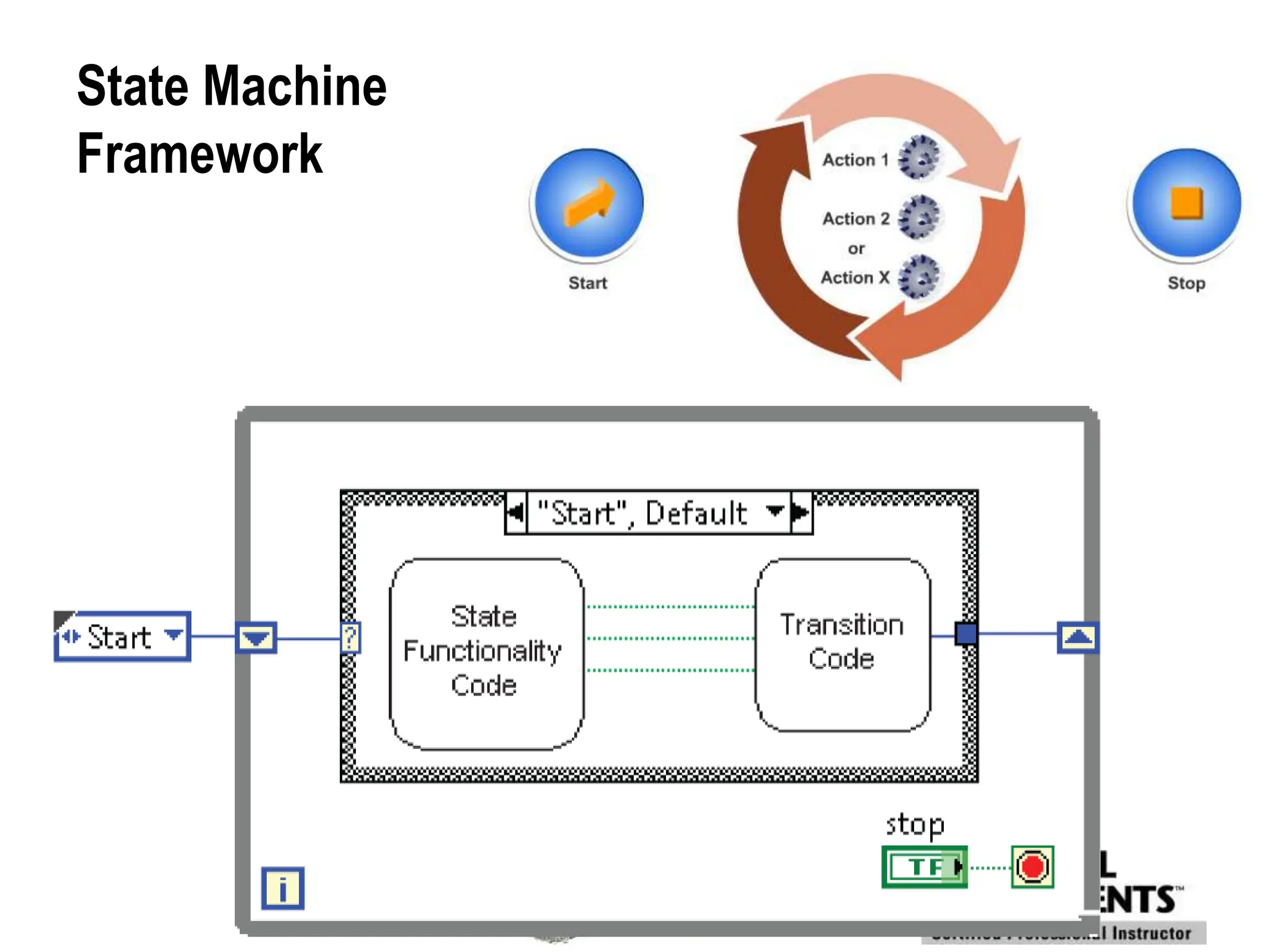
General VI Framework
State Machine
Framework
Producer/Consumer Design Patterns
Choose of a Design Pattern through templates
“Create Project…”
D. Event-Driven Programming
Event — An asynchronous notification that something has
occurred
Event-Driven Programming — Method of programming
where the program waits for an event to occur before
executing one or more functions
User Action
on
Front Panel
Block Diagram
Execution
Polling versus Event Structures
Polling
• Method of event-based programming where a loop must continually
run code to check if changes have occurred.
• Polling the front panel requires a significant amount of CPU time.
• Polling can fail to detect changes if they occur too quickly.
Event Structures
• Events in Event structures eliminate the need to poll the front panel.
• Benefits of using Event structures:
– Reduces the CPU requirements of the program.
– Simplifies the block diagram code.
– Guarantees that the block diagram can respond to all interactions
the user makes.
E. LabVIEW SRS DAQ Program Structure
mMGas,
GEM,…
chambers
The LabVIEW DAQ-SRS
UDP connection
“RD51-srs”
LabVIEW Project
Chambers  ON Board Electronics (signalconditioning) 
DAQ System  Bus connection  PC running LV (≥ 2012)
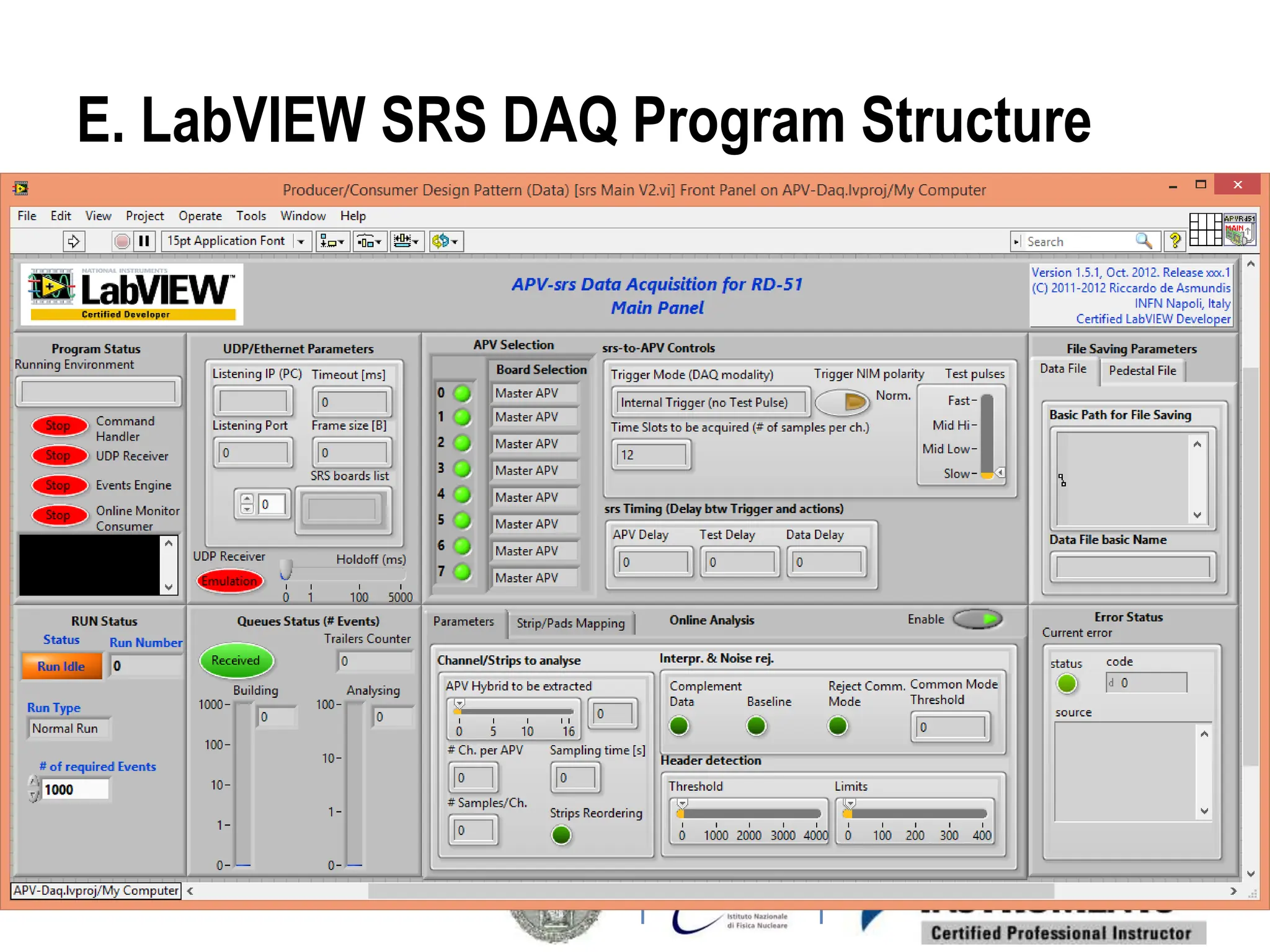
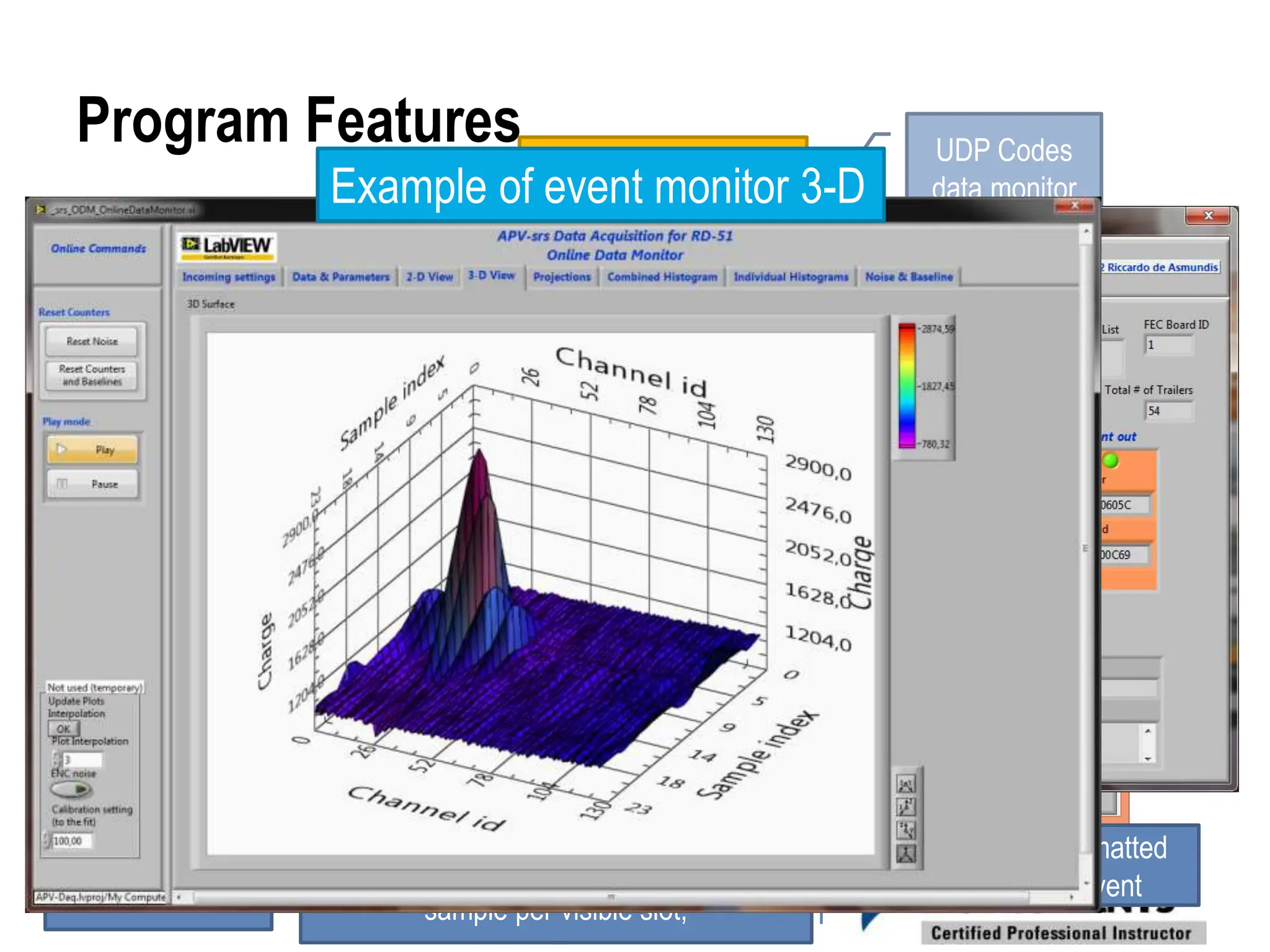
Program Features
• Fast data stream link via UDP protocol (on Ethernet)
• Monitors for data packet, event building, online events
analysis sampling
• 2-D and 3-D plot representations
• Online histograms construction
• Data file saving
• Data acquisition Run management
• User friendly (as possible…)
UDP Codes
data monitor
Formatted
Event
UDP data frame in graphical
representation: channels in color, 1
sample per visible slot;
Incoming Event
Event Building
Example of event monitor 3-D
Structure and techniques
Based on:
• A Producer-Consumer (Event driven) Design Pattern for the UI
commands [lossless]
• A Producer-Consumer (Data driven) Design Pattern for DAQ,
Run handling and data file saving [lossless]
• A Master-Slave Design Pattern for online data analysis (where
samples of events are treated) [lossy]
• In total:
• 5 parallel loops
• Initialization and shutdown
Than You
See you in the Lab this afternoon
For demonstrations

LabVIEW-Based SRS Data Acquisition System.pptx

  • 1.
    LabVIEW-Based SRS Data AcquisitionSystem Riccardo de Asmundis INFN and Università «Federico II» Napoli, Italy Certified LabVIEW Developer & Certified Professional Instructor National Instruments Austin (TX)
  • 2.
    Lecture Map Short Lesson2 LabVIEW as a complete DAQ tool Short Lesson 1 Overview of a DAQ System Laboratory 2 Taking data with LV DAQ- SRS Laboratory 1 The LV DAQ-SRS under the magnifying glass
  • 3.
    TOPICS Lesson 1 Overview ofa Data Acquisition System A. DAQ System Overview B. Sensors C. Signals D. DAQ Hardware E. Signal Conditioning F. DAQ Software
  • 4.
    A. DAQ SystemOverview Purpose To measure an electrical or physical phenomenon such as voltage, current, temperature, pressure, or sound Data Acquisition (DAQ)–the automatic collection of data from sensors, instruments, and devices in a factory, laboratory, or in the field.
  • 5.
    DAQ System Overview SignalConditioning Sensor Or Signal DAQ Hardware I/O DAQ Software Bus
  • 6.
    B. Sensor Overview •What is a sensor? • Types of sensors Signal Conditioning Sensor Or Signal DAQ Hardware I/O DAQ Software Bus
  • 7.
    What is aSensor? A sensor converts physical phenomena into measureable electrical signals Signal Physical Phenomena Sensor
  • 8.
    Types of Sensors PhenomenaSensors Temperature Thermocouples, Resistive Temperature Devices (RTDs), Thermistors Strain and Pressure Strain gages, Piezoelectric transducers Sound Microphone Vibration Accelerometer Position and Displacement Potentiometers, Linear voltage differential transformer, Optical encoder Fluid Head meters, Rotational flowmeters pH pH electrodes Light Vacuum tube, Photo sensors Particles and Radiation detection in general Ionization-proportional-Geiger chambers, Scintillators, Silicon detectors,…
  • 9.
    C. Signal Overview •Signal classification • Signal information Signal Conditioning Sensor Or Signal DAQ Hardware I/O DAQ Software Bus
  • 10.
  • 11.
    5 Ways toMeasure the Same Signal ANALOG Domain DIGITAL Domain
  • 12.
    D. DAQ HardwareOverview • Purpose of DAQ hardware − Transfer data between your sensor/signal and your software Signal Conditioning Sensor Or Signal DAQ Hardware I/O DAQ Software Bus
  • 13.
    Typical General PurposeDAQ Device Architecture Features • Analog Input • Analog Output • Digital I/O • Counter DAQ Circuitry − Clock&Timing, FIFO,… Data Transfer Bus − USB, PCI, PCI Express, PXI, PXI Express Synchronization Bus • Used to synchronize multiple DAQ devices • Allows sharing of timing and trigger signals between devices
  • 14.
    General DAQ Devicesvs Specialised ones General DAQ Devices are suitable for DAQ in «simple» situations Physics presents different challenges • Weak and fast signals • Bad as both voltage or current sources !!!  need very special signal conditioning − Charge integration amplification − Low noise techniques − Wide frequency band with the risk of EMI &/or auto oscillations • Signal timing • Fast signals, short rise and fall time • Triggering techniques needed • Testing lab • Industrial test bench • Virtual instrumentation • Long term DAQ (environmental, structures, homeland security,…) • Monitoring systems • Non real-time control systems • … Easy or standard signal conditioning needed NON-standard signal conditioning! • Custom front-end electronics • Very specialized custom or industry-made DAQ electronics
  • 15.
    mMGas, GEM,… chambers The LabVIEW DAQ-SRS UDPconnection “RD51-srs” LabVIEW Project Chambers  ON Board Electronics (signalconditioning)  DAQ System  Bus connection  PC running LV (≥ 2012)
  • 16.
    E. Signal Conditioning •Purpose of signal conditioning • Signal conditioning tasks and examples Signal Conditioning Sensor Or Signal DAQ Hardware I/O DAQ Software Bus
  • 17.
    Purpose of SignalConditioning • Signal conditioning takes a signal that is difficult for your DAQ device to measure and makes it easier to measure • Signal conditioning is not always required − Depends on the sensor or signal being measured Noisy, Low-Level Signal Filtered, Amplified Signal Signal Conditioning
  • 18.
    Signal Conditioning Tasks Theydepend on the type of signal, but in principle Analogue domain: • Voltage measurement • Amplification • Attenuation • Isolation • Filtering
  • 19.
    F. DAQ SoftwareOverview • After acquiring data, you usually still need to do more − Signal processing, generate a report, interact with data, etc. Signal Conditioning Sensor Or Signal DAQ Hardware I/O DAQ Software Bus
  • 20.
    TOPICS Lesson 2 LabVIEW asa complete DAQ tool A. What is LabVIEW B. Learning LabVIEW C. LV Design Patterns D. Event programming E. LabVIEW SRS DAQ program structure
  • 21.
    A. What IsLabVIEW? — A graphical programming environment used to develop sophisticated measurement, test, and control systems. LabVIEW: • Interfaces with wide variety of hardware • Scales across different targets and OSs • Provides built-in analysis libraries
  • 22.
    Some LabVIEW Features •Fully Graphical programming • Natural interface with NI hardware • Easy interfacing with third part hardware • Built in Advanced Analysis functions • Built in C, Matlab, Mathematica compatibility • Plug-ins for different processing • Sound&Vibration, Simulation models, Datalogging & Supervisory Control,… • Real Time & FPGA programming • Xilinx families FPGA
  • 23.
    B. Learning LabVIEW Twomain approaches: • “Sit & go” − Due to the graphical programming, most people think it is simple or even trivial to develop with − Knowledge of few elements induces beginners to think “all is understood so I can do everything” − The result can be a disaster • Training program • Systematic approach: allows user to learn about available language elements gradually • Presents features which would be totally ignored otherwise
  • 24.
    Some other “spaghettidiagram” If you draw something like this in your past, please: 1. trash all away 2. forget everything 3. restart from beginning ! Sometime people are proud of such a job and this is extremely dangerous.
  • 25.
    Certifications Certified LV Associate DeveloperExam Certified LabVIEW Developer Exam Certified LabVIEW Architect Exam LabVIEW Core 3 LabVIEW Core 1 LabVIEW Core 2 Managing Software Engineering in LabVIEW Advanced Architectures in LabVIEW LabVIEW Connectivity Object-Oriented Design and Programming in LabVIEW LabVIEW Performance LabVIEW Real-Time 1 LabVIEW Real-Time 2 LabVIEW Instrument Control LabVIEW Modular Instruments LabVIEW FPGA DAQ & Signal Conditioning Other Courses New User Experienced User Advanced User Available LabVIEW courses
  • 26.
    LabVIEW Education • InstructorLed Training − LabVIEW Performance − Object-Oriented Design and Programming in LabVIEW − Managing Software Engineering in LabVIEW − Advanced Architectures in LabVIEW − RealTime and FPGA − Data Acquisition − … • Self-Paced Online: Accessible 24 hours a day, prerecorded video training modules, interactive quizzes, and challenging exercises with solutions. • Printed Course Materials: a variety of instructional packages and tools designed to educate you at your own pace Take time to STUDY: time spent so, acts as a credit for the future !
  • 27.
    C. Design Patterns •Why use Design Patterns? − They have proven themselves useful for developing software. − You don’t have to start a program from scratch. − They make it easier for others to read and modify your code. Design Patterns – Code implementations and techniques that are solutions to specific problems in software design Design patterns typically evolve through the efforts of many developers and are fine-tuned for simplicity, maintainability, and readability.
  • 28.
    Simple VI Pattern •Single VI that takes a measurement, performs calculations, and either displays the results or records them to disk. • Usually does not require a specific start or stop action from the user.
  • 29.
  • 30.
  • 31.
  • 32.
    Choose of aDesign Pattern through templates “Create Project…”
  • 33.
    D. Event-Driven Programming Event— An asynchronous notification that something has occurred Event-Driven Programming — Method of programming where the program waits for an event to occur before executing one or more functions User Action on Front Panel Block Diagram Execution
  • 34.
    Polling versus EventStructures Polling • Method of event-based programming where a loop must continually run code to check if changes have occurred. • Polling the front panel requires a significant amount of CPU time. • Polling can fail to detect changes if they occur too quickly. Event Structures • Events in Event structures eliminate the need to poll the front panel. • Benefits of using Event structures: – Reduces the CPU requirements of the program. – Simplifies the block diagram code. – Guarantees that the block diagram can respond to all interactions the user makes.
  • 35.
    E. LabVIEW SRSDAQ Program Structure
  • 36.
    mMGas, GEM,… chambers The LabVIEW DAQ-SRS UDPconnection “RD51-srs” LabVIEW Project Chambers  ON Board Electronics (signalconditioning)  DAQ System  Bus connection  PC running LV (≥ 2012)
  • 37.
    Program Features • Fastdata stream link via UDP protocol (on Ethernet) • Monitors for data packet, event building, online events analysis sampling • 2-D and 3-D plot representations • Online histograms construction • Data file saving • Data acquisition Run management • User friendly (as possible…) UDP Codes data monitor Formatted Event UDP data frame in graphical representation: channels in color, 1 sample per visible slot; Incoming Event Event Building Example of event monitor 3-D
  • 38.
    Structure and techniques Basedon: • A Producer-Consumer (Event driven) Design Pattern for the UI commands [lossless] • A Producer-Consumer (Data driven) Design Pattern for DAQ, Run handling and data file saving [lossless] • A Master-Slave Design Pattern for online data analysis (where samples of events are treated) [lossy] • In total: • 5 parallel loops • Initialization and shutdown
  • 39.
    Than You See youin the Lab this afternoon For demonstrations