2-1
©2009 Raj Jain
CSE571S
Washington University in St. Louis
Network Security
Network Security
Concepts
Concepts
Raj Jain
Washington University in Saint Louis
Saint Louis, MO 63130
Jain@cse.wustl.edu
These slides are available on-line at:
http://www.cse.wustl.edu/~jain/cse571-09/
2-2
©2009 Raj Jain
CSE571S
Washington University in St. Louis
Overview
Overview
1. Security Components and Threats
2. Security Policy and Issues
3. Types of Malware and Attacks
4. Security Mechanisms
5. Network Security Audit
6. The Orange Book
7. Legal Issues
2-3
©2009 Raj Jain
CSE571S
Washington University in St. Louis
Security Components
Security Components
! Confidentiality: Need access control, Cryptography,
Existence of data
! Integrity: No change, content, source, prevention
mechanisms, detection mechanisms
! Availability: Denial of service attacks,
! Confidentiality, Integrity and Availability (CIA)
2-4
©2009 Raj Jain
CSE571S
Washington University in St. Louis
Threats
Threats
! Disclosure, alteration, and denial (DAD)
! Disclosure or unauthorized access: snooping,
passive wiretapping,
! Deception or acceptance of false data: active
wiretapping (data modified), man-in-the-middle
attack, Masquerading or spoofing (impersonation),
repudiation of origin (denying sending), denial of
receipt
! Disruption or prevention of correct operation
! Usurpation or unauthorized control of some part
of a system: Delay, Infinite delay ⇒ Denial of service
2-5
©2009 Raj Jain
CSE571S
Washington University in St. Louis
Security Policy
Security Policy
! Statement of what is and
what is not allowed
! Security Mechanism: Method, tool or procedure for
enforcing a security policy
2-6
©2009 Raj Jain
CSE571S
Washington University in St. Louis
Elements of Network Security Policy
1. Purchasing guidelines: Required security features
2. Privacy Policy: files, emails, keystrokes
3. Access Policy: Connecting to external systems, installing new
software
4. Accountability Policy: Responsibilities of
users/staff/management. Audit capability.
5. Authentication Policy: password policy
6. Availability statement: redundancy and recovery issues
7. Maintenance Policy: Remote maintenance? How?
8. Violations Reporting Policy: What and to whom?
9. Supporting Information: Contact information, handling
outside queries, laws,...
Ref: RFC 2196
2-7
©2009 Raj Jain
CSE571S
Washington University in St. Louis
Security Issues
Security Issues
! Goals: Prevention, Detection, Recovery
! Assurance: Assurance requires detailed specs of desired/
undesired behavior, analysis of design of hardware/software, and
arguments or proofs that the implementation, operating
procedures, and maintenance procedures work.
! Operational Issues: Benefits of protection vs. cost of
designing/implementing/using the mechanisms
! Risk Analysis: Likelihood of potential threats
! Laws: No export of cryptography from USA until 2000.
Sys Admins can't read user's file without permission.
! Customs: DNA samples for authentication, SSN as passwords
! Organizational Priorities: Security not important until an
incident
! People Problems: Insider attacks
2-8
©2009 Raj Jain
CSE571S
Washington University in St. Louis
Steps in Cracking a Network
! Information Gathering: Public sources/tools.
! Port Scanning: Find open TCP ports.
! Network Enumeration: Map the network. Servers
and workstations. Routers, switches, firewalls.
! Gaining Access: Keeping root/administrator access
! Modifying: Using access and modifying information
! Leaving a backdoor: To return at a later date.
! Covering tracks
2-9
©2009 Raj Jain
CSE571S
Washington University in St. Louis
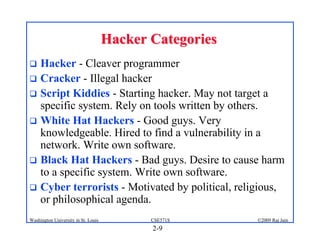
Hacker Categories
Hacker Categories
! Hacker - Cleaver programmer
! Cracker - Illegal hacker
! Script Kiddies - Starting hacker. May not target a
specific system. Rely on tools written by others.
! White Hat Hackers - Good guys. Very
knowledgeable. Hired to find a vulnerability in a
network. Write own software.
! Black Hat Hackers - Bad guys. Desire to cause harm
to a specific system. Write own software.
! Cyber terrorists - Motivated by political, religious,
or philosophical agenda.
2-10
©2009 Raj Jain
CSE571S
Washington University in St. Louis
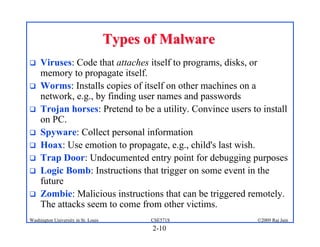
Types of Malware
Types of Malware
! Viruses: Code that attaches itself to programs, disks, or
memory to propagate itself.
! Worms: Installs copies of itself on other machines on a
network, e.g., by finding user names and passwords
! Trojan horses: Pretend to be a utility. Convince users to install
on PC.
! Spyware: Collect personal information
! Hoax: Use emotion to propagate, e.g., child's last wish.
! Trap Door: Undocumented entry point for debugging purposes
! Logic Bomb: Instructions that trigger on some event in the
future
! Zombie: Malicious instructions that can be triggered remotely.
The attacks seem to come from other victims.
2-11
©2009 Raj Jain
CSE571S
Washington University in St. Louis
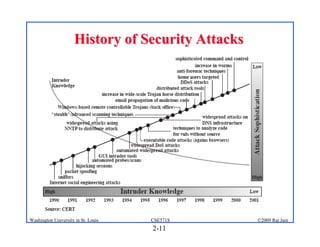
History of Security Attacks
2-12
©2009 Raj Jain
CSE571S
Washington University in St. Louis
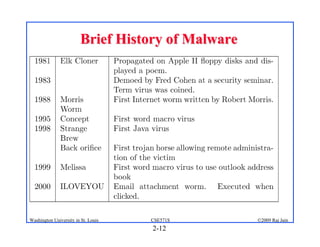
Brief History of Malware
2-13
©2009 Raj Jain
CSE571S
Washington University in St. Louis
Types of Virus
Types of Virus
! Boot sector virus
! Macro virus
! Email malware
! Web site malware (JavaScripts)
2-14
©2009 Raj Jain
CSE571S
Washington University in St. Louis
Types of Attacks
Types of Attacks
! Denial of Service (DoS): Flooding with
traffic/requests
! Buffer Overflows: Error in system programs. Allows
hacker to insert his code in to a program.
! Malware
! Brute Force: Try all passwords.
! Port Scanning:
⇒ Disable unnecessary services and close ports
! Network Mapping
2-15
©2009 Raj Jain
CSE571S
Washington University in St. Louis
Root Kits
Root Kits
! Hide by placing themselves between calls to system
routines and lower layers of operating system.
! When a program makes a system call, the root kit
intercepts the call and either passes it to the system,
handles the call itself, or drops the call.
! Allow hacker to enter a system at any time
! See rootkit.com
2-16
©2009 Raj Jain
CSE571S
Washington University in St. Louis
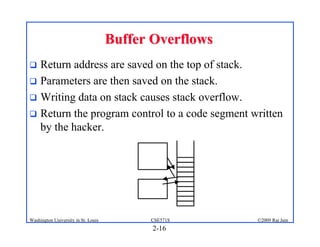
Buffer Overflows
Buffer Overflows
! Return address are saved on the top of stack.
! Parameters are then saved on the stack.
! Writing data on stack causes stack overflow.
! Return the program control to a code segment written
by the hacker.
2-17
©2009 Raj Jain
CSE571S
Washington University in St. Louis
Distributed DoS Attacks
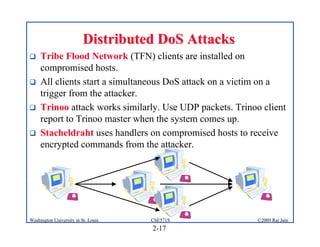
! Tribe Flood Network (TFN) clients are installed on
compromised hosts.
! All clients start a simultaneous DoS attack on a victim on a
trigger from the attacker.
! Trinoo attack works similarly. Use UDP packets. Trinoo client
report to Trinoo master when the system comes up.
! Stacheldraht uses handlers on compromised hosts to receive
encrypted commands from the attacker.
2-18
©2009 Raj Jain
CSE571S
Washington University in St. Louis
Social Engineering
Social Engineering
! Reverse social engineering: User is
persuaded to ask Hacker for help.
! Phone calls:
" Call from tech support to update the
system.
" High-level VP calling in emergency.
" Requires employee training.
! Electronic Social Engineering (Phishing):
" EBay transactions, PayPal Accounts, Bank Account,
Nigerian 419 scams (Section 419 of Nigerian criminal
code), Lottery.
" Anti-phishing workgroup (antiphishing.org) found that 5%
of the recipients respond compared to 1% for spam.
2-19
©2009 Raj Jain
CSE571S
Washington University in St. Louis
Security Mechanisms
Security Mechanisms
! Encipherment
! Digital Signature
! Access Control
! Data Integrity
! Authentication Exchange
! Traffic Padding
! Routing Control
! Notarization
2-20
©2009 Raj Jain
CSE571S
Washington University in St. Louis
Honey Pots
Honey Pots
! Trap set for a potential system
cracker
! All the services are simulated
! Honey pot raises alert allowing administrator to
investigate
! See www.specter.com
2-21
©2009 Raj Jain
CSE571S
Washington University in St. Louis
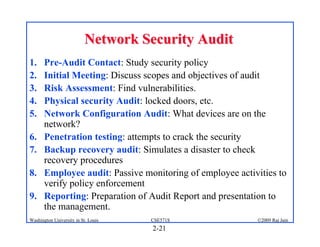
Network Security Audit
1. Pre-Audit Contact: Study security policy
2. Initial Meeting: Discuss scopes and objectives of audit
3. Risk Assessment: Find vulnerabilities.
4. Physical security Audit: locked doors, etc.
5. Network Configuration Audit: What devices are on the
network?
6. Penetration testing: attempts to crack the security
7. Backup recovery audit: Simulates a disaster to check
recovery procedures
8. Employee audit: Passive monitoring of employee activities to
verify policy enforcement
9. Reporting: Preparation of Audit Report and presentation to
the management.
2-22
©2009 Raj Jain
CSE571S
Washington University in St. Louis
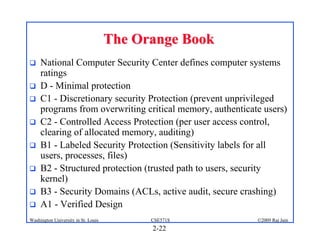
The Orange Book
The Orange Book
! National Computer Security Center defines computer systems
ratings
! D - Minimal protection
! C1 - Discretionary security Protection (prevent unprivileged
programs from overwriting critical memory, authenticate users)
! C2 - Controlled Access Protection (per user access control,
clearing of allocated memory, auditing)
! B1 - Labeled Security Protection (Sensitivity labels for all
users, processes, files)
! B2 - Structured protection (trusted path to users, security
kernel)
! B3 - Security Domains (ACLs, active audit, secure crashing)
! A1 - Verified Design
2-23
©2009 Raj Jain
CSE571S
Washington University in St. Louis
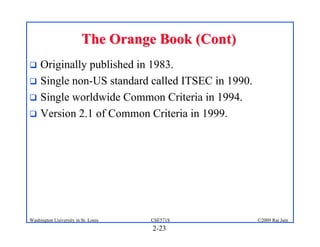
The Orange Book (Cont)
! Originally published in 1983.
! Single non-US standard called ITSEC in 1990.
! Single worldwide Common Criteria in 1994.
! Version 2.1 of Common Criteria in 1999.
2-24
©2009 Raj Jain
CSE571S
Washington University in St. Louis
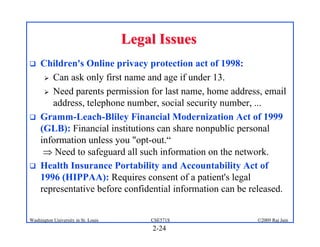
Legal Issues
Legal Issues
! Children's Online privacy protection act of 1998:
" Can ask only first name and age if under 13.
" Need parents permission for last name, home address, email
address, telephone number, social security number, ...
! Gramm-Leach-Bliley Financial Modernization Act of 1999
(GLB): Financial institutions can share nonpublic personal
information unless you "opt-out.“
⇒ Need to safeguard all such information on the network.
! Health Insurance Portability and Accountability Act of
1996 (HIPPAA): Requires consent of a patient's legal
representative before confidential information can be released.
2-25
©2009 Raj Jain
CSE571S
Washington University in St. Louis
Summary
Summary
! CIA: Confidentiality, Integrity, and Availability
DAD: Disclosure, Acceptance, Disruption
! Security Policy: Complete, clear, and enforced
! Malware: Virus, Worm, Spyware, Hoax, Root kits, …
! Attacks: DoS, DDoS, Buffer overflows, …
! Protection: Audit, Laws, Honey pots
2-26
©2009 Raj Jain
CSE571S
Washington University in St. Louis
References
References
1. Jan L. Harrington, “Network Security,” Morgan Kaufmann,
2005, ISBN:0123116333
2. Gert De Laet and Gert Schauwers, “Network Security
Fundamentals,” Cisco Press, 2005, ISBN:1587051672
3. Eric Maiwald, “Fundamentals of Network Security,”
McGraw-Hill, 2004, ISBN:0072230932
4. William Stallings, “Cryptography and Network Security:
Principles and Practices,” 4th edition, Prentice Hall, 2006,
ISBN:0131873164
5. Charlie Kaufman, et al, “Network Security:Private
Communication in a public world,” 2nd edition, Prentice Hall,
2002, ISBN:0130460192
2-27
©2009 Raj Jain
CSE571S
Washington University in St. Louis
Security URLs
Security URLs
! Center for Education and Research in Information Assurance
and Security,
http://www.cerias.purdue.edu/about/history/coast/archive/
! IETF Security area, sec.ietf.org
! Computer and Network Security Reference Index,
http://www.vtcif.telstra.com.au/info/security.html
! The Cryptography FAQ,
http://www.faqs.org/faqs/cryptography-faq/
! Tom Dunigan's Security page,
http://www.csm.ornl.gov/%7edunigan/security.html
! IEEE Technical Committee on Security and Privacy,
http://www.ieee-security.org/index.html
! Computer Security Resource Center, http://csrc.nist.gov/
2-28
©2009 Raj Jain
CSE571S
Washington University in St. Louis
Security URLs (Cont)
! Security Focus, http://www.securityfocus.com/
! SANS Institute, http://sans.org/
! Data Protection resource Directory,
http://www.dataprotectionhq.com/cryptographyanddat
asecurity/
! Helger Lipmaa's Cryptology Pointers,
http://www.adastral.ucl.ac.uk/%7ehelger/crypto/
! Network Security Directory,
http://www.networksecuritysite.info/
2-29
©2009 Raj Jain
CSE571S
Washington University in St. Louis
Security Related Usenet Groups
! sci.crypt.research
! sci.crypt
! sci.crypt.random-numbers
! alt.security
! comp.security.misc
! comp.security.firewalls
! comp.security.anounce
! comp.risks
! comp.virus
2-30
©2009 Raj Jain
CSE571S
Washington University in St. Louis
Lab Homework 2
Lab Homework 2
1. Read about the following tools
a. Ethereal, network protocol analyzer, www.ethereal.com
Use ftp client to download in binary mode (do not use browser)
New name is wireshark.
b. Superscan4, network port scanner (like nmap), http://www.lock-
mypc.com/SuperScan4.html
c. Network Surveyor, network mapping,
http://www.solarwinds.com/products/LANsurveyor/index.aspx
2. Use superscan4 to scan one to three hosts on your local net (e.g.,
CSE571XPS in the security lab) to find their open ports. Select scan type
“connect” in the Host and Service discovery panel.
3. Use network surveyor to show the map of all hosts on your local net (or
between 128.252.166.1 through 128.252.166.85)
4. Start Ethereal to capture all traffic. Open www.google.com in a web
browser. Stop Ethereal. List all packets seen and interpret them.
Use capture filter: “No broadcast and No multicast”

l_02sec.pdf

  • 1.
    2-1 ©2009 Raj Jain CSE571S WashingtonUniversity in St. Louis Network Security Network Security Concepts Concepts Raj Jain Washington University in Saint Louis Saint Louis, MO 63130 Jain@cse.wustl.edu These slides are available on-line at: http://www.cse.wustl.edu/~jain/cse571-09/
  • 2.
    2-2 ©2009 Raj Jain CSE571S WashingtonUniversity in St. Louis Overview Overview 1. Security Components and Threats 2. Security Policy and Issues 3. Types of Malware and Attacks 4. Security Mechanisms 5. Network Security Audit 6. The Orange Book 7. Legal Issues
  • 3.
    2-3 ©2009 Raj Jain CSE571S WashingtonUniversity in St. Louis Security Components Security Components ! Confidentiality: Need access control, Cryptography, Existence of data ! Integrity: No change, content, source, prevention mechanisms, detection mechanisms ! Availability: Denial of service attacks, ! Confidentiality, Integrity and Availability (CIA)
  • 4.
    2-4 ©2009 Raj Jain CSE571S WashingtonUniversity in St. Louis Threats Threats ! Disclosure, alteration, and denial (DAD) ! Disclosure or unauthorized access: snooping, passive wiretapping, ! Deception or acceptance of false data: active wiretapping (data modified), man-in-the-middle attack, Masquerading or spoofing (impersonation), repudiation of origin (denying sending), denial of receipt ! Disruption or prevention of correct operation ! Usurpation or unauthorized control of some part of a system: Delay, Infinite delay ⇒ Denial of service
  • 5.
    2-5 ©2009 Raj Jain CSE571S WashingtonUniversity in St. Louis Security Policy Security Policy ! Statement of what is and what is not allowed ! Security Mechanism: Method, tool or procedure for enforcing a security policy
  • 6.
    2-6 ©2009 Raj Jain CSE571S WashingtonUniversity in St. Louis Elements of Network Security Policy Elements of Network Security Policy 1. Purchasing guidelines: Required security features 2. Privacy Policy: files, emails, keystrokes 3. Access Policy: Connecting to external systems, installing new software 4. Accountability Policy: Responsibilities of users/staff/management. Audit capability. 5. Authentication Policy: password policy 6. Availability statement: redundancy and recovery issues 7. Maintenance Policy: Remote maintenance? How? 8. Violations Reporting Policy: What and to whom? 9. Supporting Information: Contact information, handling outside queries, laws,... Ref: RFC 2196
  • 7.
    2-7 ©2009 Raj Jain CSE571S WashingtonUniversity in St. Louis Security Issues Security Issues ! Goals: Prevention, Detection, Recovery ! Assurance: Assurance requires detailed specs of desired/ undesired behavior, analysis of design of hardware/software, and arguments or proofs that the implementation, operating procedures, and maintenance procedures work. ! Operational Issues: Benefits of protection vs. cost of designing/implementing/using the mechanisms ! Risk Analysis: Likelihood of potential threats ! Laws: No export of cryptography from USA until 2000. Sys Admins can't read user's file without permission. ! Customs: DNA samples for authentication, SSN as passwords ! Organizational Priorities: Security not important until an incident ! People Problems: Insider attacks
  • 8.
    2-8 ©2009 Raj Jain CSE571S WashingtonUniversity in St. Louis Steps in Cracking a Network Steps in Cracking a Network ! Information Gathering: Public sources/tools. ! Port Scanning: Find open TCP ports. ! Network Enumeration: Map the network. Servers and workstations. Routers, switches, firewalls. ! Gaining Access: Keeping root/administrator access ! Modifying: Using access and modifying information ! Leaving a backdoor: To return at a later date. ! Covering tracks
  • 9.
    2-9 ©2009 Raj Jain CSE571S WashingtonUniversity in St. Louis Hacker Categories Hacker Categories ! Hacker - Cleaver programmer ! Cracker - Illegal hacker ! Script Kiddies - Starting hacker. May not target a specific system. Rely on tools written by others. ! White Hat Hackers - Good guys. Very knowledgeable. Hired to find a vulnerability in a network. Write own software. ! Black Hat Hackers - Bad guys. Desire to cause harm to a specific system. Write own software. ! Cyber terrorists - Motivated by political, religious, or philosophical agenda.
  • 10.
    2-10 ©2009 Raj Jain CSE571S WashingtonUniversity in St. Louis Types of Malware Types of Malware ! Viruses: Code that attaches itself to programs, disks, or memory to propagate itself. ! Worms: Installs copies of itself on other machines on a network, e.g., by finding user names and passwords ! Trojan horses: Pretend to be a utility. Convince users to install on PC. ! Spyware: Collect personal information ! Hoax: Use emotion to propagate, e.g., child's last wish. ! Trap Door: Undocumented entry point for debugging purposes ! Logic Bomb: Instructions that trigger on some event in the future ! Zombie: Malicious instructions that can be triggered remotely. The attacks seem to come from other victims.
  • 11.
    2-11 ©2009 Raj Jain CSE571S WashingtonUniversity in St. Louis History of Security Attacks History of Security Attacks
  • 12.
    2-12 ©2009 Raj Jain CSE571S WashingtonUniversity in St. Louis Brief History of Malware Brief History of Malware
  • 13.
    2-13 ©2009 Raj Jain CSE571S WashingtonUniversity in St. Louis Types of Virus Types of Virus ! Boot sector virus ! Macro virus ! Email malware ! Web site malware (JavaScripts)
  • 14.
    2-14 ©2009 Raj Jain CSE571S WashingtonUniversity in St. Louis Types of Attacks Types of Attacks ! Denial of Service (DoS): Flooding with traffic/requests ! Buffer Overflows: Error in system programs. Allows hacker to insert his code in to a program. ! Malware ! Brute Force: Try all passwords. ! Port Scanning: ⇒ Disable unnecessary services and close ports ! Network Mapping
  • 15.
    2-15 ©2009 Raj Jain CSE571S WashingtonUniversity in St. Louis Root Kits Root Kits ! Hide by placing themselves between calls to system routines and lower layers of operating system. ! When a program makes a system call, the root kit intercepts the call and either passes it to the system, handles the call itself, or drops the call. ! Allow hacker to enter a system at any time ! See rootkit.com
  • 16.
    2-16 ©2009 Raj Jain CSE571S WashingtonUniversity in St. Louis Buffer Overflows Buffer Overflows ! Return address are saved on the top of stack. ! Parameters are then saved on the stack. ! Writing data on stack causes stack overflow. ! Return the program control to a code segment written by the hacker.
  • 17.
    2-17 ©2009 Raj Jain CSE571S WashingtonUniversity in St. Louis Distributed DoS Attacks Distributed DoS Attacks ! Tribe Flood Network (TFN) clients are installed on compromised hosts. ! All clients start a simultaneous DoS attack on a victim on a trigger from the attacker. ! Trinoo attack works similarly. Use UDP packets. Trinoo client report to Trinoo master when the system comes up. ! Stacheldraht uses handlers on compromised hosts to receive encrypted commands from the attacker.
  • 18.
    2-18 ©2009 Raj Jain CSE571S WashingtonUniversity in St. Louis Social Engineering Social Engineering ! Reverse social engineering: User is persuaded to ask Hacker for help. ! Phone calls: " Call from tech support to update the system. " High-level VP calling in emergency. " Requires employee training. ! Electronic Social Engineering (Phishing): " EBay transactions, PayPal Accounts, Bank Account, Nigerian 419 scams (Section 419 of Nigerian criminal code), Lottery. " Anti-phishing workgroup (antiphishing.org) found that 5% of the recipients respond compared to 1% for spam.
  • 19.
    2-19 ©2009 Raj Jain CSE571S WashingtonUniversity in St. Louis Security Mechanisms Security Mechanisms ! Encipherment ! Digital Signature ! Access Control ! Data Integrity ! Authentication Exchange ! Traffic Padding ! Routing Control ! Notarization
  • 20.
    2-20 ©2009 Raj Jain CSE571S WashingtonUniversity in St. Louis Honey Pots Honey Pots ! Trap set for a potential system cracker ! All the services are simulated ! Honey pot raises alert allowing administrator to investigate ! See www.specter.com
  • 21.
    2-21 ©2009 Raj Jain CSE571S WashingtonUniversity in St. Louis Network Security Audit Network Security Audit 1. Pre-Audit Contact: Study security policy 2. Initial Meeting: Discuss scopes and objectives of audit 3. Risk Assessment: Find vulnerabilities. 4. Physical security Audit: locked doors, etc. 5. Network Configuration Audit: What devices are on the network? 6. Penetration testing: attempts to crack the security 7. Backup recovery audit: Simulates a disaster to check recovery procedures 8. Employee audit: Passive monitoring of employee activities to verify policy enforcement 9. Reporting: Preparation of Audit Report and presentation to the management.
  • 22.
    2-22 ©2009 Raj Jain CSE571S WashingtonUniversity in St. Louis The Orange Book The Orange Book ! National Computer Security Center defines computer systems ratings ! D - Minimal protection ! C1 - Discretionary security Protection (prevent unprivileged programs from overwriting critical memory, authenticate users) ! C2 - Controlled Access Protection (per user access control, clearing of allocated memory, auditing) ! B1 - Labeled Security Protection (Sensitivity labels for all users, processes, files) ! B2 - Structured protection (trusted path to users, security kernel) ! B3 - Security Domains (ACLs, active audit, secure crashing) ! A1 - Verified Design
  • 23.
    2-23 ©2009 Raj Jain CSE571S WashingtonUniversity in St. Louis The Orange Book (Cont) The Orange Book (Cont) ! Originally published in 1983. ! Single non-US standard called ITSEC in 1990. ! Single worldwide Common Criteria in 1994. ! Version 2.1 of Common Criteria in 1999.
  • 24.
    2-24 ©2009 Raj Jain CSE571S WashingtonUniversity in St. Louis Legal Issues Legal Issues ! Children's Online privacy protection act of 1998: " Can ask only first name and age if under 13. " Need parents permission for last name, home address, email address, telephone number, social security number, ... ! Gramm-Leach-Bliley Financial Modernization Act of 1999 (GLB): Financial institutions can share nonpublic personal information unless you "opt-out.“ ⇒ Need to safeguard all such information on the network. ! Health Insurance Portability and Accountability Act of 1996 (HIPPAA): Requires consent of a patient's legal representative before confidential information can be released.
  • 25.
    2-25 ©2009 Raj Jain CSE571S WashingtonUniversity in St. Louis Summary Summary ! CIA: Confidentiality, Integrity, and Availability DAD: Disclosure, Acceptance, Disruption ! Security Policy: Complete, clear, and enforced ! Malware: Virus, Worm, Spyware, Hoax, Root kits, … ! Attacks: DoS, DDoS, Buffer overflows, … ! Protection: Audit, Laws, Honey pots
  • 26.
    2-26 ©2009 Raj Jain CSE571S WashingtonUniversity in St. Louis References References 1. Jan L. Harrington, “Network Security,” Morgan Kaufmann, 2005, ISBN:0123116333 2. Gert De Laet and Gert Schauwers, “Network Security Fundamentals,” Cisco Press, 2005, ISBN:1587051672 3. Eric Maiwald, “Fundamentals of Network Security,” McGraw-Hill, 2004, ISBN:0072230932 4. William Stallings, “Cryptography and Network Security: Principles and Practices,” 4th edition, Prentice Hall, 2006, ISBN:0131873164 5. Charlie Kaufman, et al, “Network Security:Private Communication in a public world,” 2nd edition, Prentice Hall, 2002, ISBN:0130460192
  • 27.
    2-27 ©2009 Raj Jain CSE571S WashingtonUniversity in St. Louis Security URLs Security URLs ! Center for Education and Research in Information Assurance and Security, http://www.cerias.purdue.edu/about/history/coast/archive/ ! IETF Security area, sec.ietf.org ! Computer and Network Security Reference Index, http://www.vtcif.telstra.com.au/info/security.html ! The Cryptography FAQ, http://www.faqs.org/faqs/cryptography-faq/ ! Tom Dunigan's Security page, http://www.csm.ornl.gov/%7edunigan/security.html ! IEEE Technical Committee on Security and Privacy, http://www.ieee-security.org/index.html ! Computer Security Resource Center, http://csrc.nist.gov/
  • 28.
    2-28 ©2009 Raj Jain CSE571S WashingtonUniversity in St. Louis Security URLs (Cont) Security URLs (Cont) ! Security Focus, http://www.securityfocus.com/ ! SANS Institute, http://sans.org/ ! Data Protection resource Directory, http://www.dataprotectionhq.com/cryptographyanddat asecurity/ ! Helger Lipmaa's Cryptology Pointers, http://www.adastral.ucl.ac.uk/%7ehelger/crypto/ ! Network Security Directory, http://www.networksecuritysite.info/
  • 29.
    2-29 ©2009 Raj Jain CSE571S WashingtonUniversity in St. Louis Security Related Usenet Groups Security Related Usenet Groups ! sci.crypt.research ! sci.crypt ! sci.crypt.random-numbers ! alt.security ! comp.security.misc ! comp.security.firewalls ! comp.security.anounce ! comp.risks ! comp.virus
  • 30.
    2-30 ©2009 Raj Jain CSE571S WashingtonUniversity in St. Louis Lab Homework 2 Lab Homework 2 1. Read about the following tools a. Ethereal, network protocol analyzer, www.ethereal.com Use ftp client to download in binary mode (do not use browser) New name is wireshark. b. Superscan4, network port scanner (like nmap), http://www.lock- mypc.com/SuperScan4.html c. Network Surveyor, network mapping, http://www.solarwinds.com/products/LANsurveyor/index.aspx 2. Use superscan4 to scan one to three hosts on your local net (e.g., CSE571XPS in the security lab) to find their open ports. Select scan type “connect” in the Host and Service discovery panel. 3. Use network surveyor to show the map of all hosts on your local net (or between 128.252.166.1 through 128.252.166.85) 4. Start Ethereal to capture all traffic. Open www.google.com in a web browser. Stop Ethereal. List all packets seen and interpret them. Use capture filter: “No broadcast and No multicast”