May 6, 2020: Anypoint Platform
Manila MuleSoft Meetup Group
Housekeeping Rules
All contents © MuleSoft Inc.
Housekeeping Rules
• This session will be recorded
• Please be muted during the speaker presentation
• The recording and slides for today’s presentations will be made
available to all attendees
• At the end of each presentation, there will be a Q&A session
• After all the presentations, there will be a quiz game where you will
get a chance to win a training voucher from MuleSoft
All contents © MuleSoft Inc.
Our Partners
4
All contents © MuleSoft Inc.
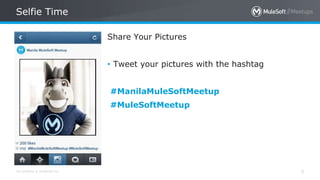
Selfie Time
5
Share Your Pictures
• Tweet your pictures with the hashtag
#ManilaMuleSoftMeetup
#MuleSoftMeetup
Agenda
All contents © MuleSoft Inc.
Agenda
7
• 6:00 pm: Introduction
• 6:15 pm: CloudHub
• 6:45 pm: API Manager
• 7:15 pm: Anypoint Monitoring and Analyzer
• 7:45 pm: Quiz Game and Giveaways
• 7:55 pm: Closing
Introductions
All contents © MuleSoft Inc.
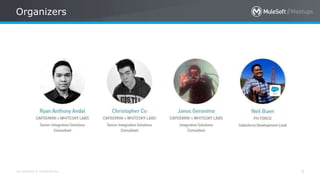
Organizers
9
Announcements
All contents © MuleSoft Inc.
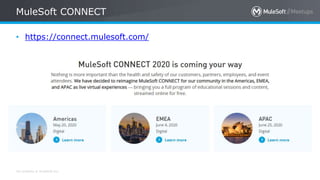
MuleSoft CONNECT
• https://connect.mulesoft.com/
All contents © MuleSoft Inc.
Free MuleSoft Instructor Lectures
• To equip you with skills for the future, MuleSoft is hosting instructor
lectures to accompany our free self-paced Development
Fundamentals course. Lectures will run April 13 - May 29, 2020.
• https://training.mulesoft.com/covid19-lecture-series
All contents © MuleSoft Inc.
Speakers
13
• Joyce is currently a Senior Integration
Consultant at Capgemini + WhiteSky Labs
with applied experience on MuleSoft
integration platform.
• She has more than 8 years of IT experience
in software development in Payments
Systems, and Banking industries.

By Joyce Banting
CloudHub
All contents © MuleSoft Inc.
Topics
• What is CloudHub?
• Why use CloudHub?
• UI Overview
• Demo
• Deployment
• Application Maintenance
All contents © MuleSoft Inc.
What is CloudHub?
• Integration Platform as a Service (iPaaS) solution
• Deployment of application in the cloud
All contents © MuleSoft Inc.
Why use CloudHub?
• Scalable and Elastic
• Multi-tenant
• Fully managed, fully hosted
• Delivers 99.99% uptime
• Secure, provides access control
All contents © MuleSoft Inc.
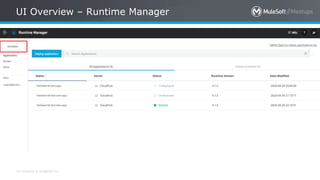
UI Overview – Runtime Manager
All contents © MuleSoft Inc.
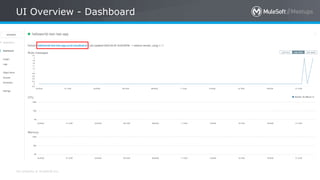
UI Overview - Dashboard
All contents © MuleSoft Inc.
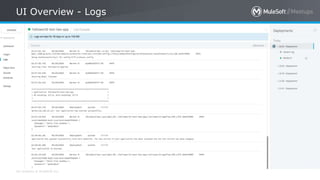
UI Overview - Logs
All contents © MuleSoft Inc.
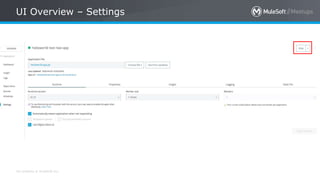
UI Overview – Settings
All contents © MuleSoft Inc.
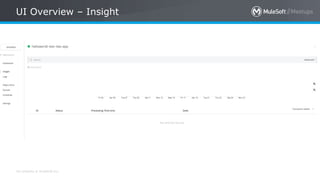
UI Overview – Insight
All contents © MuleSoft Inc.
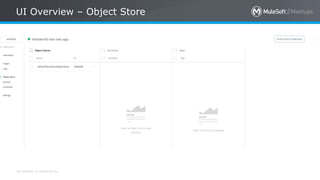
UI Overview – Object Store
All contents © MuleSoft Inc.
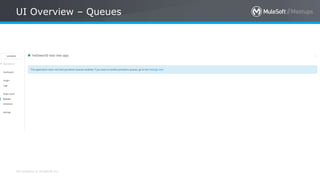
UI Overview – Queues
All contents © MuleSoft Inc.
UI Overview – Schedules
All contents © MuleSoft Inc.
DEMO – Anypoint Studio
• Prerequisites:
• Application to be deployed in Anypoint Studio
• Account in Anypoint Platform
DEMO
Deployment Thru Anypoint Studio
All contents © MuleSoft Inc.
DEMO – Anypoint Platform
• Prerequisites:
• Packaged application to be deployed
• Account in Anypoint Platform
DEMO
Deployment Thru Anypoint Platform
All contents © MuleSoft Inc.
DEMO – Anypoint CLI
• Prerequisites:
• Packaged application to be deployed
• Account in Anypoint Platform
• Anypoint CLI Installed: https://docs.mulesoft.com/runtime-
manager/anypoint-platform-cli
DEMO
Deployment Thru Anypoint CLI
All contents © MuleSoft Inc.
Resources
• Deploying to CloudHub: https://docs.mulesoft.com/runtime-
manager/deploying-to-cloudhub
• Anypoint CLI 3.x Commands:
https://docs.mulesoft.com/runtime-manager/anypoint-
platform-cli-commands
All contents © MuleSoft Inc.
DEMO – Maintenance
• Prerequisites:
• Running application in CloudHub
DEMO
Application Maintenance
Q&A
All contents © MuleSoft Inc.
Short 5 minute break
• Sign Up for an account
• https://quizizz.com/
All contents © MuleSoft Inc.
Speakers
37
• Ron is currently a Senior Integration
Consultant at Capgemini + WhiteSky Labs
with applied experience on MuleSoft
integration platform.
• He has more than 12 years of IT experience
in software development.
• He loves to build gundam and play basketball.
Ron Jacob
Introduction to Anypoint
API Manager
All contents © MuleSoft Inc.
Topics
• API Manager
• API Manager's Administrator View
• API Dashboard
• DEMO
– Policies:Client Id Enforcement
– Policies: IP Whitelisting
– Policies: Rate Limiting – SLA Based
– Analytics
• I'm a Mule Developer, how is it useful to me?
All contents © MuleSoft Inc.
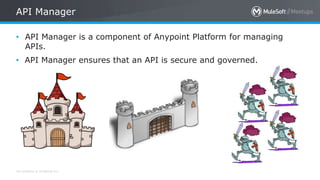
API Manager
• API Manager is a component of Anypoint Platform for managing
APIs.
• API Manager ensures that an API is secure and governed.
All contents © MuleSoft Inc.
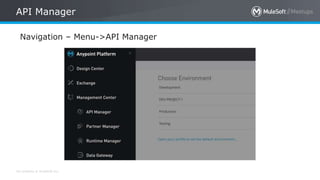
API Manager
Navigation – Menu->API Manager
All contents © MuleSoft Inc.
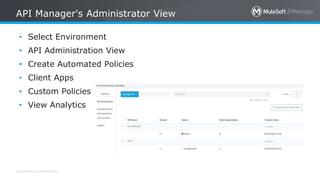
API Manager's Administrator View
• Select Environment
• API Administration View
• Create Automated Policies
• Client Apps
• Custom Policies
• View Analytics
All contents © MuleSoft Inc.
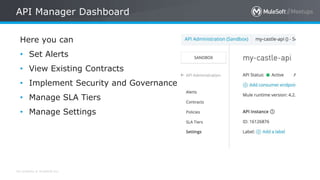
API Manager Dashboard
Here you can
• Set Alerts
• View Existing Contracts
• Implement Security and Governance
• Manage SLA Tiers
• Manage Settings
All contents © MuleSoft Inc.
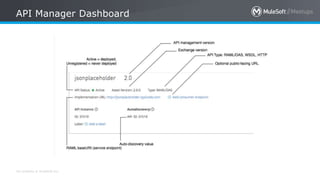
API Manager Dashboard
All contents © MuleSoft Inc.
Setting of Policies Demo
• Prerequisites:
• Account in Anypoint Platform
• Account has Manage Policies Permission
• Application deployed in Runtime Manager with API Discovery
Setting of Policies Demo
• Client Id Enforcement
• IP Whitelisting
• Rate Limiting – SLA Based
• View Analytics
All contents © MuleSoft Inc.
I'm a Mule Developer, how is it useful to me?
• With just a few simple steps, I can secure APIs with policies,
manage client access, group APIs as products, and monitor and
analyze traffic. No matter where my APIs and microservices are
hosted and which technologies they run on, I can manage them all
from one place.
All contents © MuleSoft Inc.
Resources
• API Manager Docs
– https://docs.mulesoft.com/api-manager/2.x/
• Images
– https://ya-webdesign.com/
Q&A
All contents © MuleSoft Inc.
Sign Up for an account in Quizziz
• Sign Up for an account
• https://quizizz.com/
All contents © MuleSoft Inc.
Surprise Giveaway
All contents © MuleSoft Inc.
Speakers
52
• Mike is currently a Senior Integration
Consultant at Capgemini + WhiteSky Labs
with applied experience on MuleSoft
integration platform.
• He has more than 13 years of IT experience
in software development.
• His hobbies are basketball, console gaming
and table tennis.
By Mike Figueroa
Anypoint Monitoring &
Analyzer
All contents © MuleSoft Inc.
Topics
• Anypoint Monitoring
• Background
• Key Area Capabilities
• Requirements
• Features / Demo
• Key Outcomes
• Anypoint Visualizer
• Overview
• Features
• Requirements
• Demo
Anypoint Monitoring
All contents © MuleSoft Inc.
Background
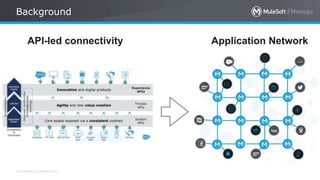
API-led connectivity Application Network
All contents © MuleSoft Inc.
Background
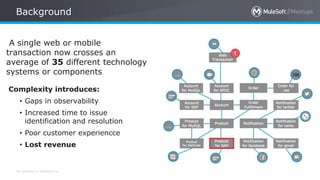
A single web or mobile
transaction now crosses an
average of 35 different technology
systems or components
Complexity introduces:
• Gaps in observability
• Increased time to issue
identification and resolution
• Poor customer experiencce
• Lost revenue
All contents © MuleSoft Inc.
Key Area Capabilities
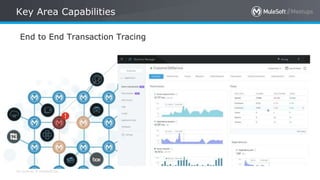
End to End Transaction Tracing
All contents © MuleSoft Inc.
Key Area Capabilities
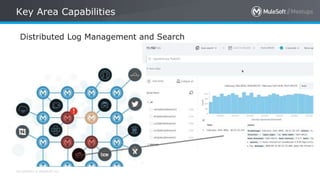
Distributed Log Management and Search
All contents © MuleSoft Inc.
Key Area Capabilities
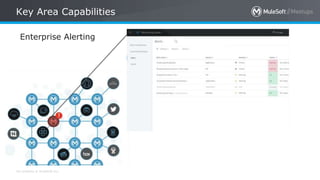
Enterprise Alerting
All contents © MuleSoft Inc.
Key Area Capabilities
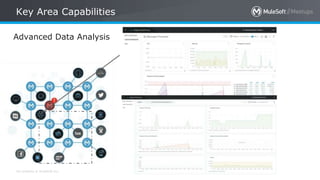
Advanced Data Analysis
All contents © MuleSoft Inc.
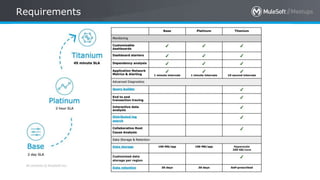
Requirements
All contents © MuleSoft Inc.
Features
• Dashboards
• Event-Driven Alerts
• Logging System
• Data Storage and Retention
• Raw Data Download
• Tools for Monitoring
• API Functional Monitoring
All contents © MuleSoft Inc.
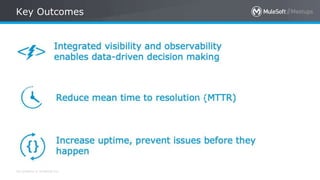
Key Outcomes
Anypoint Analyzer
All contents © MuleSoft Inc.
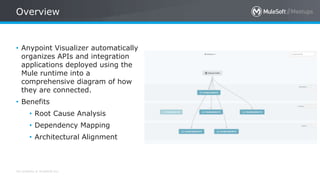
Overview
• Anypoint Visualizer automatically
organizes APIs and integration
applications deployed using the
Mule runtime into a
comprehensive diagram of how
they are connected.
• Benefits
• Root Cause Analysis
• Dependency Mapping
• Architectural Alignment
All contents © MuleSoft Inc.
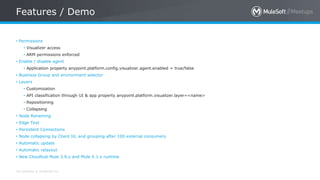
Features / Demo
• Permissions
• Visualizer access
• ARM permissions enforced
• Enable / disable agent
• Application property anypoint.platform.config.visualizer.agent.enabled = true/false
• Business Group and environment selector
• Layers
• Customization
• API classification through UI & app property anypoint.platform.visualizer.layer=<name>
• Repositioning
• Collapsing
• Node Renaming
• Edge Text
• Persistent Connections
• Node collapsing by Client Id, and grouping after 100 external consumers
• Automatic update
• Automatic relayout
• New Cloudhub Mule 3.9.x and Mule 4.1.x runtime
Q&A
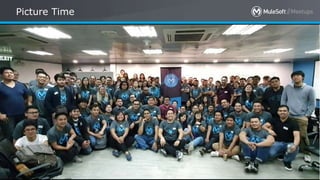
Picture Time
All contents © MuleSoft Inc.
Picture Time
70
Online Quiz Game
All contents © MuleSoft Inc.
Online Quiz
• https://quizizz.com/join?gc=097110
All contents © MuleSoft Inc.
Facebook Group
• https://facebook.com/groups/muleph
See you next time
Please send topic suggestions to the organizer
6th Manila MuleSoft Meetup May 2020

6th Manila MuleSoft Meetup May 2020

  • 1.
    May 6, 2020:Anypoint Platform Manila MuleSoft Meetup Group
  • 2.
  • 3.
    All contents ©MuleSoft Inc. Housekeeping Rules • This session will be recorded • Please be muted during the speaker presentation • The recording and slides for today’s presentations will be made available to all attendees • At the end of each presentation, there will be a Q&A session • After all the presentations, there will be a quiz game where you will get a chance to win a training voucher from MuleSoft
  • 4.
    All contents ©MuleSoft Inc. Our Partners 4
  • 5.
    All contents ©MuleSoft Inc. Selfie Time 5 Share Your Pictures • Tweet your pictures with the hashtag #ManilaMuleSoftMeetup #MuleSoftMeetup
  • 6.
  • 7.
    All contents ©MuleSoft Inc. Agenda 7 • 6:00 pm: Introduction • 6:15 pm: CloudHub • 6:45 pm: API Manager • 7:15 pm: Anypoint Monitoring and Analyzer • 7:45 pm: Quiz Game and Giveaways • 7:55 pm: Closing
  • 8.
  • 9.
    All contents ©MuleSoft Inc. Organizers 9
  • 10.
  • 11.
    All contents ©MuleSoft Inc. MuleSoft CONNECT • https://connect.mulesoft.com/
  • 12.
    All contents ©MuleSoft Inc. Free MuleSoft Instructor Lectures • To equip you with skills for the future, MuleSoft is hosting instructor lectures to accompany our free self-paced Development Fundamentals course. Lectures will run April 13 - May 29, 2020. • https://training.mulesoft.com/covid19-lecture-series
  • 13.
    All contents ©MuleSoft Inc. Speakers 13 • Joyce is currently a Senior Integration Consultant at Capgemini + WhiteSky Labs with applied experience on MuleSoft integration platform. • She has more than 8 years of IT experience in software development in Payments Systems, and Banking industries.
  • 14.
  • 15.
    All contents ©MuleSoft Inc. Topics • What is CloudHub? • Why use CloudHub? • UI Overview • Demo • Deployment • Application Maintenance
  • 16.
    All contents ©MuleSoft Inc. What is CloudHub? • Integration Platform as a Service (iPaaS) solution • Deployment of application in the cloud
  • 17.
    All contents ©MuleSoft Inc. Why use CloudHub? • Scalable and Elastic • Multi-tenant • Fully managed, fully hosted • Delivers 99.99% uptime • Secure, provides access control
  • 18.
    All contents ©MuleSoft Inc. UI Overview – Runtime Manager
  • 19.
    All contents ©MuleSoft Inc. UI Overview - Dashboard
  • 20.
    All contents ©MuleSoft Inc. UI Overview - Logs
  • 21.
    All contents ©MuleSoft Inc. UI Overview – Settings
  • 22.
    All contents ©MuleSoft Inc. UI Overview – Insight
  • 23.
    All contents ©MuleSoft Inc. UI Overview – Object Store
  • 24.
    All contents ©MuleSoft Inc. UI Overview – Queues
  • 25.
    All contents ©MuleSoft Inc. UI Overview – Schedules
  • 26.
    All contents ©MuleSoft Inc. DEMO – Anypoint Studio • Prerequisites: • Application to be deployed in Anypoint Studio • Account in Anypoint Platform
  • 27.
  • 28.
    All contents ©MuleSoft Inc. DEMO – Anypoint Platform • Prerequisites: • Packaged application to be deployed • Account in Anypoint Platform
  • 29.
  • 30.
    All contents ©MuleSoft Inc. DEMO – Anypoint CLI • Prerequisites: • Packaged application to be deployed • Account in Anypoint Platform • Anypoint CLI Installed: https://docs.mulesoft.com/runtime- manager/anypoint-platform-cli
  • 31.
  • 32.
    All contents ©MuleSoft Inc. Resources • Deploying to CloudHub: https://docs.mulesoft.com/runtime- manager/deploying-to-cloudhub • Anypoint CLI 3.x Commands: https://docs.mulesoft.com/runtime-manager/anypoint- platform-cli-commands
  • 33.
    All contents ©MuleSoft Inc. DEMO – Maintenance • Prerequisites: • Running application in CloudHub
  • 34.
  • 35.
  • 36.
    All contents ©MuleSoft Inc. Short 5 minute break • Sign Up for an account • https://quizizz.com/
  • 37.
    All contents ©MuleSoft Inc. Speakers 37 • Ron is currently a Senior Integration Consultant at Capgemini + WhiteSky Labs with applied experience on MuleSoft integration platform. • He has more than 12 years of IT experience in software development. • He loves to build gundam and play basketball.
  • 38.
    Ron Jacob Introduction toAnypoint API Manager
  • 39.
    All contents ©MuleSoft Inc. Topics • API Manager • API Manager's Administrator View • API Dashboard • DEMO – Policies:Client Id Enforcement – Policies: IP Whitelisting – Policies: Rate Limiting – SLA Based – Analytics • I'm a Mule Developer, how is it useful to me?
  • 40.
    All contents ©MuleSoft Inc. API Manager • API Manager is a component of Anypoint Platform for managing APIs. • API Manager ensures that an API is secure and governed.
  • 41.
    All contents ©MuleSoft Inc. API Manager Navigation – Menu->API Manager
  • 42.
    All contents ©MuleSoft Inc. API Manager's Administrator View • Select Environment • API Administration View • Create Automated Policies • Client Apps • Custom Policies • View Analytics
  • 43.
    All contents ©MuleSoft Inc. API Manager Dashboard Here you can • Set Alerts • View Existing Contracts • Implement Security and Governance • Manage SLA Tiers • Manage Settings
  • 44.
    All contents ©MuleSoft Inc. API Manager Dashboard
  • 45.
    All contents ©MuleSoft Inc. Setting of Policies Demo • Prerequisites: • Account in Anypoint Platform • Account has Manage Policies Permission • Application deployed in Runtime Manager with API Discovery
  • 46.
    Setting of PoliciesDemo • Client Id Enforcement • IP Whitelisting • Rate Limiting – SLA Based • View Analytics
  • 47.
    All contents ©MuleSoft Inc. I'm a Mule Developer, how is it useful to me? • With just a few simple steps, I can secure APIs with policies, manage client access, group APIs as products, and monitor and analyze traffic. No matter where my APIs and microservices are hosted and which technologies they run on, I can manage them all from one place.
  • 48.
    All contents ©MuleSoft Inc. Resources • API Manager Docs – https://docs.mulesoft.com/api-manager/2.x/ • Images – https://ya-webdesign.com/
  • 49.
  • 50.
    All contents ©MuleSoft Inc. Sign Up for an account in Quizziz • Sign Up for an account • https://quizizz.com/
  • 51.
    All contents ©MuleSoft Inc. Surprise Giveaway
  • 52.
    All contents ©MuleSoft Inc. Speakers 52 • Mike is currently a Senior Integration Consultant at Capgemini + WhiteSky Labs with applied experience on MuleSoft integration platform. • He has more than 13 years of IT experience in software development. • His hobbies are basketball, console gaming and table tennis.
  • 53.
    By Mike Figueroa AnypointMonitoring & Analyzer
  • 54.
    All contents ©MuleSoft Inc. Topics • Anypoint Monitoring • Background • Key Area Capabilities • Requirements • Features / Demo • Key Outcomes • Anypoint Visualizer • Overview • Features • Requirements • Demo
  • 55.
  • 56.
    All contents ©MuleSoft Inc. Background API-led connectivity Application Network
  • 57.
    All contents ©MuleSoft Inc. Background A single web or mobile transaction now crosses an average of 35 different technology systems or components Complexity introduces: • Gaps in observability • Increased time to issue identification and resolution • Poor customer experiencce • Lost revenue
  • 58.
    All contents ©MuleSoft Inc. Key Area Capabilities End to End Transaction Tracing
  • 59.
    All contents ©MuleSoft Inc. Key Area Capabilities Distributed Log Management and Search
  • 60.
    All contents ©MuleSoft Inc. Key Area Capabilities Enterprise Alerting
  • 61.
    All contents ©MuleSoft Inc. Key Area Capabilities Advanced Data Analysis
  • 62.
    All contents ©MuleSoft Inc. Requirements
  • 63.
    All contents ©MuleSoft Inc. Features • Dashboards • Event-Driven Alerts • Logging System • Data Storage and Retention • Raw Data Download • Tools for Monitoring • API Functional Monitoring
  • 64.
    All contents ©MuleSoft Inc. Key Outcomes
  • 65.
  • 66.
    All contents ©MuleSoft Inc. Overview • Anypoint Visualizer automatically organizes APIs and integration applications deployed using the Mule runtime into a comprehensive diagram of how they are connected. • Benefits • Root Cause Analysis • Dependency Mapping • Architectural Alignment
  • 67.
    All contents ©MuleSoft Inc. Features / Demo • Permissions • Visualizer access • ARM permissions enforced • Enable / disable agent • Application property anypoint.platform.config.visualizer.agent.enabled = true/false • Business Group and environment selector • Layers • Customization • API classification through UI & app property anypoint.platform.visualizer.layer=<name> • Repositioning • Collapsing • Node Renaming • Edge Text • Persistent Connections • Node collapsing by Client Id, and grouping after 100 external consumers • Automatic update • Automatic relayout • New Cloudhub Mule 3.9.x and Mule 4.1.x runtime
  • 68.
  • 69.
  • 70.
    All contents ©MuleSoft Inc. Picture Time 70
  • 71.
  • 72.
    All contents ©MuleSoft Inc. Online Quiz • https://quizizz.com/join?gc=097110
  • 73.
    All contents ©MuleSoft Inc. Facebook Group • https://facebook.com/groups/muleph
  • 74.
    See you nexttime Please send topic suggestions to the organizer

Editor's Notes

  • #6 Don’t forget to tweet your pictures using hashtag ManilaMuleSoftMeetup MuleSoftMeetup
  • #41 Salesforce stores your customer data, gives you processes to nurture prospective customers, and provide a way to collaborate with your team. It gives all your departments - including marketing, sales, commerce, and service - a single, shared view of every customer.
  • #42 It provide a full spectrum of tools that make it easy to build just about anything. For instance, admins can create a simple process app with Lightning App Builder by dragging standard components. Also, developers can create custom components that the admin can use when building apps.
  • #44 Business Analysts are technical users who deeply understand the business. They are the one who build reports and dashboards, streamline business process, and understand most of the features and requirements. Developers are your powers users, system, integrators, and your programmers. Developers build beautiful customer experiences and apps that connect back to Salesforce. Admins build apps with prebuilt components, adding fields, workflows, data sources and layouts with clicks, not code Line-of-Business Professionals are hands-down your point-and-click users.
  • #57 Have we seen this diagram before? API - Led Connectivity approach became well-known and somehow “mainstream”
  • #58 Can you we somehow guess what type of Web Transaction is described in the diagram? (E-Commerce / Shopping Cart)
  • #59 Identify and document the health of every, consecutive component within an application in your network: diagnose and prescribe solutions to broken components with ease.
  • #60 Search raw log and event data from across the application network to pinpoint the root cause of a problem.
  • #61 Track trends and create alerts to identify abnormal behavior and problems in your application network.
  • #62 Leverage templated dashboards or customize your own to provide instant visibility into your applications’ performance and detailed analysis of your network
  • #67  RCA - Visually trace where applications fail across your application network Dependency Mapping - Aggregate and map all dependent components in real- time as you organize the application network Architectural Alignment - Review system architecture throughout the SDLC to ensure that developers are following defined architecture and data governance practices.