Kinesis @ Lyft
Hafiz Hamid
2
● Hafiz Hamid
● Oldest engineer on Streaming Team @ Lyft
● 2.5 years @ Lyft
● Worked on PubSub/Streaming and messaging infra
● Prior to Lyft
○ Search @ Salesforce.com
○ Search Data/Relevancy @ Bing Search (Microsoft)
About me
3
● Streaming at Lyft
● Overview of Kinesis
● Lyft’s Streaming architecture
● Review of Kinesis as a Streaming technology
● Lessons learnt and best practices
Agenda
Event Streaming at Lyft
What are Events?
• User interactions - e.g. pin_move, ride_requested, ride_accepted
• API interactions - e.g. location_updated
• Developer events
• Networking logs
• CDC’s (Database Change Logs)
Use Cases
• Analytics
‒ BI / Reporting
‒ Hive / Presto / Redshift / Druid / ElasticSearch
• Data Science
‒ ETA’s
‒ Localized prime-time/pricing
‒ Fraud
• Event-driven Microservices
‒ Driver onboarding workflows
‒ Driver loyalty/reward workflows
‒ Adtech workflows
‒ Passenger notifications
Scale
• 80 billion events / day (70 TB of data)
• 1.2 million events / sec @ peak
• 125 consumers
Overview of Kinesis
What is Kinesis
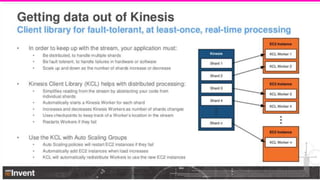
• Fully managed service for realtime Big Data ingestion and processing
• Good for fast, high-throughput data ingestion
• At-least once delivery (with KCL)
• Ordering within a partition key
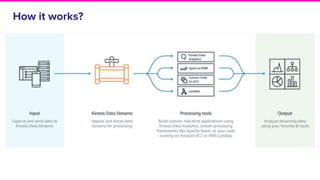
How it works?
Kinesis Concepts
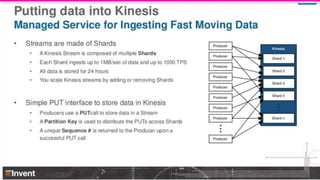
• Streams
‒ Named event streams of data
‒ 24 hours to 7 days data retention
• Shards
‒ Base throughput unit
‒ You scale Streams by adding or removing shards
‒ Each shard can ingest up to 1000 records per second, up to 1 MB/sec data rate
‒ Each shard can support up to 5 reads per second, up to 2 MB/sec data rate
• Partition Key
‒ Identifier used for Ordered Delivery and Partitioning of data across shards
• Sequence Number
‒ Number of an event as assigned by Kinesis
• Shard IteratorAge
‒ Age (in milliseconds) of the last record returned by the GetRecords API
‒ A value of zero means consumer is completely caught up
• KPL (Kinesis Producer Library)
• KCL (Kinesis Consumer Library)
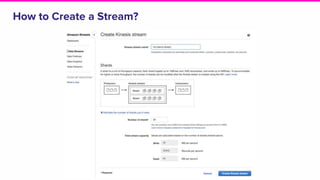
How to Create a Stream?
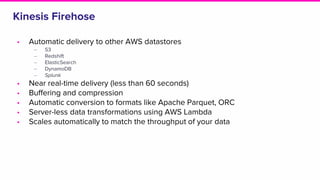
Kinesis Firehose
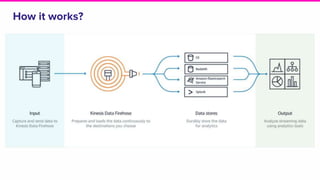
• Automatic delivery to other AWS datastores
‒ S3
‒ Redshift
‒ ElasticSearch
‒ DynamoDB
‒ Splunk
• Near real-time delivery (less than 60 seconds)
• Buffering and compression
• Automatic conversion to formats like Apache Parquet, ORC
• Server-less data transformations using AWS Lambda
• Scales automatically to match the throughput of your data
How it works?
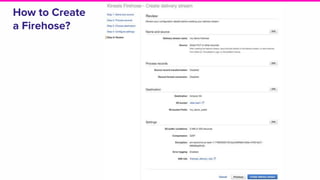
How to Create
a Firehose?
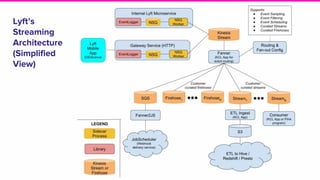
Lyft’s Streaming Architecture
Lyft’s
Streaming
Architecture
(Simplified
View)
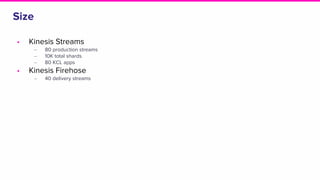
Size
• Kinesis Streams
‒ 80 production streams
‒ 10K total shards
‒ 80 KCL apps
• Kinesis Firehose
‒ 40 delivery streams
Review of Kinesis
Strengths
• Fully managed
• Elastic / Pay only for what you use
• Super high availability and reliability track record
• Relatively cheap
• First-class integration with other AWS datastores (using Firehose)
Weaknesses
• Not truly real-time, yet micro-batching system
• Not a true Pub/Sub system, no built-in consumer fan-out
• High PUT latencies
• Less integration with open-source stream processing tools (e.g. Apache Flink)
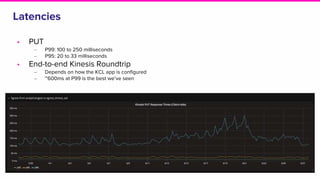
Latencies
• PUT
‒ P99: 100 to 250 milliseconds
‒ P95: 20 to 33 milliseconds
• End-to-end Kinesis Roundtrip
‒ Depends on how the KCL app is configured
‒ ~600ms at P99 is the best we’ve seen
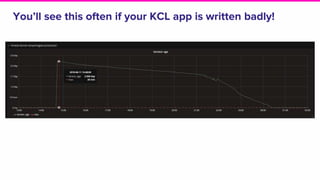
You’ll see this often if your KCL app is written badly!
Some Best Practices
• Choose a high-cardinality partition key (to avoid hot shards)
‒ Random would be best
‒ We use UUID 4 (hardly ever had an issue)
• Configure KCL apps to use all CPU cores
‒ For single-threaded code, total # of CPU cores available to KCL app should not exceed # of shards in the
stream
• Don’t let your compute become the bottleneck
‒ Write parallel KCL consumer code and leverage all CPU cores to process a single shard
‒ Will let you provision/scale Kinesis shards independent of compute
‒ Alas! We were doing it wrong for a long time
• Be careful with your checkpoint
• Don’t forget to monitor shard-level metrics
‒ Stream-level metrics may not reveal all problems
‒ Have to pay extra
• Don’t attach multiple consumers to a stream
Some Best Practices (continued)
• Plan for peak events in advance
‒ It may not be possible to scale-out compute for data already in the stream
‒ Plan for peak capacity in advance
• Don’t forget to re-provision DynamoDB IOPs after you reshard
Our Top Pain-points
• No hot restarts
‒ Latency spikes at KCL app deploys and service restarts
‒ Up to 90 seconds
• High (and unreliable PUT latencies
‒ Prohibitively high for synchronous and durable writes
• High propagation delays (end-to-end latency)
‒ Sub-second is not possible due to two Kinesis round trips
• Lack of native Pub/Sub (fan-out)
‒ Have to make a trade-off between durability and freshness
• Stream resizing (to scale-out capacity) is manual
Kinesis Features We’ve Not Tried
• Auto-scaling
• KPL (Kinesis Producer Library)
• Kinesis Analytics
‒ Streaming SQL on Kinesis Data
• Replicated streams
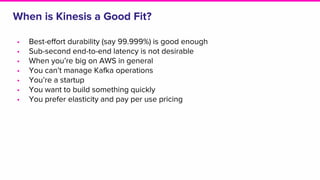
When is Kinesis a Good Fit?
• Best-effort durability (say 99.999%) is good enough
• Sub-second end-to-end latency is not desirable
• When you’re big on AWS in general
• You can’t manage Kafka operations
• You’re a startup
• You want to build something quickly
• You prefer elasticity and pay per use pricing
Lyft is hiring!
Thank you!
Hafiz Hamid | @hamid_mian | hamid@lyft.com

Kinesis @ lyft

  • 1.
  • 2.
    2 ● Hafiz Hamid ●Oldest engineer on Streaming Team @ Lyft ● 2.5 years @ Lyft ● Worked on PubSub/Streaming and messaging infra ● Prior to Lyft ○ Search @ Salesforce.com ○ Search Data/Relevancy @ Bing Search (Microsoft) About me
  • 3.
    3 ● Streaming atLyft ● Overview of Kinesis ● Lyft’s Streaming architecture ● Review of Kinesis as a Streaming technology ● Lessons learnt and best practices Agenda
  • 4.
  • 5.
    What are Events? •User interactions - e.g. pin_move, ride_requested, ride_accepted • API interactions - e.g. location_updated • Developer events • Networking logs • CDC’s (Database Change Logs)
  • 6.
    Use Cases • Analytics ‒BI / Reporting ‒ Hive / Presto / Redshift / Druid / ElasticSearch • Data Science ‒ ETA’s ‒ Localized prime-time/pricing ‒ Fraud • Event-driven Microservices ‒ Driver onboarding workflows ‒ Driver loyalty/reward workflows ‒ Adtech workflows ‒ Passenger notifications
  • 7.
    Scale • 80 billionevents / day (70 TB of data) • 1.2 million events / sec @ peak • 125 consumers
  • 8.
  • 9.
    What is Kinesis •Fully managed service for realtime Big Data ingestion and processing • Good for fast, high-throughput data ingestion • At-least once delivery (with KCL) • Ordering within a partition key
  • 10.
  • 11.
    Kinesis Concepts • Streams ‒Named event streams of data ‒ 24 hours to 7 days data retention • Shards ‒ Base throughput unit ‒ You scale Streams by adding or removing shards ‒ Each shard can ingest up to 1000 records per second, up to 1 MB/sec data rate ‒ Each shard can support up to 5 reads per second, up to 2 MB/sec data rate • Partition Key ‒ Identifier used for Ordered Delivery and Partitioning of data across shards • Sequence Number ‒ Number of an event as assigned by Kinesis • Shard IteratorAge ‒ Age (in milliseconds) of the last record returned by the GetRecords API ‒ A value of zero means consumer is completely caught up • KPL (Kinesis Producer Library) • KCL (Kinesis Consumer Library)
  • 12.
    How to Createa Stream?
  • 15.
    Kinesis Firehose • Automaticdelivery to other AWS datastores ‒ S3 ‒ Redshift ‒ ElasticSearch ‒ DynamoDB ‒ Splunk • Near real-time delivery (less than 60 seconds) • Buffering and compression • Automatic conversion to formats like Apache Parquet, ORC • Server-less data transformations using AWS Lambda • Scales automatically to match the throughput of your data
  • 16.
  • 17.
    How to Create aFirehose?
  • 18.
  • 19.
  • 20.
    Size • Kinesis Streams ‒80 production streams ‒ 10K total shards ‒ 80 KCL apps • Kinesis Firehose ‒ 40 delivery streams
  • 21.
  • 22.
    Strengths • Fully managed •Elastic / Pay only for what you use • Super high availability and reliability track record • Relatively cheap • First-class integration with other AWS datastores (using Firehose)
  • 23.
    Weaknesses • Not trulyreal-time, yet micro-batching system • Not a true Pub/Sub system, no built-in consumer fan-out • High PUT latencies • Less integration with open-source stream processing tools (e.g. Apache Flink)
  • 24.
    Latencies • PUT ‒ P99:100 to 250 milliseconds ‒ P95: 20 to 33 milliseconds • End-to-end Kinesis Roundtrip ‒ Depends on how the KCL app is configured ‒ ~600ms at P99 is the best we’ve seen
  • 25.
    You’ll see thisoften if your KCL app is written badly!
  • 26.
    Some Best Practices •Choose a high-cardinality partition key (to avoid hot shards) ‒ Random would be best ‒ We use UUID 4 (hardly ever had an issue) • Configure KCL apps to use all CPU cores ‒ For single-threaded code, total # of CPU cores available to KCL app should not exceed # of shards in the stream • Don’t let your compute become the bottleneck ‒ Write parallel KCL consumer code and leverage all CPU cores to process a single shard ‒ Will let you provision/scale Kinesis shards independent of compute ‒ Alas! We were doing it wrong for a long time • Be careful with your checkpoint • Don’t forget to monitor shard-level metrics ‒ Stream-level metrics may not reveal all problems ‒ Have to pay extra • Don’t attach multiple consumers to a stream
  • 27.
    Some Best Practices(continued) • Plan for peak events in advance ‒ It may not be possible to scale-out compute for data already in the stream ‒ Plan for peak capacity in advance • Don’t forget to re-provision DynamoDB IOPs after you reshard
  • 28.
    Our Top Pain-points •No hot restarts ‒ Latency spikes at KCL app deploys and service restarts ‒ Up to 90 seconds • High (and unreliable PUT latencies ‒ Prohibitively high for synchronous and durable writes • High propagation delays (end-to-end latency) ‒ Sub-second is not possible due to two Kinesis round trips • Lack of native Pub/Sub (fan-out) ‒ Have to make a trade-off between durability and freshness • Stream resizing (to scale-out capacity) is manual
  • 29.
    Kinesis Features We’veNot Tried • Auto-scaling • KPL (Kinesis Producer Library) • Kinesis Analytics ‒ Streaming SQL on Kinesis Data • Replicated streams
  • 30.
    When is Kinesisa Good Fit? • Best-effort durability (say 99.999%) is good enough • Sub-second end-to-end latency is not desirable • When you’re big on AWS in general • You can’t manage Kafka operations • You’re a startup • You want to build something quickly • You prefer elasticity and pay per use pricing
  • 31.
  • 32.
    Thank you! Hafiz Hamid| @hamid_mian | hamid@lyft.com

Editor's Notes

  • #9 Not the goal of this talk, but just a quick rundown for those who are not familiar with Kinesis.
  • #20 This is the present architecture, the future architecture might be different. NSQ - Open-source in-memory queue, with ability to back-off to local disk.