MS Sehgal (Bunty)
IT Faculty (Computer Science), MCA, BCA
Email : buntysehgal10@gmail.com
Welcome
Keyboarding Skills & Usage of IT
Bac
k
• Keyboarding Skills
• Keyboarding Steps
• Touch Typing Benefits
• Keyboarding Techniques
• Importance of Keyboarding Skills
• Information Technology
• Usage of Information Technology
What will we learn?
Journal Question
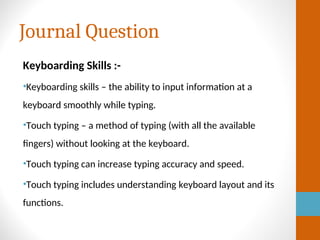
Keyboarding Skills :-
•Keyboarding skills – the ability to input information at a
keyboard smoothly while typing.
•Touch typing – a method of typing (with all the available
fingers) without looking at the keyboard.
•Touch typing can increase typing accuracy and speed.
•Touch typing includes understanding keyboard layout and its
functions.
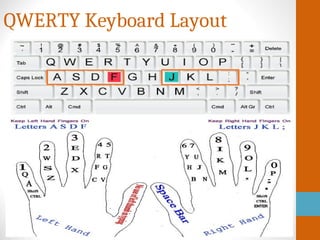
QWERTY Keyboard Layout
Typewriter Image
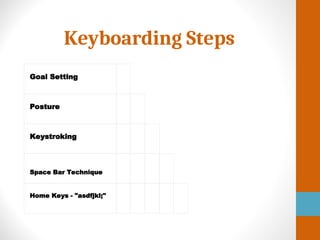
Keyboarding Steps
Goal Setting
Posture
Keystroking
Space Bar Technique
Home Keys - "asdfjkl;"
Benefits of Touch Typing
•Speed (efficient): type faster
•Accuracy (focus): make fewer mistakes
•Productivity: type longer without getting tired
•Health: less likely have health problems(hands,
wrists, neck, etc.)
Typing Tips
• Maintain A Healthy Posture.
• Familiarize yourself with the keyboard layout.
• Start typing with touch typing.
• Press each key with the proper finger.
• Each key has to pressed by the same finger all the time.
• Take a typing speed test to keep track of your progress.
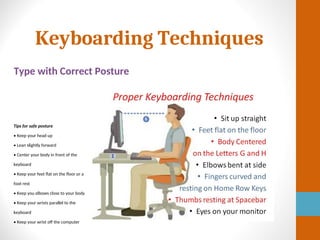
Keyboarding Techniques
Type with Correct Posture
Tips for safe posture
• Keep your head up
• Lean slightly forward
• Center your body in front of the
keyboard
• Keep your feet flat on the floor or a
foot rest
• Keep you elbows close to your body
• Keep your wrists parallel to the
keyboard
• Keep your wrist off the computer
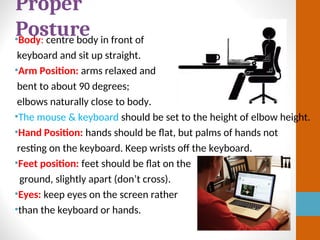
•Body: centre body in front of
keyboard and sit up straight.
•Arm Position: arms relaxed and
bent to about 90 degrees;
elbows naturally close to body.
•The mouse & keyboard should be set to the height of elbow height.
•Hand Position: hands should be flat, but palms of hands not
resting on the keyboard. Keep wrists off the keyboard.
•Feet position: feet should be flat on the
ground, slightly apart (don’t cross).
•Eyes: keep eyes on the screen rather
•than the keyboard or hands.
Proper
Posture
Keyboarding Position
• Keeping your hands positioned correctly proves crucial when
typing.
• When at rest, your hands should be on the home row, with
your left fingers on the "A" through "F" keys and your right
fingers on "J" through the semi-colon.
• From this position, it is easiest for your fingers to reach the
other keys with a minimum of movement, and on many
keyboards, the "F" and "J" keys have tiny ridges that you
can feel with your fingertips as a reminder.
• As you learn the key position, you can focus on typing
without looking at the keys.
• It may help to quietly say the name of the key as you type
it.
Keyboard Shortcuts
• Keyboard shortcuts keep your hands on the keyboard,
instead of reaching for the mouse, saving you time as well
as reducing strain on your hands, fingers and wrist.
• With keyboard shortcuts, you can quickly access the
"Start" and "Help" menus, format text, save documents,
search, access file menus and select, cut, copy and paste
text.
• For example, "Ctrl-C" copies highlighted text and "Ctrl-V"
pastes the text
Practice, Practice, Practice
• Regular practice -- by writing emails, letters or essays on
your computer -- will help you hone your keyboard
technique.
• Typing in an online or offline personal journal on a daily
basis also keeps your skills sharp.
• The numbers above the letters and the numeric pad each have
advantages, depending on what you're typing; you can
retype documents, especially those with numbers and
symbols, for an extra challenge.
Importance of Keyboarding Skills
• Technology is continuing and will continue to shape our
daily and professional lives.
• Currently, voice and other input technologies are not
prepared to meet today's demand, so the keyboard remains
the primary source for inputting information into
computers.
• Keyboarding skills are very important in that they can
impact a person's ability to communicate with others in the
future, both in social and professional realms.
Importance of Keyboarding Skills
1. Programs and Students:-
These are most necessary for using word
processing software, but are also required if using database
software, email or instant message communication. From an
academic standpoint, keyboarding skills are a must for
students interested in higher levels of education in almost any
field. Word processing software can be a substantial time-
saver and tool for students at any level; those who are unable to
use this tool will fall behind.
Importance of Keyboarding Skills
2. Job Placement:-
Many careers today require keyboarding and
basic computer skills. By having adequate keyboarding
skills, people can open up a much larger market for themselves
when making a career choice. Some fields that would require
intensive keyboarding skills would be legal, journalism,
statistics, social sciences and language arts.
Importance of Keyboarding Skills
3. Social Functions:-
As younger generations have shown, children
and young adults are communicating via text message and
via the Internet at increasing rates. A person slow to adopt
these forms of mobile and Internet communication may miss
out on opportunities to make friends with others, a key
component of social development for younger adults.
Importance of Keyboarding Skills
4. Instruction:-
According to the Saskatchewan Education
Department, a minimum of 50 hours of instruction is needed
for middle school-aged children to become proficient in
keyboarding skills. Keyboarding skills should be taught by
trained professionals who are familiar in the proper
fundamentals and techniques of key stroking. Lastly, as
with any new skill, it is important to practice keyboarding
skills to develop and maintain them over time
Information Technology
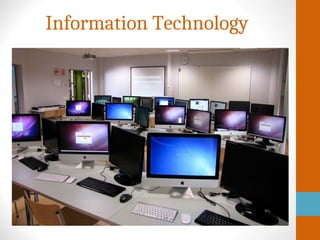
•Information technology (IT) is a process of development,
implementation, & maintenance of computers and
telecommunication resources to receive, store, access, interpret
& communicate data or information through electronic means.
Uses of information technology are in business, agriculture,
health, education, etc.
•Define information technology: Information technology (IT)
makes use of computers to process, store, recover and
broadcast information with fast communication links and
channels from one place to another in a networking
environment. The interconnection of the computer enables
people to send and accept information.
Usage of Information Technology
In this topic, we discuss the uses of information technology in
various fields of life.
•1. Social Networking
This can be described as the most common and
most important use of information technology. IT has helped to
bring the society together, ensuring that strong relationships are
formed and maintained. Social media sites, such as Facebook,
are a good proof of this.
•2. Management of Departments
When computers were invented, the business
world underwent a tremendous transformation. Computer
software is now being used to ensure the smooth running of
different departments in organizations. These departments may
include security, human resources, among other departments.
Usage of Information Technology
•3. Ensuring Success in the Global Market
Software packages are used by businesses to get
jobs done faster and easier. This way, businesses, and industries
gain a better and quick outlook of the global markets.
Information technology is also used to manage these software
packages.
•4. Online Businesses
The development of information technology has led
to the growth of online businesses. More customers are
demanding faster access to their purchased items. Due to this,
online business platforms have been created to help in keeping
up with the demand and supply. A good example of such a
platform is Amazon, which uses information technology to make
online transactions with customers.
Usage of Information Technology
•5. Education System
Information technology has found applications in
the modern-day education system. Online classes are now being
offered in almost every school. Students can access these
classes from anywhere, using laptops, smartphones, or even
tablets. Information technology has indeed made learning
easier.
•6. Online Bank Transactions
Information technology is used to ensure that
online Internet transactions are kept safe and secure. Security
networks and programs are used to enhance the safety of these
transactions. In the absence of information technology, secure
online bank transactions would be almost impossible.
Usage of Information Technology
•7. Facilitates Sending and Receiving of Money
Sending and receiving of money has now been
made both easier and faster, by information technology. Online
businesses of any field can now open websites with ease,
without the need for registering. If the business owner intends
to make transactions, they can use registered online platforms,
such as eBay and Amazon.
•8. Easier Access to Credit
Due to information technology, a person’s credit
scores and ratings can be found securely online. Lending and
insurance companies can, therefore, make quick credit checks
on businesses or individuals, facilitating the easier opening of
credits.
Usage of Information Technology
•9. Helping in Decision-Making
Most businesses make use of information
technology when making decisions, sometimes even
unknowingly. For instance, IT is used in understanding important
metrics, such as specific clients with overdue accounts.
•10. Supporting Innovation
In the workplace environment, there will always be
research being conducted. And, without the Internet, which is
an information technology tool, research conducted would be
meaningless. IT is, therefore, very important for research and
innovation to happen.
Usage of Information Technology
•Conclusion:-
Where would the world be if there was no
Information Technology? We wouldn’t even want to fathom the
answer to that. It is very clear that every business field, and
even individuals, would simply crumble with the absence of
Information Technology. After all, you don’t have to be in the
field of IT, for it to touch your life.
Any Query?
Have A Nice Day…!
Thanks for Watching…!

Keyboarding Skills PPT.pptx2121212121221

  • 1.
    MS Sehgal (Bunty) ITFaculty (Computer Science), MCA, BCA Email : buntysehgal10@gmail.com Welcome
  • 2.
    Keyboarding Skills &Usage of IT Bac k • Keyboarding Skills • Keyboarding Steps • Touch Typing Benefits • Keyboarding Techniques • Importance of Keyboarding Skills • Information Technology • Usage of Information Technology What will we learn?
  • 3.
    Journal Question Keyboarding Skills:- •Keyboarding skills – the ability to input information at a keyboard smoothly while typing. •Touch typing – a method of typing (with all the available fingers) without looking at the keyboard. •Touch typing can increase typing accuracy and speed. •Touch typing includes understanding keyboard layout and its functions.
  • 4.
  • 5.
  • 6.
  • 7.
    Benefits of TouchTyping •Speed (efficient): type faster •Accuracy (focus): make fewer mistakes •Productivity: type longer without getting tired •Health: less likely have health problems(hands, wrists, neck, etc.)
  • 8.
    Typing Tips • MaintainA Healthy Posture. • Familiarize yourself with the keyboard layout. • Start typing with touch typing. • Press each key with the proper finger. • Each key has to pressed by the same finger all the time. • Take a typing speed test to keep track of your progress.
  • 9.
    Keyboarding Techniques Type withCorrect Posture Tips for safe posture • Keep your head up • Lean slightly forward • Center your body in front of the keyboard • Keep your feet flat on the floor or a foot rest • Keep you elbows close to your body • Keep your wrists parallel to the keyboard • Keep your wrist off the computer
  • 10.
    •Body: centre bodyin front of keyboard and sit up straight. •Arm Position: arms relaxed and bent to about 90 degrees; elbows naturally close to body. •The mouse & keyboard should be set to the height of elbow height. •Hand Position: hands should be flat, but palms of hands not resting on the keyboard. Keep wrists off the keyboard. •Feet position: feet should be flat on the ground, slightly apart (don’t cross). •Eyes: keep eyes on the screen rather •than the keyboard or hands. Proper Posture
  • 11.
    Keyboarding Position • Keepingyour hands positioned correctly proves crucial when typing. • When at rest, your hands should be on the home row, with your left fingers on the "A" through "F" keys and your right fingers on "J" through the semi-colon. • From this position, it is easiest for your fingers to reach the other keys with a minimum of movement, and on many keyboards, the "F" and "J" keys have tiny ridges that you can feel with your fingertips as a reminder. • As you learn the key position, you can focus on typing without looking at the keys. • It may help to quietly say the name of the key as you type it.
  • 12.
    Keyboard Shortcuts • Keyboardshortcuts keep your hands on the keyboard, instead of reaching for the mouse, saving you time as well as reducing strain on your hands, fingers and wrist. • With keyboard shortcuts, you can quickly access the "Start" and "Help" menus, format text, save documents, search, access file menus and select, cut, copy and paste text. • For example, "Ctrl-C" copies highlighted text and "Ctrl-V" pastes the text
  • 13.
    Practice, Practice, Practice •Regular practice -- by writing emails, letters or essays on your computer -- will help you hone your keyboard technique. • Typing in an online or offline personal journal on a daily basis also keeps your skills sharp. • The numbers above the letters and the numeric pad each have advantages, depending on what you're typing; you can retype documents, especially those with numbers and symbols, for an extra challenge.
  • 14.
    Importance of KeyboardingSkills • Technology is continuing and will continue to shape our daily and professional lives. • Currently, voice and other input technologies are not prepared to meet today's demand, so the keyboard remains the primary source for inputting information into computers. • Keyboarding skills are very important in that they can impact a person's ability to communicate with others in the future, both in social and professional realms.
  • 15.
    Importance of KeyboardingSkills 1. Programs and Students:- These are most necessary for using word processing software, but are also required if using database software, email or instant message communication. From an academic standpoint, keyboarding skills are a must for students interested in higher levels of education in almost any field. Word processing software can be a substantial time- saver and tool for students at any level; those who are unable to use this tool will fall behind.
  • 16.
    Importance of KeyboardingSkills 2. Job Placement:- Many careers today require keyboarding and basic computer skills. By having adequate keyboarding skills, people can open up a much larger market for themselves when making a career choice. Some fields that would require intensive keyboarding skills would be legal, journalism, statistics, social sciences and language arts.
  • 17.
    Importance of KeyboardingSkills 3. Social Functions:- As younger generations have shown, children and young adults are communicating via text message and via the Internet at increasing rates. A person slow to adopt these forms of mobile and Internet communication may miss out on opportunities to make friends with others, a key component of social development for younger adults.
  • 18.
    Importance of KeyboardingSkills 4. Instruction:- According to the Saskatchewan Education Department, a minimum of 50 hours of instruction is needed for middle school-aged children to become proficient in keyboarding skills. Keyboarding skills should be taught by trained professionals who are familiar in the proper fundamentals and techniques of key stroking. Lastly, as with any new skill, it is important to practice keyboarding skills to develop and maintain them over time
  • 19.
  • 20.
    Information Technology •Information technology(IT) is a process of development, implementation, & maintenance of computers and telecommunication resources to receive, store, access, interpret & communicate data or information through electronic means. Uses of information technology are in business, agriculture, health, education, etc. •Define information technology: Information technology (IT) makes use of computers to process, store, recover and broadcast information with fast communication links and channels from one place to another in a networking environment. The interconnection of the computer enables people to send and accept information.
  • 21.
    Usage of InformationTechnology In this topic, we discuss the uses of information technology in various fields of life. •1. Social Networking This can be described as the most common and most important use of information technology. IT has helped to bring the society together, ensuring that strong relationships are formed and maintained. Social media sites, such as Facebook, are a good proof of this. •2. Management of Departments When computers were invented, the business world underwent a tremendous transformation. Computer software is now being used to ensure the smooth running of different departments in organizations. These departments may include security, human resources, among other departments.
  • 22.
    Usage of InformationTechnology •3. Ensuring Success in the Global Market Software packages are used by businesses to get jobs done faster and easier. This way, businesses, and industries gain a better and quick outlook of the global markets. Information technology is also used to manage these software packages. •4. Online Businesses The development of information technology has led to the growth of online businesses. More customers are demanding faster access to their purchased items. Due to this, online business platforms have been created to help in keeping up with the demand and supply. A good example of such a platform is Amazon, which uses information technology to make online transactions with customers.
  • 23.
    Usage of InformationTechnology •5. Education System Information technology has found applications in the modern-day education system. Online classes are now being offered in almost every school. Students can access these classes from anywhere, using laptops, smartphones, or even tablets. Information technology has indeed made learning easier. •6. Online Bank Transactions Information technology is used to ensure that online Internet transactions are kept safe and secure. Security networks and programs are used to enhance the safety of these transactions. In the absence of information technology, secure online bank transactions would be almost impossible.
  • 24.
    Usage of InformationTechnology •7. Facilitates Sending and Receiving of Money Sending and receiving of money has now been made both easier and faster, by information technology. Online businesses of any field can now open websites with ease, without the need for registering. If the business owner intends to make transactions, they can use registered online platforms, such as eBay and Amazon. •8. Easier Access to Credit Due to information technology, a person’s credit scores and ratings can be found securely online. Lending and insurance companies can, therefore, make quick credit checks on businesses or individuals, facilitating the easier opening of credits.
  • 25.
    Usage of InformationTechnology •9. Helping in Decision-Making Most businesses make use of information technology when making decisions, sometimes even unknowingly. For instance, IT is used in understanding important metrics, such as specific clients with overdue accounts. •10. Supporting Innovation In the workplace environment, there will always be research being conducted. And, without the Internet, which is an information technology tool, research conducted would be meaningless. IT is, therefore, very important for research and innovation to happen.
  • 26.
    Usage of InformationTechnology •Conclusion:- Where would the world be if there was no Information Technology? We wouldn’t even want to fathom the answer to that. It is very clear that every business field, and even individuals, would simply crumble with the absence of Information Technology. After all, you don’t have to be in the field of IT, for it to touch your life.
  • 27.
  • 28.
    Have A NiceDay…! Thanks for Watching…!