WELCOME TO COMPUTER
SYSTEM SERVICING (CSS)
Learning competencies:
1. KNOW BASIC WINDOWS KEYBOARD SHORTCUTS
2. DEVELOP BETTER TYPING SKILLS
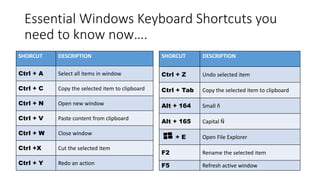
Essential Windows Keyboard Shortcuts you
need to know now….
SHORCUT DESCRIPTION
Ctrl + A Select all items in window
Ctrl + C Copy the selected item to clipboard
Ctrl + N Open new window
Ctrl + V Paste content from clipboard
Ctrl + W Close window
Ctrl +X Cut the selected item
Ctrl + Y Redo an action
SHORCUT DESCRIPTION
Ctrl + Z Undo selected item
Ctrl + Tab Copy the selected item to clipboard
Alt + 164 Small ñ
Alt + 165 Capital Ñ
+ E Open File Explorer
F2 Rename the selected item
F5 Refresh active window
Essential Windows Keyboard Shortcuts you
need to know now….
SHORCUT DESCRIPTION
Alt + F4 Close the active item or app
Print
Screen
Copy current screen to clipboard
Escape Cancel the current task
Ctrl + P Print a document or page
Ctrl + B Bold the selected item
Ctrl +U Underline the selected item
Ctrl + E Center alignment the selected item
SHORCUT DESCRIPTION
Ctrl + I Italicize the selected item
Ctrl + S Save the file
Ctrl + L Align Left the selected item
Ctrl + R Align Right the selected item
Ctrl + J Justified selected item
Ctrl + [ Resize text into smaller
Ctrl + ] Resize text into bigger
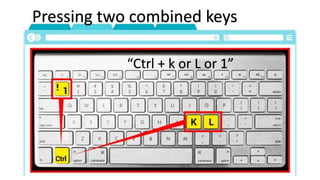
Pressing two combined keys
“Ctrl + k or L or 1”
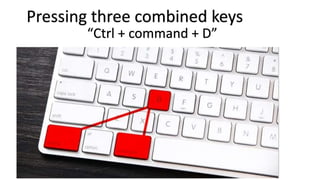
Pressing three combined keys
“Ctrl + command + D”
KEYBOARD AND SHORTCUT KEYS.pptx

KEYBOARD AND SHORTCUT KEYS.pptx

  • 1.
    WELCOME TO COMPUTER SYSTEMSERVICING (CSS) Learning competencies: 1. KNOW BASIC WINDOWS KEYBOARD SHORTCUTS 2. DEVELOP BETTER TYPING SKILLS
  • 2.
    Essential Windows KeyboardShortcuts you need to know now…. SHORCUT DESCRIPTION Ctrl + A Select all items in window Ctrl + C Copy the selected item to clipboard Ctrl + N Open new window Ctrl + V Paste content from clipboard Ctrl + W Close window Ctrl +X Cut the selected item Ctrl + Y Redo an action SHORCUT DESCRIPTION Ctrl + Z Undo selected item Ctrl + Tab Copy the selected item to clipboard Alt + 164 Small ñ Alt + 165 Capital Ñ + E Open File Explorer F2 Rename the selected item F5 Refresh active window
  • 3.
    Essential Windows KeyboardShortcuts you need to know now…. SHORCUT DESCRIPTION Alt + F4 Close the active item or app Print Screen Copy current screen to clipboard Escape Cancel the current task Ctrl + P Print a document or page Ctrl + B Bold the selected item Ctrl +U Underline the selected item Ctrl + E Center alignment the selected item SHORCUT DESCRIPTION Ctrl + I Italicize the selected item Ctrl + S Save the file Ctrl + L Align Left the selected item Ctrl + R Align Right the selected item Ctrl + J Justified selected item Ctrl + [ Resize text into smaller Ctrl + ] Resize text into bigger
  • 4.
    Pressing two combinedkeys “Ctrl + k or L or 1”
  • 5.
    Pressing three combinedkeys “Ctrl + command + D”