Accessibility in a Nutshell:
What Every Publisher, Educator,
and Librarian should know
George Kerscher
The DAISY Consortium, Benetech
Abstract
Over the past five years we have seen revolutionary change in digital
publishing and reading in the mainstream, which finally integrates
requirements of persons with disabilities of all kinds. This session will cover
specific print-disability characteristics that impact reading, and look at the
important standards, software, metadata, and Inclusive Publishing initiatives
that every librarian, publisher, educator, or reading system developer should
know. In 30 minutes, you will get the Inclusive Publishing big picture, and
hopefully get ideas on directions your organization should be considering.
Overview
• The Big Picture, Persons with Disabilities
• EPUB 3 meets the Accessibility Requirements
• Reading Systems that support Accessibility
• Other Document Formats
• A word about the Mainstream and Services for Persons with Disabilities
• Great Supporting Software and Specifications
• Accessibility Metadata, Key to Discovery and Procurement
• Exposing Accessibility Metadata to Patrons and Customers
• Significant Issues we need to address
• What George would love to see Libraries Do!!!
The Big Picture 1
• Access to information by persons with disabilities is the goal.
• It must be digital because…
People with disabilities use Access Technology (AT)
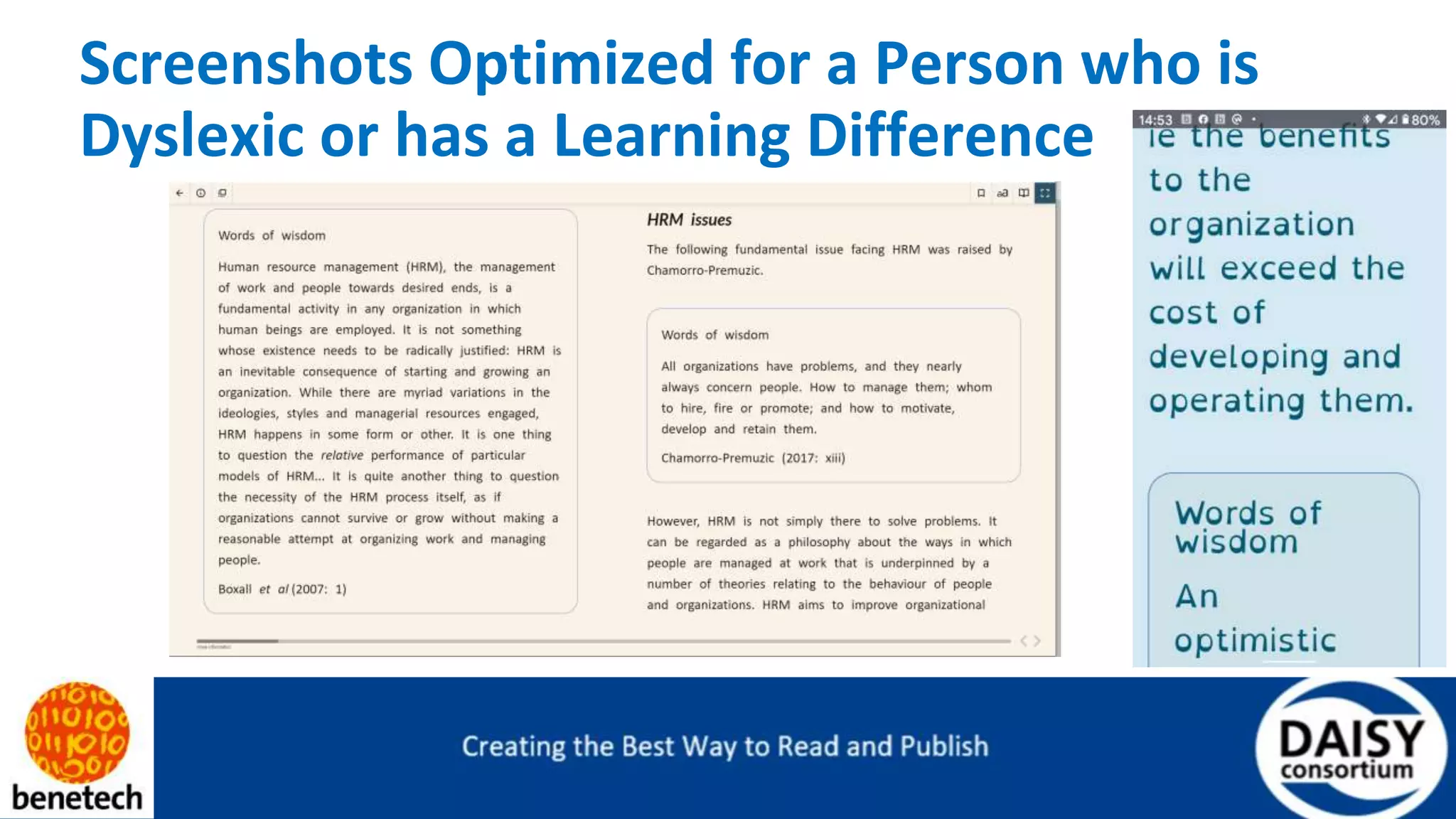
• The largest population is persons with dyslexia and learning differences
who must adjust font, line lengths, foreground and background colors,
and have TTS read aloud with highlighting.
The Big Picture 2
• Persons with low vision make up the largest part of the visually impaired
community. They must enlarge font size, change foreground and
background colors, and have TTS capabilities
The Big Picture 3
• Persons who are blind are the smallest, but perhaps the most vocal part of
the print-disabled population. They must have access to the textual
content for TTS and refreshable braille, and graphical content must be
available through descriptions. Great navigation is essential for efficient
reading.
• Personalization of these presentational characteristics are also what
people in the mainstream want as well; making accessible content is best
for everybody
EPUB 3 Meets the Accessibility
Requirements for Visual Adjustments
• Based on HTML, CSS, and the Open Web Platform
• All accessibility features are inherited
• Scalable fonts with reflow, making EPUB work on all size screens without needing to pan
and zoom
• Change foreground and background colors
• Change margins and line spacing
• Select a “Dyslexic Friendly Font”
• Or increase the font size for low vision users
Screenshots Optimized for a Person who is
Dyslexic or has a Learning Difference
EPUB 3 meets the Accessibility
Requirements for Text-To-Speech (TTS),
Reading, & Navigation
• All disability groups take advantage of TTS
• Persons who are blind rely on a screen reader for TTS and Refreshable
braille support
• EPUB has all text in proper reading order
• Table of Contents for quick navigation to anywhere in the title
• Go-to-page same as the print equivalent
• Images have short alt text or longer extended descriptions
• Tables and MathML reading supported
Short Demonstration of Screen Reader
• Non-Visual Desktop (NVDA) freely available for Windows
• Jaws could have also been used, which is not free
• Thorium for Windows, open source and freely available from the
Microsoft Store
• The book I am showing is certified as Born Accessible
• “An Introduction to Brain and Behavior”
• Publisher: Macmillan Learning
• Certified by Benetech’s Global Certified Accessible (GCA) program
Reading Systems that Support Accessibility
• You need an EPUB 3 Reading System to properly render a publication
• Reading Systems are available on all platforms, Windows, Mac, iOS, Android, Linux
• Reading System accessibility does not happen by accident
• Developer must pay attention to accessibility requirements
• Then there is the testing of the Reading System with Assistive Technology (AT)
• http://www.epubtest.org
• Roundup of Reading System recommendations
• https://inclusivepublishing.org/rs-accessibility/
Screen Reader Demo
Other Format Options—HTML
• Short document such as papers from journal databases are often displayed in the
browser
• The articles are usually marked up with heading and other structure
• Reading in the browser can be a quick and familiar experience
• Can work well on computers and tablets, sometimes rather difficult on a smartphone
• Some platforms provide the ability to change font and offer a dark mode
• Often possible to have a reasonable read aloud experience
• Options to modify font, spacing and colors are limited
• With a screen reader it can be challenging to navigate into the article and stay in there
• Works best when there is the choice to read online or download as an EPUB
Other Format Options—PDF
• PDF is well-designed to faithfully print exactly the same on all printers.
• It is not designed to be a great online reading experience
• PDF works for many readers using a large screen
• It can be horrible on smaller screens
• Designed to be a digital representation of a large piece of paper
• Not designed to reflow, no change to fonts, text color, spacing, line length
• To be somewhat accessible, it must be tagged for reading order
• In real life users expect unpredictable reading order
• To be somewhat accessible semantics for headings, paragraphs, lists, tables etc. must be tagged
• In real life, users expect poor navigation and document semantics
• Tagging is consuming and requires expert knowledge
• Make a change to the publication, and you must do it all over again.
• Huge industry getting paid to tag PDF
• From a blind person’s perspective, PDF stands for Pretty Damn Frustrating
A Word about the Mainstream and Services
for Persons with Disabilities
Until recently, persons with disabilities could only get their books and information from specialized services.
➔ National Service for the Blind and Print Disabled (NLS)
➔ Learning Ally was originally Recording for the Blind
➔ Bookshare the largest collection in the world for accessible materials
➔ National Braille Press
➔ American Printing House for the Blind
➔ There are other organizations and there are many in other countries
However, these services, while wonderful, are apart from the mainstream
Only a small fraction of books, journals, etc. published ever make it to their services
We now, with Born Accessible EPUB 3, have an opportunity to make all published works accessible
Great Supporting Software and
Specifications
• EPUB 3.2 from the W3C, same standards organization that brings you the World Wide Web
• EPUB Accessibility Conformance and Discovery Specification 1.0, now voting by NISO to be an ISO
Standard
• Accessibility Checker for EPUB (Ace by DAISY) free and open source
• Simple Manual Reporting Tool (SMART by DAISY
• DAISY Knowledge Base linked from Ace and Smart
• GoogleDocs, Pages, Libra Office and InDesign support EPUB production
• EPUB generation from “WordToEPUB” free from DAISY
• Word has great accessibility checker built in
• Use Word styles and other features to make great EPUB 3 that is Born Accessible
Accessibility Metadata, Key to Discovery &
Procurement
• EPUB Accessibility Specification identifies required and optional metadata
• Schema.org accessibility metadata is inside the EPUB
• Metadata Travels with each publication
• Some key metadata fields:
➔ AccessibilitySummary—human readable prose that describes the overall accessibility of the publication
➔ conformsTo—identifies the accessibility standard that publication adheres to, e.g. EPUB and WCAG AA
➔ The above is a Born Accessible EPUB 3
➔ certifiedBy—identifies who is making the accessibility claim, third party or self-certification
➔ accessModeSufficient—If this value is “textual” then everything in the title can be accessed through
text, i.e. the images have alt text and may have extended descriptions.
➔ Many others are available.
Exposing Accessibility Metadata to Patrons
and Customers
• Publishers also create ONIX accessibility metadata (code page 196)
• Crosswalk for Schema.org and ONIX at:
• http://www.a11ymetadata.org/the-specification/metadata-crosswalk/
• Publishing Community Group at W3C is working on a “User Experience Guide for
Displaying Accessibility metadata for EPUB”. This translates metadata to language
average people can understand.
❏ accessModeSufficient=”textual” translates to “screen reader friendly”
❏ Find the current draft at: https://w3c.github.io/publ-a11y/UX-Guide-
Metadata/principles/#general-overview
• VitalSource first to expose the accessibility metadata in their catalog
Significant Issues We Need to Address
• All publishers need to embrace the EPUB Accessibility Conformance and Discovery
specification
• All publishers must include accessibility metadata in their EPUB publications
• Publishers must use the accessible metadata available in ONIX
• Universities need to select Born Accessible 3 for their coursework
• We need to get rid of inaccessible EPUB reading Systems
• We need K-12 to embrace EPUB as Higher Ed has done
• We need professors and teachers to produce EPUB 3, and now it is easy
• Open Educational Resources (OER) should be in EPUB 3, and OER should be held to the
Born Accessible Standards as commercial publishers are
• Every producer of EPUB should use Ace by DAISY, which is free and open source
What George would love to see Libraries
Do!!!
• Learn how to serve persons with disabilities
• Make libraries inclusive for persons with disabilities
• Learn how to identify persons with print disabilities and help them to
address issues
• Libraries need to purchase /license Born Accessible EPUB 3
• We need a crosswalk from Schema to MARC and BIBFRAME
• Libraries need to expose accessibility metadata in their catalogues
• We must become an inclusive publishing society!!!
What you Need to Bookmark
The single bookmark I would recommend is:
http://www.inclusivepublishing.org
Find the latest definitive articles and links for the best approach to producing,
delivering and reading accessible content for everyone.

Kerscher "Accessibility in a Nutshell: What Every Publisher, Educator, and Librarian should know"

  • 1.
    Accessibility in aNutshell: What Every Publisher, Educator, and Librarian should know George Kerscher The DAISY Consortium, Benetech
  • 2.
    Abstract Over the pastfive years we have seen revolutionary change in digital publishing and reading in the mainstream, which finally integrates requirements of persons with disabilities of all kinds. This session will cover specific print-disability characteristics that impact reading, and look at the important standards, software, metadata, and Inclusive Publishing initiatives that every librarian, publisher, educator, or reading system developer should know. In 30 minutes, you will get the Inclusive Publishing big picture, and hopefully get ideas on directions your organization should be considering.
  • 3.
    Overview • The BigPicture, Persons with Disabilities • EPUB 3 meets the Accessibility Requirements • Reading Systems that support Accessibility • Other Document Formats • A word about the Mainstream and Services for Persons with Disabilities • Great Supporting Software and Specifications • Accessibility Metadata, Key to Discovery and Procurement • Exposing Accessibility Metadata to Patrons and Customers • Significant Issues we need to address • What George would love to see Libraries Do!!!
  • 4.
    The Big Picture1 • Access to information by persons with disabilities is the goal. • It must be digital because… People with disabilities use Access Technology (AT) • The largest population is persons with dyslexia and learning differences who must adjust font, line lengths, foreground and background colors, and have TTS read aloud with highlighting.
  • 5.
    The Big Picture2 • Persons with low vision make up the largest part of the visually impaired community. They must enlarge font size, change foreground and background colors, and have TTS capabilities
  • 6.
    The Big Picture3 • Persons who are blind are the smallest, but perhaps the most vocal part of the print-disabled population. They must have access to the textual content for TTS and refreshable braille, and graphical content must be available through descriptions. Great navigation is essential for efficient reading. • Personalization of these presentational characteristics are also what people in the mainstream want as well; making accessible content is best for everybody
  • 7.
    EPUB 3 Meetsthe Accessibility Requirements for Visual Adjustments • Based on HTML, CSS, and the Open Web Platform • All accessibility features are inherited • Scalable fonts with reflow, making EPUB work on all size screens without needing to pan and zoom • Change foreground and background colors • Change margins and line spacing • Select a “Dyslexic Friendly Font” • Or increase the font size for low vision users
  • 8.
    Screenshots Optimized fora Person who is Dyslexic or has a Learning Difference
  • 9.
    EPUB 3 meetsthe Accessibility Requirements for Text-To-Speech (TTS), Reading, & Navigation • All disability groups take advantage of TTS • Persons who are blind rely on a screen reader for TTS and Refreshable braille support • EPUB has all text in proper reading order • Table of Contents for quick navigation to anywhere in the title • Go-to-page same as the print equivalent • Images have short alt text or longer extended descriptions • Tables and MathML reading supported
  • 10.
    Short Demonstration ofScreen Reader • Non-Visual Desktop (NVDA) freely available for Windows • Jaws could have also been used, which is not free • Thorium for Windows, open source and freely available from the Microsoft Store • The book I am showing is certified as Born Accessible • “An Introduction to Brain and Behavior” • Publisher: Macmillan Learning • Certified by Benetech’s Global Certified Accessible (GCA) program
  • 11.
    Reading Systems thatSupport Accessibility • You need an EPUB 3 Reading System to properly render a publication • Reading Systems are available on all platforms, Windows, Mac, iOS, Android, Linux • Reading System accessibility does not happen by accident • Developer must pay attention to accessibility requirements • Then there is the testing of the Reading System with Assistive Technology (AT) • http://www.epubtest.org • Roundup of Reading System recommendations • https://inclusivepublishing.org/rs-accessibility/
  • 12.
  • 13.
    Other Format Options—HTML •Short document such as papers from journal databases are often displayed in the browser • The articles are usually marked up with heading and other structure • Reading in the browser can be a quick and familiar experience • Can work well on computers and tablets, sometimes rather difficult on a smartphone • Some platforms provide the ability to change font and offer a dark mode • Often possible to have a reasonable read aloud experience • Options to modify font, spacing and colors are limited • With a screen reader it can be challenging to navigate into the article and stay in there • Works best when there is the choice to read online or download as an EPUB
  • 14.
    Other Format Options—PDF •PDF is well-designed to faithfully print exactly the same on all printers. • It is not designed to be a great online reading experience • PDF works for many readers using a large screen • It can be horrible on smaller screens • Designed to be a digital representation of a large piece of paper • Not designed to reflow, no change to fonts, text color, spacing, line length • To be somewhat accessible, it must be tagged for reading order • In real life users expect unpredictable reading order • To be somewhat accessible semantics for headings, paragraphs, lists, tables etc. must be tagged • In real life, users expect poor navigation and document semantics • Tagging is consuming and requires expert knowledge • Make a change to the publication, and you must do it all over again. • Huge industry getting paid to tag PDF • From a blind person’s perspective, PDF stands for Pretty Damn Frustrating
  • 15.
    A Word aboutthe Mainstream and Services for Persons with Disabilities Until recently, persons with disabilities could only get their books and information from specialized services. ➔ National Service for the Blind and Print Disabled (NLS) ➔ Learning Ally was originally Recording for the Blind ➔ Bookshare the largest collection in the world for accessible materials ➔ National Braille Press ➔ American Printing House for the Blind ➔ There are other organizations and there are many in other countries However, these services, while wonderful, are apart from the mainstream Only a small fraction of books, journals, etc. published ever make it to their services We now, with Born Accessible EPUB 3, have an opportunity to make all published works accessible
  • 16.
    Great Supporting Softwareand Specifications • EPUB 3.2 from the W3C, same standards organization that brings you the World Wide Web • EPUB Accessibility Conformance and Discovery Specification 1.0, now voting by NISO to be an ISO Standard • Accessibility Checker for EPUB (Ace by DAISY) free and open source • Simple Manual Reporting Tool (SMART by DAISY • DAISY Knowledge Base linked from Ace and Smart • GoogleDocs, Pages, Libra Office and InDesign support EPUB production • EPUB generation from “WordToEPUB” free from DAISY • Word has great accessibility checker built in • Use Word styles and other features to make great EPUB 3 that is Born Accessible
  • 17.
    Accessibility Metadata, Keyto Discovery & Procurement • EPUB Accessibility Specification identifies required and optional metadata • Schema.org accessibility metadata is inside the EPUB • Metadata Travels with each publication • Some key metadata fields: ➔ AccessibilitySummary—human readable prose that describes the overall accessibility of the publication ➔ conformsTo—identifies the accessibility standard that publication adheres to, e.g. EPUB and WCAG AA ➔ The above is a Born Accessible EPUB 3 ➔ certifiedBy—identifies who is making the accessibility claim, third party or self-certification ➔ accessModeSufficient—If this value is “textual” then everything in the title can be accessed through text, i.e. the images have alt text and may have extended descriptions. ➔ Many others are available.
  • 18.
    Exposing Accessibility Metadatato Patrons and Customers • Publishers also create ONIX accessibility metadata (code page 196) • Crosswalk for Schema.org and ONIX at: • http://www.a11ymetadata.org/the-specification/metadata-crosswalk/ • Publishing Community Group at W3C is working on a “User Experience Guide for Displaying Accessibility metadata for EPUB”. This translates metadata to language average people can understand. ❏ accessModeSufficient=”textual” translates to “screen reader friendly” ❏ Find the current draft at: https://w3c.github.io/publ-a11y/UX-Guide- Metadata/principles/#general-overview • VitalSource first to expose the accessibility metadata in their catalog
  • 19.
    Significant Issues WeNeed to Address • All publishers need to embrace the EPUB Accessibility Conformance and Discovery specification • All publishers must include accessibility metadata in their EPUB publications • Publishers must use the accessible metadata available in ONIX • Universities need to select Born Accessible 3 for their coursework • We need to get rid of inaccessible EPUB reading Systems • We need K-12 to embrace EPUB as Higher Ed has done • We need professors and teachers to produce EPUB 3, and now it is easy • Open Educational Resources (OER) should be in EPUB 3, and OER should be held to the Born Accessible Standards as commercial publishers are • Every producer of EPUB should use Ace by DAISY, which is free and open source
  • 20.
    What George wouldlove to see Libraries Do!!! • Learn how to serve persons with disabilities • Make libraries inclusive for persons with disabilities • Learn how to identify persons with print disabilities and help them to address issues • Libraries need to purchase /license Born Accessible EPUB 3 • We need a crosswalk from Schema to MARC and BIBFRAME • Libraries need to expose accessibility metadata in their catalogues • We must become an inclusive publishing society!!!
  • 21.
    What you Needto Bookmark The single bookmark I would recommend is: http://www.inclusivepublishing.org Find the latest definitive articles and links for the best approach to producing, delivering and reading accessible content for everyone.