K to 12 BASIC EDUCATION CURRICULUM
Exploratory Course on
COMPUTER HARDWARE SERVICING
Republic of the Philippines
DEPARTMENT OF EDCUATION
TECHNOLOGY AND LIVELIHOOD EDUCATION
CURRICULUM GUIDE
K to 12 TECHNOLOGY AND LIVELIHOOD EDUCATION
INDUSTRIAL ARTS – COMPUTER HARDWARE SERVICING
(Exploratory)
TWG on K to 12 – Curriculum Guide 2
Curriculum Guide for the Exploratory Course on Computer Hardware Servicing
For you to get a complete picture of the complete TLE exploratory course on Computer Hardware Servicing, you are hereby provided with the
Curriculum Guide on Computer Hardware Servicing.
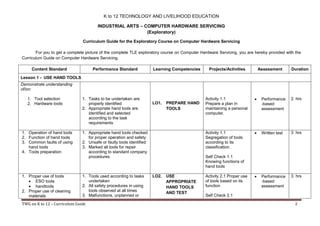
Content Standard Performance Standard Learning Competencies Projects/Activities Assessment Duration
Lesson 1 - USE HAND TOOLS
Demonstrate understanding
of/on:
1. Tool selection
2. Hardware tools
1. Tasks to be undertaken are
properly identified
2. Appropriate hand tools are
identified and selected
according to the task
requirements
LO1. PREPARE HAND
TOOLS
Activity 1.1
Prepare a plan in
maintaining a personal
computer.
 Performance
-based
assessment
2 hrs
1. Operation of hand tools
2. Function of hand tools
3. Common faults of using
hand tools
4. Tools preparation
1. Appropriate hand tools checked
for proper operation and safety
2. Unsafe or faulty tools identified
3. Marked all tools for repair
according to standard company
procedures
Activity 1.1
Segregation of tools
according to its
classification.
Self Check 1.1
Knowing functions of
hand tools
 Written test 3 hrs
1. Proper use of tools
 ESO tools
 handtools
2. Proper use of cleaning
materials
1. Tools used according to tasks
undertaken
2. All safety procedures in using
tools observed at all times
3. Malfunctions, unplanned or
LO2. USE
APPROPRIATE
HAND TOOLS
AND TEST
Activity 2.1 Proper use
of tools based on its
function
Self Check 2.1
 Performance
-based
assessment
3 hrs
K to 12 TECHNOLOGY AND LIVELIHOOD EDUCATION
INDUSTRIAL ARTS – COMPUTER HARDWARE SERVICING
(Exploratory)
TWG on K to 12 – Curriculum Guide 3
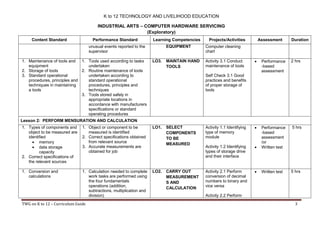
Content Standard Performance Standard Learning Competencies Projects/Activities Assessment Duration
unusual events reported to the
supervisor
EQUIPMENT Computer cleaning
chart
1. Maintenance of tools and
equipment
2. Storage of tools
3. Standard operational
procedures, principles and
techniques in maintaining
a tools
1. Tools used according to tasks
undertaken
2. Routine maintenance of tools
undertaken according to
standard operational
procedures, principles and
techniques
3. Tools stored safely in
appropriate locations in
accordance with manufacturers
specifications or standard
operating procedures
LO3. MAINTAIN HAND
TOOLS
Activity 3.1 Conduct
maintenance of tools
Self Check 3.1 Good
practices and benefits
of proper storage of
tools
 Performance
-based
assessment
2 hrs
Lesson 2: PERFORM MENSURATION AND CALCULATION
1. Types of components and
object to be measured are
identified
 memory
 data storage
capacity
2. Correct specifications of
the relevant sources
1. Object or component to be
measured is identified
2. Correct specifications obtained
from relevant source
3. Accurate measurements are
obtained for job
LO1. SELECT
COMPONENTS
TO BE
MEASURED
Activity 1.1 Identifying
type of memory
module
Activity 1.2 Identifying
types of storage drive
and their interface
 Performance
-based
assessment
/or
 Written test
5 hrs
1. Conversion and
calculations
1. Calculation needed to complete
work tasks are performed using
the four fundamentals
operations (addition,
subtractions, multiplication and
division)
LO2. CARRY OUT
MEASUREMENT
S AND
CALCULATION
Activity 2.1 Perform
conversion of decimal
numbers to binary and
vice versa
Activity 2.2 Perform
 Written test 5 hrs
K to 12 TECHNOLOGY AND LIVELIHOOD EDUCATION
INDUSTRIAL ARTS – COMPUTER HARDWARE SERVICING
(Exploratory)
TWG on K to 12 – Curriculum Guide 4
Content Standard Performance Standard Learning Competencies Projects/Activities Assessment Duration
2. Numerical computation is
self-checked and corrected
for accuracy
conversion from bytes
to kilobytes,
megabytes, gigabytes,
terabytes
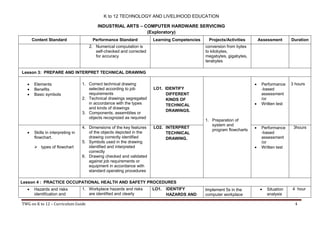
Lesson 3: PREPARE AND INTERPRET TECHNICAL DRAWING
 Elements
 Benefits
 Basic symbols
1. Correct technical drawing
selected according to job
requirements
2. Technical drawings segregated
in accordance with the types
and kinds of drawings
3. Components, assemblies or
objects recognized as required
LO1. IDENTIFY
DIFFERENT
KINDS OF
TECHNICAL
DRAWINGS.
1. Preparation of
system and
program flowcharts
 Performance
-based
assessment
/or
 Written test
3 hours
 Skills in interpreting in
flowchart.
 types of flowchart
4. Dimensions of the key features
of the objects depicted in the
drawing correctly identified
5. Symbols used in the drawing
identified and interpreted
correctly
6. Drawing checked and validated
against job requirements or
equipment in accordance with
standard operating procedures
LO2. INTERPRET
TECHNICAL
DRAWING.
 Performance
-based
assessment
/or
 Written test
3hours
Lesson 4 : PRACTICE OCCUPATIONAL HEALTH AND SAFETY PROCEDURES
 Hazards and risks
identification and
1. Workplace hazards and risks
are identified and clearly
LO1. IDENTIFY
HAZARDS AND
Implement 5s in the
computer workplace
 Situation
analysis
4 hour
K to 12 TECHNOLOGY AND LIVELIHOOD EDUCATION
INDUSTRIAL ARTS – COMPUTER HARDWARE SERVICING
(Exploratory)
TWG on K to 12 – Curriculum Guide 5
Content Standard Performance Standard Learning Competencies Projects/Activities Assessment Duration
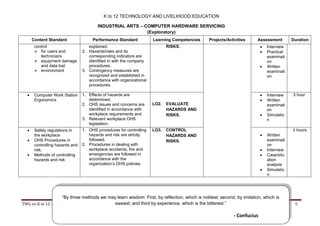
control
 for users and
technicians
 equipment damage
and data lost
 environment
explained.
2. Hazards/risks and its
corresponding indicators are
identified in with the company
procedures.
3. Contingency measures are
recognized and established in
accordance with organizational
procedures.
RISKS.  Interview
 Practical
examinati
on
 Written
examinati
on
 Computer Work Station
Ergonomics
1. Effects of hazards are
determined.
2. OHS issues and concerns are
identified in accordance with
workplace requirements and
3. Relevant workplace OHS
legislation.
LO2. EVALUATE
HAZARDS AND
RISKS.
 Interview
 Written
examinati
on
 Simulatio
n
3 hour
 Safety regulations in
the workplace
 OHS Procedures in
controlling hazards and
risk.
 Methods of controlling
hazards and risk
1. OHS procedures for controlling
hazards and risk are strictly
followed.
2. Procedures in dealing with
workplace accidents, fire and
emergencies are followed in
accordance with the
organization’s OHS policies.
LO3. CONTROL
HAZARDS AND
RISKS.
 Written
examinati
on
 Interview
 Case/situ
ation
analysis
 Simulatio
n
3 hours
“By three methods we may learn wisdom: First, by reflection, which is noblest; second, by imitation, which is
easiest; and third by experience, which is the bitterest.”
- Confucius

K to 12 Curriculum Guide for Computer_PCHS_v1.0

  • 1.
    K to 12BASIC EDUCATION CURRICULUM Exploratory Course on COMPUTER HARDWARE SERVICING Republic of the Philippines DEPARTMENT OF EDCUATION TECHNOLOGY AND LIVELIHOOD EDUCATION CURRICULUM GUIDE
  • 2.
    K to 12TECHNOLOGY AND LIVELIHOOD EDUCATION INDUSTRIAL ARTS – COMPUTER HARDWARE SERVICING (Exploratory) TWG on K to 12 – Curriculum Guide 2 Curriculum Guide for the Exploratory Course on Computer Hardware Servicing For you to get a complete picture of the complete TLE exploratory course on Computer Hardware Servicing, you are hereby provided with the Curriculum Guide on Computer Hardware Servicing. Content Standard Performance Standard Learning Competencies Projects/Activities Assessment Duration Lesson 1 - USE HAND TOOLS Demonstrate understanding of/on: 1. Tool selection 2. Hardware tools 1. Tasks to be undertaken are properly identified 2. Appropriate hand tools are identified and selected according to the task requirements LO1. PREPARE HAND TOOLS Activity 1.1 Prepare a plan in maintaining a personal computer.  Performance -based assessment 2 hrs 1. Operation of hand tools 2. Function of hand tools 3. Common faults of using hand tools 4. Tools preparation 1. Appropriate hand tools checked for proper operation and safety 2. Unsafe or faulty tools identified 3. Marked all tools for repair according to standard company procedures Activity 1.1 Segregation of tools according to its classification. Self Check 1.1 Knowing functions of hand tools  Written test 3 hrs 1. Proper use of tools  ESO tools  handtools 2. Proper use of cleaning materials 1. Tools used according to tasks undertaken 2. All safety procedures in using tools observed at all times 3. Malfunctions, unplanned or LO2. USE APPROPRIATE HAND TOOLS AND TEST Activity 2.1 Proper use of tools based on its function Self Check 2.1  Performance -based assessment 3 hrs
  • 3.
    K to 12TECHNOLOGY AND LIVELIHOOD EDUCATION INDUSTRIAL ARTS – COMPUTER HARDWARE SERVICING (Exploratory) TWG on K to 12 – Curriculum Guide 3 Content Standard Performance Standard Learning Competencies Projects/Activities Assessment Duration unusual events reported to the supervisor EQUIPMENT Computer cleaning chart 1. Maintenance of tools and equipment 2. Storage of tools 3. Standard operational procedures, principles and techniques in maintaining a tools 1. Tools used according to tasks undertaken 2. Routine maintenance of tools undertaken according to standard operational procedures, principles and techniques 3. Tools stored safely in appropriate locations in accordance with manufacturers specifications or standard operating procedures LO3. MAINTAIN HAND TOOLS Activity 3.1 Conduct maintenance of tools Self Check 3.1 Good practices and benefits of proper storage of tools  Performance -based assessment 2 hrs Lesson 2: PERFORM MENSURATION AND CALCULATION 1. Types of components and object to be measured are identified  memory  data storage capacity 2. Correct specifications of the relevant sources 1. Object or component to be measured is identified 2. Correct specifications obtained from relevant source 3. Accurate measurements are obtained for job LO1. SELECT COMPONENTS TO BE MEASURED Activity 1.1 Identifying type of memory module Activity 1.2 Identifying types of storage drive and their interface  Performance -based assessment /or  Written test 5 hrs 1. Conversion and calculations 1. Calculation needed to complete work tasks are performed using the four fundamentals operations (addition, subtractions, multiplication and division) LO2. CARRY OUT MEASUREMENT S AND CALCULATION Activity 2.1 Perform conversion of decimal numbers to binary and vice versa Activity 2.2 Perform  Written test 5 hrs
  • 4.
    K to 12TECHNOLOGY AND LIVELIHOOD EDUCATION INDUSTRIAL ARTS – COMPUTER HARDWARE SERVICING (Exploratory) TWG on K to 12 – Curriculum Guide 4 Content Standard Performance Standard Learning Competencies Projects/Activities Assessment Duration 2. Numerical computation is self-checked and corrected for accuracy conversion from bytes to kilobytes, megabytes, gigabytes, terabytes Lesson 3: PREPARE AND INTERPRET TECHNICAL DRAWING  Elements  Benefits  Basic symbols 1. Correct technical drawing selected according to job requirements 2. Technical drawings segregated in accordance with the types and kinds of drawings 3. Components, assemblies or objects recognized as required LO1. IDENTIFY DIFFERENT KINDS OF TECHNICAL DRAWINGS. 1. Preparation of system and program flowcharts  Performance -based assessment /or  Written test 3 hours  Skills in interpreting in flowchart.  types of flowchart 4. Dimensions of the key features of the objects depicted in the drawing correctly identified 5. Symbols used in the drawing identified and interpreted correctly 6. Drawing checked and validated against job requirements or equipment in accordance with standard operating procedures LO2. INTERPRET TECHNICAL DRAWING.  Performance -based assessment /or  Written test 3hours Lesson 4 : PRACTICE OCCUPATIONAL HEALTH AND SAFETY PROCEDURES  Hazards and risks identification and 1. Workplace hazards and risks are identified and clearly LO1. IDENTIFY HAZARDS AND Implement 5s in the computer workplace  Situation analysis 4 hour
  • 5.
    K to 12TECHNOLOGY AND LIVELIHOOD EDUCATION INDUSTRIAL ARTS – COMPUTER HARDWARE SERVICING (Exploratory) TWG on K to 12 – Curriculum Guide 5 Content Standard Performance Standard Learning Competencies Projects/Activities Assessment Duration control  for users and technicians  equipment damage and data lost  environment explained. 2. Hazards/risks and its corresponding indicators are identified in with the company procedures. 3. Contingency measures are recognized and established in accordance with organizational procedures. RISKS.  Interview  Practical examinati on  Written examinati on  Computer Work Station Ergonomics 1. Effects of hazards are determined. 2. OHS issues and concerns are identified in accordance with workplace requirements and 3. Relevant workplace OHS legislation. LO2. EVALUATE HAZARDS AND RISKS.  Interview  Written examinati on  Simulatio n 3 hour  Safety regulations in the workplace  OHS Procedures in controlling hazards and risk.  Methods of controlling hazards and risk 1. OHS procedures for controlling hazards and risk are strictly followed. 2. Procedures in dealing with workplace accidents, fire and emergencies are followed in accordance with the organization’s OHS policies. LO3. CONTROL HAZARDS AND RISKS.  Written examinati on  Interview  Case/situ ation analysis  Simulatio n 3 hours “By three methods we may learn wisdom: First, by reflection, which is noblest; second, by imitation, which is easiest; and third by experience, which is the bitterest.” - Confucius