Introduction to JUnit
using Mockito and
Powermockito
Topics
• What is Junit
• Introduction to Mockito and powermockito
• Methods used in Mockito & powermockito
• Code example
What is Unit Testing?
• Unit testing is the testing of single entity (class or method). Unit testing is very essential to
every software company to give a quality product to their customers.
JUnit
• JUnit is a Regression Testing Framework used by developers to
implement unit testing in Java and accelerate programming speed and
increase the quality of code.
• JUnit is a unit testing framework for Java programming language.
What are important features of JUnit?
• It is an open source framework.
• Provides Annotation to identify the test methods.
• Provides Assertions for testing expected results.
• Provides Test runners for running tests.
• JUnit tests can be organized into test suites containing test cases and even other test
suites.
• JUnit shows test progress in a bar that is green if test is going fine and it turns red
when a test fails
execution procedure of the JUnit test API
methods
• First of all method annotated as @BeforeClass execute only once.
• Lastly, the method annotated as @AfterClass executes only once.
• Method annotated as @Before executes for each test case but before executing the
test case.
• Method annotated as @After executes for each test case but after the execution of
test case.
• In between method annotated as @Before and method annotated as @After each
test case executes.
What is mocking?
• Mocking is a way to test the functionality of a class in isolation. Mocking
does not require a database connection or properties file read or file server
read to test a functionality. Mock objects do the mocking of the real service.
A mock object returns a dummy data corresponding to some dummy input
passed to it.
Introduction to Mockito
• Lets understand basic annotations like
1.Mock
2.Spy
3.InjectMocks
4.RunWith
Enable Mockito Annotations
First – let's see how to enable the use of annotations with Mockito tests.
In order for these annotations to be enabled, we'll need to annotate the JUnit test with a
runner – MockitoJUnitRunner as in the following example:
@RunWith(MockitoJUnitRunner.class)
public class MockitoAnnotationTest {
...
}
1
2
3
4
@Before
public void init() {
MockitoAnnotations.initMocks(this);
}
Alternatively, we can enable these annotations programmatically as well, by
invoking MockitoAnnotations.initMocks() as in the following example:
@Mock Annotation
The most used widely used annotation in Mockito is @Mock. We can use @Mock to create and inject mocked
instances without having to call Mockito.mock manually.
In the following example – we'll create a mocked ArrayList with the manual way without using @Mock annotation
1
2
3
4
5
6
7
8
9
10
11
@Test
public void whenNotUseMockAnnotation_thenCorrect() {
List mockList = Mockito.mock(ArrayList.class);
mockList.add("one");
Mockito.verify(mockList).add("one");
assertEquals(0, mockList.size());
Mockito.when(mockList.size()).thenReturn(100);
assertEquals(100, mockList.size());
}
1
2
3
4
5
6
7
8
9
10
11
12
@Mock
List<String> mockedList;
@Test
public void whenUseMockAnnotation_thenMockIsInjected() {
mockedList.add("one");
Mockito.verify(mockedList).add("one");
assertEquals(0, mockedList.size());
Mockito.when(mockedList.size()).thenReturn(100);
assertEquals(100, mockedList.size());
}
@Spy Annotation
1
2
3
4
5
6
7
8
9
10
11
12
13
14
15
@Test
public void whenNotUseSpyAnnotation_thenCorrect() {
List<String> spyList = Mockito.spy(new
ArrayList<String>());
spyList.add("one");
spyList.add("two");
Mockito.verify(spyList).add("one");
Mockito.verify(spyList).add("two");
assertEquals(2, spyList.size());
Mockito.doReturn(100).when(spyList).size();
assertEquals(100, spyList.size());
}
1
2
3
4
5
6
7
8
9
10
11
12
13
14
15
16
@Spy
List<String> spiedList = new ArrayList<String>();
@Test
public void whenUseSpyAnnotation_thenSpyIsInjectedCorrectly() {
spiedList.add("one");
spiedList.add("two");
Mockito.verify(spiedList).add("one");
Mockito.verify(spiedList).add("two");
assertEquals(2, spiedList.size());
Mockito.doReturn(100).when(spiedList).size();
assertEquals(100, spiedList.size());
}
In this example we:
• Used the real method spiedList.add() to add elements to the spiedList.
• Stubbed the method spiedList.size() to return 100 instead of 2 using Mockito.doReturn().
@InjectMocks Annotation
Now – let's discuss how to use @InjectMocks annotation – to inject mock fields into the tested object automatically.
In the following example – we use @InjectMocks to inject the mock wordMap into the MyDictionary dic:
1
2
3
4
5
6
7
8
9
10
11
12
@Mock
Map<String, String> wordMap;
@InjectMocks
MyDictionary dic = new MyDictionary();
@Test
public void whenUseInjectMocksAnnotation_thenCorrect() {
Mockito.when(wordMap.get("aWord")).thenReturn("aMeaning");
assertEquals("aMeaning", dic.getMeaning("aWord"));
}
1
2
3
4
5
6
7
8
9
10
11
12
13
public class MyDictionary {
Map<String, String> wordMap;
public MyDictionary() {
wordMap = new HashMap<String, String>();
}
public void add(final String word, final String meaning) {
wordMap.put(word, meaning);
}
public String getMeaning(final String word) {
return wordMap.get(word);
}
}
Original ClassTest Class
ArgumentMatchers
• Mockito.anyInt()
• Mockito.anyString()
• Mockito.anyDouble()
• Mockito.anyObject()
• Mockito.anyList()
• etc
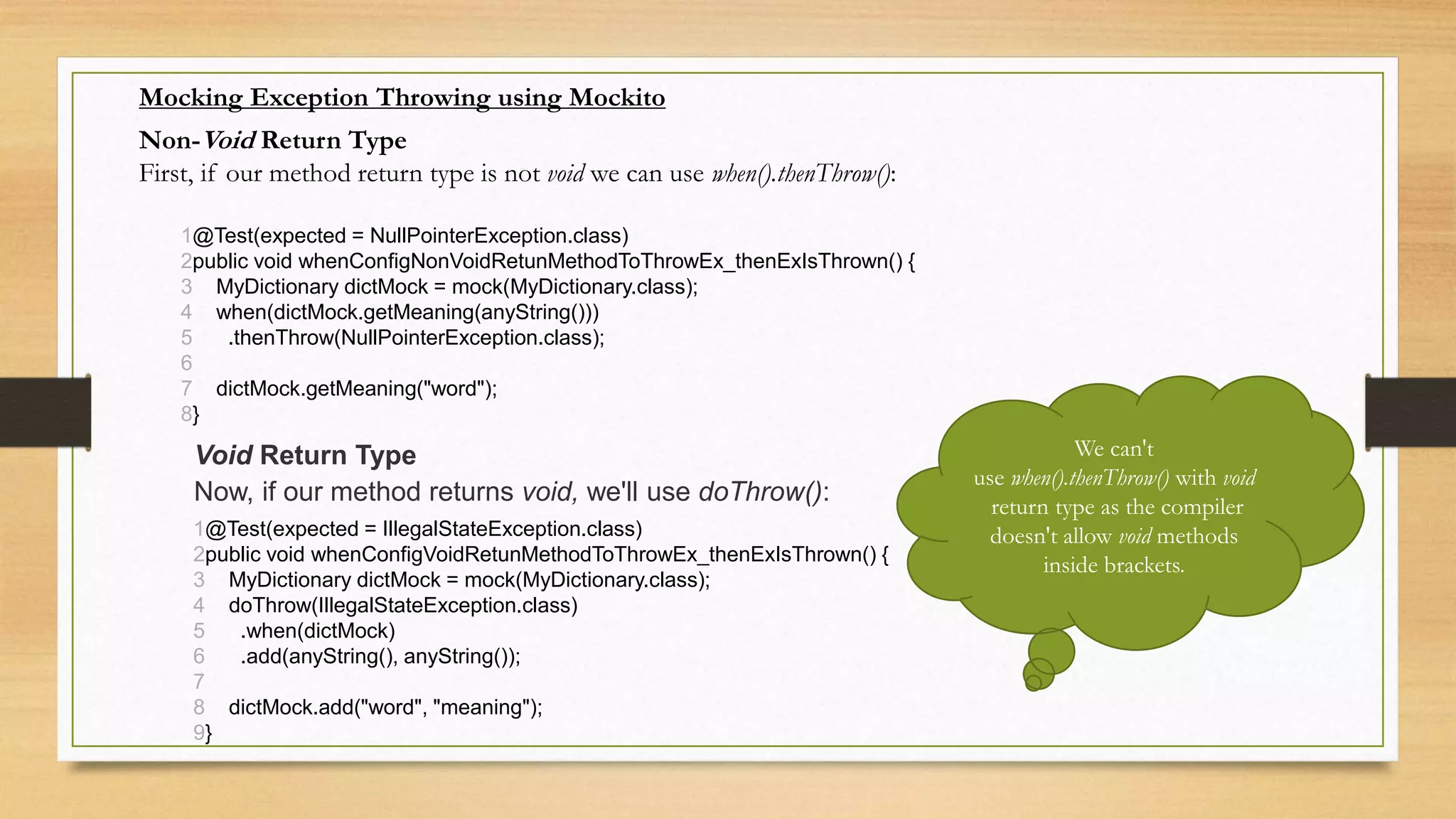
Mocking Exception Throwing using Mockito
Non-Void Return Type
First, if our method return type is not void we can use when().thenThrow():
1
2
3
4
5
6
7
8
@Test(expected = NullPointerException.class)
public void whenConfigNonVoidRetunMethodToThrowEx_thenExIsThrown() {
MyDictionary dictMock = mock(MyDictionary.class);
when(dictMock.getMeaning(anyString()))
.thenThrow(NullPointerException.class);
dictMock.getMeaning("word");
}
Void Return Type
Now, if our method returns void, we'll use doThrow():
1
2
3
4
5
6
7
8
9
@Test(expected = IllegalStateException.class)
public void whenConfigVoidRetunMethodToThrowEx_thenExIsThrown() {
MyDictionary dictMock = mock(MyDictionary.class);
doThrow(IllegalStateException.class)
.when(dictMock)
.add(anyString(), anyString());
dictMock.add("word", "meaning");
}
We can't
use when().thenThrow() with void
return type as the compiler
doesn't allow void methods
inside brackets.
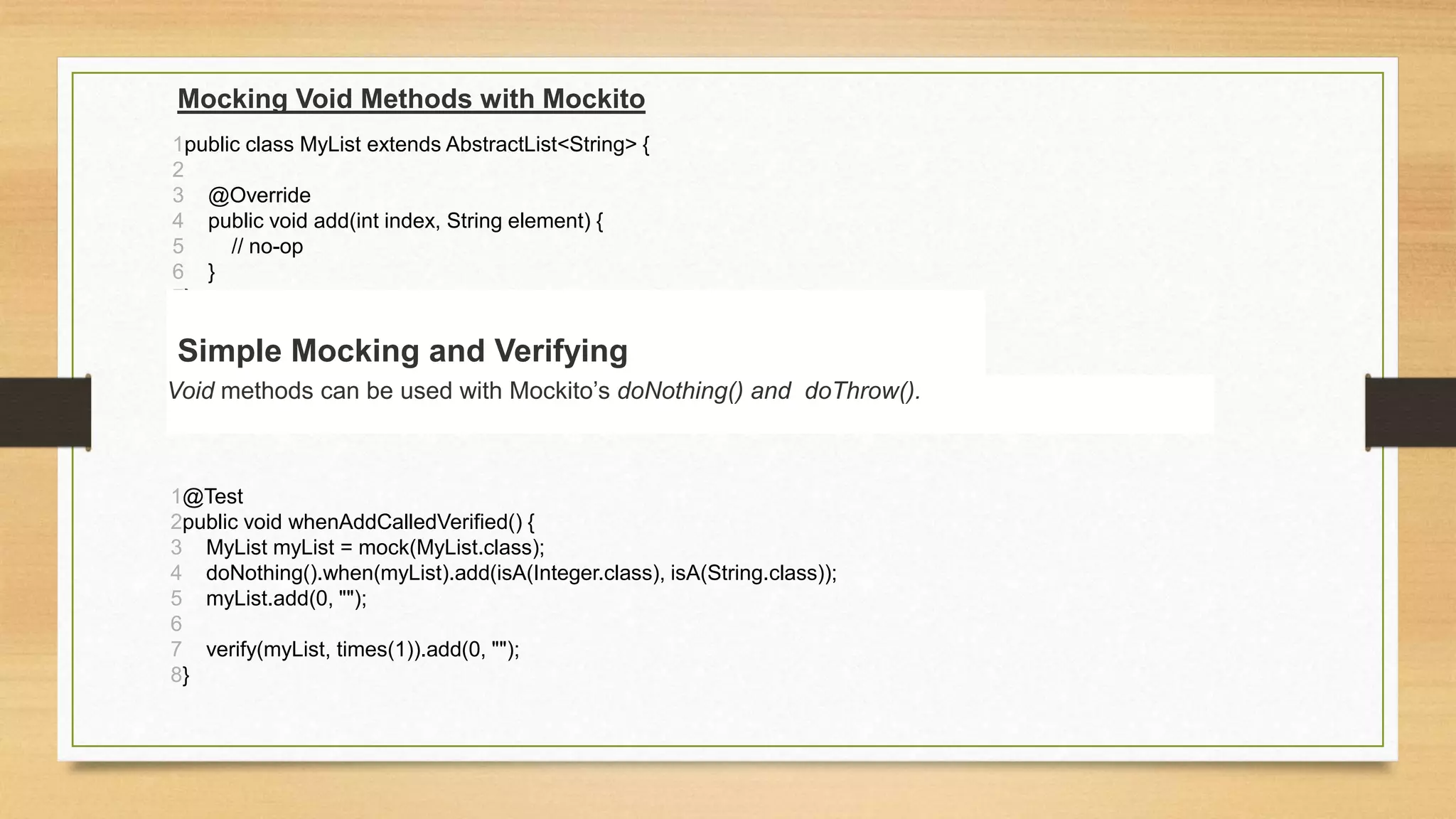
Mocking Void Methods with Mockito
1
2
3
4
5
6
7
public class MyList extends AbstractList<String> {
@Override
public void add(int index, String element) {
// no-op
}
}
1
2
3
4
5
6
7
8
@Test
public void whenAddCalledVerified() {
MyList myList = mock(MyList.class);
doNothing().when(myList).add(isA(Integer.class), isA(String.class));
myList.add(0, "");
verify(myList, times(1)).add(0, "");
}
Simple Mocking and Verifying
Void methods can be used with Mockito’s doNothing() and doThrow().
Introduction to PowerMockito
• PowerMockito is a PowerMock's extension API to support Mockito. It
provides capabilities to work with the Java Reflection API in a simple way to
overcome the problems of Mockito, such as the lack of ability to mock final,
static or private methods.
• Preparing for Testing with PowerMockito
1
2
@RunWith(PowerMockRunner.class)
@PrepareForTest(fullyQualifiedNames = "com.baeldung.powermockito.introduction.*")
The fullyQualifiedNames element in the @PrepareForTest annotation represents an array of fully qualified names of
types we want to mock. In this case, we use a package name with a wildcard to tell PowerMockito to prepare all types
within the com.baeldung.powermockito.introduction package for mocking.
Now we are ready to exploit the power of PowerMockito.
Mocking Constructors and Final Methods
1
2
3
4
5
public class CollaboratorWithFinalMethods {
public final String helloMethod() {
return "Hello World!";
}
}
1
CollaboratorWithFinalMethods mock =
mock(CollaboratorWithFinalMethods.class);
whenNew(CollaboratorWithFinalMethods.class).withNoArguments()
.thenReturn(mock);
when(collaborator.helloMethod()).thenReturn("Hello Baeldung!");
String welcome = collaborator.helloMethod();
Mockito.verify(collaborator).helloMethod();
assertEquals("Hello Baeldung!", welcome);
Original code Test Case steps
Mocking Static Methods
1mockStatic(CollaboratorWithStaticMethods.class);
In order to mock these static methods, we need to register the enclosing class with
the PowerMockito API:
Mocking Private Methods
LuckyNumberGenerator mock = spy(new LuckyNumberGenerator());
when(mock, "getDefaultLuckyNumber").thenReturn(300);
Method with No Arguments but with Return Value
Method with Argument and Return Value
LuckyNumberGenerator mock = spy(new LuckyNumberGenerator());
doReturn(1).when(mock, "getComputedLuckyNumber", ArgumentMatchers.anyInt());
Q & A

Junit mockito and PowerMock in Java

  • 1.
    Introduction to JUnit usingMockito and Powermockito
  • 2.
    Topics • What isJunit • Introduction to Mockito and powermockito • Methods used in Mockito & powermockito • Code example
  • 3.
    What is UnitTesting? • Unit testing is the testing of single entity (class or method). Unit testing is very essential to every software company to give a quality product to their customers.
  • 4.
    JUnit • JUnit isa Regression Testing Framework used by developers to implement unit testing in Java and accelerate programming speed and increase the quality of code. • JUnit is a unit testing framework for Java programming language.
  • 5.
    What are importantfeatures of JUnit? • It is an open source framework. • Provides Annotation to identify the test methods. • Provides Assertions for testing expected results. • Provides Test runners for running tests. • JUnit tests can be organized into test suites containing test cases and even other test suites. • JUnit shows test progress in a bar that is green if test is going fine and it turns red when a test fails
  • 6.
    execution procedure ofthe JUnit test API methods • First of all method annotated as @BeforeClass execute only once. • Lastly, the method annotated as @AfterClass executes only once. • Method annotated as @Before executes for each test case but before executing the test case. • Method annotated as @After executes for each test case but after the execution of test case. • In between method annotated as @Before and method annotated as @After each test case executes.
  • 7.
    What is mocking? •Mocking is a way to test the functionality of a class in isolation. Mocking does not require a database connection or properties file read or file server read to test a functionality. Mock objects do the mocking of the real service. A mock object returns a dummy data corresponding to some dummy input passed to it.
  • 8.
    Introduction to Mockito •Lets understand basic annotations like 1.Mock 2.Spy 3.InjectMocks 4.RunWith
  • 9.
    Enable Mockito Annotations First– let's see how to enable the use of annotations with Mockito tests. In order for these annotations to be enabled, we'll need to annotate the JUnit test with a runner – MockitoJUnitRunner as in the following example: @RunWith(MockitoJUnitRunner.class) public class MockitoAnnotationTest { ... } 1 2 3 4 @Before public void init() { MockitoAnnotations.initMocks(this); } Alternatively, we can enable these annotations programmatically as well, by invoking MockitoAnnotations.initMocks() as in the following example:
  • 10.
    @Mock Annotation The mostused widely used annotation in Mockito is @Mock. We can use @Mock to create and inject mocked instances without having to call Mockito.mock manually. In the following example – we'll create a mocked ArrayList with the manual way without using @Mock annotation 1 2 3 4 5 6 7 8 9 10 11 @Test public void whenNotUseMockAnnotation_thenCorrect() { List mockList = Mockito.mock(ArrayList.class); mockList.add("one"); Mockito.verify(mockList).add("one"); assertEquals(0, mockList.size()); Mockito.when(mockList.size()).thenReturn(100); assertEquals(100, mockList.size()); } 1 2 3 4 5 6 7 8 9 10 11 12 @Mock List<String> mockedList; @Test public void whenUseMockAnnotation_thenMockIsInjected() { mockedList.add("one"); Mockito.verify(mockedList).add("one"); assertEquals(0, mockedList.size()); Mockito.when(mockedList.size()).thenReturn(100); assertEquals(100, mockedList.size()); }
  • 11.
    @Spy Annotation 1 2 3 4 5 6 7 8 9 10 11 12 13 14 15 @Test public voidwhenNotUseSpyAnnotation_thenCorrect() { List<String> spyList = Mockito.spy(new ArrayList<String>()); spyList.add("one"); spyList.add("two"); Mockito.verify(spyList).add("one"); Mockito.verify(spyList).add("two"); assertEquals(2, spyList.size()); Mockito.doReturn(100).when(spyList).size(); assertEquals(100, spyList.size()); } 1 2 3 4 5 6 7 8 9 10 11 12 13 14 15 16 @Spy List<String> spiedList = new ArrayList<String>(); @Test public void whenUseSpyAnnotation_thenSpyIsInjectedCorrectly() { spiedList.add("one"); spiedList.add("two"); Mockito.verify(spiedList).add("one"); Mockito.verify(spiedList).add("two"); assertEquals(2, spiedList.size()); Mockito.doReturn(100).when(spiedList).size(); assertEquals(100, spiedList.size()); } In this example we: • Used the real method spiedList.add() to add elements to the spiedList. • Stubbed the method spiedList.size() to return 100 instead of 2 using Mockito.doReturn().
  • 12.
    @InjectMocks Annotation Now –let's discuss how to use @InjectMocks annotation – to inject mock fields into the tested object automatically. In the following example – we use @InjectMocks to inject the mock wordMap into the MyDictionary dic: 1 2 3 4 5 6 7 8 9 10 11 12 @Mock Map<String, String> wordMap; @InjectMocks MyDictionary dic = new MyDictionary(); @Test public void whenUseInjectMocksAnnotation_thenCorrect() { Mockito.when(wordMap.get("aWord")).thenReturn("aMeaning"); assertEquals("aMeaning", dic.getMeaning("aWord")); } 1 2 3 4 5 6 7 8 9 10 11 12 13 public class MyDictionary { Map<String, String> wordMap; public MyDictionary() { wordMap = new HashMap<String, String>(); } public void add(final String word, final String meaning) { wordMap.put(word, meaning); } public String getMeaning(final String word) { return wordMap.get(word); } } Original ClassTest Class
  • 13.
    ArgumentMatchers • Mockito.anyInt() • Mockito.anyString() •Mockito.anyDouble() • Mockito.anyObject() • Mockito.anyList() • etc
  • 14.
    Mocking Exception Throwingusing Mockito Non-Void Return Type First, if our method return type is not void we can use when().thenThrow(): 1 2 3 4 5 6 7 8 @Test(expected = NullPointerException.class) public void whenConfigNonVoidRetunMethodToThrowEx_thenExIsThrown() { MyDictionary dictMock = mock(MyDictionary.class); when(dictMock.getMeaning(anyString())) .thenThrow(NullPointerException.class); dictMock.getMeaning("word"); } Void Return Type Now, if our method returns void, we'll use doThrow(): 1 2 3 4 5 6 7 8 9 @Test(expected = IllegalStateException.class) public void whenConfigVoidRetunMethodToThrowEx_thenExIsThrown() { MyDictionary dictMock = mock(MyDictionary.class); doThrow(IllegalStateException.class) .when(dictMock) .add(anyString(), anyString()); dictMock.add("word", "meaning"); } We can't use when().thenThrow() with void return type as the compiler doesn't allow void methods inside brackets.
  • 15.
    Mocking Void Methodswith Mockito 1 2 3 4 5 6 7 public class MyList extends AbstractList<String> { @Override public void add(int index, String element) { // no-op } } 1 2 3 4 5 6 7 8 @Test public void whenAddCalledVerified() { MyList myList = mock(MyList.class); doNothing().when(myList).add(isA(Integer.class), isA(String.class)); myList.add(0, ""); verify(myList, times(1)).add(0, ""); } Simple Mocking and Verifying Void methods can be used with Mockito’s doNothing() and doThrow().
  • 16.
    Introduction to PowerMockito •PowerMockito is a PowerMock's extension API to support Mockito. It provides capabilities to work with the Java Reflection API in a simple way to overcome the problems of Mockito, such as the lack of ability to mock final, static or private methods. • Preparing for Testing with PowerMockito 1 2 @RunWith(PowerMockRunner.class) @PrepareForTest(fullyQualifiedNames = "com.baeldung.powermockito.introduction.*") The fullyQualifiedNames element in the @PrepareForTest annotation represents an array of fully qualified names of types we want to mock. In this case, we use a package name with a wildcard to tell PowerMockito to prepare all types within the com.baeldung.powermockito.introduction package for mocking. Now we are ready to exploit the power of PowerMockito.
  • 17.
    Mocking Constructors andFinal Methods 1 2 3 4 5 public class CollaboratorWithFinalMethods { public final String helloMethod() { return "Hello World!"; } } 1 CollaboratorWithFinalMethods mock = mock(CollaboratorWithFinalMethods.class); whenNew(CollaboratorWithFinalMethods.class).withNoArguments() .thenReturn(mock); when(collaborator.helloMethod()).thenReturn("Hello Baeldung!"); String welcome = collaborator.helloMethod(); Mockito.verify(collaborator).helloMethod(); assertEquals("Hello Baeldung!", welcome); Original code Test Case steps
  • 18.
    Mocking Static Methods 1mockStatic(CollaboratorWithStaticMethods.class); Inorder to mock these static methods, we need to register the enclosing class with the PowerMockito API:
  • 19.
    Mocking Private Methods LuckyNumberGeneratormock = spy(new LuckyNumberGenerator()); when(mock, "getDefaultLuckyNumber").thenReturn(300); Method with No Arguments but with Return Value Method with Argument and Return Value LuckyNumberGenerator mock = spy(new LuckyNumberGenerator()); doReturn(1).when(mock, "getComputedLuckyNumber", ArgumentMatchers.anyInt());
  • 20.