Comment réaliser votre câble JTAG

Ce document s’adresse aux propriétaires d’un démodulateur (ici powersky) ‘mort’ pour
                            avoir (mal) upgrader le firmware
             En particulier le bootloader et avoir perdu la connexion RS232
                         Qui aurait permis la reprogrammation
                                 This tutorial is in French
              followed of an english and approximate translation (sorry)…
Il n’engage que vous, mais m’a permis de ressusciter mon démodulateur après upgrade
                                d’un mauvais bootloader…

                    D’abord, c’est quoi un câble JTAG ?
           Ce câble permet la communication entre un PC et le processeur
                Ou les mémoires de certains appareils électroniques
                    Comme votre démodulateur POWERSKY…
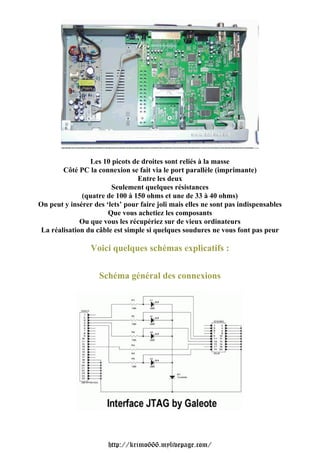
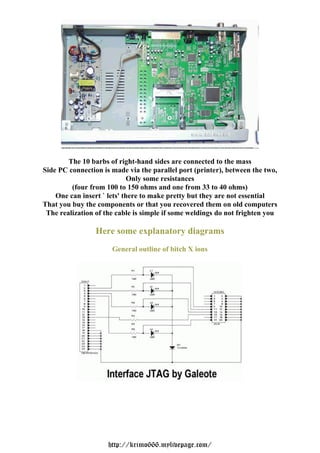
              Le port de communication est un connecteur à 20 picots
               Se trouvant sur la carte-mère de votre démodulateur :


                          http://krimo666.mylivepage.com/
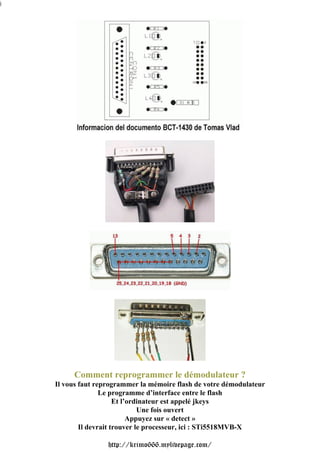
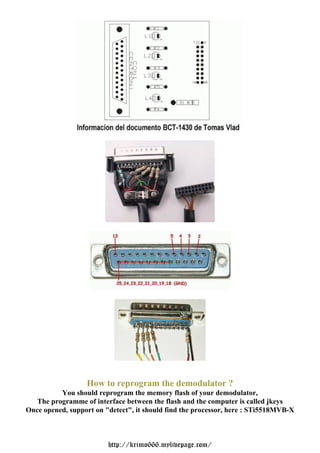
Les 10 picots de droites sont reliés à la masse
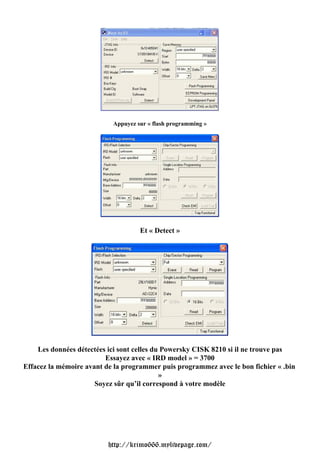
        Côté PC la connexion se fait via le port parallèle (imprimante)
                                 Entre les deux
                        Seulement quelques résistances
              (quatre de 100 à 150 ohms et une de 33 à 40 ohms)
On peut y insérer des ‘lets’ pour faire joli mais elles ne sont pas indispensables
                       Que vous achetiez les composants
              Ou que vous les récupériez sur de vieux ordinateurs
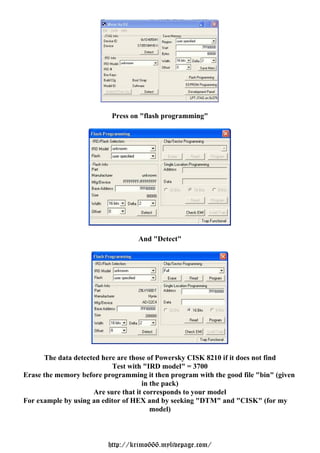
 La réalisation du câble est simple si quelques soudures ne vous font pas peur

                 Voici quelques schémas explicatifs :


                    Schéma général des connexions


                       http://krimo666.mylivepage.com/
j


         Comment reprogrammer le démodulateur ?
    Il vous faut reprogrammer la mémoire flash de votre démodulateur
                   Le programme d’interface entre le flash
                        Et l’ordinateur est appelé jkeys
                                Une fois ouvert
                             Appuyez sur « detect »
            Il devrait trouver le processeur, ici : STi5518MVB-X

                    http://krimo666.mylivepage.com/
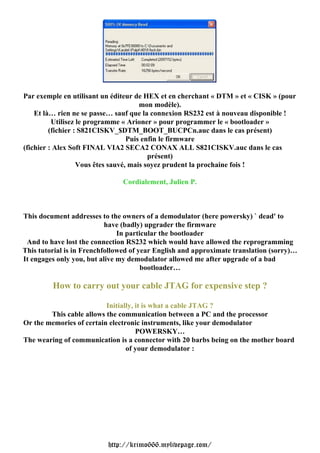
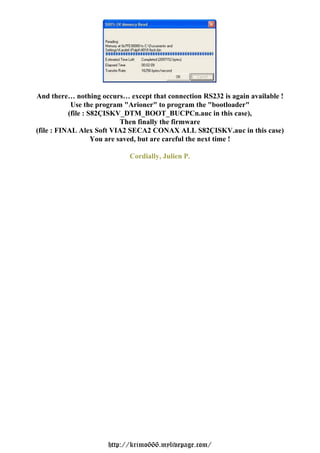
Appuyez sur « flash programming »


                                    Et « Detect »


    Les données détectées ici sont celles du Powersky CISK 8210 si il ne trouve pas
                         Essayez avec « IRD model » = 3700
Effacez la mémoire avant de la programmer puis programmez avec le bon fichier « .bin
                                            »
                      Soyez sûr qu’il correspond à votre modèle


                          http://krimo666.mylivepage.com/
Par exemple en utilisant un éditeur de HEX et en cherchant « DTM » et « CISK » (pour
                                       mon modèle).
    Et là… rien ne se passe… sauf que la connexion RS232 est à nouveau disponible !
          Utilisez le programme « Arioner » pour programmer le « bootloader »
         (fichier : S821CISKV_$DTM_BOOT_BUCPCn.auc dans le cas présent)
                                   Puis enfin le firmware
(fichier : Alex Soft FINAL VIA2 SECA2 CONAX ALL S821CISKV.auc dans le cas
                                          présent)
                   Vous êtes sauvé, mais soyez prudent la prochaine fois !

                               Cordialement, Julien P.


This document addresses to the owners of a demodulator (here powersky) ` dead' to
                           have (badly) upgrader the firmware
                               In particular the bootloader
 And to have lost the connection RS232 which would have allowed the reprogramming
This tutorial is in Frenchfollowed of year English and approximate translation (sorry)…
It engages only you, but alive my demodulator allowed me after upgrade of a bad
                                       bootloader…

         How to carry out your cable JTAG for expensive step ?

                          Initially, it is what a cable JTAG ?
        This cable allows the communication between a PC and the processor
Or the memories of certain electronic instruments, like your demodulator
                                     POWERSKY…
The wearing of communication is a connector with 20 barbs being on the mother board
                                 of your demodulator :


                           http://krimo666.mylivepage.com/
The 10 barbs of right-hand sides are connected to the mass
Side PC connection is made via the parallel port (printer), between the two,
                             Only some resistances
         (four from 100 to 150 ohms and one from 33 to 40 ohms)
    One can insert ` lets' there to make pretty but they are not essential
That you buy the components or that you recovered them on old computers
 The realization of the cable is simple if some weldings do not frighten you

                 Here some explanatory diagrams
                      General outline of bitch X ions


                     http://krimo666.mylivepage.com/
How to reprogram the demodulator ?
          You should reprogram the memory flash of your demodulator,
   The programme of interface between the flash and the computer is called jkeys
Once opened, support on "detect", it should find the processor, here : STi5518MVB-X


                         http://krimo666.mylivepage.com/
Press on "flash programming"


                                   And "Detect"


      The data detected here are those of Powersky CISK 8210 if it does not find
                           Test with "IRD model" = 3700
Erase the memory before programming it then program with the good file "bin" (given
                                     in the pack)
                     Are sure that it corresponds to your model
For example by using an editor of HEX and by seeking "DTM" and "CISK" (for my
                                        model)


                         http://krimo666.mylivepage.com/
And there… nothing occurs… except that connection RS232 is again available !
            Use the program "Arioner" to program the "bootloader"
           (file : S82ÇISKV_DTM_BOOT_BUCPCn.auc in this case),
                             Then finally the firmware
(file : FINAL Alex Soft VIA2 SECA2 CONAX ALL S82ÇISKV.auc in this case)
                    You are saved, but are careful the next time !

                            Cordially, Julien P.


                      http://krimo666.mylivepage.com/

Jtag Powersky

  • 1.
    Comment réaliser votrecâble JTAG Ce document s’adresse aux propriétaires d’un démodulateur (ici powersky) ‘mort’ pour avoir (mal) upgrader le firmware En particulier le bootloader et avoir perdu la connexion RS232 Qui aurait permis la reprogrammation This tutorial is in French followed of an english and approximate translation (sorry)… Il n’engage que vous, mais m’a permis de ressusciter mon démodulateur après upgrade d’un mauvais bootloader… D’abord, c’est quoi un câble JTAG ? Ce câble permet la communication entre un PC et le processeur Ou les mémoires de certains appareils électroniques Comme votre démodulateur POWERSKY… Le port de communication est un connecteur à 20 picots Se trouvant sur la carte-mère de votre démodulateur : http://krimo666.mylivepage.com/
  • 2.
    Les 10 picotsde droites sont reliés à la masse Côté PC la connexion se fait via le port parallèle (imprimante) Entre les deux Seulement quelques résistances (quatre de 100 à 150 ohms et une de 33 à 40 ohms) On peut y insérer des ‘lets’ pour faire joli mais elles ne sont pas indispensables Que vous achetiez les composants Ou que vous les récupériez sur de vieux ordinateurs La réalisation du câble est simple si quelques soudures ne vous font pas peur Voici quelques schémas explicatifs : Schéma général des connexions http://krimo666.mylivepage.com/
  • 3.
    j Comment reprogrammer le démodulateur ? Il vous faut reprogrammer la mémoire flash de votre démodulateur Le programme d’interface entre le flash Et l’ordinateur est appelé jkeys Une fois ouvert Appuyez sur « detect » Il devrait trouver le processeur, ici : STi5518MVB-X http://krimo666.mylivepage.com/
  • 4.
    Appuyez sur «flash programming » Et « Detect » Les données détectées ici sont celles du Powersky CISK 8210 si il ne trouve pas Essayez avec « IRD model » = 3700 Effacez la mémoire avant de la programmer puis programmez avec le bon fichier « .bin » Soyez sûr qu’il correspond à votre modèle http://krimo666.mylivepage.com/
  • 5.
    Par exemple enutilisant un éditeur de HEX et en cherchant « DTM » et « CISK » (pour mon modèle). Et là… rien ne se passe… sauf que la connexion RS232 est à nouveau disponible ! Utilisez le programme « Arioner » pour programmer le « bootloader » (fichier : S821CISKV_$DTM_BOOT_BUCPCn.auc dans le cas présent) Puis enfin le firmware (fichier : Alex Soft FINAL VIA2 SECA2 CONAX ALL S821CISKV.auc dans le cas présent) Vous êtes sauvé, mais soyez prudent la prochaine fois ! Cordialement, Julien P. This document addresses to the owners of a demodulator (here powersky) ` dead' to have (badly) upgrader the firmware In particular the bootloader And to have lost the connection RS232 which would have allowed the reprogramming This tutorial is in Frenchfollowed of year English and approximate translation (sorry)… It engages only you, but alive my demodulator allowed me after upgrade of a bad bootloader… How to carry out your cable JTAG for expensive step ? Initially, it is what a cable JTAG ? This cable allows the communication between a PC and the processor Or the memories of certain electronic instruments, like your demodulator POWERSKY… The wearing of communication is a connector with 20 barbs being on the mother board of your demodulator : http://krimo666.mylivepage.com/
  • 6.
    The 10 barbsof right-hand sides are connected to the mass Side PC connection is made via the parallel port (printer), between the two, Only some resistances (four from 100 to 150 ohms and one from 33 to 40 ohms) One can insert ` lets' there to make pretty but they are not essential That you buy the components or that you recovered them on old computers The realization of the cable is simple if some weldings do not frighten you Here some explanatory diagrams General outline of bitch X ions http://krimo666.mylivepage.com/
  • 7.
    How to reprogramthe demodulator ? You should reprogram the memory flash of your demodulator, The programme of interface between the flash and the computer is called jkeys Once opened, support on "detect", it should find the processor, here : STi5518MVB-X http://krimo666.mylivepage.com/
  • 8.
    Press on "flashprogramming" And "Detect" The data detected here are those of Powersky CISK 8210 if it does not find Test with "IRD model" = 3700 Erase the memory before programming it then program with the good file "bin" (given in the pack) Are sure that it corresponds to your model For example by using an editor of HEX and by seeking "DTM" and "CISK" (for my model) http://krimo666.mylivepage.com/
  • 9.
    And there… nothingoccurs… except that connection RS232 is again available ! Use the program "Arioner" to program the "bootloader" (file : S82ÇISKV_DTM_BOOT_BUCPCn.auc in this case), Then finally the firmware (file : FINAL Alex Soft VIA2 SECA2 CONAX ALL S82ÇISKV.auc in this case) You are saved, but are careful the next time ! Cordially, Julien P. http://krimo666.mylivepage.com/