Journey to the cloud - experiences in
migrating an on-premise infrastructure to
AWS
Mikhail Advani
ThoughtWorks
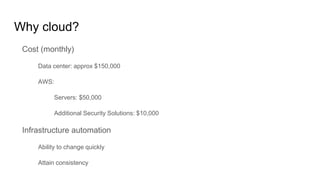
Why cloud?
Cost (monthly)
Data center: approx $150,000
AWS:
Servers: $50,000
Additional Security Solutions: $10,000
Infrastructure automation
Ability to change quickly
Attain consistency
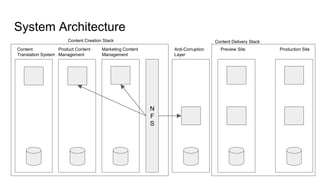
System Architecture
N
F
S
Product Content
Management
Marketing Content
Management
Anti-Corruption
Layer
Preview Site Production Site
Content Creation Stack Content Delivery Stack
Content
Translation System
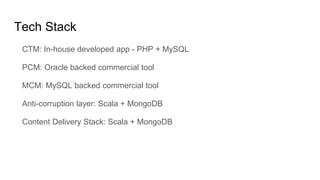
Tech Stack
CTM: In-house developed app - PHP + MySQL
PCM: Oracle backed commercial tool
MCM: MySQL backed commercial tool
Anti-corruption layer: Scala + MongoDB
Content Delivery Stack: Scala + MongoDB
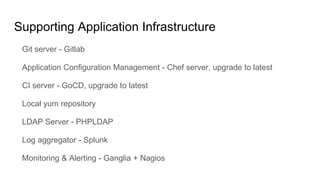
Supporting Application Infrastructure
Git server - Gitlab
Application Configuration Management - Chef server, upgrade to latest
CI server - GoCD, upgrade to latest
Local yum repository
LDAP Server - PHPLDAP
Log aggregator - Splunk
Monitoring & Alerting - Ganglia + Nagios
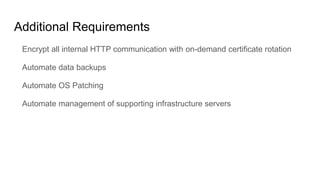
Additional Requirements
Encrypt all internal HTTP communication with on-demand certificate rotation
Automate data backups
Automate OS Patching
Automate management of supporting infrastructure servers
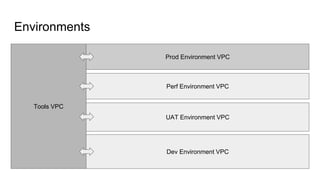
Environments
Tools VPC
Prod Environment VPC
Perf Environment VPC
UAT Environment VPC
Dev Environment VPC
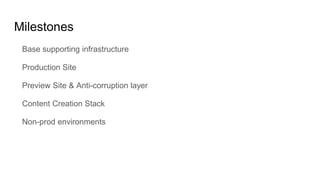
Milestones
Base supporting infrastructure
Production Site
Preview Site & Anti-corruption layer
Content Creation Stack
Non-prod environments
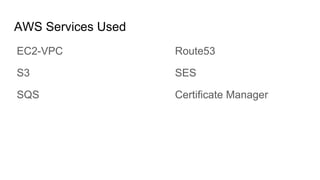
AWS Services Used
EC2-VPC
S3
SQS
Route53
SES
Certificate Manager
EC2 creation
Factors to select infrastructure automation tool:
Idempotency
Simplicity
Serverless
DNS
Emails
Proxy & Relays
Monitoring
Backups
EBS backups
S3 backups
Jump Box
Authorization
Key logging
No SSH open at the network level
SSL Certificate Rotation
Secret Management
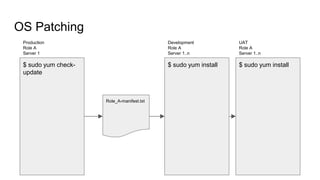
OS Patching
$ sudo yum check-
update
Production
Role A
Server 1
Role_A-manifest.txt
$ sudo yum install
Development
Role A
Server 1..n
$ sudo yum install
UAT
Role A
Server 1..n
SSH Key Rotation
Migration Day

Journey to the cloud

Editor's Notes

  • #3 What automation also gave us was identical structure across environments and faster spinup of new servers
  • #7 Backups were previously carried out by snapshotting the complete system. OS patching was a manual activity(typically 1 day)
  • #8 One environment per VPC got us the isolation we wanted between environments. Also production, non-prod and tools VPCs belonged to different accounts Dedicated tenancy was chosen in Tools & Prod a safe-guard against future hypervisor vulnerabilities and also as a compliance measure
  • #11 We chose Ansible after evaluating terraform, chef and cloud formation AWS CLI and python boto were also used where ansible fell short
  • #12 Route53 was a winner being a managed service. We didn’t need to care about availability. Gotcha’s: In case you want cross account VPCs to share the same hosted zone, raise a request from both the accounts and give enough lead time Route53 DNS resolution may not work for the first few seconds when your instance is booting up. As a result, any custom services that you have defined to run on boot up should be tolerant to DNS failures
  • #13 Purpose: Alerts and reports SES Simple, quick. Bounce handling was done using a logger Emails had to be sent from instances in the pvt subnet. This became a problem
  • #14 NAT Gateway would have been much better Support for all protocols HA would be managed Squid as HTTP(S) proxy Postfix for SMTP relay Cron for SFTP
  • #15 Ganglia - Custom alerts using Nagios Given a choice, we would have considered migrating our monitoring to another tools CloudWatch for RDS & ELB - No alerts
  • #16 EBS backups - anything which stored data in simple files S3 backups - artifacts exported by applications which were being uploaded by cron driven scripts Clean up of artifacts should be done iff the new backup was successful Restoration was manual
  • #17 EC2Box, for of KeyBox Browser based AWS tags based filtering for authorization SSH keys were stored securely within the DB of the tool
  • #18 SSL Certificate key pairs were checked into version control and deployed with every run In case of non-prod environments, self-signed SSL certificates were generated with every run
  • #19 git-crypt: Certificates & SSH keys were also checked into version control, encrypted using git-crypt ansible-vault: Credentials were stored encrypted using ansible-vault The distribution of these keys on developer machines, deploy agents and ansible controller were carried out manually as it was a one time activity vs the complexity of setup of a key management system
  • #21 We had shared AMI’s across our environments from which we had not removed the public key. As a result we used a common SSH key across accounts. The additional key pair setup while instance creation was an alternative way to SSH into our instances. Key rotation was automated by adding the new key and then removing the existing key
  • #22 750+ GB of data, 50 million files Ensure a dry run of data copy before actual migration pbzip2 is a very useful tool to archive large number of small files Configure the maintenance window to be different as compared to your RDS import duration. 110GB in dry run which took about 1 hour took in excess of 8 hours due to backup running