Journey to
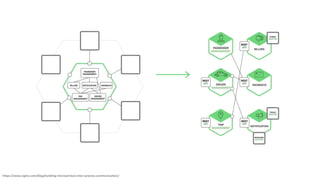
Microservice architecture
via Amazon Lambda
https://www.flickr.com/photos/robertthigpen/5651555624/
Sergej Jakovljev
https://www.nginx.com/blog/building-microservices-inter-process-communication/
Example
RDS with Lambda
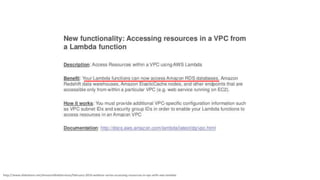
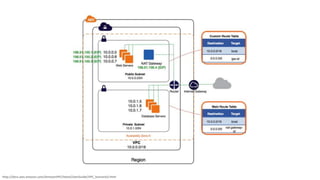
http://www.slideshare.net/AmazonWebServices/february-2016-webinar-series-accessing-resources-in-vpc-with-aws-lambda
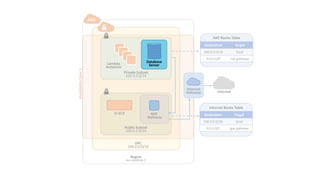
http://docs.aws.amazon.com/AmazonVPC/latest/UserGuide/VPC_Scenario2.html
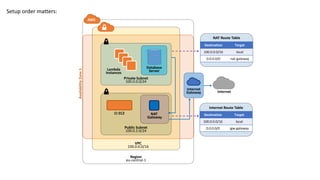
VPC
100.0.0.0/16
AWS
Private Subnet
100.0.0.0/24
Public Subnet
100.0.2.0/24
Internet
Gateway
Lambda
Instances
NAT
Gateway
Database
Server
NAT Route Table
Destination Target
100.0.0.0/16 local
0.0.0.0/0 nat-gateway
Internet Route Table
Destination Target
100.0.0.0/16 local
0.0.0.0/0 igw-gateway
CI EC2
Internet
Region
eu-central-1
AvailabilityZone1
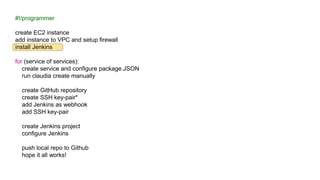
Setup order matters:
Code Structure
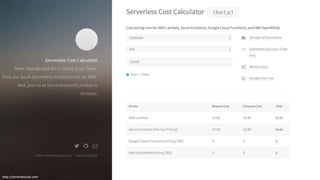
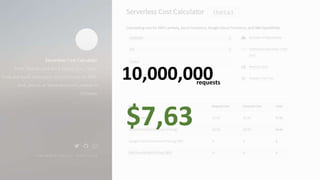
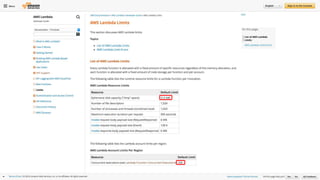
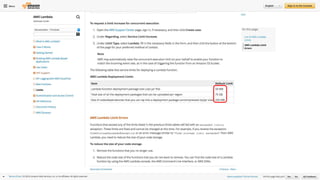
Pricing & Limits
http://serverlesscalc.com
10,000,000
$7,63
requests
https://www.flickr.com/photos/68751915@N05/6355816649
https://www.linkedin.com/pulse/aws-lambda-container-
lifetime-config-refresh-frederik-willaert
https://www.flickr.com/photos/38007185@N00/8466324955/
https://www.linkedin.com/pulse/aws-lambda-container-lifetime-config-refresh-frederik-willaert
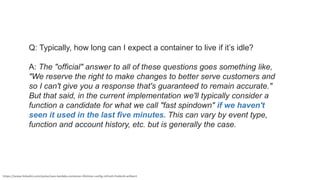
Q: Typically, how long can I expect a container to live if it’s idle?
A: The "official" answer to all of these questions goes something like,
"We reserve the right to make changes to better serve customers and
so I can't give you a response that's guaranteed to remain accurate."
But that said, in the current implementation we'll typically consider a
function a candidate for what we call "fast spindown" if we haven't
seen it used in the last five minutes. This can vary by event type,
function and account history, etc. but is generally the case.
Continuous
Integration
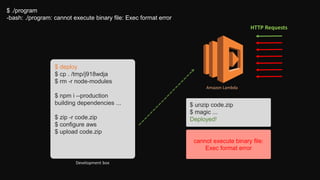
Development box
$ ./program
-bash: ./program: cannot execute binary file: Exec format error
$ deploy
$ cp . /tmp/j918wdja
$ rm -r node-modules
$ npm i --production
building dependencies ...
$ zip -r code.zip
$ configure aws
$ upload code.zip
cannot execute binary file:
Exec format error
$ unzip code.zip
$ magic ...
Deployed!
HTTP Requests
Amazon Lambda
VPC
100.0.0.0/16
AWS
Private Subnet
100.0.0.0/24
Public Subnet
100.0.2.0/24
Internet
Gateway
Lambda
Instances
NAT
Gateway
NAT Route Table
Destination Target
100.0.0.0/16 local
0.0.0.0/0 nat-gateway
Internet Route Table
Destination Target
100.0.0.0/16 local
0.0.0.0/0 igw-gateway
CI EC2
Internet
Region
eu-central-1
AvailabilityZone1
Database
Server
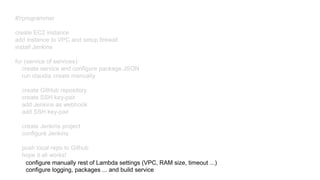
#!/programmer
create EC2 instance
add instance to VPC and setup firewall
install Jenkins
for (service of services):
create service and configure package.JSON
run claudia create manually
create GitHub repository
create SSH key-pair*
add Jenkins as webhook
add SSH key-pair
create Jenkins project
configure Jenkins
push local repo to Github
hope it all works!
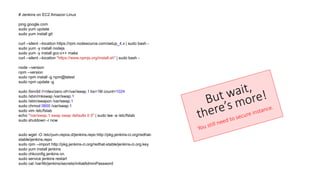
# Jenkins on EC2 Amazon Linux
ping google.com
sudo yum update
sudo yum install git
curl --silent --location https://rpm.nodesource.com/setup_4.x | sudo bash -
sudo yum -y install nodejs
sudo yum -y install gcc-c++ make
curl --silent --location "https://www.npmjs.org/install.sh" | sudo bash -
node --version
npm --version
sudo npm install -g npm@latest
sudo npm update -g
sudo /bin/dd if=/dev/zero of=/var/swap.1 bs=1M count=1024
sudo /sbin/mkswap /var/swap.1
sudo /sbin/swapon /var/swap.1
sudo chmod 0600 /var/swap.1
sudo vim /etc/fstab
echo "/var/swap.1 swap swap defaults 0 0" | sudo tee -a /etc/fstab
sudo shutdown -r now
sudo wget -O /etc/yum.repos.d/jenkins.repo http://pkg.jenkins-ci.org/redhat-
stable/jenkins.repo
sudo rpm --import http://pkg.jenkins-ci.org/redhat-stable/jenkins-ci.org.key
sudo yum install jenkins
sudo chkconfig jenkins on
sudo service jenkins restart
sudo cat /var/lib/jenkins/secrets/initialAdminPassword
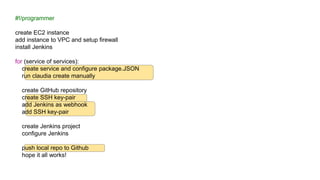
#!/programmer
create EC2 instance
add instance to VPC and setup firewall
install Jenkins
for (service of services):
create service and configure package.JSON
run claudia create manually
create GitHub repository
create SSH key-pair
add Jenkins as webhook
add SSH key-pair
create Jenkins project
configure Jenkins
push local repo to Github
hope it all works!
https://www.flickr.com/photos/44811338@N05/7505286308/
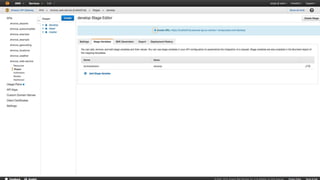
configure manually rest of Lambda settings (VPC, RAM size, timeout ...)
configure logging, packages ... and build service
Further reading
Discussion
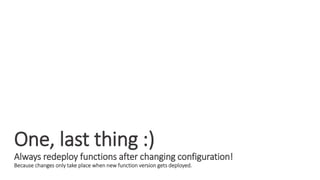
One, last thing :)
Always redeploy functions after changing configuration!
Because changes only take place when new function version gets deployed.
Big thanks to Gordan and Damir.
Blog post (covering most of the presentation)
Soon on Axilis.com blog
Book (recommended by Damir)
Building Microservices by Sam Newman
Introduction:
https://app.pluralsight.com/library/courses/microservices-architecture/table-of-contents
https://www.nginx.com/blog/introduction-to-microservices/
VPC Example:
https://gist.github.com/reggi/dc5f2620b7b4f515e68e46255ac042a7
References:
https://claudiajs.com/claudia-api-builder.html
https://www.linkedin.com/pulse/aws-lambda-container-lifetime-config-refresh-frederik-willaert
https://medium.com/@tjholowaychuk/dos-and-don-ts-of-aws-lambda-7dfcab7ad115#.937xuhm3a
http://docs.aws.amazon.com/lambda/latest/dg/limits.html
https://www.flickr.com/photos/gagzclix/9472875083/
Official AWS Documentation
https://aws.amazon.com/documentation/

Journey to Microservice architecture via Amazon Lambda

Editor's Notes

  • #11 Source – Integration Show
  • #12 Environment variables