


Time saving digital tools
- an intro to automations &
integrations
A show and tell session
May 2023
We've changed our
name, but not our
focus...
We bring people working
in non profits and Tech
for Good together, to
share & learn from each
other
@TSC_London
Welcome to TechSoup Connect London Chapter
techsoup-connect-london
https://events.techsoup.org/techsoup-
connect-london-chapter/
TechSoup Connect London Organisers
Agenda
● Networking/Introduction/Keeping in touch
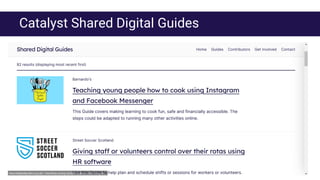
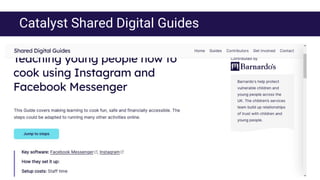
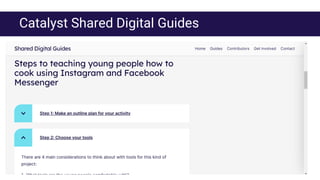
● Catalyst Shared Digital Guides (Joe Roberson)
● Automating invoice approvals using Power Automate (Jacky Fung, Kingston Voluntary Action)
● Automating onboarding using Slack Automation & Zapier (Tamara Schon, Agencies for Good)
● Automating databases using Make and AirTable (Alice Linell & Paul Firby, Superhighways)
● Break out/Networking session
● Next meeting/Zoom poll/Ideas for future sessions
● Community shout outs
● Wrap: Feedback form
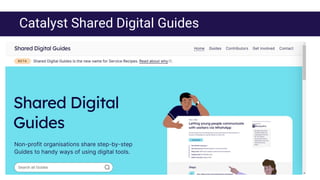
Catalyst Shared Digital Guides
Show and tell sessions
● Automating invoice approvals using Power Automate
Jacky Fung, Kingston Voluntary Action
● Automating onboarding using Slack Automation & Zapier
Tamara Schon, Agencies for Good
● Automating databases using AirTable and Make
Alice Linell & Paul Firby, Superhighways
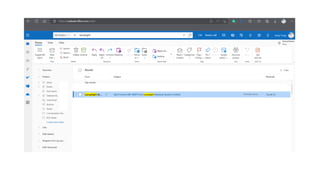
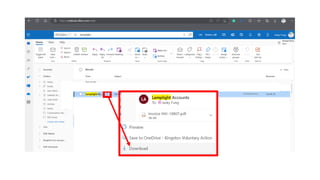
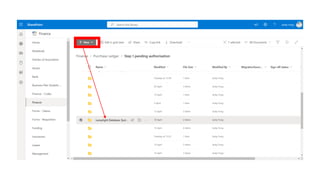
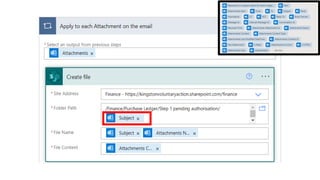
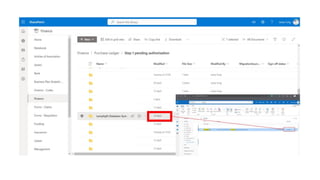
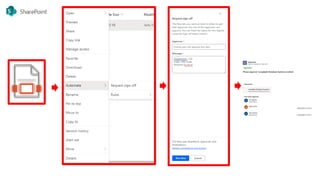
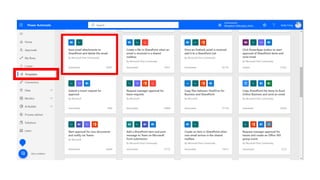
Using Power Automate
(Outlook + SharePoint)
Jacky Fung, Finance Manager
Kingston Voluntary Action CIO
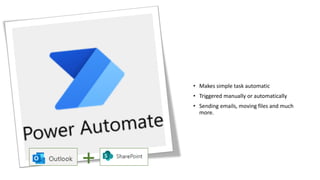
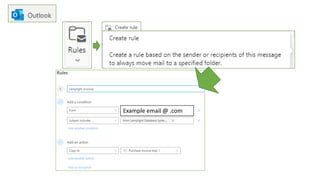
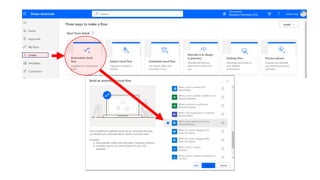
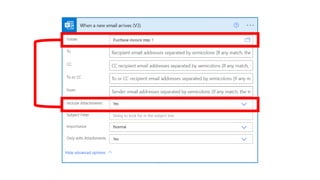
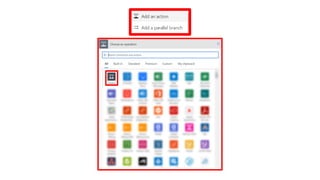
• Makes simple task automatic
• Triggered manually or automatically
• Sending emails, moving files and much
more.
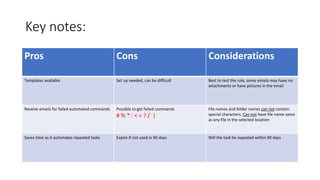
Key notes:
Pros Cons Considerations
Templates available Set up needed, can be difficult Best to test the rule, some emails may have no
attachments or have pictures in the email
Receive emails for failed automated commands Possible to get failed commands
# % * : < > ? / |
File names and folder names can not contain
special characters. Can not have file name same
as any file in the selected location
Saves time as it automates repeated tasks Expire if not used in 90 days Will the task be repeated within 90 days
Automating community
management
Utilising Slack’s built-in tools and Zapier
AfG is a non-profit community on Slack, enabling agencies and freelancers working
in the ‘for good’ sector. Budget is limited and the community doesn’t have a
commercial purpose, so most tools we use are free.
I’m contracted to work approximately 5 days a month so I’m not on Slack every day, all
day.
About Agencies for Good & My role as a Community Manager
As I’m not on Slack every day, it’s sometimes hard to catch up with all the
new members and intervene in time. Bu automating the onboarding
message, I can be certain that they will receive necessary information to
get started.
Problem / inefficiency to solve 1 - Onboarding
In the community survey results I’ve ran, I’ve noticed most members said
they visit AfG on average 2-3 times a week, which means, due to the
design of Slack platform, they are likely to miss out on the posts and
discussions.
Problem / inefficiency to solve 2 - Channel Activity Round-ups
Action
I wanted to create an automated
onboarding message, containing
information on the posting
guidelines and useful channels
Outcomes
Using Slack’s built-in tool,
Workflows, I’ve set up an
automation sending a message to
every new member
Onboarding
Action
I had to find a tool that will enable
me to ‘store’ posts in Slack that I
can easily copy/paste into a single
round-up post.
Outcomes
I have connected Zapier app and
created an automation where I can
‘Push’ Slack messages into a
Google Doc
Channel activity round-ups
Use cases
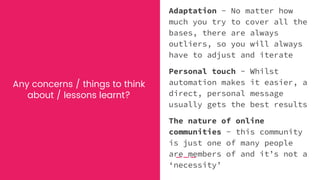
Any concerns / things to think
about / lessons learnt?
Adaptation - No matter how
much you try to cover all the
bases, there are always
outliers, so you will always
have to adjust and iterate
Personal touch - Whilst
automation makes it easier, a
direct, personal message
usually gets the best results
The nature of online
communities - this community
is just one of many people
are members of and it’s not a
‘necessity’
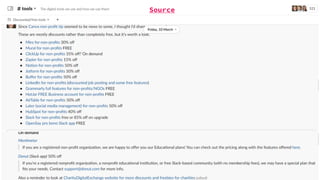
Source
Network session
● Break out groups (7 mins)
○ What particularly interested you?
○ What will you try out?
● On return
○ Post key conclusions in chat
Next meetings:
● Under discussion: “People and culture”
○ Why important for digital success
○ From change resistance to change curiosity
○ Date to be confirmed - possibly June
○ Would you attend?
● Summer break
● If you have ideas for later this year, please let us know
● Do you want to help us plan these sessions?
Community Shout Outs
Tell us about:
● events,
● resources,
● networks
● something about you
● or anything….
that are helpful for this
community
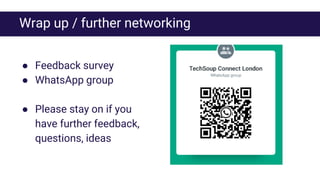
Wrap up / further networking
● Feedback survey
● WhatsApp group
● Please stay on if you
have further feedback,
questions, ideas

Time saving tools presentation.pdf

  • 1.
    Time saving digitaltools - an intro to automations & integrations A show and tell session May 2023
  • 2.
    We've changed our name,but not our focus... We bring people working in non profits and Tech for Good together, to share & learn from each other @TSC_London Welcome to TechSoup Connect London Chapter techsoup-connect-london https://events.techsoup.org/techsoup- connect-london-chapter/
  • 3.
  • 4.
    Agenda ● Networking/Introduction/Keeping intouch ● Catalyst Shared Digital Guides (Joe Roberson) ● Automating invoice approvals using Power Automate (Jacky Fung, Kingston Voluntary Action) ● Automating onboarding using Slack Automation & Zapier (Tamara Schon, Agencies for Good) ● Automating databases using Make and AirTable (Alice Linell & Paul Firby, Superhighways) ● Break out/Networking session ● Next meeting/Zoom poll/Ideas for future sessions ● Community shout outs ● Wrap: Feedback form
  • 5.
  • 6.
  • 7.
  • 8.
  • 9.
    Show and tellsessions ● Automating invoice approvals using Power Automate Jacky Fung, Kingston Voluntary Action ● Automating onboarding using Slack Automation & Zapier Tamara Schon, Agencies for Good ● Automating databases using AirTable and Make Alice Linell & Paul Firby, Superhighways
  • 10.
    Using Power Automate (Outlook+ SharePoint) Jacky Fung, Finance Manager Kingston Voluntary Action CIO
  • 14.
    • Makes simpletask automatic • Triggered manually or automatically • Sending emails, moving files and much more.
  • 22.
    Key notes: Pros ConsConsiderations Templates available Set up needed, can be difficult Best to test the rule, some emails may have no attachments or have pictures in the email Receive emails for failed automated commands Possible to get failed commands # % * : < > ? / | File names and folder names can not contain special characters. Can not have file name same as any file in the selected location Saves time as it automates repeated tasks Expire if not used in 90 days Will the task be repeated within 90 days
  • 24.
  • 25.
    AfG is anon-profit community on Slack, enabling agencies and freelancers working in the ‘for good’ sector. Budget is limited and the community doesn’t have a commercial purpose, so most tools we use are free. I’m contracted to work approximately 5 days a month so I’m not on Slack every day, all day. About Agencies for Good & My role as a Community Manager
  • 26.
    As I’m noton Slack every day, it’s sometimes hard to catch up with all the new members and intervene in time. Bu automating the onboarding message, I can be certain that they will receive necessary information to get started. Problem / inefficiency to solve 1 - Onboarding
  • 27.
    In the communitysurvey results I’ve ran, I’ve noticed most members said they visit AfG on average 2-3 times a week, which means, due to the design of Slack platform, they are likely to miss out on the posts and discussions. Problem / inefficiency to solve 2 - Channel Activity Round-ups
  • 28.
    Action I wanted tocreate an automated onboarding message, containing information on the posting guidelines and useful channels Outcomes Using Slack’s built-in tool, Workflows, I’ve set up an automation sending a message to every new member Onboarding
  • 29.
    Action I had tofind a tool that will enable me to ‘store’ posts in Slack that I can easily copy/paste into a single round-up post. Outcomes I have connected Zapier app and created an automation where I can ‘Push’ Slack messages into a Google Doc Channel activity round-ups
  • 30.
  • 31.
    Any concerns /things to think about / lessons learnt? Adaptation - No matter how much you try to cover all the bases, there are always outliers, so you will always have to adjust and iterate Personal touch - Whilst automation makes it easier, a direct, personal message usually gets the best results The nature of online communities - this community is just one of many people are members of and it’s not a ‘necessity’
  • 32.
  • 33.
    Network session ● Breakout groups (7 mins) ○ What particularly interested you? ○ What will you try out? ● On return ○ Post key conclusions in chat
  • 34.
    Next meetings: ● Underdiscussion: “People and culture” ○ Why important for digital success ○ From change resistance to change curiosity ○ Date to be confirmed - possibly June ○ Would you attend? ● Summer break ● If you have ideas for later this year, please let us know ● Do you want to help us plan these sessions?
  • 35.
    Community Shout Outs Tellus about: ● events, ● resources, ● networks ● something about you ● or anything…. that are helpful for this community
  • 36.
    Wrap up /further networking ● Feedback survey ● WhatsApp group ● Please stay on if you have further feedback, questions, ideas