Jenkins User Conference   New York, May 17 2012   #jenkinsconf


       Jenkins Data Mining
       on the Command Line


                     Noah Sussman
                     Etsy
Jenkins User Conference   New York, May 17 2012   #jenkinsconf


   Etsy

       Etsy is the marketplace we make
     together. We enable people anywhere to
     easily build and directly exchange with
     independent, creative businesses. Etsy has
     15 million members and 875,000 sellers in
     over 150 countries. In 2011, our sellers
     grossed more than $525 million in sales.
Jenkins User Conference    New York, May 17 2012   #jenkinsconf


   Etsy

   !     Total Members: over 15 million
   !     Total Active Sellers: over 875,000
   !     Unique Visitors per month: 40 million
   !     Items Currently Listed: 13 million
   !     Page Views per month: over 1.4 billion
Jenkins User Conference   New York, May 17 2012   #jenkinsconf


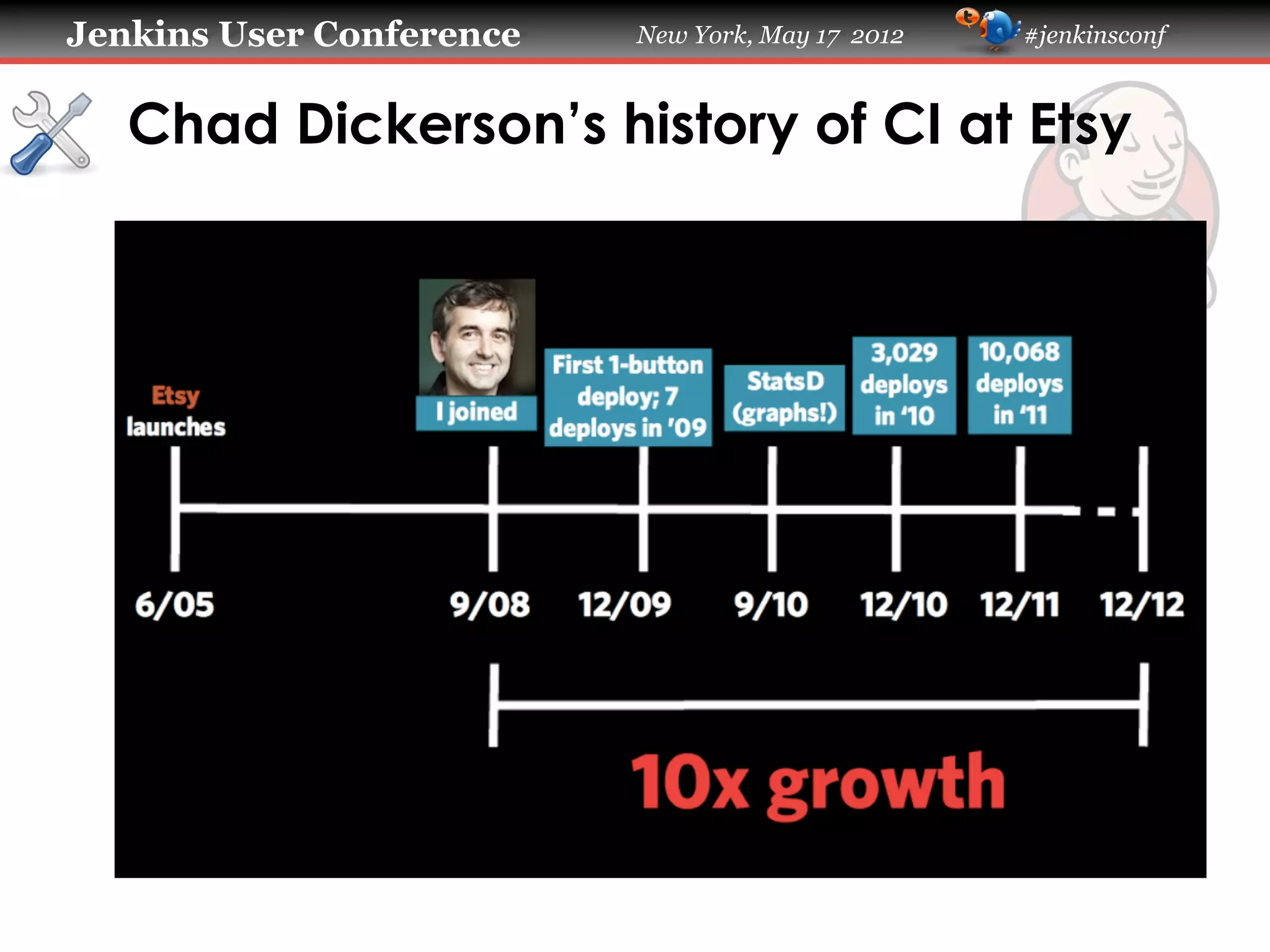
   Chad Dickerson’s history of CI at Etsy
Jenkins User Conference     New York, May 17 2012   #jenkinsconf


   CI systems exhibit complex behaviors

   !     Jenkins plugins provide nice visibility:
   !     xUnit Plugin
   !     Warnings Plugin
   !     Radiator View Plugin
   !     Extended Email Plugin
   !     IRC Plugin
   !     If you’re not using these yet – start now!
   !     But…
Jenkins User Conference   New York, May 17 2012   #jenkinsconf


   But…


   !   What is the failure rate of a specific test?
   !   How many failed builds occur per day?
   !   What is the status of slave bob0107?
   !   How many executors were busy in the last
       five minutes?
   !   How many slaves are currently attached?
Jenkins User Conference       New York, May 17 2012   #jenkinsconf


   Tools

   !     find,	
  grep,	
  cut,	
  spark,	
  perl,	
  irb
   !     My tools work on Mac OS and Linux.
   !     If you’re on Windows you can use Cygwin.
   !     Or you could do it all with Perl or Ruby.
   !     Or with something else.
   !     There’s more than one way to do it.
Jenkins User Conference   New York, May 17 2012   #jenkinsconf


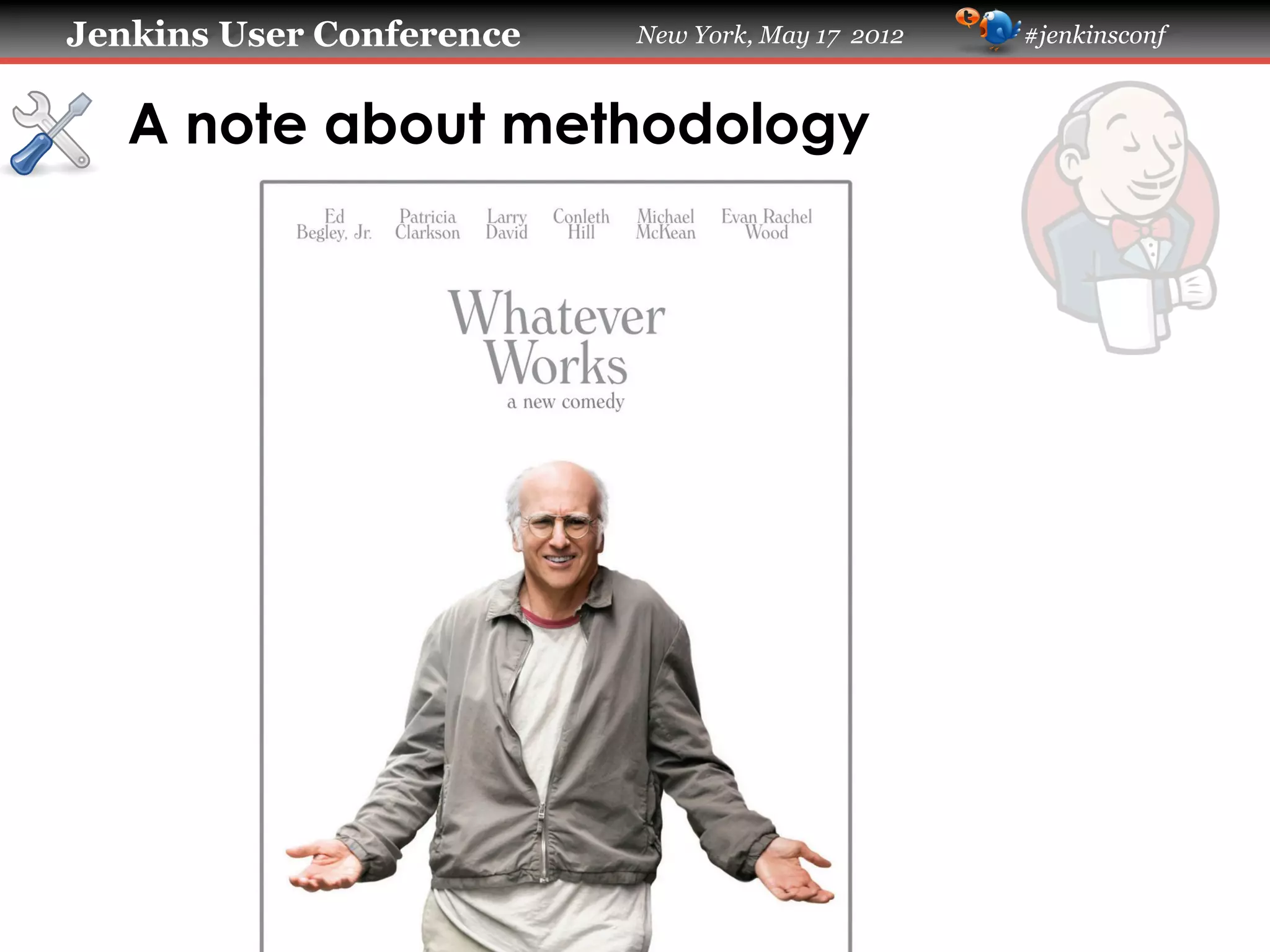
   A note about methodology
Jenkins User Conference    New York, May 17 2012   #jenkinsconf


   Whatever works

   !     Simple > Robust
   !     Simple > Reusable
   !     Simple > Performant
   !     Simple > Elegant
   !     Do the minimum amount of work
         necessary to get the information that you
         need in order to make a decision.
Jenkins User Conference   New York, May 17 2012   #jenkinsconf


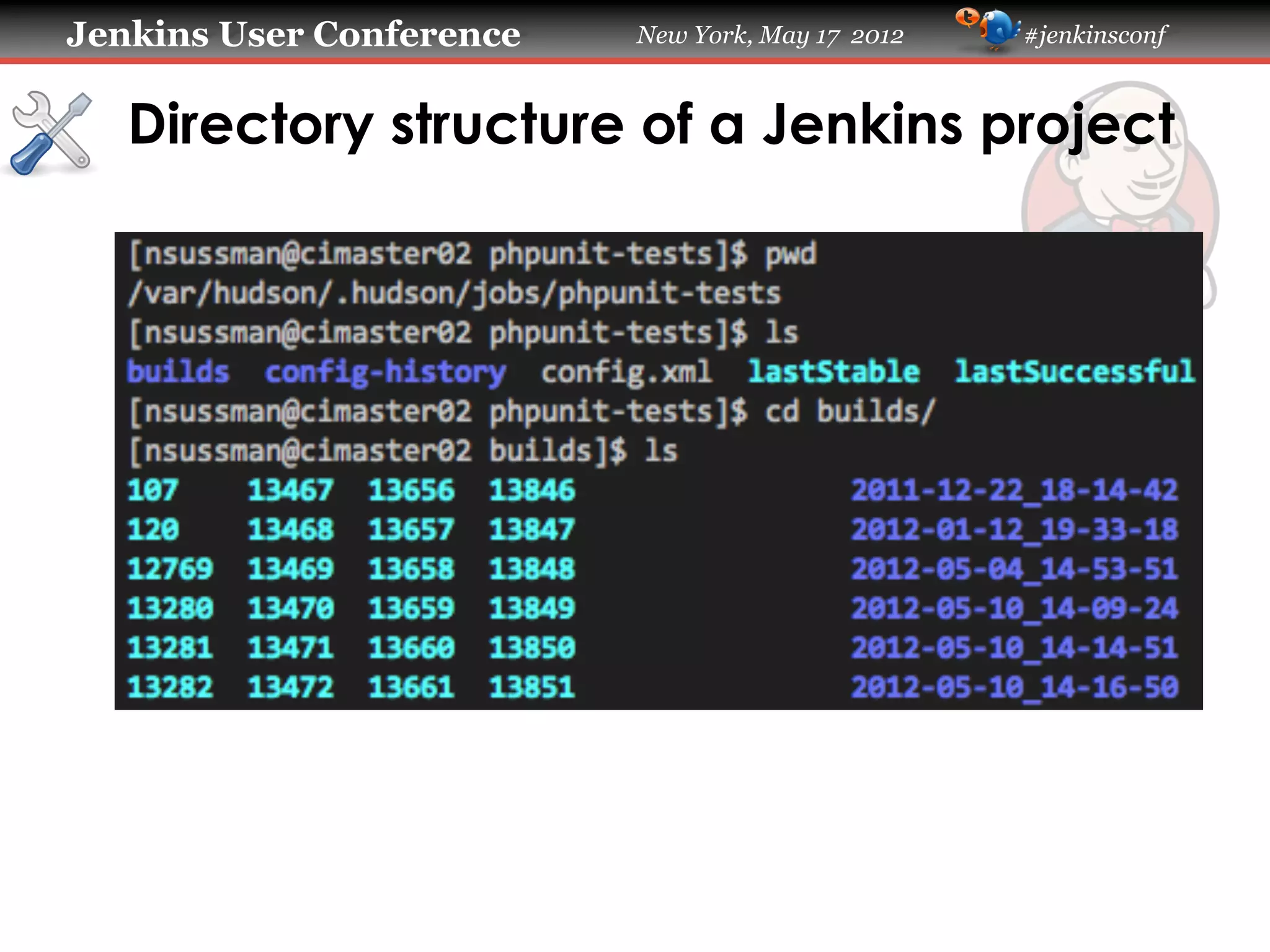
   Directory structure of a Jenkins project
Jenkins User Conference   New York, May 17 2012   #jenkinsconf


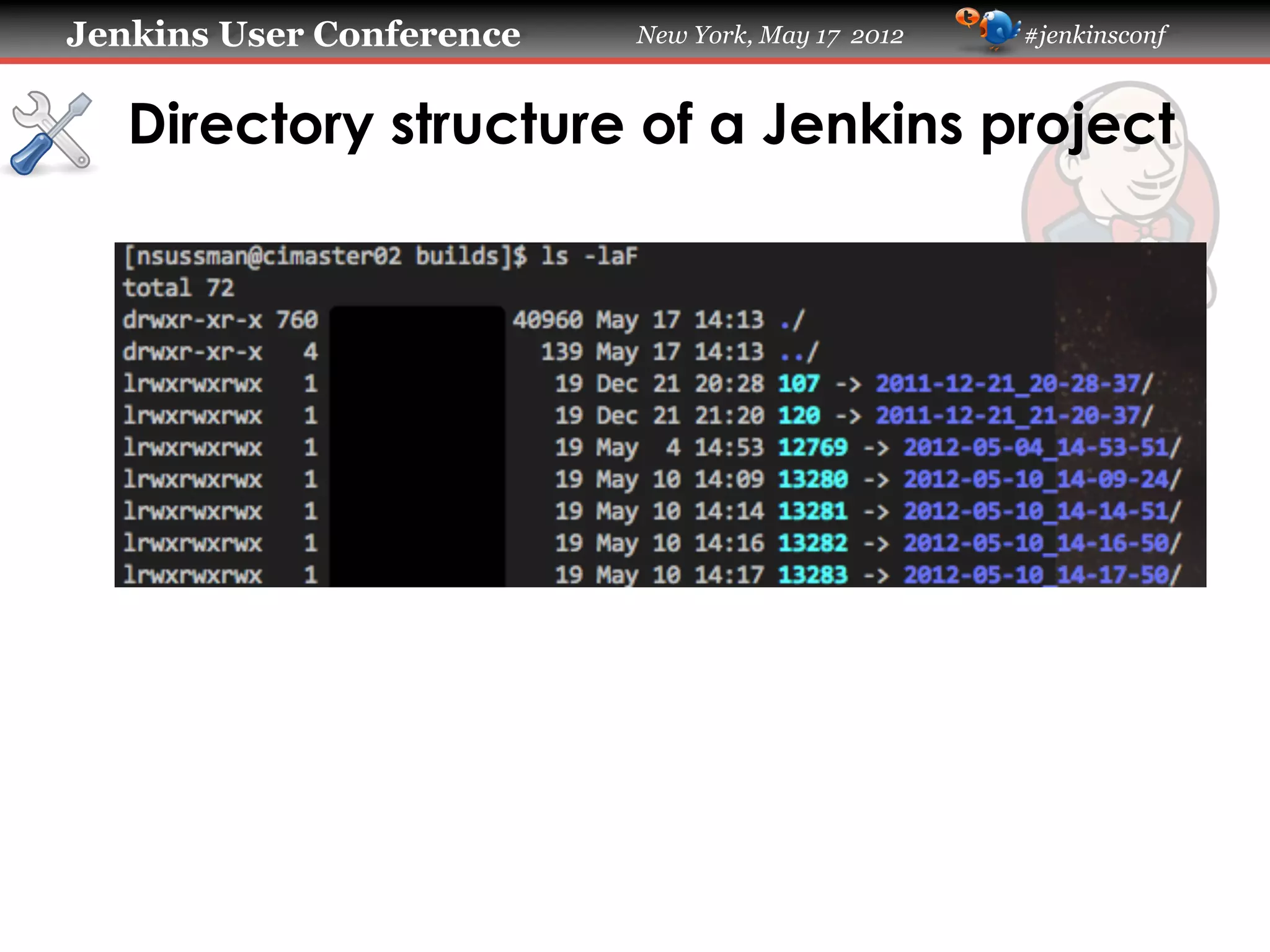
   Directory structure of a Jenkins project
Jenkins User Conference   New York, May 17 2012   #jenkinsconf


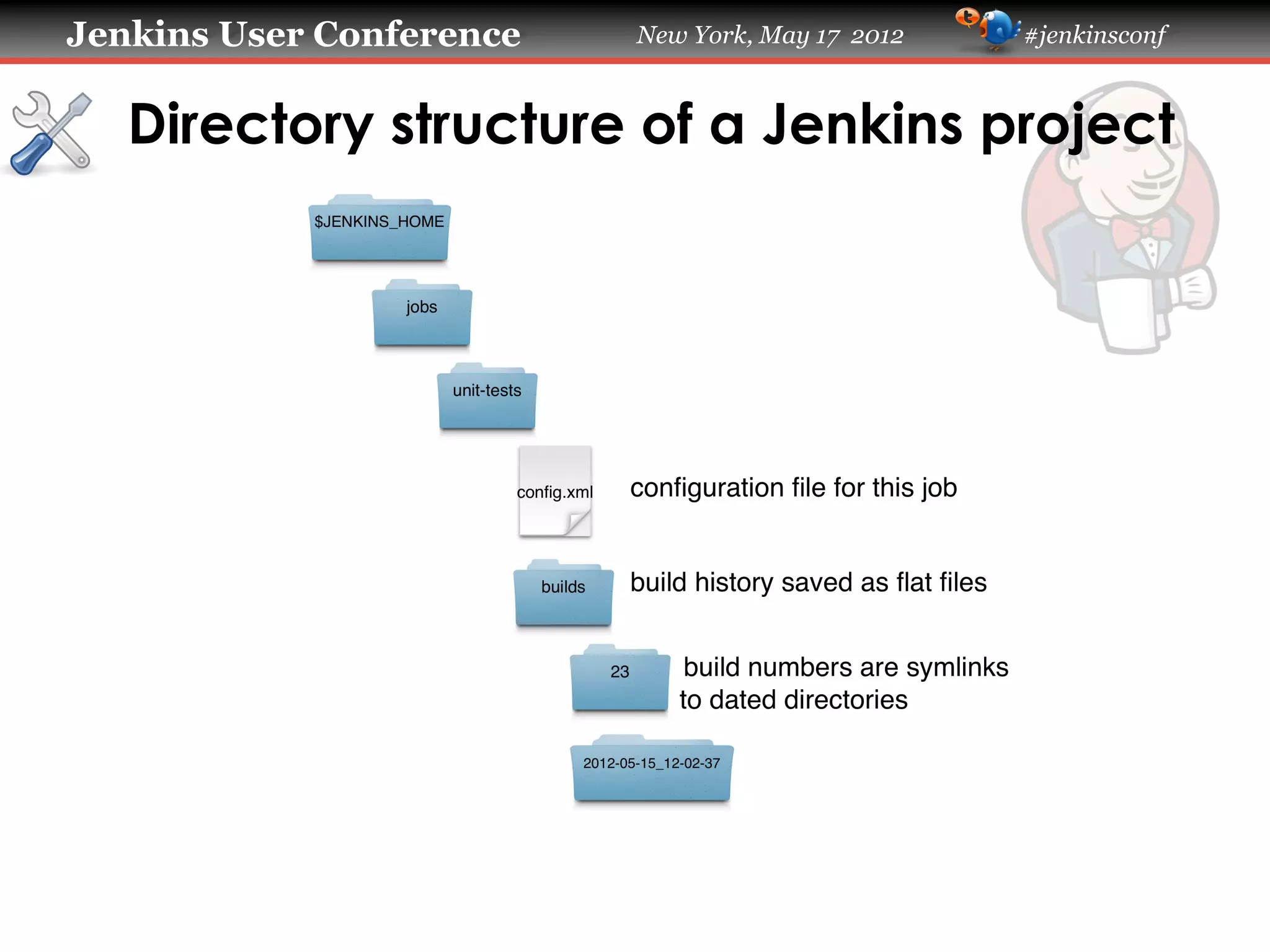
   Directory structure of a Jenkins project
Jenkins User Conference   New York, May 17 2012   #jenkinsconf


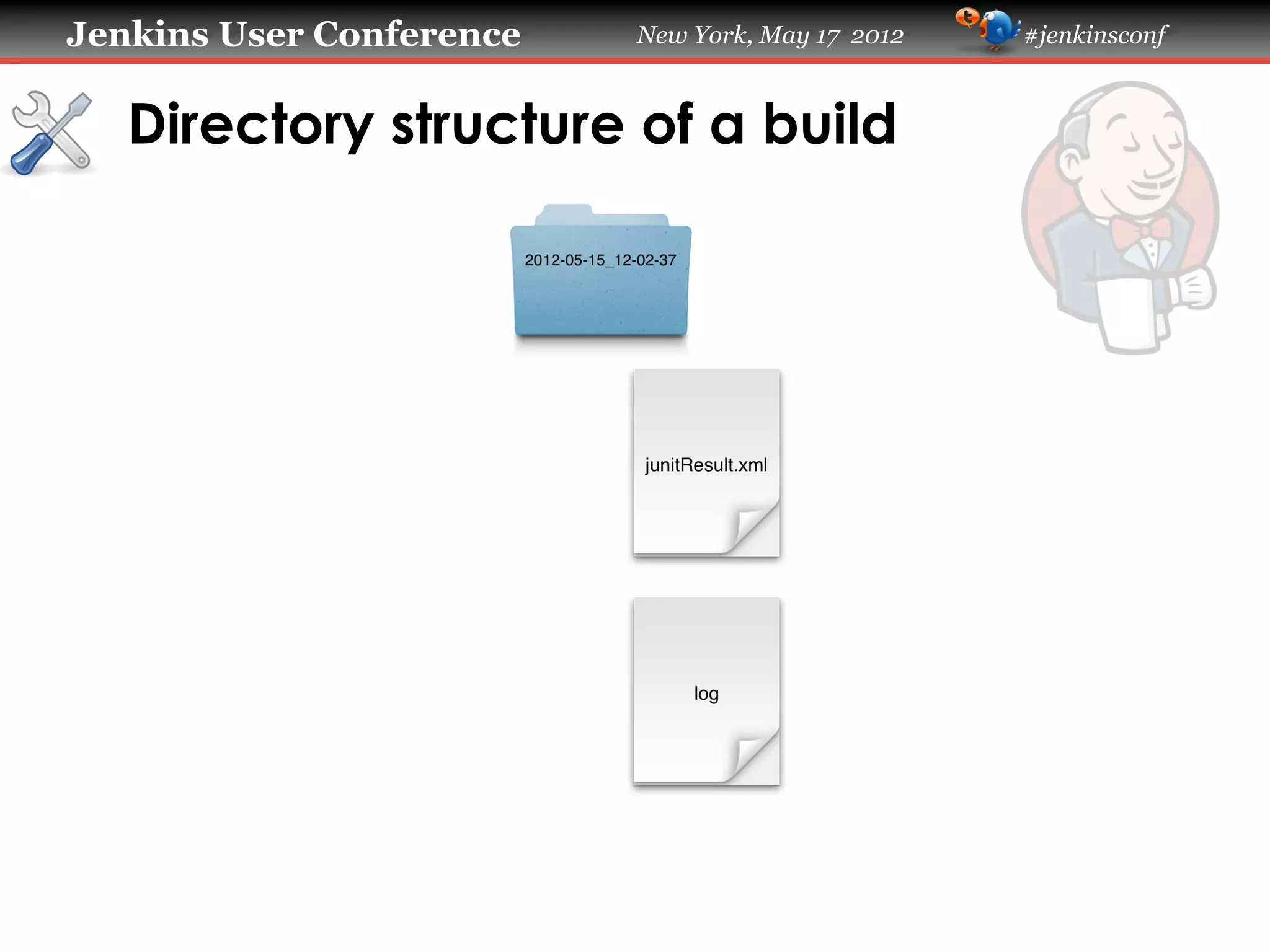
   Directory structure of a build
Jenkins User Conference   New York, May 17 2012   #jenkinsconf


   Determining how often a test fails

   !   You can get this information through the
       xUnit plugin.
   !   But you have to click through a lot of
       screens.
   !   Doing it on the command line is faster.
Jenkins User Conference   New York, May 17 2012   #jenkinsconf


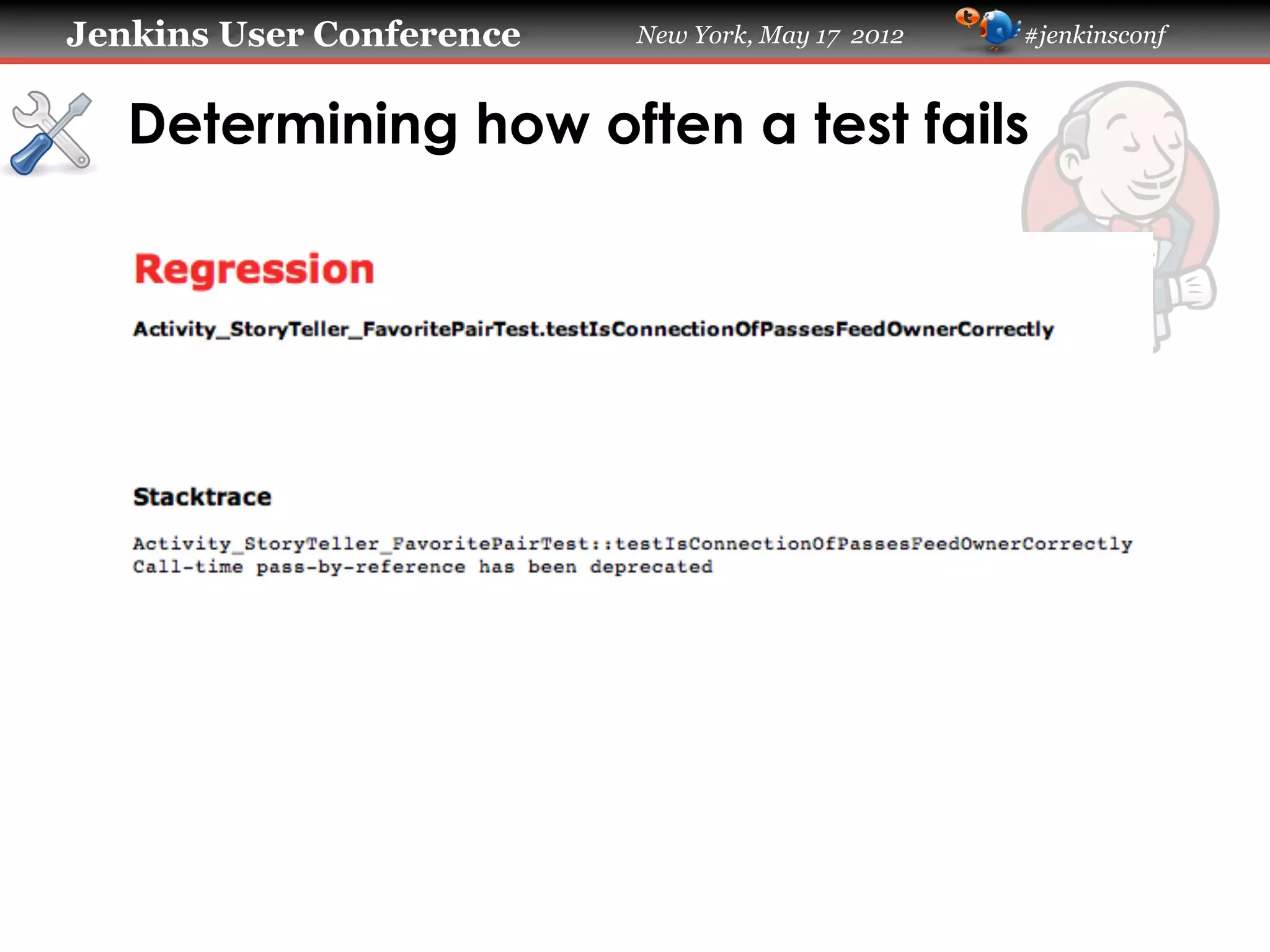
   Determining how often a test fails
Jenkins User Conference   New York, May 17 2012   #jenkinsconf


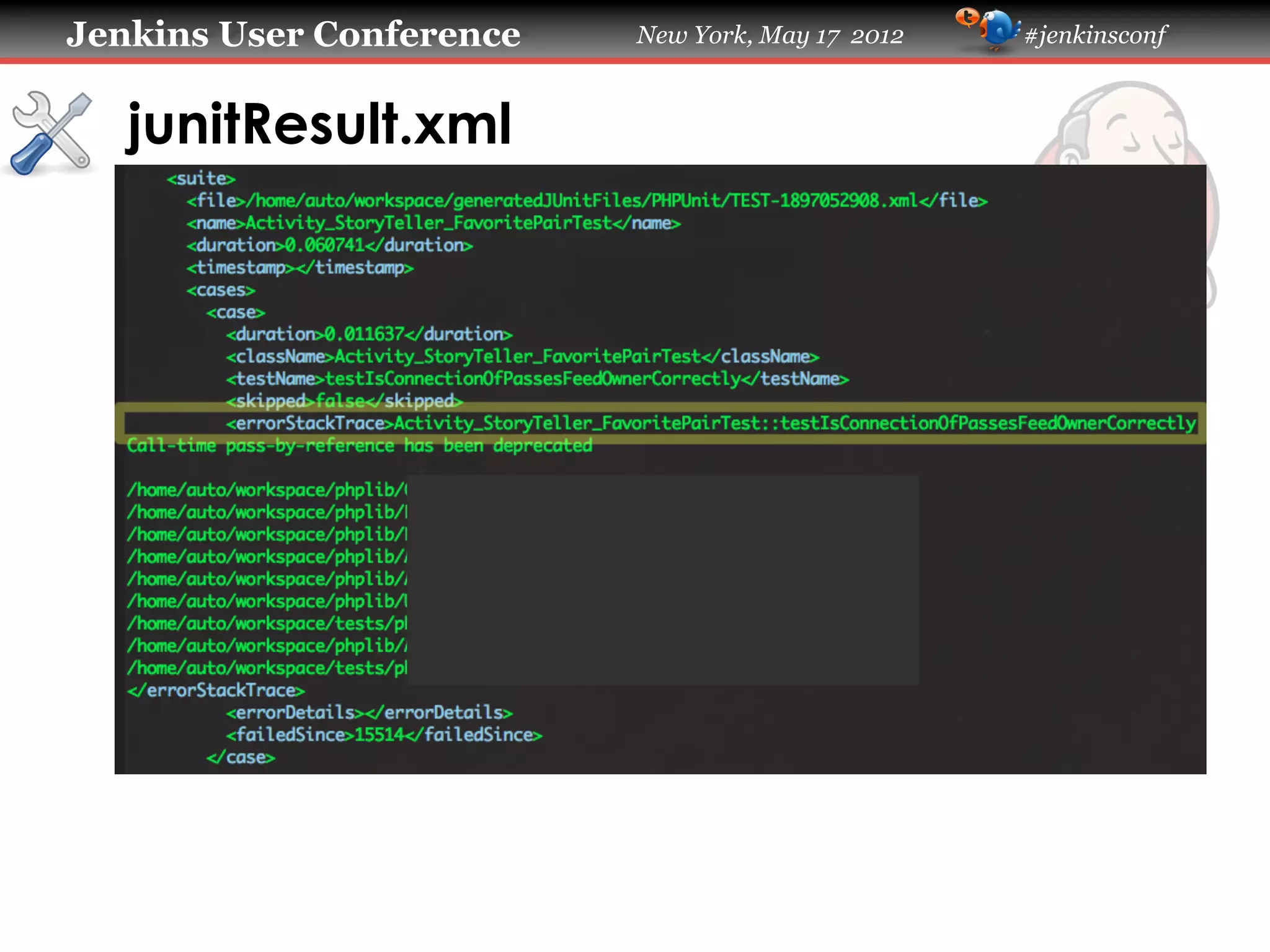
   junitResult.xml
Jenkins User Conference                     New York, May 17 2012           #jenkinsconf


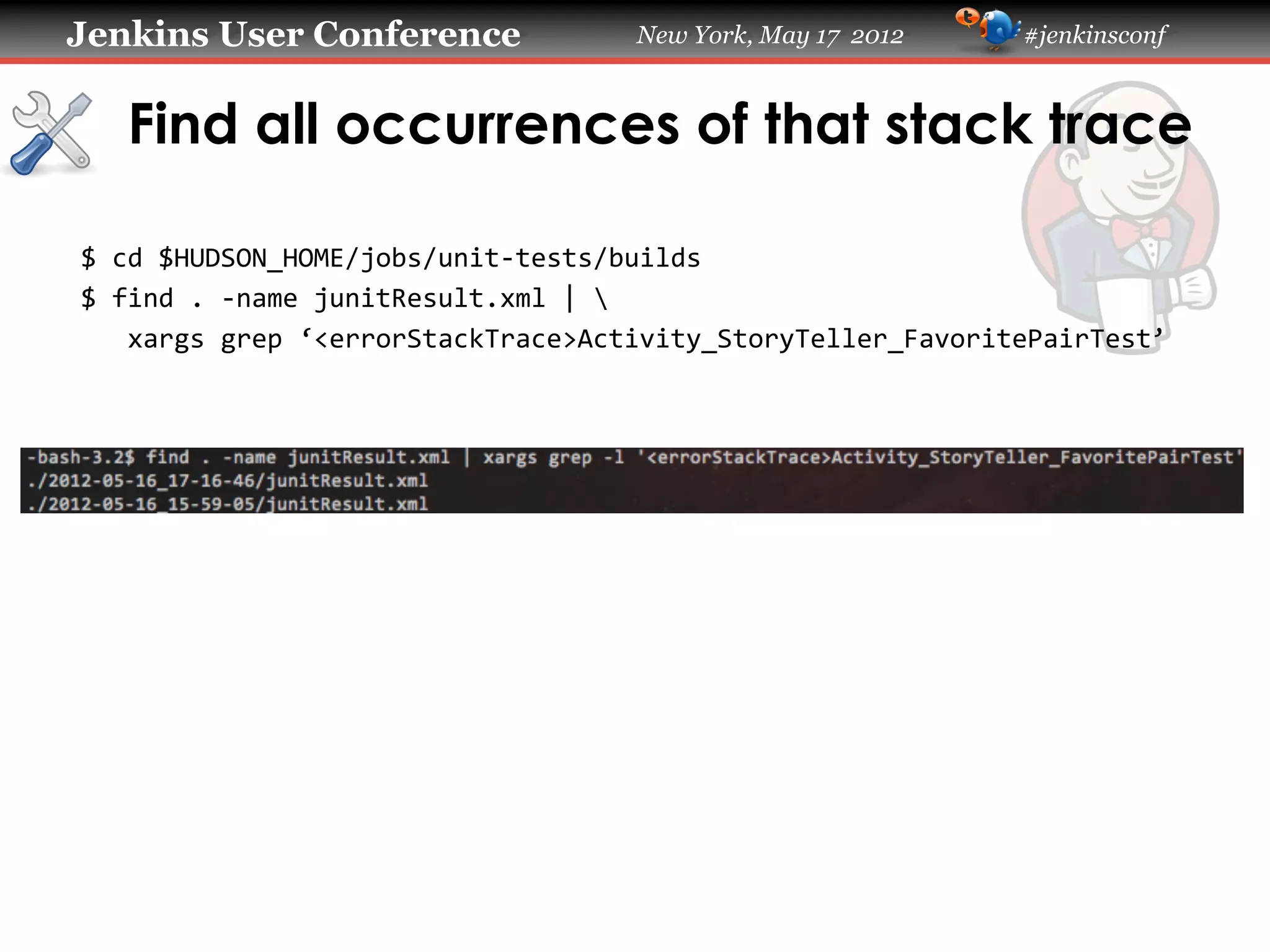
   Find all occurrences of that stack trace

$	
  cd	
  $HUDSON_HOME/jobs/unit-­‐tests/builds	
  
$	
  find	
  .	
  -­‐name	
  junitResult.xml	
  |	


  xargs	
  grep	
  ‘<errorStackTrace>Activity_StoryTeller_FavoritePairTest’	


Jenkins User Conference         New York, May 17 2012   #jenkinsconf


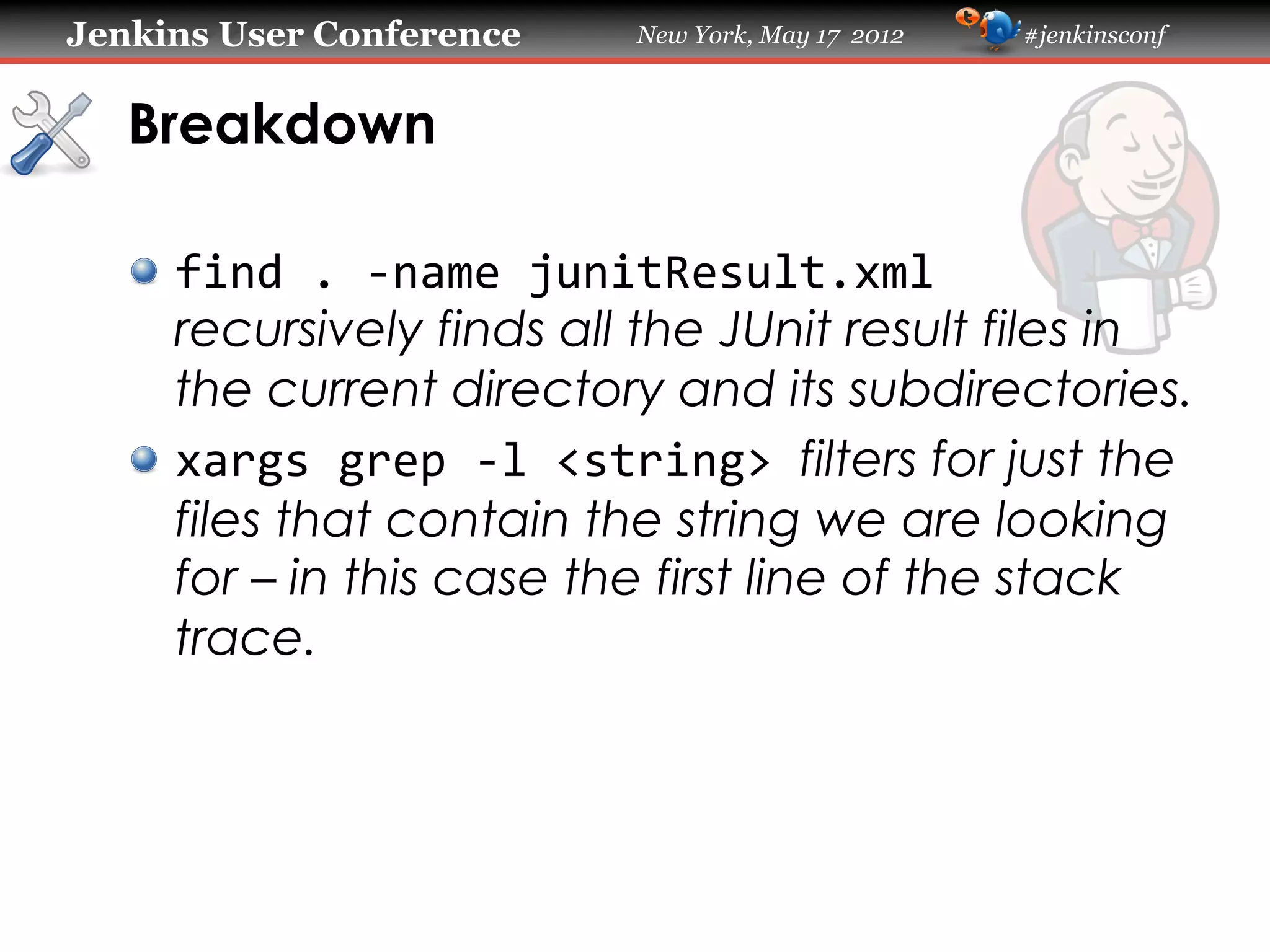
   Breakdown

   !   find	
  .	
  -­‐name	
  junitResult.xml	
  
       recursively finds all the JUnit result files in
       the current directory and its subdirectories.
   !   xargs	
  grep	
  -­‐l	
  <string>	
  filters for just the
       files that contain the string we are looking
       for – in this case the first line of the stack
       trace.
Jenkins User Conference         New York, May 17 2012   #jenkinsconf


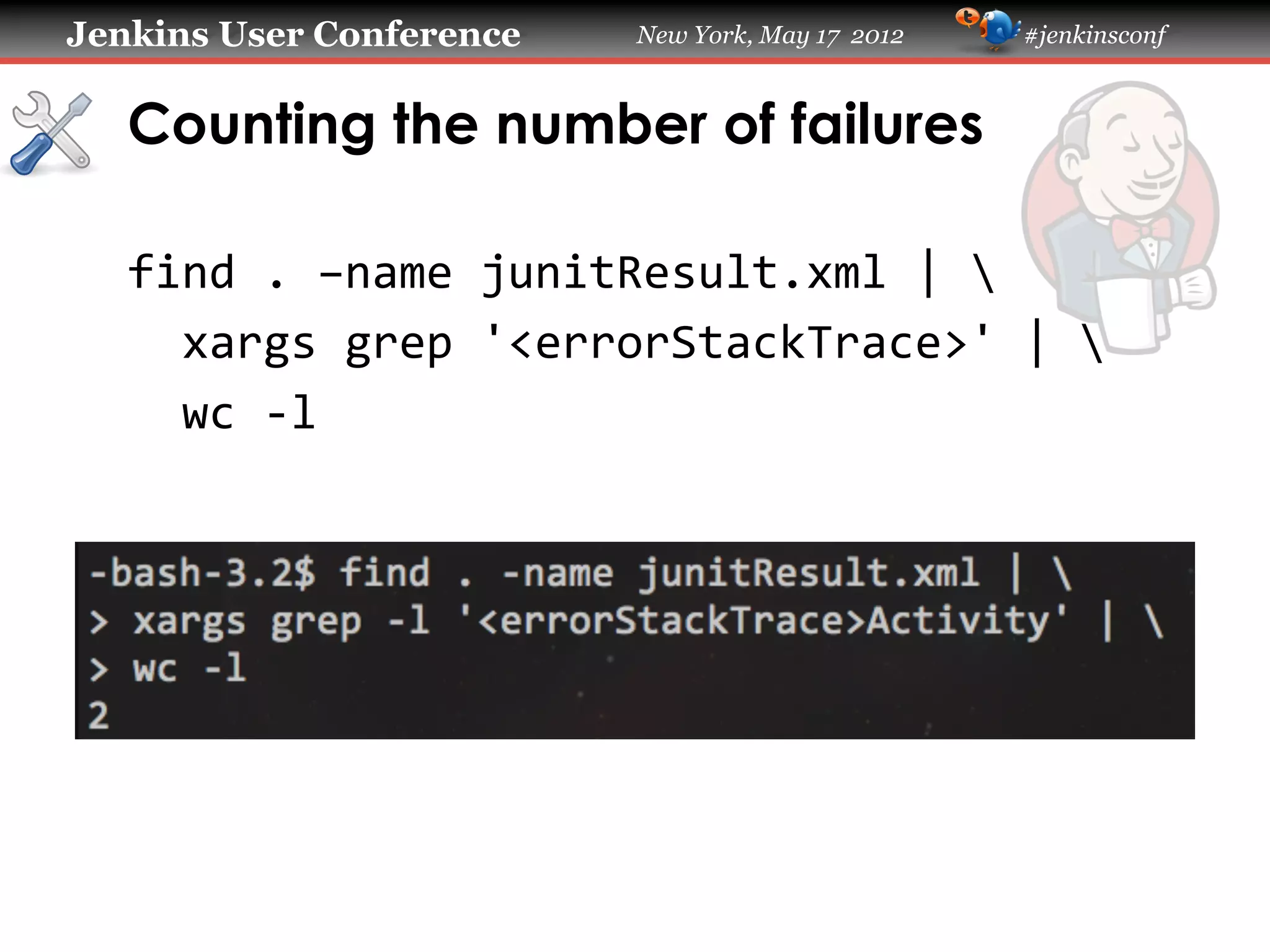
   Counting the number of failures

   find	
  .	
  –name	
  junitResult.xml	
  |	


  xargs	
  grep	
  '<errorStackTrace>'	
  |	


  wc	
  -­‐l	
  
Jenkins User Conference   New York, May 17 2012   #jenkinsconf


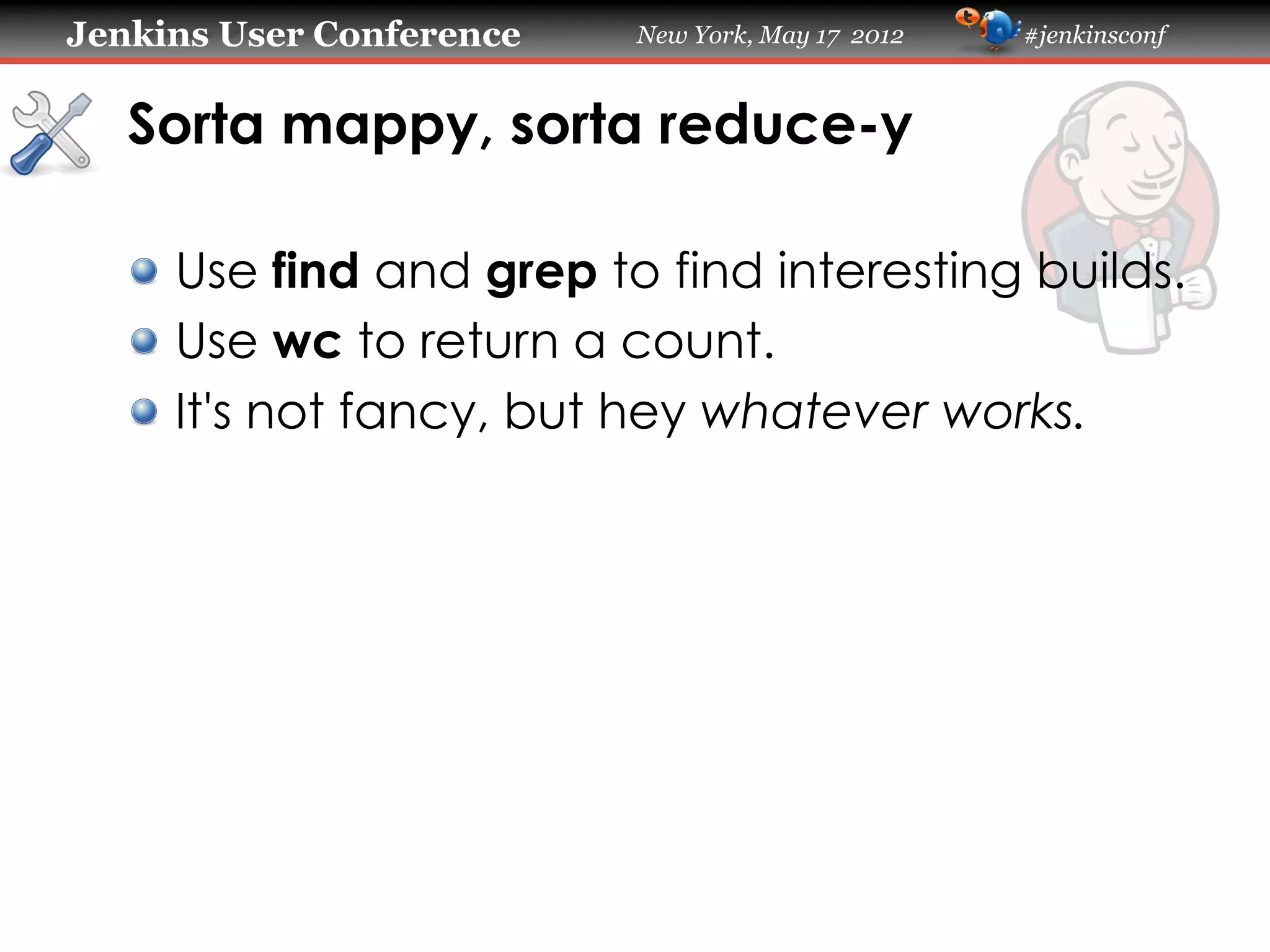
   Sorta mappy, sorta reduce-y

   !   Use find and grep to find interesting builds.
   !   Use wc to return a count.
   !   It's not fancy, but hey whatever works.
Jenkins User Conference   New York, May 17 2012   #jenkinsconf


   Bucketing failed builds by date

   !   How many builds fail each day?
   !   You can figure this out from the build trend
       graph, but again it's much faster to do it
       on the command line.
Jenkins User Conference                 New York, May 17 2012   #jenkinsconf


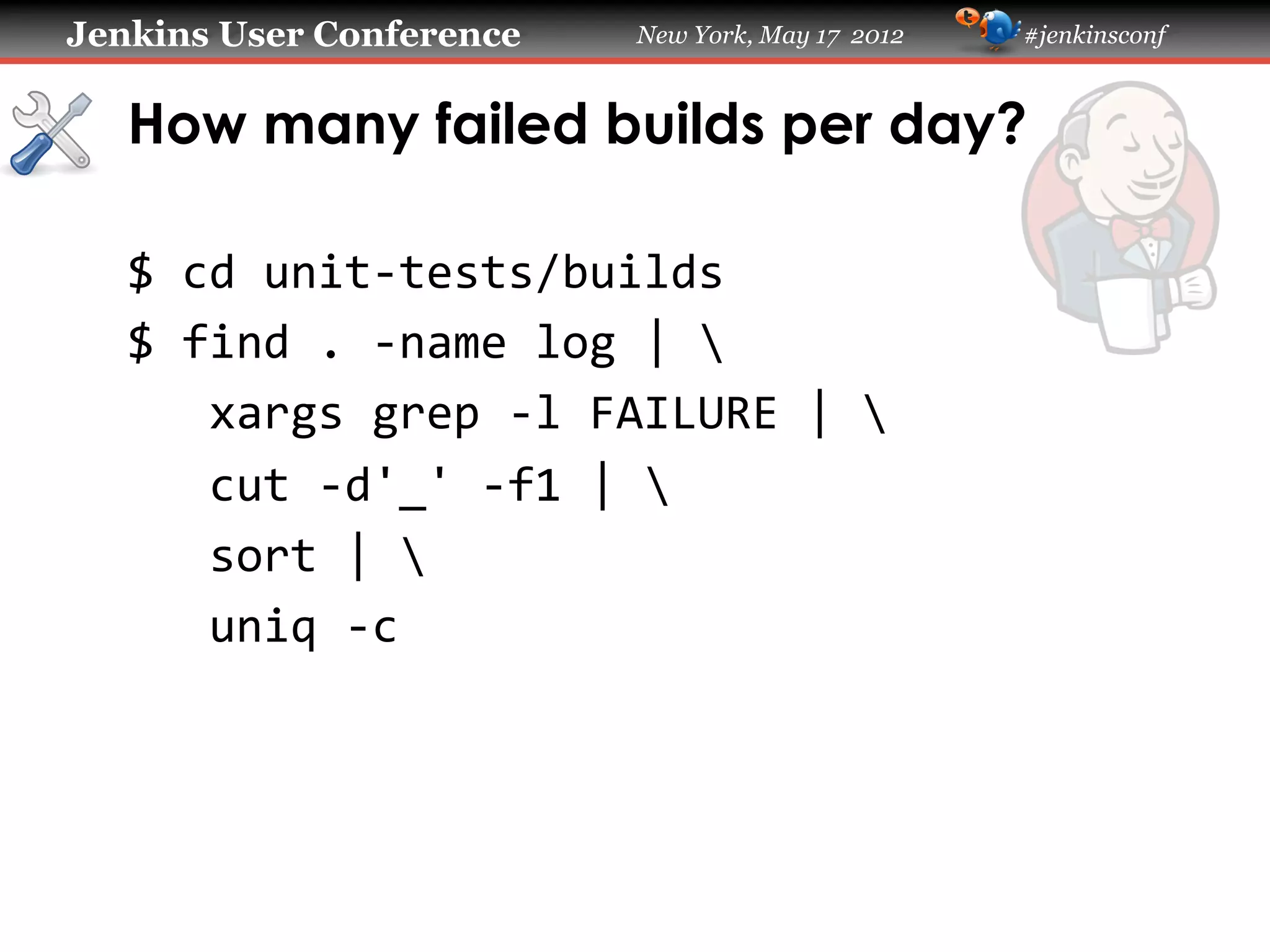
   How many failed builds per day?

   $	
  cd	
  unit-­‐tests/builds	
  
   $	
  find	
  .	
  -­‐name	
  log	
  |	


  xargs	
  grep	
  -­‐l	
  FAILURE	
  |	


  cut	
  -­‐d'_'	
  -­‐f1	
  |	


  sort	
  |	


  uniq	
  -­‐c	
  
Jenkins User Conference   New York, May 17 2012   #jenkinsconf


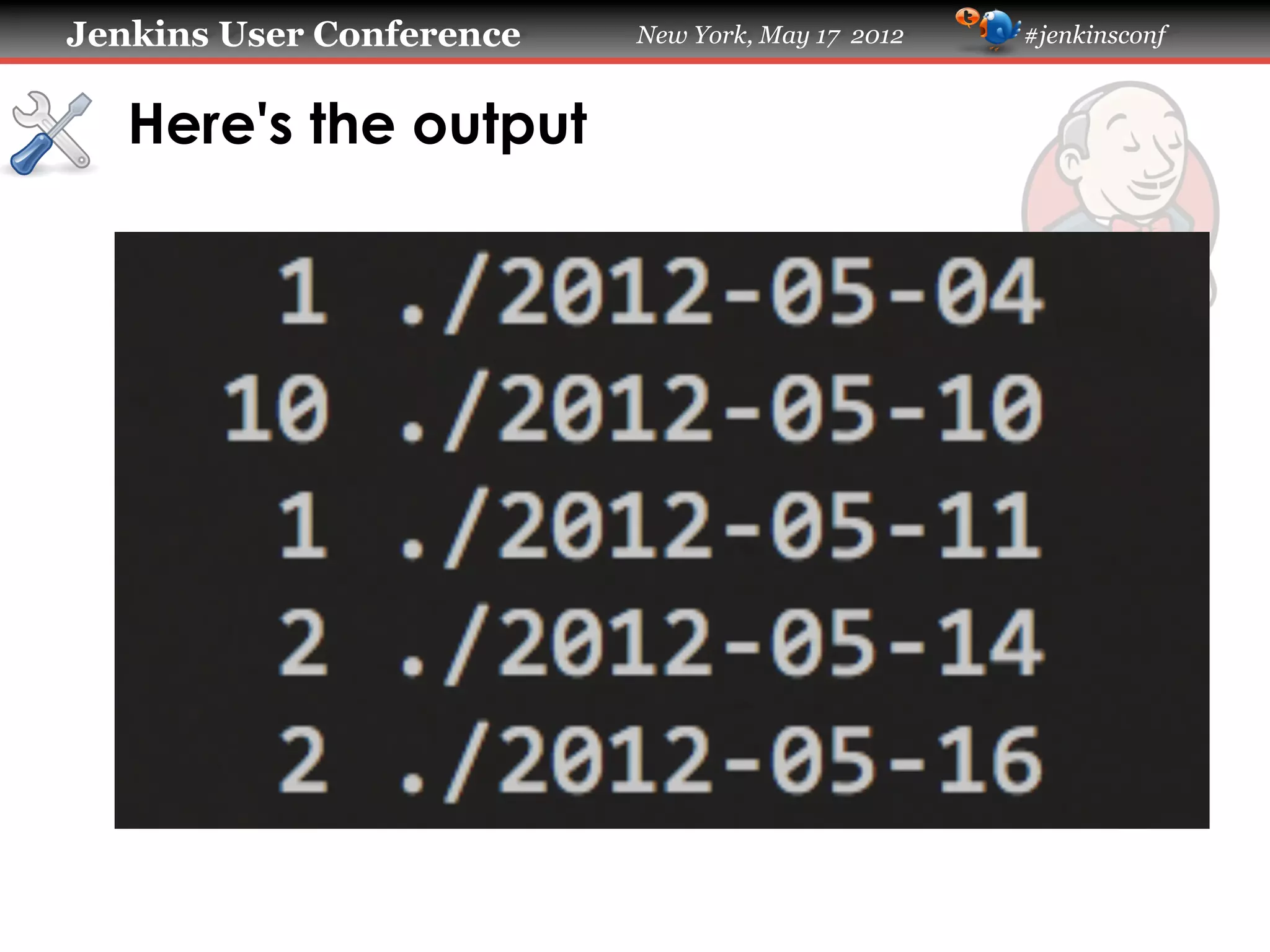
   Here's the output
Jenkins User Conference        New York, May 17 2012   #jenkinsconf


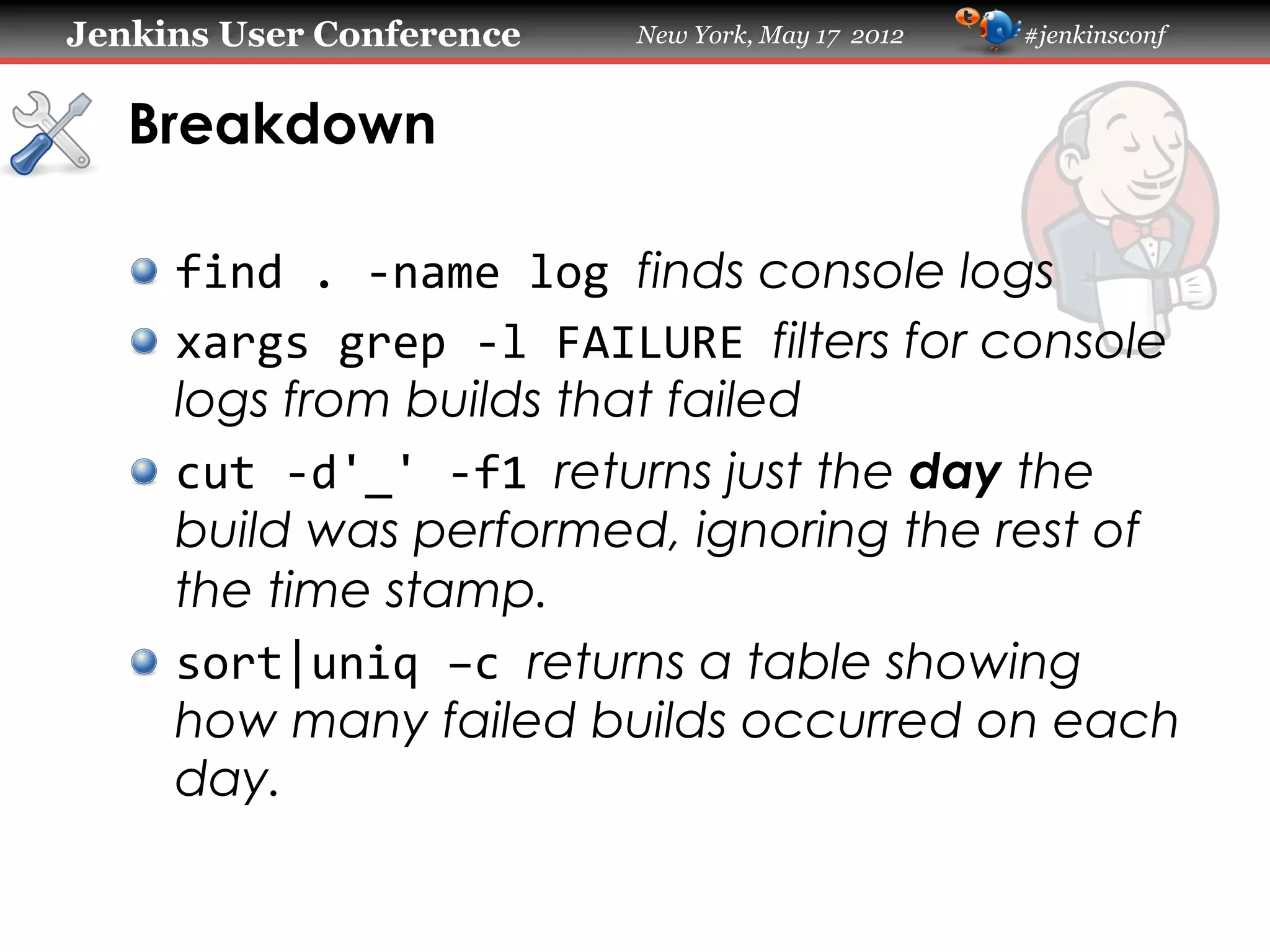
   Breakdown

   !   find	
  .	
  -­‐name	
  log	
  finds console logs
   !   xargs	
  grep	
  -­‐l	
  FAILURE	
  filters for console
       logs from builds that failed
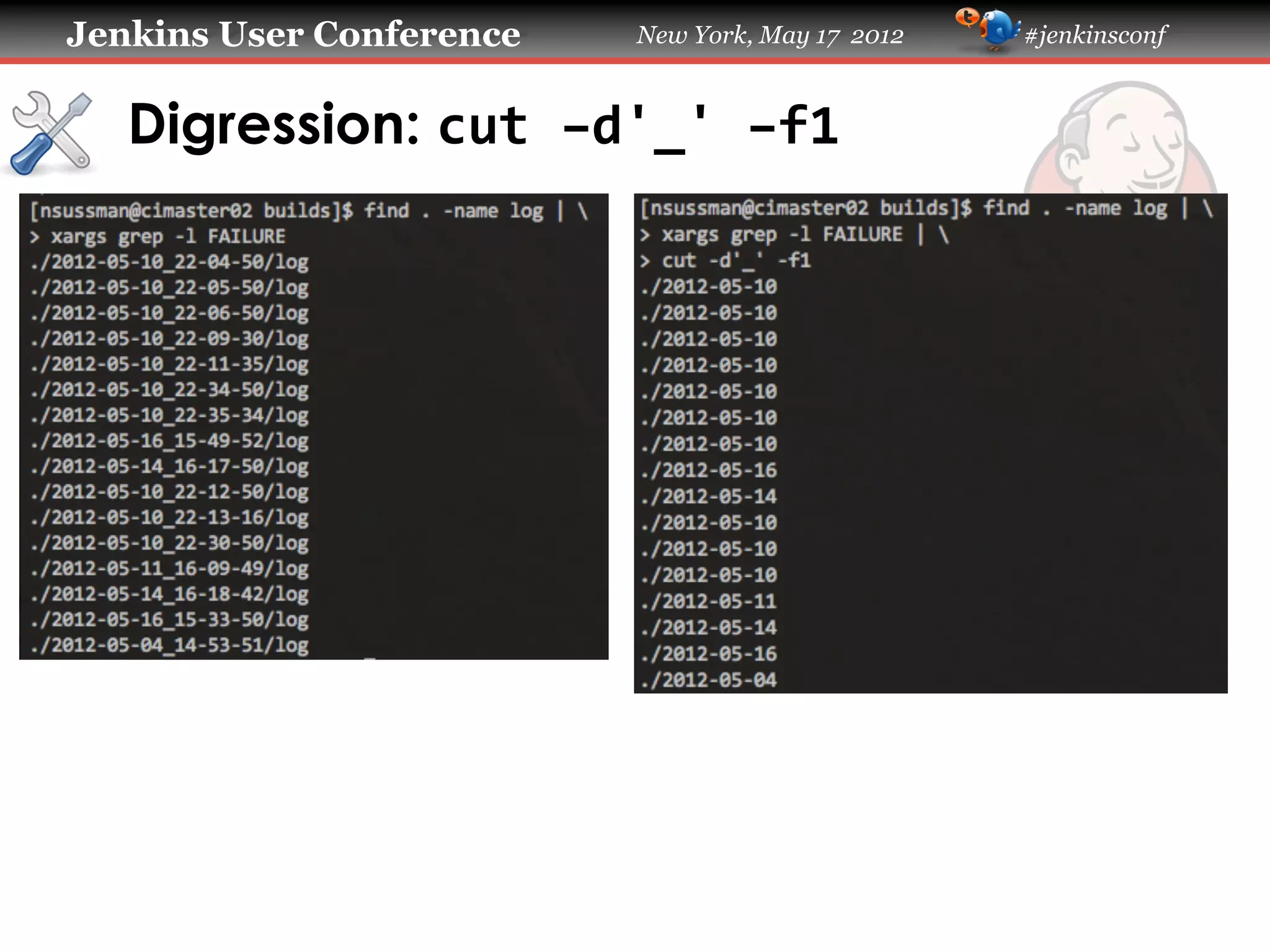
   !   cut	
  -­‐d'_'	
  -­‐f1	
  returns just the day the
       build was performed, ignoring the rest of
       the time stamp.
   !   sort|uniq	
  –c	
  returns a table showing
       how many failed builds occurred on each
       day.
Jenkins User Conference   New York, May 17 2012   #jenkinsconf


   Digression: cut	
  –d'_'	
  –f1	
  
Jenkins User Conference   New York, May 17 2012   #jenkinsconf


   Quick 'n' dirty graphs with spark
Jenkins User Conference     New York, May 17 2012   #jenkinsconf


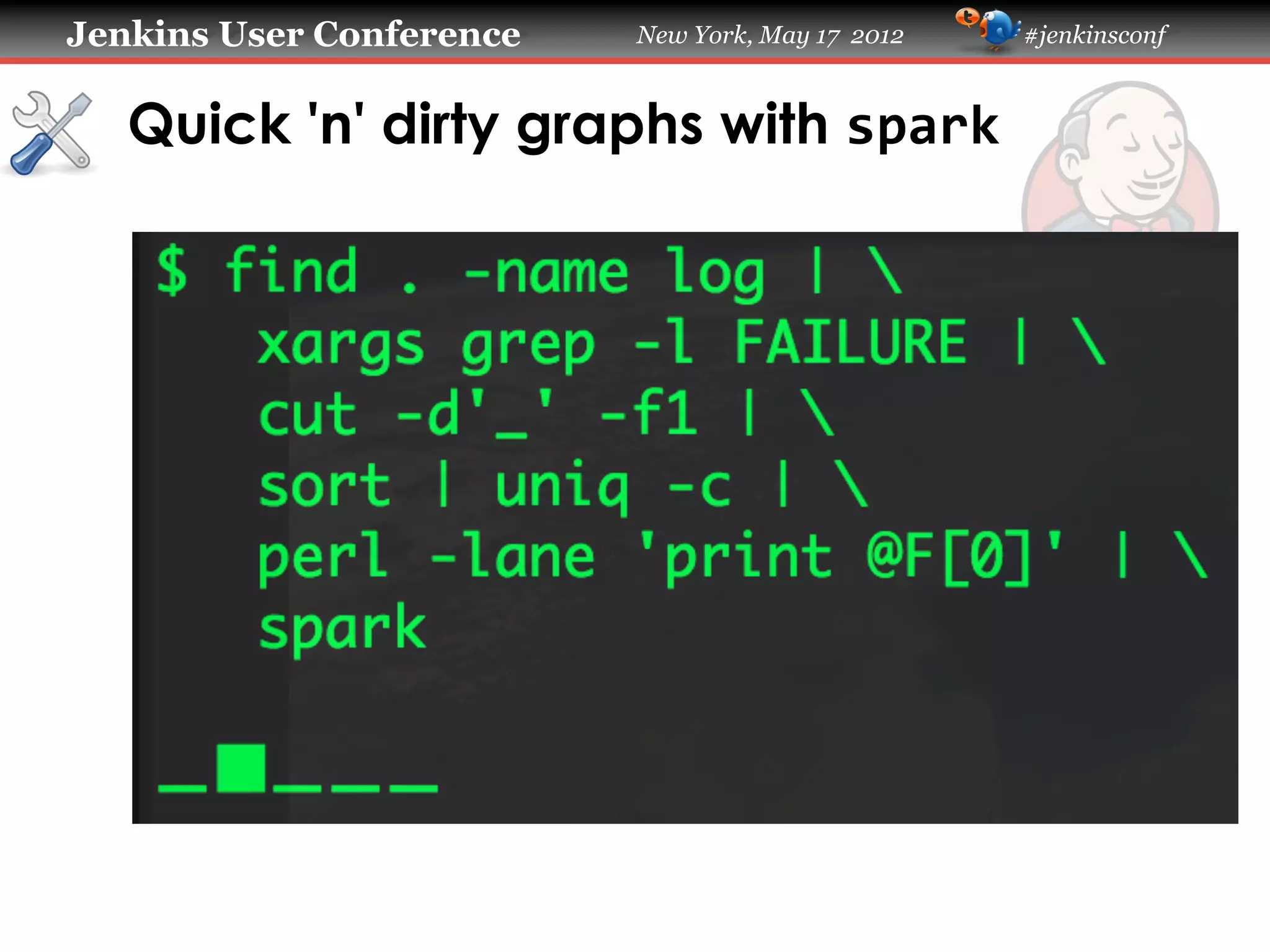
   Quick 'n' dirty graphs with spark

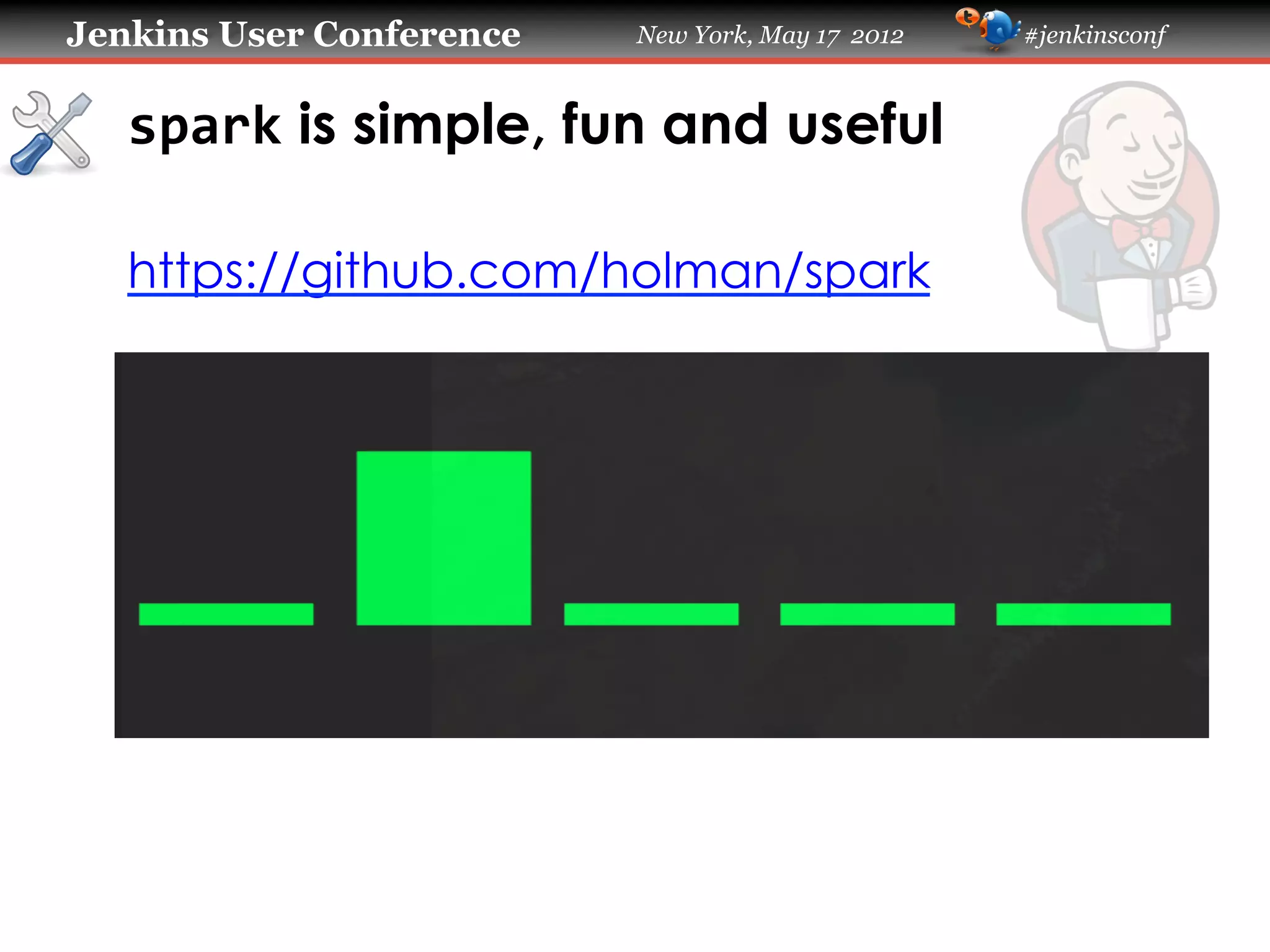
   !   spark takes a whitespace-delimited list of
       numbers as its input and produces a
       graph using Unicode block characters.
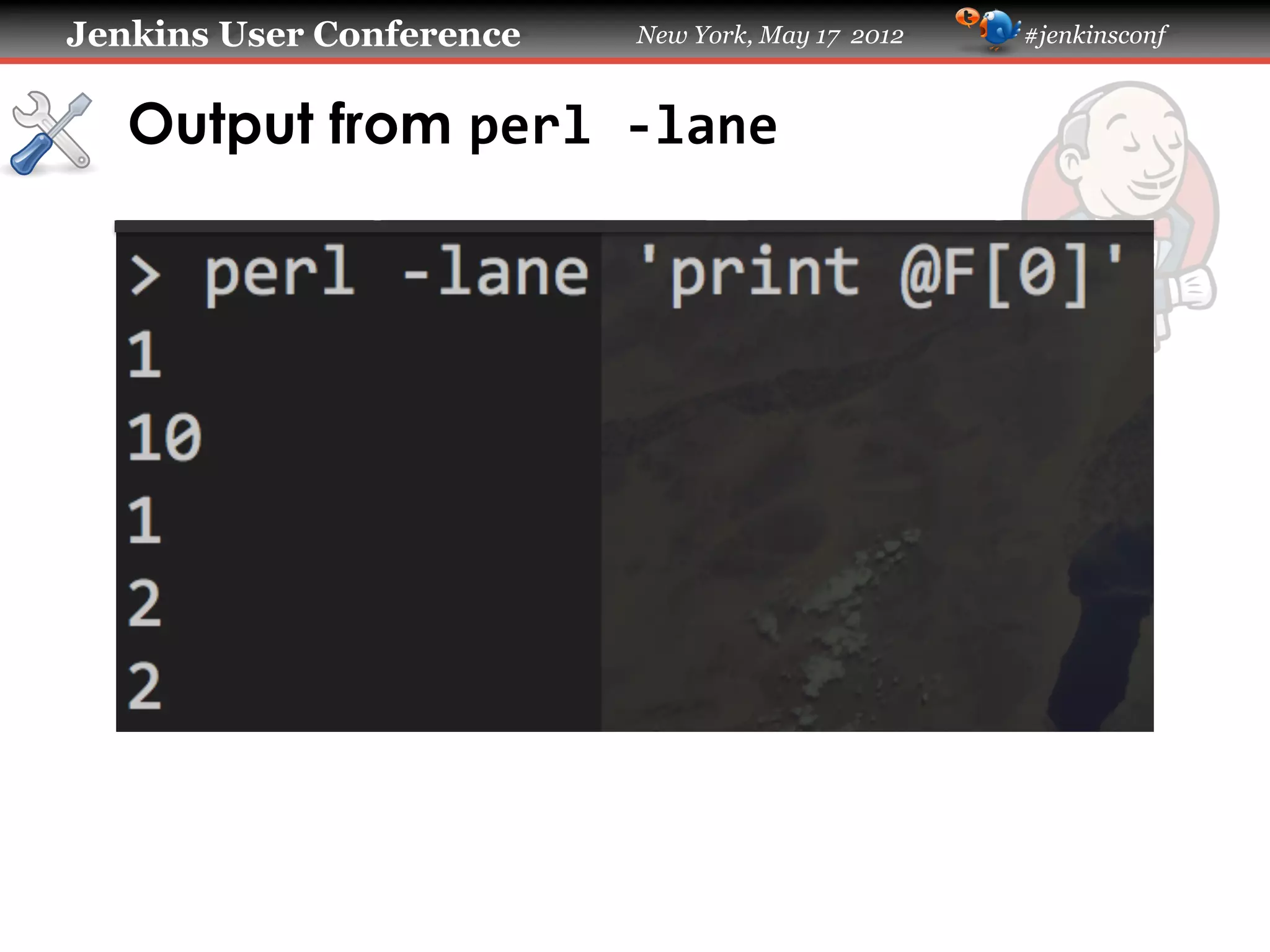
   !   perl	
  –lane	
  'print	
  @F[0]'	
  filters out
       everything but the counts of builds that
       failed per day, resulting in list of integers
       that can be consumed by spark
Jenkins User Conference   New York, May 17 2012   #jenkinsconf


   Output from perl	
  -­‐lane	
  
Jenkins User Conference   New York, May 17 2012   #jenkinsconf


   spark is simple, fun and useful

   https://github.com/holman/spark
Jenkins User Conference    New York, May 17 2012   #jenkinsconf


   The Jenkins JSON API

   !   To read the documentation, go to
       http://ci.example.com/api
   !   You can append /api/json to the end of
       nearly any Jenkins URL to get JSON data.
   !   http://ci.example.com/api/json for latest builds
   !   http://ci.example.com/job/unit-tests/api/json
       for history of a specific build.
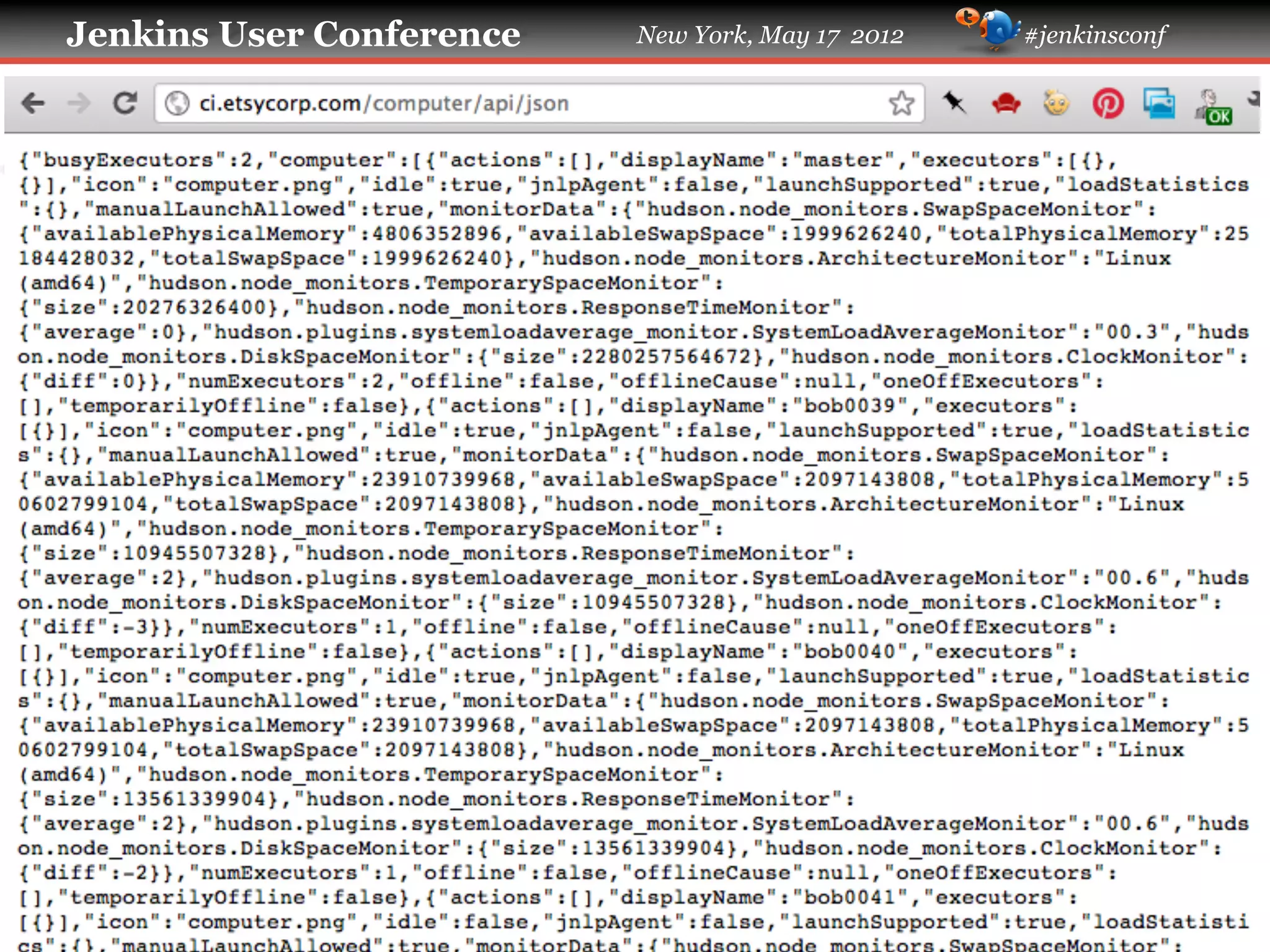
   !   http://ci.example.com/computer/api/json for
       slave information.
Jenkins User Conference   New York, May 17 2012   #jenkinsconf


   Using depth= to get more granular data

   !   If the API response doesn't contain some
       data that you expected, try
       appending ?depth=1 to the URL.
   !   If you still don't get what you want,
       increase the integer value.
   !   Usually you'll keep getting more data up
       until around ?depth=5
   !   Exactly what and how much data you'll
       get is dependent on the configuration of
       your Jenkins instance.
Jenkins User Conference   New York, May 17 2012   #jenkinsconf


   Drawbacks of using depth=

   !   Depending on how deep you go into the
       API response, you can wind up with a lot
       of data.
   !   Such large responses can be expensive to
       download.
   !   In some cases you can request a response
       so large that you will wind up
       DDoSing Jenkins!
Jenkins User Conference   New York, May 17 2012   #jenkinsconf


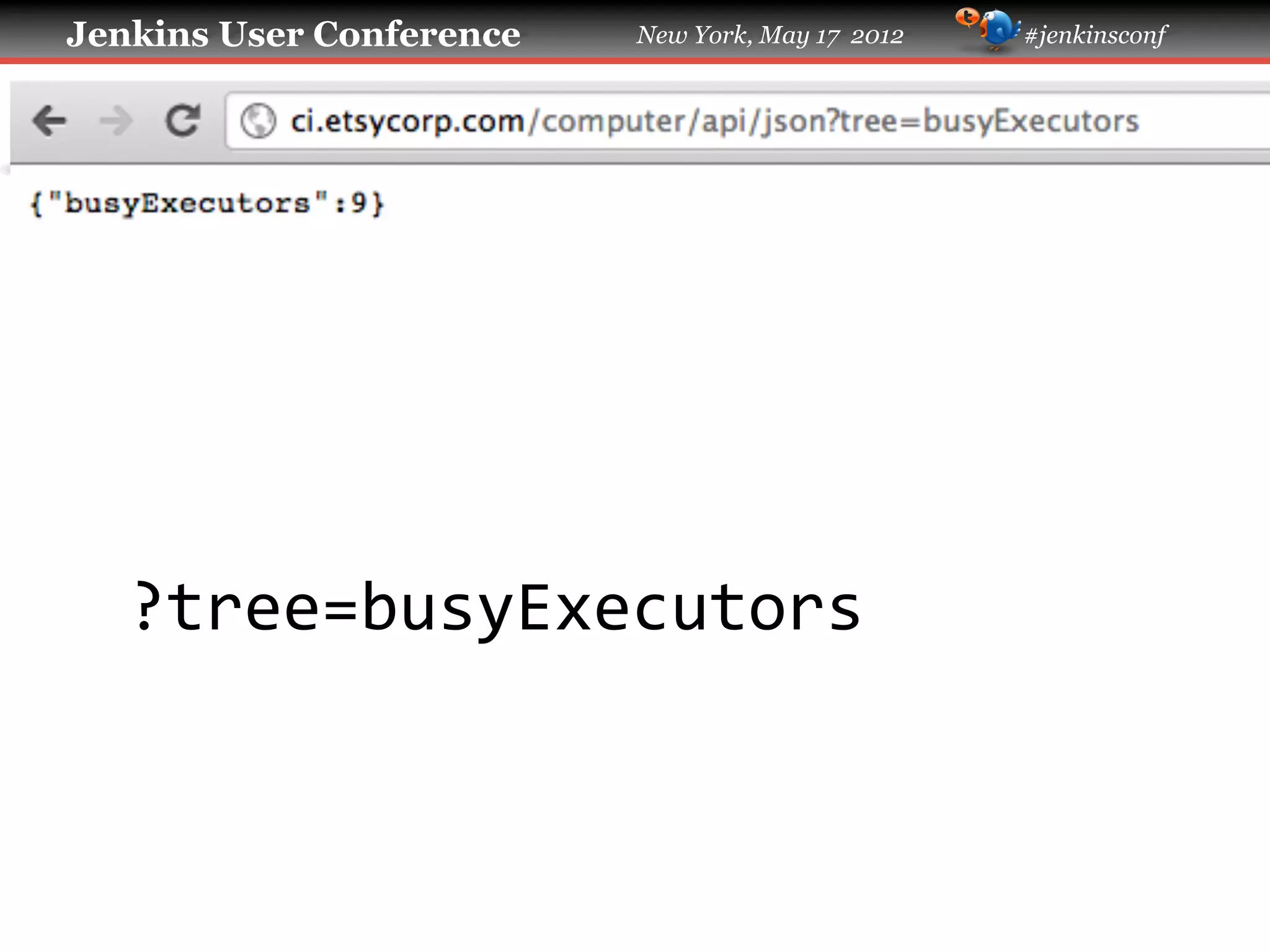
   Using tree= to filter the API response

   !   The tree= URL parameter is like a
       SQL query.
   !   Use depth= to look at the wealth of
       information available.
   !   Then use tree= to select only the
       information you actually need.
   !   This can dramatically reduce the size of
       your API responses.
Jenkins User Conference   New York, May 17 2012   #jenkinsconf


   ?tree=busyExecutors	
  
Jenkins User Conference   New York, May 17 2012   #jenkinsconf


   ?tree=computer[displayName]	
  
Jenkins User Conference                           New York, May 17 2012             #jenkinsconf


     Is the slave named bob0107 attached?


curl	
  -­‐s	
  "http://ci.etsycorp.com/computer/api/json?tree=computer[displayName]"	
  |	


  grep	
  bob0107	
  
Jenkins User Conference   New York, May 17 2012   #jenkinsconf


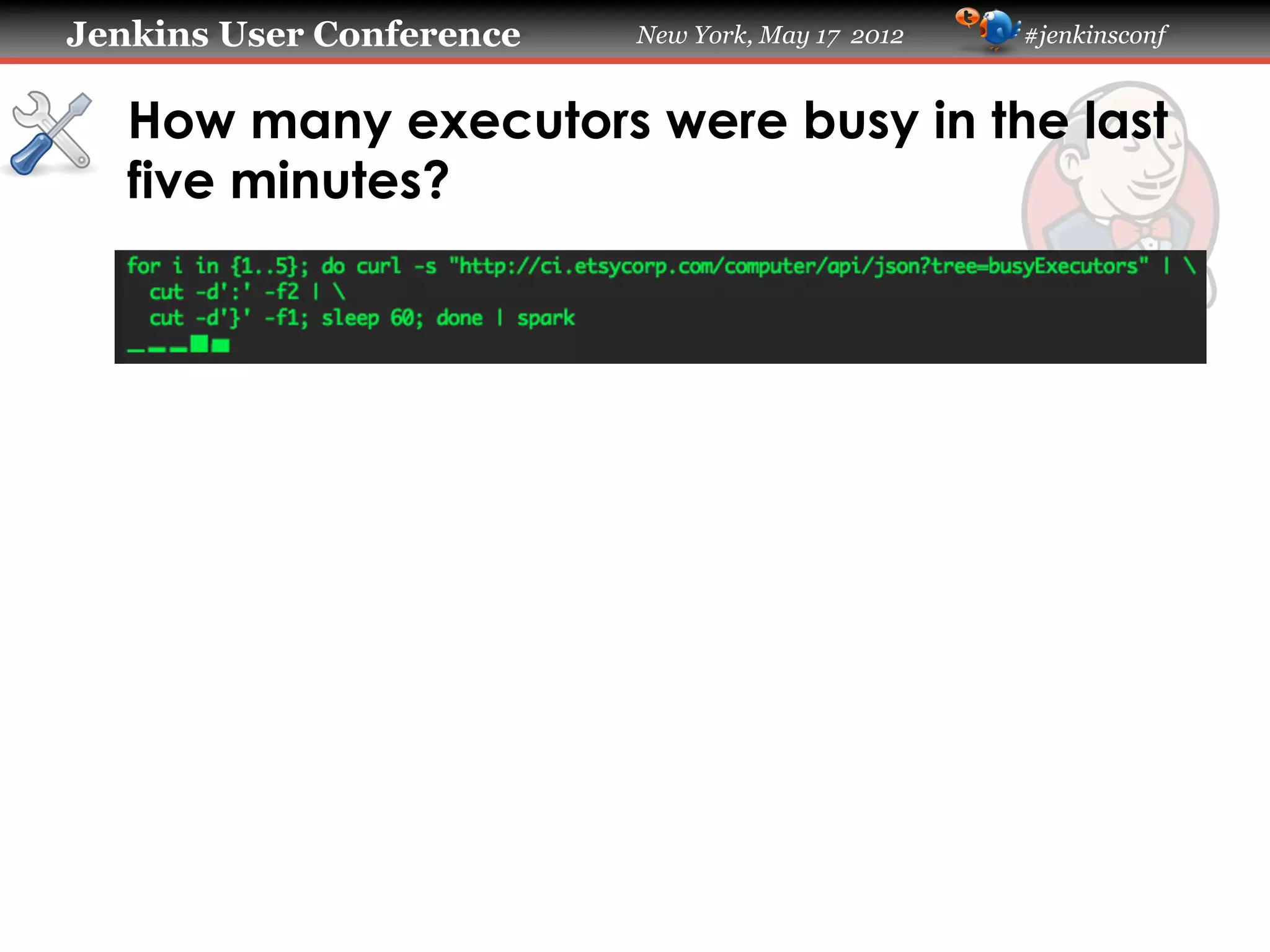
   How many executors were busy in the last
   five minutes?
Jenkins User Conference   New York, May 17 2012   #jenkinsconf


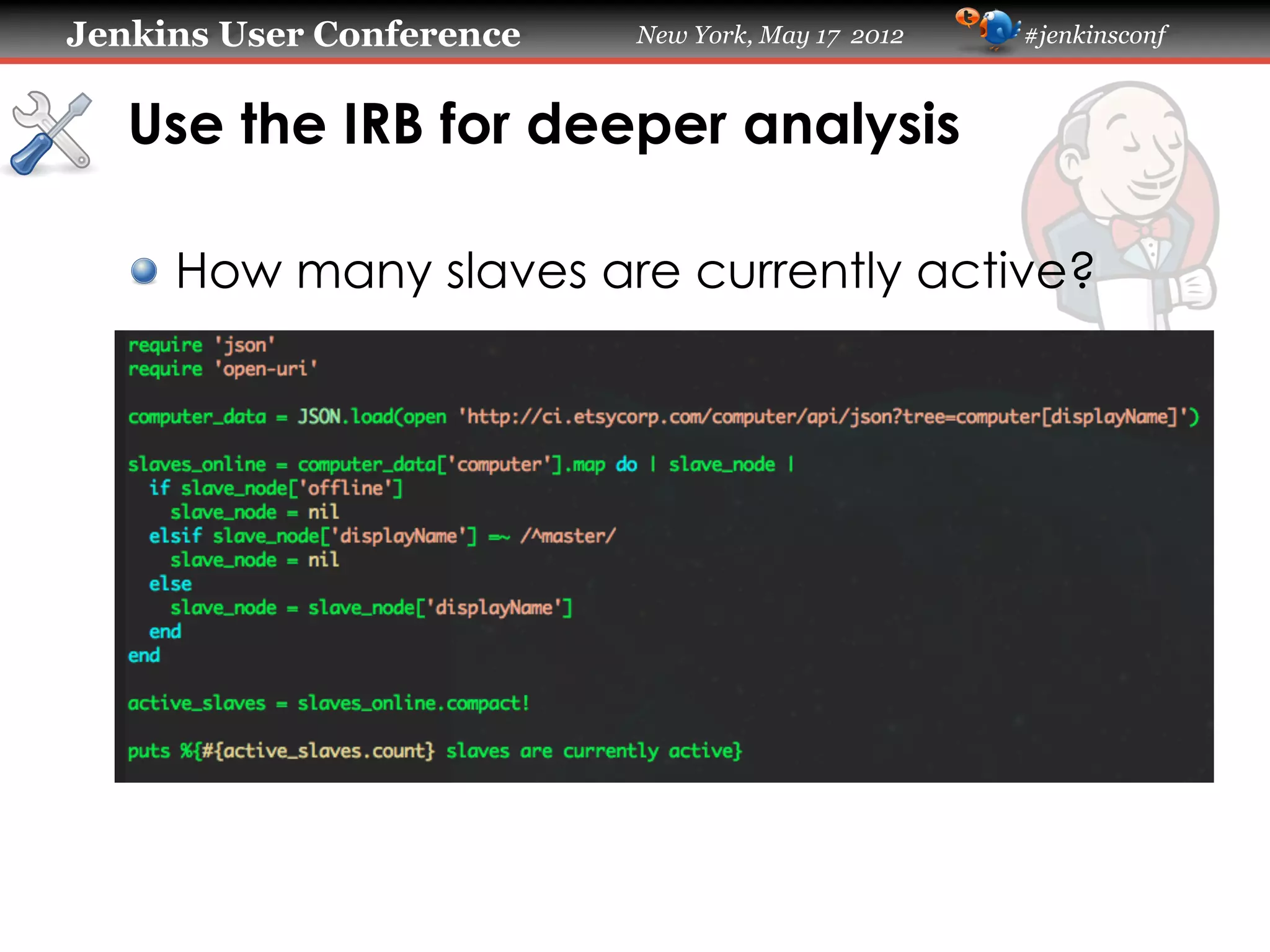
   Use the IRB for deeper analysis

   !   How many slaves are currently active?
Jenkins User Conference     New York, May 17 2012   #jenkinsconf


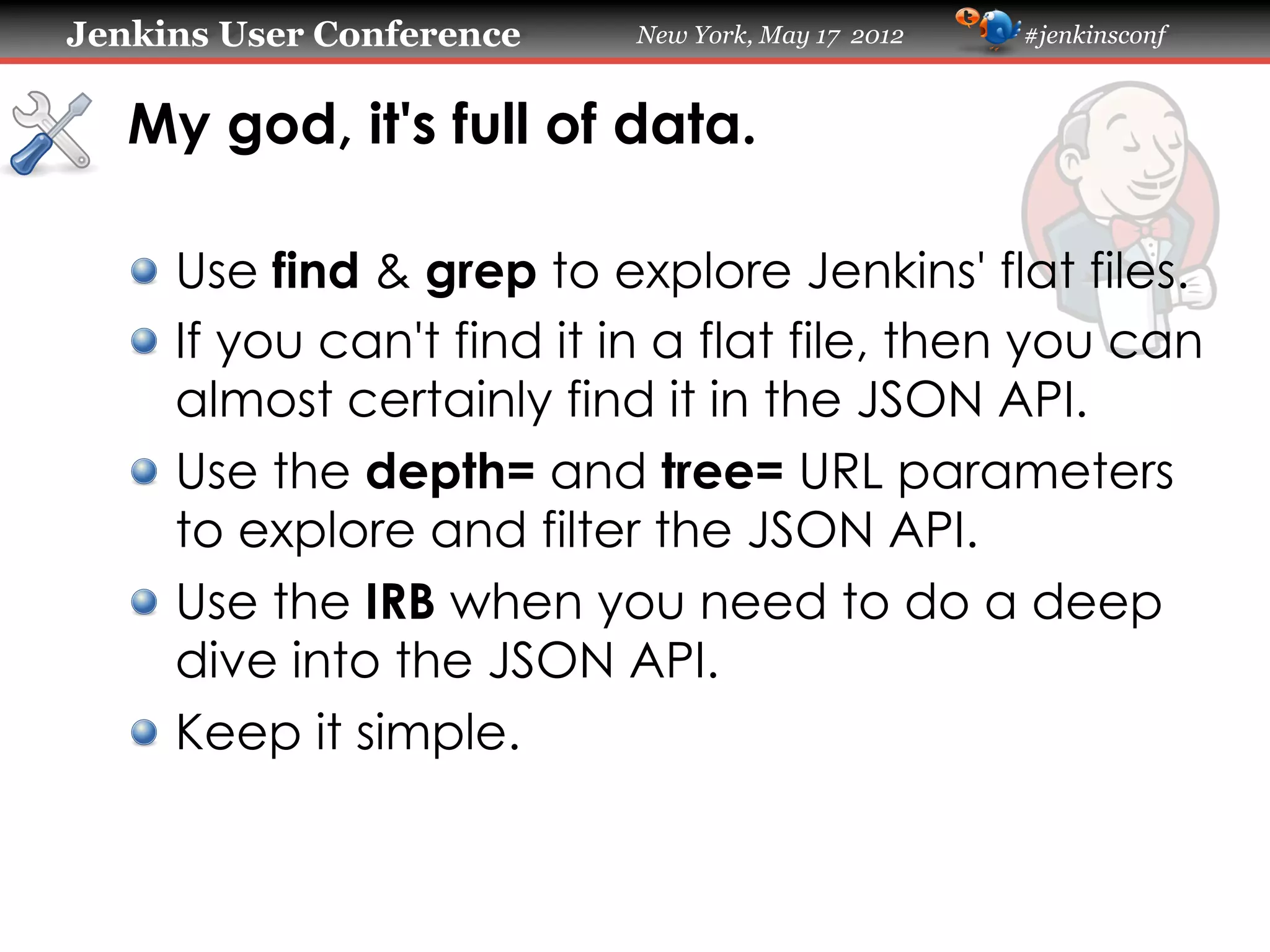
   My god, it's full of data.

   !   Use find & grep to explore Jenkins' flat files.
   !   If you can't find it in a flat file, then you can
       almost certainly find it in the JSON API.
   !   Use the depth= and tree= URL parameters
       to explore and filter the JSON API.
   !   Use the IRB when you need to do a deep
       dive into the JSON API.
   !   Keep it simple.
Jenkins User Conference   New York, May 17 2012   #jenkinsconf


   Going Deeper

   !   Use the Post-Build Task plugin to run a shell
       script and use Netcat to send the resulting
       data to Graphite or another RRD tool.
   !   Drop your shell script into a new Jenkins job
       and use the Plot Plugin to build ad hoc
       graphs of the results over time.
   !   These examples all produced TSV output.
       Redirect that to a file and you can graph it
       with GNUPlot or Google SpreadSheets.
Jenkins User Conference   New York, May 17 2012   #jenkinsconf


   Questions?                        @NoahSussman
Jenkins User Conference   New York, May 17 2012   #jenkinsconf


   Thank You To Our Sponsors
   Platinum
   Sponsor


   Gold
   Sponsors


   Silver
   Sponsors


   Bronze
   Sponsors

Jenkins data mining on the command line - Jenkins User Conference NYC 2012

  • 1.
    Jenkins User Conference New York, May 17 2012 #jenkinsconf Jenkins Data Mining on the Command Line Noah Sussman Etsy
  • 2.
    Jenkins User Conference New York, May 17 2012 #jenkinsconf Etsy Etsy is the marketplace we make together. We enable people anywhere to easily build and directly exchange with independent, creative businesses. Etsy has 15 million members and 875,000 sellers in over 150 countries. In 2011, our sellers grossed more than $525 million in sales.
  • 3.
    Jenkins User Conference New York, May 17 2012 #jenkinsconf Etsy !   Total Members: over 15 million !   Total Active Sellers: over 875,000 !   Unique Visitors per month: 40 million !   Items Currently Listed: 13 million !   Page Views per month: over 1.4 billion
  • 4.
    Jenkins User Conference New York, May 17 2012 #jenkinsconf Chad Dickerson’s history of CI at Etsy
  • 5.
    Jenkins User Conference New York, May 17 2012 #jenkinsconf CI systems exhibit complex behaviors !   Jenkins plugins provide nice visibility: ! xUnit Plugin !   Warnings Plugin !   Radiator View Plugin !   Extended Email Plugin !   IRC Plugin !   If you’re not using these yet – start now! !   But…
  • 6.
    Jenkins User Conference New York, May 17 2012 #jenkinsconf But… !   What is the failure rate of a specific test? !   How many failed builds occur per day? !   What is the status of slave bob0107? !   How many executors were busy in the last five minutes? !   How many slaves are currently attached?
  • 7.
    Jenkins User Conference New York, May 17 2012 #jenkinsconf Tools !   find,  grep,  cut,  spark,  perl,  irb !   My tools work on Mac OS and Linux. !   If you’re on Windows you can use Cygwin. !   Or you could do it all with Perl or Ruby. !   Or with something else. !   There’s more than one way to do it.
  • 8.
    Jenkins User Conference New York, May 17 2012 #jenkinsconf A note about methodology
  • 9.
    Jenkins User Conference New York, May 17 2012 #jenkinsconf Whatever works !   Simple > Robust !   Simple > Reusable !   Simple > Performant !   Simple > Elegant !   Do the minimum amount of work necessary to get the information that you need in order to make a decision.
  • 10.
    Jenkins User Conference New York, May 17 2012 #jenkinsconf Directory structure of a Jenkins project
  • 11.
    Jenkins User Conference New York, May 17 2012 #jenkinsconf Directory structure of a Jenkins project
  • 12.
    Jenkins User Conference New York, May 17 2012 #jenkinsconf Directory structure of a Jenkins project
  • 13.
    Jenkins User Conference New York, May 17 2012 #jenkinsconf Directory structure of a build
  • 14.
    Jenkins User Conference New York, May 17 2012 #jenkinsconf Determining how often a test fails !   You can get this information through the xUnit plugin. !   But you have to click through a lot of screens. !   Doing it on the command line is faster.
  • 15.
    Jenkins User Conference New York, May 17 2012 #jenkinsconf Determining how often a test fails
  • 16.
    Jenkins User Conference New York, May 17 2012 #jenkinsconf junitResult.xml
  • 17.
    Jenkins User Conference New York, May 17 2012 #jenkinsconf Find all occurrences of that stack trace $  cd  $HUDSON_HOME/jobs/unit-­‐tests/builds   $  find  .  -­‐name  junitResult.xml  |          xargs  grep  ‘<errorStackTrace>Activity_StoryTeller_FavoritePairTest’    
  • 18.
    Jenkins User Conference New York, May 17 2012 #jenkinsconf Breakdown !   find  .  -­‐name  junitResult.xml   recursively finds all the JUnit result files in the current directory and its subdirectories. !   xargs  grep  -­‐l  <string>  filters for just the files that contain the string we are looking for – in this case the first line of the stack trace.
  • 19.
    Jenkins User Conference New York, May 17 2012 #jenkinsconf Counting the number of failures find  .  –name  junitResult.xml  |        xargs  grep  '<errorStackTrace>'  |        wc  -­‐l  
  • 20.
    Jenkins User Conference New York, May 17 2012 #jenkinsconf Sorta mappy, sorta reduce-y !   Use find and grep to find interesting builds. !   Use wc to return a count. !   It's not fancy, but hey whatever works.
  • 21.
    Jenkins User Conference New York, May 17 2012 #jenkinsconf Bucketing failed builds by date !   How many builds fail each day? !   You can figure this out from the build trend graph, but again it's much faster to do it on the command line.
  • 22.
    Jenkins User Conference New York, May 17 2012 #jenkinsconf How many failed builds per day? $  cd  unit-­‐tests/builds   $  find  .  -­‐name  log  |          xargs  grep  -­‐l  FAILURE  |          cut  -­‐d'_'  -­‐f1  |          sort  |          uniq  -­‐c  
  • 23.
    Jenkins User Conference New York, May 17 2012 #jenkinsconf Here's the output
  • 24.
    Jenkins User Conference New York, May 17 2012 #jenkinsconf Breakdown !   find  .  -­‐name  log  finds console logs !   xargs  grep  -­‐l  FAILURE  filters for console logs from builds that failed !   cut  -­‐d'_'  -­‐f1  returns just the day the build was performed, ignoring the rest of the time stamp. !   sort|uniq  –c  returns a table showing how many failed builds occurred on each day.
  • 25.
    Jenkins User Conference New York, May 17 2012 #jenkinsconf Digression: cut  –d'_'  –f1  
  • 26.
    Jenkins User Conference New York, May 17 2012 #jenkinsconf Quick 'n' dirty graphs with spark
  • 27.
    Jenkins User Conference New York, May 17 2012 #jenkinsconf Quick 'n' dirty graphs with spark !   spark takes a whitespace-delimited list of numbers as its input and produces a graph using Unicode block characters. !   perl  –lane  'print  @F[0]'  filters out everything but the counts of builds that failed per day, resulting in list of integers that can be consumed by spark
  • 28.
    Jenkins User Conference New York, May 17 2012 #jenkinsconf Output from perl  -­‐lane  
  • 29.
    Jenkins User Conference New York, May 17 2012 #jenkinsconf spark is simple, fun and useful https://github.com/holman/spark
  • 30.
    Jenkins User Conference New York, May 17 2012 #jenkinsconf The Jenkins JSON API !   To read the documentation, go to http://ci.example.com/api !   You can append /api/json to the end of nearly any Jenkins URL to get JSON data. !   http://ci.example.com/api/json for latest builds !   http://ci.example.com/job/unit-tests/api/json for history of a specific build. !   http://ci.example.com/computer/api/json for slave information.
  • 31.
    Jenkins User Conference New York, May 17 2012 #jenkinsconf Using depth= to get more granular data !   If the API response doesn't contain some data that you expected, try appending ?depth=1 to the URL. !   If you still don't get what you want, increase the integer value. !   Usually you'll keep getting more data up until around ?depth=5 !   Exactly what and how much data you'll get is dependent on the configuration of your Jenkins instance.
  • 32.
    Jenkins User Conference New York, May 17 2012 #jenkinsconf Drawbacks of using depth= !   Depending on how deep you go into the API response, you can wind up with a lot of data. !   Such large responses can be expensive to download. !   In some cases you can request a response so large that you will wind up DDoSing Jenkins!
  • 33.
    Jenkins User Conference New York, May 17 2012 #jenkinsconf Using tree= to filter the API response !   The tree= URL parameter is like a SQL query. !   Use depth= to look at the wealth of information available. !   Then use tree= to select only the information you actually need. !   This can dramatically reduce the size of your API responses.
  • 34.
    Jenkins User Conference New York, May 17 2012 #jenkinsconf
  • 35.
    Jenkins User Conference New York, May 17 2012 #jenkinsconf ?tree=busyExecutors  
  • 36.
    Jenkins User Conference New York, May 17 2012 #jenkinsconf ?tree=computer[displayName]  
  • 37.
    Jenkins User Conference New York, May 17 2012 #jenkinsconf Is the slave named bob0107 attached?         curl  -­‐s  "http://ci.etsycorp.com/computer/api/json?tree=computer[displayName]"  |        grep  bob0107  
  • 38.
    Jenkins User Conference New York, May 17 2012 #jenkinsconf How many executors were busy in the last five minutes?
  • 39.
    Jenkins User Conference New York, May 17 2012 #jenkinsconf Use the IRB for deeper analysis !   How many slaves are currently active?
  • 40.
    Jenkins User Conference New York, May 17 2012 #jenkinsconf My god, it's full of data. !   Use find & grep to explore Jenkins' flat files. !   If you can't find it in a flat file, then you can almost certainly find it in the JSON API. !   Use the depth= and tree= URL parameters to explore and filter the JSON API. !   Use the IRB when you need to do a deep dive into the JSON API. !   Keep it simple.
  • 41.
    Jenkins User Conference New York, May 17 2012 #jenkinsconf Going Deeper !   Use the Post-Build Task plugin to run a shell script and use Netcat to send the resulting data to Graphite or another RRD tool. !   Drop your shell script into a new Jenkins job and use the Plot Plugin to build ad hoc graphs of the results over time. !   These examples all produced TSV output. Redirect that to a file and you can graph it with GNUPlot or Google SpreadSheets.
  • 42.
    Jenkins User Conference New York, May 17 2012 #jenkinsconf Questions? @NoahSussman
  • 43.
    Jenkins User Conference New York, May 17 2012 #jenkinsconf Thank You To Our Sponsors Platinum Sponsor Gold Sponsors Silver Sponsors Bronze Sponsors