




The DevOpsification of
Windows Server
Jeffrey Snover
Microsoft Technical Fellow
Chief Architect Enterprise
Cloud Group
@JSNOVER
What is DevOps?
DevOps is about culture
and processes
DevOps is NOT
about tools and technology
But…..
This is wrong
Tools and
technology
play a critical
role
Tools and technology
can make DevOps
easy or hard
Windows Server 2016
is architected
to make DevOps easy
Windows Server
2016 resolves the
interface between
devs and ops
Windows Server has been silent
on the interface
between Devs and Ops
• No architecture
• 1,000 blossoms bloomed
1,000 conflicts also bloomed
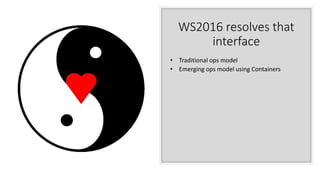
WS2016 resolves that
interface
• Traditional ops model
• Emerging ops model using Containers
Why?
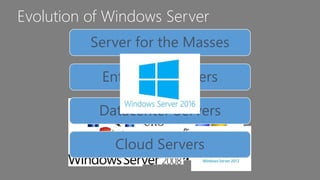
Evolution of Windows Server
Server for the Masses
Enterprise Servers
Datacenter Servers
Cloud Servers
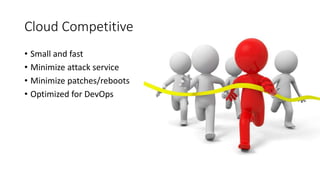
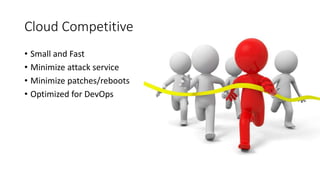
Cloud Competitive
• Small and fast
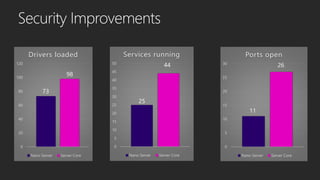
• Minimize attack service
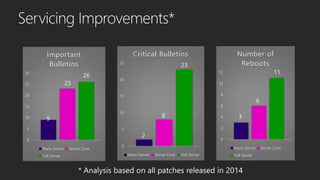
• Minimize patches/reboots
• Optimized for DevOps
Cloud + DevOps
Saving $ => Making $$$$$$$$
DevOpsification of Windows
• Componentization
• Development
• Packaging & deployment
• Configuration
• Containers & Docker
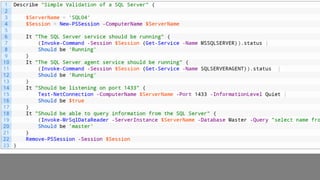
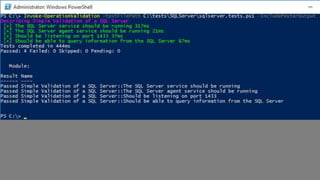
• Operational Validation Testing
• Operating Securely
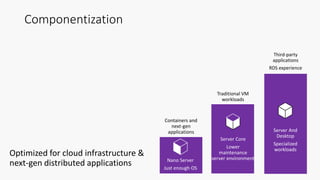
Componentization
Optimized for cloud infrastructure &
next-gen distributed applications
Containers and
next-gen
applications Server And
Desktop
Specialized
workloads
Third-party
applications
RDS experience
Server Core
Lower
maintenance
server environment
Traditional VM
workloads
Nano Server
Just enough OS
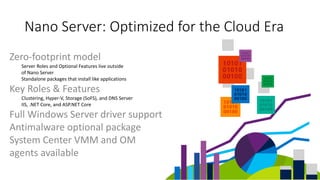
Zero-footprint model
Server Roles and Optional Features live outside
of Nano Server
Standalone packages that install like applications
Key Roles & Features
Clustering, Hyper-V, Storage (SoFS), and DNS Server
IIS, .NET Core, and ASP.NET Core
Full Windows Server driver support
Antimalware optional package
System Center VMM and OM
agents available
Nano Server: Optimized for the Cloud Era
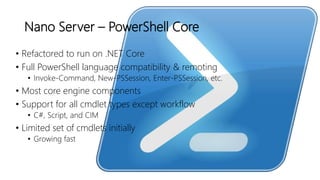
Nano Server – PowerShell Core
• Refactored to run on .NET Core
• Full PowerShell language compatibility & remoting
• Invoke-Command, New-PSSession, Enter-PSSession, etc.
• Most core engine components
• Support for all cmdlet types except workflow
• C#, Script, and CIM
• Limited set of cmdlets initially
• Growing fast
DevOpsification of Windows
• Componentization
• Development
• Packaging & deployment
• Configuration
• Containers & Docker
• Operational Validation Testing
• Operating Securely
DevOpsification of Windows
• Componentization
• Development
• Packaging & deployment
• Configuration
• Containers & Docker
• Operational Validation Testing
• Operating Securely
First a word about MSI
• Not supported on Nano Server
• MSI has GUI dependencies
• Custom Actions are the portal to
hell
Windows Server App installer
(WSA)
• New declarative Server installer
• Extends the AppX schema
• Allows for Server-specific extensions, such as NT
Services, Perf Counters, COM Objects, WMI
providers, ETW events
• No custom actions
• 4 out of 5 kittens love WSA
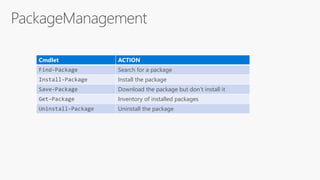
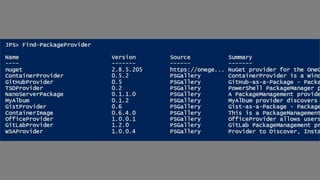
Cmdlet ACTION
Find-Package Search for a package
Install-Package Install the package
Save-Package Download the package but don’t install it
Get-Package Inventory of installed packages
Uninstall-Package Uninstall the package
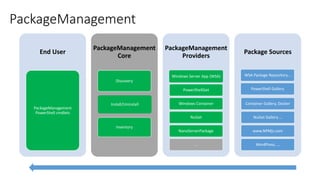
PackageManagement
End User
PackageManagement
PowerShell cmdlets
PackageManagement
Core
Discovery
Install/Uninstall
Inventory
PackageManagement
Providers
Windows Server App (WSA)
PowerShellGet
Windows Container
NuGet
NanoServerPackage
…
Package Sources
WSA Package Repository…
PowerShell Gallery
Container Gallery, Docker
NuGet Gallery …
www.NPMjs.com
WordPress, …
DevOpsification of Windows
• Componentization
• Development
• Packaging & deployment
• Configuration
• Containers & Docker
• Operational Validation Testing
• Operating Securely
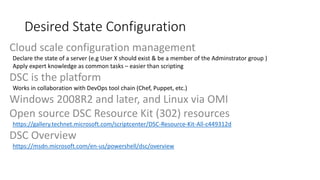
Cloud scale configuration management
Declare the state of a server (e.g User X should exist & be a member of the Adminstrator group )
Apply expert knowledge as common tasks – easier than scripting
DSC is the platform
Works in collaboration with DevOps tool chain (Chef, Puppet, etc.)
Windows 2008R2 and later, and Linux via OMI
Open source DSC Resource Kit (302) resources
https://gallery.technet.microsoft.com/scriptcenter/DSC-Resource-Kit-All-c449312d
DSC Overview
https://msdn.microsoft.com/en-us/powershell/dsc/overview
Desired State Configuration
DevOpsification of Windows
• Componentization
• Development
• Packaging & deployment
• Configuration
• Containers & Docker
• Operational Validation Testing
• Operating Securely
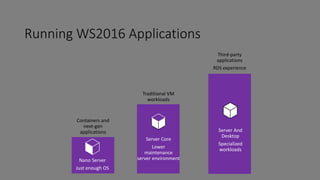
Running WS2016 Applications
Containers and
next-gen
applications Server And
Desktop
Specialized
workloads
Third-party
applications
RDS experience
Server Core
Lower
maintenance
server environment
Traditional VM
workloads
Nano Server
Just enough OS
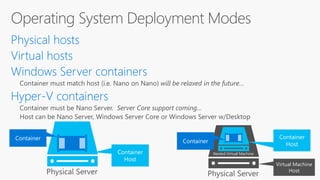
Virtual Machine
Host
Nested Virtual Machine
Container
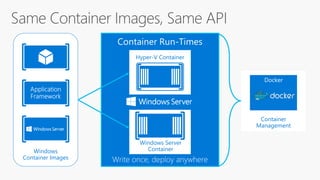
Management
Docker
Windows
Container Images
Hyper-V Container
Windows Server
Container
DevOpsification of Windows
• Componentization
• Development
• Packaging & deployment
• Configuration
• Containers & Docker
• Operational Validation Testing
• Operating Securely
DevOpsification of Windows
• Componentization
• Development
• Packaging & deployment
• Configuration
• Containers & Docker
• Operational Validation Testing
• Operating Securely
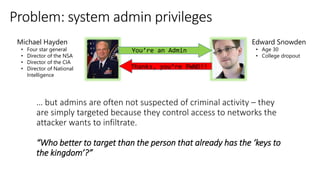
“Who better to target than the person that already has the ‘keys to
the kingdom’?”
You’re an Admin
Thanks, you’re PWND!!
Edward Snowden
• Age 30
• College dropout
Michael Hayden
• Four star general
• Director of the NSA
• Director of the CIA
• Director of National
Intelligence
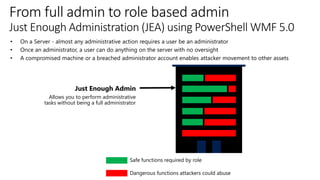
Safe functions required by role
Dangerous functions attackers could abuse
Just Enough Admin
Allows you to perform administrative
tasks without being a full administrator
• On a Server - almost any administrative action requires a user be an administrator
• Once an administrator, a user can do anything on the server with no oversight
• A compromised machine or a breached administrator account enables attacker movement to other assets
From full admin to role based admin
Just Enough Administration (JEA) using PowerShell WMF 5.0
JEA Resources:
https://github.com/PowerShell/JEA
https://gallery.technet.microsoft.com/Just-Enough-Administration-6b5ad370
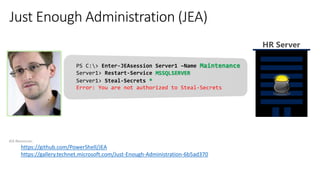
PS C:> Enter-JEAsession Server1 –Name Maintenance
Server1> Restart-Service MSSQLSERVER
HR Server
Server1> Steal-Secrets *
Error: You are not authorized to Steal-Secrets
DevOpsification of Windows
• Componentization
• Development
• Packaging & deployment
• Configuration
• Containers & Docker
• Operational Validation Testing
• Operating Securely
DevOpsification of Windows
• Componentization
• Development
• Packaging & deployment
• Configuration
• Containers & Docker
• Operational Validation Testing
• Operating Securely
Available DownlevelWS2016
Cloud Competitive
• Small and Fast
• Minimize attack service
• Minimize patches/reboots
• Optimized for DevOps
0
5
10
15
20
25
Critical Bulletins
Nano Server Server Core Full Server
0
5
10
15
20
25
30
Important
Bulletins
Nano Server Server Core
Full Server
0
2
4
6
8
10
12
Number of
Reboots
Nano Server Server Core
Full Server
23
8
2
9
23
26
6
11
3
0
5
10
15
20
25
30
Ports open
Nano Server Server Core
0
5
10
15
20
25
30
35
40
45
50
Services running
Nano Server Server Core
0
20
40
60
80
100
120
Drivers loaded
Nano Server Server Core
11
26
25
44
73
98
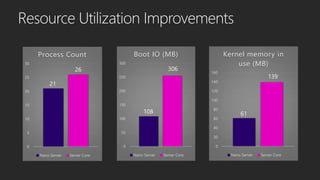
0
50
100
150
200
250
300
Boot IO (MB)
Nano Server Server Core
0
5
10
15
20
25
30
Process Count
Nano Server Server Core
0
20
40
60
80
100
120
140
160
Kernel memory in
use (MB)
Nano Server Server Core
26
21
61
139
108
306
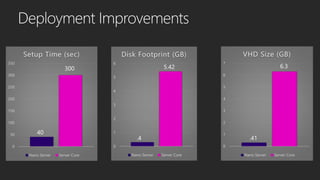
0
50
100
150
200
250
300
350
Setup Time (sec)
Nano Server Server Core
0
1
2
3
4
5
6
Disk Footprint (GB)
Nano Server Server Core
0
1
2
3
4
5
6
7
VHD Size (GB)
Nano Server Server Core
.41
6.3
40
300 5.42
.4
DevOps is about culture
and processes
Tools and technology
can make DevOps
easy or hard
Windows Server 2016
is architected
to make DevOps easy
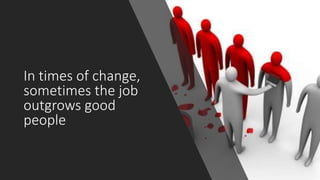
In times of change,
sometimes the job
outgrows good
people
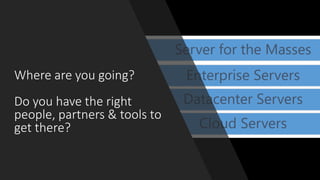
Where are you going?
Do you have the right
people, partners & tools to
get there?
Q&A

WinOps Conf 2016 - Jeffrey Snover - The DevOpsification of Windows Server

  • 1.
    The DevOpsification of WindowsServer Jeffrey Snover Microsoft Technical Fellow Chief Architect Enterprise Cloud Group @JSNOVER
  • 2.
  • 3.
    DevOps is aboutculture and processes
  • 4.
    DevOps is NOT abouttools and technology
  • 5.
  • 6.
  • 7.
  • 8.
    Tools and technology canmake DevOps easy or hard
  • 9.
    Windows Server 2016 isarchitected to make DevOps easy
  • 10.
    Windows Server 2016 resolvesthe interface between devs and ops
  • 11.
    Windows Server hasbeen silent on the interface between Devs and Ops • No architecture • 1,000 blossoms bloomed
  • 12.
  • 13.
    WS2016 resolves that interface •Traditional ops model • Emerging ops model using Containers
  • 14.
  • 15.
    Evolution of WindowsServer Server for the Masses Enterprise Servers Datacenter Servers Cloud Servers
  • 16.
    Cloud Competitive • Smalland fast • Minimize attack service • Minimize patches/reboots • Optimized for DevOps
  • 17.
    Cloud + DevOps Saving$ => Making $$$$$$$$
  • 18.
    DevOpsification of Windows •Componentization • Development • Packaging & deployment • Configuration • Containers & Docker • Operational Validation Testing • Operating Securely
  • 19.
    Componentization Optimized for cloudinfrastructure & next-gen distributed applications Containers and next-gen applications Server And Desktop Specialized workloads Third-party applications RDS experience Server Core Lower maintenance server environment Traditional VM workloads Nano Server Just enough OS
  • 20.
    Zero-footprint model Server Rolesand Optional Features live outside of Nano Server Standalone packages that install like applications Key Roles & Features Clustering, Hyper-V, Storage (SoFS), and DNS Server IIS, .NET Core, and ASP.NET Core Full Windows Server driver support Antimalware optional package System Center VMM and OM agents available Nano Server: Optimized for the Cloud Era
  • 21.
    Nano Server –PowerShell Core • Refactored to run on .NET Core • Full PowerShell language compatibility & remoting • Invoke-Command, New-PSSession, Enter-PSSession, etc. • Most core engine components • Support for all cmdlet types except workflow • C#, Script, and CIM • Limited set of cmdlets initially • Growing fast
  • 22.
    DevOpsification of Windows •Componentization • Development • Packaging & deployment • Configuration • Containers & Docker • Operational Validation Testing • Operating Securely
  • 24.
    DevOpsification of Windows •Componentization • Development • Packaging & deployment • Configuration • Containers & Docker • Operational Validation Testing • Operating Securely
  • 25.
    First a wordabout MSI • Not supported on Nano Server • MSI has GUI dependencies • Custom Actions are the portal to hell
  • 26.
    Windows Server Appinstaller (WSA) • New declarative Server installer • Extends the AppX schema • Allows for Server-specific extensions, such as NT Services, Perf Counters, COM Objects, WMI providers, ETW events • No custom actions • 4 out of 5 kittens love WSA
  • 27.
    Cmdlet ACTION Find-Package Searchfor a package Install-Package Install the package Save-Package Download the package but don’t install it Get-Package Inventory of installed packages Uninstall-Package Uninstall the package
  • 29.
    PackageManagement End User PackageManagement PowerShell cmdlets PackageManagement Core Discovery Install/Uninstall Inventory PackageManagement Providers WindowsServer App (WSA) PowerShellGet Windows Container NuGet NanoServerPackage … Package Sources WSA Package Repository… PowerShell Gallery Container Gallery, Docker NuGet Gallery … www.NPMjs.com WordPress, …
  • 30.
    DevOpsification of Windows •Componentization • Development • Packaging & deployment • Configuration • Containers & Docker • Operational Validation Testing • Operating Securely
  • 31.
    Cloud scale configurationmanagement Declare the state of a server (e.g User X should exist & be a member of the Adminstrator group ) Apply expert knowledge as common tasks – easier than scripting DSC is the platform Works in collaboration with DevOps tool chain (Chef, Puppet, etc.) Windows 2008R2 and later, and Linux via OMI Open source DSC Resource Kit (302) resources https://gallery.technet.microsoft.com/scriptcenter/DSC-Resource-Kit-All-c449312d DSC Overview https://msdn.microsoft.com/en-us/powershell/dsc/overview Desired State Configuration
  • 32.
    DevOpsification of Windows •Componentization • Development • Packaging & deployment • Configuration • Containers & Docker • Operational Validation Testing • Operating Securely
  • 33.
    Running WS2016 Applications Containersand next-gen applications Server And Desktop Specialized workloads Third-party applications RDS experience Server Core Lower maintenance server environment Traditional VM workloads Nano Server Just enough OS
  • 34.
  • 35.
  • 36.
    DevOpsification of Windows •Componentization • Development • Packaging & deployment • Configuration • Containers & Docker • Operational Validation Testing • Operating Securely
  • 40.
    DevOpsification of Windows •Componentization • Development • Packaging & deployment • Configuration • Containers & Docker • Operational Validation Testing • Operating Securely
  • 41.
    “Who better totarget than the person that already has the ‘keys to the kingdom’?” You’re an Admin Thanks, you’re PWND!! Edward Snowden • Age 30 • College dropout Michael Hayden • Four star general • Director of the NSA • Director of the CIA • Director of National Intelligence
  • 42.
    Safe functions requiredby role Dangerous functions attackers could abuse Just Enough Admin Allows you to perform administrative tasks without being a full administrator • On a Server - almost any administrative action requires a user be an administrator • Once an administrator, a user can do anything on the server with no oversight • A compromised machine or a breached administrator account enables attacker movement to other assets From full admin to role based admin Just Enough Administration (JEA) using PowerShell WMF 5.0
  • 43.
    JEA Resources: https://github.com/PowerShell/JEA https://gallery.technet.microsoft.com/Just-Enough-Administration-6b5ad370 PS C:>Enter-JEAsession Server1 –Name Maintenance Server1> Restart-Service MSSQLSERVER HR Server Server1> Steal-Secrets * Error: You are not authorized to Steal-Secrets
  • 44.
    DevOpsification of Windows •Componentization • Development • Packaging & deployment • Configuration • Containers & Docker • Operational Validation Testing • Operating Securely
  • 46.
    DevOpsification of Windows •Componentization • Development • Packaging & deployment • Configuration • Containers & Docker • Operational Validation Testing • Operating Securely Available DownlevelWS2016
  • 47.
    Cloud Competitive • Smalland Fast • Minimize attack service • Minimize patches/reboots • Optimized for DevOps
  • 48.
    0 5 10 15 20 25 Critical Bulletins Nano ServerServer Core Full Server 0 5 10 15 20 25 30 Important Bulletins Nano Server Server Core Full Server 0 2 4 6 8 10 12 Number of Reboots Nano Server Server Core Full Server 23 8 2 9 23 26 6 11 3
  • 49.
    0 5 10 15 20 25 30 Ports open Nano ServerServer Core 0 5 10 15 20 25 30 35 40 45 50 Services running Nano Server Server Core 0 20 40 60 80 100 120 Drivers loaded Nano Server Server Core 11 26 25 44 73 98
  • 50.
    0 50 100 150 200 250 300 Boot IO (MB) NanoServer Server Core 0 5 10 15 20 25 30 Process Count Nano Server Server Core 0 20 40 60 80 100 120 140 160 Kernel memory in use (MB) Nano Server Server Core 26 21 61 139 108 306
  • 51.
    0 50 100 150 200 250 300 350 Setup Time (sec) NanoServer Server Core 0 1 2 3 4 5 6 Disk Footprint (GB) Nano Server Server Core 0 1 2 3 4 5 6 7 VHD Size (GB) Nano Server Server Core .41 6.3 40 300 5.42 .4
  • 52.
    DevOps is aboutculture and processes
  • 53.
    Tools and technology canmake DevOps easy or hard
  • 54.
    Windows Server 2016 isarchitected to make DevOps easy
  • 55.
    In times ofchange, sometimes the job outgrows good people
  • 56.
    Where are yougoing? Do you have the right people, partners & tools to get there?
  • 57.