Tutorial: How to Generate Customized Java 8
Code from Your Database
Per Minborg
CTO, Speedment, Inc
Emil Forslund
Developer, Speedment, Inc.
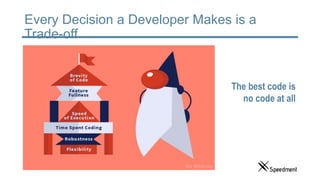
Every Decision a Developer Makes is a
Trade-off
The best code is
no code at all
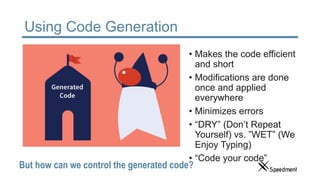
Using Code Generation
• Makes the code efficient
and short
• Modifications are done
once and applied
everywhere
• Minimizes errors
• “DRY” (Don’t Repeat
Yourself) vs. ”WET” (We
Enjoy Typing)
• “Code your code”
But how can we control the generated code?
About Us
Per Minborg
• Founder of several IT companies
• Lives in Palo Alto
• 20 years of Java experience
• 15+ US patents
• Speaker at Java events
• Blog: Minborg’s Java Pot
Emil Forslund
• Java Developer
• Lives in Palo Alto
• 8 years of Java
experience
• Speaker at Java events
• Blog: Age of Java
Spire
• Speedment Open Source mascot
• Lives on GitHub
• 1.5 years of mascot experience
Agenda
• Problem Description
• Code Generation in Database Applications
• How Does it Work?
• Hands on Demo
• Controlling the Code Generation
• Generate Custom Classes
• Add new Method to Existing Classes
• Hands on Demo
• Additional Features
• Real World Examples
• Questions & Answers
Agenda
• Problem Description
• Code Generation in Database Applications
• How Does it Work?
• Hands on Demo
• Controlling the Code Generation
• Generate Custom Classes
• Add new Method to Existing Classes
• Hands on Demo
• Additional Features
• Real World Examples
• Questions & Answers
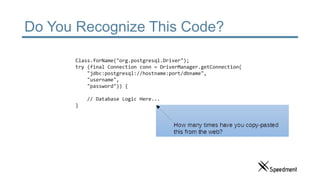
Do You Recognize This Code?
Class.forName("org.postgresql.Driver");
try (final Connection conn = DriverManager.getConnection(
"jdbc:postgresql://hostname:port/dbname",
"username",
"password")) {
// Database Logic Here...
}
Why Creating DB-Apps is So Time
Consuming
• Even trivial database operations require a
lot of boilerplate code
• Mixing SQL and Java is error-prone
• ORMs require you to write annotated
POJOs for every table
• Creating even a simple DB app can take
hours
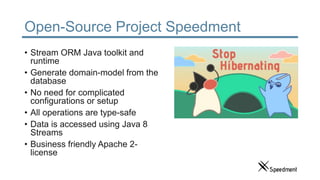
Open-Source Project Speedment
• Stream ORM Java toolkit and
runtime
• Generate domain-model from the
database
• No need for complicated
configurations or setup
• All operations are type-safe
• Data is accessed using Java 8
Streams
• Business friendly Apache 2-
license
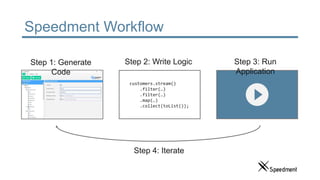
Speedment Workflow
customers.stream()
.filter(…)
.filter(…)
.map(…)
.collect(toList());
Step 1: Generate
Code
Step 2: Write Logic Step 3: Run
Application
Step 4: Iterate
Agenda
• Problem Description
• Code Generation in Database Applications
• How Does it Work?
• Hands on Demo
• Controlling the Code Generation
• Generate Custom Classes
• Add new Method to Existing Classes
• Hands on Demo
• Additional Features
• Real World Examples
• Questions & Answers
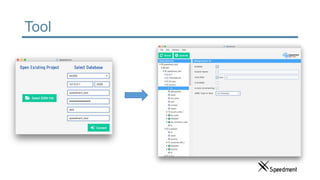
Tool
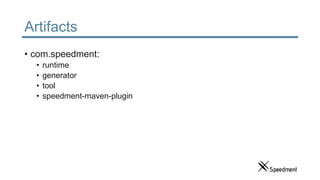
Artifacts
• com.speedment:
• runtime
• generator
• tool
• speedment-maven-plugin
So How Do the Generated Code Work?
• Code is organized based on database structure
• Hash-sums make sure user changes are not overwritten
If the DB structure changes, the code is
updated with the press of a button
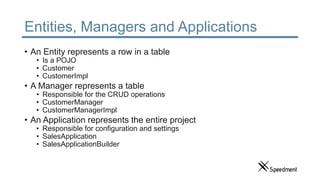
Entities, Managers and Applications
• An Entity represents a row in a table
• Is a POJO
• Customer
• CustomerImpl
• A Manager represents a table
• Responsible for the CRUD operations
• CustomerManager
• CustomerManagerImpl
• An Application represents the entire project
• Responsible for configuration and settings
• SalesApplication
• SalesApplicationBuilder
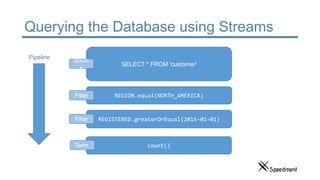
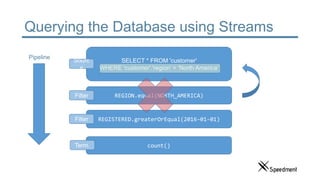
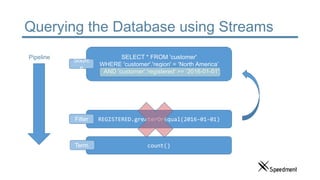
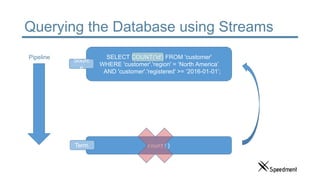
Querying the Database using Streams
• Queries are expressed
using Java 8 streams
• Streams are analyzed to
produce high-performance
queries
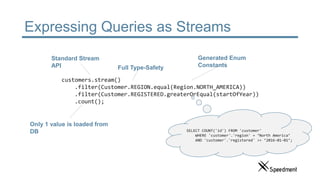
Expressing Queries as Streams
customers.stream()
.filter(Customer.REGION.equal(Region.NORTH_AMERICA))
.filter(Customer.REGISTERED.greaterOrEqual(startOfYear))
.count();
Standard Stream
API
Generated Enum
Constants
Only 1 value is loaded from
DB
Full Type-Safety
SELECT COUNT('id') FROM 'customer'
WHERE 'customer'.'region' = ‘North America’
AND 'customer'.'registered' >= ‘2016-01-01’;
Querying the Database using Streams
SELECT * FROM 'customer'
REGION.equal(NORTH_AMERICA)
REGISTERED.greaterOrEqual(2016-01-01)
count()
Sourc
e
Filter
Filter
Term.
Pipeline
Querying the Database using Streams
SELECT * FROM 'customer'
WHERE 'customer'.'region' = ‘North America’
REGION.equal(NORTH_AMERICA)
REGISTERED.greaterOrEqual(2016-01-01)
count()
Sourc
e
Filter
Filter
Term.
Pipeline
Querying the Database using Streams
SELECT * FROM 'customer'
WHERE 'customer'.'region' = ‘North America’
AND 'customer'.'registered' >= ‘2016-01-01’;
REGISTERED.greaterOrEqual(2016-01-01)
count()
Sourc
e
Filter
Term.
Pipeline
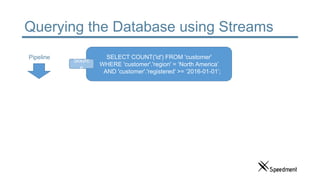
Querying the Database using Streams
SELECT COUNT('id') FROM 'customer'
WHERE 'customer'.'region' = ‘North America’
AND 'customer'.'registered' >= ‘2016-01-01’;
count()
Sourc
e
Term.
Pipeline
Querying the Database using Streams
SELECT COUNT('id') FROM 'customer'
WHERE 'customer'.'region' = ‘North America’
AND 'customer'.'registered' >= ‘2016-01-01’;
Sourc
e
Pipeline
Expressing Queries as Streams
// Gets the second page of customers in North America
// sorted by name in the form of a JSON array
“[“+
customers.stream()
.filter(REGION.equal(Region.NORTH_AMERICA))
.sorted(NAME.comparator())
.skip(10)
.limit(10) // JVM from here…
.map(JsonEncoder.allOf(customers)::apply)
.collect(joining(“, ”))
+”]”;
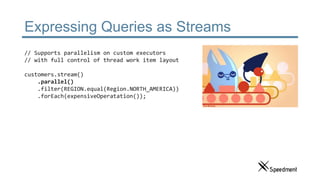
Expressing Queries as Streams
// Supports parallelism on custom executors
// with full control of thread work item layout
customers.stream()
.parallel()
.filter(REGION.equal(Region.NORTH_AMERICA))
.forEach(expensiveOperatation());
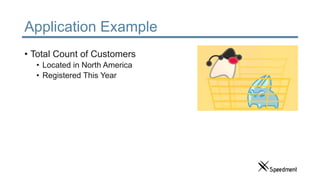
Application Example
• Total Count of Customers
• Located in North America
• Registered This Year
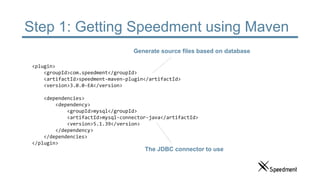
Step 1: Getting Speedment using Maven
<plugin>
<groupId>com.speedment</groupId>
<artifactId>speedment-maven-plugin</artifactId>
<version>3.0.0-EA</version>
<dependencies>
<dependency>
<groupId>mysql</groupId>
<artifactId>mysql-connector-java</artifactId>
<version>5.1.39</version>
</dependency>
</dependencies>
</plugin>
Generate source files based on database
The JDBC connector to use
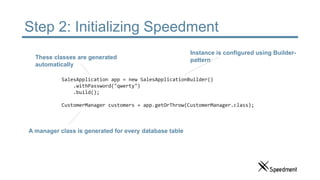
Step 2: Initializing Speedment
SalesApplication app = new SalesApplicationBuilder()
.withPassword("qwerty")
.build();
CustomerManager customers = app.getOrThrow(CustomerManager.class);
These classes are generated
automatically
Instance is configured using Builder-
pattern
A manager class is generated for every database table
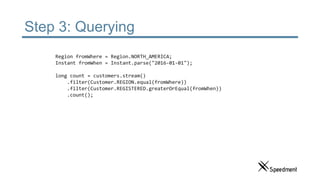
Step 3: Querying
Region fromWhere = Region.NORTH_AMERICA;
Instant fromWhen = Instant.parse("2016-01-01");
long count = customers.stream()
.filter(Customer.REGION.equal(fromWhere))
.filter(Customer.REGISTERED.greaterOrEqual(fromWhen))
.count();
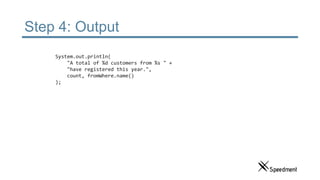
Step 4: Output
System.out.println(
"A total of %d customers from %s " +
"have registered this year.",
count, fromWhere.name()
);
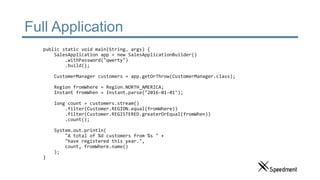
Full Application
public static void main(String… args) {
SalesApplication app = new SalesApplicationBuilder()
.withPassword("qwerty")
.build();
CustomerManager customers = app.getOrThrow(CustomerManager.class);
Region fromWhere = Region.NORTH_AMERICA;
Instant fromWhen = Instant.parse("2016-01-01");
long count = customers.stream()
.filter(Customer.REGION.equal(fromWhere))
.filter(Customer.REGISTERED.greaterOrEqual(fromWhen))
.count();
System.out.println(
"A total of %d customers from %s " +
"have registered this year.",
count, fromWhere.name()
);
}
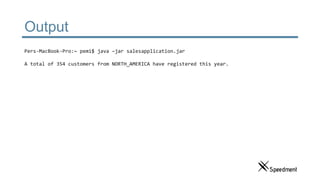
Output
Pers-MacBook-Pro:~ pemi$ java –jar salesapplication.jar
A total of 354 customers from NORTH_AMERICA have registered this year.
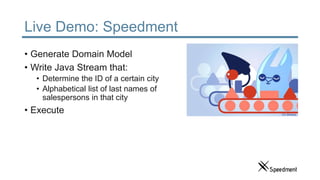
Live Demo: Speedment
• Generate Domain Model
• Write Java Stream that:
• Determine the ID of a certain city
• Alphabetical list of last names of
salespersons in that city
• Execute
Agenda
• Problem Description
• Code Generation in Database Applications
• How Does it Work?
• Hands on Demo
• Controlling the Code Generation
• Generate Custom Classes
• Add new Method to Existing Classes
• Hands on Demo
• Additional Features
• Real World Examples
• Questions & Answers
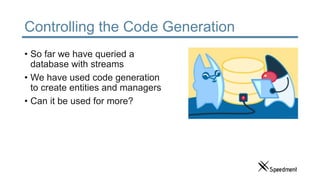
Controlling the Code Generation
• So far we have queried a
database with streams
• We have used code generation
to create entities and managers
• Can it be used for more?
What is Available out of the Box?
• MVC oriented code generation
• Modular design
• Database domain model
• JSON configuration (DSL)
• Java language namer
• Translator and TranslatorDecorator
• Maven goals
• Type mappers
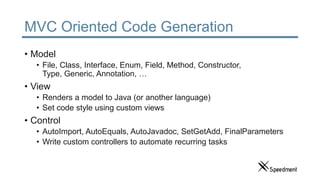
MVC Oriented Code Generation
• Model
• File, Class, Interface, Enum, Field, Method, Constructor,
Type, Generic, Annotation, …
• View
• Renders a model to Java (or another language)
• Set code style using custom views
• Control
• AutoImport, AutoEquals, AutoJavadoc, SetGetAdd, FinalParameters
• Write custom controllers to automate recurring tasks
MVC Oriented Code Generation
• Separation of concerns
• Code generation is type safe
• Catch errors compile time
• Discover methods directly in the IDE
• Reuse code segments and controllers
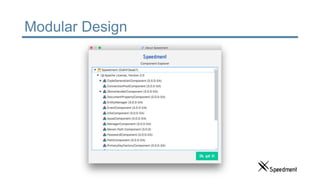
Modular Design
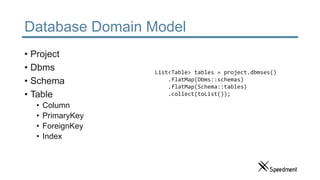
Database Domain Model
• Project
• Dbms
• Schema
• Table
• Column
• PrimaryKey
• ForeignKey
• Index
List<Table> tables = project.dbmses()
.flatMap(Dbms::schemas)
.flatMap(Schema::tables)
.collect(toList());
JSON Configuration (DSL)
{
"config" : {
"name" : "sales",
"dbmses" : [{
"name" : "db0",
"typeName" : "MySQL",
"ipAddress" : "127.0.0.1",
"username" : "root",
"schemas" : [{
"name" : "sales",
"tables" : [
{ "name" : "city" },
{ "name" : "salesperson" }
]
}]
}]
}
}
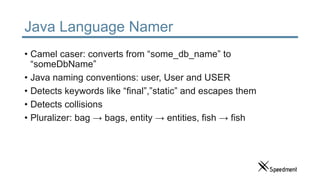
Java Language Namer
• Camel caser: converts from “some_db_name” to
“someDbName”
• Java naming conventions: user, User and USER
• Detects keywords like “final”,”static” and escapes them
• Detects collisions
• Pluralizer: bag → bags, entity → entities, fish → fish
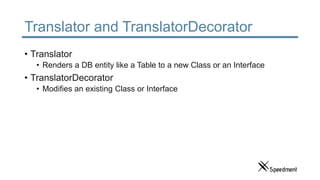
Translator and TranslatorDecorator
• Translator
• Renders a DB entity like a Table to a new Class or an Interface
• TranslatorDecorator
• Modifies an existing Class or Interface
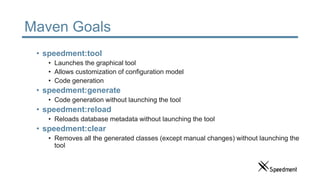
Maven Goals
• speedment:tool
• Launches the graphical tool
• Allows customization of configuration model
• Code generation
• speedment:generate
• Code generation without launching the tool
• speedment:reload
• Reloads database metadata without launching the tool
• speedment:clear
• Removes all the generated classes (except manual changes) without launching the
tool
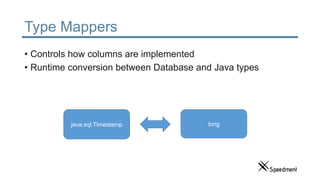
Type Mappers
• Controls how columns are implemented
• Runtime conversion between Database and Java types
java.sql.Timestamp long
Generation vs. Templates
• Separation of concerns
• Easily change code style
• Minimize maintenance
• Maximize reusability
Generate a New Custom Class
1. Create a new Translator
2. Model how the new class
should look
3. Define a Plugin Class
4. Include it in project pom.xml
Example: Generate a Point class
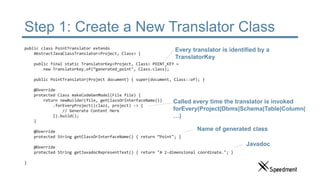
Step 1: Create a New Translator Class
public class PointTranslator extends
AbstractJavaClassTranslator<Project, Class> {
public final static TranslatorKey<Project, Class> POINT_KEY =
new TranslatorKey.of(“generated_point", Class.class);
public PointTranslator(Project document) { super(document, Class::of); }
@Override
protected Class makeCodeGenModel(File file) {
return newBuilder(file, getClassOrInterfaceName())
.forEveryProject((clazz, project) -> {
// Generate Content Here
}).build();
}
@Override
protected String getClassOrInterfaceName() { return ”Point"; }
@Override
protected String getJavadocRepresentText() { return "A 2-dimensional coordinate."; }
}
Every translator is identified by a
TranslatorKey
Name of generated class
Javadoc
Called every time the translator is invoked
forEvery(Project|Dbms|Schema|Table|Column|
…)
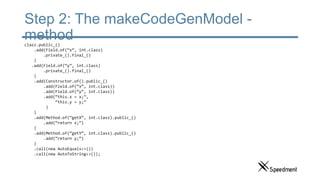
Step 2: The makeCodeGenModel -
methodclazz.public_()
.add(Field.of(“x”, int.class)
.private_().final_()
)
.add(Field.of(“y”, int.class)
.private_().final_()
)
.add(Constructor.of().public_()
.add(Field.of(“x”, int.class))
.add(Field.of(“y”, int.class))
.add(“this.x = x;”,
“this.y = y;”
)
)
.add(Method.of(“getX”, int.class).public_()
.add(“return x;”)
)
.add(Method.of(“getY”, int.class).public_()
.add(“return y;”)
)
.call(new AutoEquals<>())
.call(new AutoToString<>());
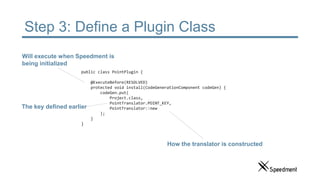
Step 3: Define a Plugin Class
public class PointPlugin {
@ExecuteBefore(RESOLVED)
protected void install(CodeGenerationComponent codeGen) {
codeGen.put(
Project.class,
PointTranslator.POINT_KEY,
PointTranslator::new
);
}
}
The key defined earlier
Will execute when Speedment is
being initialized
How the translator is constructed
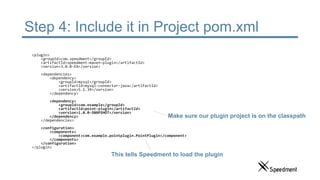
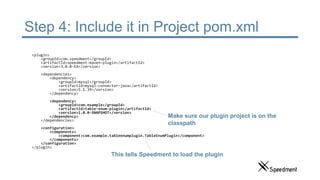
Step 4: Include it in Project pom.xml
<plugin>
<groupId>com.speedment</groupId>
<artifactId>speedment-maven-plugin</artifactId>
<version>3.0.0-EA</version>
<dependencies>
<dependency>
<groupId>mysql</groupId>
<artifactId>mysql-connector-java</artifactId>
<version>5.1.39</version>
</dependency>
<dependency>
<groupId>com.example</groupId>
<artifactId>point-plugin</artifactId>
<version>1.0.0-SNAPSHOT</version>
</dependency>
</dependencies>
<configuration>
<components>
<component>com.example.pointplugin.PointPlugin</component>
</components>
</configuration>
</plugin>
This tells Speedment to load the plugin
Make sure our plugin project is on the classpath
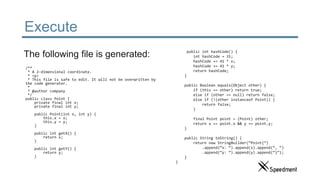
Execute
/**
* A 2-dimensional coordinate.
* <p>
* This file is safe to edit. It will not be overwritten by
the code generator.
*
* @author company
*/
public class Point {
private final int x;
private final int y;
public Point(int x, int y) {
this.x = x;
this.y = y;
}
public int getX() {
return x;
}
public int getY() {
return y;
}
The following file is generated: public int hashCode() {
int hashCode = 31;
hashCode += 41 * x;
hashCode += 41 * y;
return hashCode;
}
public Boolean equals(Object other) {
if (this == other) return true;
else if (other == null) return false;
else if (!(other instanceof Point)) {
return false;
}
final Point point = (Point) other;
return x == point.x && y == point.y;
}
public String toString() {
return new StringBuilder(“Point{”)
.append(“x: “).append(x).append(“, “)
.append(“y: “).append(y).append(“}”);
}
}
A More Concrete Example
1. Create a new Translator
2. Model how the new class
should look
3. Define a Plugin Class
4. Include it in project pom.xml
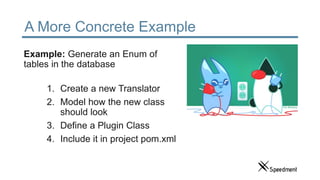
Example: Generate an Enum of
tables in the database
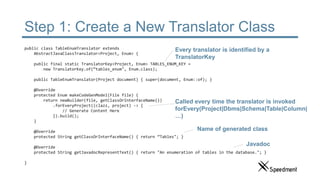
Step 1: Create a New Translator Class
public class TableEnumTranslator extends
AbstractJavaClassTranslator<Project, Enum> {
public final static TranslatorKey<Project, Enum> TABLES_ENUM_KEY =
new TranslatorKey.of(“tables_enum", Enum.class);
public TableEnumTranslator(Project document) { super(document, Enum::of); }
@Override
protected Enum makeCodeGenModel(File file) {
return newBuilder(file, getClassOrInterfaceName())
.forEveryProject((clazz, project) -> {
// Generate Content Here
}).build();
}
@Override
protected String getClassOrInterfaceName() { return ”Tables"; }
@Override
protected String getJavadocRepresentText() { return "An enumeration of tables in the database."; }
}
Every translator is identified by a
TranslatorKey
Name of generated class
Javadoc
Called every time the translator is invoked
forEvery(Project|Dbms|Schema|Table|Column|
…)
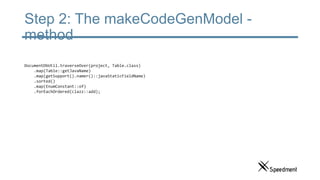
Step 2: The makeCodeGenModel -
method
DocumentDbUtil.traverseOver(project, Table.class)
.map(Table::getJavaName)
.map(getSupport().namer()::javaStaticFieldName)
.sorted()
.map(EnumConstant::of)
.forEachOrdered(clazz::add);
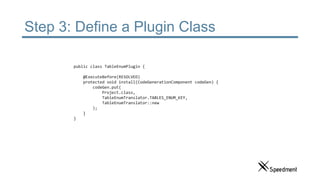
Step 3: Define a Plugin Class
public class TableEnumPlugin {
@ExecuteBefore(RESOLVED)
protected void install(CodeGenerationComponent codeGen) {
codeGen.put(
Project.class,
TableEnumTranslator.TABLES_ENUM_KEY,
TableEnumTranslator::new
);
}
}
Step 4: Include it in Project pom.xml
<plugin>
<groupId>com.speedment</groupId>
<artifactId>speedment-maven-plugin</artifactId>
<version>3.0.0-EA</version>
<dependencies>
<dependency>
<groupId>mysql</groupId>
<artifactId>mysql-connector-java</artifactId>
<version>5.1.39</version>
</dependency>
<dependency>
<groupId>com.example</groupId>
<artifactId>table-enum-plugin</artifactId>
<version>1.0.0-SNAPSHOT</version>
</dependency>
</dependencies>
<configuration>
<components>
<component>com.example.tableenumplugin.TableEnumPlugin</component>
</components>
</configuration>
</plugin>
This tells Speedment to load the plugin
Make sure our plugin project is on the
classpath
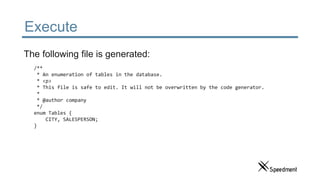
Execute
/**
* An enumeration of tables in the database.
* <p>
* This file is safe to edit. It will not be overwritten by the code generator.
*
* @author company
*/
enum Tables {
CITY, SALESPERSON;
}
The following file is generated:
Generate all the Things
• Gson Adapters
• Spring Configuration Files
• REST Controllers
• and much more…
Agenda
• Problem Description
• Code Generation in Database Applications
• How Does it Work?
• Hands on Demo
• Controlling the Code Generation
• Generate Custom Classes
• Add new Method to Existing Classes
• Hands on Demo
• Additional Features
• Real World Examples
• Questions & Answers
Add New Method to Existing Classes
• So far we have
• Queried a database with generated
classes
• Generated a custom class
• How do we modify the existing
generation of classes?
Add New Method to Existing Classes
• Fit Into Existing Class Hierarchy
• Change Naming Conventions
• Optimize Internal Implementations
• Add Custom Methods
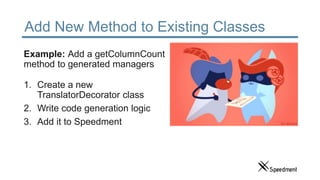
Add New Method to Existing Classes
Example: Add a getColumnCount
method to generated managers
1. Create a new
TranslatorDecorator class
2. Write code generation logic
3. Add it to Speedment
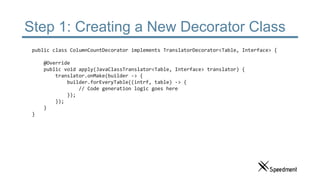
Step 1: Creating a New Decorator Class
public class ColumnCountDecorator implements TranslatorDecorator<Table, Interface> {
@Override
public void apply(JavaClassTranslator<Table, Interface> translator) {
translator.onMake(builder -> {
builder.forEveryTable((intrf, table) -> {
// Code generation logic goes here
});
});
}
}
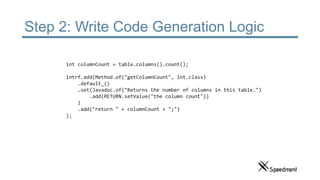
Step 2: Write Code Generation Logic
int columnCount = table.columns().count();
intrf.add(Method.of("getColumnCount", int.class)
.default_()
.set(Javadoc.of("Returns the number of columns in this table.")
.add(RETURN.setValue("the column count"))
)
.add("return " + columnCount + ";")
);
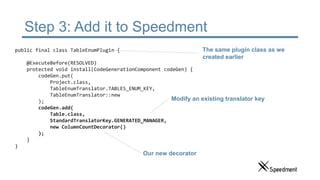
Step 3: Add it to Speedment
public final class TableEnumPlugin {
@ExecuteBefore(RESOLVED)
protected void install(CodeGenerationComponent codeGen) {
codeGen.put(
Project.class,
TableEnumTranslator.TABLES_ENUM_KEY,
TableEnumTranslator::new
);
codeGen.add(
Table.class,
StandardTranslatorKey.GENERATED_MANAGER,
new ColumnCountDecorator()
);
}
}
Modify an existing translator key
Our new decorator
The same plugin class as we
created earlier
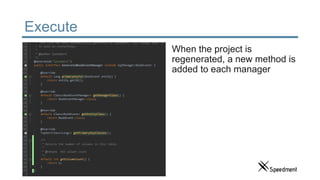
Execute
When the project is
regenerated, a new method is
added to each manager
Agenda
• Problem Description
• Code Generation in Database Applications
• How Does it Work?
• Hands on Demo
• Controlling the Code Generation
• Generate Custom Classes
• Add new Method to Existing Classes
• Hands on Demo
• Additional Features
• Real World Examples
• Questions & Answers
Demo: Advanced Plugin
• Use the Speedment Spring
Plugin to generate a working
REST API
Agenda
• Problem Description
• Code Generation in Database Applications
• How Does it Work?
• Hands on Demo
• Controlling the Code Generation
• Generate Custom Classes
• Add new Method to Existing Classes
• Hands on Demo
• Additional Features
• Real World Examples
• Questions & Answers
Additional Features
• Add GUI Tool components for
custom configuration
• Extend the JSON DSL
dynamically with plugins
• Automate your build
environment with Maven
• Add custom data type
mappers
Additional Features
• Plugin a custom namer
• Generate classes that are related to other domain models
• Generate classes for other languages
• Style the GUI Tool
Database Connectors
Open Source
• MySQL
• PostgreSQL
• MariaDB
Enterprise
• Oracle
• Microsoft SQL server
• dB2
Agenda
• Problem Description
• Code Generation in Database Applications
• How Does it Work?
• Hands on Demo
• Controlling the Code Generation
• Generate Custom Classes
• Add new Method to Existing Classes
• Hands on Demo
• Additional Features
• Real World Examples
• Questions & Answers
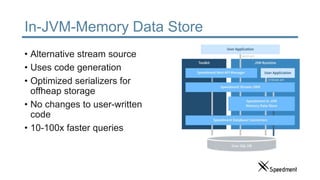
In-JVM-Memory Data Store
• Alternative stream source
• Uses code generation
• Optimized serializers for
offheap storage
• No changes to user-written
code
• 10-100x faster queries
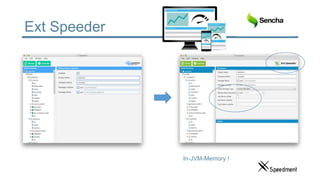
Ext Speeder
In-JVM-Memory !
Q&A
www.speedment.org
github.com/speedment
@speedment
www.speedment.com
Linkedin:
Per Minborg
Emil Forslund

JavaOne2016 - How to Generate Customized Java 8 Code from Your Database [TUT4489]

  • 1.
    Tutorial: How toGenerate Customized Java 8 Code from Your Database Per Minborg CTO, Speedment, Inc Emil Forslund Developer, Speedment, Inc.
  • 2.
    Every Decision aDeveloper Makes is a Trade-off The best code is no code at all
  • 3.
    Using Code Generation •Makes the code efficient and short • Modifications are done once and applied everywhere • Minimizes errors • “DRY” (Don’t Repeat Yourself) vs. ”WET” (We Enjoy Typing) • “Code your code” But how can we control the generated code?
  • 4.
    About Us Per Minborg •Founder of several IT companies • Lives in Palo Alto • 20 years of Java experience • 15+ US patents • Speaker at Java events • Blog: Minborg’s Java Pot Emil Forslund • Java Developer • Lives in Palo Alto • 8 years of Java experience • Speaker at Java events • Blog: Age of Java Spire • Speedment Open Source mascot • Lives on GitHub • 1.5 years of mascot experience
  • 5.
    Agenda • Problem Description •Code Generation in Database Applications • How Does it Work? • Hands on Demo • Controlling the Code Generation • Generate Custom Classes • Add new Method to Existing Classes • Hands on Demo • Additional Features • Real World Examples • Questions & Answers
  • 6.
    Agenda • Problem Description •Code Generation in Database Applications • How Does it Work? • Hands on Demo • Controlling the Code Generation • Generate Custom Classes • Add new Method to Existing Classes • Hands on Demo • Additional Features • Real World Examples • Questions & Answers
  • 7.
    Do You RecognizeThis Code? Class.forName("org.postgresql.Driver"); try (final Connection conn = DriverManager.getConnection( "jdbc:postgresql://hostname:port/dbname", "username", "password")) { // Database Logic Here... }
  • 8.
    Why Creating DB-Appsis So Time Consuming • Even trivial database operations require a lot of boilerplate code • Mixing SQL and Java is error-prone • ORMs require you to write annotated POJOs for every table • Creating even a simple DB app can take hours
  • 9.
    Open-Source Project Speedment •Stream ORM Java toolkit and runtime • Generate domain-model from the database • No need for complicated configurations or setup • All operations are type-safe • Data is accessed using Java 8 Streams • Business friendly Apache 2- license
  • 10.
    Speedment Workflow customers.stream() .filter(…) .filter(…) .map(…) .collect(toList()); Step 1:Generate Code Step 2: Write Logic Step 3: Run Application Step 4: Iterate
  • 11.
    Agenda • Problem Description •Code Generation in Database Applications • How Does it Work? • Hands on Demo • Controlling the Code Generation • Generate Custom Classes • Add new Method to Existing Classes • Hands on Demo • Additional Features • Real World Examples • Questions & Answers
  • 12.
  • 13.
    Artifacts • com.speedment: • runtime •generator • tool • speedment-maven-plugin
  • 14.
    So How Dothe Generated Code Work? • Code is organized based on database structure • Hash-sums make sure user changes are not overwritten If the DB structure changes, the code is updated with the press of a button
  • 15.
    Entities, Managers andApplications • An Entity represents a row in a table • Is a POJO • Customer • CustomerImpl • A Manager represents a table • Responsible for the CRUD operations • CustomerManager • CustomerManagerImpl • An Application represents the entire project • Responsible for configuration and settings • SalesApplication • SalesApplicationBuilder
  • 16.
    Querying the Databaseusing Streams • Queries are expressed using Java 8 streams • Streams are analyzed to produce high-performance queries
  • 17.
    Expressing Queries asStreams customers.stream() .filter(Customer.REGION.equal(Region.NORTH_AMERICA)) .filter(Customer.REGISTERED.greaterOrEqual(startOfYear)) .count(); Standard Stream API Generated Enum Constants Only 1 value is loaded from DB Full Type-Safety SELECT COUNT('id') FROM 'customer' WHERE 'customer'.'region' = ‘North America’ AND 'customer'.'registered' >= ‘2016-01-01’;
  • 18.
    Querying the Databaseusing Streams SELECT * FROM 'customer' REGION.equal(NORTH_AMERICA) REGISTERED.greaterOrEqual(2016-01-01) count() Sourc e Filter Filter Term. Pipeline
  • 19.
    Querying the Databaseusing Streams SELECT * FROM 'customer' WHERE 'customer'.'region' = ‘North America’ REGION.equal(NORTH_AMERICA) REGISTERED.greaterOrEqual(2016-01-01) count() Sourc e Filter Filter Term. Pipeline
  • 20.
    Querying the Databaseusing Streams SELECT * FROM 'customer' WHERE 'customer'.'region' = ‘North America’ AND 'customer'.'registered' >= ‘2016-01-01’; REGISTERED.greaterOrEqual(2016-01-01) count() Sourc e Filter Term. Pipeline
  • 21.
    Querying the Databaseusing Streams SELECT COUNT('id') FROM 'customer' WHERE 'customer'.'region' = ‘North America’ AND 'customer'.'registered' >= ‘2016-01-01’; count() Sourc e Term. Pipeline
  • 22.
    Querying the Databaseusing Streams SELECT COUNT('id') FROM 'customer' WHERE 'customer'.'region' = ‘North America’ AND 'customer'.'registered' >= ‘2016-01-01’; Sourc e Pipeline
  • 23.
    Expressing Queries asStreams // Gets the second page of customers in North America // sorted by name in the form of a JSON array “[“+ customers.stream() .filter(REGION.equal(Region.NORTH_AMERICA)) .sorted(NAME.comparator()) .skip(10) .limit(10) // JVM from here… .map(JsonEncoder.allOf(customers)::apply) .collect(joining(“, ”)) +”]”;
  • 24.
    Expressing Queries asStreams // Supports parallelism on custom executors // with full control of thread work item layout customers.stream() .parallel() .filter(REGION.equal(Region.NORTH_AMERICA)) .forEach(expensiveOperatation());
  • 25.
    Application Example • TotalCount of Customers • Located in North America • Registered This Year
  • 26.
    Step 1: GettingSpeedment using Maven <plugin> <groupId>com.speedment</groupId> <artifactId>speedment-maven-plugin</artifactId> <version>3.0.0-EA</version> <dependencies> <dependency> <groupId>mysql</groupId> <artifactId>mysql-connector-java</artifactId> <version>5.1.39</version> </dependency> </dependencies> </plugin> Generate source files based on database The JDBC connector to use
  • 27.
    Step 2: InitializingSpeedment SalesApplication app = new SalesApplicationBuilder() .withPassword("qwerty") .build(); CustomerManager customers = app.getOrThrow(CustomerManager.class); These classes are generated automatically Instance is configured using Builder- pattern A manager class is generated for every database table
  • 28.
    Step 3: Querying RegionfromWhere = Region.NORTH_AMERICA; Instant fromWhen = Instant.parse("2016-01-01"); long count = customers.stream() .filter(Customer.REGION.equal(fromWhere)) .filter(Customer.REGISTERED.greaterOrEqual(fromWhen)) .count();
  • 29.
    Step 4: Output System.out.println( "Atotal of %d customers from %s " + "have registered this year.", count, fromWhere.name() );
  • 30.
    Full Application public staticvoid main(String… args) { SalesApplication app = new SalesApplicationBuilder() .withPassword("qwerty") .build(); CustomerManager customers = app.getOrThrow(CustomerManager.class); Region fromWhere = Region.NORTH_AMERICA; Instant fromWhen = Instant.parse("2016-01-01"); long count = customers.stream() .filter(Customer.REGION.equal(fromWhere)) .filter(Customer.REGISTERED.greaterOrEqual(fromWhen)) .count(); System.out.println( "A total of %d customers from %s " + "have registered this year.", count, fromWhere.name() ); }
  • 31.
    Output Pers-MacBook-Pro:~ pemi$ java–jar salesapplication.jar A total of 354 customers from NORTH_AMERICA have registered this year.
  • 32.
    Live Demo: Speedment •Generate Domain Model • Write Java Stream that: • Determine the ID of a certain city • Alphabetical list of last names of salespersons in that city • Execute
  • 33.
    Agenda • Problem Description •Code Generation in Database Applications • How Does it Work? • Hands on Demo • Controlling the Code Generation • Generate Custom Classes • Add new Method to Existing Classes • Hands on Demo • Additional Features • Real World Examples • Questions & Answers
  • 34.
    Controlling the CodeGeneration • So far we have queried a database with streams • We have used code generation to create entities and managers • Can it be used for more?
  • 35.
    What is Availableout of the Box? • MVC oriented code generation • Modular design • Database domain model • JSON configuration (DSL) • Java language namer • Translator and TranslatorDecorator • Maven goals • Type mappers
  • 36.
    MVC Oriented CodeGeneration • Model • File, Class, Interface, Enum, Field, Method, Constructor, Type, Generic, Annotation, … • View • Renders a model to Java (or another language) • Set code style using custom views • Control • AutoImport, AutoEquals, AutoJavadoc, SetGetAdd, FinalParameters • Write custom controllers to automate recurring tasks
  • 37.
    MVC Oriented CodeGeneration • Separation of concerns • Code generation is type safe • Catch errors compile time • Discover methods directly in the IDE • Reuse code segments and controllers
  • 38.
  • 39.
    Database Domain Model •Project • Dbms • Schema • Table • Column • PrimaryKey • ForeignKey • Index List<Table> tables = project.dbmses() .flatMap(Dbms::schemas) .flatMap(Schema::tables) .collect(toList());
  • 40.
    JSON Configuration (DSL) { "config": { "name" : "sales", "dbmses" : [{ "name" : "db0", "typeName" : "MySQL", "ipAddress" : "127.0.0.1", "username" : "root", "schemas" : [{ "name" : "sales", "tables" : [ { "name" : "city" }, { "name" : "salesperson" } ] }] }] } }
  • 41.
    Java Language Namer •Camel caser: converts from “some_db_name” to “someDbName” • Java naming conventions: user, User and USER • Detects keywords like “final”,”static” and escapes them • Detects collisions • Pluralizer: bag → bags, entity → entities, fish → fish
  • 42.
    Translator and TranslatorDecorator •Translator • Renders a DB entity like a Table to a new Class or an Interface • TranslatorDecorator • Modifies an existing Class or Interface
  • 43.
    Maven Goals • speedment:tool •Launches the graphical tool • Allows customization of configuration model • Code generation • speedment:generate • Code generation without launching the tool • speedment:reload • Reloads database metadata without launching the tool • speedment:clear • Removes all the generated classes (except manual changes) without launching the tool
  • 44.
    Type Mappers • Controlshow columns are implemented • Runtime conversion between Database and Java types java.sql.Timestamp long
  • 45.
    Generation vs. Templates •Separation of concerns • Easily change code style • Minimize maintenance • Maximize reusability
  • 46.
    Generate a NewCustom Class 1. Create a new Translator 2. Model how the new class should look 3. Define a Plugin Class 4. Include it in project pom.xml Example: Generate a Point class
  • 47.
    Step 1: Createa New Translator Class public class PointTranslator extends AbstractJavaClassTranslator<Project, Class> { public final static TranslatorKey<Project, Class> POINT_KEY = new TranslatorKey.of(“generated_point", Class.class); public PointTranslator(Project document) { super(document, Class::of); } @Override protected Class makeCodeGenModel(File file) { return newBuilder(file, getClassOrInterfaceName()) .forEveryProject((clazz, project) -> { // Generate Content Here }).build(); } @Override protected String getClassOrInterfaceName() { return ”Point"; } @Override protected String getJavadocRepresentText() { return "A 2-dimensional coordinate."; } } Every translator is identified by a TranslatorKey Name of generated class Javadoc Called every time the translator is invoked forEvery(Project|Dbms|Schema|Table|Column| …)
  • 48.
    Step 2: ThemakeCodeGenModel - methodclazz.public_() .add(Field.of(“x”, int.class) .private_().final_() ) .add(Field.of(“y”, int.class) .private_().final_() ) .add(Constructor.of().public_() .add(Field.of(“x”, int.class)) .add(Field.of(“y”, int.class)) .add(“this.x = x;”, “this.y = y;” ) ) .add(Method.of(“getX”, int.class).public_() .add(“return x;”) ) .add(Method.of(“getY”, int.class).public_() .add(“return y;”) ) .call(new AutoEquals<>()) .call(new AutoToString<>());
  • 49.
    Step 3: Definea Plugin Class public class PointPlugin { @ExecuteBefore(RESOLVED) protected void install(CodeGenerationComponent codeGen) { codeGen.put( Project.class, PointTranslator.POINT_KEY, PointTranslator::new ); } } The key defined earlier Will execute when Speedment is being initialized How the translator is constructed
  • 50.
    Step 4: Includeit in Project pom.xml <plugin> <groupId>com.speedment</groupId> <artifactId>speedment-maven-plugin</artifactId> <version>3.0.0-EA</version> <dependencies> <dependency> <groupId>mysql</groupId> <artifactId>mysql-connector-java</artifactId> <version>5.1.39</version> </dependency> <dependency> <groupId>com.example</groupId> <artifactId>point-plugin</artifactId> <version>1.0.0-SNAPSHOT</version> </dependency> </dependencies> <configuration> <components> <component>com.example.pointplugin.PointPlugin</component> </components> </configuration> </plugin> This tells Speedment to load the plugin Make sure our plugin project is on the classpath
  • 51.
    Execute /** * A 2-dimensionalcoordinate. * <p> * This file is safe to edit. It will not be overwritten by the code generator. * * @author company */ public class Point { private final int x; private final int y; public Point(int x, int y) { this.x = x; this.y = y; } public int getX() { return x; } public int getY() { return y; } The following file is generated: public int hashCode() { int hashCode = 31; hashCode += 41 * x; hashCode += 41 * y; return hashCode; } public Boolean equals(Object other) { if (this == other) return true; else if (other == null) return false; else if (!(other instanceof Point)) { return false; } final Point point = (Point) other; return x == point.x && y == point.y; } public String toString() { return new StringBuilder(“Point{”) .append(“x: “).append(x).append(“, “) .append(“y: “).append(y).append(“}”); } }
  • 52.
    A More ConcreteExample 1. Create a new Translator 2. Model how the new class should look 3. Define a Plugin Class 4. Include it in project pom.xml Example: Generate an Enum of tables in the database
  • 53.
    Step 1: Createa New Translator Class public class TableEnumTranslator extends AbstractJavaClassTranslator<Project, Enum> { public final static TranslatorKey<Project, Enum> TABLES_ENUM_KEY = new TranslatorKey.of(“tables_enum", Enum.class); public TableEnumTranslator(Project document) { super(document, Enum::of); } @Override protected Enum makeCodeGenModel(File file) { return newBuilder(file, getClassOrInterfaceName()) .forEveryProject((clazz, project) -> { // Generate Content Here }).build(); } @Override protected String getClassOrInterfaceName() { return ”Tables"; } @Override protected String getJavadocRepresentText() { return "An enumeration of tables in the database."; } } Every translator is identified by a TranslatorKey Name of generated class Javadoc Called every time the translator is invoked forEvery(Project|Dbms|Schema|Table|Column| …)
  • 54.
    Step 2: ThemakeCodeGenModel - method DocumentDbUtil.traverseOver(project, Table.class) .map(Table::getJavaName) .map(getSupport().namer()::javaStaticFieldName) .sorted() .map(EnumConstant::of) .forEachOrdered(clazz::add);
  • 55.
    Step 3: Definea Plugin Class public class TableEnumPlugin { @ExecuteBefore(RESOLVED) protected void install(CodeGenerationComponent codeGen) { codeGen.put( Project.class, TableEnumTranslator.TABLES_ENUM_KEY, TableEnumTranslator::new ); } }
  • 56.
    Step 4: Includeit in Project pom.xml <plugin> <groupId>com.speedment</groupId> <artifactId>speedment-maven-plugin</artifactId> <version>3.0.0-EA</version> <dependencies> <dependency> <groupId>mysql</groupId> <artifactId>mysql-connector-java</artifactId> <version>5.1.39</version> </dependency> <dependency> <groupId>com.example</groupId> <artifactId>table-enum-plugin</artifactId> <version>1.0.0-SNAPSHOT</version> </dependency> </dependencies> <configuration> <components> <component>com.example.tableenumplugin.TableEnumPlugin</component> </components> </configuration> </plugin> This tells Speedment to load the plugin Make sure our plugin project is on the classpath
  • 57.
    Execute /** * An enumerationof tables in the database. * <p> * This file is safe to edit. It will not be overwritten by the code generator. * * @author company */ enum Tables { CITY, SALESPERSON; } The following file is generated:
  • 58.
    Generate all theThings • Gson Adapters • Spring Configuration Files • REST Controllers • and much more…
  • 59.
    Agenda • Problem Description •Code Generation in Database Applications • How Does it Work? • Hands on Demo • Controlling the Code Generation • Generate Custom Classes • Add new Method to Existing Classes • Hands on Demo • Additional Features • Real World Examples • Questions & Answers
  • 60.
    Add New Methodto Existing Classes • So far we have • Queried a database with generated classes • Generated a custom class • How do we modify the existing generation of classes?
  • 61.
    Add New Methodto Existing Classes • Fit Into Existing Class Hierarchy • Change Naming Conventions • Optimize Internal Implementations • Add Custom Methods
  • 62.
    Add New Methodto Existing Classes Example: Add a getColumnCount method to generated managers 1. Create a new TranslatorDecorator class 2. Write code generation logic 3. Add it to Speedment
  • 63.
    Step 1: Creatinga New Decorator Class public class ColumnCountDecorator implements TranslatorDecorator<Table, Interface> { @Override public void apply(JavaClassTranslator<Table, Interface> translator) { translator.onMake(builder -> { builder.forEveryTable((intrf, table) -> { // Code generation logic goes here }); }); } }
  • 64.
    Step 2: WriteCode Generation Logic int columnCount = table.columns().count(); intrf.add(Method.of("getColumnCount", int.class) .default_() .set(Javadoc.of("Returns the number of columns in this table.") .add(RETURN.setValue("the column count")) ) .add("return " + columnCount + ";") );
  • 65.
    Step 3: Addit to Speedment public final class TableEnumPlugin { @ExecuteBefore(RESOLVED) protected void install(CodeGenerationComponent codeGen) { codeGen.put( Project.class, TableEnumTranslator.TABLES_ENUM_KEY, TableEnumTranslator::new ); codeGen.add( Table.class, StandardTranslatorKey.GENERATED_MANAGER, new ColumnCountDecorator() ); } } Modify an existing translator key Our new decorator The same plugin class as we created earlier
  • 66.
    Execute When the projectis regenerated, a new method is added to each manager
  • 67.
    Agenda • Problem Description •Code Generation in Database Applications • How Does it Work? • Hands on Demo • Controlling the Code Generation • Generate Custom Classes • Add new Method to Existing Classes • Hands on Demo • Additional Features • Real World Examples • Questions & Answers
  • 68.
    Demo: Advanced Plugin •Use the Speedment Spring Plugin to generate a working REST API
  • 69.
    Agenda • Problem Description •Code Generation in Database Applications • How Does it Work? • Hands on Demo • Controlling the Code Generation • Generate Custom Classes • Add new Method to Existing Classes • Hands on Demo • Additional Features • Real World Examples • Questions & Answers
  • 70.
    Additional Features • AddGUI Tool components for custom configuration • Extend the JSON DSL dynamically with plugins • Automate your build environment with Maven • Add custom data type mappers
  • 71.
    Additional Features • Plugina custom namer • Generate classes that are related to other domain models • Generate classes for other languages • Style the GUI Tool
  • 72.
    Database Connectors Open Source •MySQL • PostgreSQL • MariaDB Enterprise • Oracle • Microsoft SQL server • dB2
  • 73.
    Agenda • Problem Description •Code Generation in Database Applications • How Does it Work? • Hands on Demo • Controlling the Code Generation • Generate Custom Classes • Add new Method to Existing Classes • Hands on Demo • Additional Features • Real World Examples • Questions & Answers
  • 74.
    In-JVM-Memory Data Store •Alternative stream source • Uses code generation • Optimized serializers for offheap storage • No changes to user-written code • 10-100x faster queries
  • 75.
  • 76.

Editor's Notes

  • #6 What we are going to talk about today
  • #7 What we are going to talk about today
  • #8 Ice-breaker
  • #9 Negatives
  • #10 Positives
  • #11 Agile Workflow
  • #12 What we are going to talk about today
  • #13 Positives
  • #14 Positives
  • #15 Code Structure Let the database be the center of the iterative process
  • #16 What we are going to talk about today
  • #18 Pause before the fourth arrow ”Do you know what the coolest aspect of this paragraph is?”
  • #24 Positives
  • #25 Positives
  • #29 Output on next slide
  • #30 Output on next slide
  • #31 Output on next slide
  • #32 Next: Emil Live Demo #1
  • #34 What we are going to talk about today
  • #35 Stop here
  • #42 Mention problem before showing the solutions
  • #50 @ExecuteBefore says this class must be configured before use Dependency injection is used to get access to the code generation component
  • #56 @ExecuteBefore says this class must be configured before use Dependency injection is used to get access to the code generation component
  • #59 Now that you have seen all this, how do you think code generation can solve your challenges? Do you have ideas what you can generate?
  • #60 What we are going to talk about today
  • #61 Entities, Managers, Application
  • #62 Why add methods? You know your own domain model best!
  • #67 For every table! Like 100 tables!
  • #68 What we are going to talk about today
  • #69 Live Demo, then Q&A
  • #70 What we are going to talk about today
  • #71 Live Demo, then Q&A
  • #72 Live Demo, then Q&A
  • #74 What we are going to talk about today
  • #76 Live Demo, then Q&A