OOPS THROUGH JAVA
2
UNIT-I
3
4
5
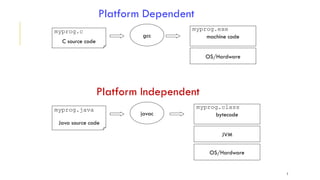
OS/Hardware
machine code
C source code
myprog.c
gcc
myprog.exe
Platform Dependent
JVM
bytecode
Java source code
myprog.java
javac
myprog.class
OS/Hardware
Platform Independent
6
ISSUES:
1) Portability
2) Platform Independence
3) Security
4) Reliability
5) Reusability / Extensibility
6) Shareability( Networking)
7
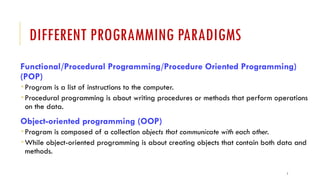
DIFFERENT PROGRAMMING PARADIGMS
Functional/Procedural Programming/Procedure Oriented Programming)
(POP)
 Program is a list of instructions to the computer.
 Procedural programming is about writing procedures or methods that perform operations
on the data.
Object-oriented programming (OOP)
 Program is composed of a collection objects that communicate with each other.
 While object-oriented programming is about creating objects that contain both data and
methods.
8
SOFTWARE DESIGN APPROACHES:
TOP DOWN VS BOTTOM UP:
9
HIERARCHY OF PROGRAMMING PARADIGMS:
10
11
PROCEDURE ORIENTED PROGRAMMING
12
POP VS OOP:
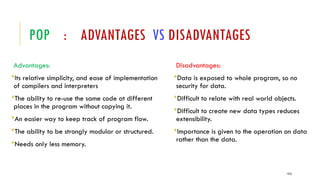
POP : ADVANTAGES VS DISADVANTAGES
Advantages:
Its relative simplicity, and ease of implementation
of compilers and interpreters
The ability to re-use the same code at different
places in the program without copying it.
An easier way to keep track of program flow.
The ability to be strongly modular or structured.
Needs only less memory.
Disadvantages:
Data is exposed to whole program, so no
security for data.
Difficult to relate with real world objects.
Difficult to create new data types reduces
extensibility.
Importance is given to the operation on data
rather than the data.
1313
14
15
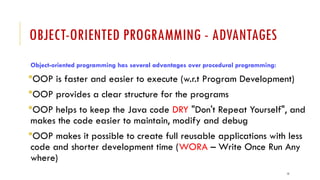
OBJECT-ORIENTED PROGRAMMING - ADVANTAGES
Object-oriented programming has several advantages over procedural programming:
OOP is faster and easier to execute (w.r.t Program Development)
OOP provides a clear structure for the programs
OOP helps to keep the Java code DRY "Don't Repeat Yourself", and
makes the code easier to maintain, modify and debug
OOP makes it possible to create full reusable applications with less
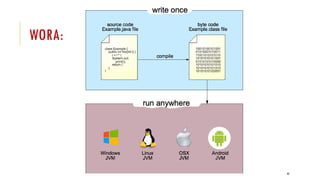
code and shorter development time (WORA – Write Once Run Any
where)
16
OBJECT-ORIENTED PROGRAMMING - ADVANTAGES
Simplicity: Software objects model real world objects, so the complexity is reduced and the
program structure is very clear.
Modularity: Each object forms a separate entity whose internal workings are decoupled from
other parts of the system.
Modifiability: It is easy to make minor changes in the data representation or the procedures in an
OO program. Changes inside a class do not affect any other part of a program, since the only
public interface that the external world has to a class is through the use of methods.
Extensibility: Adding new features or responding to changing operating environments can be
solved by introducing a few new objects and modifying some existing ones.
Maintainability: Objects can be maintained separately, making locating and fixing problems
easier.
Reusability: Objects can be reused in different programs.
17
DISADVANTAGES OF OOP:
Designing a program in OOP concept is a little bit tricky.
The programmer should have a proper planning before designing a program
using OOP approach.
Since everything is treated as objects in OOP, the programmers need proper skill
such as design skills, programming skills, thinking in terms of objects etc.
The size of programmes developed with OOP is larger than the procedural
approach.
Since larger in size, that means more instruction to be executed, which results in the
slower execution of programmes.
18
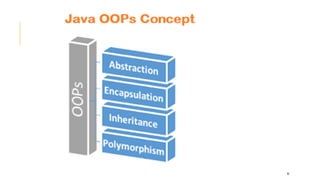
OOP(S) - CONCEPTS
OOP stands for Object-Oriented Programming.
There are four main OOP concepts
Abstraction,
Encapsulation,
Inheritance, and
Polymorphism
19
ABSTRACTION
Abstraction is the process of hiding certain details and showing only essential
information to the user. (What is to be done ? Rather than how it is done ?)
Abstraction means using simple things to represent complexity.
For eg:
1) We all know how to turn the TV on, but we don’t need
to know how it works (Internal Circuit /Components ).
2) Use ATM
20
WHAT ARE CLASSES AND OBJECTS?
Classes and objects are the two main aspects of object-oriented programming.
class is a template for objects (i.e., collection of objects of same type) and
an object is an instance of a class.
21
ENCAPSULATION
A way to achieve Abstraction & provides “data hiding”.
Encapsulation, is to make sure that "sensitive" data is hidden from users.
Encapsulation is the practice of keeping fields within a class private, then providing
access to them via public methods.
It’s a protective barrier that keeps the data and code safe within the class itself.
This way, we can re-use objects like code components or variables without allowing
open access to the data system-wide.
22
INHERITANCE
It is a mechanism in which one object acquires all the properties and behaviours of a
parent object.
It is an important part of OOPs (Object Oriented programming system).
The idea behind inheritance in Java is that you can create new classes that are built
upon existing classes.
Inheritance supports the concept of “reusability”, i.e. when we want to create a new
class and there is already a class that includes some of the code that we want, we can
derive our new class from the existing class.
23
POLYMORPHISM
The word polymorphism means having many forms.
The word “poly” means many and “morphs” means forms, So it means many forms.
The same word to mean different things in different contexts.
One form of polymorphism in Java is method overloading. That’s when different
meanings are implied by the code itself.
The other form is method overriding.
Ex: A person at the same time can have different characteristic. Like a man at the
same time is a father, a husband, an employee. So the same person posses different
behaviour in different situations.
24
IN REAL LIFE - OOPS
25
26
27
WHAT IS JAVA?
Java is a popular Internet programming language, created in 1995.
It is owned by Oracle (Previously owned by Sun Micro Systems) , and more than 3
billion devices run Java.
It is used for:
Mobile applications (specially Android apps)
Desktop applications
Web applications
Web servers and Application servers
Games
Database connection
And much, much more!
28
WHY JAVA ?
Java is one of the most popular and widely used programming language
and platform.
A platform is an environment that helps to develop and run programs
written in any programming language.
Java is fast, reliable and secure.
From desktop to web applications, scientific supercomputers to gaming
consoles, cell phones to the Internet, Java is used in every nook and
corner.
29
HISTORY OF JAVA
James Arthur Gosling, (born May 19, 1955) is a Canadian computer scientist, best
known as the founder and lead designer behind the Java programming language.
Java was started as a project called "Oak" by James Gosling in June 1991 at Sun at
Microsystems of USA.
The language was initially called Oak after an oak tree that stood outside Gosling's
office. Later the project went by the name Green and was finally renamed Java,
from Java coffee. "Java" being used as slang for "coffee"
Gosling designed Java with a C/C++-style syntax that system and application
programmers would find familiar.
The first public implementation was Java 1.0 in 1995.
30
JAVA VERSIONS
JDK Alpha and Beta (1995)
JDK 1.0 (23rd Jan 1996)
JDK 1.1 (19th Feb 1997)
J2SE 1.2 (8th Dec 1998)
J2SE 1.3 (8th May 2000)
J2SE 1.4 (6th Feb 2002)
J2SE 5.0 (30th Sep 2004)
Java SE 6 (11th Dec 2006)
Java SE 7 (28th July 2011)
Java SE 8 (18th March 2014)
Java SE 9 (21st Sep 2017)
Java SE 10 (20th March 2018)
31
JAVA EDITIONS/PLATFORMS
32
FEATURES OF JAVA (BUZZ WORDS)

Simple

Secured

Object Oriented

Robust

Platform Independence
(Architecture Neutral

Portable

Compiled & Interpreted
Multithreaded
Dynamic
Distributed
High Performance(JIT)
Java is case-sensitive
33
JAVA ENVIRONMENT
The programming environment of Java consists of three components
mainly:
JDK
JRE
JVM
34
JDK & JAVA API:
JDK = JAVA DEVELOPMENT KIT
JDK = JAVA TOOLS + JAVA API
35
JAVA TOOLS JAVA API
1. javac
2. java
3. javadoc
4. javah
5. javap
6. jdb
7. appletviewer
1. Packages
2. Classes / Interfaces
3. methods
36
JAVA API PACKAGES:
API : Application Programming Interface
1. Standalone Application Programming
 java.lang
 java.util
 java.io
2. Applets / GUI & Network Programming
 java.net
 java.applet
37
JDK VS JRE VS JVM
JDK (Java Development Kit):
JDK contains everything that will be required to develop and run Java application.
JRE (Java Runtime Environment):
JRE contains everything required to run Java application which has already been compiled. It
doesn’t contain the code library required to develop Java application.
JVM (Java Virtual Machine):
JVM is a virtual machine which works on top of your operating system to provide a recommended
environment for your compiled Java code. JVM only works with bytecode.
Hence you need to compile your Java application(.java) so that it can be converted to bytecode
format (also known as the .class file).
Which then will be used by JVM to run an application. JVM only provide the environment needed
to executed Java Bytecode.
38
JAVA VIRTUAL MACHINE (JVM)
The Java Language is a language specification.
The Sun JVM is written in C, JVM run on your machine is a platform-
dependent executable code.
The Java Virtual Machine by Oracle, i.e., Oracle JVM(HotSpot) on which
Java Code is executed is written in C++.
39
JAVA VIRTUAL MACHINE
JVM is a engine that provides runtime environment to drive the Java Code or
applications. It converts Java bytecode into machines language.
JVM is a part of JRE(Java Run Environment). It stands for Java Virtual Machine
In other programming languages, the compiler produces machine code for a
particular system. However, Java compiler produces code for a Virtual
Machine known as Java Virtual Machine.
First, Java code is complied into bytecode. This bytecode gets interpreted on
different machines
Between host system and Java source, Bytecode is an intermediary language.
JVM is responsible for allocating memory space.
40
JAVA VIRTUAL MACHINE
41
JAVA IS BOTH COMPILED &INTERPRETED LANGUAGE
A compiler is a program which converts a program from one level of language to another.
Example conversion of C++ program into machine code.
The java compiler converts high-level java code into bytecode (which is also a type of machine
code).
An interpreter is a program which converts a program at one level to another programming
language at the same level. Example conversion of Java program into C++
In Java, the Just In Time Code generator converts the bytecode into the native machine code which
are at the same programming levels.
Hence, Java is both compiled as well as interpreted language.
JIT or Just-in-time compiler is the part of the Java Virtual Machine (JVM). It is used to speed up
the execution time
In comparison to other compiler machines, Java may be slow in execution.
42
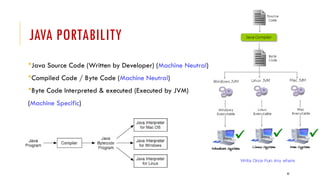
JAVA PORTABILITY
Java Source Code (Written by Developer) (Machine Neutral)
Compiled Code / Byte Code (Machine Neutral)
Byte Code Interpreted & executed (Executed by JVM)
(Machine Specific)
c
43
WORA:
44
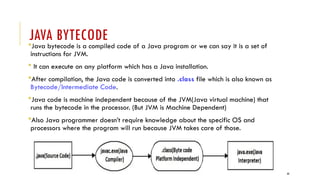
JAVA BYTECODE
Java bytecode is a compiled code of a Java program or we can say it is a set of
instructions for JVM.
 It can execute on any platform which has a Java installation.
After compilation, the Java code is converted into .class file which is also known as
Bytecode/Intermediate Code.
Java code is machine independent because of the JVM(Java virtual machine) that
runs the bytecode in the processor. (But JVM is Machine Dependent)
Also Java programmer doesn’t require knowledge about the specific OS and
processors where the program will run because JVM takes care of those.
45
46
JAVA EXECUTION IS SLOWER ? ? ?
47
48
49
50
JAVA BASICS:
Where to download Java.
How to install Java.
Setting up the Environment Variables.
Our First Java Program.
How to compile a Java application.
How to run a Java Application.
Difference between important terms in Java (JDK vs JRE or J2SE vs J2EE..).
51
HOW TO DOWNLOAD JAVA
The latest version of Java can be downloaded from Java Website
URL:
https://www.oracle.com/technetwork/java/javase/downloads/jdk8-downloads-2133151.html
52
JAVA INSTALLATION
There are no special requirements when installing Java.
Be sure that you have suitable permissions on your computer to
install software.
It can be installed like any other software (.exe)
53
SETTING UP THE ENVIRONMENT VARIABLES
You need to set PATH to compile Java source code and create Java class files.
JDK bin directory contains javac and java commands to compile and run Java
programs.
CLASSPATH is little different than Path and it's used by JVM rather than Operating
System to load classes at runtime.
JAVA_HOME: This environment variable will point to the location of the Java home
directory. (C:Program FilesJavajdk1.6.0_02)
Note: PATH/JAVA_HOME is for OS and CLASSPATH is for JVM
PATH/JAVA_HOME : C:Program FilesJavajdk1.8.0_51bin (Tools)
CLASSPATH: C:Program FilesJavajdk1.8.0_51lib ( Supporting files – jars)
54
SAMPLE JAVA PROGRAM (MYCLASS.JAVA)
import java.lang.*;
public class MyClass
{
public static void main(String[] args)
{
System.out.println("Welcome to Java World!");
}
}
55
JAVA MAIN() METHOD
56
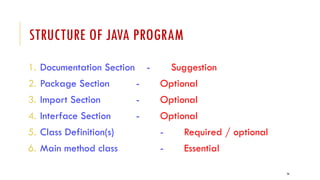
STRUCTURE OF JAVA PROGRAM
1. Documentation Section - Suggestion
2. Package Section - Optional
3. Import Section - Optional
4. Interface Section - Optional
5. Class Definition(s) - Required / optional
6. Main method class - Essential
57
58
JAVA COMMENTS (DOCUMENTATION)
// Single-Line Comment
/*
* Multiple-Line comment
*/
/**
* JavaDoc comment
*/
59
JAVA TOOLS/IDE:
1) To compile a java program:
Use javac
Example:
C:UsersRollno>javac MyClass.java
2) To run a java program:
Use java
Example:
C:UsersRollno>java MyClass
60
JAVA PROGRAMMING BASICS – DATA TYPES
Two categories:
1. Primitive (Fundamental)
 List shown in next slide
2. Non-Primitive ( Referenced – Group of values / Advanced data types)
 Class
 Interface
 String
 Array etc.,
61
DATA TYPES:
62
JAVA KEYWORDS
abstract boolean break byte byvalue
case cast * catch char class
const * continue default do double
else extends false # final finally
float for future * generic * goto *
if implements import inner * instanceof
int interface long native new
null # operator * outer * package private
protected public rest * return short
static super switch synchronized this
threadsafe * throw throws transient true #
try var * void volatile while
Note: Total 60=33 (exists)+27 new keywords & some( *) are reserved for future purpose,
# - defined by java
63
JAVA PRIMITIVE DATA TYPES
Default Value
0
0
0
0
0.0
0.0
u0000
false
64
JAVA CODING(NAMING) CONVENTIONS - STANDARDS:
For good maintenance and readability of code in java
65
JAVA CODING(NAMING) CONVENTIONS - STANDARDS:
For example : package java.lang;
package lbrce.cse;
package lbrce.ece;
For example : RED, YELLOW,GREEN
MAX_PRIORITY,
MAX_MARKS
RED, YELLOW, MAX_PRIORITY, MAX_STOCK_COUNT
66
VARIABLES – TYPES:
A variable is a name given to a memory location.
It is the basic unit of storage in a program.
The value stored in a variable can be changed during program execution.
A variable is only a name given to a memory location, all the operations done on the
variable effects that memory location.
In Java, all the variables must be declared before use.
67
HOW TO DECLARE VARIABLES?
We can declare variables in java as follows:
68
TYPES OF VARIABLES IN JAVA:
There are three types of variables in Java:
1)Local Variables
2)Instance Variables
3)Static Variables
69
1) LOCAL VARIABLES
DEF: A variable defined within a block or method or constructor is called
local variable.
These variable are created when the block in entered or the function is
called and destroyed after exiting from the block or when the call returns
from the function.
The scope of these variables exists only within the block in which the
variable is declared. i.e. we can access these variable only within that
block.
Initialization of Local Variable is Mandatory.
70
EXAMPLE:
public void StudentAge()
{
// local variable age
int age = 0;
age = age + 5;
}
71
2) INSTANCE VARIABLES
DEF: Instance variables are non-static variables and are declared in a class outside
any method, constructor or block.
As instance variables are declared in a class, these variables are created when an
object of the class is created and destroyed when the object is destroyed.
Unlike local variables, we may use access specifiers for instance variables. If we do
not specify any access specifier then the default access specifier will be used.
Initialization of Instance Variable is not Mandatory. Its default value is 0
Instance Variable can be accessed only by creating objects.
72
EXAMPLE:
class Marks
{
// These variables are instance variables.
// These variables are in a class
// and are not inside any function
int engMarks;
int mathsMarks;
int phyMarks;
}
73
3)STATIC VARIABLES
DEF: Static variables are also known as Class variables.
These variables are declared similarly as instance variables, the
difference is that static variables are declared using the static keyword
within a class outside any method constructor or block.
Unlike instance variables, we can only have one copy of a static
variable per class irrespective of how many objects we create.
Static variables are created at the start of program execution and
destroyed automatically when execution ends.
Initialization of Static Variable is not Mandatory. Its default value is 0
74
EXAMPLE:
class Emp
{
// static variable salary
public static double salary;
}
For Accessing Static Variable:
Emp.salary
75
JAVA OPERATORS:
Operator in java is a symbol that is used to perform operations.
For example: +, -, *, / etc.
76
77
RELATIONAL OPERATORS:
Operator Meaning
== Is equal to
!= Is not equal to
> Greater than
< Less than
>= Greater than or equal to
<= Less than or equal to
78
LOGICAL OPERATORS:
Operator Meaning Work
&& Logical
AND
If both operands are true then only "logical AND operator"
evaluate true.
|| Logical OR The logical OR operator is only evaluated as true when one of
its operands evaluates true. If either or both expressions
evaluate to true, then the result is true.
! Logical
Not
Logical NOT is a Unary Operator, it operates on single
operands. It reverses the value of operands, if the value is true,
then it gives false, and if it is false, then it gives true.
79
ASSIGNMENT OPERATORS:
The Java Assignment Operators are used when you want to assign a value to the
expression.
The assignment operator denoted by the single equal sign =
Example:
int a = 6;
float b = 6.8F;
80
JAVA COMPOUND ASSIGNMENT OPERATORS:
Java provides some special Compound Assignment Operators, also known
as Shorthand Assignment Operators.
It's called shorthand because it provides a short way to assign an expression to a
variable.
For example, you write a statement:
a = a+6;
In Java, you can also write the above statement like this:
a += 6;
81
UNARY ARITHMETIC OPERATORS:
In Java, unary arithmetic operators are used to increasing or decreasing the value of
an operand.
Increment operator adds 1 to the value of a variable, whereas the decrement
operator decreases a value.
Example Description
val = a++; Store the value of "a" in "val" then increments.
val = a--; Store the value of "a" in "val" then decrements.
val = ++a; Increments "a" then store the new value of "a" in "val".
val = --a; Decrements "a" then store the new value of "a" in "val".
82
BITWISE OPERATORS IN JAVA
Bitwise operators are used to perform manipulation of individual bits of a number.
1) Bitwise OR (|)
2) Bitwise AND (&)
3) Bitwise XOR (^)
4) Bitwise Complement (~)
5) Shift Operators:
 Signed Right shift operator (>>) ,
 Left shift operator (<<),
 Unsigned Right shift operator (>>>)
83
BITWISE OR (|)
a = 5 = 0101 (In Binary)
b = 7 = 0111 (In Binary)
Bitwise OR Operation of 5 and 7
0101
| 0111
________
0111 = 7 (In decimal)
84
BITWISE AND (&)
a = 5 = 0101 (In Binary)
b = 7 = 0111 (In Binary)
Bitwise AND Operation of 5 and 7
0101
& 0111
________
0101 = 5 (In decimal)
85
BITWISE XOR (^)
a = 5 = 0101 (In Binary)
b = 7 = 0111 (In Binary)
Bitwise XOR Operation of 5 and 7
0101
^ 0111
________
0010 = 2 (In decimal)
86
BITWISE COMPLEMENT (~)
a = 5 = 0101 (In Binary)
Bitwise Compliment Operation of 5
~ 0101
_______
1010 = 10 (In decimal)
Note: Compiler will give 2’s complement of that number, i.e., 2’s compliment of 10
will be -6.
87
SHIFT OPERATORS:
These operators are used to shift the bits of a number
left or right thereby multiplying or dividing the number by
two respectively.
They can be used when we have to multiply or divide a
number by two.
88
SIGNED RIGHT SHIFT OPERATOR (>>)
Shifts the bits of the number to the right and fills 0 on left as a result.
The leftmost bit depends on the sign of initial number.
Example 1:
a = 10
a>>1 = 5
Example 2:
a = -10
a>>1 = -5
We preserve the sign bit.
89
LEFT SHIFT OPERATOR (<<)
Shifts the bits of the number to the left and fills 0 on left as a result.
Example :
a = 5 = 0000 0101
b = -10 = 1111 0110
a << 1 = 0000 1010 = 10
a << 2 = 0001 0100 = 20
b << 1 = 0000 1010 = - 20
b << 2 = 0001 0100 = - 40
90
UNSIGNED RIGHT SHIFT OPERATOR (>>>)
Shifts the bits of the number to the right and fills 0 on left as a result. The leftmost bit is set
to 0.
(>>>) is unsigned-shift; it’ll insert 0.
But (>>) is signed, and will extend the sign bit.
Example 1:
a = 10
a>>>1 = 5
Example 2:
a = -10
a>>>1 = 2147483643
DOES NOT preserve the sign bit.
91
Operator Meaning
+= Increments then assigns
-= Decrements then assigns
*= Multiplies then assigns
/= Divides then assigns
%= Modulus then assigns
<<= Binary Left Shift and assigns
>>= Binary Right Shift and assigns
>>>= Shift right zero fill and assigns
&= Binary AND assigns
^= Binary exclusive OR and assigns
|= Binary inclusive OR and assigns
92
JAVA INSTANCEOF OPERATOR:
The Java instanceof Operator is used to determining whether this object belongs to
this particular (class or subclass or interface) or not.
Syntax:
object-reference instanceof type;
Example:
if (c instanceof Employee)
Note: Employee is class & c is an instance of that class
93
JAVA CONDITIONAL OPERATOR (TERNARY):
The Java Conditional Operator selects one of two expressions for
evaluation, which is based on the value of the first operands.
It is also called ternary operator because it
takes three arguments.
Syntax: expression1 ? expression2:expression3;
Example: c= a>b?a:b;
94
CONTROL STATEMENTS IN JAVA
1)Sequential statements
2)Control Statements (Decision Making & loops)
95
SEQUENTIAL STATEMENTS
Def:
These statements are executed by JVM one by one in a
sequential manner.
96
CONTROL STATEMENTS
Def: Which alter the flow of execution and provide
better control to the programmer on the flow of
execution.
97
CONTROL STATEMENTS - TYPES
1) if
2) if….else
3) switch
1) while loop
2) do….while loop
3) for loop
4) for-each loop
5) break
6) continue
98
SIMPLE IF & IF…ELSE & IF….ELSE…IF
(DECISION MAKING)
Syntax:
if(condition)
{
…….
}
Syntax:
if(condition)
{
…….
}
else
{
………..
}
Syntax:
if(condition)
{
…….
}
else if(condition)
{
 ………..
}
else
{
 …..
}
99
SWITCH…CASE:
Syntax:
switch (expression)
{
case value1:
statement1;
break;
case value2:
statement2;
break;
.
.
case valueN:
statementN;
break;
default:
statementDefault;
}
100
LOOPS: WHILE & DO…WHILE
while loop: (Entry Controlled loop)
Syntax :
while (boolean condition)
{
loop statements...
}
do….while loop: (Exit Controlled loop)
Syntax :
do
{
statements..
}
while (condition);
101
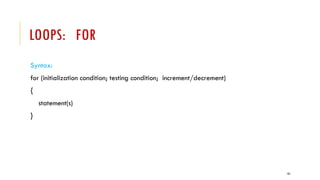
LOOPS: FOR
Syntax:
for (initialization condition; testing condition; increment/decrement)
{
statement(s)
}
102
LOOPS: FOR…EACH
Syntax:
for (data_type variable: Collection/array)
{
statement(s)
}
Example:
int arr[]={10,20,30,40,50};
for(int i:arr)
{
System.out.println(i);
}
103
INPUT AND OUTPUT
Two Methods:
1) InputStreamReader class & BufferedReader class
2) Scanner class
104
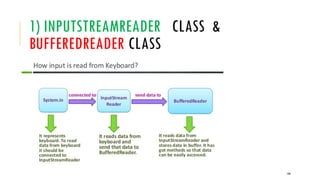
1) INPUTSTREAMREADER CLASS &
BUFFEREDREADER CLASS
105
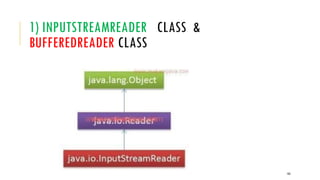
1) INPUTSTREAMREADER CLASS &
BUFFEREDREADER CLASS
106
1) INPUTSTREAMREADER CLASS &
BUFFEREDREADER CLASS : METHODS
1) read() - java.io.BufferedReader.read() method reads a single
character from this buffered reader.
2) readLine() - java.io.BufferedReader.readline() method read a line of
text. A line is considered to be terminated by any one of a line feed ('n')
107
2) SCANNER CLASS
Scanner is a class in java.util package
Used for obtaining the input of the primitive types like int,
double, etc. and strings.
108
2) SCANNER CLASS
109
2) SCANNER CLASS : METHODS
next() - It is used to get the next complete token from the scanner
which is in use.
nextInt() - It scans the next token of the input as an Int.
nextShort() - It scans the next token of the input as a short.
nextLong() - It scans the next token of the input as a long.
nextFloat() - It scans the next token of the input as a float.
nextDouble() - It scans the next token of the input as a double.
110
COMMAND LINE ARGUMENTS: (I/O)
java command-line argument is an argument, that is
passed at the time of running the java program.
The arguments passed from the console can be received
in the java program via main(String args[ ]) method and it
can be used as an input.
111
EXAMPLE OF COMMAND-LINE ARGUMENTS
import java.lang.*;
class Carg
{
public static void main(String args[])
{
for(int i=0;i<args.length;i++)
System.out.println(args[i]);
}
}
Compile by
D:> javac Carg.java
Run by
D:> java Carg ECE sri 3 2
Output:
ECE - args[0]
sri - args[1]
3 - args[2]
2 - args[3]
112
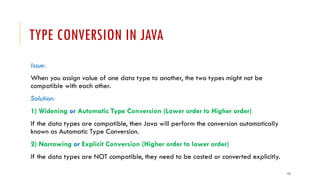
TYPE CONVERSION IN JAVA
Issue:
When you assign value of one data type to another, the two types might not be
compatible with each other.
Solution:
1) Widening or Automatic Type Conversion (Lower order to Higher order)
If the data types are compatible, then Java will perform the conversion automatically
known as Automatic Type Conversion.
2) Narrowing or Explicit Conversion (Higher order to lower order)
If the data types are NOT compatible, they need to be casted or converted explicitly.
113
TYPE CONVERSION IN JAVA
1) Widening or Automatic Type Conversion (Lower order to Higher order)
This happens when:
The two data types are compatible.
When we assign value of a smaller data type to a bigger data type.
But no automatic conversion is supported from numeric type to char or boolean.
Also, char and boolean are not compatible with each other.
114
AUTOMATIC TYPE CONVERSION : EXAMPLE
class Test
{
public static void main(String[] args)
{
int i = 100;
// automatic type conversion
long l = i;
// automatic type conversion
float f = l;
System.out.println("Int value "+i);
System.out.println("Long value "+l);
System.out.println("Float value "+f);
}
}
OUTPUT:
Int value 100
Long value 100
Float value 100.0
115
TYPE CONVERSION IN JAVA
2) Narrowing or Explicit Conversion (Higher order to lower order)
If we want to assign a value of larger data type to a smaller data type we perform
explicit type casting or narrowing.
This is useful for incompatible data types where automatic conversion cannot be done.
116
TYPE CONVERSION IN JAVA
Example: char and number are not compatible with each other. (Do explicit conversion)
117
JAVA ARRAYS:
Types:
1) Single Dimensional (1-D)
2) Multi Dimensional (2-D, 3-D, ….)
118
JAVA ARRAYS: 1-DIMENSIONAL
DEF: Normally, an array is a collection of similar type of elements
(Homogeneous)
Java array is an object which contains elements of a similar data type.
Additionally, The elements of an array are stored in a contiguous memory
location.
It is a data structure where we store similar elements.
We can store only a fixed set of elements in a Java array.
Array in Java is index-based, the first element of the array is stored at the 0th
index, 2nd element is stored on 1st index and so on.
119
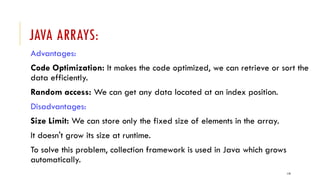
JAVA ARRAYS:
Advantages:
Code Optimization: It makes the code optimized, we can retrieve or sort the
data efficiently.
Random access: We can get any data located at an index position.
Disadvantages:
Size Limit: We can store only the fixed size of elements in the array.
It doesn't grow its size at runtime.
To solve this problem, collection framework is used in Java which grows
automatically.
120
ARRAY VARIABLES: 3 STEP PROCESS
1) Array Declaration
2) Array Construction
3) Array Initialization/Assignment
121
1) ARRAY DECLARATION
Syntax:
dataType[ ] array_variable;
(or)
dataType array_variable[ ];
Example:
int[ ] A;
(or)
int A[ ];
122
2) ARRAY CONSTRUCTION
Syntax:
array_variable= new dataType[size];
Example-1:
A= new int[10];
Example-2:
Declaration and Construction combined:
int A[ ] = new int[10];
123
3) ARRAY INITIALIZATION / ASSIGNMENT
Syntax:
// Assigns an integer value 1 to the first element 0 of the array
A[0]=1;
// Assigns an integer value 2 to the second element 1 of the array
A[1]=2;
124
3) ARRAY INITIALIZATION / ASSIGNMENT
Declaring and initialize an Array
// Initilializes an integer array of length 4 where the first
element is 1 , second element is 2 and so on.
int A[ ] = {1, 2, 3, 4};
125
JAVA ARRAY INDEX
Example :
int[ ] age = new int[5];
126
JAVA ARRAYS: 2-DIMENSIONAL
(MULTI DIMENSIONAL)
Multidimensional arrays are array of arrays
Each element of the array holding the reference of other
array.
127
JAVA ARRAYS: 2-DIMENSIONAL
(MULTI DIMENSIONAL)
Syntax:
dataType[ ][ ] array_variable;
(or)
dataType array_variable[ ][ ];
Example:
Int[ ][ ] A;
(or)
int A[ ][ ];
128
JAVA ARRAYS: 2-DIMENSIONAL
(MULTI DIMENSIONAL)
//2D array or matrix - Declaration
int A[ ][ ] = new int[10][20];
//2D array Initialization
int A[ ][ ] = { {2,7,9}, {3,6,1}, {7,4,2} };
129
JAVA ARRAYS: 2-DIMENSIONAL
int[ ][ ] A = new int[3][4];
130
EXAMPLE TO INITIALIZE A 2D ARRAY (JAGGED ARRAY)
(DIFFERENT SIZE -ROWS)
int[ ][ ] A = {
{1, 2, 3},
{4, 5, 6, 9},
{7},
};
131
2D ARRAY: REFERENCES
int Marks[ ][ ]=new int[4][3];
132
JAVA ARRAYS: 3-DIMENSIONAL
(MULTI DIMENSIONAL)
Syntax:
dataType[ ][ ][ ] array_variable;
(or)
dataType array_variable[ ][ ][ ];
Example:
int[ ][ ][ ] A;
(or)
int A[ ][ ][ ];
133
JAVA ARRAYS: 3-DIMENSIONAL
(MULTI DIMENSIONAL)
//3D array or matrix - Declaration
int A[ ][ ][ ] = new int[3][10][10 ];
//3D array Initialization
int A[ ][ ][ ] = { {2,7,9}, {3,6,1}, {7,4,2} };
134
JAVA ARRAYS: 3-DIMENSIONAL
(MULTI DIMENSIONAL)
//3D Array Declaration
int A[ ][ ][ ]= new A[3][4][2];
135
JAVA ARRAYS: 3-DIMENSIONAL
(MULTI DIMENSIONAL) INITIALIZAION
int A[ ][ ][ ] = {
{
{1, 2, 3} ,
{4, 5, 6}
} ,
{
{7,8,9},
{10,11,12}
}
} ;
136
ACCESS SPECIFIERS/MODIFIERS:
An access specifier is a keyword that indicates how a
field/variable or method can be accessed.
(i.e., scope/visibility)
137
138
ACCESS SPECIFIERS:
139
140
ACCESS SPECIFIERS:
141
CLASSES AND OBJECTS IN JAVA
Classes and Objects are basic concepts of Object Oriented
Programming which revolve around the real life entities.
A class is a group of objects which have common
properties.
It is a template or blueprint from which objects are
created.
It is a logical entity. It can't be physical.
142
CLASSES:
A class is a user defined blueprint or prototype from which objects are created.
It represents the set of properties or methods that are common to all objects of one type.
In general, class declarations can include these components, in order:
Modifiers : A class can be public or has default access
Class name: The name should begin with a initial letter (capitalized by convention).
Superclass(if any): The name of the class’s parent (superclass), if any, preceded by the
keyword extends. A class can only extend (subclass) one parent.
Interfaces(if any): A comma-separated list of interfaces implemented by the class, if any,
preceded by the keyword implements. A class can implement more than one interface.
Body: The class body surrounded by braces, { }.
143
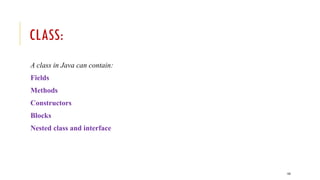
CLASS:
A class in Java can contain:
Fields
Methods
Constructors
Blocks
Nested class and interface
144
CLASS:
Constructors are used for initializing new objects.
Fields are variables that provides the state of the class and its
objects, and
methods are used to implement the behavior of the class and its
objects.
145
OBJECT:
Definitions:
An object is a real-world entity.
An object is a runtime entity.
The object is an entity which has state and behaviour.
The object is an instance of a class.
146
OBJECT:
It is a basic unit of Object Oriented Programming and
represents the real life entities.
A typical Java program creates many objects, which as you
know, interact by invoking methods.
characteristics of an object:
State: represents the data (value) of an object.
Behavior: represents the behavior (functionality) of an object such as
deposit, withdraw, etc.
Identity: An object identity is typically implemented via a unique ID. The
value of the ID is not visible to the external user. However, it is used
internally by the JVM to identify each object uniquely.
147
148
149
CLASS & OBJECT:
Syntax to declare a class:
class class_name
{
Access specifier field(s) (or) Instance Variables;
constructor;
Access specifier method(s);
}
150
CLASS & OBJECT:
Instance variable in Java:
A variable which is created inside the class but outside
the method is known as an instance variable.
Instance variable doesn't get memory at compile time.
It gets memory at runtime when an object or instance is
created.
That is why it is known as an instance variable.
151
CLASS & OBJECT:
Method in Java:
In Java, a method is like a function which is used to expose the behavior of an object.
Advantage of Method
Code Reusability
Code Optimization
152
CLASS & OBJECT: SYNTAX
class Student
{
private int rno;
private String name;
private float cgpa;
public void input()
{
-----
}
public void display()
{
------
}
}
//object(s) creation - Instance of class
Student s1=new Student();
Student s2=new Student();
Student s3=new Student();
153
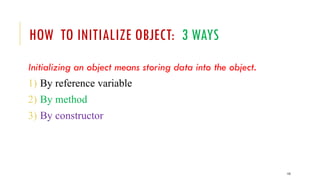
HOW TO INITIALIZE OBJECT: 3 WAYS
Initializing an object means storing data into the object.
1) By reference variable
2) By method
3) By constructor
154
1)BY REFERENCE VARIABLE
Syntax:
object . Instance_variable = value;
Example:
s1.id=101;
s1.name=“sri”;
NOTE: Example TestStudent3.java
155
2)BY METHOD
We are creating the two objects of Student class and initializing the value to these
objects by invoking the insert method.
NOTE: Example TestStudent5.java
156
3)BY CONSTRUCTOR : CONSTRUCTORS IN JAVA
DEF: A constructor is a block of code similar to the method.
It is called when an instance of the class is created.
At the time of calling constructor, memory for the object is allocated in the
memory.
It is a special type of method which is used to initialize the object.
Every time an object is created using the new() keyword, at least one constructor is
called.
It calls a default constructor if there is no constructor available in the class. In such
case, Java compiler provides a default constructor by default.
157
RULES FOR CREATING JAVA CONSTRUCTOR:
1) Constructor name must be the same as its class name
2) A Constructor must have no return type (not even void)
3) A Java constructor cannot be abstract, static, final, and synchronized
NOTE:
We can use access modifiers while declaring a constructor.It controls
the object creation.
In other words, we can have private, protected, public or default
constructor in Java.
158
TYPES OF CONSTRUCTORS:
There are two types of constructors in Java:
a) Default constructor (no-arguments constructor)
b) Parameterized constructor
159
A) DEFAULT CONSTRUCTOR
(NO-ARGUMENTS CONSTRUCTOR)
A constructor is called "Default Constructor" when it doesn't have any parameter.
Syntax of default constructor:
class_name()
{
….
}
Example : College.java
Note: The default constructor is used to provide the default values to the object like 0, null, etc.,
depending on the type.
160
B) PARAMETERIZED CONSTRUCTOR
A constructor which has a specific number of parameters is called a parameterized
constructor.
Why use the parameterized constructor?
The parameterized constructor is used to provide different values to distinct objects.
However, you can provide the same values also.
Example:
Student4.java
Estudent.java
161
CONSTRUCTOR OVERLOADING IN JAVA
Constructor overloading is a technique of having more than one constructor with
different parameter lists.
They are arranged in a way that each constructor performs a different task.
They are differentiated by the compiler by the number of parameters in the list and
their types.
162
CONSTRUCTOR VS METHOD IN JAVA
Java Constructor Java Method
A constructor is used to initialize the
state of an object.
A method is used to expose the behavior
of an object.
A constructor must not have a return
type.
A method must have a return type.
The constructor is invoked implicitly. The method is invoked explicitly.
The Java compiler provides a default
constructor if you don't have any
constructor in a class.
The method is not provided by the
compiler in any case.
The constructor name must be same as
the class name.
The method name may or may not be
same as the class name.
163
COPY OF OBJECT  OBJECT:
(JAVA COPY CONSTRUCTOR)
There is no copy constructor in Java.
However, we can copy the values from one object to another like copy constructor
in C++.
There are many ways to copy the values of one object into another in Java.
1) By constructor
2) By assigning the values of one object into another
3) By clone() method of Object class
164
1)BY CONSTRUCTOR:
copy constructor implementation should perform
deep copy for any referenced objects in the class by
creating new objects and copy the values
It usually accepts only one parameter that is
just another instance of the same class.
165
3) BY ASSIGNING THE VALUES OF ONE OBJECT
INTO ANOTHER:
We can copy the contents of one object into another
object by assigning the values of one object into
another individually field by field.
166
3) BY CLONE() METHOD OF OBJECT CLASS
The object cloning is a way to create exact copy of an
object.
The clone() method of Object class is used to clone an
object.
The clone() method saves the extra processing task for
creating the exact copy of an object. If we perform it by
using the new keyword, it will take a lot of processing time
to be performed that is why we use object cloning.
167
-----Some Programs-----
168
WRAPPER CLASSES:
A Wrapper class is a class whose object wraps or contains a primitive
data types.
The wrapper class in Java provides the mechanism to convert
primitive into object and object into primitive.
169
USE OF WRAPPER CLASSES IN JAVA
Java is an object-oriented programming language, so we need to deal with objects many
times like in Collections, Serialization, Synchronization, etc.
Change the value in Method: Java supports only call by value. So, if we pass a primitive
value, it will not change the original value. But, if we convert the primitive value in an
object, it will change the original value.
Serialization: We need to convert the objects into streams to perform the serialization. If
we have a primitive value, we can convert it in objects through the wrapper classes.
Synchronization: Java synchronization works with objects in Multithreading.
java.util package: The java.util package provides the utility classes to deal with objects.
Collection Framework: Java collection framework works with objects only. All classes of
the collection framework (ArrayList, LinkedList, Vector, HashSet, LinkedHashSet,
TreeSet, PriorityQueue, ArrayDeque, etc.) deal with objects only.
170
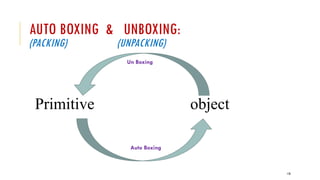
AUTO BOXING & UNBOXING:
(PACKING) (UNPACKING)
Primitive object
Auto Boxing
Un Boxing
171
AUTO BOXING:
Automatic conversion of primitive types to the object
of their corresponding wrapper classes is known as
autoboxing.
For example – conversion of int to Integer, long to
Long, double to Double etc.
172
UNBOXING:
It is just the reverse process of autoboxing.
Automatically converting an object of a wrapper
class to its corresponding primitive type is known
as unboxing.
For example – conversion of Integer to int, Long
to long, Double to double etc.
173
PRIMITIVE DATA TYPES AND CORRESPONDING
WRAPPER CLASS
Eight classes of the java.lang package are known as wrapper classes in Java.
174
PRIMITIVE TO WRAPPER : EXAMPLE (AUTOBOXING)
See example,
WrapperExample1.java
175
WRAPPER TO PRIMITIVE:EXAMPLE (AUTOBOXING)
See example,
WrapperExample2.java
176
JAVA WRAPPER CLASSES EXAMPLE
See example,
WrapperExample3.java
177
1) CONVERSION OF PRIMITIVE DATA TYPES TO
OBJECTS:
Integer ival = new Integer(i);
Float fval = new Float(f);
Double dval = new Double(d);
Long lval = new Long(l);
Note: Parameter is primitive value
178
2) CONVERSION OF OBJECTS TO PRIMITIVE DATA
TYPES :
int i = ival.intValue();
float f = fval.floatValue();
long l = lval.longValue();
double d = dval.doubleValue();
179
3) CONVERSION OF NUMBERS(PRIMITIVE) TO
STRINGS:
String s1=Integer.toString(i);
String s2=Float.toString(f);
String s3=Double.toString(d);
String s4=Long.toString(l);
180
4) CONVERSION OF STRING OBJECTS TO NUMERIC
OBJECTS:
Integer ival=Integer.valueOf(s1);
Float fval=Float.valueOf(s2);
Double dval=Double.valueOf(s3);
Long lval=Long.valueOf(s4);
181
5) CONVERSION OF NUMERIC STRINGS(OBJECTS)
TO PRIMITIVE TYPES(NUMBERS):
int i=Integer.parseInt(s1);
long l=Long.parseLong(s2);
float f=Float.parseFloat(s3);
double d=Double.parseDouble(s4);
182
JAVA STRING CLASS
Java String class implements three interfaces, namely – Serializable, Comparable and
CharSequence.
183
STRINGS:
Def:
String is a class, it is used often in the form of data type
( java.lang package)
Note: In java all classes are considered as data type(user-defined). So, we
consider this String as data type. (It is not character array- but object)
Example:
String s1=“Hello”;
184
CREATE A STRING:
There are 3 ways to create strings in java:
1) Assign a group of characters (i.e., String literal) to variable
Example-1: String s1;
s1=“hello”;
Example-2: String s1=“hello”;
2) Using ‘new’ operator (new keyword)
Example:
String s1=new String(“hello”);
3) By converting a character array into strings. (char array  String)
Example-1: Example-2: (specified characters only)
char s1[]={‘h’,’e’,’l’,’l’,’o’}; char s1[]={‘c’,’h’,’a’,’i’,’r’};
String s2= new String(s1); String s2= new String(s1,2,3);  air
185
STRING LITERAL:
String s1="Welcome";
//It doesn't create a new instance
String s2="Welcome";
Note:
String objects are stored in a special memory area known as the "string constant pool".
To make Java more memory efficient (because no new objects are created if it exists
already in the string constant pool).
186
BY NEW KEYWORD:
//creates two objects and one reference variable
String s=new String("Welcome");
In such case, JVM will create a new string object in normal (non-pool) heap memory.
187
Note: references are stored in stack memory and objects
are stored in heap memory
188
STRING CLASS METHODS:
1) String concatenation:
Syntax:
String concat(String s);
Example:
String s1;
s1="Hello";
String s2="World";
String s3=s1.concat(s2);
String s4=s1+s2;
Output:
S3- HelloWorld
S4- HelloWorld
189
STRING CLASS METHODS:
2) String length:
Syntax:
int length();
Example:
String s1;
s1="Hello";
int n=s1.length();
Output:
S1- 5
190
STRING CLASS METHODS:
3) Specific character:
Syntax:
char charAt(int i); // index-start with 0
Example:
String s1;
s1="Hello";
char ch=s1.charAt(1);
Output:
S1- e
191
STRING CLASS METHODS:
4) String comparison
Syntax:
int compareTo(String s1);
Example:
String s1="Hello";
String s2=“hello”;
int n=s1.compareTo(s2);
Output:
String comparison: -32
Note-1:
s1==s2  0
s1<s2  -ve
s1>s2  +ve
Note-2: (Ignore case)
int compareToIgnoreCase(String)
192
STRING CLASS METHODS:
5) String comparison - true/false
Syntax:
boolean equals(String s1);
Example:
String s1="Hello";
String s2=“hello”;
boolean b=s1.equals(s2);
Output:
String comparison: false
Note:
Boolean
equalsIgnoreCase(String s)
193
STRING CLASS METHODS:
6) String Starts with- true/false
Syntax:
boolean startsWith(String s1);
Example:
String s1=“ramkumar";
String s2=“ram”;
boolean b=s1.startsWith(s2);
Output:
String starts with: true
Note:
boolean endsWith(String s1);
194
STRING CLASS METHODS:
7) Index of substring
Syntax:
int indexOf(String s1);
Example:
String s1=“ramkumar";
String s2=“kumar”;
int n=s1.indexOf(s2);
Output:
Index of substring:3
Note:
If doesn’t exist  -ve
195
STRING CLASS METHODS:
8) Last Index of substring
Syntax:
int lastIndexOf(String s1);
Example:
String s1=“This is book,is it?";
String s2=“is”;
int n=s1.lastIndexOf(s2);
Output:
Last Index of substring:13
Note:
If doesn’t exist  -ve
196
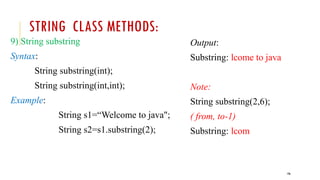
STRING CLASS METHODS:
9) String substring
Syntax:
String substring(int);
String substring(int,int);
Example:
String s1=“Welcome to java";
String s2=s1.substring(2);
Output:
Substring: lcome to java
Note:
String substring(2,6);
( from, to-1)
Substring: lcom
197
STRING CLASS METHODS:
10) String conversion : lower  upper
Syntax:
String toLowerCase();
Example:
String s1=“Welcome to java";
String s2 =s1.toUpperCase();
Output:
Lower to Upper:WELCOME TO
JAVA
Note:
s1 =s2.toLowerCase();
Upper to Lower:welcome to java
198
STRING CLASS METHODS:
11) String Trim : remove spaces (begin & end)
Syntax:
String trim();
Example:
String s1=“ hello ";
String s2 =s1.trim();
Output:
After Trim:hello
199
STRING CLASS METHODS:
12) String Split: (using delimiter)
Syntax:
String split(String); //parameter is delimiter
Example:
String s1=“Hello, this is java program";
String sarr[]=s1.split(" ");
for(String i:sarr)
System.out.println(i);
Output:
Hello,
this
is
java
program
200
STRING CLASS METHODS:
13) String - character(occurrence) Replace
Syntax:
String replace(char, char)
Example:
String s1=“Hello";
s1=s1.replace(‘e’,’a’);
Output:
After replaceing:Hallo
201
JAVA STRING COMPARE
We can compare string in java on the basis of content and reference.
There are three ways to compare string in java:
1) By equals() method
2) By = = operator
3) By compareTo() method
202
1) BY EQUALS() METHOD
The method is : equals() method & equalsIgnoreCase()
It is used in authentication. (To Check content equality)
Syntax:
public boolean equals(String);
public boolean equalsIgnoreCase(String);
203
2) BY = = OPERATOR
Uses == operator
Used for Reference matching (i.e., whether both belong
to same class type or not)
Used for objects.
204
String s1 = new String("HELLO");
String s2 = new String("HELLO");
System.out.println(s1 == s2); // false
205
3) BY COMPARETO() METHOD
compareTo() method
Used while sorting (i.e., equality
checking)
Checks the order of occurrence - as per
dictionary order)
Syntax:
int compareTo(String s1);
Output:
String comparison: -32
Note-1:
s1==s2  0
s1<s2  -ve
s1>s2  +ve
Note-2: (Ignore case)
int compareToIgnoreCase(String)
206
IMMUTABILITY OF STRINGS:
Objects are divided into
1) Mutable & 2) Immutable
Mutable objects are objects whose contents can be modified.
Immutable simply means unmodifiable or unchangeable.
Once string object is created its data or state can't be changed but
a new string object is created.
String objects are immutable.
207
MUTABLE VS IMMUTABLE:
Java String is immutable and final
A new String is created whenever we do String manipulation.
As String manipulations are resource consuming, Java provides two
utility classes: StringBuffer and StringBuilder.
Let us understand the difference between these two utility classes:
StringBuffer and StringBuilder are mutable classes.
208
STRINGBUFFER CLASS
Java StringBuffer class is used to create mutable (modifiable) string.
The StringBuffer class in java is same as String class except it is
mutable i.e. it can be changed.
Java StringBuffer class is thread-safe i.e. multiple threads cannot access
it simultaneously. So it is safe and will result in an order.
209
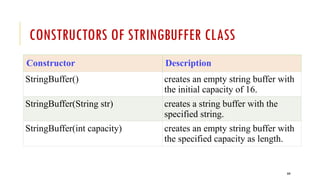
CONSTRUCTORS OF STRINGBUFFER CLASS
Constructor Description
StringBuffer() creates an empty string buffer with
the initial capacity of 16.
StringBuffer(String str) creates a string buffer with the
specified string.
StringBuffer(int capacity) creates an empty string buffer with
the specified capacity as length.
210
METHODS OF STRINGBUFFER CLASS:
Refer DOCUMENT…..
211
STRINGBUILDER CLASS
Java StringBuilder class is used to create mutable (modifiable)
string.
The Java StringBuilder class is same as StringBuffer class
except that it is non-synchronized.
It is available since JDK 1.5.
212
CONSTRUCTORS OF STRINGBUILDER CLASS
Constructor Description
StringBuilder() creates an empty string Builder with the
initial capacity of 16.
StringBuilder(String str) creates a string Builder with the specified
string.
StringBuilder(int length) creates an empty string Builder with the
specified capacity as length.
213
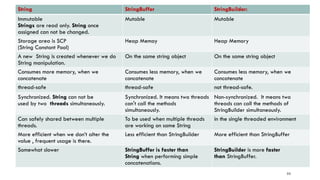
String StringBuffer StringBuilder:
Immutable
Strings are read only. String once
assigned can not be changed.
Mutable Mutable
Storage area is SCP
(String Constant Pool)
Heap Memoy Heap Memory
A new String is created whenever we do
String manipulation.
On the same string object On the same string object
Consumes more memory, when we
concatenate
Consumes less memory, when we
concatenate
Consumes less memory, when we
concatenate
thread-safe thread-safe not thread-safe.
Synchronized. String can not be
used by two threads simultaneously.
Synchronized. It means two threads
can't call the methods
simultaneously.
Non-synchronized. It means two
threads can call the methods of
StringBuilder simultaneously.
Can safely shared between multiple
threads.
To be used when multiple threads
are working on same String
in the single threaded environment
More efficient when we don’t alter the
value , frequent usage is there.
Less efficient than StringBuilder More efficient than StringBuffer
Somewhat slower StringBuffer is faster than
String when performing simple
concatenations.
StringBuilder is more faster
than StringBuffer.
214
STRING CONCATENATION OPERATOR ( + ):
NOTE:
The "+" operator is overloaded for String and used to
concatenated two string.
Internally "+" operation is implemented using
either StringBuffer or StringBuilder.
215

JAVA_VR23_OOPS THROUGH JAVA PPT UNIT-1.pptx

  • 1.
  • 2.
  • 3.
  • 4.
  • 5.
    5 OS/Hardware machine code C sourcecode myprog.c gcc myprog.exe Platform Dependent JVM bytecode Java source code myprog.java javac myprog.class OS/Hardware Platform Independent
  • 6.
    6 ISSUES: 1) Portability 2) PlatformIndependence 3) Security 4) Reliability 5) Reusability / Extensibility 6) Shareability( Networking)
  • 7.
    7 DIFFERENT PROGRAMMING PARADIGMS Functional/ProceduralProgramming/Procedure Oriented Programming) (POP)  Program is a list of instructions to the computer.  Procedural programming is about writing procedures or methods that perform operations on the data. Object-oriented programming (OOP)  Program is composed of a collection objects that communicate with each other.  While object-oriented programming is about creating objects that contain both data and methods.
  • 8.
  • 9.
  • 10.
  • 11.
  • 12.
  • 13.
    POP : ADVANTAGESVS DISADVANTAGES Advantages: Its relative simplicity, and ease of implementation of compilers and interpreters The ability to re-use the same code at different places in the program without copying it. An easier way to keep track of program flow. The ability to be strongly modular or structured. Needs only less memory. Disadvantages: Data is exposed to whole program, so no security for data. Difficult to relate with real world objects. Difficult to create new data types reduces extensibility. Importance is given to the operation on data rather than the data. 1313
  • 14.
  • 15.
    15 OBJECT-ORIENTED PROGRAMMING -ADVANTAGES Object-oriented programming has several advantages over procedural programming: OOP is faster and easier to execute (w.r.t Program Development) OOP provides a clear structure for the programs OOP helps to keep the Java code DRY "Don't Repeat Yourself", and makes the code easier to maintain, modify and debug OOP makes it possible to create full reusable applications with less code and shorter development time (WORA – Write Once Run Any where)
  • 16.
    16 OBJECT-ORIENTED PROGRAMMING -ADVANTAGES Simplicity: Software objects model real world objects, so the complexity is reduced and the program structure is very clear. Modularity: Each object forms a separate entity whose internal workings are decoupled from other parts of the system. Modifiability: It is easy to make minor changes in the data representation or the procedures in an OO program. Changes inside a class do not affect any other part of a program, since the only public interface that the external world has to a class is through the use of methods. Extensibility: Adding new features or responding to changing operating environments can be solved by introducing a few new objects and modifying some existing ones. Maintainability: Objects can be maintained separately, making locating and fixing problems easier. Reusability: Objects can be reused in different programs.
  • 17.
    17 DISADVANTAGES OF OOP: Designinga program in OOP concept is a little bit tricky. The programmer should have a proper planning before designing a program using OOP approach. Since everything is treated as objects in OOP, the programmers need proper skill such as design skills, programming skills, thinking in terms of objects etc. The size of programmes developed with OOP is larger than the procedural approach. Since larger in size, that means more instruction to be executed, which results in the slower execution of programmes.
  • 18.
    18 OOP(S) - CONCEPTS OOPstands for Object-Oriented Programming. There are four main OOP concepts Abstraction, Encapsulation, Inheritance, and Polymorphism
  • 19.
    19 ABSTRACTION Abstraction is theprocess of hiding certain details and showing only essential information to the user. (What is to be done ? Rather than how it is done ?) Abstraction means using simple things to represent complexity. For eg: 1) We all know how to turn the TV on, but we don’t need to know how it works (Internal Circuit /Components ). 2) Use ATM
  • 20.
    20 WHAT ARE CLASSESAND OBJECTS? Classes and objects are the two main aspects of object-oriented programming. class is a template for objects (i.e., collection of objects of same type) and an object is an instance of a class.
  • 21.
    21 ENCAPSULATION A way toachieve Abstraction & provides “data hiding”. Encapsulation, is to make sure that "sensitive" data is hidden from users. Encapsulation is the practice of keeping fields within a class private, then providing access to them via public methods. It’s a protective barrier that keeps the data and code safe within the class itself. This way, we can re-use objects like code components or variables without allowing open access to the data system-wide.
  • 22.
    22 INHERITANCE It is amechanism in which one object acquires all the properties and behaviours of a parent object. It is an important part of OOPs (Object Oriented programming system). The idea behind inheritance in Java is that you can create new classes that are built upon existing classes. Inheritance supports the concept of “reusability”, i.e. when we want to create a new class and there is already a class that includes some of the code that we want, we can derive our new class from the existing class.
  • 23.
    23 POLYMORPHISM The word polymorphismmeans having many forms. The word “poly” means many and “morphs” means forms, So it means many forms. The same word to mean different things in different contexts. One form of polymorphism in Java is method overloading. That’s when different meanings are implied by the code itself. The other form is method overriding. Ex: A person at the same time can have different characteristic. Like a man at the same time is a father, a husband, an employee. So the same person posses different behaviour in different situations.
  • 24.
  • 25.
  • 26.
  • 27.
    27 WHAT IS JAVA? Javais a popular Internet programming language, created in 1995. It is owned by Oracle (Previously owned by Sun Micro Systems) , and more than 3 billion devices run Java. It is used for: Mobile applications (specially Android apps) Desktop applications Web applications Web servers and Application servers Games Database connection And much, much more!
  • 28.
    28 WHY JAVA ? Javais one of the most popular and widely used programming language and platform. A platform is an environment that helps to develop and run programs written in any programming language. Java is fast, reliable and secure. From desktop to web applications, scientific supercomputers to gaming consoles, cell phones to the Internet, Java is used in every nook and corner.
  • 29.
    29 HISTORY OF JAVA JamesArthur Gosling, (born May 19, 1955) is a Canadian computer scientist, best known as the founder and lead designer behind the Java programming language. Java was started as a project called "Oak" by James Gosling in June 1991 at Sun at Microsystems of USA. The language was initially called Oak after an oak tree that stood outside Gosling's office. Later the project went by the name Green and was finally renamed Java, from Java coffee. "Java" being used as slang for "coffee" Gosling designed Java with a C/C++-style syntax that system and application programmers would find familiar. The first public implementation was Java 1.0 in 1995.
  • 30.
    30 JAVA VERSIONS JDK Alphaand Beta (1995) JDK 1.0 (23rd Jan 1996) JDK 1.1 (19th Feb 1997) J2SE 1.2 (8th Dec 1998) J2SE 1.3 (8th May 2000) J2SE 1.4 (6th Feb 2002) J2SE 5.0 (30th Sep 2004) Java SE 6 (11th Dec 2006) Java SE 7 (28th July 2011) Java SE 8 (18th March 2014) Java SE 9 (21st Sep 2017) Java SE 10 (20th March 2018)
  • 31.
  • 32.
    32 FEATURES OF JAVA(BUZZ WORDS)  Simple  Secured  Object Oriented  Robust  Platform Independence (Architecture Neutral  Portable  Compiled & Interpreted Multithreaded Dynamic Distributed High Performance(JIT) Java is case-sensitive
  • 33.
    33 JAVA ENVIRONMENT The programmingenvironment of Java consists of three components mainly: JDK JRE JVM
  • 34.
    34 JDK & JAVAAPI: JDK = JAVA DEVELOPMENT KIT JDK = JAVA TOOLS + JAVA API
  • 35.
    35 JAVA TOOLS JAVAAPI 1. javac 2. java 3. javadoc 4. javah 5. javap 6. jdb 7. appletviewer 1. Packages 2. Classes / Interfaces 3. methods
  • 36.
    36 JAVA API PACKAGES: API: Application Programming Interface 1. Standalone Application Programming  java.lang  java.util  java.io 2. Applets / GUI & Network Programming  java.net  java.applet
  • 37.
    37 JDK VS JREVS JVM JDK (Java Development Kit): JDK contains everything that will be required to develop and run Java application. JRE (Java Runtime Environment): JRE contains everything required to run Java application which has already been compiled. It doesn’t contain the code library required to develop Java application. JVM (Java Virtual Machine): JVM is a virtual machine which works on top of your operating system to provide a recommended environment for your compiled Java code. JVM only works with bytecode. Hence you need to compile your Java application(.java) so that it can be converted to bytecode format (also known as the .class file). Which then will be used by JVM to run an application. JVM only provide the environment needed to executed Java Bytecode.
  • 38.
    38 JAVA VIRTUAL MACHINE(JVM) The Java Language is a language specification. The Sun JVM is written in C, JVM run on your machine is a platform- dependent executable code. The Java Virtual Machine by Oracle, i.e., Oracle JVM(HotSpot) on which Java Code is executed is written in C++.
  • 39.
    39 JAVA VIRTUAL MACHINE JVMis a engine that provides runtime environment to drive the Java Code or applications. It converts Java bytecode into machines language. JVM is a part of JRE(Java Run Environment). It stands for Java Virtual Machine In other programming languages, the compiler produces machine code for a particular system. However, Java compiler produces code for a Virtual Machine known as Java Virtual Machine. First, Java code is complied into bytecode. This bytecode gets interpreted on different machines Between host system and Java source, Bytecode is an intermediary language. JVM is responsible for allocating memory space.
  • 40.
  • 41.
    41 JAVA IS BOTHCOMPILED &INTERPRETED LANGUAGE A compiler is a program which converts a program from one level of language to another. Example conversion of C++ program into machine code. The java compiler converts high-level java code into bytecode (which is also a type of machine code). An interpreter is a program which converts a program at one level to another programming language at the same level. Example conversion of Java program into C++ In Java, the Just In Time Code generator converts the bytecode into the native machine code which are at the same programming levels. Hence, Java is both compiled as well as interpreted language. JIT or Just-in-time compiler is the part of the Java Virtual Machine (JVM). It is used to speed up the execution time In comparison to other compiler machines, Java may be slow in execution.
  • 42.
    42 JAVA PORTABILITY Java SourceCode (Written by Developer) (Machine Neutral) Compiled Code / Byte Code (Machine Neutral) Byte Code Interpreted & executed (Executed by JVM) (Machine Specific) c
  • 43.
  • 44.
    44 JAVA BYTECODE Java bytecodeis a compiled code of a Java program or we can say it is a set of instructions for JVM.  It can execute on any platform which has a Java installation. After compilation, the Java code is converted into .class file which is also known as Bytecode/Intermediate Code. Java code is machine independent because of the JVM(Java virtual machine) that runs the bytecode in the processor. (But JVM is Machine Dependent) Also Java programmer doesn’t require knowledge about the specific OS and processors where the program will run because JVM takes care of those.
  • 45.
  • 46.
  • 47.
  • 48.
  • 49.
  • 50.
    50 JAVA BASICS: Where todownload Java. How to install Java. Setting up the Environment Variables. Our First Java Program. How to compile a Java application. How to run a Java Application. Difference between important terms in Java (JDK vs JRE or J2SE vs J2EE..).
  • 51.
    51 HOW TO DOWNLOADJAVA The latest version of Java can be downloaded from Java Website URL: https://www.oracle.com/technetwork/java/javase/downloads/jdk8-downloads-2133151.html
  • 52.
    52 JAVA INSTALLATION There areno special requirements when installing Java. Be sure that you have suitable permissions on your computer to install software. It can be installed like any other software (.exe)
  • 53.
    53 SETTING UP THEENVIRONMENT VARIABLES You need to set PATH to compile Java source code and create Java class files. JDK bin directory contains javac and java commands to compile and run Java programs. CLASSPATH is little different than Path and it's used by JVM rather than Operating System to load classes at runtime. JAVA_HOME: This environment variable will point to the location of the Java home directory. (C:Program FilesJavajdk1.6.0_02) Note: PATH/JAVA_HOME is for OS and CLASSPATH is for JVM PATH/JAVA_HOME : C:Program FilesJavajdk1.8.0_51bin (Tools) CLASSPATH: C:Program FilesJavajdk1.8.0_51lib ( Supporting files – jars)
  • 54.
    54 SAMPLE JAVA PROGRAM(MYCLASS.JAVA) import java.lang.*; public class MyClass { public static void main(String[] args) { System.out.println("Welcome to Java World!"); } }
  • 55.
  • 56.
    56 STRUCTURE OF JAVAPROGRAM 1. Documentation Section - Suggestion 2. Package Section - Optional 3. Import Section - Optional 4. Interface Section - Optional 5. Class Definition(s) - Required / optional 6. Main method class - Essential
  • 57.
  • 58.
    58 JAVA COMMENTS (DOCUMENTATION) //Single-Line Comment /* * Multiple-Line comment */ /** * JavaDoc comment */
  • 59.
    59 JAVA TOOLS/IDE: 1) Tocompile a java program: Use javac Example: C:UsersRollno>javac MyClass.java 2) To run a java program: Use java Example: C:UsersRollno>java MyClass
  • 60.
    60 JAVA PROGRAMMING BASICS– DATA TYPES Two categories: 1. Primitive (Fundamental)  List shown in next slide 2. Non-Primitive ( Referenced – Group of values / Advanced data types)  Class  Interface  String  Array etc.,
  • 61.
  • 62.
    62 JAVA KEYWORDS abstract booleanbreak byte byvalue case cast * catch char class const * continue default do double else extends false # final finally float for future * generic * goto * if implements import inner * instanceof int interface long native new null # operator * outer * package private protected public rest * return short static super switch synchronized this threadsafe * throw throws transient true # try var * void volatile while Note: Total 60=33 (exists)+27 new keywords & some( *) are reserved for future purpose, # - defined by java
  • 63.
    63 JAVA PRIMITIVE DATATYPES Default Value 0 0 0 0 0.0 0.0 u0000 false
  • 64.
    64 JAVA CODING(NAMING) CONVENTIONS- STANDARDS: For good maintenance and readability of code in java
  • 65.
    65 JAVA CODING(NAMING) CONVENTIONS- STANDARDS: For example : package java.lang; package lbrce.cse; package lbrce.ece; For example : RED, YELLOW,GREEN MAX_PRIORITY, MAX_MARKS RED, YELLOW, MAX_PRIORITY, MAX_STOCK_COUNT
  • 66.
    66 VARIABLES – TYPES: Avariable is a name given to a memory location. It is the basic unit of storage in a program. The value stored in a variable can be changed during program execution. A variable is only a name given to a memory location, all the operations done on the variable effects that memory location. In Java, all the variables must be declared before use.
  • 67.
    67 HOW TO DECLAREVARIABLES? We can declare variables in java as follows:
  • 68.
    68 TYPES OF VARIABLESIN JAVA: There are three types of variables in Java: 1)Local Variables 2)Instance Variables 3)Static Variables
  • 69.
    69 1) LOCAL VARIABLES DEF:A variable defined within a block or method or constructor is called local variable. These variable are created when the block in entered or the function is called and destroyed after exiting from the block or when the call returns from the function. The scope of these variables exists only within the block in which the variable is declared. i.e. we can access these variable only within that block. Initialization of Local Variable is Mandatory.
  • 70.
    70 EXAMPLE: public void StudentAge() { //local variable age int age = 0; age = age + 5; }
  • 71.
    71 2) INSTANCE VARIABLES DEF:Instance variables are non-static variables and are declared in a class outside any method, constructor or block. As instance variables are declared in a class, these variables are created when an object of the class is created and destroyed when the object is destroyed. Unlike local variables, we may use access specifiers for instance variables. If we do not specify any access specifier then the default access specifier will be used. Initialization of Instance Variable is not Mandatory. Its default value is 0 Instance Variable can be accessed only by creating objects.
  • 72.
    72 EXAMPLE: class Marks { // Thesevariables are instance variables. // These variables are in a class // and are not inside any function int engMarks; int mathsMarks; int phyMarks; }
  • 73.
    73 3)STATIC VARIABLES DEF: Staticvariables are also known as Class variables. These variables are declared similarly as instance variables, the difference is that static variables are declared using the static keyword within a class outside any method constructor or block. Unlike instance variables, we can only have one copy of a static variable per class irrespective of how many objects we create. Static variables are created at the start of program execution and destroyed automatically when execution ends. Initialization of Static Variable is not Mandatory. Its default value is 0
  • 74.
    74 EXAMPLE: class Emp { // staticvariable salary public static double salary; } For Accessing Static Variable: Emp.salary
  • 75.
    75 JAVA OPERATORS: Operator injava is a symbol that is used to perform operations. For example: +, -, *, / etc.
  • 76.
  • 77.
    77 RELATIONAL OPERATORS: Operator Meaning ==Is equal to != Is not equal to > Greater than < Less than >= Greater than or equal to <= Less than or equal to
  • 78.
    78 LOGICAL OPERATORS: Operator MeaningWork && Logical AND If both operands are true then only "logical AND operator" evaluate true. || Logical OR The logical OR operator is only evaluated as true when one of its operands evaluates true. If either or both expressions evaluate to true, then the result is true. ! Logical Not Logical NOT is a Unary Operator, it operates on single operands. It reverses the value of operands, if the value is true, then it gives false, and if it is false, then it gives true.
  • 79.
    79 ASSIGNMENT OPERATORS: The JavaAssignment Operators are used when you want to assign a value to the expression. The assignment operator denoted by the single equal sign = Example: int a = 6; float b = 6.8F;
  • 80.
    80 JAVA COMPOUND ASSIGNMENTOPERATORS: Java provides some special Compound Assignment Operators, also known as Shorthand Assignment Operators. It's called shorthand because it provides a short way to assign an expression to a variable. For example, you write a statement: a = a+6; In Java, you can also write the above statement like this: a += 6;
  • 81.
    81 UNARY ARITHMETIC OPERATORS: InJava, unary arithmetic operators are used to increasing or decreasing the value of an operand. Increment operator adds 1 to the value of a variable, whereas the decrement operator decreases a value. Example Description val = a++; Store the value of "a" in "val" then increments. val = a--; Store the value of "a" in "val" then decrements. val = ++a; Increments "a" then store the new value of "a" in "val". val = --a; Decrements "a" then store the new value of "a" in "val".
  • 82.
    82 BITWISE OPERATORS INJAVA Bitwise operators are used to perform manipulation of individual bits of a number. 1) Bitwise OR (|) 2) Bitwise AND (&) 3) Bitwise XOR (^) 4) Bitwise Complement (~) 5) Shift Operators:  Signed Right shift operator (>>) ,  Left shift operator (<<),  Unsigned Right shift operator (>>>)
  • 83.
    83 BITWISE OR (|) a= 5 = 0101 (In Binary) b = 7 = 0111 (In Binary) Bitwise OR Operation of 5 and 7 0101 | 0111 ________ 0111 = 7 (In decimal)
  • 84.
    84 BITWISE AND (&) a= 5 = 0101 (In Binary) b = 7 = 0111 (In Binary) Bitwise AND Operation of 5 and 7 0101 & 0111 ________ 0101 = 5 (In decimal)
  • 85.
    85 BITWISE XOR (^) a= 5 = 0101 (In Binary) b = 7 = 0111 (In Binary) Bitwise XOR Operation of 5 and 7 0101 ^ 0111 ________ 0010 = 2 (In decimal)
  • 86.
    86 BITWISE COMPLEMENT (~) a= 5 = 0101 (In Binary) Bitwise Compliment Operation of 5 ~ 0101 _______ 1010 = 10 (In decimal) Note: Compiler will give 2’s complement of that number, i.e., 2’s compliment of 10 will be -6.
  • 87.
    87 SHIFT OPERATORS: These operatorsare used to shift the bits of a number left or right thereby multiplying or dividing the number by two respectively. They can be used when we have to multiply or divide a number by two.
  • 88.
    88 SIGNED RIGHT SHIFTOPERATOR (>>) Shifts the bits of the number to the right and fills 0 on left as a result. The leftmost bit depends on the sign of initial number. Example 1: a = 10 a>>1 = 5 Example 2: a = -10 a>>1 = -5 We preserve the sign bit.
  • 89.
    89 LEFT SHIFT OPERATOR(<<) Shifts the bits of the number to the left and fills 0 on left as a result. Example : a = 5 = 0000 0101 b = -10 = 1111 0110 a << 1 = 0000 1010 = 10 a << 2 = 0001 0100 = 20 b << 1 = 0000 1010 = - 20 b << 2 = 0001 0100 = - 40
  • 90.
    90 UNSIGNED RIGHT SHIFTOPERATOR (>>>) Shifts the bits of the number to the right and fills 0 on left as a result. The leftmost bit is set to 0. (>>>) is unsigned-shift; it’ll insert 0. But (>>) is signed, and will extend the sign bit. Example 1: a = 10 a>>>1 = 5 Example 2: a = -10 a>>>1 = 2147483643 DOES NOT preserve the sign bit.
  • 91.
    91 Operator Meaning += Incrementsthen assigns -= Decrements then assigns *= Multiplies then assigns /= Divides then assigns %= Modulus then assigns <<= Binary Left Shift and assigns >>= Binary Right Shift and assigns >>>= Shift right zero fill and assigns &= Binary AND assigns ^= Binary exclusive OR and assigns |= Binary inclusive OR and assigns
  • 92.
    92 JAVA INSTANCEOF OPERATOR: TheJava instanceof Operator is used to determining whether this object belongs to this particular (class or subclass or interface) or not. Syntax: object-reference instanceof type; Example: if (c instanceof Employee) Note: Employee is class & c is an instance of that class
  • 93.
    93 JAVA CONDITIONAL OPERATOR(TERNARY): The Java Conditional Operator selects one of two expressions for evaluation, which is based on the value of the first operands. It is also called ternary operator because it takes three arguments. Syntax: expression1 ? expression2:expression3; Example: c= a>b?a:b;
  • 94.
    94 CONTROL STATEMENTS INJAVA 1)Sequential statements 2)Control Statements (Decision Making & loops)
  • 95.
    95 SEQUENTIAL STATEMENTS Def: These statementsare executed by JVM one by one in a sequential manner.
  • 96.
    96 CONTROL STATEMENTS Def: Whichalter the flow of execution and provide better control to the programmer on the flow of execution.
  • 97.
    97 CONTROL STATEMENTS -TYPES 1) if 2) if….else 3) switch 1) while loop 2) do….while loop 3) for loop 4) for-each loop 5) break 6) continue
  • 98.
    98 SIMPLE IF &IF…ELSE & IF….ELSE…IF (DECISION MAKING) Syntax: if(condition) { ……. } Syntax: if(condition) { ……. } else { ……….. } Syntax: if(condition) { ……. } else if(condition) {  ……….. } else {  ….. }
  • 99.
    99 SWITCH…CASE: Syntax: switch (expression) { case value1: statement1; break; casevalue2: statement2; break; . . case valueN: statementN; break; default: statementDefault; }
  • 100.
    100 LOOPS: WHILE &DO…WHILE while loop: (Entry Controlled loop) Syntax : while (boolean condition) { loop statements... } do….while loop: (Exit Controlled loop) Syntax : do { statements.. } while (condition);
  • 101.
    101 LOOPS: FOR Syntax: for (initializationcondition; testing condition; increment/decrement) { statement(s) }
  • 102.
    102 LOOPS: FOR…EACH Syntax: for (data_typevariable: Collection/array) { statement(s) } Example: int arr[]={10,20,30,40,50}; for(int i:arr) { System.out.println(i); }
  • 103.
    103 INPUT AND OUTPUT TwoMethods: 1) InputStreamReader class & BufferedReader class 2) Scanner class
  • 104.
    104 1) INPUTSTREAMREADER CLASS& BUFFEREDREADER CLASS
  • 105.
    105 1) INPUTSTREAMREADER CLASS& BUFFEREDREADER CLASS
  • 106.
    106 1) INPUTSTREAMREADER CLASS& BUFFEREDREADER CLASS : METHODS 1) read() - java.io.BufferedReader.read() method reads a single character from this buffered reader. 2) readLine() - java.io.BufferedReader.readline() method read a line of text. A line is considered to be terminated by any one of a line feed ('n')
  • 107.
    107 2) SCANNER CLASS Scanneris a class in java.util package Used for obtaining the input of the primitive types like int, double, etc. and strings.
  • 108.
  • 109.
    109 2) SCANNER CLASS: METHODS next() - It is used to get the next complete token from the scanner which is in use. nextInt() - It scans the next token of the input as an Int. nextShort() - It scans the next token of the input as a short. nextLong() - It scans the next token of the input as a long. nextFloat() - It scans the next token of the input as a float. nextDouble() - It scans the next token of the input as a double.
  • 110.
    110 COMMAND LINE ARGUMENTS:(I/O) java command-line argument is an argument, that is passed at the time of running the java program. The arguments passed from the console can be received in the java program via main(String args[ ]) method and it can be used as an input.
  • 111.
    111 EXAMPLE OF COMMAND-LINEARGUMENTS import java.lang.*; class Carg { public static void main(String args[]) { for(int i=0;i<args.length;i++) System.out.println(args[i]); } } Compile by D:> javac Carg.java Run by D:> java Carg ECE sri 3 2 Output: ECE - args[0] sri - args[1] 3 - args[2] 2 - args[3]
  • 112.
    112 TYPE CONVERSION INJAVA Issue: When you assign value of one data type to another, the two types might not be compatible with each other. Solution: 1) Widening or Automatic Type Conversion (Lower order to Higher order) If the data types are compatible, then Java will perform the conversion automatically known as Automatic Type Conversion. 2) Narrowing or Explicit Conversion (Higher order to lower order) If the data types are NOT compatible, they need to be casted or converted explicitly.
  • 113.
    113 TYPE CONVERSION INJAVA 1) Widening or Automatic Type Conversion (Lower order to Higher order) This happens when: The two data types are compatible. When we assign value of a smaller data type to a bigger data type. But no automatic conversion is supported from numeric type to char or boolean. Also, char and boolean are not compatible with each other.
  • 114.
    114 AUTOMATIC TYPE CONVERSION: EXAMPLE class Test { public static void main(String[] args) { int i = 100; // automatic type conversion long l = i; // automatic type conversion float f = l; System.out.println("Int value "+i); System.out.println("Long value "+l); System.out.println("Float value "+f); } } OUTPUT: Int value 100 Long value 100 Float value 100.0
  • 115.
    115 TYPE CONVERSION INJAVA 2) Narrowing or Explicit Conversion (Higher order to lower order) If we want to assign a value of larger data type to a smaller data type we perform explicit type casting or narrowing. This is useful for incompatible data types where automatic conversion cannot be done.
  • 116.
    116 TYPE CONVERSION INJAVA Example: char and number are not compatible with each other. (Do explicit conversion)
  • 117.
    117 JAVA ARRAYS: Types: 1) SingleDimensional (1-D) 2) Multi Dimensional (2-D, 3-D, ….)
  • 118.
    118 JAVA ARRAYS: 1-DIMENSIONAL DEF:Normally, an array is a collection of similar type of elements (Homogeneous) Java array is an object which contains elements of a similar data type. Additionally, The elements of an array are stored in a contiguous memory location. It is a data structure where we store similar elements. We can store only a fixed set of elements in a Java array. Array in Java is index-based, the first element of the array is stored at the 0th index, 2nd element is stored on 1st index and so on.
  • 119.
    119 JAVA ARRAYS: Advantages: Code Optimization:It makes the code optimized, we can retrieve or sort the data efficiently. Random access: We can get any data located at an index position. Disadvantages: Size Limit: We can store only the fixed size of elements in the array. It doesn't grow its size at runtime. To solve this problem, collection framework is used in Java which grows automatically.
  • 120.
    120 ARRAY VARIABLES: 3STEP PROCESS 1) Array Declaration 2) Array Construction 3) Array Initialization/Assignment
  • 121.
    121 1) ARRAY DECLARATION Syntax: dataType[] array_variable; (or) dataType array_variable[ ]; Example: int[ ] A; (or) int A[ ];
  • 122.
    122 2) ARRAY CONSTRUCTION Syntax: array_variable=new dataType[size]; Example-1: A= new int[10]; Example-2: Declaration and Construction combined: int A[ ] = new int[10];
  • 123.
    123 3) ARRAY INITIALIZATION/ ASSIGNMENT Syntax: // Assigns an integer value 1 to the first element 0 of the array A[0]=1; // Assigns an integer value 2 to the second element 1 of the array A[1]=2;
  • 124.
    124 3) ARRAY INITIALIZATION/ ASSIGNMENT Declaring and initialize an Array // Initilializes an integer array of length 4 where the first element is 1 , second element is 2 and so on. int A[ ] = {1, 2, 3, 4};
  • 125.
    125 JAVA ARRAY INDEX Example: int[ ] age = new int[5];
  • 126.
    126 JAVA ARRAYS: 2-DIMENSIONAL (MULTIDIMENSIONAL) Multidimensional arrays are array of arrays Each element of the array holding the reference of other array.
  • 127.
    127 JAVA ARRAYS: 2-DIMENSIONAL (MULTIDIMENSIONAL) Syntax: dataType[ ][ ] array_variable; (or) dataType array_variable[ ][ ]; Example: Int[ ][ ] A; (or) int A[ ][ ];
  • 128.
    128 JAVA ARRAYS: 2-DIMENSIONAL (MULTIDIMENSIONAL) //2D array or matrix - Declaration int A[ ][ ] = new int[10][20]; //2D array Initialization int A[ ][ ] = { {2,7,9}, {3,6,1}, {7,4,2} };
  • 129.
    129 JAVA ARRAYS: 2-DIMENSIONAL int[][ ] A = new int[3][4];
  • 130.
    130 EXAMPLE TO INITIALIZEA 2D ARRAY (JAGGED ARRAY) (DIFFERENT SIZE -ROWS) int[ ][ ] A = { {1, 2, 3}, {4, 5, 6, 9}, {7}, };
  • 131.
    131 2D ARRAY: REFERENCES intMarks[ ][ ]=new int[4][3];
  • 132.
    132 JAVA ARRAYS: 3-DIMENSIONAL (MULTIDIMENSIONAL) Syntax: dataType[ ][ ][ ] array_variable; (or) dataType array_variable[ ][ ][ ]; Example: int[ ][ ][ ] A; (or) int A[ ][ ][ ];
  • 133.
    133 JAVA ARRAYS: 3-DIMENSIONAL (MULTIDIMENSIONAL) //3D array or matrix - Declaration int A[ ][ ][ ] = new int[3][10][10 ]; //3D array Initialization int A[ ][ ][ ] = { {2,7,9}, {3,6,1}, {7,4,2} };
  • 134.
    134 JAVA ARRAYS: 3-DIMENSIONAL (MULTIDIMENSIONAL) //3D Array Declaration int A[ ][ ][ ]= new A[3][4][2];
  • 135.
    135 JAVA ARRAYS: 3-DIMENSIONAL (MULTIDIMENSIONAL) INITIALIZAION int A[ ][ ][ ] = { { {1, 2, 3} , {4, 5, 6} } , { {7,8,9}, {10,11,12} } } ;
  • 136.
    136 ACCESS SPECIFIERS/MODIFIERS: An accessspecifier is a keyword that indicates how a field/variable or method can be accessed. (i.e., scope/visibility)
  • 137.
  • 138.
  • 139.
  • 140.
  • 141.
    141 CLASSES AND OBJECTSIN JAVA Classes and Objects are basic concepts of Object Oriented Programming which revolve around the real life entities. A class is a group of objects which have common properties. It is a template or blueprint from which objects are created. It is a logical entity. It can't be physical.
  • 142.
    142 CLASSES: A class isa user defined blueprint or prototype from which objects are created. It represents the set of properties or methods that are common to all objects of one type. In general, class declarations can include these components, in order: Modifiers : A class can be public or has default access Class name: The name should begin with a initial letter (capitalized by convention). Superclass(if any): The name of the class’s parent (superclass), if any, preceded by the keyword extends. A class can only extend (subclass) one parent. Interfaces(if any): A comma-separated list of interfaces implemented by the class, if any, preceded by the keyword implements. A class can implement more than one interface. Body: The class body surrounded by braces, { }.
  • 143.
    143 CLASS: A class inJava can contain: Fields Methods Constructors Blocks Nested class and interface
  • 144.
    144 CLASS: Constructors are usedfor initializing new objects. Fields are variables that provides the state of the class and its objects, and methods are used to implement the behavior of the class and its objects.
  • 145.
    145 OBJECT: Definitions: An object isa real-world entity. An object is a runtime entity. The object is an entity which has state and behaviour. The object is an instance of a class.
  • 146.
    146 OBJECT: It is abasic unit of Object Oriented Programming and represents the real life entities. A typical Java program creates many objects, which as you know, interact by invoking methods. characteristics of an object: State: represents the data (value) of an object. Behavior: represents the behavior (functionality) of an object such as deposit, withdraw, etc. Identity: An object identity is typically implemented via a unique ID. The value of the ID is not visible to the external user. However, it is used internally by the JVM to identify each object uniquely.
  • 147.
  • 148.
  • 149.
    149 CLASS & OBJECT: Syntaxto declare a class: class class_name { Access specifier field(s) (or) Instance Variables; constructor; Access specifier method(s); }
  • 150.
    150 CLASS & OBJECT: Instancevariable in Java: A variable which is created inside the class but outside the method is known as an instance variable. Instance variable doesn't get memory at compile time. It gets memory at runtime when an object or instance is created. That is why it is known as an instance variable.
  • 151.
    151 CLASS & OBJECT: Methodin Java: In Java, a method is like a function which is used to expose the behavior of an object. Advantage of Method Code Reusability Code Optimization
  • 152.
    152 CLASS & OBJECT:SYNTAX class Student { private int rno; private String name; private float cgpa; public void input() { ----- } public void display() { ------ } } //object(s) creation - Instance of class Student s1=new Student(); Student s2=new Student(); Student s3=new Student();
  • 153.
    153 HOW TO INITIALIZEOBJECT: 3 WAYS Initializing an object means storing data into the object. 1) By reference variable 2) By method 3) By constructor
  • 154.
    154 1)BY REFERENCE VARIABLE Syntax: object. Instance_variable = value; Example: s1.id=101; s1.name=“sri”; NOTE: Example TestStudent3.java
  • 155.
    155 2)BY METHOD We arecreating the two objects of Student class and initializing the value to these objects by invoking the insert method. NOTE: Example TestStudent5.java
  • 156.
    156 3)BY CONSTRUCTOR :CONSTRUCTORS IN JAVA DEF: A constructor is a block of code similar to the method. It is called when an instance of the class is created. At the time of calling constructor, memory for the object is allocated in the memory. It is a special type of method which is used to initialize the object. Every time an object is created using the new() keyword, at least one constructor is called. It calls a default constructor if there is no constructor available in the class. In such case, Java compiler provides a default constructor by default.
  • 157.
    157 RULES FOR CREATINGJAVA CONSTRUCTOR: 1) Constructor name must be the same as its class name 2) A Constructor must have no return type (not even void) 3) A Java constructor cannot be abstract, static, final, and synchronized NOTE: We can use access modifiers while declaring a constructor.It controls the object creation. In other words, we can have private, protected, public or default constructor in Java.
  • 158.
    158 TYPES OF CONSTRUCTORS: Thereare two types of constructors in Java: a) Default constructor (no-arguments constructor) b) Parameterized constructor
  • 159.
    159 A) DEFAULT CONSTRUCTOR (NO-ARGUMENTSCONSTRUCTOR) A constructor is called "Default Constructor" when it doesn't have any parameter. Syntax of default constructor: class_name() { …. } Example : College.java Note: The default constructor is used to provide the default values to the object like 0, null, etc., depending on the type.
  • 160.
    160 B) PARAMETERIZED CONSTRUCTOR Aconstructor which has a specific number of parameters is called a parameterized constructor. Why use the parameterized constructor? The parameterized constructor is used to provide different values to distinct objects. However, you can provide the same values also. Example: Student4.java Estudent.java
  • 161.
    161 CONSTRUCTOR OVERLOADING INJAVA Constructor overloading is a technique of having more than one constructor with different parameter lists. They are arranged in a way that each constructor performs a different task. They are differentiated by the compiler by the number of parameters in the list and their types.
  • 162.
    162 CONSTRUCTOR VS METHODIN JAVA Java Constructor Java Method A constructor is used to initialize the state of an object. A method is used to expose the behavior of an object. A constructor must not have a return type. A method must have a return type. The constructor is invoked implicitly. The method is invoked explicitly. The Java compiler provides a default constructor if you don't have any constructor in a class. The method is not provided by the compiler in any case. The constructor name must be same as the class name. The method name may or may not be same as the class name.
  • 163.
    163 COPY OF OBJECT OBJECT: (JAVA COPY CONSTRUCTOR) There is no copy constructor in Java. However, we can copy the values from one object to another like copy constructor in C++. There are many ways to copy the values of one object into another in Java. 1) By constructor 2) By assigning the values of one object into another 3) By clone() method of Object class
  • 164.
    164 1)BY CONSTRUCTOR: copy constructorimplementation should perform deep copy for any referenced objects in the class by creating new objects and copy the values It usually accepts only one parameter that is just another instance of the same class.
  • 165.
    165 3) BY ASSIGNINGTHE VALUES OF ONE OBJECT INTO ANOTHER: We can copy the contents of one object into another object by assigning the values of one object into another individually field by field.
  • 166.
    166 3) BY CLONE()METHOD OF OBJECT CLASS The object cloning is a way to create exact copy of an object. The clone() method of Object class is used to clone an object. The clone() method saves the extra processing task for creating the exact copy of an object. If we perform it by using the new keyword, it will take a lot of processing time to be performed that is why we use object cloning.
  • 167.
  • 168.
    168 WRAPPER CLASSES: A Wrapperclass is a class whose object wraps or contains a primitive data types. The wrapper class in Java provides the mechanism to convert primitive into object and object into primitive.
  • 169.
    169 USE OF WRAPPERCLASSES IN JAVA Java is an object-oriented programming language, so we need to deal with objects many times like in Collections, Serialization, Synchronization, etc. Change the value in Method: Java supports only call by value. So, if we pass a primitive value, it will not change the original value. But, if we convert the primitive value in an object, it will change the original value. Serialization: We need to convert the objects into streams to perform the serialization. If we have a primitive value, we can convert it in objects through the wrapper classes. Synchronization: Java synchronization works with objects in Multithreading. java.util package: The java.util package provides the utility classes to deal with objects. Collection Framework: Java collection framework works with objects only. All classes of the collection framework (ArrayList, LinkedList, Vector, HashSet, LinkedHashSet, TreeSet, PriorityQueue, ArrayDeque, etc.) deal with objects only.
  • 170.
    170 AUTO BOXING &UNBOXING: (PACKING) (UNPACKING) Primitive object Auto Boxing Un Boxing
  • 171.
    171 AUTO BOXING: Automatic conversionof primitive types to the object of their corresponding wrapper classes is known as autoboxing. For example – conversion of int to Integer, long to Long, double to Double etc.
  • 172.
    172 UNBOXING: It is justthe reverse process of autoboxing. Automatically converting an object of a wrapper class to its corresponding primitive type is known as unboxing. For example – conversion of Integer to int, Long to long, Double to double etc.
  • 173.
    173 PRIMITIVE DATA TYPESAND CORRESPONDING WRAPPER CLASS Eight classes of the java.lang package are known as wrapper classes in Java.
  • 174.
    174 PRIMITIVE TO WRAPPER: EXAMPLE (AUTOBOXING) See example, WrapperExample1.java
  • 175.
    175 WRAPPER TO PRIMITIVE:EXAMPLE(AUTOBOXING) See example, WrapperExample2.java
  • 176.
    176 JAVA WRAPPER CLASSESEXAMPLE See example, WrapperExample3.java
  • 177.
    177 1) CONVERSION OFPRIMITIVE DATA TYPES TO OBJECTS: Integer ival = new Integer(i); Float fval = new Float(f); Double dval = new Double(d); Long lval = new Long(l); Note: Parameter is primitive value
  • 178.
    178 2) CONVERSION OFOBJECTS TO PRIMITIVE DATA TYPES : int i = ival.intValue(); float f = fval.floatValue(); long l = lval.longValue(); double d = dval.doubleValue();
  • 179.
    179 3) CONVERSION OFNUMBERS(PRIMITIVE) TO STRINGS: String s1=Integer.toString(i); String s2=Float.toString(f); String s3=Double.toString(d); String s4=Long.toString(l);
  • 180.
    180 4) CONVERSION OFSTRING OBJECTS TO NUMERIC OBJECTS: Integer ival=Integer.valueOf(s1); Float fval=Float.valueOf(s2); Double dval=Double.valueOf(s3); Long lval=Long.valueOf(s4);
  • 181.
    181 5) CONVERSION OFNUMERIC STRINGS(OBJECTS) TO PRIMITIVE TYPES(NUMBERS): int i=Integer.parseInt(s1); long l=Long.parseLong(s2); float f=Float.parseFloat(s3); double d=Double.parseDouble(s4);
  • 182.
    182 JAVA STRING CLASS JavaString class implements three interfaces, namely – Serializable, Comparable and CharSequence.
  • 183.
    183 STRINGS: Def: String is aclass, it is used often in the form of data type ( java.lang package) Note: In java all classes are considered as data type(user-defined). So, we consider this String as data type. (It is not character array- but object) Example: String s1=“Hello”;
  • 184.
    184 CREATE A STRING: Thereare 3 ways to create strings in java: 1) Assign a group of characters (i.e., String literal) to variable Example-1: String s1; s1=“hello”; Example-2: String s1=“hello”; 2) Using ‘new’ operator (new keyword) Example: String s1=new String(“hello”); 3) By converting a character array into strings. (char array  String) Example-1: Example-2: (specified characters only) char s1[]={‘h’,’e’,’l’,’l’,’o’}; char s1[]={‘c’,’h’,’a’,’i’,’r’}; String s2= new String(s1); String s2= new String(s1,2,3);  air
  • 185.
    185 STRING LITERAL: String s1="Welcome"; //Itdoesn't create a new instance String s2="Welcome"; Note: String objects are stored in a special memory area known as the "string constant pool". To make Java more memory efficient (because no new objects are created if it exists already in the string constant pool).
  • 186.
    186 BY NEW KEYWORD: //createstwo objects and one reference variable String s=new String("Welcome"); In such case, JVM will create a new string object in normal (non-pool) heap memory.
  • 187.
    187 Note: references arestored in stack memory and objects are stored in heap memory
  • 188.
    188 STRING CLASS METHODS: 1)String concatenation: Syntax: String concat(String s); Example: String s1; s1="Hello"; String s2="World"; String s3=s1.concat(s2); String s4=s1+s2; Output: S3- HelloWorld S4- HelloWorld
  • 189.
    189 STRING CLASS METHODS: 2)String length: Syntax: int length(); Example: String s1; s1="Hello"; int n=s1.length(); Output: S1- 5
  • 190.
    190 STRING CLASS METHODS: 3)Specific character: Syntax: char charAt(int i); // index-start with 0 Example: String s1; s1="Hello"; char ch=s1.charAt(1); Output: S1- e
  • 191.
    191 STRING CLASS METHODS: 4)String comparison Syntax: int compareTo(String s1); Example: String s1="Hello"; String s2=“hello”; int n=s1.compareTo(s2); Output: String comparison: -32 Note-1: s1==s2  0 s1<s2  -ve s1>s2  +ve Note-2: (Ignore case) int compareToIgnoreCase(String)
  • 192.
    192 STRING CLASS METHODS: 5)String comparison - true/false Syntax: boolean equals(String s1); Example: String s1="Hello"; String s2=“hello”; boolean b=s1.equals(s2); Output: String comparison: false Note: Boolean equalsIgnoreCase(String s)
  • 193.
    193 STRING CLASS METHODS: 6)String Starts with- true/false Syntax: boolean startsWith(String s1); Example: String s1=“ramkumar"; String s2=“ram”; boolean b=s1.startsWith(s2); Output: String starts with: true Note: boolean endsWith(String s1);
  • 194.
    194 STRING CLASS METHODS: 7)Index of substring Syntax: int indexOf(String s1); Example: String s1=“ramkumar"; String s2=“kumar”; int n=s1.indexOf(s2); Output: Index of substring:3 Note: If doesn’t exist  -ve
  • 195.
    195 STRING CLASS METHODS: 8)Last Index of substring Syntax: int lastIndexOf(String s1); Example: String s1=“This is book,is it?"; String s2=“is”; int n=s1.lastIndexOf(s2); Output: Last Index of substring:13 Note: If doesn’t exist  -ve
  • 196.
    196 STRING CLASS METHODS: 9)String substring Syntax: String substring(int); String substring(int,int); Example: String s1=“Welcome to java"; String s2=s1.substring(2); Output: Substring: lcome to java Note: String substring(2,6); ( from, to-1) Substring: lcom
  • 197.
    197 STRING CLASS METHODS: 10)String conversion : lower  upper Syntax: String toLowerCase(); Example: String s1=“Welcome to java"; String s2 =s1.toUpperCase(); Output: Lower to Upper:WELCOME TO JAVA Note: s1 =s2.toLowerCase(); Upper to Lower:welcome to java
  • 198.
    198 STRING CLASS METHODS: 11)String Trim : remove spaces (begin & end) Syntax: String trim(); Example: String s1=“ hello "; String s2 =s1.trim(); Output: After Trim:hello
  • 199.
    199 STRING CLASS METHODS: 12)String Split: (using delimiter) Syntax: String split(String); //parameter is delimiter Example: String s1=“Hello, this is java program"; String sarr[]=s1.split(" "); for(String i:sarr) System.out.println(i); Output: Hello, this is java program
  • 200.
    200 STRING CLASS METHODS: 13)String - character(occurrence) Replace Syntax: String replace(char, char) Example: String s1=“Hello"; s1=s1.replace(‘e’,’a’); Output: After replaceing:Hallo
  • 201.
    201 JAVA STRING COMPARE Wecan compare string in java on the basis of content and reference. There are three ways to compare string in java: 1) By equals() method 2) By = = operator 3) By compareTo() method
  • 202.
    202 1) BY EQUALS()METHOD The method is : equals() method & equalsIgnoreCase() It is used in authentication. (To Check content equality) Syntax: public boolean equals(String); public boolean equalsIgnoreCase(String);
  • 203.
    203 2) BY == OPERATOR Uses == operator Used for Reference matching (i.e., whether both belong to same class type or not) Used for objects.
  • 204.
    204 String s1 =new String("HELLO"); String s2 = new String("HELLO"); System.out.println(s1 == s2); // false
  • 205.
    205 3) BY COMPARETO()METHOD compareTo() method Used while sorting (i.e., equality checking) Checks the order of occurrence - as per dictionary order) Syntax: int compareTo(String s1); Output: String comparison: -32 Note-1: s1==s2  0 s1<s2  -ve s1>s2  +ve Note-2: (Ignore case) int compareToIgnoreCase(String)
  • 206.
    206 IMMUTABILITY OF STRINGS: Objectsare divided into 1) Mutable & 2) Immutable Mutable objects are objects whose contents can be modified. Immutable simply means unmodifiable or unchangeable. Once string object is created its data or state can't be changed but a new string object is created. String objects are immutable.
  • 207.
    207 MUTABLE VS IMMUTABLE: JavaString is immutable and final A new String is created whenever we do String manipulation. As String manipulations are resource consuming, Java provides two utility classes: StringBuffer and StringBuilder. Let us understand the difference between these two utility classes: StringBuffer and StringBuilder are mutable classes.
  • 208.
    208 STRINGBUFFER CLASS Java StringBufferclass is used to create mutable (modifiable) string. The StringBuffer class in java is same as String class except it is mutable i.e. it can be changed. Java StringBuffer class is thread-safe i.e. multiple threads cannot access it simultaneously. So it is safe and will result in an order.
  • 209.
    209 CONSTRUCTORS OF STRINGBUFFERCLASS Constructor Description StringBuffer() creates an empty string buffer with the initial capacity of 16. StringBuffer(String str) creates a string buffer with the specified string. StringBuffer(int capacity) creates an empty string buffer with the specified capacity as length.
  • 210.
    210 METHODS OF STRINGBUFFERCLASS: Refer DOCUMENT…..
  • 211.
    211 STRINGBUILDER CLASS Java StringBuilderclass is used to create mutable (modifiable) string. The Java StringBuilder class is same as StringBuffer class except that it is non-synchronized. It is available since JDK 1.5.
  • 212.
    212 CONSTRUCTORS OF STRINGBUILDERCLASS Constructor Description StringBuilder() creates an empty string Builder with the initial capacity of 16. StringBuilder(String str) creates a string Builder with the specified string. StringBuilder(int length) creates an empty string Builder with the specified capacity as length.
  • 213.
    213 String StringBuffer StringBuilder: Immutable Stringsare read only. String once assigned can not be changed. Mutable Mutable Storage area is SCP (String Constant Pool) Heap Memoy Heap Memory A new String is created whenever we do String manipulation. On the same string object On the same string object Consumes more memory, when we concatenate Consumes less memory, when we concatenate Consumes less memory, when we concatenate thread-safe thread-safe not thread-safe. Synchronized. String can not be used by two threads simultaneously. Synchronized. It means two threads can't call the methods simultaneously. Non-synchronized. It means two threads can call the methods of StringBuilder simultaneously. Can safely shared between multiple threads. To be used when multiple threads are working on same String in the single threaded environment More efficient when we don’t alter the value , frequent usage is there. Less efficient than StringBuilder More efficient than StringBuffer Somewhat slower StringBuffer is faster than String when performing simple concatenations. StringBuilder is more faster than StringBuffer.
  • 214.
    214 STRING CONCATENATION OPERATOR( + ): NOTE: The "+" operator is overloaded for String and used to concatenated two string. Internally "+" operation is implemented using either StringBuffer or StringBuilder.
  • 215.