Java Programming
A Step-by-Step Guide to Becoming
Proficient in Java
Overview
Agenda
• Problem-Solving & Logic Building
• Operators in Java
• Control Statements: If-Else & Switch
• Loops in Java
• Arrays in Java
Problem-Solving and Logic Building
Breaking Down Problems
Problem-Solving Approach
1. Understand: Carefully read and analyze the problem statement to clarify
what is required.
2. Plan: Outline the logical steps needed to reach the solution.
3. Write: Implement the code based on the planned logic.
4. Test: Verify the solution with different inputs to ensure correctness.
Visual Aid
Problem
Understandin
g
Planning Writing Testing
Example 1
Problem: Write a program that determines if a
number is even or odd.
Understand: Even numbers are divisible by 2; odd
numbers are not.
Plan: Use if-else statement and the modulus
operator.
Write: Implement the code
Test: Testing with various cases, e.g., testing both
even and odd numbers.
Example 2
Problem: Write a program to find the area of a
rectangle given its length and width.
Understand: Formula for the area of a rectangle is
length * width.
Plan: Get inputs for length and width, multiply
them, and print the result.
Write: Implement the code
Test: Test with different values
Exercises (Problem-Solving)
Exercise 1: Find the square of a number.
• Input: A single integer.
• Output: Its square.
Exercise 2: Calculate the sum of two numbers.
• Input: Two integers.
• Output: Their sum.
Exercise 3: Convert minutes to hours.
• Input: Number of minutes.
• Output: Hours and remaining minutes (e.g., 150
minutes is 2 hours, 30 minutes).
Exercise 4: Determine if a number is positive or
negative.
• Input: A single integer.
• Output: Display whether it is positive or
negative.
Exercise 5: Check if a character is uppercase or
lowercase.
• Input: A single character.
• Output: Display "Uppercase" or "Lowercase".
Operators in Java
Introduction to Operators
Types of Operators
1. Arithmetic Operators: Used for basic mathematical operations.
• Examples: +, -, *, /, %
2. Relational Operators: Compare two values and return a boolean result (true or false).
• Examples: ==, !=, <, >, <=, >=
3. Logical Operators: Combine multiple conditions or expressions.
• Examples: && (AND), || (OR), ! (NOT)
4. Assignment Operators: Used to assign values to variables.
• Examples: =, +=, -=, *=, /=
Operator Examples
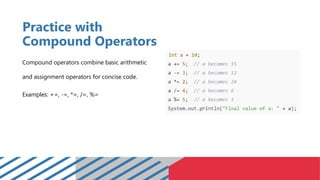
Practice with
Compound Operators
Compound operators combine basic arithmetic
and assignment operators for concise code.
Examples: +=, -=, *=, /=, %=
Exercises (Operators)
1. 7 + 5 × 2 = ?
2. 10 ≤ 15 = ?
3. (3>2) && (4<5) = ?
4. (15>10) && (20<25) && (3==3) =?
5. 8 != 8 = ?
6. (5<3) || (2>1) = ?
7. (5>8) || (10<=10) = ?
8. 15 == 15 = ?
9. (7≥5) && (2==3) = ?
10. (true && false) || (false && true) = ?
If-Else and Switch
If-Else Structure
if-else statement is used to run a block of code under a certain condition and
another block of code under another condition
If-Else Structure (Example Code)
Switch Case
Handle multiple conditions based on a single variable.
Switch Case (Example Code)
Read and Analyze
1. Number Classification
Read and Analyze
2. Temperature Check
Read and Analyze
3. Age and Eligibility Check
Read and Analyze
4. Number Range Puzzle
Read and Analyze
5. Character Evaluation
Exercises (Control Statements)
Exercise 1: Voting Eligibility Check.
• Description: Use if-else to determine if a person
can vote (age 18 and above).
Exercise 2: Simple Grading System.
• Description: Use if-else to assign a grade based
on a score (90-100: A, 80-89: B, etc.).
Exercise 3: Temperature Check.
• Description: Use if-else to categorize
temperature (e.g., <0: Freezing, 1-10: Cold, etc.).
Exercise 4: Simple Calculator Using Switch.
• Description: Use switch to perform simple
calculator operations (add, subtract, multiply,
divide).
Arrays & Loops
Introduction to Loops
A loop is a programming structure that repeats a block of code as long as a
specified condition is met.
Why Use Loops?
• Loops allow us to automate repetitive tasks, making code efficient and
reducing redundancy.
• Useful in situations where actions need to be repeated a specific number of
times or until a condition is satisfied.
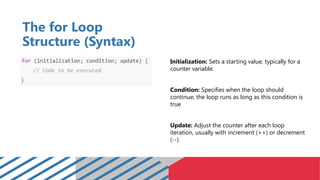
The for Loop
Structure (Syntax)
Initialization: Sets a starting value, typically for a
counter variable.
Condition: Specifies when the loop should
continue; the loop runs as long as this condition is
true
Update: Adjust the counter after each loop
iteration, usually with increment (++) or decrement
(--).
The for Loop Structure
(Flow of Execution)
Initialize: Set the loop variable to its starting value.
Check Condition: If true, the loop body executes;
if false, the loop exits.
Execute: Run the code inside the loop.
Update: Modify the loop variable according to the
update expression, then repeat.
Common Uses of the for Loop (Examples)
1. Iterate Through an Array
Example: Print all elements of an array.
Common Uses of the for Loop (Examples)
2. Sum of Natural Numbers (1 to N)
Example: Calculate the sum of numbers from 1 to 10.
Introduction to Arrays
An array is a collection of variables that are stored in contiguous memory
locations and can be accessed by an index.
Characteristics:
• Arrays store multiple values of the same data type.
• Fixed size, meaning the size is defined at the time of declaration.
• Array index starts at 0.
Introduction to Arrays
Syntax:
Accessing Elements:
Working with Arrays (Examples)
Example 1: Sum of Array Elements
Calculate the sum of all elements in an array.
Working with Arrays (Examples)
Example 2: Finding the Maximum Element
Find the largest value in an array of numbers.
Exercises (Arrays)
Exercise 1: Find the Average of Elements
• Write code to calculate the average of an array's
elements.
Exercise 2: Count Occurrences of a Number.
• Count how many times a specific number
appears in an array.
Exercise 3: Print Array in Reverse Order
• Print the array starting from the last element.
Exercise 4: Merge Two Arrays
• Combine two arrays into one larger array
Exercise 5: Find Difference Between Max and Min
Values
• Calculate the difference between the largest and
smallest values in the array.
Exercise 6: Sort an Array
• Sort the array in ascending or descending order
(without using built-in functions if possible).
Multi-Dimensional Arrays
Multi-dimensional arrays are arrays of arrays, allowing for structures like tables or matrices.
Multi-Dimensional Arrays (Examples)
Example 1: Sum of Elements in a 2D Array Example 2: Transpose of a Matrix
Exercises (Multi-Dimensional Arrays)
Exercise 1: Transpose of a Matrix
• Create a program that transposes a 2D array
(i.e., swaps rows with columns).
Exercise 2: Row and Column Sum
• Write a program to find the sum of each row
and each column in a 2D array.
Exercise 3: Find Maximum and Minimum Elements
• Write a program to find the maximum and
minimum values in a 2D array.
Exercise 4: Diagonal Sum
• Write a program to calculate the sum of the
main diagonal elements of a square matrix.
Exercise 5: Count Odd and Even Numbers
• Write a program to count the number of odd
and even numbers in a 2D array.
Exercise 6: Replace Negative Numbers
• Replace all negative numbers in a 2D array with
0.
Exercises (Multi-Dimensional Arrays)
Exercise 7: Count Elements Greater Than a Given
Value
• Write a program that counts how many
elements in a 2D array are greater than a given
value.
Exercise 8: Check Symmetry
• Write a program to check if a 2D array is
symmetric, i.e., (array[i][j] == array[j][i])
Exercise 9: Count Positive and Negative Elements
• Write a program to count the number of
positive and negative elements in a 2D array.
Exercise 10: Increment Elements
• Write a program to increment each element in a
2D array by 1.
Thank You
For Listening

Java-Programming.forBSITSTUDENTfreespptx

  • 1.
    Java Programming A Step-by-StepGuide to Becoming Proficient in Java
  • 2.
    Overview Agenda • Problem-Solving &Logic Building • Operators in Java • Control Statements: If-Else & Switch • Loops in Java • Arrays in Java
  • 3.
  • 4.
    Breaking Down Problems Problem-SolvingApproach 1. Understand: Carefully read and analyze the problem statement to clarify what is required. 2. Plan: Outline the logical steps needed to reach the solution. 3. Write: Implement the code based on the planned logic. 4. Test: Verify the solution with different inputs to ensure correctness.
  • 5.
  • 6.
    Example 1 Problem: Writea program that determines if a number is even or odd. Understand: Even numbers are divisible by 2; odd numbers are not. Plan: Use if-else statement and the modulus operator. Write: Implement the code Test: Testing with various cases, e.g., testing both even and odd numbers.
  • 7.
    Example 2 Problem: Writea program to find the area of a rectangle given its length and width. Understand: Formula for the area of a rectangle is length * width. Plan: Get inputs for length and width, multiply them, and print the result. Write: Implement the code Test: Test with different values
  • 8.
    Exercises (Problem-Solving) Exercise 1:Find the square of a number. • Input: A single integer. • Output: Its square. Exercise 2: Calculate the sum of two numbers. • Input: Two integers. • Output: Their sum. Exercise 3: Convert minutes to hours. • Input: Number of minutes. • Output: Hours and remaining minutes (e.g., 150 minutes is 2 hours, 30 minutes). Exercise 4: Determine if a number is positive or negative. • Input: A single integer. • Output: Display whether it is positive or negative. Exercise 5: Check if a character is uppercase or lowercase. • Input: A single character. • Output: Display "Uppercase" or "Lowercase".
  • 9.
  • 10.
    Introduction to Operators Typesof Operators 1. Arithmetic Operators: Used for basic mathematical operations. • Examples: +, -, *, /, % 2. Relational Operators: Compare two values and return a boolean result (true or false). • Examples: ==, !=, <, >, <=, >= 3. Logical Operators: Combine multiple conditions or expressions. • Examples: && (AND), || (OR), ! (NOT) 4. Assignment Operators: Used to assign values to variables. • Examples: =, +=, -=, *=, /=
  • 11.
  • 12.
    Practice with Compound Operators Compoundoperators combine basic arithmetic and assignment operators for concise code. Examples: +=, -=, *=, /=, %=
  • 13.
    Exercises (Operators) 1. 7+ 5 × 2 = ? 2. 10 ≤ 15 = ? 3. (3>2) && (4<5) = ? 4. (15>10) && (20<25) && (3==3) =? 5. 8 != 8 = ? 6. (5<3) || (2>1) = ? 7. (5>8) || (10<=10) = ? 8. 15 == 15 = ? 9. (7≥5) && (2==3) = ? 10. (true && false) || (false && true) = ?
  • 14.
  • 15.
    If-Else Structure if-else statementis used to run a block of code under a certain condition and another block of code under another condition
  • 16.
  • 17.
    Switch Case Handle multipleconditions based on a single variable.
  • 18.
  • 19.
    Read and Analyze 1.Number Classification
  • 20.
    Read and Analyze 2.Temperature Check
  • 21.
    Read and Analyze 3.Age and Eligibility Check
  • 22.
    Read and Analyze 4.Number Range Puzzle
  • 23.
    Read and Analyze 5.Character Evaluation
  • 24.
    Exercises (Control Statements) Exercise1: Voting Eligibility Check. • Description: Use if-else to determine if a person can vote (age 18 and above). Exercise 2: Simple Grading System. • Description: Use if-else to assign a grade based on a score (90-100: A, 80-89: B, etc.). Exercise 3: Temperature Check. • Description: Use if-else to categorize temperature (e.g., <0: Freezing, 1-10: Cold, etc.). Exercise 4: Simple Calculator Using Switch. • Description: Use switch to perform simple calculator operations (add, subtract, multiply, divide).
  • 25.
  • 26.
    Introduction to Loops Aloop is a programming structure that repeats a block of code as long as a specified condition is met. Why Use Loops? • Loops allow us to automate repetitive tasks, making code efficient and reducing redundancy. • Useful in situations where actions need to be repeated a specific number of times or until a condition is satisfied.
  • 27.
    The for Loop Structure(Syntax) Initialization: Sets a starting value, typically for a counter variable. Condition: Specifies when the loop should continue; the loop runs as long as this condition is true Update: Adjust the counter after each loop iteration, usually with increment (++) or decrement (--).
  • 28.
    The for LoopStructure (Flow of Execution) Initialize: Set the loop variable to its starting value. Check Condition: If true, the loop body executes; if false, the loop exits. Execute: Run the code inside the loop. Update: Modify the loop variable according to the update expression, then repeat.
  • 29.
    Common Uses ofthe for Loop (Examples) 1. Iterate Through an Array Example: Print all elements of an array.
  • 30.
    Common Uses ofthe for Loop (Examples) 2. Sum of Natural Numbers (1 to N) Example: Calculate the sum of numbers from 1 to 10.
  • 31.
    Introduction to Arrays Anarray is a collection of variables that are stored in contiguous memory locations and can be accessed by an index. Characteristics: • Arrays store multiple values of the same data type. • Fixed size, meaning the size is defined at the time of declaration. • Array index starts at 0.
  • 32.
  • 33.
    Working with Arrays(Examples) Example 1: Sum of Array Elements Calculate the sum of all elements in an array.
  • 34.
    Working with Arrays(Examples) Example 2: Finding the Maximum Element Find the largest value in an array of numbers.
  • 35.
    Exercises (Arrays) Exercise 1:Find the Average of Elements • Write code to calculate the average of an array's elements. Exercise 2: Count Occurrences of a Number. • Count how many times a specific number appears in an array. Exercise 3: Print Array in Reverse Order • Print the array starting from the last element. Exercise 4: Merge Two Arrays • Combine two arrays into one larger array Exercise 5: Find Difference Between Max and Min Values • Calculate the difference between the largest and smallest values in the array. Exercise 6: Sort an Array • Sort the array in ascending or descending order (without using built-in functions if possible).
  • 36.
    Multi-Dimensional Arrays Multi-dimensional arraysare arrays of arrays, allowing for structures like tables or matrices.
  • 37.
    Multi-Dimensional Arrays (Examples) Example1: Sum of Elements in a 2D Array Example 2: Transpose of a Matrix
  • 38.
    Exercises (Multi-Dimensional Arrays) Exercise1: Transpose of a Matrix • Create a program that transposes a 2D array (i.e., swaps rows with columns). Exercise 2: Row and Column Sum • Write a program to find the sum of each row and each column in a 2D array. Exercise 3: Find Maximum and Minimum Elements • Write a program to find the maximum and minimum values in a 2D array. Exercise 4: Diagonal Sum • Write a program to calculate the sum of the main diagonal elements of a square matrix. Exercise 5: Count Odd and Even Numbers • Write a program to count the number of odd and even numbers in a 2D array. Exercise 6: Replace Negative Numbers • Replace all negative numbers in a 2D array with 0.
  • 39.
    Exercises (Multi-Dimensional Arrays) Exercise7: Count Elements Greater Than a Given Value • Write a program that counts how many elements in a 2D array are greater than a given value. Exercise 8: Check Symmetry • Write a program to check if a 2D array is symmetric, i.e., (array[i][j] == array[j][i]) Exercise 9: Count Positive and Negative Elements • Write a program to count the number of positive and negative elements in a 2D array. Exercise 10: Increment Elements • Write a program to increment each element in a 2D array by 1.
  • 40.