http://publicationslist.org/junio
The Java Platform
Prof. Dr. Jose Fernando Rodrigues Junior
Universidade de São Paulo
ICMC-USP
http://publicationslist.org/junio
Overview
• Introduction
• Running Java
• Evolution and Documentation
• JDK and Compilation
• Java vs C++
• Coding
• Conclusions
http://publicationslist.org/junio
INTRODUCTION
http://publicationslist.org/junio
Java Features
• Modern project, eliminates known programming
pitfalls (like pointers and array overflow)
• Objected Oriented
• Powerful set of ready-to-go functionalities
• Rich documentation with Javadocs
http://publicationslist.org/junio
Java Features
• Security: no memory overflow, sandbox (outworld
limited view), bytecode validation
• Performance: 50% to 100% C performance
• Wide scope of use: plenty of free code
http://publicationslist.org/junio
Some facts
• Released in 1995 - Sun Microsystems
• Java stands for nothing at all, it is only the brand of the
coffee its earlier programmers used to drink
• Style derived from C and C++, 99% OOP
• Code emulation: an old idea, inviable for long
• Initial Java appeal: applets over the Internet – it wasn’t
good for applications, bad performance and clumsy graphics
• Java main niches today: enterprise applications (multi-
platform), middleware, database interfaces, cell phones and
pda’s
http://publicationslist.org/junio
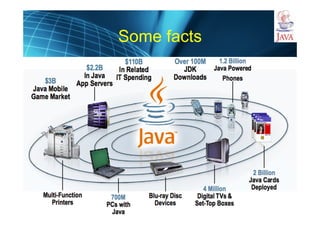
Some facts
http://publicationslist.org/junio
Java platform structure:
4 components
1) Java runtime – Java Virtual Machine (JVM)
2) Java language – 99.9% object oriented
3) Java compiler – javac – and tools
4) Java library – a lot of stuff ready-to-use
The term Java, can be rather confusing as
“Java” might refer to any of these components
http://publicationslist.org/junio
RUNNING JAVA
http://publicationslist.org/junio
Running Java
• Java is emulated in a virtual computer, the Java
Virtual Machine (JVM)
• The assembly language of JVM is the bytecode
• To run Java, one must have this computer
– Physically: picoJava processor
– Virtually: the Java Virtual Machine software
• Where to get this?
– Install the Java Runtime Environment (JRE)
(also available as part of JDK)
http://publicationslist.org/junio
Java Runtime Environment
• What´s in JRE?
– JVM
– Java lib: some basic things are expected to be
there, check rt.jar (util, math, lang, awt, swing,
etc)
– Runtime libraries: binaries, platform-specific
http://publicationslist.org/junio
Java Execution
• Java/Javaw: standard JVM evocation
• HotSpot: standard JVM, since Java 1.3, a lot faster
• Apache Harmony
• IBM J9
• Oracle JRockit
• Mac OS Runtime for Java
http://publicationslist.org/junio
Java Execution
• All these JVM run bytecodes
• But bytecodes do not come only from Java:
– JRuby: Rubby bytecode compiler
– Jython : Python
– JGNAT: Ada
– JavaFX/Rhino: Java Script
– Quercus: PHP
– Clojure: Lisp
– C2J: C
http://publicationslist.org/junio
EVOLUTION AND
DOCUMENTATION
http://publicationslist.org/junio
Java Evolution
• 1995: Version 1.0, 8 packages with 212
classes
• 1997: Version 1.1: 23 packages - 504
classes, improved JVM, Swing is started
• 1999: Version 1.2 - Java 2 Platform - 59
packages - 1520 classes, SDK, JFC (AWT,
Swing and Java 2D)
http://publicationslist.org/junio
Java Evolution
• 2000: Version 1.3: 76 packages - 1842
classes, Hotspot JVM
• 2002: Version 1.4: 135 packages - 2991
classes, better I/O and XML
• 2004: Version 5 (previously numbered 1.5) -
165 packages, over 3000 classes, generics,
faster startup, less memory
http://publicationslist.org/junio
Java Evolution
• 2006: Version 6, more on web, databases,
desktop-oriented API and security
• 2011: Java 7, structural redesign features;
more modularization, multi-language
enhancements, developer productivity and
performance
• 2014: Java 8, functional programing,
JavaScript runtime, among others
http://publicationslist.org/junio
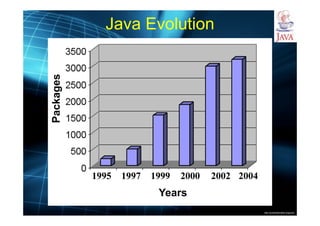
Java Evolution
Years
Packages
http://publicationslist.org/junio
Java Distributions
• Java Standard Edition (J2SE): client-side
standalone applications or applets
• Java Enterprise Edition (J2EE): server-side
applications such as Java servlets and Java
ServerPages
• Java Micro Edition (J2ME): applications for
mobile devices such as cell phones
http://publicationslist.org/junio
Main packages (libraries)
• java.lang: metadata handlers (object, class, packages),
number classes, system,…
• java.math
• java.net
• java.io
• java.util
• java.sql
• java.applet
• java.awt (inluding Java 2d), java swing
• java.security
• java.util: zip, jar, maps, sets, lists, vectors,…
http://publicationslist.org/junio
Documentation
Demonstration
http://publicationslist.org/junio
JDK AND COMPILATION
http://publicationslist.org/junio
Java platform structure:
4 components
The 4 components (runtime, compiler, language and
libraries) of the Java platform come in the software
bundle known as Java Development Kit
Besides, the kit comes with:
• javadoc: a framework for documentation
• jar: a framework for archiving
• jdb: a debugger
• appletviewer: a platform for browser-designed
applications
And many, many other tools.
http://publicationslist.org/junio
Java compilation
• Javac: standard compiler
• Jikes (sourceforge): open source compiler, a lot faster
• GNU Compiler for Java (GCJ): part of gcc project,
generates bytecodes or native code
• Eclipse Compiler for Java (ECJ): open source from
Eclipse project
• Excelsior JET: commercial Java compilation (bytecode
and binary), optimization and distribution
http://publicationslist.org/junio
Compilation vs Interpretation vs
Emulation
• Compilation: the code is read and converted to the
machine’s instruction set  static binary executable
file  later execution
• Interpretation: during execution, the code is read
and, on the fly, actions are taken so as to have the
expected behavior  script language (but not only)
• Emulation: the code is compiled to the instruction
set of a machine different from the machine it is to
be executed on  need of a machine emulator
http://publicationslist.org/junio
Java Execution Framework
• Java is compiled into bytecodes, the
instruction set of the Java Virtual Machine
(JVM)
• Platform independence, over JVM emulation
• Just-in-time compilation, for performance
• Garbage collector: automated memory
management in JVM
http://publicationslist.org/junio
Bytecodes
• Bytecodes are quite simple and structured
• Different from binaries, it is not difficult to get a
bytecode file and reverse engineer it to the original
code
• This fact has lead to the advent of obfuscation
• Obfuscation: obfuscator software shuffles bytecodes
so that reverse engineering becomes a lot more
difficult and, eventually, useless
http://publicationslist.org/junio
Not only from Sun
• Provided by Sun (GNU Public License) and others:
– GNU Classpath
– OpenJDK (da própria Sun)
– OpenJDK-IcedTea (Red Hat)
– Kaffe (http://www.kaffe.org/)
– Kada, portable devices (http://www.kadasystems.com/)
– LaTTe
– Dinkum Jcore Library
– Microsoft SDK
– SableVM
– IBM's J9 JDK
– Oracle Corporation's JRockit
– Blackdown Java (Linux JDK)
– Apache Harmony
http://publicationslist.org/junio
Why Java from other vendors?
• Open source software with an agreement
license different from Sun´s
• Use other languages to have the benefits
of Java
• Better performance
http://publicationslist.org/junio
Also Java
• Servlets: Java used the same way as CGI
• JSP: JavaServer Pages, Java used the
same way as PHP and ASP
• Java FX: a higher level script language
that runs on the JVM - Java FX competes
with Adobe Flash (Action Script)
http://publicationslist.org/junio
Mobile Java
• There is no, de facto, hardware platform for mobile
devices
• Hence, a multi-platform solution is a good choice
• One of the greatest Java niches is mobile
• Java Platform, Micro Edition (ME): the Java
platform for embedded systems, mobile devices
and set-top boxes
http://publicationslist.org/junio
Mobile Java
• There is no, de facto, hardware platform for mobile
devices
• Hence, a multi-platform solution is a good choice
• One of the greatest Java niches is mobile
• Java Platform, Micro Edition (ME): the Java
platform for embedded systems, mobile devices
and set-top boxes
There is an even smaller subset of the Java
Platform, called Java Card
It provides Java in an enviroment with no more
than the 16 KB found in smart cards
http://publicationslist.org/junio
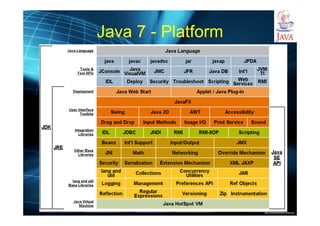
Java 7 - Platform
http://publicationslist.org/junio
JAVA VS C++
http://publicationslist.org/junio
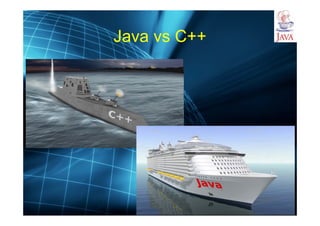
Java vs C++
http://publicationslist.org/junio
Java vs C++
• Java Has No Pointers:
– referencing and dereferencing: it is handled for you
automatically
– no manipulation of pointers or memory addresses of
any kind:
• no pointer arithmetic
• no computation of the size, in bytes, of any primitive type or object
• Why?
– pointers are a source of bugs: no pointers simplifies the
language and eliminates many potential bugs
– pointers and pointer arithmetic: they could be used to
sidestep Java's run-time checks and security mechanisms -
no pointers allows Java to provide the security guarantees
that it does
http://publicationslist.org/junio
Java vs C++
• Java Has No Global Variables: in case it is very needed, one has
to use static modifiers inside classes, attributes must be inside a
class
• Java Does Not Support Multiple Inheritance: multiple
inheritance is not necessary, and it can be better accomplished
with interfaces
• Java Does Not Allow Operator Overloading: it might permit
extensions to the syntax of the language, which is not good
• No pre-compilation: that is, no .h, no #ifdefs, no defines and no
macros
http://publicationslist.org/junio
Other features
• Java has both kinds of comments like C++ does
• Everything must be in a class: no structs, enumerations nor
unions, only classes
• No headers: all method definitions are defined in the body of
the classes
• Static quoted strings: they are automatically converted into
String objects
• Objects of non-primitive types can be created only via new:
there’s no equivalent to creating non-primitive objects “on the
stack” as in C++
http://publicationslist.org/junio
Other features
• All array accesses are checked for bounds violations
• Automatic garbage collection prevents memory leaks
• Clean, relatively fool-proof exception handling
• Simple language support for multi-threading
• Bytecode verification of network applets
http://publicationslist.org/junio
CODING
http://publicationslist.org/junio
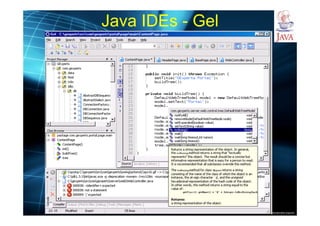
Java IDEs - Gel
http://publicationslist.org/junio
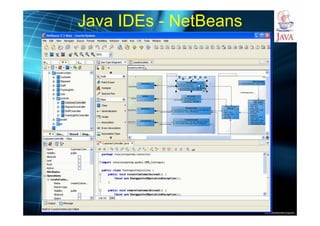
Java IDEs - NetBeans
http://publicationslist.org/junio
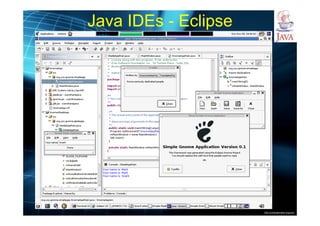
Java IDEs - Eclipse
http://publicationslist.org/junio
A Simple Java Program
import java.net.*;
/*First Java program*/
class SystemHello{
public static void main(String args[]){
try{
System.out.println(
"Hi, my name is " + InetAddress.getLocalHost().getHostName()
+
" , my IP is " + InetAddress.getLocalHost().getHostAddress());
}catch(Exception e){
System.out.println("Exception caught ="+e.getMessage());
}
} //end main method
} //end class
http://publicationslist.org/junio
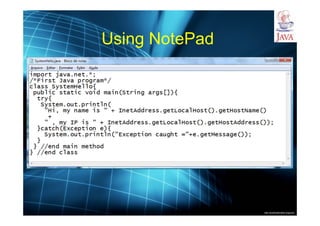
Using NotePad
http://publicationslist.org/junio
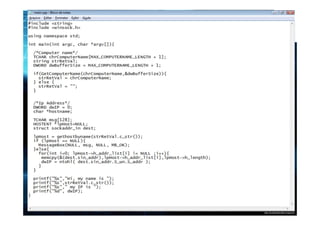
Similar C/C++
http://publicationslist.org/junio
Similar C/C++
http://publicationslist.org/junio
Creating, Compiling, and Running Programs
Source Code
Compile Source Code
i.e., javacSystemHello.java
Bytecode
Run Byteode
i.e., java SystemHello
Result
If compilation errors
If runtime er rorso r incorrect result
impor t java.net.*;
/*F ir st Javapr ogram*/
class SystemHell o{
public static voi d mai n(Str ing ar gs[ ]){
tr y{
System.out.pri ntln(
"Hi , my nam ei s"+ InetAddress.get Local Host( ).getHo stName()
+
", m y IP is "+ InetAddress.getLocalHost() .get HostAddress() );
}cat ch( Exception e){
System.out.pri ntln("Exception caught = "+ e.get Message()) ;
}
} //end main method
} //end class
…
Method SystemHello()
0 aload_0
…
Method void main(java.lang.String[])
0 getstatic #2 …
3 ldc #3 <S tring "Wel come to
Java!">
5 invokevirt ual #4 …
Saved on the disk
stored on the disk
Source code (d eveloped by the programmer)
Byte code (generated by the compiler for JVM
to read an d interpret, not fo r you to understand)
Create/Modi fy Source Code
http://publicationslist.org/junio
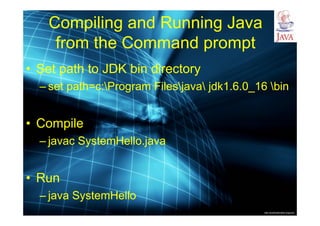
Compiling and Running Java
from the Command prompt
• Set path to JDK bin directory
– set path=c:Program Filesjava jdk1.6.0_16 bin
• Compile
– javac SystemHello.java
• Run
– java SystemHello
http://publicationslist.org/junio
Compiling and Running Java
from NetBeans
• Install NetBeans
• Type code
• Run
http://publicationslist.org/junio
Anatomy of a Java Program
• Comments
• Package
• Reserved words
• Modifiers
• Statements
• Blocks
• Classes
• Methods
• The main method
http://publicationslist.org/junio
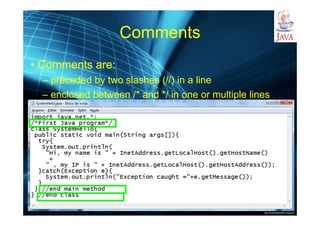
Comments
• Comments are:
– preceded by two slashes (//) in a line
– enclosed between /* and */ in one or multiple lines
http://publicationslist.org/junio
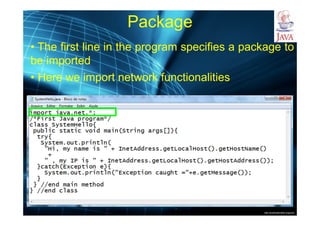
Package
• The first line in the program specifies a package to
be imported
• Here we import network functionalities
http://publicationslist.org/junio
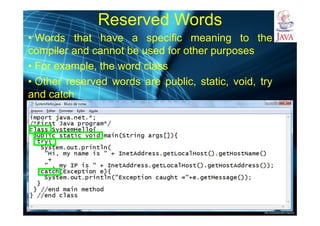
Reserved Words
• Words that have a specific meaning to the
compiler and cannot be used for other purposes
• For example, the word class
• Other reserved words are public, static, void, try
and catch
http://publicationslist.org/junio
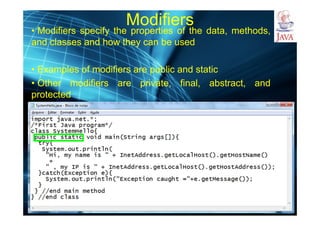
Modifiers
• Modifiers specify the properties of the data, methods,
and classes and how they can be used
• Examples of modifiers are public and static
• Other modifiers are private, final, abstract, and
protected
http://publicationslist.org/junio
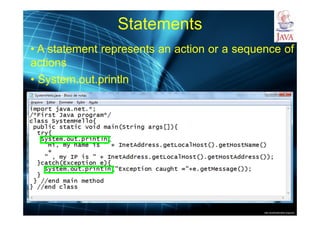
Statements
• A statement represents an action or a sequence of
actions
• System.out.println
http://publicationslist.org/junio
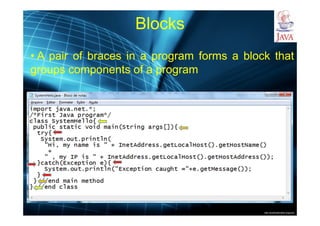
Blocks
• A pair of braces in a program forms a block that
groups components of a program
http://publicationslist.org/junio
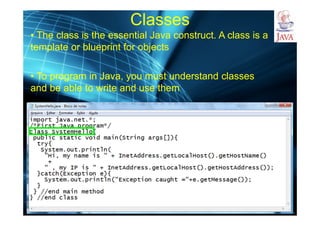
Classes
• The class is the essential Java construct. A class is a
template or blueprint for objects
• To program in Java, you must understand classes
and be able to write and use them
http://publicationslist.org/junio
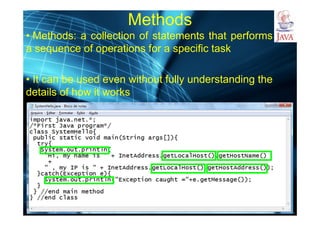
Methods
• Methods: a collection of statements that performs
a sequence of operations for a specific task
• It can be used even without fully understanding the
details of how it works
http://publicationslist.org/junio
The main Method
• Provides the control of program flow
• JVM executes the application by invoking the main
method
public static void main(String args[])
{
// Statements;
}
• Any/every class can have a public static main
method - so, every class is potentially executable 
good for tests
http://publicationslist.org/junio
The main Method
• Provides the control of program flow
• JVM executes the application by invoking the main
method
public static void main(String[] args)
{
// Statements;
}
http://publicationslist.org/junio
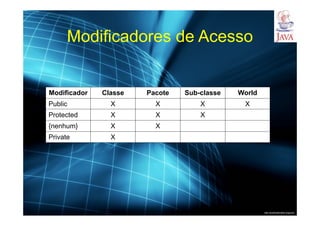
Modificadores de Acesso
Modificador Classe Pacote Sub-classe World
Public X X X X
Protected X X X
{nenhum} X X
Private X
http://publicationslist.org/junio
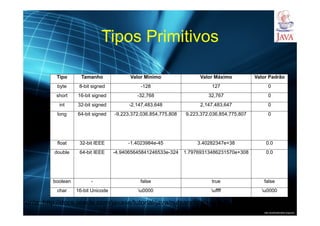
Tipos Primitivos
Tipo Tamanho Valor Mínimo Valor Máximo Valor Padrão
byte 8-bit signed -128 127 0
short 16-bit signed -32,768 32,767 0
int 32-bit signed -2,147,483,648 2,147,483,647 0
long 64-bit signed -9,223,372,036,854,775,808 9,223,372,036,854,775,807 0
float 32-bit IEEE -1.4023984e-45 3.40282347e+38 0.0
double 64-bit IEEE -4.94065645841246533e-324 1.79769313486231570e+308 0.0
boolean - false true false
char 16-bit Unicode u0000 uffff u0000
Fonte: http://docs.oracle.com/javase/tutorial/java/nutsandbolts/datatypes.html
http://publicationslist.org/junio
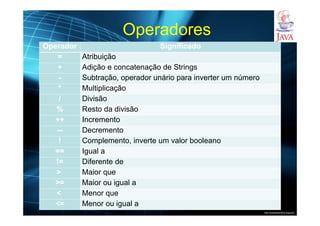
Operadores
Operador Significado
= Atribuição
+ Adição e concatenação de Strings
- Subtração, operador unário para inverter um número
* Multiplicação
/ Divisão
% Resto da divisão
++ Incremento
-- Decremento
! Complemento, inverte um valor booleano
== Igual a
!= Diferente de
> Maior que
>= Maior ou igual a
< Menor que
<= Menor ou igual a
http://publicationslist.org/junio
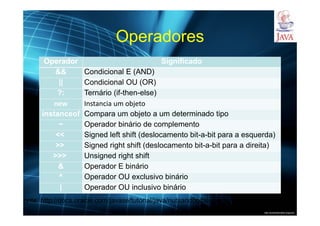
Operadores
Operador Significado
&& Condicional E (AND)
|| Condicional OU (OR)
?: Ternário (if-then-else)
new Instancia um objeto
instanceof Compara um objeto a um determinado tipo
~ Operador binário de complemento
<< Signed left shift (deslocamento bit-a-bit para a esquerda)
>> Signed right shift (deslocamento bit-a-bit para a direita)
>>> Unsigned right shift
& Operador E binário
^ Operador OU exclusivo binário
| Operador OU inclusivo binário
Fonte: http://docs.oracle.com/javase/tutorial/java/nutsandbolts/operators.html
http://publicationslist.org/junio
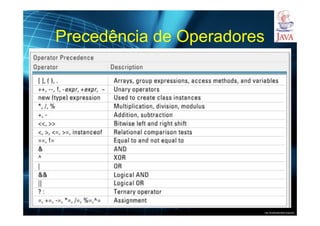
Precedência de Operadores
Fonte: http://tecnoesis.wordpress.com/2009/11/07/declaring-initializing-and-using-variables/
http://publicationslist.org/junio
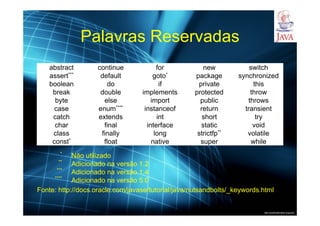
Palavras Reservadas
abstract continue for new switch
assert*** default goto* package synchronized
boolean do if private this
break double implements protected throw
byte else import public throws
case enum**** instanceof return transient
catch extends int short try
char final interface static void
class finally long strictfp** volatile
const* float native super while
*
Não utilizado
**
Adicionado na versão 1.2
***
Adicionado na versão 1.4
****
Adicionado na versão 5.0
Fonte: http://docs.oracle.com/javase/tutorial/java/nutsandbolts/_keywords.html
http://publicationslist.org/junio
Conclusion
• Java gathers two of the most important
and useful things in computing:
– organization
– simplicity

Java platform