Java Performance Tuning
The Ultimate Guide to
Ender Aydin Orak
koders.co
koders.co
INTRODUCTION
1
WHAT YOU WILL LEARN ?
You WILL LEARN:
Application performance principles &
methods
You WILL LEARN:
JVM structure and internals regarding
application performance
You WILL LEARN:
Garbage Collection types and when to
use which
You WILL LEARN:
Monitoring, Profiling, Tuning,
Troubleshooting JVM applications
You WILL LEARN:
Using OS and JVM tools for better
application performance
You WILL LEARN:
Applying performance best practices
You WILL LEARN:
Java language level tips & tricks
YOU WILL PRACTICE ON:
•Dead locks
•Memory leaks
•Lock contention
•CPU utilization
•Collections
•Locks
•Multithreading
•Best practices
Performance Approaches
•Top-Down: Focus on top level application
• Application Developers (our approach)
Performance Approaches
•Bottom-Up: Focus on the lowest level: CPU.
• Performance Specialists
Performance Tuning Steps
Monitoring
Performance Tuning Steps
Profiling
Performance Tuning Steps
Tuning
koders.co
JVM Overview &
INTERNALS
2
Objectives
• JVM Runtime & Architecture
• Command Line Options
• VM Life Cycle
• Class Loading
JAVA PROGRAMMING LANGUAGE
• Object oriented, Garbage collected*
• Class based
• .java files (source) compiled into .class files (bytecode)
• JVM executes platform independent bytecodes
–DAVID WHEELER
“All problems in computer science can be
solved by another level of indirection”
JVM Overvıew
• JVM: Java Virtual Machine
• A specification (JCP, JSR)
• Can have multiple implementations
• OpenJDK, Hotspot*, JRockit (Oracle), IBM J9, much
more
• Platform independent: “Write once, run everywhere”
–JOEL SPOLSKY
“All non-trivial abstractions, to some
degree, are leaky.”
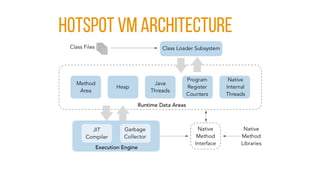
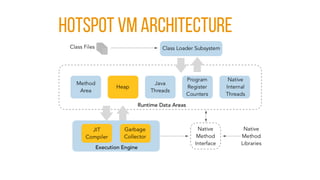
HOTSPOT VM ARCHITECTURE
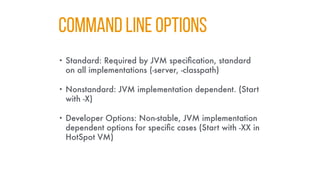
COMMAND LINE OPTIONS
• Standard: Required by JVM specification, standard
on all implementations (-server, -classpath)
• Nonstandard: JVM implementation dependent. (Start
with -X)
• Developer Options: Non-stable, JVM implementation
dependent options for specific cases (Start with -XX in
HotSpot VM)
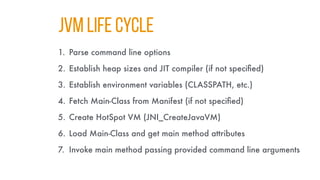
JVM LIFE CYCLE
1. Parse command line options
2. Establish heap sizes and JIT compiler (if not specified)
3. Establish environment variables (CLASSPATH, etc.)
4. Fetch Main-Class from Manifest (if not specified)
5. Create HotSpot VM (JNI_CreateJavaVM)
6. Load Main-Class and get main method attributes
7. Invoke main method passing provided command line arguments
koders.co
PERFORMANCE
Overview
3
Objectives
• Key concepts regarding application performance
• Common performance problems and principles
• Methodology to follow in solving problems
QUESTIONS & Expectations
• Expected throughput ?
• Acceptable latency per request ?
• How many concurrent users/tasks ?
• Expected throughput and latency ?
• Acceptable garbage collection latency ?
Terminology
• CPU Utilization: Percentage of the CPU usage
(user+kernel)
• User CPU Utilization: the percent of time the application
spends in application code
TERMINOLOGY
• Memory Utilization: Memory usage percentage
(ram/swap)
• Swapping should be avoided all times.
TERMINOLOGY
• Lock Contention: The case where a thread or process
tries to acquire a lock held by another process or
thread.
• Prevents concurrency and utilization. Should be avoided as
much as possible.
TERMINOLOGY
• Network & Disk I/O Utilization: The amount of data
sent and received via network and disk.
• Should be traced and used carefully.
Performance
• Aspects of performance:
• Responsiveness
• Throughput
• Memory Footprint
• Startup Time
• Scalability
RESPONSIVENESS
• Ability of a system to complete assigned tasks within
a given time
• Critical on most of modern software applications
(Web, Desktop, CRUD apps, Web services)
• Long pause times are not acceptable
• The focus is on responding in short periods of time
THROUGHPUT
• The amount of work done in a specific period of time.
• Critical for some specific application types
(e.g. Data analysis, Batch operations, Report generation)
• High pause times are acceptable
• Focus is on how much work are getting done over a longer
period of time
Memory Footprint
• The amount of main memory used by the application
• How much memory ?
• How the usage changes ?
• Does application uses any swap space ?
• Dedicated or shared system ?
STARTUP TIME
• The time taken for an application to start
• Important for both the server and client applications
• “Time ‘till performance”
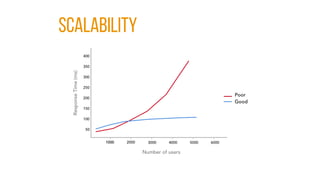
SCALABILITY
• How well an application performs as the load on it
increases
• Huge topic that shapes the modern software architectures
• Should be linear, not exponential
• Can be measured on different layers in a complex system
Scalability
Focus areas
• Java application performance
• Tuning JVM for throughput or responsiveness
• Discovery, troubleshooting and tuning JVM
Performance Methodology
• Our steps to follow
1.Monitoring
2.Profiling
3.Tuning
Performance Monitoring
• Non-intrusively collecting and observing performance
data
• Early detection of possible problems
• Essential for production environments
• Early stage for troubleshooting problems
• OS and JVM tools
PERFORMANCE PROFILING
• Collecting and observing performance data using
special tools
• More intrusive & has affect on performance
• Narrower focus to find problems
• Not suitable for production environments
PERFORMANCE TUNING
• Changing configuration, parameters or even source
code for optimizing performance
• Follows monitoring and profiling
• Targets responsiveness or throughput
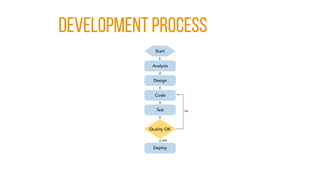
Development PROCESS
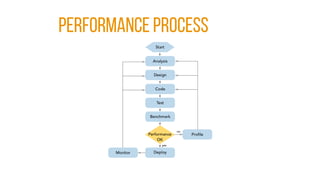
PERFORMANCE PROCESS
koders.co
JVM AND GARBAGE
COLLECTION
4
Objectives
• What garbage collection is and what it does
• Types of garbage collectors
• Differences and basic use cases of different garbage
collectors
• Garbage collection process
Garbage collectıon
• In computer science, garbage collection (GC) is a
form of automatic memory management.
• The garbage collector, attempts to reclaim memory
occupied by objects that are no longer in use by the
program.
Garbage Collectıon
• Main tasks of GC
• Allocating memory for new objects
• Keeping live (referenced) objects in memory
• Removing dead (unreferenced) objects and reclaiming
memory used by them
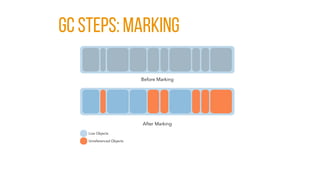
GC Steps: MARKING
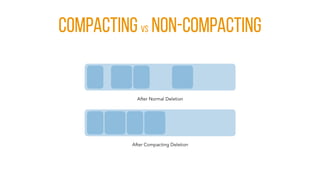
GC Steps: DELETION [normal]
GC Steps: DELETION [COMPACTING]
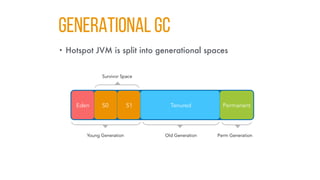
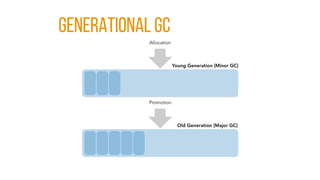
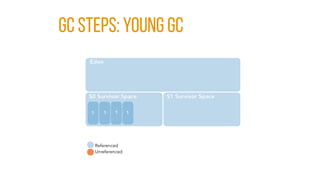
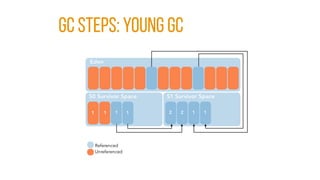
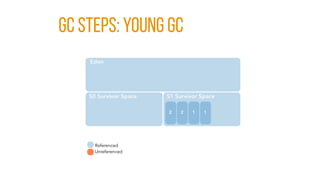
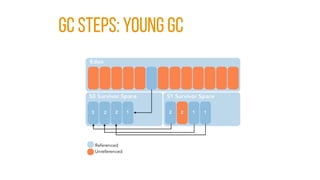
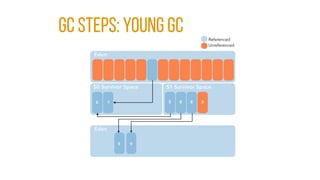
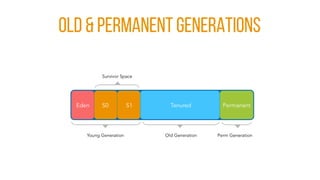
GENERATIONAL GC
• Hotspot JVM is split into generational spaces
WHY GENERATIONAL GC ?
• Object life patterns in OO languages:
• Most objects “die young”
• Older objects rarely references to young ones
GENERATIONAL GC
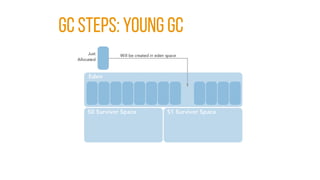
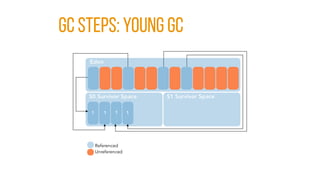
GC STEPS: YOUNG GC
GC STEPS: YOUNG GC
GC STEPS: YOUNG GC
GC STEPS: YOUNG GC
GC STEPS: YOUNG GC
GC STEPS: YOUNG GC
GC STEPS: YOUNG GC
OLD & PERMANENT GENERATIONS
koders.co
GARBAGE
COLLECTORS
5
Objectives
• Garbage collection performance metrics
• Garbage collection algorithms
• Types of garbage collectors
• JVM ergonomics
GC PERFORMANCE METRICS
• There are mainly 3 ways to measure GC
performance:
• Throughput
• Responsiveness
• Memory footprint
FOCUS: Throughput
• Mostly long-running, batch processes
• High pause times can be acceptable
• Responsiveness per process is not critical
FOCUS: RESPONSIVENESS
• Priority is on servicing all requests within a predefined
time interval
• High GC pause times are not acceptable
• Throughput is secondary
GC ALGORITHMS
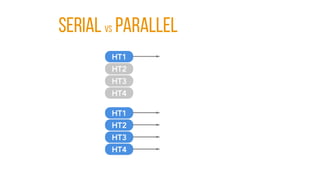
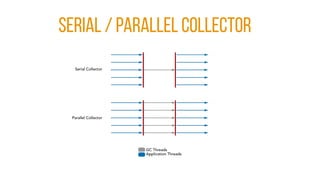
• Serial vs Parallel
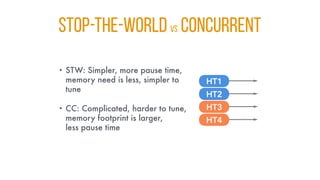
• Stop-the-world vs Concurrent
• Compacting vs Non-Compacting vs Copying
Serial vs Parallel
STOP-THE-WORLD vs CONCURRENT
• STW: Simpler, more pause time,
memory need is less, simpler to
tune
• CC: Complicated, harder to tune,
memory footprint is larger,
less pause time
CoMPACTING vs Non-Compactıng
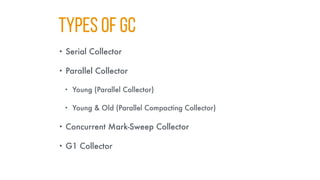
TYPES OF GC
• Serial Collector
• Parallel Collector
• Young (Parallel Collector)
• Young & Old (Parallel Compacting Collector)
• Concurrent Mark-Sweep Collector
• G1 Collector
SERIAL / Parallel Collector
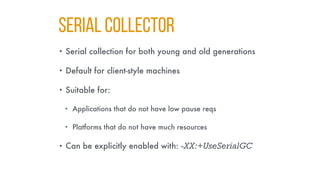
SERIAL COllector
• Serial collection for both young and old generations
• Default for client-style machines
• Suitable for:
• Applications that do not have low pause reqs
• Platforms that do not have much resources
• Can be explicitly enabled with: -XX:+UseSerialGC
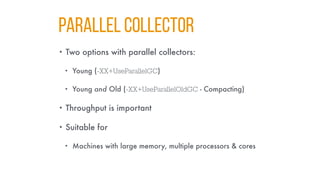
PARALLEL COLLECTOR
• Two options with parallel collectors:
• Young (-XX+UseParallelGC)
• Young and Old (-XX+UseParallelOldGC - Compacting)
• Throughput is important
• Suitable for
• Machines with large memory, multiple processors & cores
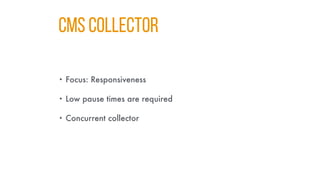
CMS COLLECTOR
• Focus: Responsiveness
• Low pause times are required
• Concurrent collector
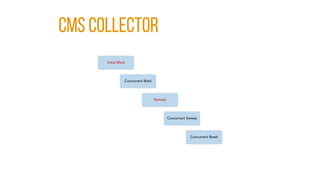
CMS COLLECTOR
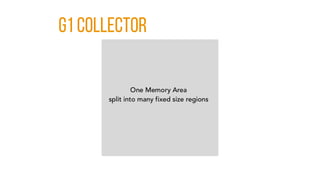
g1 Collector
g1 Collector [REGIONS]
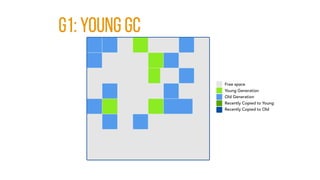
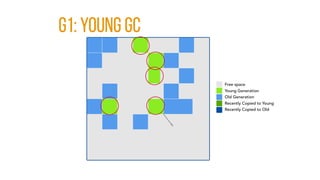
g1: YOUNG GC
g1: YOUNG GC
g1: YOUNG GC [end]
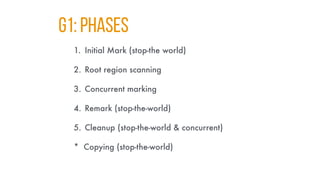
g1: PHASES
1. Initial Mark (stop-the world)
2. Root region scanning
3. Concurrent marking
4. Remark (stop-the-world)
5. Cleanup (stop-the-world & concurrent)
* Copying (stop-the-world)
g1: PHASES [INITIAL MARK]
g1: PHASES [Concurrent mark]
g1: PHASES [REMARK]
g1: PHASES [COPYING/CLEANUP]
g1: PHASES [AFTER COPYING]
koders.co
COMMAND LINE
Monitoring
6
Objectıves
• Using JVM command line tools
• jps, jmd, stat
• Monitor JVMs
• Identify running JVMs
• Monitor GC & JIT activity
MONITORING
• First step to observe & identify (possible) problems
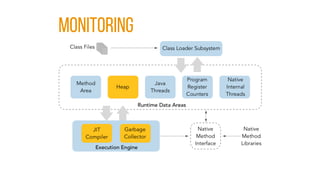
MONITORING
WHAT TO MONITOR
• Parts of interest
• Heap usage & Garbage collection
• JIT compilation
• Data of interest
• Frequency and duration of GCs
• Java heap usage
• Thread counts & states
JDK COMMAND LINE TOOLS
• jps
• jmcd
• jstat
JIT COMPILATION
• JIT compiler: optimizer, just in-time compiler
• Command line tools to monitor
• -XX:+PrintCompilation (~2% CPU)
• jstat
• Data of interest
• Frequency, duration, opt/de-opt cycles, failed compilations
INTERFERING JIT COMPILER
• .hotspot_compiler file
• Turns of jit compilation for specified methods/classes
• Very rarely used
• Opt/de-opt cycles, failure or possible bug in JVM
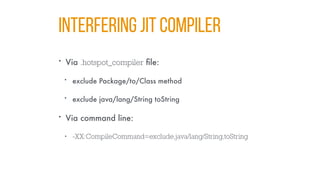
INTERFERING JIT COMPILER
• Via .hotspot_compiler file:
• exclude Package/to/Class method
• exclude java/lang/String toString
• Via command line:
• -XX:CompileCommand=exclude,java/lang/String,toString
koders.co
Monitoring OS
Performance
7
Objectıves
• Monitor CPU usage
• Monitor processes
• Monitor network & disk & swap I/O
• On Linux (+Windows)
Terminology
• CPU Utilization: Percentage of the CPU usage
(user+kernel)
• User CPU Utilization: the percent of time the application
spends in application code
TERMINOLOGY
• Memory Utilization: Memory usage percentage and
whether all the memory used by process reside in
physical (ram) or virtual (swap) memory.
• Swapping (using disk space as virtual memory) is pretty
expensive and should be avoided all times.
TERMINOLOGY
• Lock Contention: The case where a thread or process
tries to acquire a lock held by another process or
thread.
• Prevents concurrency and utilization. Should be avoided as
much as possible.
TERMINOLOGY
• Network & Disk I/O Utilization: The amount of data
sent and received via network and disk.
• Should be traced and used carefully.
Monitoring CPU Usage
• Monitor general and process based CPU usage
• Key definitions & metrics
• User (usr) time
• System (sys) time
• Voluntary context switch (VCX)
• Involuntary context switch (ICX)
MONITORING CPU
• Key points
• CPU utilization
• High sys/usr time
• CPU scheduler run queue
Monitoring CPU Usage
• Tools to use (Linux)
• top
• htop
• vmstat
• prstat
• gnome-system-monitor
MONITORING MEMORY
• Key points
• Memory footprint
• Change in usage of memory
• Virtual memory usage
MONITORING MEMORY
• Tools to use (Linux)
• free
• vmstat
MONITORING DISK I/O
• Key points
• Number of disk accesses
• Disk access latencies
• Virtual memory usage
MONITORING DISK I/O
• Tools to use (Linux)
• iostat
• lsof
• iotop
MONITORING NETWORK I/O
• Key points
• Connection count
• Connection statistics & states
• Total network traffic
MONITORING NETWORK I/O
• Tools to use (Linux)
• netstat
• iptraf
• tcpdump
• iftop
• monitorix
koders.co
USING
Visual Tools
8
Objectıves
• Monitor Java applications using visual tools:
• JConsole
• VisualVM
• Mission Control
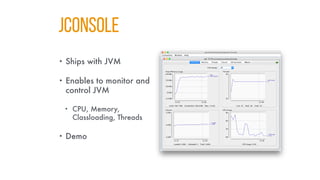
JConsole
• Ships with JVM
• Enables to monitor and
control JVM
• CPU, Memory,
Classloading, Threads
• Demo
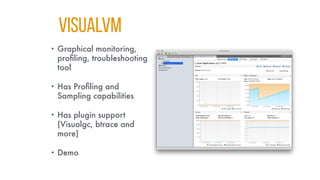
VISUALVM
• Graphical monitoring,
profiling, troubleshooting
tool
• Has Profiling and
Sampling capabilities
• Has plugin support
(Visualgc, btrace and
more)
• Demo
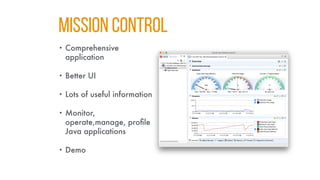
MISSION CONTROL
• Comprehensive
application
• Better UI
• Lots of useful information
• Monitor,
operate,manage, profile
Java applications
• Demo
JMX - MANAGED BEANS
• JMX: Java Management Extensions
• Used to monitor & manage JVM
• Managed Beans (MBeans)
• Objects used to manage Java resources
• Managed by JMX agents
koders.co
PROFILING JAVA
APPLICATIONS
9
Objectives
• Profiling Java applications using:
• jmap and jhat
• JVisual VM
• Java Flight Recorder
JMAP and JHAT
• JVM command line tools
• jmap: Creates heap profile data
• jhat: Primitively Presents data in browser
• Demo
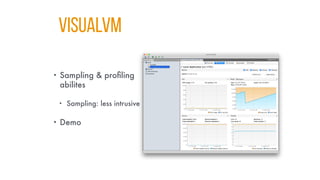
VISUALVM
• Sampling & profiling
abilites
• Sampling: less intrusive
• Demo
koders.co
Profiling
Performance Issues
10
Objectives
• Profiling Java applications to troubleshoot and
optimize
• Detecting memory leaks
• Detecting lock contentions
• Identifying anti-patterns in heap profiles
HEAP PROFILING
• Necessary when:
• Observing frequent garbage collections
• Need for a larger heap by application
• Tune application for better performance & hardware
utilization
HEAP PROFILING: TIPS
• What to look for ?
• Objects with
• a large amount of bytes being allocated
• a high number of object allocations
• Stack traces where
• large amounts of bytes are being allocated
• large number of objects are being allocated
HEAP PROFILING: TOOLS
• jmap and jhat
• Snapshot of the application
• Top consumers & Allocation stack traces
• Compare multiple snapshots
MEMORY LEAK
• Refers to the situation when an object unintentionally
resides in memory thus can not be collected by GC.
• Frequent garbage collection
• Poor application performance
• Application failure (Out of memory error) Frequent
garbage collection
MEMORY LEAK: TOOLS
• Visual VM
• Flight Recorder
• jmap and jhat
MEMORY LEAK: TIPS
• Monitor running application
• Look for memory changes, survivor generations
• Profile applications, compare snapshots
• Look for object count changes, top grovers
• Always use -XX:+HeapDumpOnOutOfMemoryError
parameter on production
LOCK CONTENTION
• Usage of synchronization utilities (synchronized,
locks, conc. collections, etc.) cause threads to wait or
perform worse.
• Should be kept as minimum as possible.
LOCK CONTENTION: MONITOR
• Things to observe:
• High number of voluntary context switches
• Thread states and state changes (Visual VM, Flight
Recorder)
• Possible deadlocks (jstack, Visual Tools)
PROFILING ANTI-PATTERNS
• Frequent garbage collections
• Overallocation of objects
• High number of threads
• High volume of lock contention
• Large number of exception objects
koders.co
GARBAGE COLLECTION
Tuning
11
Objectives
• Learning to tune GC by setting generation sizes
• Comparing and selecting suitable GC for
performance requirements
• Monitor and understand GC outputs
Garbage Collectıon
• Main tasks of GC
• Allocating memory for new objects
• Keeping live (referenced) objects in memory
• Removing dead (unreferenced) objects and reclaiming
memory used by them
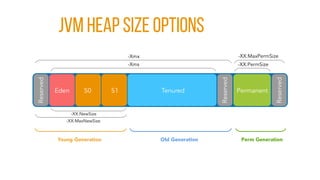
JVM Heap Size Options
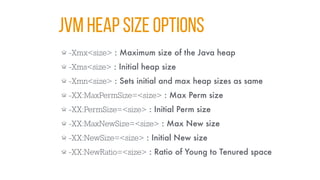
-Xmx<size> : Maximum size of the Java heap
-Xms<size> : Initial heap size
-Xmn<size> : Sets initial and max heap sizes as same
-XX:MaxPermSize=<size> : Max Perm size
-XX:PermSize=<size> : Initial Perm size
-XX:MaxNewSize=<size> : Max New size
-XX:NewSize=<size> : Initial New size
-XX:NewRatio=<size> : Ratio of Young to Tenured space
GARBAGE COLLECTORS
• Serial Collector
• Parallel (Throughput) Collector
• Concurrent Mark-Sweep (CMS) Collector
• Garbage First (G1) Collector
SERIAL COLLECTOR
• Single-threaded young generation collector
• Single-threaded old generation collector
• Parameter: -XX:+UseSerialGC
SERIAL COLLECTOR: TIPS
• Not suitable for applications with high performance
requirements
• Can be suitable for client applications with limited
hardware resources
• More suitable for platforms that has less than 256
MB of memory for JVM and do not have multicores
PARALLEL COLLECTOR
• Multi-threaded young generation collector
• Multi-threaded old generation collector
• Parameters:
• -XX+UseParallelGC (Parallel Young, Single-Threaded Old)
• -XX:+UseParallelOldGC (Young&Old BOTH MultiThreaded)
PARALLEL COLLECTOR: TIPS
• Suitable for applications that target throughput rather
than responsiveness
• Suitable for platforms that have multiple processors &
cores
• -XX:ParallelGCThreads=[N] can be used to specify GC
thread count
• default = Runtime.availableProcessors() (JDK 7+)
• Better reduced if multiple JVMs running on the same machine
CMS COLLECTOR
• Multi-threaded young generation collector
• Single-threaded concurrent old generation collector
• Parameter: -XX:+ConcMarkSweepGC
CMS COLLECTOR: GOOD TO KNOW
• CMS targets responsiveness and runs concurrently.
And it doesn’t come for free.
• More memory (~20%) and CPU resources needed
• Memory fragmentation
• It can lose the race. (Concurrent mode failure)
CMS COLLECTOR: GOOD TO KNOW
• CMS has to start earlier to collect not to lose the race
• -XX:CMSInitiatingOccupancyFraction=n (default 60%, J8)
• n: Percentage of tenured space size
CMS COLLECTOR: TIPS
• Size young generation as large as possible
• Small young generation puts pressure on old generation
• Consider heap profiling
• Choose tuning survivor spaces
• Enable class-unloading if needed (appservers, etc.)
-XX:+CMSClassUnloadingEnabled, -XX+PermGenSweepingEnabled
CMS: TIPS
• TODO : CMS important parameters
G1 Collector
• Parallel and concurrent young generation collector
• Single-threaded old generation collector
• Parameter: -XX:+UseG1GC
• Expected to replace CMS (J9)
G1 Collector: GOOD TO KNOW
• Concurrent & responsiveness collector like G1.
Suitable for multiprocessor platforms and heap sizes
of 6GB or more.
• Targets to stay within specified pause-time
requirements.
• Suitable for stable and predictable GC time 0.5 seconds or
below.
G1 COLLECTOR: TIPS
• G1 optimizes itself to meet pause-time requirements.
• Do not set the size of young generation space
• Use 90% goal instead of average response time (ART)
• A lower pause-time goal causes more effort of GC,
throughput decreases
koders.co
Language-Level
TIPS & TRICS
12
Objectives
• Object allocation best practices
• Java reference types and differences between them
• Usage of finalizers
• Synchronization tips & tricks & best practices
OBJECTS: BEST PRACTICES
• The problem is not the object allocation, nor the
reclamation
• Not expensive: ~10 native instructions in common case
• Allocating small objects for intermediate results is fine
OBJECTS: BEST PRACTICES
• Use short-lived immutable objects instead of long-
lived mutable objects.
• Functional Programming is rising !
• Use clearer, simpler code with more allocations
instead of more obscure code with fewer allocations
• KISS: Keep It Simple Stupid
• “Premature optimization is root of all evil” - Donald Knuth
OBJECTS: BEST PRACTICES
• Large Objects are expensive !
• Allocation
• Initialization
• Different sized large objects can cause fragmentation
• Avoid creating large objects
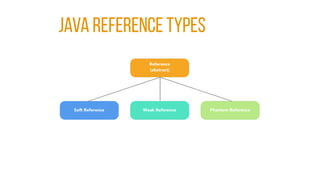
JAVA REFERENCE TYPES
REFERENCES: SOFT REFERENCE
• “Clear this object if you don’t have enough memory, I
can handle that.”
• get() returns the object if it is not reclaimed by GC.
• -XX:SoftRefLRUPolicyMSPerMB=[n] can be used to
control lifetime of the reference (default 1000 ms)
• Use case: Caches
REFERENCES: WEAK REFERENCE
• “Consider this reference as if it doesn’t exist. Let me
access it if it is still available.”
• get() returns the object if it is not reclaimed by GC.
• Use case: Thread pools
REFERENCES: PHANTOM REFERENCE
• “I just want to know if you have deleted the object or
not”
• get() always returns null.
• Use Case: Finalize actions
FINALIZERS
• Finalizers are not equivalents of C++ destructors
• Finalize methods have almost no practical and
meaningful use case
• Finalize methods of objects are called by GC threads.
• Handled differently than other objects, create pressure on GC
• Time consuming operations lengthen GC cycle
• Not guaranteed to be called
LANGUAGE TIPS: STRINGS
• Strings are immutable
• String “literals” are cached in String Pool
• Avoid creating Strings with “new”
LANGUAGE TIPS: STRINGS
• Avoid String concatenation
• Use StringBuilder with appropriate initial size
• Not StringBuffer (avoid synchronization)
LANGUAGE TIPS: USE PRIMITIVES
• Use primitives whenever possible, not wrapper
objects.
• Auto Boxing and Unboxing are not free of cost.
LANGUAGE TIPS: AVOID EXCEPTIONS
• Exceptions are very expensive objects
• Avoid creating them for
• non-exceptional cases
• flow control
THREADS
• Avoid excessive use of synchronized
• Increases lock contention, leads to poor performance
• Can cause dead-locks
• Minimize the synchronization
• Only for the critical section
• As short as possible
• Use other locks, concurrent collections whenever suitable
Threads: TIPS
• Favor immutable objects
• No need for synchronization
• Embrace functional paradigm
• Do not use threads directly
• Hard to maintain and program correctly
• Use Executers, thread pools
• Use concurrent collections and tune them properly
CACHING
• Caching is a common source of memory leaks
• Avoid when possible
• Avoid creating large objects in the first place
• Mind when to remove any object added to cache
• Make sure it happens, in any condition
koders.co
That’s all folks!
Congrats!
Ender Aydin Orak

Java Performance Tuning

  • 1.
    Java Performance Tuning TheUltimate Guide to Ender Aydin Orak koders.co
  • 2.
  • 3.
  • 4.
    You WILL LEARN: Applicationperformance principles & methods
  • 5.
    You WILL LEARN: JVMstructure and internals regarding application performance
  • 6.
    You WILL LEARN: GarbageCollection types and when to use which
  • 7.
    You WILL LEARN: Monitoring,Profiling, Tuning, Troubleshooting JVM applications
  • 8.
    You WILL LEARN: UsingOS and JVM tools for better application performance
  • 9.
    You WILL LEARN: Applyingperformance best practices
  • 10.
    You WILL LEARN: Javalanguage level tips & tricks
  • 11.
    YOU WILL PRACTICEON: •Dead locks •Memory leaks •Lock contention •CPU utilization •Collections •Locks •Multithreading •Best practices
  • 12.
    Performance Approaches •Top-Down: Focuson top level application • Application Developers (our approach)
  • 13.
    Performance Approaches •Bottom-Up: Focuson the lowest level: CPU. • Performance Specialists
  • 14.
  • 15.
  • 16.
  • 17.
  • 18.
    Objectives • JVM Runtime& Architecture • Command Line Options • VM Life Cycle • Class Loading
  • 19.
    JAVA PROGRAMMING LANGUAGE •Object oriented, Garbage collected* • Class based • .java files (source) compiled into .class files (bytecode) • JVM executes platform independent bytecodes
  • 20.
    –DAVID WHEELER “All problemsin computer science can be solved by another level of indirection”
  • 21.
    JVM Overvıew • JVM:Java Virtual Machine • A specification (JCP, JSR) • Can have multiple implementations • OpenJDK, Hotspot*, JRockit (Oracle), IBM J9, much more • Platform independent: “Write once, run everywhere”
  • 22.
    –JOEL SPOLSKY “All non-trivialabstractions, to some degree, are leaky.”
  • 23.
  • 24.
  • 25.
    COMMAND LINE OPTIONS •Standard: Required by JVM specification, standard on all implementations (-server, -classpath) • Nonstandard: JVM implementation dependent. (Start with -X) • Developer Options: Non-stable, JVM implementation dependent options for specific cases (Start with -XX in HotSpot VM)
  • 26.
    JVM LIFE CYCLE 1.Parse command line options 2. Establish heap sizes and JIT compiler (if not specified) 3. Establish environment variables (CLASSPATH, etc.) 4. Fetch Main-Class from Manifest (if not specified) 5. Create HotSpot VM (JNI_CreateJavaVM) 6. Load Main-Class and get main method attributes 7. Invoke main method passing provided command line arguments
  • 27.
  • 28.
    Objectives • Key conceptsregarding application performance • Common performance problems and principles • Methodology to follow in solving problems
  • 29.
    QUESTIONS & Expectations •Expected throughput ? • Acceptable latency per request ? • How many concurrent users/tasks ? • Expected throughput and latency ? • Acceptable garbage collection latency ?
  • 30.
    Terminology • CPU Utilization:Percentage of the CPU usage (user+kernel) • User CPU Utilization: the percent of time the application spends in application code
  • 31.
    TERMINOLOGY • Memory Utilization:Memory usage percentage (ram/swap) • Swapping should be avoided all times.
  • 32.
    TERMINOLOGY • Lock Contention:The case where a thread or process tries to acquire a lock held by another process or thread. • Prevents concurrency and utilization. Should be avoided as much as possible.
  • 33.
    TERMINOLOGY • Network &Disk I/O Utilization: The amount of data sent and received via network and disk. • Should be traced and used carefully.
  • 34.
    Performance • Aspects ofperformance: • Responsiveness • Throughput • Memory Footprint • Startup Time • Scalability
  • 35.
    RESPONSIVENESS • Ability ofa system to complete assigned tasks within a given time • Critical on most of modern software applications (Web, Desktop, CRUD apps, Web services) • Long pause times are not acceptable • The focus is on responding in short periods of time
  • 36.
    THROUGHPUT • The amountof work done in a specific period of time. • Critical for some specific application types (e.g. Data analysis, Batch operations, Report generation) • High pause times are acceptable • Focus is on how much work are getting done over a longer period of time
  • 37.
    Memory Footprint • Theamount of main memory used by the application • How much memory ? • How the usage changes ? • Does application uses any swap space ? • Dedicated or shared system ?
  • 38.
    STARTUP TIME • Thetime taken for an application to start • Important for both the server and client applications • “Time ‘till performance”
  • 39.
    SCALABILITY • How wellan application performs as the load on it increases • Huge topic that shapes the modern software architectures • Should be linear, not exponential • Can be measured on different layers in a complex system
  • 40.
  • 41.
    Focus areas • Javaapplication performance • Tuning JVM for throughput or responsiveness • Discovery, troubleshooting and tuning JVM
  • 42.
    Performance Methodology • Oursteps to follow 1.Monitoring 2.Profiling 3.Tuning
  • 43.
    Performance Monitoring • Non-intrusivelycollecting and observing performance data • Early detection of possible problems • Essential for production environments • Early stage for troubleshooting problems • OS and JVM tools
  • 44.
    PERFORMANCE PROFILING • Collectingand observing performance data using special tools • More intrusive & has affect on performance • Narrower focus to find problems • Not suitable for production environments
  • 45.
    PERFORMANCE TUNING • Changingconfiguration, parameters or even source code for optimizing performance • Follows monitoring and profiling • Targets responsiveness or throughput
  • 46.
  • 47.
  • 48.
  • 49.
    Objectives • What garbagecollection is and what it does • Types of garbage collectors • Differences and basic use cases of different garbage collectors • Garbage collection process
  • 50.
    Garbage collectıon • Incomputer science, garbage collection (GC) is a form of automatic memory management. • The garbage collector, attempts to reclaim memory occupied by objects that are no longer in use by the program.
  • 51.
    Garbage Collectıon • Maintasks of GC • Allocating memory for new objects • Keeping live (referenced) objects in memory • Removing dead (unreferenced) objects and reclaiming memory used by them
  • 52.
  • 53.
  • 54.
    GC Steps: DELETION[COMPACTING]
  • 55.
    GENERATIONAL GC • HotspotJVM is split into generational spaces
  • 56.
    WHY GENERATIONAL GC? • Object life patterns in OO languages: • Most objects “die young” • Older objects rarely references to young ones
  • 57.
  • 58.
  • 59.
  • 60.
  • 61.
  • 62.
  • 63.
  • 64.
  • 65.
    OLD & PERMANENTGENERATIONS
  • 66.
  • 67.
    Objectives • Garbage collectionperformance metrics • Garbage collection algorithms • Types of garbage collectors • JVM ergonomics
  • 68.
    GC PERFORMANCE METRICS •There are mainly 3 ways to measure GC performance: • Throughput • Responsiveness • Memory footprint
  • 69.
    FOCUS: Throughput • Mostlylong-running, batch processes • High pause times can be acceptable • Responsiveness per process is not critical
  • 70.
    FOCUS: RESPONSIVENESS • Priorityis on servicing all requests within a predefined time interval • High GC pause times are not acceptable • Throughput is secondary
  • 71.
    GC ALGORITHMS • Serialvs Parallel • Stop-the-world vs Concurrent • Compacting vs Non-Compacting vs Copying
  • 72.
  • 73.
    STOP-THE-WORLD vs CONCURRENT •STW: Simpler, more pause time, memory need is less, simpler to tune • CC: Complicated, harder to tune, memory footprint is larger, less pause time
  • 74.
  • 75.
    TYPES OF GC •Serial Collector • Parallel Collector • Young (Parallel Collector) • Young & Old (Parallel Compacting Collector) • Concurrent Mark-Sweep Collector • G1 Collector
  • 76.
  • 77.
    SERIAL COllector • Serialcollection for both young and old generations • Default for client-style machines • Suitable for: • Applications that do not have low pause reqs • Platforms that do not have much resources • Can be explicitly enabled with: -XX:+UseSerialGC
  • 78.
    PARALLEL COLLECTOR • Twooptions with parallel collectors: • Young (-XX+UseParallelGC) • Young and Old (-XX+UseParallelOldGC - Compacting) • Throughput is important • Suitable for • Machines with large memory, multiple processors & cores
  • 79.
    CMS COLLECTOR • Focus:Responsiveness • Low pause times are required • Concurrent collector
  • 80.
  • 81.
  • 82.
  • 83.
  • 84.
  • 85.
  • 86.
    g1: PHASES 1. InitialMark (stop-the world) 2. Root region scanning 3. Concurrent marking 4. Remark (stop-the-world) 5. Cleanup (stop-the-world & concurrent) * Copying (stop-the-world)
  • 87.
  • 88.
  • 89.
  • 90.
  • 91.
  • 92.
  • 93.
    Objectıves • Using JVMcommand line tools • jps, jmd, stat • Monitor JVMs • Identify running JVMs • Monitor GC & JIT activity
  • 94.
    MONITORING • First stepto observe & identify (possible) problems
  • 95.
  • 96.
    WHAT TO MONITOR •Parts of interest • Heap usage & Garbage collection • JIT compilation • Data of interest • Frequency and duration of GCs • Java heap usage • Thread counts & states
  • 97.
    JDK COMMAND LINETOOLS • jps • jmcd • jstat
  • 98.
    JIT COMPILATION • JITcompiler: optimizer, just in-time compiler • Command line tools to monitor • -XX:+PrintCompilation (~2% CPU) • jstat • Data of interest • Frequency, duration, opt/de-opt cycles, failed compilations
  • 99.
    INTERFERING JIT COMPILER •.hotspot_compiler file • Turns of jit compilation for specified methods/classes • Very rarely used • Opt/de-opt cycles, failure or possible bug in JVM
  • 100.
    INTERFERING JIT COMPILER •Via .hotspot_compiler file: • exclude Package/to/Class method • exclude java/lang/String toString • Via command line: • -XX:CompileCommand=exclude,java/lang/String,toString
  • 101.
  • 102.
    Objectıves • Monitor CPUusage • Monitor processes • Monitor network & disk & swap I/O • On Linux (+Windows)
  • 103.
    Terminology • CPU Utilization:Percentage of the CPU usage (user+kernel) • User CPU Utilization: the percent of time the application spends in application code
  • 104.
    TERMINOLOGY • Memory Utilization:Memory usage percentage and whether all the memory used by process reside in physical (ram) or virtual (swap) memory. • Swapping (using disk space as virtual memory) is pretty expensive and should be avoided all times.
  • 105.
    TERMINOLOGY • Lock Contention:The case where a thread or process tries to acquire a lock held by another process or thread. • Prevents concurrency and utilization. Should be avoided as much as possible.
  • 106.
    TERMINOLOGY • Network &Disk I/O Utilization: The amount of data sent and received via network and disk. • Should be traced and used carefully.
  • 107.
    Monitoring CPU Usage •Monitor general and process based CPU usage • Key definitions & metrics • User (usr) time • System (sys) time • Voluntary context switch (VCX) • Involuntary context switch (ICX)
  • 108.
    MONITORING CPU • Keypoints • CPU utilization • High sys/usr time • CPU scheduler run queue
  • 109.
    Monitoring CPU Usage •Tools to use (Linux) • top • htop • vmstat • prstat • gnome-system-monitor
  • 110.
    MONITORING MEMORY • Keypoints • Memory footprint • Change in usage of memory • Virtual memory usage
  • 111.
    MONITORING MEMORY • Toolsto use (Linux) • free • vmstat
  • 112.
    MONITORING DISK I/O •Key points • Number of disk accesses • Disk access latencies • Virtual memory usage
  • 113.
    MONITORING DISK I/O •Tools to use (Linux) • iostat • lsof • iotop
  • 114.
    MONITORING NETWORK I/O •Key points • Connection count • Connection statistics & states • Total network traffic
  • 115.
    MONITORING NETWORK I/O •Tools to use (Linux) • netstat • iptraf • tcpdump • iftop • monitorix
  • 116.
  • 117.
    Objectıves • Monitor Javaapplications using visual tools: • JConsole • VisualVM • Mission Control
  • 118.
    JConsole • Ships withJVM • Enables to monitor and control JVM • CPU, Memory, Classloading, Threads • Demo
  • 119.
    VISUALVM • Graphical monitoring, profiling,troubleshooting tool • Has Profiling and Sampling capabilities • Has plugin support (Visualgc, btrace and more) • Demo
  • 120.
    MISSION CONTROL • Comprehensive application •Better UI • Lots of useful information • Monitor, operate,manage, profile Java applications • Demo
  • 121.
    JMX - MANAGEDBEANS • JMX: Java Management Extensions • Used to monitor & manage JVM • Managed Beans (MBeans) • Objects used to manage Java resources • Managed by JMX agents
  • 122.
  • 123.
    Objectives • Profiling Javaapplications using: • jmap and jhat • JVisual VM • Java Flight Recorder
  • 124.
    JMAP and JHAT •JVM command line tools • jmap: Creates heap profile data • jhat: Primitively Presents data in browser • Demo
  • 125.
    VISUALVM • Sampling &profiling abilites • Sampling: less intrusive • Demo
  • 126.
  • 127.
    Objectives • Profiling Javaapplications to troubleshoot and optimize • Detecting memory leaks • Detecting lock contentions • Identifying anti-patterns in heap profiles
  • 128.
    HEAP PROFILING • Necessarywhen: • Observing frequent garbage collections • Need for a larger heap by application • Tune application for better performance & hardware utilization
  • 129.
    HEAP PROFILING: TIPS •What to look for ? • Objects with • a large amount of bytes being allocated • a high number of object allocations • Stack traces where • large amounts of bytes are being allocated • large number of objects are being allocated
  • 130.
    HEAP PROFILING: TOOLS •jmap and jhat • Snapshot of the application • Top consumers & Allocation stack traces • Compare multiple snapshots
  • 131.
    MEMORY LEAK • Refersto the situation when an object unintentionally resides in memory thus can not be collected by GC. • Frequent garbage collection • Poor application performance • Application failure (Out of memory error) Frequent garbage collection
  • 132.
    MEMORY LEAK: TOOLS •Visual VM • Flight Recorder • jmap and jhat
  • 133.
    MEMORY LEAK: TIPS •Monitor running application • Look for memory changes, survivor generations • Profile applications, compare snapshots • Look for object count changes, top grovers • Always use -XX:+HeapDumpOnOutOfMemoryError parameter on production
  • 134.
    LOCK CONTENTION • Usageof synchronization utilities (synchronized, locks, conc. collections, etc.) cause threads to wait or perform worse. • Should be kept as minimum as possible.
  • 135.
    LOCK CONTENTION: MONITOR •Things to observe: • High number of voluntary context switches • Thread states and state changes (Visual VM, Flight Recorder) • Possible deadlocks (jstack, Visual Tools)
  • 136.
    PROFILING ANTI-PATTERNS • Frequentgarbage collections • Overallocation of objects • High number of threads • High volume of lock contention • Large number of exception objects
  • 137.
  • 138.
    Objectives • Learning totune GC by setting generation sizes • Comparing and selecting suitable GC for performance requirements • Monitor and understand GC outputs
  • 139.
    Garbage Collectıon • Maintasks of GC • Allocating memory for new objects • Keeping live (referenced) objects in memory • Removing dead (unreferenced) objects and reclaiming memory used by them
  • 140.
  • 141.
    JVM Heap SizeOptions -Xmx<size> : Maximum size of the Java heap -Xms<size> : Initial heap size -Xmn<size> : Sets initial and max heap sizes as same -XX:MaxPermSize=<size> : Max Perm size -XX:PermSize=<size> : Initial Perm size -XX:MaxNewSize=<size> : Max New size -XX:NewSize=<size> : Initial New size -XX:NewRatio=<size> : Ratio of Young to Tenured space
  • 142.
    GARBAGE COLLECTORS • SerialCollector • Parallel (Throughput) Collector • Concurrent Mark-Sweep (CMS) Collector • Garbage First (G1) Collector
  • 143.
    SERIAL COLLECTOR • Single-threadedyoung generation collector • Single-threaded old generation collector • Parameter: -XX:+UseSerialGC
  • 144.
    SERIAL COLLECTOR: TIPS •Not suitable for applications with high performance requirements • Can be suitable for client applications with limited hardware resources • More suitable for platforms that has less than 256 MB of memory for JVM and do not have multicores
  • 145.
    PARALLEL COLLECTOR • Multi-threadedyoung generation collector • Multi-threaded old generation collector • Parameters: • -XX+UseParallelGC (Parallel Young, Single-Threaded Old) • -XX:+UseParallelOldGC (Young&Old BOTH MultiThreaded)
  • 146.
    PARALLEL COLLECTOR: TIPS •Suitable for applications that target throughput rather than responsiveness • Suitable for platforms that have multiple processors & cores • -XX:ParallelGCThreads=[N] can be used to specify GC thread count • default = Runtime.availableProcessors() (JDK 7+) • Better reduced if multiple JVMs running on the same machine
  • 147.
    CMS COLLECTOR • Multi-threadedyoung generation collector • Single-threaded concurrent old generation collector • Parameter: -XX:+ConcMarkSweepGC
  • 148.
    CMS COLLECTOR: GOODTO KNOW • CMS targets responsiveness and runs concurrently. And it doesn’t come for free. • More memory (~20%) and CPU resources needed • Memory fragmentation • It can lose the race. (Concurrent mode failure)
  • 149.
    CMS COLLECTOR: GOODTO KNOW • CMS has to start earlier to collect not to lose the race • -XX:CMSInitiatingOccupancyFraction=n (default 60%, J8) • n: Percentage of tenured space size
  • 150.
    CMS COLLECTOR: TIPS •Size young generation as large as possible • Small young generation puts pressure on old generation • Consider heap profiling • Choose tuning survivor spaces • Enable class-unloading if needed (appservers, etc.) -XX:+CMSClassUnloadingEnabled, -XX+PermGenSweepingEnabled
  • 151.
    CMS: TIPS • TODO: CMS important parameters
  • 152.
    G1 Collector • Paralleland concurrent young generation collector • Single-threaded old generation collector • Parameter: -XX:+UseG1GC • Expected to replace CMS (J9)
  • 153.
    G1 Collector: GOODTO KNOW • Concurrent & responsiveness collector like G1. Suitable for multiprocessor platforms and heap sizes of 6GB or more. • Targets to stay within specified pause-time requirements. • Suitable for stable and predictable GC time 0.5 seconds or below.
  • 154.
    G1 COLLECTOR: TIPS •G1 optimizes itself to meet pause-time requirements. • Do not set the size of young generation space • Use 90% goal instead of average response time (ART) • A lower pause-time goal causes more effort of GC, throughput decreases
  • 155.
  • 156.
    Objectives • Object allocationbest practices • Java reference types and differences between them • Usage of finalizers • Synchronization tips & tricks & best practices
  • 157.
    OBJECTS: BEST PRACTICES •The problem is not the object allocation, nor the reclamation • Not expensive: ~10 native instructions in common case • Allocating small objects for intermediate results is fine
  • 158.
    OBJECTS: BEST PRACTICES •Use short-lived immutable objects instead of long- lived mutable objects. • Functional Programming is rising ! • Use clearer, simpler code with more allocations instead of more obscure code with fewer allocations • KISS: Keep It Simple Stupid • “Premature optimization is root of all evil” - Donald Knuth
  • 159.
    OBJECTS: BEST PRACTICES •Large Objects are expensive ! • Allocation • Initialization • Different sized large objects can cause fragmentation • Avoid creating large objects
  • 160.
  • 161.
    REFERENCES: SOFT REFERENCE •“Clear this object if you don’t have enough memory, I can handle that.” • get() returns the object if it is not reclaimed by GC. • -XX:SoftRefLRUPolicyMSPerMB=[n] can be used to control lifetime of the reference (default 1000 ms) • Use case: Caches
  • 162.
    REFERENCES: WEAK REFERENCE •“Consider this reference as if it doesn’t exist. Let me access it if it is still available.” • get() returns the object if it is not reclaimed by GC. • Use case: Thread pools
  • 163.
    REFERENCES: PHANTOM REFERENCE •“I just want to know if you have deleted the object or not” • get() always returns null. • Use Case: Finalize actions
  • 164.
    FINALIZERS • Finalizers arenot equivalents of C++ destructors • Finalize methods have almost no practical and meaningful use case • Finalize methods of objects are called by GC threads. • Handled differently than other objects, create pressure on GC • Time consuming operations lengthen GC cycle • Not guaranteed to be called
  • 165.
    LANGUAGE TIPS: STRINGS •Strings are immutable • String “literals” are cached in String Pool • Avoid creating Strings with “new”
  • 166.
    LANGUAGE TIPS: STRINGS •Avoid String concatenation • Use StringBuilder with appropriate initial size • Not StringBuffer (avoid synchronization)
  • 167.
    LANGUAGE TIPS: USEPRIMITIVES • Use primitives whenever possible, not wrapper objects. • Auto Boxing and Unboxing are not free of cost.
  • 168.
    LANGUAGE TIPS: AVOIDEXCEPTIONS • Exceptions are very expensive objects • Avoid creating them for • non-exceptional cases • flow control
  • 169.
    THREADS • Avoid excessiveuse of synchronized • Increases lock contention, leads to poor performance • Can cause dead-locks • Minimize the synchronization • Only for the critical section • As short as possible • Use other locks, concurrent collections whenever suitable
  • 170.
    Threads: TIPS • Favorimmutable objects • No need for synchronization • Embrace functional paradigm • Do not use threads directly • Hard to maintain and program correctly • Use Executers, thread pools • Use concurrent collections and tune them properly
  • 171.
    CACHING • Caching isa common source of memory leaks • Avoid when possible • Avoid creating large objects in the first place • Mind when to remove any object added to cache • Make sure it happens, in any condition
  • 172.