“Java” – for a beginner

           By:
    Biswadip Goswami


       (c) Biswadip Goswami, biswadip_g@hotmail.com
What are we going to venture !
•   The Platform.
•   Java Virtual Machine.
•   The Programming Environment.
•   Some fundamentals (datatypes etc.).
•   Structure of a Java Program.
•   Mistakes we make while writing the code.


                   (c) Biswadip Goswami, biswadip_g@hotmail.com
The platform
Java is a whole platform !
Huge library
Lots of reusable code
Execution environment providing services as
• Security
• Portability
• Automatic garbage collection and more

                 (c) Biswadip Goswami, biswadip_g@hotmail.com
The Virtual Machine
JVM or Java Virtual Machine.
• Platform independent execution environment
• Convert ByteCode to machine code
• Mimics a real Java processor
• The ByteCode is executed regardless of the
  Operating System
• A ByteCode stream: 03 3b
   – The mnemonics
      • iconst_0 // 03
      • istore_0 // 3b
                  (c) Biswadip Goswami, biswadip_g@hotmail.com
JVM and Garbage Collection:
JVM stores all objects by the java applications and
Garbage Collection is a process of automatically
freeing those objects which are not referenced by
the program any more.
Garbage collector also stops heap fragmentation.


                   (c) Biswadip Goswami, biswadip_g@hotmail.com
Some IDEs Available:
• NetBeans [http://www.netbeans.org]
• Eclipse [http://www.eclipse.org]
• JBuilder 7
  [http://www.borland.com/jbuilder]
• Oracle9i JDeveloper
  [http://www.oracle.com/ip/develop/ids/]


                (c) Biswadip Goswami, biswadip_g@hotmail.com
JARGONS !
•   JDK – Java development kit
•   JRE – Java runtime environment
•   SE – Standard Edition
•   EE – Enterprise edition
•   ME – Micro edition
•   J2 – Java 2
•   SDK – Software development kit
•   Netbeans – there is no acronym sorry !
                    (c) Biswadip Goswami, biswadip_g@hotmail.com
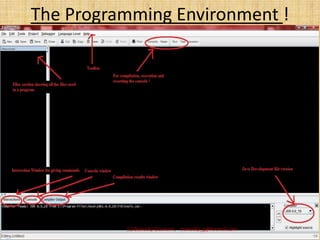
The Programming Environment !


          (c) Biswadip Goswami, biswadip_g@hotmail.com
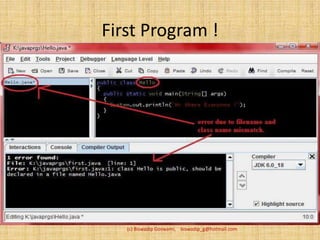
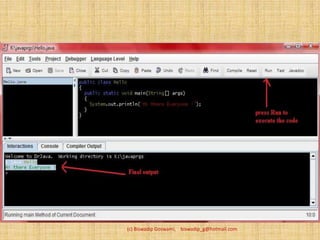
First Program !


   (c) Biswadip Goswami, biswadip_g@hotmail.com
(c) Biswadip Goswami, biswadip_g@hotmail.com
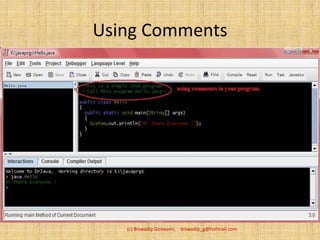
Using Comments


   (c) Biswadip Goswami, biswadip_g@hotmail.com
Data Types
• Java is a strongly typed language
• Eight primitive types in Java
• Integer types
  – int (4bytes)
  – Short (2bytes)
  – Long (8bytes)
  – Byte (1byte)
• Floating point type
  – Float (4bytes)
  – Double (8bytes) (c) Biswadip Goswami,   biswadip_g@hotmail.com
• Char type – used to describe individual
  characters. E.g. - b (backspace), t (tab)
• Boolean type – it has two values ‘true’ and
  ‘false’.
• After declaring a variable, it must be
  explicitly initialized. E.g. int days=30;
• In java declaration can be done anywhere in
  the code. E.g. for(int x;x<=10;x++);

                 (c) Biswadip Goswami, biswadip_g@hotmail.com
Example


(c) Biswadip Goswami, biswadip_g@hotmail.com
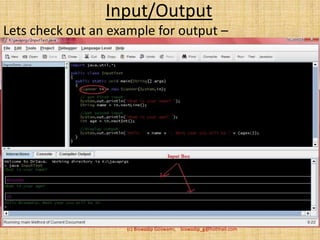
Input/Output
Lets check out an example for output –


                    (c) Biswadip Goswami, biswadip_g@hotmail.com
•   Console input and output in Java.
•   Standard output stream (System.out.println)
•   Standard input stream (System.in)
•   Methods of Scanner class reads inputs.
       • Scanner(System.in)
• nextLine method – input with space
• next method – input single string

                       (c) Biswadip Goswami, biswadip_g@hotmail.com
The Structure:
Any simple java program looks like
<access-specifier> class <class-name>
{
<access-specifier> static void main(varargs)
{
variables;
functions;
}
}
                     (c) Biswadip Goswami, biswadip_g@hotmail.com
Troubleshooting:
• Check for upper and lower case of class name and
  .java program name.
• Bad command or file name - check for installation
• Cannot read: xyz.java – check for the file in the
  current directory
• Error about new language construct – check for the
  latest version of JDK
• Cannot find the symbol – check for the
  name/keywork/identifier
• Using an IDE generally saves you from setting of the
  CLASSPath.
                    (c) Biswadip Goswami, biswadip_g@hotmail.com
Thank you !
For assistance with your ASP.Net or JAVA
  requirements contact:
               Biswadip Goswami
Primary e-mail: biswadip_g@hotmail.com
Alt e-mail: biswadip@cognobytes.com
Webpage:
  http://people.cognobytes.com/biswadip
Skype me at biswadip.g
                 (c) Biswadip Goswami, biswadip_g@hotmail.com

Java for the Beginners

  • 1.
    “Java” – fora beginner By: Biswadip Goswami (c) Biswadip Goswami, biswadip_g@hotmail.com
  • 2.
    What are wegoing to venture ! • The Platform. • Java Virtual Machine. • The Programming Environment. • Some fundamentals (datatypes etc.). • Structure of a Java Program. • Mistakes we make while writing the code. (c) Biswadip Goswami, biswadip_g@hotmail.com
  • 3.
    The platform Java isa whole platform ! Huge library Lots of reusable code Execution environment providing services as • Security • Portability • Automatic garbage collection and more (c) Biswadip Goswami, biswadip_g@hotmail.com
  • 4.
    The Virtual Machine JVMor Java Virtual Machine. • Platform independent execution environment • Convert ByteCode to machine code • Mimics a real Java processor • The ByteCode is executed regardless of the Operating System • A ByteCode stream: 03 3b – The mnemonics • iconst_0 // 03 • istore_0 // 3b (c) Biswadip Goswami, biswadip_g@hotmail.com
  • 5.
    JVM and GarbageCollection: JVM stores all objects by the java applications and Garbage Collection is a process of automatically freeing those objects which are not referenced by the program any more. Garbage collector also stops heap fragmentation. (c) Biswadip Goswami, biswadip_g@hotmail.com
  • 6.
    Some IDEs Available: •NetBeans [http://www.netbeans.org] • Eclipse [http://www.eclipse.org] • JBuilder 7 [http://www.borland.com/jbuilder] • Oracle9i JDeveloper [http://www.oracle.com/ip/develop/ids/] (c) Biswadip Goswami, biswadip_g@hotmail.com
  • 7.
    JARGONS ! • JDK – Java development kit • JRE – Java runtime environment • SE – Standard Edition • EE – Enterprise edition • ME – Micro edition • J2 – Java 2 • SDK – Software development kit • Netbeans – there is no acronym sorry ! (c) Biswadip Goswami, biswadip_g@hotmail.com
  • 8.
    The Programming Environment! (c) Biswadip Goswami, biswadip_g@hotmail.com
  • 9.
    First Program ! (c) Biswadip Goswami, biswadip_g@hotmail.com
  • 10.
    (c) Biswadip Goswami,biswadip_g@hotmail.com
  • 11.
    Using Comments (c) Biswadip Goswami, biswadip_g@hotmail.com
  • 12.
    Data Types • Javais a strongly typed language • Eight primitive types in Java • Integer types – int (4bytes) – Short (2bytes) – Long (8bytes) – Byte (1byte) • Floating point type – Float (4bytes) – Double (8bytes) (c) Biswadip Goswami, biswadip_g@hotmail.com
  • 13.
    • Char type– used to describe individual characters. E.g. - b (backspace), t (tab) • Boolean type – it has two values ‘true’ and ‘false’. • After declaring a variable, it must be explicitly initialized. E.g. int days=30; • In java declaration can be done anywhere in the code. E.g. for(int x;x<=10;x++); (c) Biswadip Goswami, biswadip_g@hotmail.com
  • 14.
    Example (c) Biswadip Goswami,biswadip_g@hotmail.com
  • 15.
    Input/Output Lets check outan example for output – (c) Biswadip Goswami, biswadip_g@hotmail.com
  • 16.
    Console input and output in Java. • Standard output stream (System.out.println) • Standard input stream (System.in) • Methods of Scanner class reads inputs. • Scanner(System.in) • nextLine method – input with space • next method – input single string (c) Biswadip Goswami, biswadip_g@hotmail.com
  • 17.
    The Structure: Any simplejava program looks like <access-specifier> class <class-name> { <access-specifier> static void main(varargs) { variables; functions; } } (c) Biswadip Goswami, biswadip_g@hotmail.com
  • 18.
    Troubleshooting: • Check forupper and lower case of class name and .java program name. • Bad command or file name - check for installation • Cannot read: xyz.java – check for the file in the current directory • Error about new language construct – check for the latest version of JDK • Cannot find the symbol – check for the name/keywork/identifier • Using an IDE generally saves you from setting of the CLASSPath. (c) Biswadip Goswami, biswadip_g@hotmail.com
  • 19.
    Thank you ! Forassistance with your ASP.Net or JAVA requirements contact: Biswadip Goswami Primary e-mail: biswadip_g@hotmail.com Alt e-mail: biswadip@cognobytes.com Webpage: http://people.cognobytes.com/biswadip Skype me at biswadip.g (c) Biswadip Goswami, biswadip_g@hotmail.com