ALEX JOSE
KV PATTOM SHIFT-I
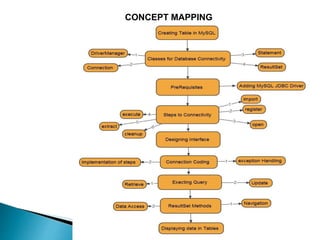
CONCEPT MAPPING
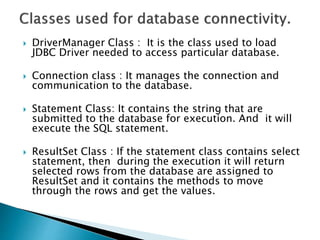
 DriverManager Class : It is the class used to load
JDBC Driver needed to access particular database.
 Connection class : It manages the connection and
communication to the database.
 Statement Class: It contains the string that are
submitted to the database for execution. And it will
execute the SQL statement.
 ResultSet Class : If the statement class contains select
statement, then during the execution it will return
selected rows from the database are assigned to
ResultSet and it contains the methods to move
through the rows and get the values.
 Step1. import packages required for Database
Programming.
 Step2. Register the JDBC Driver.
 Open a connection.
 Execute a Query.
 Extract data from the ResultSet.
 Cleanup the environment.
DESIGN THE INTERFACE AS PER REQUIREMENT
 1. Import the packages required for Database
Programming
 import java.sql.*;
 2. Register the JDBC Driver with Java Program.
 Class.forName(“java.sql.DriverManager");
 3. Open the connection.
 This requires using the
DriverManager.getConnection() method to create
a connection object, which represents the
physical connection with the database. To
connect to the database, we need complete URL
to the database with userid and password of
MySQL.
 4. Execute a query.
 We need to create an object of type Statement or
PreparedStatement for building and submitting
an SQL statement to the database using the
createStatement() function of Connection class.
 in the Statement class executeQuery() method is
needed to execute select statement in SQL and
executeUpdate() method is to execute DML
statements.
 if the SQL command is Select statement we need
a class called ResultSet to store and process the
records.
 The Result set refers to a logical set of records
that are fetched from the database by executing
a query and made available to the application
program.
 next()
 moves the cursor forward one
 first()
 to move to the firts row.
 last()
 move the cursor to the lat lasr row.
 relative(int rows)
 moves the cursor relative to the current position.
 absolute(int rno)
 position the cursor on the rno th rows in the
ResultSet.
 getRow()
 to get the current cursor position.
Extract data from ResultSet
 ResultSet class has several methods to get
the values from the columns from the rows
pointed by the cursor.
 getInt("FieldName");
 getString("FieldName");
getString(fieldNumber);
 getFloat("FieldName");
 getDate("FieldName");
 getLong("FieldName");.
DISPLAYING DATA IN TABLES
 DefaultTableModel dtm=(javax.swing.table.DefaultTableModel)studenttab.getModel();
 int rows=dtm.getRowCount();
 if(rows>0)
 {
 for(int i=0;i<rows;i++)
 {
 dtm.removeRow(0);
 }
 }
 try
 {
 Class.forName("java.sql.DriverManager");
 Connection con=DriverManager.getConnection("jdbc:mysql://localhost:3306/mydbll“,"root","");
 Statement stmt=con.createStatement();
 String str="select * from student";
 ResultSet rs=stmt.executeQuery(str);
 while(rs.next())
 {
 int sid=rs.getInt("stdid");
 String sname= rs.getString("stdname");
int mark= rs.getInt(“mark");
 Object obj[]={sid,sname,mark};
 dtm.addRow(obj);

 }
 }
 catch(Exception e)
 {
 System.out.println(e);
 }
 Executing the select statement having criteria.
 String str=”select * from student where stdid=”+
t1.getText;
 String str=”select * from student where stsname=’ ” +
tname.getText() +” ’ ”;

 To Execute DML commands
 Int sid=Integer.parseInt(t1.getText());
 String sname= tname.getText();
 Int mark=Integer.parseInt(tmark.getText());
 String str=”insert into student values(“+ sid+” , ’ “ +
sname +” ’ , “+ mark +”)”;
 Stmt.executeUpdate(str);
 String str=”delete * from student where stdid=” +
t1.getText() +”)”;
 Stmt.executeUpdate(str);

 String str=”update student set mark =mark+5 where
stdname=’ ” + tname.getText() +” ’ )”;
 Stmt.executeUpdate(str);
Java Databse Connectvity- Alex Jose

Java Databse Connectvity- Alex Jose

  • 1.
  • 2.
  • 4.
     DriverManager Class: It is the class used to load JDBC Driver needed to access particular database.  Connection class : It manages the connection and communication to the database.  Statement Class: It contains the string that are submitted to the database for execution. And it will execute the SQL statement.  ResultSet Class : If the statement class contains select statement, then during the execution it will return selected rows from the database are assigned to ResultSet and it contains the methods to move through the rows and get the values.
  • 6.
     Step1. importpackages required for Database Programming.  Step2. Register the JDBC Driver.  Open a connection.  Execute a Query.  Extract data from the ResultSet.  Cleanup the environment.
  • 7.
    DESIGN THE INTERFACEAS PER REQUIREMENT
  • 8.
     1. Importthe packages required for Database Programming  import java.sql.*;  2. Register the JDBC Driver with Java Program.  Class.forName(“java.sql.DriverManager");  3. Open the connection.  This requires using the DriverManager.getConnection() method to create a connection object, which represents the physical connection with the database. To connect to the database, we need complete URL to the database with userid and password of MySQL.
  • 11.
     4. Executea query.  We need to create an object of type Statement or PreparedStatement for building and submitting an SQL statement to the database using the createStatement() function of Connection class.  in the Statement class executeQuery() method is needed to execute select statement in SQL and executeUpdate() method is to execute DML statements.  if the SQL command is Select statement we need a class called ResultSet to store and process the records.  The Result set refers to a logical set of records that are fetched from the database by executing a query and made available to the application program.
  • 12.
     next()  movesthe cursor forward one  first()  to move to the firts row.  last()  move the cursor to the lat lasr row.  relative(int rows)  moves the cursor relative to the current position.  absolute(int rno)  position the cursor on the rno th rows in the ResultSet.  getRow()  to get the current cursor position.
  • 13.
    Extract data fromResultSet  ResultSet class has several methods to get the values from the columns from the rows pointed by the cursor.  getInt("FieldName");  getString("FieldName"); getString(fieldNumber);  getFloat("FieldName");  getDate("FieldName");  getLong("FieldName");.
  • 15.
  • 16.
     DefaultTableModel dtm=(javax.swing.table.DefaultTableModel)studenttab.getModel(); int rows=dtm.getRowCount();  if(rows>0)  {  for(int i=0;i<rows;i++)  {  dtm.removeRow(0);  }  }  try  {  Class.forName("java.sql.DriverManager");  Connection con=DriverManager.getConnection("jdbc:mysql://localhost:3306/mydbll“,"root","");  Statement stmt=con.createStatement();  String str="select * from student";  ResultSet rs=stmt.executeQuery(str);  while(rs.next())  {  int sid=rs.getInt("stdid");  String sname= rs.getString("stdname"); int mark= rs.getInt(“mark");  Object obj[]={sid,sname,mark};  dtm.addRow(obj);   }  }  catch(Exception e)  {  System.out.println(e);  }
  • 17.
     Executing theselect statement having criteria.  String str=”select * from student where stdid=”+ t1.getText;  String str=”select * from student where stsname=’ ” + tname.getText() +” ’ ”;   To Execute DML commands  Int sid=Integer.parseInt(t1.getText());  String sname= tname.getText();  Int mark=Integer.parseInt(tmark.getText());  String str=”insert into student values(“+ sid+” , ’ “ + sname +” ’ , “+ mark +”)”;  Stmt.executeUpdate(str);  String str=”delete * from student where stdid=” + t1.getText() +”)”;  Stmt.executeUpdate(str);   String str=”update student set mark =mark+5 where stdname=’ ” + tname.getText() +” ’ )”;  Stmt.executeUpdate(str);