1
2015/2016
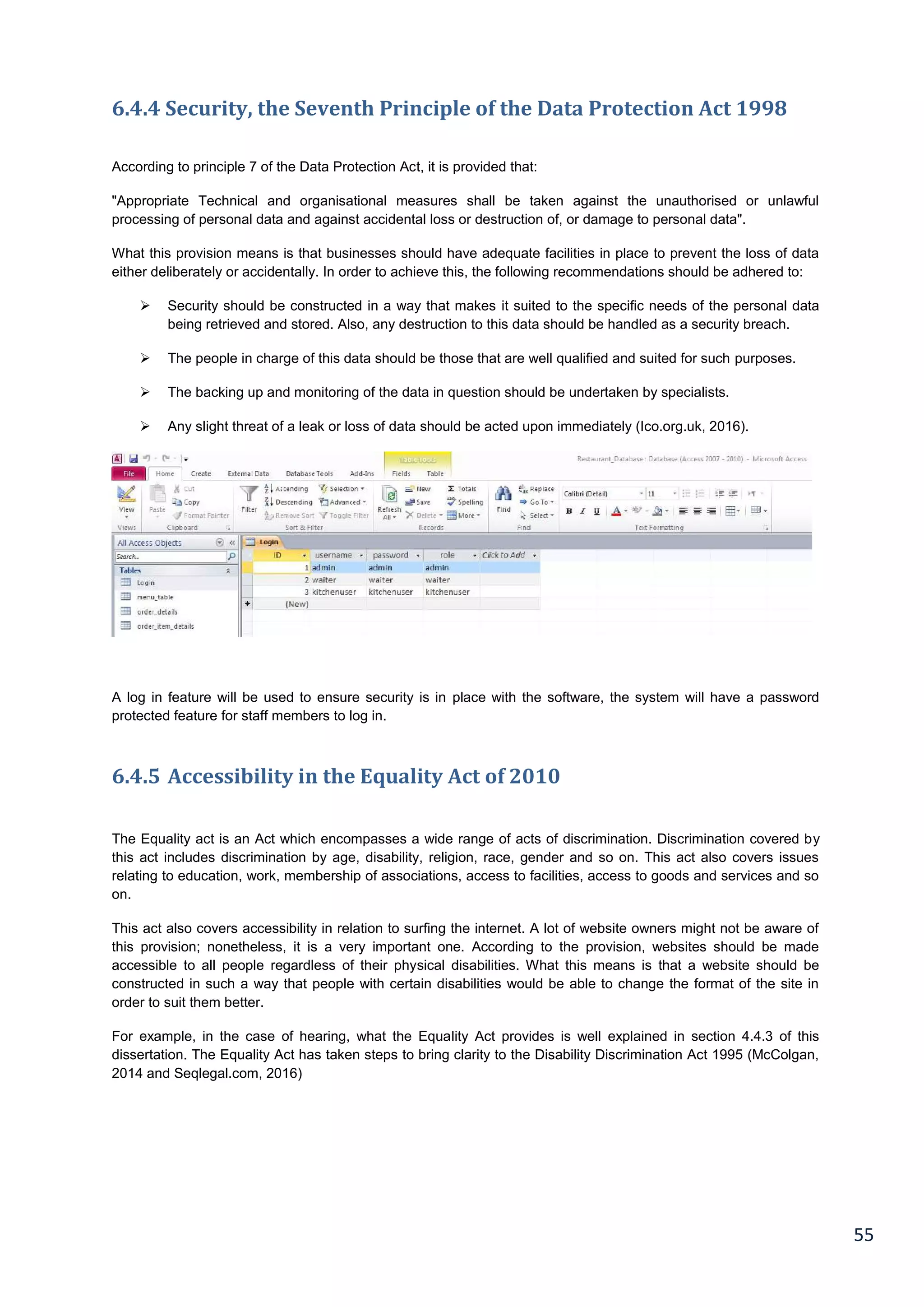
2
The candidate confirms that the following have been submitted:
Items Format Recipient(s) & Date
Deliverable 1 Proposal 17/10/2015
Deliverable 2 Report 22/05/2016
Deliverable 3 Application System 22/05/2016
Deliverable 4 VIVA presentation 09/05/2016
Type of project: Restaurant Management System
Deliverables:
 Functioning software application
 Literature Review
 List of (non) functional requirement
 Schematic models (analyses +design)
 Evaluation findings
 Dissertation report.
3
ABSTRACT
This part of the chapter gives an introduction to the project by defining the problems encountered by restaurants,
the aim of this objective is to introduce a system that minimises the problems and have a system that leads to an
increase in profits.
There are present existing answers for Point-of-Sale systems which are sold with the required expensive hardware,
in this manner for any new organisations hoping to work to a financial plan, the more advanced programming and
equipment arrangements are out of their extension. Inside of the restaurant sector, clients are prone to come back
to the restaurant upon the service they get, for example, receiving quality food, good customer service such as
delivering the food on time. However, the issue emerges in the event that they needed to wait for an irrational
amount of time which results to the food being cold or perhaps there has been a mistake in the order, or a misstep
in the request. These issues make it unlikely for the client to return.
4
ACKNOWLEDGEMENTS
First I would like to thank my supervisor Harjinder Rahnu for his time and support during the course of this project
as well as my first and second year of my course. Harjinder has been always been helpful to everyone during the
years. He made his lessons very enjoyable and serious at the same time, I’ve never heard any negative
comments about Harjinder. His enthusiasm and passion made learning easier for me as well as my friends who
also talk good of him and we will always remember him
5
Contents
ABSTRACT..................................................................................................................................................................................................3
ACKNOWLEDGEMENTS .......................................................................................................................................................................4
1.1 Chapter Overview.................................................................................................................................................................9
1.2 The Problem..............................................................................................................................................................................9
1.3 Ethical Issues in Software Development ......................................................................................................................9
1.4 Project Proposal ................................................................................................................................................................... 10
1.5 Aim and Objectives.............................................................................................................................................................. 10
1.6 Research & Development Methodology - (Software Development Life Cycle)........................................... 11
1.8 Resources................................................................................................................................................................................. 12
Platform choice ..................................................................................................................................................................................... 12
Software choice..................................................................................................................................................................................... 12
1.9 Deliverables............................................................................................................................................................................ 13
1.9.1 Schedule and Project Management................................................................................................................................ 13
1.9.2 Activity List............................................................................................................................................................................. 14
1.9.3 Gantt Chart............................................................................................................................................................................. 15
1.9.4 Work Break-Down Structure......................................................................................................................................... 16
1.9.5 Risk Matrix............................................................................................................................................................................. 17
2.1 Literature Review ............................................................................................................................................................. 18
2.2 E-commerce and E-business (Challenges they face)............................................................................................ 18
2.3 Present functions in generic website applications ............................................................................................... 20
2.4 Real life website application example ........................................................................................................................ 20
Restaurant Management Ordering System............................................................................................................................... 22
2.5 Systems development life cycle..................................................................................................................................... 23
2.6 Different types of methodologies.................................................................................................................................. 24
2.7 Selected hardware for the prototype.......................................................................................................................... 26
2.8 Software chosen for the prototype............................................................................................................................... 26
3.1 Research Methods & Project Management ........................................................................................................ 27
3.2 Definition of primary and secondary data................................................................................................................ 27
3.3 Pros and cons of primary data ....................................................................................................................................... 28
3.4 Pros and cons of secondary data................................................................................................................................... 28
3.5 Formal methods of collecting data............................................................................................................................... 28
3.5.1 Observations .......................................................................................................................................................................... 28
3.5.2 Questionnaires ...................................................................................................................................................................... 29
3.5.3 Document Analysis.............................................................................................................................................................. 29
3.5.4 Focus Groups.......................................................................................................................................................................... 30
3.6 Formal Research Methods ............................................................................................................................................... 30
Ethnographic.......................................................................................................................................................................................... 30
6
Action research ..................................................................................................................................................................................... 31
Use of Systematic Approach:........................................................................................................................................................... 32
3.6.1 Data Collection Methods used for the completion of this project ....................................................................... 32
3.6.2 Use of Systematic Approach................................................................................................................................................. 32
4.1 Project Management........................................................................................................................................................ 33
4.1.1 Activity List............................................................................................................................................................................. 34
4.1.2 Gantt Chart.............................................................................................................................................................................. 35
4.1.3 Work Break-Down Structure.......................................................................................................................................... 36
4.1.4 Risk Matrix.............................................................................................................................................................................. 37
5.1 Analysis & Design.............................................................................................................................................................. 38
5.2 System Analysis .................................................................................................................................................................... 38
5.2.1 System Design............................................................................................................................................................................. 38
5.3 Functional and Non-functional requirements......................................................................................................... 39
5.4 Data Method for Collecting Functional Requirements........................................................................................ 39
5.4.1 Questionnaires ........................................................................................................................................................................... 39
5.4.2 Focus Groups/Workshops ............................................................................................................................................... 39
5.4.3 Interviews .................................................................................................................................................................................... 39
5.4.4 How Functional and Non Functional Requirements are collected: .................................................................... 40
5.4.5 Formal Methods of Data Collection for Functional Requirements................................................................. 40
5.5 Definition of Terms ............................................................................................................................................................. 40
5.5.1 Use Case.................................................................................................................................................................................... 40
5.5.2 Class Diagram ........................................................................................................................................................................ 40
5.5.3 Activity Diagram........................................................................................................................................................................ 40
Functional requirements for the restaurant:........................................................................................................................... 41
Non-Functional requirements for the restaurant: ................................................................................................................ 41
5.6 Business case statement ................................................................................................................................................... 42
5.7 Business case statement [2]............................................................................................................................................ 43
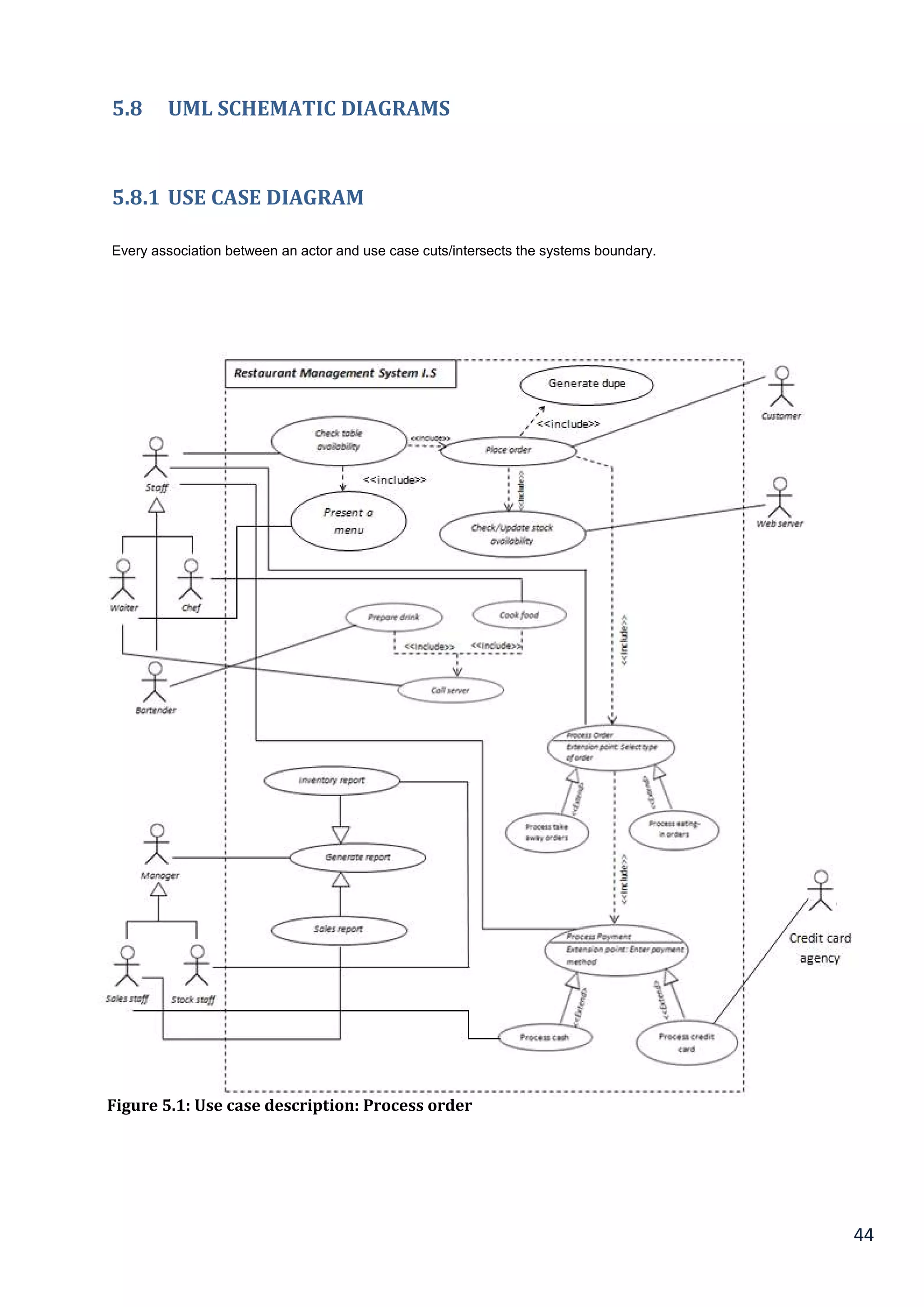
5.8 UML SCHEMATIC DIAGRAMS......................................................................................................................................... 44
5.8.1 Use case diagram.................................................................................................................................................................. 44
5.8.2 Use Case Description.......................................................................................................................................................... 45
5.8.3 Class Diagram ........................................................................................................................................................................ 46
5.8.4 Activity Diagram................................................................................................................................................................... 46
5.8.5 Sequence Diagram............................................................................................................................................................... 48
5.9 Web Interface Design ......................................................................................................................................................... 49
5.9.1 Design Principles for User Interface............................................................................................................................ 49
5.9.2 Nielsen’s Heuristics............................................................................................................................................................. 49
5.9.3 Mock screens – Balsamiq.................................................................................................................................................. 50
5.9.4 Accessibility (DDA ACT 1995 & EQUALITY LEGILSATION).............................................................................. 51
Disability Discrimination Act 1995.............................................................................................................................................. 51
Equality Legislation............................................................................................................................................................................. 51
7
5.9.5 Measures to address security......................................................................................................................................... 52
5.9.6 Measures to Address Accessibility............................................................................................................................... 52
6.1 Law and Ethics..................................................................................................................................................................... 53
6.2 Definition of Law.................................................................................................................................................................. 53
6.3 The Definition of Ethics..................................................................................................................................................... 53
6.4 Quality of Fitness for Purpose........................................................................................................................................ 54
6.4.1 What is meant by Quality of Fitness for Purpose?................................................................................................. 54
6.4.2 Sales of Goods Act 1979 (h/w)....................................................................................................................................... 54
6.4.3 Sale (SUPPLY) of Goods and Services Act 1983 (s/w) ........................................................................................ 54
6.4.4 Security, the Seventh Principle of the Data Protection Act 1998.................................................................... 55
6.4.5 Accessibility in the Equality Act of 2010 ................................................................................................................... 55
6.5 The Definition of Professionalism by the BCS and ACM Codes........................................................................ 56
6.6 Teleological and Deontological Principles in the Definition of Ethics......................................................... 57
7.1 Testing ..................................................................................................................................................................................... 58
7.2 Testing Techniques ............................................................................................................................................................. 58
7.3 Unit Testing ............................................................................................................................................................................ 58
7.4 Usability Testing................................................................................................................................................................... 58
7.5 Usability Inspection ............................................................................................................................................................ 58
6.6 Testing Analysis.................................................................................................................................................................... 59
7.7 Chapter Summary................................................................................................................................................................ 59
7.8 Testing features .................................................................................................................................................................... 60
7.9 Test results.............................................................................................................................................................................. 61
8.1 Evaluation.............................................................................................................................................................................. 62
8.2 Further Development......................................................................................................................................................... 62
8.3 Client feedback...................................................................................................................................................................... 62
8.3.1 Graphical User Interface (GUI)....................................................................................................................................... 62
8.3.2 Table Management.............................................................................................................................................................. 62
8.3.3 Cooking Instructions .......................................................................................................................................................... 62
8.3.4 Online Management............................................................................................................................................................ 63
8.3.5 Reflection – What would have been done different.............................................................................................. 63
8.3.6 Modifications/Enhancements ........................................................................................................................................ 64
8.4 Project Experience - Developed Skills ........................................................................................................................ 65
8.5 Chapter Summary ............................................................................................................................................................. 65
8
List of Figures....................................................................................................................................................................................... 69
List of Tables ........................................................................................................................................................................................ 69
APPENDIX A............................................................................................................................................................................................ 70
APPENDIX B............................................................................................................................................................................................ 71
APPENDIX C............................................................................................................................................................................................ 72
APPENDIX D ........................................................................................................................................................................................... 73
9
Chapter 1
Introduction
1.1 Chapter Overview
This part of the chapter gives a prologue to the project by defining the issues experienced by restaurants, the aim
of this objective is to introduce a system that minimises the problems and have a system that leads to an increase
in profits.
1.2 The Problem
There are present existing answers for Point-of-Sale systems which are sold with the required expensive hardware,
in this manner for any new organisations hoping to work to a financial plan, the more advanced programming and
equipment arrangements are out of their extension. Inside of the restaurant sector, clients are prone to come back
to the restaurant upon the service they get, for example, receiving quality food, good customer service such as
delivering the food on time. However, the issue emerges in the event that they needed to wait for an irrational
amount of time which results to the food being cold or perhaps there has been a mistake in the order, or a misstep
in the request. These issues make it unlikely for the client to return.
The lack of efficiency in the system could lead to business failure. Therefore an answer for this issue would be to
minimise mistakes inside of the bill and the order line. Another solution is to reduce delays; this comes through
team work and communication within the team.
1.3 Ethical Issues in Software Development
These are a list of ethical issues that software companies and developers face:
 Using open-source code without properly crediting the source
 Consuming illegal software to achieve and accomplish tasks
 Recoding shifts in business requirements
 Not addressing business requirements
 Producing a workable prototype on time and within budget constraints
 Safeguarding and protecting data privacy
These are a list of ethical issues concerning the completion of an undergraduate project:
 Protection and obscurity of participants
 Break of certainty/confidence, whereby the engineer might have access to commercially delicate data
concerning the customer
 To get the consent of participants and educate them of the part they are to play in the project
Order logging is an important feature for restaurants who work around a software based system. Many
restaurants in 2015 tend to deliver food through apps. When dealing with customers through app software, “it is
essential to use their information correctly and not falsely advertise their information” (Data Protection Act 1998).
10
1.4 Project Proposal
The point of this project is to outline and make an restaurant management system using most of the systems and
techniques from the field guaranteeing that no common slip-ups are repeated. This improves client fulfilment which
results to profit gain.
 There are recorded proposed features that can be found in table 1.1.
The main objective is to maximise profit by increasing efficient and decreasing the mistakes that take place in the
kitchen, this will be done without compromising customer satisfaction. At this moment of time, there are still
numerous restaurants that still use a paper-based system to get messages across between the restaurant and the
kitchen, this way of communication is one of the least efficient methods. However, this approach may be
implemented and designed in a successful profitable restaurant but there are numerous problems which might be
seen as reducing the restaurant's efficiency, they are the following problems:
 The lack of communication that is caused by handwriting
 Uncontrolled order logging(poor order taking)
 Unproductive communication between restaurant & kitchen
 Faults with order tracking and lack of time management
 Lack of good quality stock management
 Limited statistical output
1.5 Aim and Objectives
In order to complete this undergraduate project the following aim and objectives have been formulated and stated,
as follows:
Aim: To develop an IS application for a Small to Medium Sized Enterprise [SME] restaurant
Objectives:
 Conduct a literature review in order to ascertain what the salient issues are concerning the analysis, design
and implementation of IS application for SMEs and in particular Restaurants
 Use primary research methods in order to collect functional and non-functional requirements from the client
[restaurant business]
 Complete an analysis and design of the IS application.
 Complete testing, implementation and evaluation of the IS application
 Complete a self-evaluation of the under graduate project experience
11
1.6 Research & Development Methodology - (Software Development Life Cycle)
A mixture of quantitative and qualitative strategies will be utilised to get rich photo of the marvels; quantitative
instrument for the choice quality, pre-and post-season surveys and meet. Pugnacious exploration will assume a
part in this examination since it creates of new thoughts. Every strategy has its focal points and hindrances,
utilising distinctive sorts of exploration techniques will give me a wealthier comprehension than picking up from
one technique alone, and additionally supplementing every strategy with different sorts of methodologies, also
known as data triangulation. Data triangulation is the point at which the examination crosses confirm the same
data. When two or more sources of information are gathered that encourages approval of information through
cross verification is called data triangulation (Write.com, 2015).
The meaning of software development methodology is when a system is used to plan the design of a software
system which controls the process the growth and development. According to (Storey, 2009) software
development methodologies first emerged in the 1960’s with systems development life cycles which was known to
be the first formalised methodology which is still useful in 2015.
The provisional platform choice is Visual Basic which is one of the agile methodologies using an iterative based
system. This choice will be substantiated by an evaluation of alternative software choices and methodologies in
the literature review.
Each iteration obligates around the development cycle that is similar to the waterfall model which consists of:
 Preparation/Design
 Requirement analysis
 Design
 Development & Testing
In every cycle, the association's clients are given a demo/exhibition to promote helpful criticism and feedback. This
methodology diminishes dangers and grants the project to acclimate to request redresses quickly with least cost.
1.7 Proposed Features
This table displays the proposed features of the system and the actions needed to be taken.
This list will be further added to by the collection of more functional and non-functional requirements from the client
by using formal methods of primary data.
Table 1 – Proposed Features
12
1.8 Resources
1.9 Functional Requirements
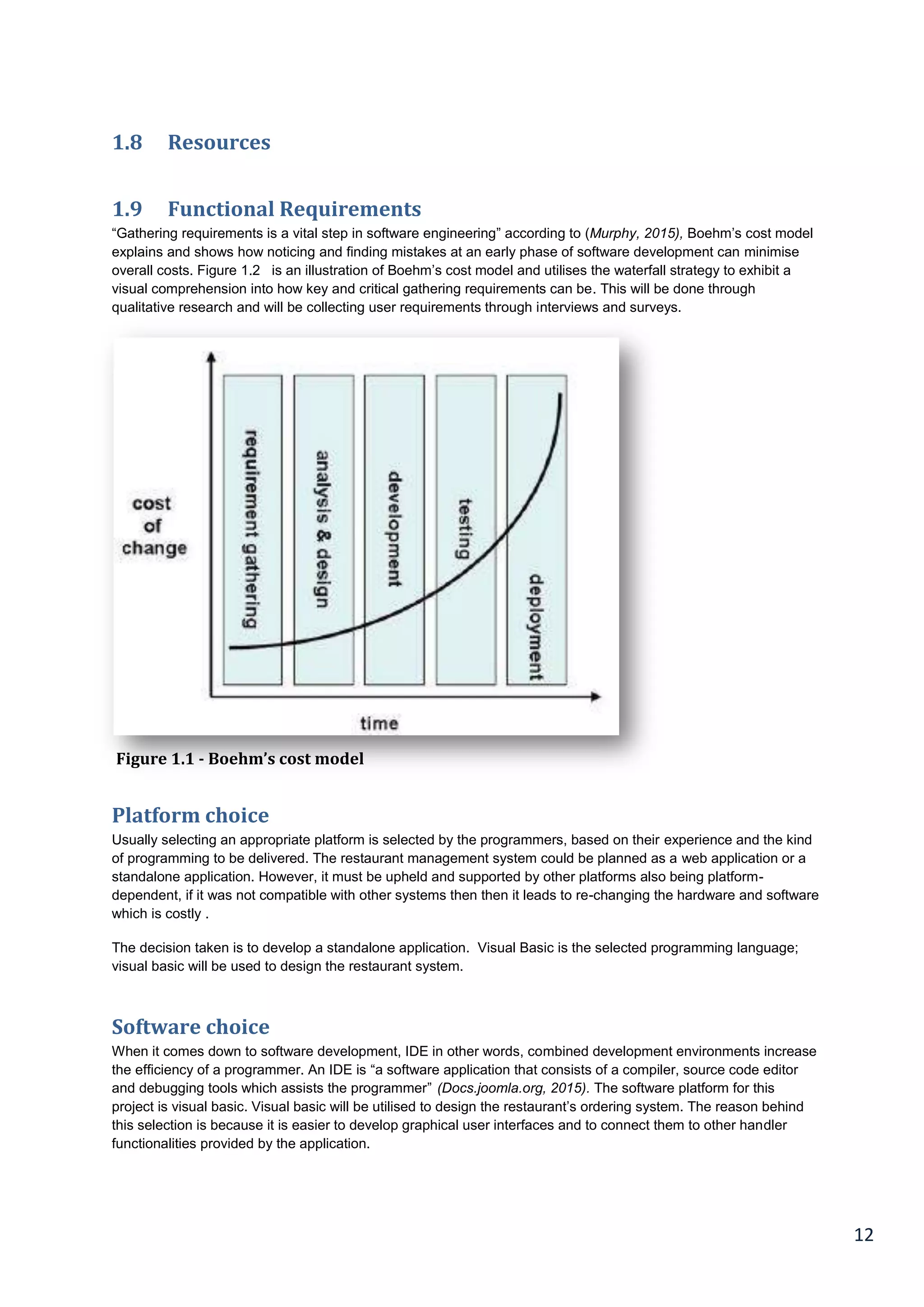
“Gathering requirements is a vital step in software engineering” according to (Murphy, 2015), Boehm’s cost model
explains and shows how noticing and finding mistakes at an early phase of software development can minimise
overall costs. Figure 1.2 is an illustration of Boehm’s cost model and utilises the waterfall strategy to exhibit a
visual comprehension into how key and critical gathering requirements can be. This will be done through
qualitative research and will be collecting user requirements through interviews and surveys.
Platform choice
Usually selecting an appropriate platform is selected by the programmers, based on their experience and the kind
of programming to be delivered. The restaurant management system could be planned as a web application or a
standalone application. However, it must be upheld and supported by other platforms also being platform-
dependent, if it was not compatible with other systems then then it leads to re-changing the hardware and software
which is costly .
The decision taken is to develop a standalone application. Visual Basic is the selected programming language;
visual basic will be used to design the restaurant system.
Software choice
When it comes down to software development, IDE in other words, combined development environments increase
the efficiency of a programmer. An IDE is “a software application that consists of a compiler, source code editor
and debugging tools which assists the programmer” (Docs.joomla.org, 2015). The software platform for this
project is visual basic. Visual basic will be utilised to design the restaurant’s ordering system. The reason behind
this selection is because it is easier to develop graphical user interfaces and to connect them to other handler
functionalities provided by the application.
Figure 1.1 - Boehm’s cost model
13
1.9 Deliverables
 Functioning software application
 Literature Review
 List of (non) functional requirement
 Schematic models (analyses +design)
 Evaluation findings
 Dissertation report.
1.9.1 Schedule and Project Management
Project management is the idea of implementing knowledge, skills and methods to perform projects successfully
and proficiently Pmi.org, (2015).
A project can be defined as a way of making an effort of executing a plan in order to achieve an objective which is
set out. This can also be put into perspective as outputs, outcomes or benefits. A project is seen successful if
objectives are met. However, it must be in accordance to their conditions (time and budget must be agreed upon).
The method and procedure of developing and designing a new software application is tedious and takes a lot of
effort. The design, development and the release of the final product all takes time (Pinto and Mantel, 1990). Since
there is a limited time and a small budget to discharge a software package, software organisation
designers/developers come up short because of being under pressure to release a software bug-free product on
time and at a reasonable and affordable price According to this book, (Teach Yourself Extreme Programming in 24
hours, 2013), the main reasons for software project failure were:
 Unfinished or changing system requirement
 Lack of resources
 Lack of technical support
 Poor planning
 Limited support from senior management
 Lack of familiarisation to the new technology
 Inadequate or lack of project management methodology
(Scribd, 2015)
14
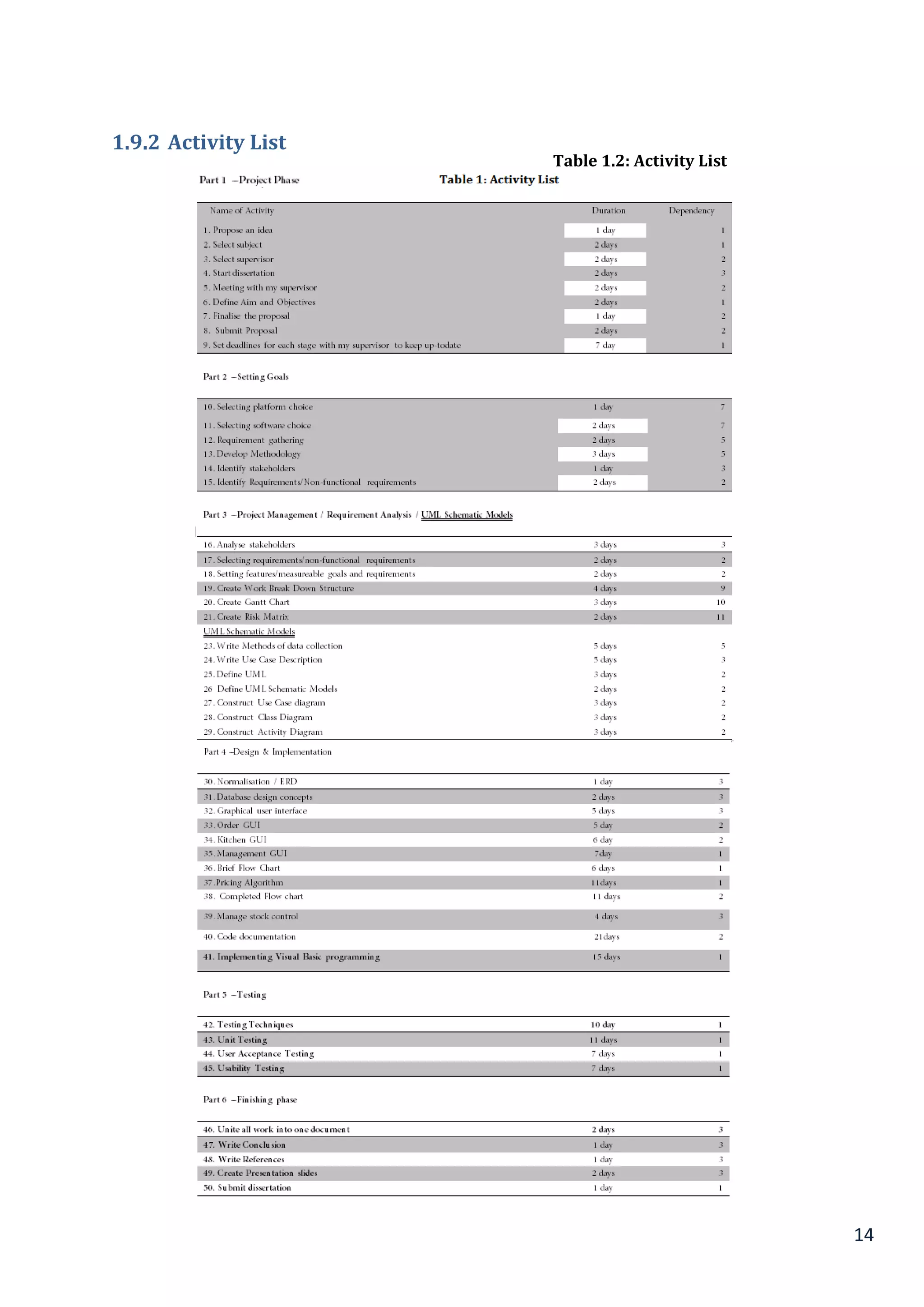
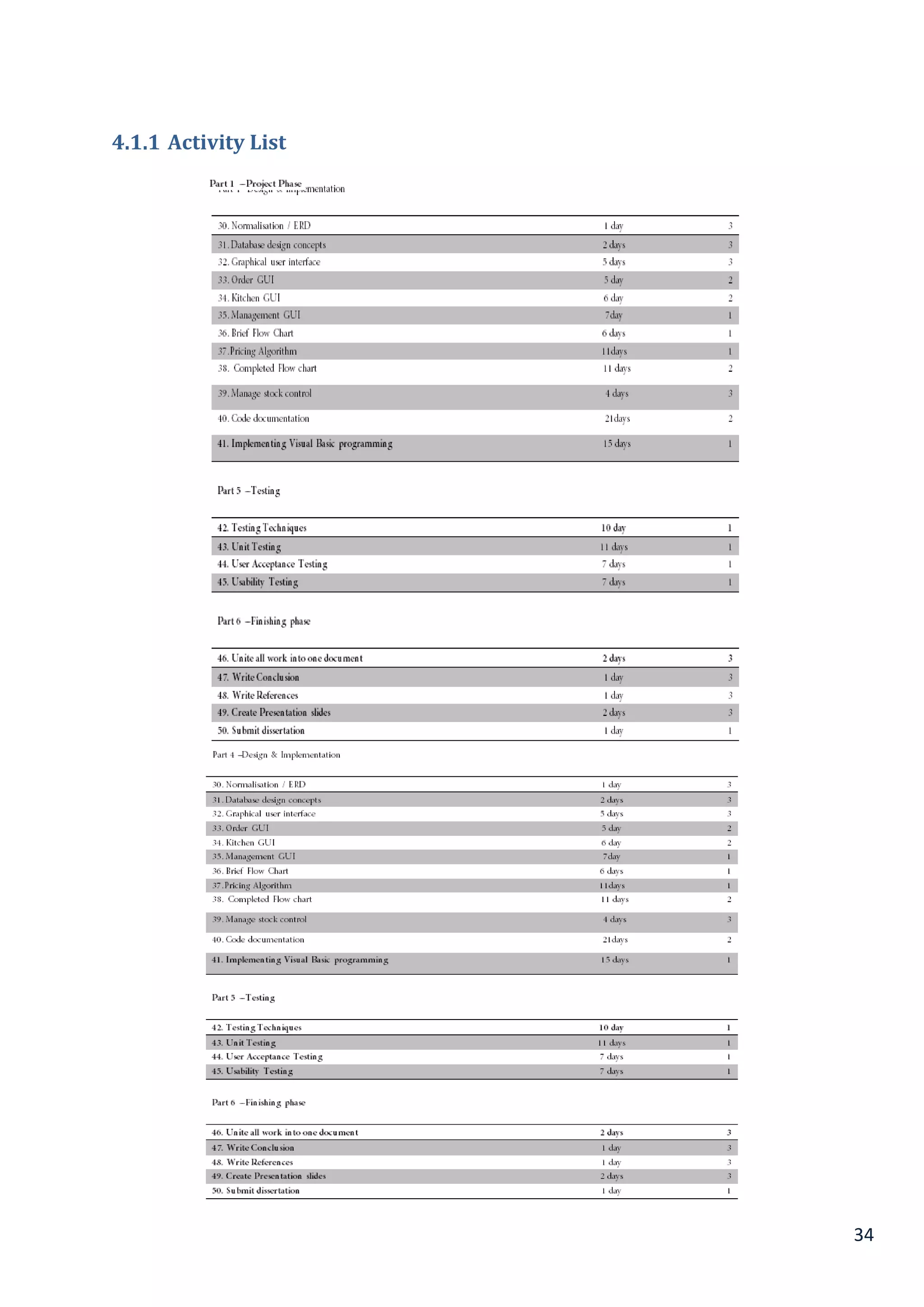
1.9.2 Activity List
Table 1.2: Activity List
List
15
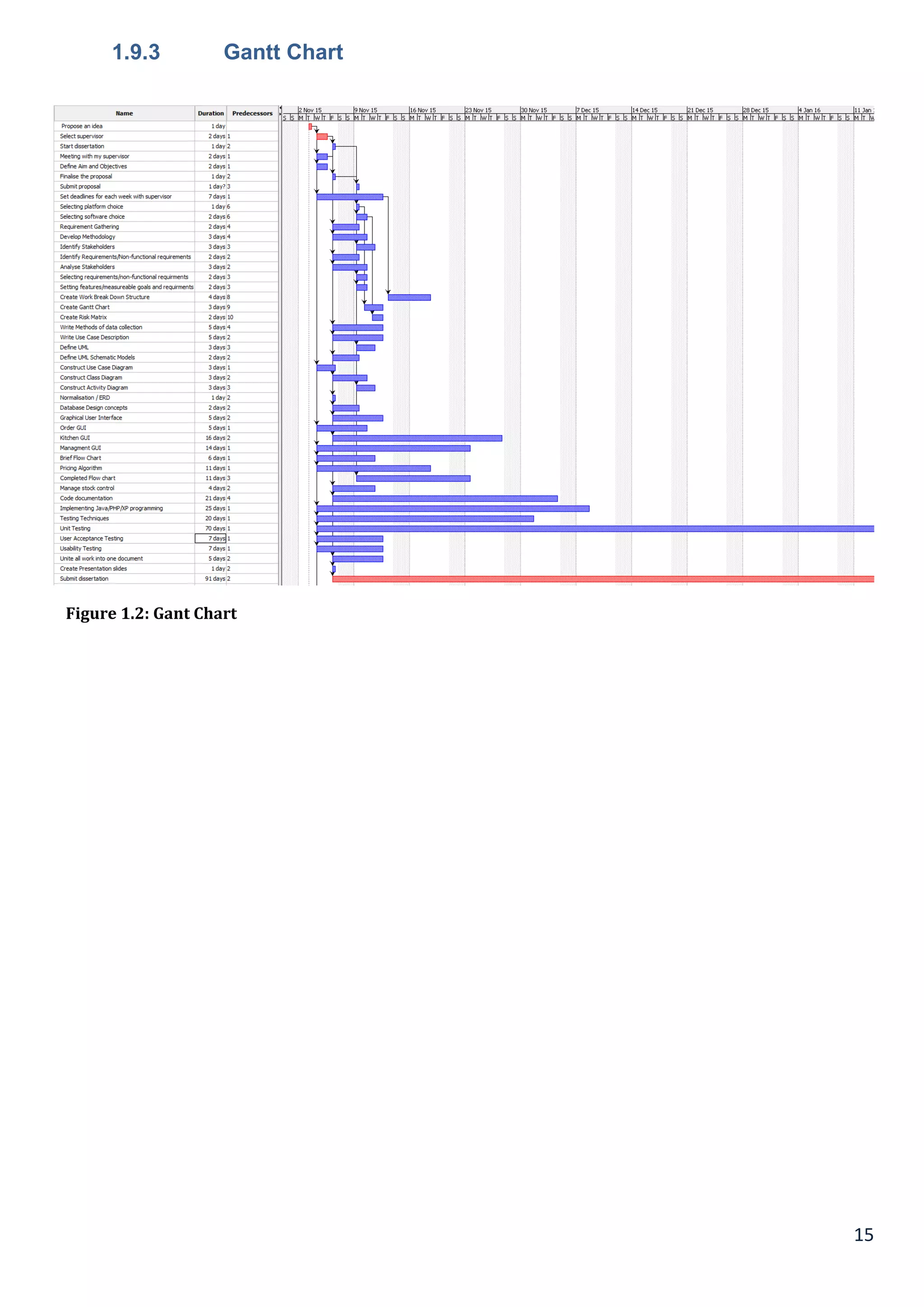
1.9.3 Gantt Chart
Figure 1.2: Gant Chart
16
1.9.4 Work Break-Down Structure
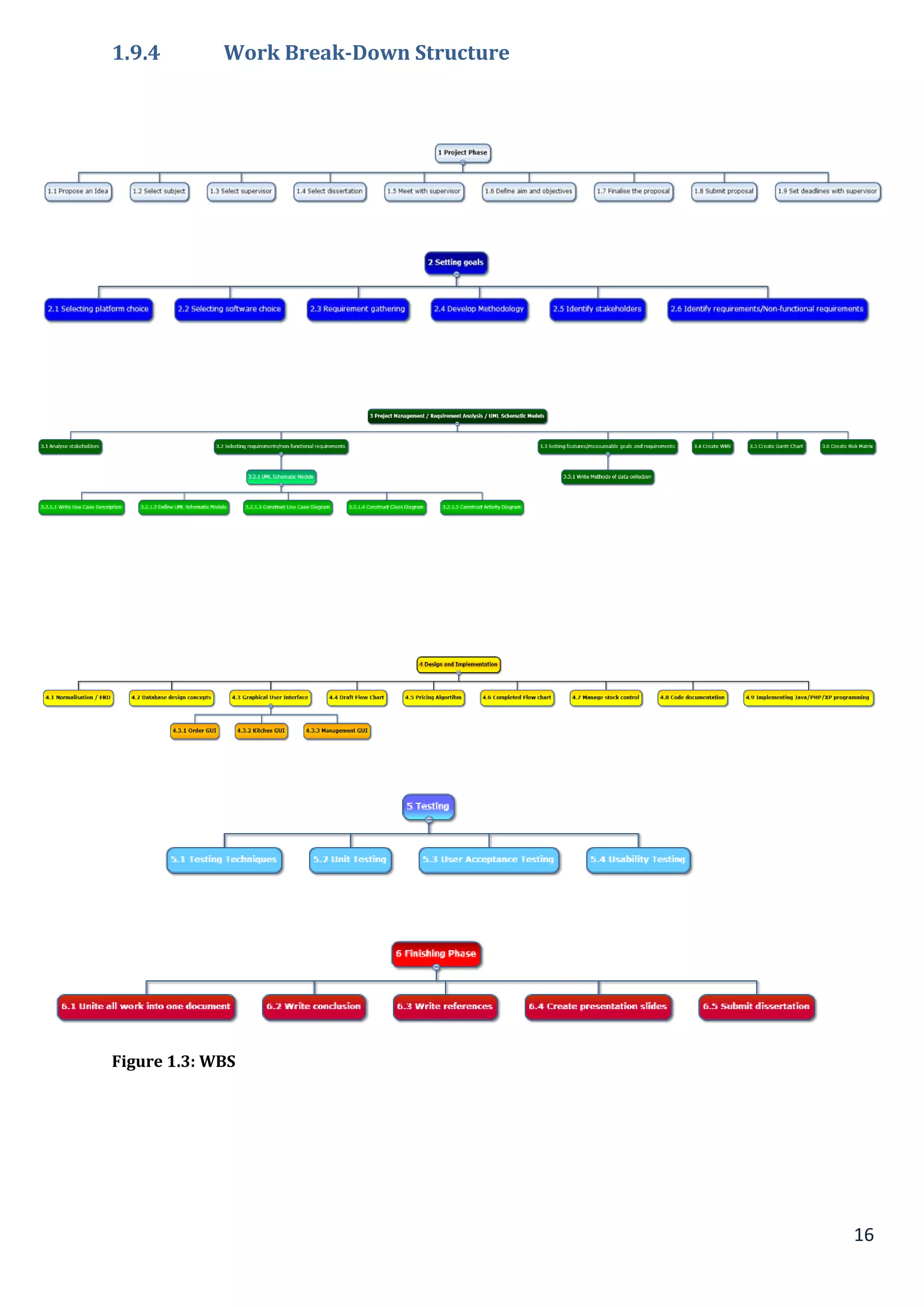
Figure 1.3: WBS
17
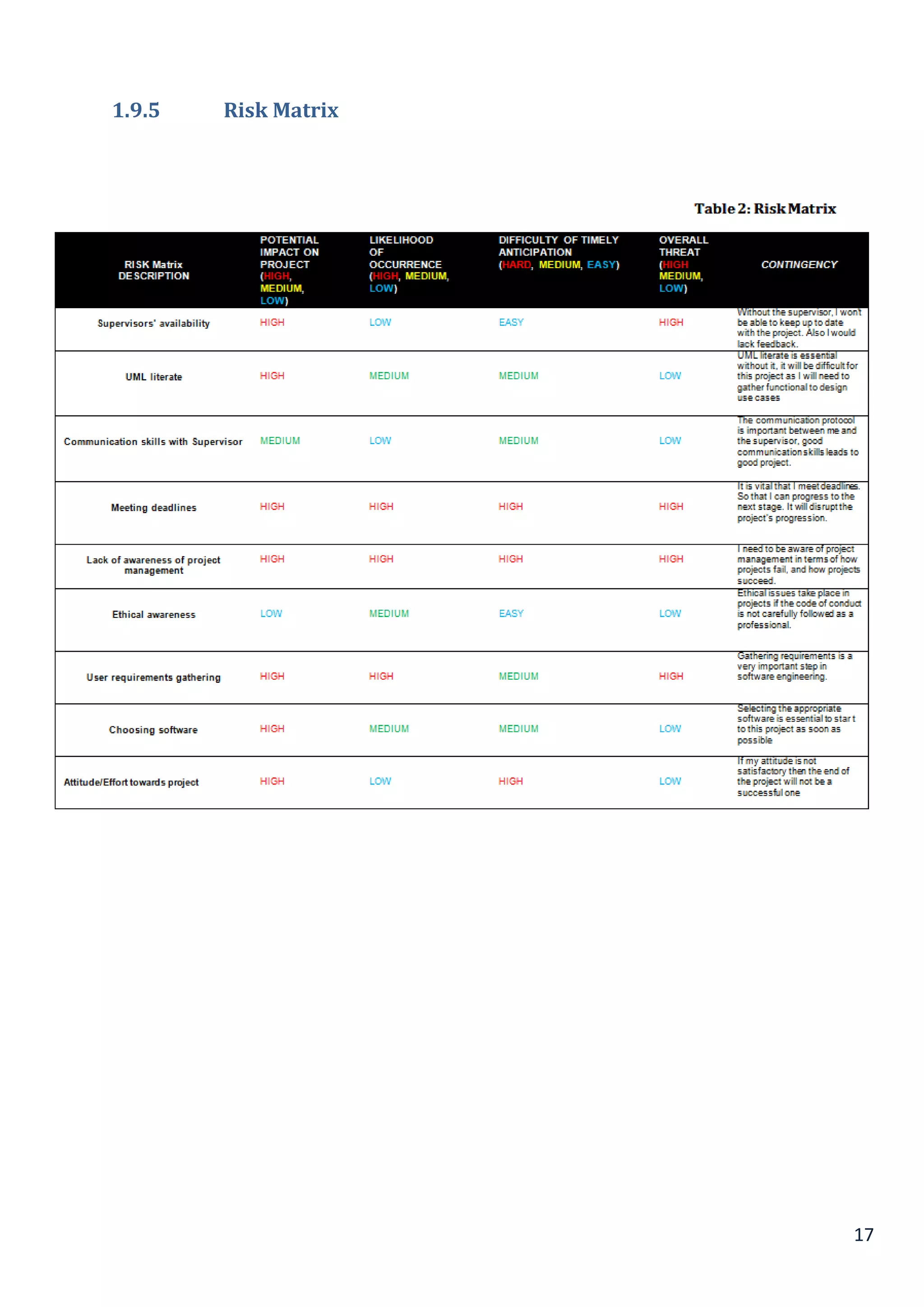
1.9.5 Risk Matrix
18
Chapter 2
2.1 Literature Review
This part of the chapter in the section gives knowledge to Point of Sale (POS) system comparative in nature to the
one being created in this project. In addition, this chapter delivers an introduction to the important of requirement
gathering and will discuss different type of methodologies. Arguments will be made on as to why e-commerce and
e-commerce is important. This section of the report will consist of a discussion on the platform and software
chosen for this project.
2.2 E-commerce and E-business (Challenges they face)
E-commerce handles many aspects on the internet such as product research, the exchange of business
documents over the internet. The definition of e-commerce in its simplest form is buying and selling of goods or
services over electronic systems (Referenceforbusiness.com, 2016). The history of e-commerce is short but is
rather impressive, it actually dates back to the 1970s when they sent the first business document over an
electronic wire. But as supposed to our definition it started back early in the 1990s, this is when the World Wild
Web came into surface and also when the US Government passed a legislation in 1991 to delete the past of credit
card information online (Greenstein and Feinman, 2000).
According to Coleman Parkes’ survey (Parkes, 2013), the research shows that the revenue generated by e-
commerce is expected to increase by an average of 6% over the next year and that two thirds of business-to-
business organisations already sell online. In addition, the research also shows that 21-40% of a business’s
contributes resulted to e-commerce and that number is expected to increase fast over up-coming years.
Within a few ticks, an exchange or an order can be placed and finished through the internet easily. For example, a
managing an account exchange should be possible through the internet inside of couple of minutes, whereas the
customary keeping money method might take up to hours. This proves that e-commerce is beneficial to both
consumer and business because payment and documentation can be completed with greater efficiency.
To put it plainly, with no real difficulties, E-commerce will definitely continue to establish and develop in the
worldwide market and it will become an essential business arrangement for any organisation that is hoping to
survive and compete in any competition they might face in the ever evolving market. (Webdesign.vinsign.com,
2016)
"Time plays a key part to both the business and consumers”. From a business perspective, with less time spent
during every exchange, more exchange can be proficient around the same time. With respect to the buyer, they
will spare time during their exchange.
To both the shoppers and business, availability is a critical key component for deciding the entire business. From a
business point of view; e-commerce gives better network to its potential client clients on the grounds that their site
can be gotten to for all intents and purposes from any area through the web. From a client point of view; e-
business is a great deal more advantageous for them as they can browse whole diverse directories of catalogues
of lists with no bother.
E-business is a blend of business programming keeping in mind the end goal to make some sort of estimations of
for its customers and accomplices and the enterprise itself. E-business is a more extensive term than e-commerce;
it is regularly taken to mean the coordination of electronic process past buying and offering exercises, for instance;
for example; full integration into associations’ enterprise resource or different business instruments to embrace
business procedures by keeps an eye on of electronic exchanges end-to-end (Papazoglou and Ribbers, 2006, p3).
This incorporates virtual organisations and in addition the conventional organisations; this comprises of offering
and purchasing client administration, CRM, joint effort, research advancement, correspondence and HRM
(Heinonen, 2013). Key process, for example, CRM, SCM and ERP these parts of procedure in sites implies
enterprise clients can accomplish more than submitting a request and paying for it, they can now track order from
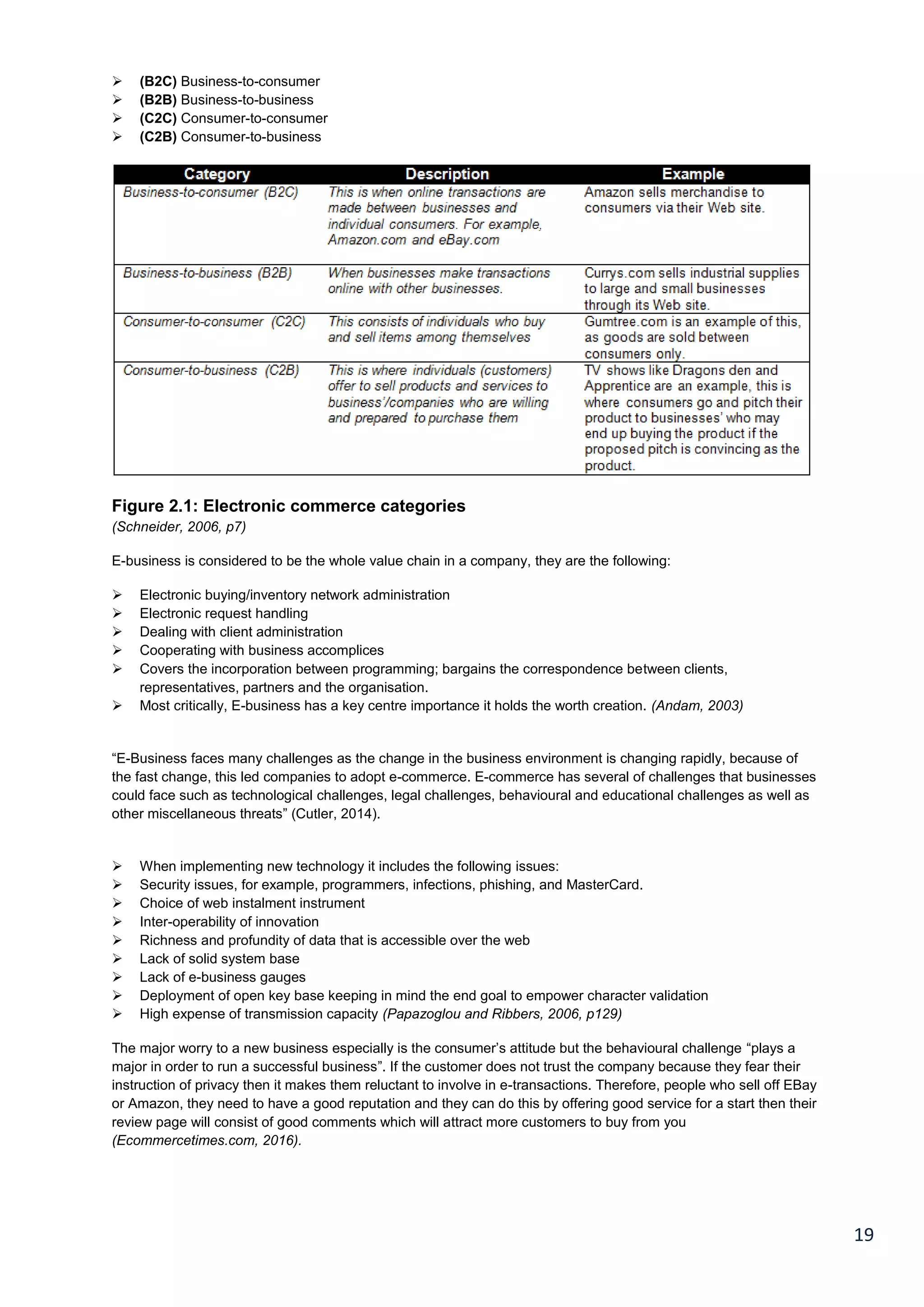
placement to deliver. Figure 2 summarises the four categories of electronic commerce.
19
 (B2C) Business-to-consumer
 (B2B) Business-to-business
 (C2C) Consumer-to-consumer
 (C2B) Consumer-to-business
Figure 2.1: Electronic commerce categories
(Schneider, 2006, p7)
E-business is considered to be the whole value chain in a company, they are the following:
 Electronic buying/inventory network administration
 Electronic request handling
 Dealing with client administration
 Cooperating with business accomplices
 Covers the incorporation between programming; bargains the correspondence between clients,
representatives, partners and the organisation.
 Most critically, E-business has a key centre importance it holds the worth creation. (Andam, 2003)
“E-Business faces many challenges as the change in the business environment is changing rapidly, because of
the fast change, this led companies to adopt e-commerce. E-commerce has several of challenges that businesses
could face such as technological challenges, legal challenges, behavioural and educational challenges as well as
other miscellaneous threats” (Cutler, 2014).
 When implementing new technology it includes the following issues:
 Security issues, for example, programmers, infections, phishing, and MasterCard.
 Choice of web instalment instrument
 Inter-operability of innovation
 Richness and profundity of data that is accessible over the web
 Lack of solid system base
 Lack of e-business gauges
 Deployment of open key base keeping in mind the end goal to empower character validation
 High expense of transmission capacity (Papazoglou and Ribbers, 2006, p129)
The major worry to a new business especially is the consumer’s attitude but the behavioural challenge “plays a
major in order to run a successful business”. If the customer does not trust the company because they fear their
instruction of privacy then it makes them reluctant to involve in e-transactions. Therefore, people who sell off EBay
or Amazon, they need to have a good reputation and they can do this by offering good service for a start then their
review page will consist of good comments which will attract more customers to buy from you
(Ecommercetimes.com, 2016).
20
2.3 Present functions in generic website applications
Web programs are a software application that permits clients to recover information and interface with substance
that is situated on site pages inside of the site (Papazoglou and Ribbers, 2006, p129). Advanced sites allow the
catch, stockpiling, handling and transmission of sensitive client information for instance, personal details, credit
card and other government managed savings information and so forth (Russo et al., 2016).. This kind of
information allows the user to use the service for immediate or recurrent purposes; these actions are done via web
applications. Web application features that shape modern websites and deliver communication with prospects and
customers;
 Webmail,
 Login pages,
 Support and product request forms
 Shopping basket
 Content Management Systems
Most businesses have numerous of web-based applications which functional size is required to be determined.
The following guidelines are derived from the Function Point Analysis. It was first made public by Allan Albrecht of
IBM in 1979 (Russo et al., 2016). The FPA technique enumerates the functions contained within software that
have a meaning to software users. The web is “used as a channel for many types of businesses whether it’s a
small organisation or large: over 1 billion users of internet use e-commerce spending accounted for $102.1 billion
in 2006” (approx. 70 billion in pounds) (Acunetix, 2016). This measurement has a connection straightforwardly to
the business requirements that the product is planned to address. It in this manner can be connected through an
extensive variety of development situations and for the duration of the life of a development project. It can likewise
be connected from right on time requirements definition to full operational use. In synopsis, the capacity point
method conveys and gives a target, similar measure that helps with the, planning, management control of software,
and production evaluation.
2.4 Real life website application example
Examples of real life website applications
Web applications can just carry out its employment on the off chance that it is intended to meet the prerequisites
of the clients which are frequently met with a straightforward, responsive and simple to-use interface. With a
specific end goal to address the issues of the buyer, the planner needs to put their best web improvement and
outlining abilities to full impact and remembering a couple focuses (Designmodo, 2015).
The focuses that the creator ought to consider are the improvement and planning period of the web application
and incorporate the accompanying.
 “Blank state
 UI speed advancement
 Display of use
 Stages of client interface components
 Smart utilisation of visuals
 Proper presentation of data and directions
 Upgrading or downsizing the arrangement
 Choice of precise cursor pointer
 Alternative traits
 Finished state
(Designmodo, 2015)
21
This website features a one-screen landing page that is split into two equal parts to hold the information more
efficiently and at the same time be in style.
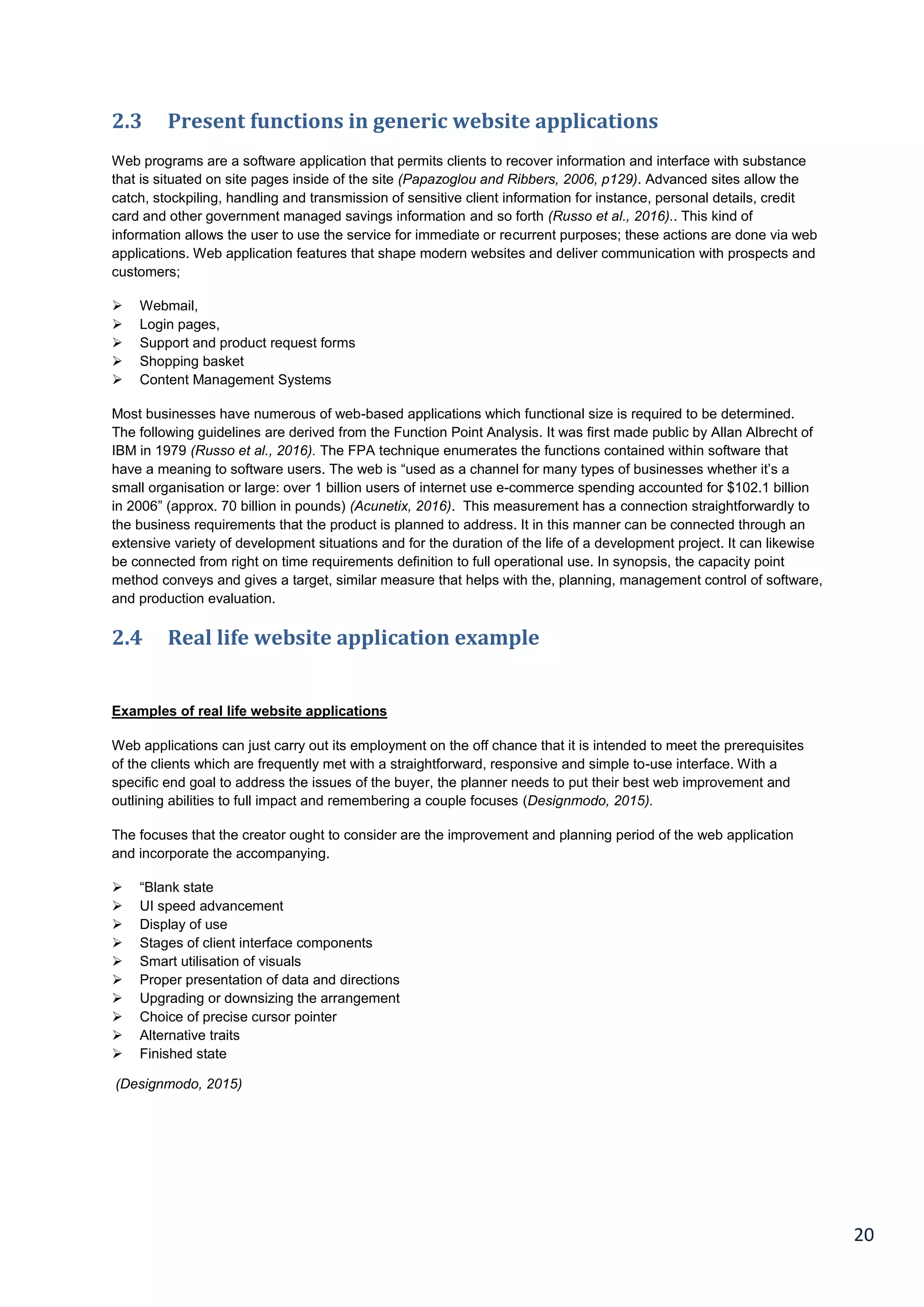
For the proposed system, this feature would be ideal because customer orders would hold more than one type of
information such as order ID, order time, table number and so forth.
Figure 2.2 Website application
22
Restaurant Management Ordering System
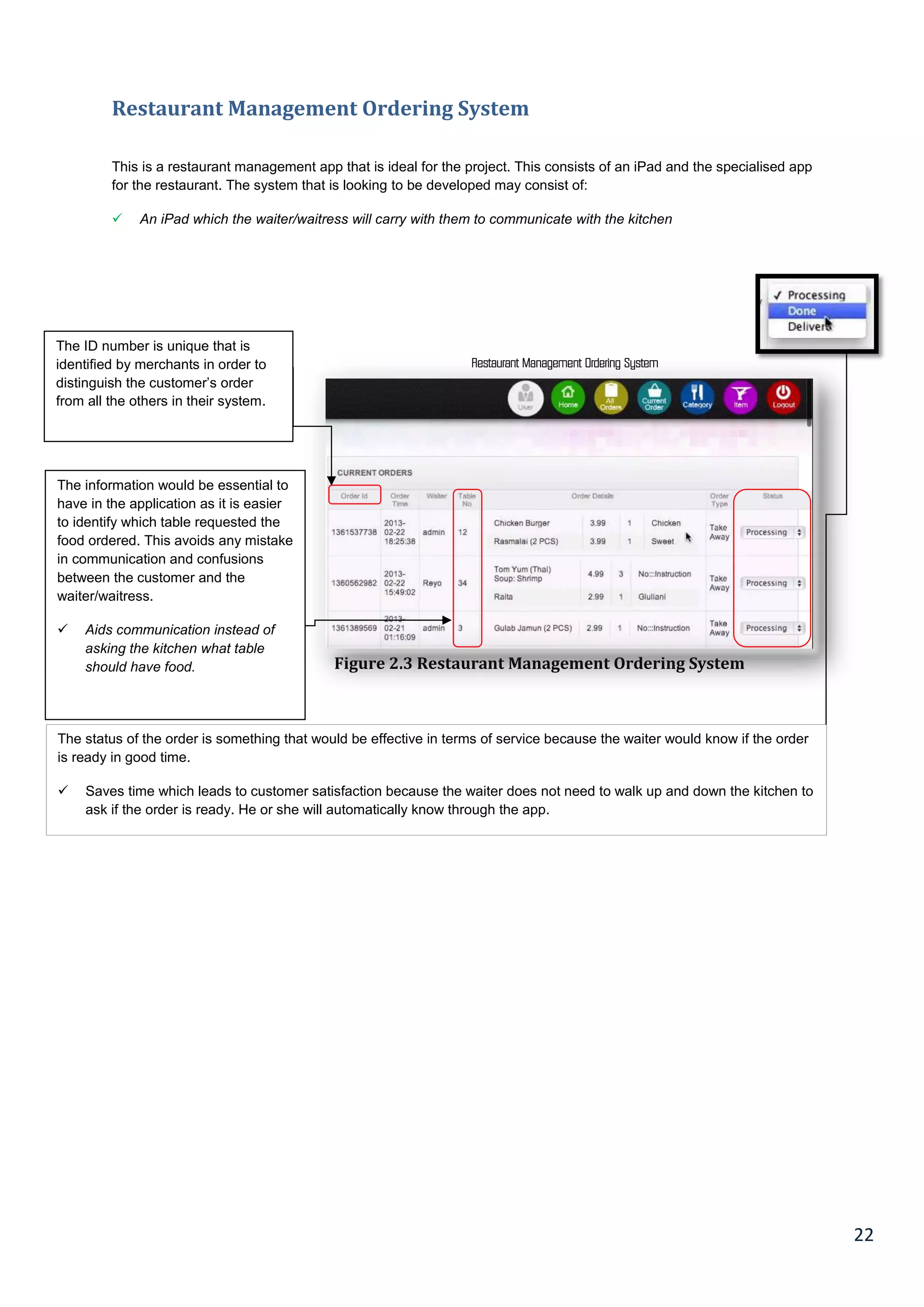
This is a restaurant management app that is ideal for the project. This consists of an iPad and the specialised app
for the restaurant. The system that is looking to be developed may consist of:
 An iPad which the waiter/waitress will carry with them to communicate with the kitchen
Restaurant Management Ordering System
Figure 2.3 Restaurant Management Ordering System
The information would be essential to
have in the application as it is easier
to identify which table requested the
food ordered. This avoids any mistake
in communication and confusions
between the customer and the
waiter/waitress.
 Aids communication instead of
asking the kitchen what table
should have food.
The ID number is unique that is
identified by merchants in order to
distinguish the customer’s order
from all the others in their system.
The status of the order is something that would be effective in terms of service because the waiter would know if the order
is ready in good time.
 Saves time which leads to customer satisfaction because the waiter does not need to walk up and down the kitchen to
ask if the order is ready. He or she will automatically know through the app.
23
2.5 Systems development life cycle
The SDLC is a chain of six steps that team in a team project work by in order to conceptualise, analyse, design,
build and implement a new data technology system successfully. Following the SDLC increases efficiency and
minimises the danger of item failure. The system development life cycle is a model utilised as a part of task
administration that characterises the stages included a data project. It starts from a starting possibility study
through support of the completed item (MacIsaac and Kroll, 2006)
The first SDLC method was the waterfall model, however there are other methods, for instance, fast application
development, joint application development, the fountain model, the spiral model, and so on. A few strategies work
for various kinds of particular tasks yet the major segment for undertaking achievement is the way by which nearly
the course of action was taken after.
Each iteration consists of the following:
1. Planning
2. Requirements
3. Analysis
4. Design
5. Implementation
6. Testing
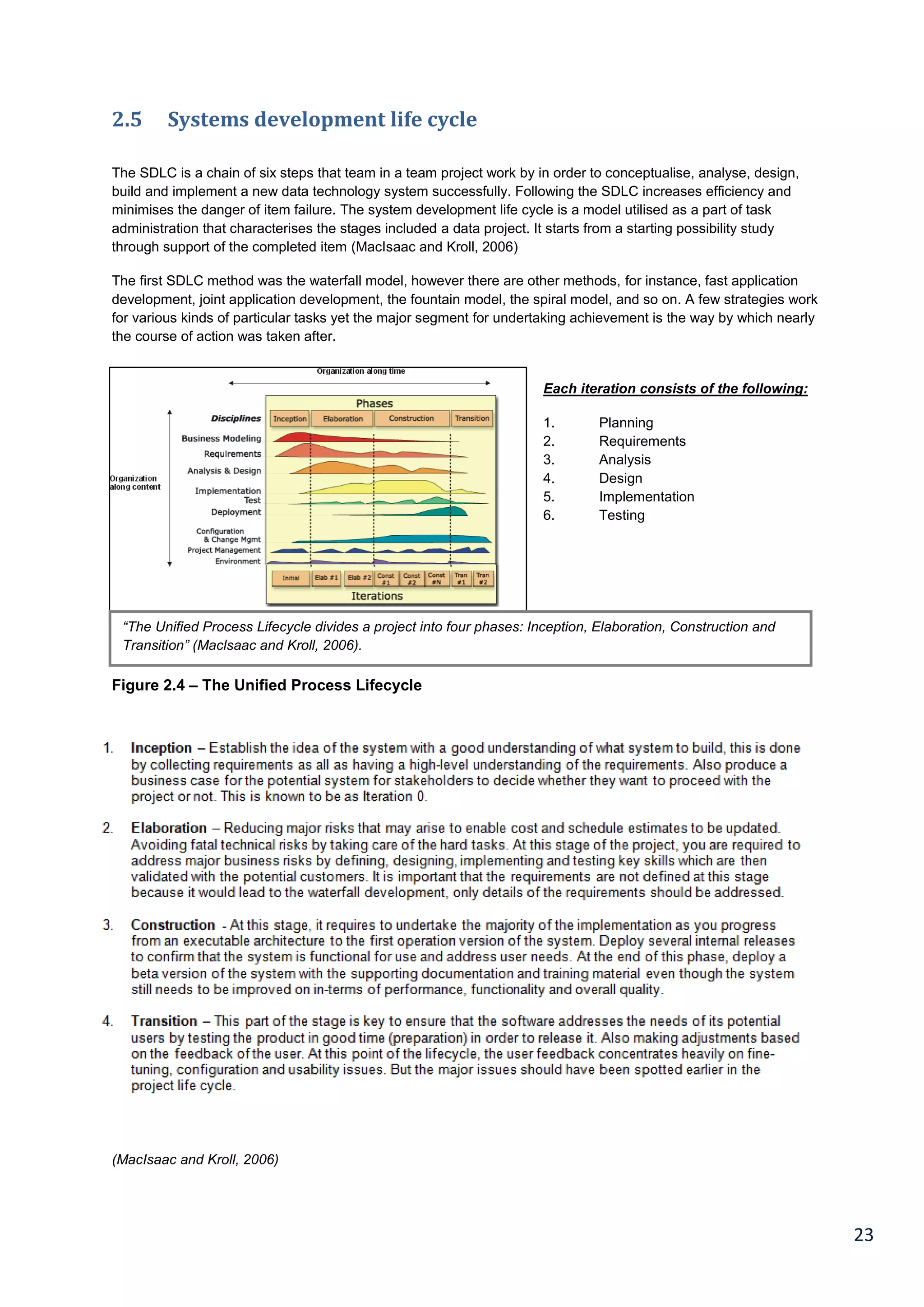
Figure 2.4 – The Unified Process Lifecycle
(MacIsaac and Kroll, 2006)
“The Unified Process Lifecycle divides a project into four phases: Inception, Elaboration, Construction and
Transition” (Maclsaac and Kroll, 2006).
24
2.6 Different types of methodologies
In programming, software development methodologies are structures that are used to structure, control and
arrange the procedure used in creating information systems (Itinfo.am 2016).
Waterfall (First original model of SDLC) – The main feature of this model is that when an improvement level is
completed, work would commence on the next one. At the end of each stage, a review is undertaken in order to
determine if the project is going in the right direction or it should be discarded (Itinfo.am, 2016).
Advantages of Waterfall method:
 This system is well understood by programming engineers, making it easy to use.
 It is ideal for small projects if the necessities are well understood.
 It is cost viable. This means that the time expended ahead of schedule in the product generation cycle could
result in better economy in later stages.
Disadvantages of Waterfall method:
 The major drawback of this methodology is that testing is done once at the conclusion of the project, prior to
its release. This can be regarded as "final inspection". It is normally undertaken by the manufacturing
inspector before the product is finally released to the consumer.
 It poses a lot of uncertainties and high risk
 It isn't flexible
 The model isn't well suited for object-oriented and complex projects.
Selected Methodology: This methodology is suitable for the project considering the fact that its requirements are
easy to understand and are well suited for smaller projects since the time span for the project happens to be short.
This methodology is also suitable considering the fact that testing would be accordingly done. Also this
methodology is suitable for smaller project since according to most developers, it is easier to follow. (Itinfo.am,
2016)
Agile vs. XP methodology
Agile - This approach is a software engineering framework which allows for development iterations all through the
project's life-cycle. The literal meaning of agile means for something to be done quickly (itinfo.am). Thus Agile
Testing seeks to validate the needs of the client (requirement) in the shortest possible time, making it user friendly.
This methodology is suitable for projects with a short duration. Hence, this is the reason why it is best suited for
the particular project in question.
The project is usually centered on Visual Basic Programming. This makes it to be considered by some as being
under XP technology (itinfo.am, 2016).
The agile methodology shares a lot of similarities with spiral methodology. The major difference between both is
that in agile methodology, the iterations are shorter.
25
Extreme programming – In some cases, XP is usually regarded as a type of agile programming. However, most
programmers see it as a different and separate methodology. Going by the Agile manifesto (Fowler and Highsmith,
2001), the main principles of agile methodology include:
1. Satisfaction of the customer by the continued delivering of useful software.
2. Delivering working software on a frequent basis.
3. Welcoming of late changes in the requirements.
4. It is simple.
5. Constant adaptation to changing circumstances.
Advantages of Agile methodology
 It is time and cost effective
 It places more focus on application in contrast to documentation
 It helps to highlight issues well in advance and provides opportunities for addressing these issues through
regular daily meetings and deliberations.
 Requirements can be changed during later stages in development.
 It results in quality software in a short time span, resulting in a satisfied customer.
Disadvantages of Agile methodology
 It could result in disastrous consequences if the customer or his representative is not clear as to the specific
user requirements.
 It lacks emphasis on required documentation and design.
Spiral Methodology – This methodology is best suited for large projects in contrast to the agile methodology
which is best suited for smaller projects. This methodology combines features of the waterfall and prototyping
model. The definition of the spiral model was provided by Barry Boehm in the article "A Spiral Model of Software
Development and Enhancement" (W.Boehm, 1988). This model is the first to highlight on the importance of
iteration in project development.
Advantages of Spiral methodology:
 It is flexible considering the fact that the phases of development can be determined by the project manager.
 The estimates for schedule and budget are realistic due to the fact that relevant issues have been sorted out
at the early stages of development.
 The software if completed at an early stage of the software's life cycle.
(Natalya's QA Blog, 2012)
Disadvantages of Spiral methodology
 It doesn't work well for small projects.
 It requires a high level of expertise for risk analysis
 When risk is being evaluated, it could cost more than the actual system to resolve issues.
26
Rapid Application Development (RAD) Methodology – This methodology refers to programming languages that
have a faster implementation rate than third generation programming languages such as Pascal, FORTRAN and
C/C++. RAD languages are able to achieve this feat due to the fact that they reduce the amount of production it
takes in order to complete a product. However, this method lacks flexibility, making it best suited to in-house
software developers (Istqbexamcertification.com, 2016).
Advantages of RAD:
 Reduced development time
 Components are increasingly reusable
 It encourages feedback from the customer
Disadvantages of RAD model:
 One of the major disadvantages of this model is that without a strong team, identifying the business
requirements would be a problem.
 It requires skilful developers and designers
 It is quite expensive due to the fact that the cost of automation is very high.
2.7 Selected hardware for the prototype
In considering software development, IDE, also referred to as combined development environment, helps to
increase a programmer’s efficiency. An IDE is software which comprises of a source code editor, debugging tools
and a compiler. These components go a long way to make the work of the programmer easier. (docs.joommla.org,
2015).
For this project, the software platform to be used is visual basic. Visual basic would be used in order to design the
ordering system of the restaurant. The reason for this is due to the fact that it makes it easier to develop graphic
user interfaces and have them connected to different handler functionalities provided by the application.
The major reason for choosing visual basic is due to the fact that its programming language structure is simpler
and its code is easier to execute.
2.8 Software chosen for the prototype
In the world of software development, IDE has very remarkable importance to enhance the output by helping a
programmer to accelerate their efficiency. As a software application, the IDE is a set of complier, source code
editor and debugging tools to help the programmer perform their tasks well (Docs.joomla.org, 2015).
Visual Basic is an essential software framework to execute this project and you can use the visual basic for
designing the ordering system of the restaurant. It is the best choice as it is very easy for developing graphical
user interfaces and linking them to other functionalities provided by using the very application. Due to the user
friendly structure of the programming language, it is the best alternative (Docs.joomla.org, 2015).
27
Chapter 3
3.1 Research Methods & Project Management
Research method is the aspect of the project that is concerned with data collection. It is very important for a
researcher to know the sort of data required in order to proceed with the project. It is after this that the researcher
would be able to select between numerous approaches, techniques and methods of data protection. It would also
enable the researcher to effectively plan the collection of the required data.
Each research methodology has different stages; however these stages are also followed systematically. This
project would carry out a systematic review of the relevant literature. In the end, the review would have further
elaborated on each stage in the research process.
Project management can be defined as the implementation of knowledge, method and skills to enable one to
successfully and proficiently carry out a project (pmi.org, 2015).
Project can be defined as a way of executing a plan in order to achieve a set objective. It can be categorized into
outputs, outcomes or benefits. A project would be regarded as successful if the set out objectives of the project
are accomplished. However, this has to be in accordance with the conditions of time and budget initially agreed
upon.
The method and procedure for designing a software application is tedious and time consuming. Since there is
limited time and funds, software designers/developers are put under pressure to deliver bug free applications
within limited time and at a reasonable price. According to the book, (Teach yourself Extreme Programming in 24
hours, 2013), the main reason why most software projects fail was due to:
 Lack of resources
 Changing system requirements
 Poor planning
 Limited support from senior management
 Absence of technical support
 No familiarization with the new technology
 No methodology for project management
(Scribd, 2015)
3.2 Definition of primary and secondary data
Primary Data: This is also referred to as “first hand” data. It consists of research done using raw data through
methods like: document analysis, focus groups, questionnaires or observations. After the accumulation of the raw
data, it is analysed in order to discern the relevant information that it holds. (Crowther, Lancaster and Lancaster,
2009, p 89-91).
Another important feature of primary data is the fact that the information in them is proprietary information. This
means that the information in them can be well secured from competitors. It usually offers an informational
advantage to the particular business that carried out the research.
Secondary Data: From the word “secondary” we can infer that secondary data is not new information. Secondary
data is generally data that has been previously collected by another party (Crowther, Lancaster and Lancaster,
2009, p 89-91).
Good examples of secondary data are documentary evidence of events that occured in the past. Examples
include minutes of meetings, debates, newspaper reports, histories written by other historians, synopsis of
discussions and so on.
28
3.3 Pros and cons of primary data
Pros of Primary data: A major advantage of primary data is the fact that it suits the direct purpose of the study
(iwh.on.ca, 2016).
Another advantage is the fact that the researcher also has direct control over findings and can employ the best
technique best suited for the specific information that he seeks to find (Knowthis.com, 2016).
Cons of Primary Data: One of the major disadvantages of primary data is that it could be costly. Extra costs have
to be incurred when the researcher would have to take care of some logistics like printing paper for questionnaires
or getting equipment needed for an experiment (Knowthis.com, 2016).
3.4 Pros and cons of secondary data
Pros of Secondary Data: The information contained in secondary data is not in any way expensive to obtain. This
is due to the fact that the costs that would be incurred have already been incurred by the person who conducted
the primary research.
Researchers could also use information collated from secondary data to verify their own primary data.
Cons of Secondary Data: A disadvantage of using secondary data is the fact that organisations that make use of
them have to take extra steps to ensure that they were gotten through reliable means.
Another disadvantage of secondary data is the fact that it might not be presented in a format that meets the
specific needs of the marketer.
Another disadvantage is the fact that secondary data might not be current.
Secondary data also doesn’t have the characteristic of being proprietary. This means that it can be accessed by all
persons, even competitors (Knowthis.com, 2016).
3.5 Formal methods of collecting data
The following are the various formal methods of collecting primary data: observation, questionnaires, focus groups
and document analysis.
3.5.1 Observations
This method of data collection involves the use of different senses. In observation, the researcher could focus on
the behaviours and characteristics of the people being observed. In carrying out observation, the researcher could
be involved in watching and recording the actions of subjects (Allison, 1996. p296)..
This method is employed in situations where the subjects do not have the opportunity to speak to or write to the
researcher. In observation, records of the actions of subjects are done at the time of specific appropriate events.
(Allison, 1996. p296).
29
Types of Observation
Observation could be of the following types:
1. Naturalistic: This involves situations in which observation in done in the natural environment without any
interference whatsoever from the researcher.
2. Participant: This also involves observation of behaviour in the natural setting. However, the researcher would
be involved with the environment of the subject or he could manipulate it in order for it to have the desired
effect or to have the right variables.
3. Laboratory: This involves the observation of behaviours in a controlled lab setting with/without the knowledge
of the participants or involvement of the researcher.
3.5.2 Questionnaires
Questionnaires are similar to interviews. The difference between them is that while interviews are oral,
questionnaires are written. Questionnaires are usually employed when the researcher aims to get information from
a large sample of subjects. Questionnaires can be filled with or without the presence of the researcher.
However, there are some limitations to the reliability of questionnaires. Although questionnaires can easily and
quickly be quantified by the researcher, it is contended that questionnaires do not account for some variables like
changes in emotions and behavior. (K.Popper, 2004).
According to phenomenologists, quantitative research is only an artificial creation by the researcher due to the fact
that they collect information without explanations from the subjects (S.Ackroyd). With questionnaires, there is no
way to ascertain the reliability of the information provided by the respondent. The respondent could not be saying
the truth or they might not give much thought to the questions being posed.
Despite the above handicaps, one of the advantages of questionnaires is the fact that data collected by
questionnaires can be compared and contrasted with other research data. Subsequently, they can be used to
confirm existing or test new hypotheses. (Learning, 2016).
3.5.3 Document Analysis
Document analysis is a form of qualitative research which gives voice and meaning to documents. They transform
documents into having themes that are similar to what can be gotten by using focus groups or interview transcripts.
Document analysis is an essential method of social research which is vital in most schemes of triangulation
(Drcath.net, 2016). In all, document analysis can be referred to as the process of interpreting data obtained from
documents which are relevant to a specific study.
There are three types of documents: Public Records, Personal Documents and Physical Evidence.
1. Public Records: these are records of the activities of an organisation. It includes documents like student
transcripts, policy manuals, strategic plans, annual reports etc.
2. Personal Documents: these are first person documents that contain personal information. Examples
include emails, calendars, Facebook posts, blog posts, newspapers, journals and so on.
Physical Evidence: This deals with physical objects like flyers, training materials, posters and so on
30
3.5.4 Focus Groups
The use of focus groups is a qualitative assessment method. It is one which encourages the free flow of ideas.
Focus groups usually have one moderator who may be assisted by other team members. They consist of about 8-
12 pre-screened people for the particular process. They also last for a period of about 1-2 hours.
Focus groups are distinct from document analysis due to the fact that in focus groups, the researcher can
document data pertaining to the body language of the respondents. Focus groups are used for systems that need
to be tested by interaction. For example, if a user raises an eyebrow while using a program, it shows that the user
is confused.
Focus groups are ideal for projects that can be improved through discussions and physical interaction.
3.6 Formal Research Methods
Formal research methods encompass processes by which we learn about each other and the world we live in. the
following are the characteristics of formal research:
 Systematic: They consist of a number of predictable steps that are used to provide reliable information.
 Organisational: they have a highly organized structure which enables the researcher to integrate and make
sense of the information gathered.
 Questions: They seek to ask questions in order to gain insight into how people behave or how the
environment operates.
 Finding Answers: One of the important features of research is to find answers to questions about the planet
earth on which we live in.
Example of Formal Research: When people meet their doctor in order to complain of high blood pressure, the
doctor knows what to do due to previous information that has been collected by formal research.
The following are examples of formal research:
Ethnographic
This research methodology is concerned with social interactions, perceptions and behaviors that come up
between teams, groups, communities etc. The aim of ethnography is to provide a rich holistic perspective into the
views and actions of people (Qualitative Research Methodologies: Ethnography, 2016).
This approach has a number of important advantages. For instance, engaging in participant observation puts
ethnographers in situations in which they can gain insight into social actions in numerous contexts. There are
some social activities that are hidden from public view. With the use of ethnography, researchers can gain useful
insight into these practices.
However, obtaining approval from the research ethics committee can be stringent due to the fact that ethnography
poses health risks since it is concerned with physical social interactions.
Experimental Research
Experimental research deals with questions of “what if”. Ideally, they are situations in which the researcher
introduces a new component into the scenario being studied in order to observe the differences in effect. The main
agenda of this method is to manipulate a variable in order to examine its effects on other variables (Allison, 1996,
p17). This research method involves situations where subjects are randomly distributed between different control
groups and the researcher examines one effect at a time in the controlled environment.
31
Case Study
Case studies are used in a situation in which the researcher adds extra effort to buttress information that has been
previously collated through previous research. Case studies are widely used by social scientists in order to study
real-life problems and proffer meaningful solutions. According to (Robert K Yin, 1984) case studies are used as
empirical inquiries. Case studies make use of interviews and documentary materials without participant
observation. A handful of well-known researchers have written about case studies and techniques for effectively
organizing and carrying them out (Ischool.utexas.edu, 2016).
Here are examples of some well-known researchers: Helen Simons, Robert K, and Robert E Stake.
When carrying out case studies, the following steps should be followed:
1. Define and determine the research questions
2. Select the cases and determine the techniques for analyzing and gathering data.
3. Prepare to collate the data
4. Collect the field data
5. Analyse and evaluate the data
6. Prepare your report.
Action Research
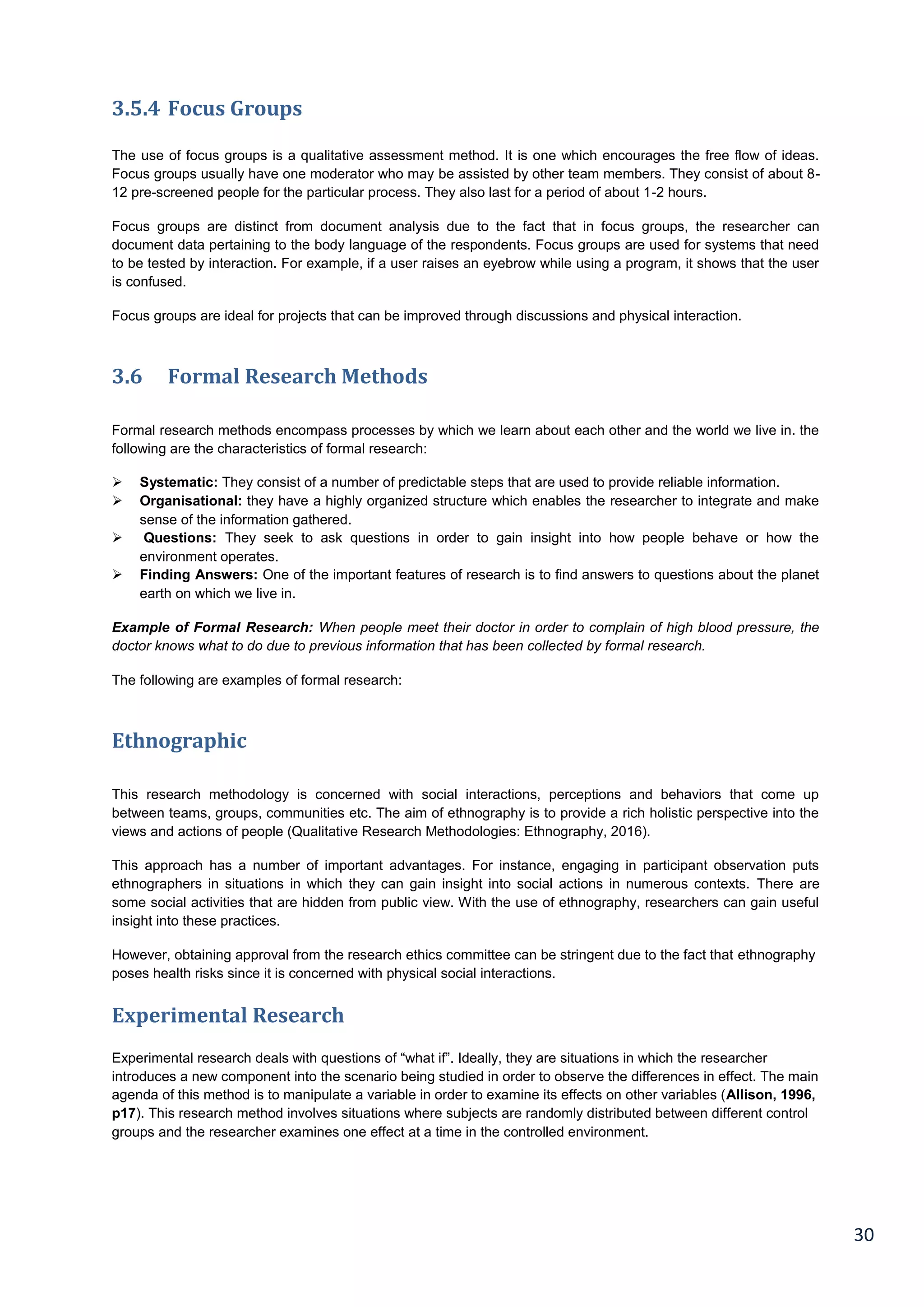
This is also referred to as the “plan, teach, reflect and apply” cycle. It is done by examining data, coming up with
your area focus, creating your action plan in order to address the area focus, carrying out your action plan and
then reflecting on the results.
Action plan research does not involve you visiting the library; it does not include focusing on wrong things. It
involves finding ways to continuously improve the environment by observing evidence and then taking action.
However, researchers that undertake in action research have to pay attention to the ethical issues such as having
participant’s consent before the collection of data.
The action research process is also known as the “plan, teach, reflect and apply cycle”. It’s a process in which you
examine your practice by looking at data, developing an area focus, creating a plan of action, to address the focus
area acting on that plan and then reflecting on the results (Winter, 2016).
Action research is not a research project where you go to the library; it is not focusing on what is wrong. Action
research is about focusing on ways continuously improving practice by looking at evidence around you and taking
action. However, action researchers must pay attention to the ethical issues such as having the consent of the
participants before collecting data.
Figure 3.4: Action Research Cycle
(Creative Educator, 2016)
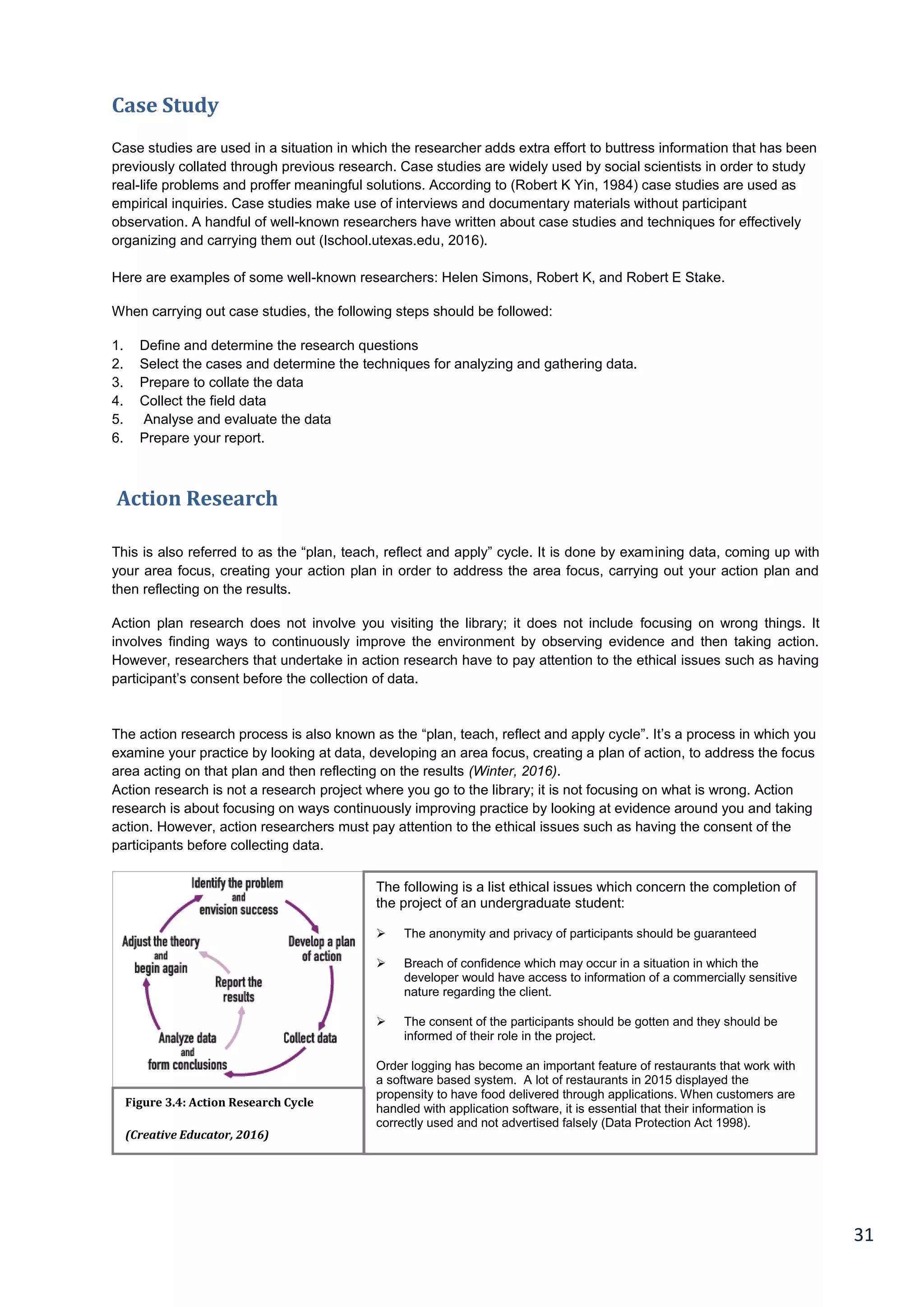
The following is a list ethical issues which concern the completion of
the project of an undergraduate student:
 The anonymity and privacy of participants should be guaranteed
 Breach of confidence which may occur in a situation in which the
developer would have access to information of a commercially sensitive
nature regarding the client.
 The consent of the participants should be gotten and they should be
informed of their role in the project.
Order logging has become an important feature of restaurants that work with
a software based system. A lot of restaurants in 2015 displayed the
propensity to have food delivered through applications. When customers are
handled with application software, it is essential that their information is
correctly used and not advertised falsely (Data Protection Act 1998).
32
Six principles used for an action research:
1. Reflexive critique: this involves noticing and being aware of our individual perceptual biases.
2. Dialectical Critique: This is a way of understanding the relationship between the various components that
make up the phenomena in the present context.
3. Collaborative Resources: In this situation, the views and opinions of everyone are respected as individually
contributing to a better understanding of the scenario in question.
4. Risking Disturbance: In this situation, the researcher should accept the reality of his work being criticized after
it has been submitted.
5. Creating Plural Structures: This is concerned with the creation of several accounts and multiple critiques
instead of a single individual and authoritative translation.
6. Internalization of Theory and Practice: This is a situation in which theory and practice is seen in the light of
two interdependent and complementary phase of the process of change.
Use of Systematic Approach:
Referring to the undergraduate project that is in the process of completion, formal research methods were not
consciously adhered to. This doesn’t mean that the project wasn’t completed in a structurally organised manner.
The project was divided into milestones that were further sub-divided into manageable tasks (See Chapter 1,
Figure 1.3: Work Breakdown Structure).
In order to accomplish this project, project management models were developed. See Chapter 4.
3.6.1 Data Collection Methods used for the completion of this project
The primary data to be acquired for this project would include:
 Functional and non-functional requirements
 User requirements and evaluations
The secondary data collected for this project include information. These data can be regarded as the most
important part of this project. They include: systems development (design, analysis, evaluation and
implementation), projecting management, ethical considerations, project write up and so on. The secondary data
would be gotten from:
 Books and Journals [hard and soft copies]
 Conference proceedings
 The internet [blogs, wikis etc.]
 Trade magazine, Newspapers etc.
The different sources of secondary data would be adequately listed in the Bibliography and References.
3.6.2 Use of Systematic Approach
Referring back to the undergraduate project that is on the journey of completion, a formal research method was
not consciously followed. However this does not mean the project was not completed in an organised structure.
The project was broken down to milestones that were further broken down into manageable tasks (See Chapter 1,
Figure 1.3: Work Breakdown Structure).
Project management models were developed in order to support this project to be accomplished. See chapter 4.
33
Chapter 4
4.1 Project Management
Project management is the idea of implementing knowledge, skills and methods to perform projects successfully
and proficiently Pmi.org, (2015).
A project can be defined as a way of making an effort of executing a plan in order to achieve an objective which is
set out. This can also be put into perspective as outputs, outcomes or benefits. A project is seen successful if
objectives are met. However, it must be in accordance to their conditions (time and budget must be agreed upon).
The method and procedure of developing and designing a new software application is tedious and takes a lot of
effort. The design, development and the release of the final product all takes time (Pinto and Mantel, 1990). Since
there is a limited time and a small budget to discharge a software package, software organisation
designers/developers come up short because of being under pressure to release a software bug-free product on
time and at a reasonable and affordable price According to this book, (Teach Yourself Extreme Programming in 24
hours, 2013), the main reasons for software project failure were:
 Unfinished or changing system requirement
 Lack of resources
 Lack of technical support
 Poor planning
 Limited support from senior management
 Lack of familiarisation to the new technology
 Inadequate or lack of project management methodology
(Scribd, 2015)
34
4.1.1 Activity List
35
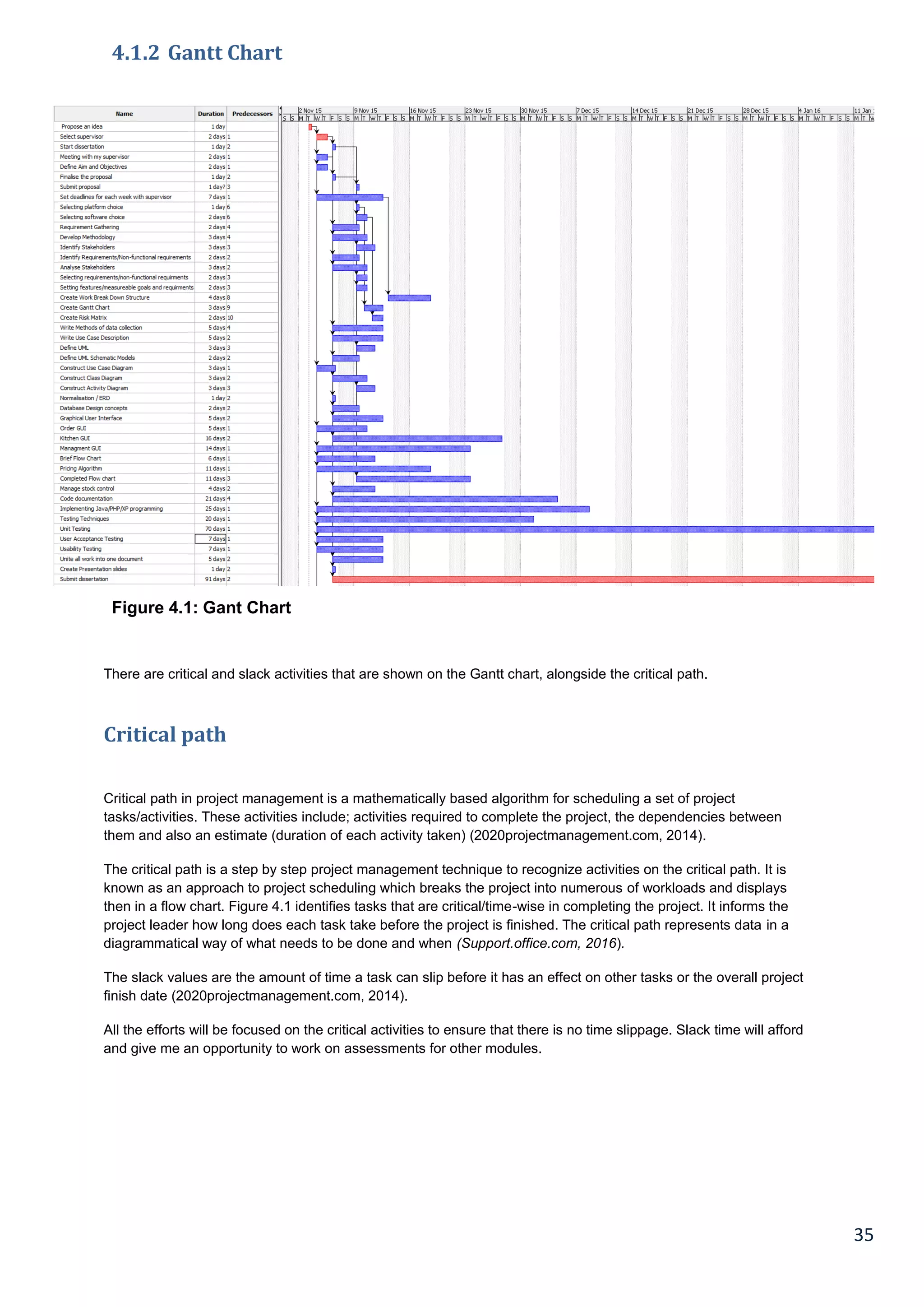
4.1.2 Gantt Chart
Figure 4.1: Gant Chart
There are critical and slack activities that are shown on the Gantt chart, alongside the critical path.
Critical path
Critical path in project management is a mathematically based algorithm for scheduling a set of project
tasks/activities. These activities include; activities required to complete the project, the dependencies between
them and also an estimate (duration of each activity taken) (2020projectmanagement.com, 2014).
The critical path is a step by step project management technique to recognize activities on the critical path. It is
known as an approach to project scheduling which breaks the project into numerous of workloads and displays
then in a flow chart. Figure 4.1 identifies tasks that are critical/time-wise in completing the project. It informs the
project leader how long does each task take before the project is finished. The critical path represents data in a
diagrammatical way of what needs to be done and when (Support.office.com, 2016).
The slack values are the amount of time a task can slip before it has an effect on other tasks or the overall project
finish date (2020projectmanagement.com, 2014).
All the efforts will be focused on the critical activities to ensure that there is no time slippage. Slack time will afford
and give me an opportunity to work on assessments for other modules.
36
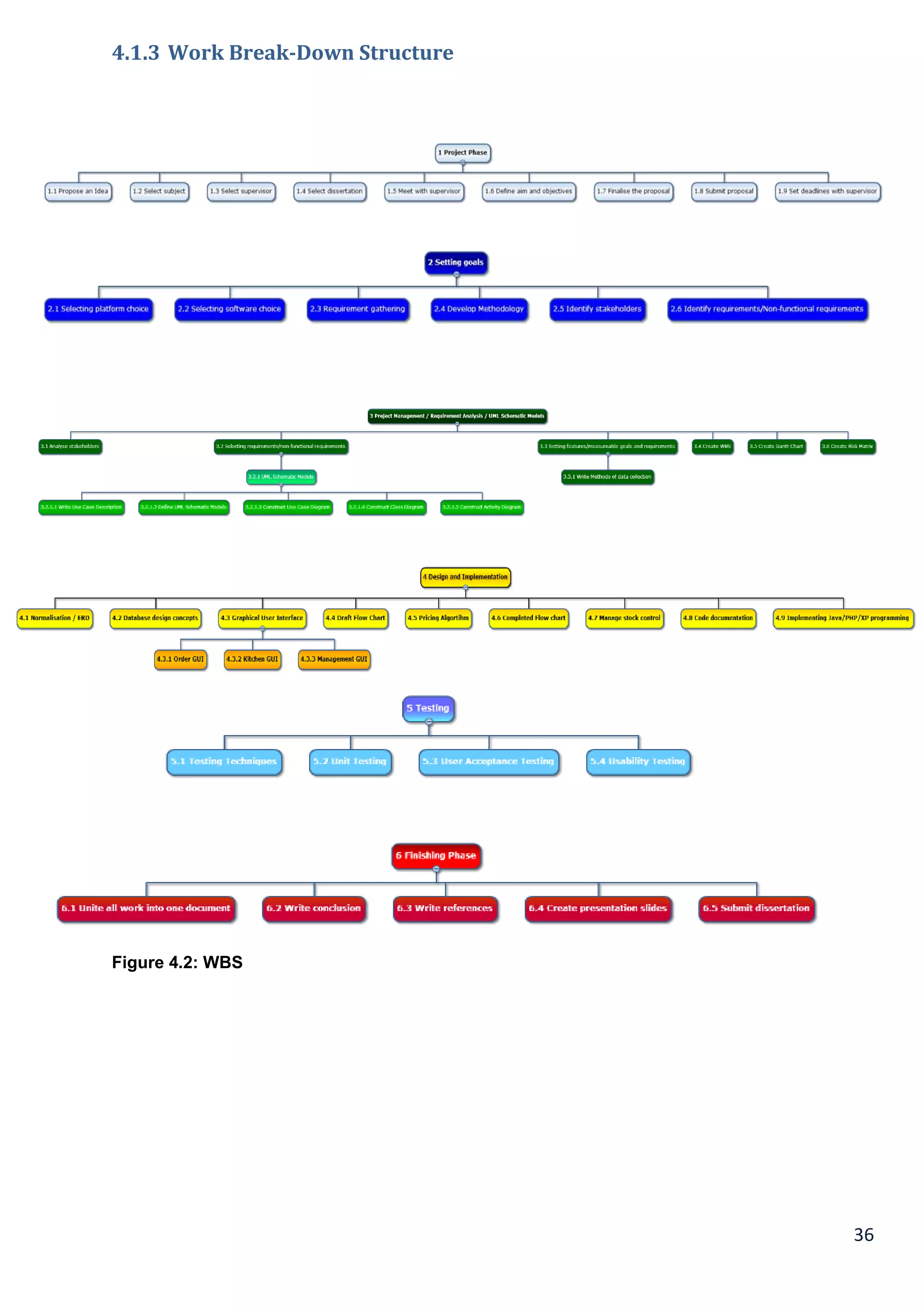
4.1.3 Work Break-Down Structure
Figure 4.2: WBS
37
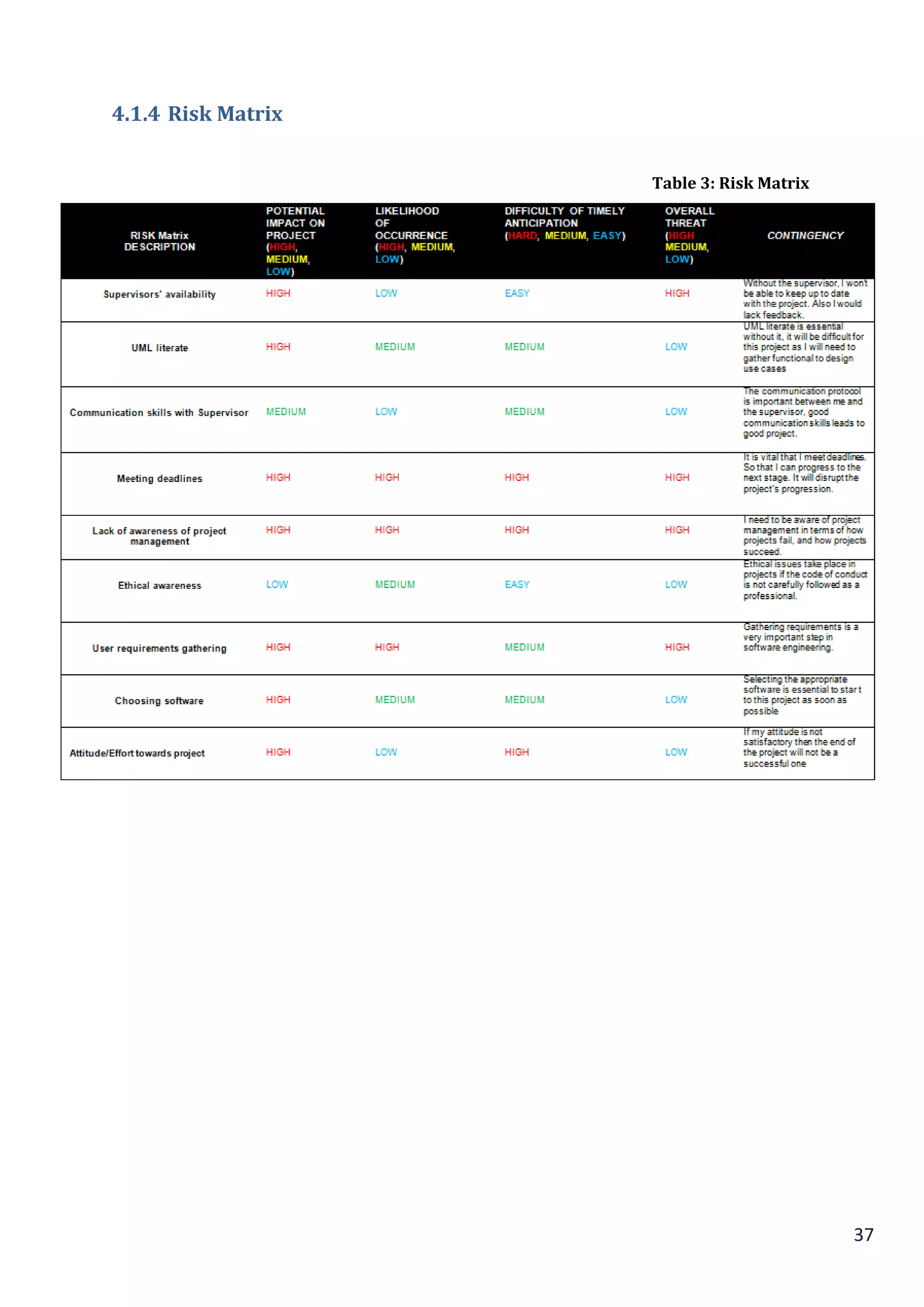
4.1.4 Risk Matrix
Table 3: Risk Matrix
38
Chapter 5
5.1 Analysis & Design
This chapter includes a case study/business statement and consists of UML schematic models based on the
scenario. The UML schematic is a language used for software engineering. The reason why a business case
statement is vital in this project is because it utilises the problem and the goal statements which converts it into a
statement of business value. It is a formal written argument to convince a decision maker to approve some sort of
action. A business encapsulates the reasoning for initiating a project or an objective.
The business case statement will have a record that justifies a starting project. It describes the costs, benefits and
the impact, also a calculation of the financial case. The business case also provides the frame work for the
approved project.
5.2 System Analysis
System analysis can be described as the process of collecting and understanding of factual data, problem
identification and suggestion of feasible recommendations regarding the improvement of system’s operations. This
process involves the careful study of business procedures, operational data gathering, comprehending information
flow processes, discovering obstacles and developing processes of surmounting those obstacles. These goals are
generally meant to ensure the attainment of organisational goals. System analysis also encompasses the
subdivision of broad functions involving the entire system, understanding manual processes and identifying data
store (Lauesen, 2013).
The major aims behind conducting system analysis hinges on the need to find answers to each business process.
Series of questions are being asked like; “what is being done?”, “how is it being done?” ”what are the measures for
improvement?” etc. The process of system analysis requires intensive thinking and this involves the creative
abilities of a System Analyst. It tends to induce the birth of an efficient system satisfying the immediate desires of
the user. It also possesses a scope for future growth within the firm. It is therefore imperative to know that system
design adopts an iterative process. This means that it continues until an acceptable and preferred solution is
obtained (Thimbleby, 2011).
5.2.1 System Design
The design of a new system is hinged on the detailed analysis of the system and the user requirements. In
organized literature, this trend is referred to as system designing. It is considered as the most important phase in
the development of a system. This stage is the aftermath of the system analysis stage. It is so because the logical
system design obtained during the system analysis stage is thereafter converted into physical form. The logical
design obtained during the system analysis stage is transformed into a physical design. At this stage, there is a
detailed drafting of the processing specifications, codification schemes, forms, databases, output and input
required for the optimal functioning of the system. At the system design stage, decisions are made regarding the
hardware requirements, software requirements and programming language of the new system. Also, decisions are
made concerning the limitations of the system, workload, equipment source, control process and data structure of
the new system. Decisions regarding the documentation, training, interface, usage procedures, staffing
requirements and taking backups are taken at this stage of system design (Maguire, 2013).
There exist a large number of techniques and tools used for providing valid descriptions of system designs. They
include; Decision tree, Decision table, Structured English, Data dictionary, Data flow diagram (DFD) and Flowchart.
39
5.3 Functional and Non-functional requirements
In terms of system requirements, a system requirement that describes rather what the system will do, but how well
the system will do it, for instance system performance requirements, system external requirements, design and
software attributes. In other words, non-functional requirements are hard to test; this differentiates between a
functional requirement (what the system will do) and a non-functional requirement (outside the system such
backing up customer details (Chung, L. 2015).
Non-functional requirements are extras that can be added to the system. They are not necessary how the system
functions but can be how it’s laid out and how the end user can be more easily visible and easily readable.
Non-functional requirements attributes; Understand-ability, usability, modifiability, inter-operability, reliability,
portability, maintainability, customisability, adaptability and variability, user-friendliness, robustness, timeliness,
responsiveness, correctness and completeness, performance, efficiency, accuracy, precision, cost and
development time.
5.4 Data Method for Collecting Functional Requirements
There are three basic methods for collection data on functional requirements. They include questionnaires, focus
groups/workshops and interviews.
5.4.1 Questionnaires
These are sets of questions formulated to collate information from users. Some of them require simple Yes/No
answers while a large number of them requires respondents to select pre-determined answers. In some complex
scenarios, users are expected to provide answers based on their specific idiosyncrasies (Smith, 1986).
5.4.2 Focus Groups/Workshops
This is a special type of interview conducted on a one-on-one basis where information is received from a particular
person’s perspective. Through workshops, information can be collated from a large number of individuals that
participate in such activities (Maguire, 2013).
5.4.3 Interviews
Interviews are designed to ask specific questions to people. In most case scenarios, interviews are conducted on
a one-on-one basis but in recent times, it has been revealed that interviews can also be simultaneously conducted
on a large group. There are several guidelines regarding the conduct of interviews and they include the following;
not a public forum, structured/unstructured/semi-structured, may involve prototypes and shouldn’t be too time
consuming (Lauesen, 2013).
40
5.4.4 How Functional and Non Functional Requirements are collected:
Functional and non-functional requirements are collected based on the performance of systems across various
benchmarks. The various ways to collect functional requirements include business rules, authentication, audit
tracking, historical data and certification requirements. Other ways of collecting functional requirements include
legal or regulatory requirements, reporting requirements, external interfaces, authorization levels, administrative
functions, transaction corrections, adjustments and cancellations (Maguire, 2013).
Non-functional requirements on the other hand, can be collected through several means. They include
performance, capacity, scalability, availability, recoverability and maintainability. Others include reliability,
serviceability, regulatory, security, data integrity, environmental, usability, interoperability and manageability.
5.4.5 Formal Methods of Data Collection for Functional Requirements
There are two distinct ways of data collection for functional requirements. These methods include naturalistic
observation and studying documentation. In terms of naturalistic observation, it is difficult for humans to provide
adequate explanations on what they do, or to even describe accurately how they perform a task. Naturalistic
observation tends to speed time, provide insight into the tasks of stakeholders and good for understanding the
nature of time (Maguire, 2013).
Studying documentation involves a manual documentation of steps involved in completing a specific task. These
are often written down in manuals and they provide an excellent source if documentation about the steps involved
within an activity and the documentation also required.
5.5 Definition of Terms
5.5.1 Use Case
A use case can be defined as series of related instructions between a system and a user with the aim of achieving
a specific goal. These are the types of diagram that are included in uml such as “use case, class diagram, acivitity
diagram, sequence diagram and collaboration. They are known as mul schematic models” (Bennett, McRobb and
Farmer, 2010).
5.5.2 Class Diagram
A class diagram describes an illustration of source code and relationship dependencies among classes using the
Unified Modelling Language (UML). In this specific scenario, a class describes the variables and methods within
an object, which is a distinct entity within a program. It is also stated as a unit of code acting as a representative of
the entity. Class diagrams are important in all the various forms of object-oriented programming (OOP) (Bennett,
McRobb and Farmer, 2010).
5.5.3 Activity Diagram
A class diagram describes an illustration of source code and relationship dependencies among classes using the
Unified Modelling Language (UML). In this specific scenario, a class describes the variables and methods within
an object, which is a distinct entity within a program. It is also stated as a unit of code acting as a representative of
the entity. Class diagrams are important in all the various forms of object-oriented programming (OOP) (Maguire,
2013).
41
Functional requirements for the restaurant:
 To develop a system checks table availability
 The system should be able to handle as well as process payments a) deliver an user-interface for credit card
transaction system ABTS to process payments b) the system should compute fees
 The system should be able to update stock availability after every order
 Develop a system that stores sales made between customers and the business and should generate report
such as inventory & sales report
 System should be able to generate reports that are given to operational staffs such as transaction reports.
 To develop a system where both waiter and the kitchen communicate in order to serve customers on time and
effectively
Non-Functional requirements for the restaurant:
 To increase in efficiency when order taking.
 To reduce errors in order taking and increase reliability & response time between the system and the staff.
Making order takin easier by using a system instead of pen and paper
 The system should be user-friendly in order to allow staff members to manoeuvre around the system which
makes their job easier which also could affect the customer’s day (customer satisfaction)
 The system should respond in time in order to reduce havoc and traffic in the restaurant such as the overload
in the queue due to slow order taking
 The system has to meet client’s needs by the server responding back with precise results (when the system
searches for table availability, it should inform the staff with the correct information) sending away a customer
when a table is able is bad for the business as it could lead to profit loss.

 For security purposes, include a back-up procedure
 For privacy purposes, protect customer bank details when paying by card, this could breach the Data
Protection Act 1998 if data of the customer is not protected.
Reasons for starting the project include:
 An increase in efficiency
 Aiding communication between the waiter and the kitchen
 Elevated profits
 Better controlled order logging
 Productive restaurant-kitchen communication
 Good quality stock management
 Unlimited statistical output
The business case will be used to:
 Monitor progress
 Confirm any requests for changes are in scope
 Evaluate key outcomes
 Confirm that the project continues to justify the effort and resources being used
42
5.6 Business case statement
ALI BABA FOOD - Restaurant Business Case Statement
Situational Assessment and Problem Statement:
Ali Baba have not provided easy ways of taking orders from customers, we have some high standard chefs who
can’t read handwritings and find it difficult to do their job efficiently and on time. Customers don’t want to wait for a
long time for their food to be served; therefore by including a digital form of taking orders will make the
communication between the waiter and kitchen productive.
 The lack of communication that is caused by handwriting
 Uncontrolled order logging(poor order taking)
 Unproductive restaurant-kitchen communication
 Problems with order tracking and lack of time management
 Lack of good quality stock management
 Limited statistical output
Project description:
The project goal is to maximize profit by increasing efficient and decreasing the mistakes that take place in the
kitchen, this will be done without compromising customer satisfaction. At this moment of time, there are still
numerous restaurants that use a paper-based system to communicate between the restaurant and kitchen which
can be shown to be one of the least efficient methods. However, this approach may be implemented and designed
in a successful profitable restaurant but there are numerous problems which could be seen as reducing the
restaurant's efficiency.
This project will be completed by [April 2016].
Costs for the project also include staff, costs, ongoing costs, hardware/software and implementation.
Solution description:
Within the restaurant sector, customers are likely to return to the restaurant depending on the service they get
such as receiving quality food, the customer service the waiter delivers to the customer. However, the problem
arises if they had to wait for an unreasonable amount of time which results to the food being cold, or a mistake in
the order. These problems make it unlikely for the customer to return.
Therefore a solution to this problem would be to minimise mistakes within the bill and order. Another solution is to
reduce delays; this comes through team work and communication within the team.
 An increase in efficiency
 Aiding communication between the waiter and the kitchen
 Elevated profits
 Better controlled order logging
 Productive restaurant-kitchen communication
 Good quality stock management
 Unlimited statistical output
 Construct reports that can be utilised to determine value of electronic resources as well as training needed by
staff members
 Built-in smart TV in the kitchen to see orders that are sent by the waiter/waitress
43
5.7 Business case statement [2]
Cost and benefit analysis:
This includes the cost of the project alongside any benefits and any return on investment. The cost of the solution
is £19000 including software, hardware, etc. A breakdown of each component of the purchase will be shown. The
implementation of the software will enhance and improve management.
 250+ electronic systems for which Ali Baba’s need to pay for.
 Improved management in the user of IDs and passwords for staffs, it is important each staff has their own log
in details to track performance.
 An increase in efficiency
 Aiding communication between the waiter and the kitchen
 Elevated profits
 Better controlled order logging
 Productive restaurant-kitchen communication
 Good quality stock management
 Unlimited statistical output
Implementation timeline:
 Set up and propose a database which will hold user IDs and passwords [March 2016]
 Set up a system which deals with the billing system (payment e-commerce) [March 2016]
 Build a system that keeps a record of stock availability [March 2016]
 Build a pricing algorithm to calculate the price of the food [March 2016]
 Begin Testing [Feb 2016]
 Install and other components also providing training to staffs by [March 2016]
 Second Testing [March 2016]
 Release date [April 2016]
Risk Assessment:
 The system may fail to deliver on its promised time.
 The system may not evolve as expected
Conclusions and recommendations:
 The benefits and advantages of the system outweigh the costs and the risks
 The company should go ahead with the proposal
44
5.8 UML SCHEMATIC DIAGRAMS
5.8.1 USE CASE DIAGRAM
Every association between an actor and use case cuts/intersects the systems boundary.
Figure 5.1: Use case description: Process order
45
5.8.2 Use Case Description
Use Case Process order
Scenario Customer placing an order
Trigger Event Customer going to the restaurant making an order
Brief
Description
When the customer enters the restaurant, the staffs approach them and
take them to a free table. The waiter staffs then takes their order, the
customers plays a role by telling the waiter what they wish to order.
Actors Customer, staff/waiter
Related Use
Cases
Include: Check table availability
Include: Check stock availability
Include: Take away or eat-in
Include: Cash or debit card
Pre-conditions Customer must exist because an order without a customer cannot happen
Post-
conditions
Order has to be linked to a customer
Order should be created
The stock quantity must be updated after ordering
Alternate Flow A customer can place a take-away order so no table is needed
Exception
Flow
Ordering and leaving the restaurant corrupts the system flow and causes
confusion in the kitchen.
Table 4: Use case description: Process order
46
5.8.3 Class Diagram
<<use>>
+calculateTotal ()
Figure 5.2: Class Diagram
Order line [Dupe]
-ordernumber
-dupeid
-dupedescrition
+Generatedupe()
Food
-foodid
-name
-description
-price
-type
-prepared: Boolean
-served: Boolean
1...1 1...1
+modifyFood()
+setFood()
1...1 1...1
Table Reservation
*...1
1...1
1...1
*...1
-customerid
-bookingid
+reserveTable()
+cancelreservation()
+viewBooking
Kitchen
-Dupeid
+Acceptorder()
+RedoFood
<<use>>
47
5.8.4 Activity Diagram
Activity Diagram
Accept
customers in
Figure 5.3: Activity Diagram
48
5.8.5 Sequence Diagram
Figure 5.4: Sequence Diagram
49
5.9 Web Interface Design
5.9.1 Design Principles for User Interface
The principles of user design interface are meant to provide improvement in quality of the user interface design.
These principles include; the structure principle, the simplicity principle, visibility principle, feedback principle,
tolerance principle and reuse principle.
The structure principle entails that the design purposefully organizes the user interface in specific ways hinged on
consistent and clear models that are recognizable and apparent to users. It entails putting together things that are
related and separating dissimilar ones. The structure principle is basically concerned with the overall architecture
of the user interface. The simplicity principle ensures that the design appears simple, conducts tasks simply, and
simplifies things in the language of the user. It also ensures that good shortcuts are correlated to longer
procedures (Smith, 1986).
The visibility principle entails that design should ensure the visibility of all the required options and materials of a
specific task. It ensures that the user is not easily distracted by redundant and extraneous information. The
feedback principle on the other hand, ensures that users are kept adequately informed about actions, change of
state, exceptions, errors and other issues that are of interest to them. The flexibility and tolerance level of the
system is described by the tolerance principle, while the ability of the design to be internally and externally reused
is described by the reuse principle (Maguire, 2013).
5.9.2 Nielsen’s Heuristics
The most-used usability heuristics utilised for user interface design was provided by (Jakob Nielsen, 2014). He
developed the work with help from Rolf Molich, and the final design was unveiled in 1990. They include; visibility of
system status, user control and freedom, error prevention, consistency and standard, match between real and
system world, recognition rather than recall, flexibility and efficiency of use, aesthetic and minimalist design, help
and documentation.
Visibility of system status entails the ability of the system to adequately inform users on proceedings. The ability of
the system to speak the language of the user is described by the match between real world and the system.
Furthermore, the ability of the system to support undo and redo is the hallmark of the user control specification.
The ability to follow platform conventions is marked by consistency and standards, while error prevention
describes a good design which prevents the occurrence of errors. The visibility of objects, options and actions
aimed at reducing the memory load of users is described by recognition rather than recall. Flexibility entails the
ability of users to tailor frequent actions while the ability of dialogues to contain irrelevant information is described
by the aesthetic design. The ability of error messages to be written in simple and clear language is described by
the recognition condition while the provision of help and documentation is deemed necessary.
50
5.9.3 Mock screens – Balsamiq
Visibility of system: The system should always keep users informed; one of
Nielsen’s heuristics principles is to inform users what is going on through
feedback within a reasonable time limit.
Help and documentation: Another
principle is that a system with
documentation will help users to use the
software. Although it is better if the system
can be used without documentation, the
system should be self-explanatory. If there
was a user tasks it should be in concrete
steps.
Figure 5.5: Balsamiq mock up
51
5.9.4 Accessibility (DDA ACT 1995 & EQUALITY LEGILSATION)
Disability Discrimination Act 1995
The Disability Discrimination Act 1995 prohibits discrimination against people with disability. The discrimination
explained by this document covers those within a range of circumstances like employment, education, occupation,
facilities, services, provision of goods and services and the operation of public functions. The protection covers
individuals defined by section 1 of the Act. This section defines disabled person as an individual with a mental and
physical impairment that has a long term and substantial effect on his ability to perform daily activities.
This policy has been strictly followed by my system as features are present that permits accessibility and prevent
discrimination for the disabled. Through his strategy, everybody can use designed system irrespective of the state
of their physicality. The blind, deaf and even visually impaired can use the system. The people targeted by this
software include those covered by the definition of disability according to section 1 of the Act.
Windows is an operating system that support Accessibility issues; which can be used with many applications
which therefore means the Restaurant Management System can be used by the deaf and blind because Windows
have the following feature to support the disabled users and they are;
1. Ease of Access Center
2. Magnifier – This can be used with the system by making the larger to it is clearer to see
3. Narrator- Translation of the system
4. On-screen keyboard – This is for the users who are unable to see that well; the PC can expertly read
selected text from the system
5. Windows Speech Recognition- This is for the users who are unable to see; this utility allows users speech
recognition.
Equality Legislation
In order to create equality legislation for applications accessibility, it is also imperative to know that the dictates of
the Disability Discrimination Act 1995 were merged into the Equality Act 2010. This Act was aimed at bringing
clarity to the legislation based on discrimination. It emphasizes against the discrimination of the use of services
against specific groups of people. The policy is strictly followed by my software as it presents provision for wide
usage (Manangi & Chaurasia, 2010).
52
5.9.5 Measures to address security
The security features of the application include; content securities, X-frame options, forensically secure logging.
Others include SSL, secure credential and security frameworks.
The software has password enabled to view certain contents within it. These passwords authenticate users and
control their access to certain contents within the software. Examples of password protection authentication
strategies used within the software include: passwords. Two-factor authentication is utilised when conducting
sensitive transactions on the software. It is revealed that users generally use static passwords instead of two-
factor authentication when accessing software. The software is made more secure through the two-factor
authentication strategy. Users can activate this feature which will use two different factors for authentication
processes. They are asked questions regarding their former state or something they have once conducted to
provide means of authentication.
Data encryption is also present in the software whenever it is used within the internet. Data encryption helps to
provide some degree of security to activities within the software. Data encryption for this software covers activities
like email messaging, Wi-Fi connectivity and several other internet duties conducted on the application. It has
been revealed that most software developed by developers are usually out-of-date. This makes the software
vulnerable to malware attacks which are bound to undermine the activities on the software. There will be constant
notifications to users regarding software updates which will help to prevent complications and vulnerability.
5.9.6 Measures to Address Accessibility
For this system, there are several features available for use by the disabled. Examples include: screen reader for
the blind and individuals with low vision, switch control, text to speech, guided access and playback of audio
described video or close captioned video. These features are aimed at aiding easy accessibility of the system.
Windows is one operating system that supports these features that can be used with applications.
People with autism and other similar medical complications are helped by some features contained on the system.
This is because it can be programmed to disable the Home button and stay on one app. Also touch input can be
disabled for several areas of the screen. Through this Guided Access feature, the users’ needs could be specified
by dictating the portion of the app that will be functional. Access to sensitive areas like Help or Settings could be
easily controlled.
The windows utility system is designed to allow display customisation in a manner that would suit the need of
users. These features include Transparency reduction, Bold Text, Larger Dynamic Type, Reduce Motion and
Darken Colours. This feature helps to accommodate a wide range of low vision possessed by users. The PC can
expertly read selected text from the system. The reading process can be conducted loud in over 30 different
languages, which can be easily adjusted in the speaking rate and dialect of the speaker. The speech can also be
synthesised from the text, and provides methods for monitoring and controlling its process.
The features are all available that come with the operating system that are also compatible with the restaurant
system.
53
Chapter 6
6.1 Law and Ethics
The purpose of this final section is to discuss the importance of law and ethics and its relationship to this
dissertation. In order to achieve this the terms, law and ethics, would be defined. Also, their importance to this
project would also be highlighted upon.
6.2 Definition of Law
Laws are rules and regulations that are strictly adhered to by members of a community. They are regarded as
laws because their violation by any member of the society would be met with punishment. In the business sense,
most laws are already provided for by the government. These laws are related to how a business is established
and operated. However, businesses also have their own laws to guide their internal conduct. (Study.com 2016)
6.3 The Definition of Ethics
Ethics can be defined as principles of morality that dictate what is right or wrong. Acts like bribery, discrimination,
insider trading and so on are regarded as morally wrong in the business sense. The law of a country provides for
most of the ethics that would operate in a business. However, a business can have its own personal code of ethics.
This is done in order to aid it in gaining larger public acceptance (Investopedia, 2009).
An example of ethics can be observed in a situation in which a manager would not be held responsible for the bad
consequences of his action if those actions were made in good faith. Alternatively, it is considered a bad ethic if a
business ships clothes from other countries where they are made cheaply with child labour. The reason for this is
that in patronising these other companies that make use of cheap labour from underage children, they are helping
them to make profit. This is ethically wrong.
There are numerous examples of bad business ethics. Some of them include:
 Over charging
 Sexual Harassment
 Lying
 Bribery and kickbacks
 False Claims
 Discrimination
(Masterclassmanagement.com, 2016).
54
6.4 Quality of Fitness for Purpose
6.4.1 What is meant by Quality of Fitness for Purpose?
Quality of fitness for purpose means that goods that are sold should fit the specific purpose for which they have
been described to possess. If it is discovered that the goods are defective, they have to be replaced or repaired by
the seller. This ideal was first provided for in the Sales of Goods Act. However, the Sales of Goods Act has been
repealed by the Law of Consumer Right Act.
6.4.2 Sales of Goods Act 1979 (h/w)
The 1979 Sales of Goods Act bears very significant importance to consumers. The Act of 1979 makes provisions
for more stringent conditions which the seller must meet in order to sell goods. These conditions are provided
there for the benefit of the consumer. The conditions are:
 The Goods have to fit their description: The goods must fit its features as advertised, whether verbally or
written.
 The goods must be of satisfactory quality: This means that the products must last for a reasonable time and
encompass minor or specific damages. However, if the buyer has already been told of the defects in the
goods before their sale, the seller is excused from liability.
 The goods must be fit for all purposes: As previously stated, any fault in the products entitles the customer to
having the items replaced or repaired. For instance if a watch battery dies after two days or purchase, the
buyer has a 12 months warranty within which he can replace it. The issuance of a receipt at the point of
purchase would help facilitate the tracking of the time elapsed after the purchase of the goods. (BBC, 2016).
6.4.3 Sale (SUPPLY) of Goods and Services Act 1983 (s/w)
The Supply of Goods and Services Act 1982 is a very important law to businesses. The scope of the act covers
businesses that offer services to their end customers. These services include those offered by plumbers, builders,
restaurants, dentists and so on.
The Act covers the following:
 Repairs and Replacements
 Practical Steps
 Duty of Care
 Competition dates. (BBC, 2016)
55
6.4.4 Security, the Seventh Principle of the Data Protection Act 1998
According to principle 7 of the Data Protection Act, it is provided that:
"Appropriate Technical and organisational measures shall be taken against the unauthorised or unlawful
processing of personal data and against accidental loss or destruction of, or damage to personal data".
What this provision means is that businesses should have adequate facilities in place to prevent the loss of data
either deliberately or accidentally. In order to achieve this, the following recommendations should be adhered to:
 Security should be constructed in a way that makes it suited to the specific needs of the personal data
being retrieved and stored. Also, any destruction to this data should be handled as a security breach.
 The people in charge of this data should be those that are well qualified and suited for such purposes.
 The backing up and monitoring of the data in question should be undertaken by specialists.
 Any slight threat of a leak or loss of data should be acted upon immediately (Ico.org.uk, 2016).
A log in feature will be used to ensure security is in place with the software, the system will have a password
protected feature for staff members to log in.
6.4.5 Accessibility in the Equality Act of 2010
The Equality act is an Act which encompasses a wide range of acts of discrimination. Discrimination covered by
this act includes discrimination by age, disability, religion, race, gender and so on. This act also covers issues
relating to education, work, membership of associations, access to facilities, access to goods and services and so
on.
This act also covers accessibility in relation to surfing the internet. A lot of website owners might not be aware of
this provision; nonetheless, it is a very important one. According to the provision, websites should be made
accessible to all people regardless of their physical disabilities. What this means is that a website should be
constructed in such a way that people with certain disabilities would be able to change the format of the site in
order to suit them better.
For example, in the case of hearing, what the Equality Act provides is well explained in section 4.4.3 of this
dissertation. The Equality Act has taken steps to bring clarity to the Disability Discrimination Act 1995 (McColgan,
2014 and Seqlegal.com, 2016)
56
6.5 The Definition of Professionalism by the BCS and ACM Codes
The British Computing Society (BCS) has a series of codes of acceptable behaviour for members of this body.
This code of conduct seeks to encourage professionalism and moral etiquette amongst its members. When a
member of the BCS breaches any of these codes of conduct it results into a criminal offence which would see the
perpetrator bagging a conviction within 28 days.
The Code of Conduct covers the following:
 Public Interest: This applies to all the members of this organisation.
 Levels of competence, professionalism and integrity required by the society.
 The duties to relevant authorities. This covers the conduct of individuals and not ethics or business
(Bcs.org, 2016)
The approach of the BCS to project management is one which places a duty on all members who have access to
the system to keep client's data confidential. This extends to current and old clients. A system designer is
expected to design a web based system that secures the data it contains. Also, the right team of users should be
selected to work with the system. This is due to the fact that any loss of data would be against the code of conduct
and be regarded as criminal.
The Association for Computing Machinery (ACM) is a code which consists of 24 rules that are further classified
into four sections which identify the elements of commitment and personal responsibilities of professionals. These
rules encompass a lot of the issues that professionals are most likely to encounter. The four sections for these 24
rules would be highlighted below with a few examples provided to aid better understanding.
1. Section One: This section deals with fundamental ethical considerations. Examples of this include:
 Make contributions to human and societal well being
 Refrain from harming others
 Ensure honesty and be trustworthy
 Refrain from discrimination and ensure fairness in taking actions.
 Respect the privacy of others
2. Section Two: This section is more specific regarding professional conduct. Examples include:
 When accepting and providing professional views, it should be done with good manners.
 Existing laws should be known and respected.
 Agreements, contracts and assigned responsibilities should be honoured.
57
3. Section three: This section applies to those in a position of leadership, whether at work or by volunteering.
Examples include:
 Enabling members of the organisation to learn limitations and principles related to the computer system.
 Articulate the social responsibilities accruing to members of the organisation and encourage the
acceptance of these responsibilities.
4. Section four: This applies to principles of compliance with the provisions of the code. Examples include:
 To promote the principle and uphold the provisions of this code.
 Treat any violation of the provision of the code as not being consistent with membership of the ACM.
It is very important for all members of an organisation to be treated fairly and equally. In carrying out the provision
of section one, the admin should assign projects to all employees without any discrimination whatsoever. In
applying section two, administrators should ensure that the input of the employees should be felt in the project and
perspectives should be given professionally. It is the responsibility of the employee to respect the details of the
project and work according to the stipulations agreed upon in their contract. For the third section, the admin should
ensure that all members are trained in the areas of the job description. Finally, in applying section four, all the
members should be encouraged to keep abreast of the provision of the ACM. It would be the duty of the
administrator to dismiss employees that go against the provisions of the code.
6.6 Teleological and Deontological Principles in the Definition of
Ethics
The definition of ethics can be seen through two principles, teleological or deontological. These two perspectives
would be explained below.
Teleological Principles
This principle concerns itself with the end result of the action that is being taken. This end result is arrived at by
measuring the end result of previous similar action. For example, in 6.0.1 I provided an example of the use of
cheap labour in order to make the business profitable. The end result here is to make more profit by doing the
work where labour is cheaper. It is also classified as the utilitarian or greater happiness approach. This definition
of ethics doesn’t concern itself with the morality of corporate actions.
Deontological Principle
This principle views the actions of a business in the terms of morality. It concerns itself with whether corporate
actions are morally right or wrong. It places more focus on the duty, values and beliefs of individuals. A good
example is abstaining from discrimination when working with members of an organisation. (Difference Between,
2011)
58
Chapter 7
7.1 Testing
This chapter deals with the different testing techniques that were applied to evaluate the developed system, and
also are shown the results of applying these techniques. The tests were not executed directly on the code but
have been applied over some of the non-functional aspects of the system. Testing, in general, is the act of finding
out how well something works. Software testing refers to the very process of performing a series of commands in
the form of a program or application to check if the software runs well.
7.2 Testing Techniques
On this section, the different testing techniques are explained, these related with the-the application of extreme
programming (XP) methodology of software development methodology. Do not forget that with this methodology;
testing is executed at the end of every iteration.
7.3 Unit Testing
Unit testing is a technique to validate individual units of code in order to verify it. According to Don Wells (2009),
this technique is one of the most important support of the XP methodology. With the early generation of the unit
test cases within the development cycle, the test cases were applied at the end of every iteration to check that
added functionalities are working properly and to avoid unexpected side effects (Microsoft - Unit Testing, 2016).
In several iterations during this project, the customer was the subject matter expert (SME), and he reviewed and
corrected the prototype of the system in order to give feedback and approve that the requirements are met, those
that were agreed at the beginning of the project.
The Unit Testing technique was applied only during the last iterations since there would be no benefit on testing
the system without a GUI developed, and this was developed in the final stages of the project, and at that moment,
the user could check and review if the system was what he expected.
7.4 Usability Testing
Usability testing is quite similar to user acceptance testing, in which the end user evaluates the product, and he
gives feedback about how the user interacts with the system. This technique was executed at the same time as
the previous technique, and the feedback helped to apply changes over important requirements and functionalities
(Usabilityfirst.com, 2016).
An important example of how the feedback of the user was helpful is the initial design. The GUI used to have listed
to display menus, sections, and tables, and after the test of the user, the lists were not so useful because the
users could not find the desired option at ease. Increasing the size of the fonts could have solved this; however,
scroll bars would have been needed, and it was not what was expected. Hence, this pushed to make the decision
of changing the design of these lists into grids, which users found to be much easier to use.8
7.5 Usability Inspection
Usability inspection is the part of the technique in which the developer inspects the user interface and tests how it
works, instead of the end user. The testing technique was applied to check if the GUI was adequate and if it
responded with the needed speed of capture of an order to maintain restaurants’ efficiency. At this part, the
developer tested the complexity of the GUI by identifying the amount of clicks required to put an order, and the
time it took to capture it taking into account the interaction with the system (Usabilityfirst.com, 2016).
59
6.6 Testing Analysis
During the design and the implementation of the system, a very important part was always the look and feel of the
GUI. However, when applying the tests, several design decisions were shown not to be properly since they do not
work as expected.
The grid, in which the items displayed at the center of the GUI, used an algorithm to keep a consistent layout for
the user, no matter if there were added more items. The main disadvantage was that many blank cells within the
grid were not used because of the algorithm applied. It could have been developed a better algorithm to avoid
blank cells and also keep the layout consistency.
There was also another issue, it was that images and text were used in the item buttons, making difficult the
search of the desired item for the users, affecting the way they interacted with the GUI: it was not possible to use
images and text on the buttons, it should be selected one of both.
7.7 Chapter Summary
In this chapter is the documentation of many testing techniques that were executed during the development of the
project. The following chapter concludes project.
60
7.8 Testing
Feature Category Data
Emerged/Patterns &
Problems
Log in
Security
(The Seventh Principle of the Data
Protection Act 1998)
 The log in feature is
password protected for
members of staff and
works accordingly (see
chapter 6.2 for results).
 This provision means is
that businesses should
have adequate facilities
in place to prevent the
loss of data
New Order
Ordering system
 Staffs are able to make
orders digitally and
apply discounts also
(see chapter 6.2 for the
results).
 This feature allows staff
members to make
orders for the
customers
Discount functionality
User satisfaction
 Discounts are available
(see chapter 6.2 for the
results)
 Staff members are
allowed to make
discounts for customers
on the day
Viewing order for staff and kitchen
System status
 Staff members can view
the orders
 The chefs in the kitchen
can see orders
 Order view updates as
you take orders
Figure 6.1: Log in
Figure 6.2: New Order
Figure 6.3: Discount
Figure 6.4: View orders
Table 5: Testing Features
61
7.9 Test results
Feature Category Results Code testing
Log in Security A successful log in would show this.
Unsuccessful log in would show this
'These 3 below codes will connect with
the database and get the data from the
login table.
objCmd = New OleDbCommand(query, gc.OpenCon())
objCmd.Parameters.AddWithValue("@usename",
UsernameTextBox.Text)
objCmd.Parameters.AddWithValue("@password",
PasswordTextBox.Text)
objDA = New OleDbDataAdapter(objCmd)
objDT = New DataTableobjDA.Fill(objDT)
'This will check the table data have any
rows in it.
If (objDT.Rows.Count = 1) Then
'This will check the given user name and
password is correct or not. If it is correct
and will go to the main page. Else will
display the error message.
If (objDT.Rows(0).Item("username") =
UsernameTextBox.Text And
objDT.Rows(0).Item("password") =
PasswordTextBox.Text) Then
Discount User
satisfaction
How the discount works:
Total of 5 burgers and 6 chips is £48
Let’s say
discount is 20
tax is 14.5
total amount after discount & tax
48 – £20(discount) = 28
28 * 14.5%(tax) /100 = £4.06
Tax is £4 = so you add £4.06 to the
discount that was made £28
Total = 32.06
'get the total amount details
tot = 0
For i = 0 To Order_Grid.Rows.Count -
1
tot = tot +
Order_Grid.Rows(i).Cells(2).Value
Next
'assign the total value in the text box
total.Text = tot
'deduct the discount if any
discountamt = (tot - discount.Text)
'calculate the tax
taxamount = (discountamt * tax.Text) /
100
'save into final amount into the below
textbox
final_Tot.Text = discountamt +
taxamount
Table 6: Results of test
62
Chapter 8
Project Overview
8.1 Evaluation
This chapter gives the details of project’s closure and exposes the decisions that were made about the design
through all the cycle. It also points some possible future development ideas. The system covered all the functional
requirements.
The initial project plan and Gantt chart had to be readjusted during the development of the project; it has to be
concluded a month before. This was due to underestimations of the time to implement and develop some desired
and required features, and some of the lower priority requirements had to be discarded.
8.2 Further Development
The project was developed having the under time constraints of 120 hours. Therefore, the developer, who
considered just the realistic objectives, defined the proposed features specified in the requirements. If more time
had been available, the next features could have been developed.
8.3 Client feedback
8.3.1 Graphical User Interface (GUI)
The GUI was proper for the tasks, but the look and feel could be more charmed, and this leads to thinking whether
or not Java was an appropriate programming language for the “best looking” GUI development. A web developed
GUI could have been a better way to develop the user interface but the developer had not the required experience
in web development, and this would not be a good idea for the development of the project.
8.3.2 Table Management
A feature that was mentioned but that was never documented during the design stage was a table management
feature. This can give the system the ability to reserve and allocate tables, and the data would be helpful to predict
how busy the restaurant is or will be, and this would lead to a better preparation of schedules’ staff.
8.3.3 Cooking Instructions
The kitchen display is not as functional; it does not have the cooking instructions of each meal, and these can be
added to the system. It is important to mention that the database schema is not designed to support the storage of
the cooking instructions at this moment.
Also, the cooking time of individual ingredients could be included within this function, helping the chef with the
organisation the team and the kitchen responsibilities, having a better-organized kitchen to cover the commensals
orders.
63
8.3.4 Online Management
The statistics and data management can be accessed via a computer within the restaurant. The generation of a
management web application could allow remote access to the information from wherever it is needed, allowing
the managers to check on the business whenever the need to.
8.3.5 Reflection – What would have been done different
Even though the proposed features defined by the developer were completed, and the project was a great
success, the author feels that he could have been more disciplined by the plan, following it more strictly. He also
feels that some proposed features were a little bit unrealistic according to on the time and the user expectations,
and some of the features were even unnecessary.
At the conclusion of the project, the author felt that research was not conducted the best way possible, important
aspects were not considered that could have been improved the implementation of the system, this by including
interviews with restaurant owners and user questionnaires.
64
8.3.6 Modifications/Enhancements
As of course the design of this system is better than the one that is created in the project.
However, they have information that are similar such as order id, order time/date, price.
Modifications:
 Display information in one screen
 Being able to change the status of the order; processing, delivered.
 Note special instructions from customers such as no mayonnaise in the burgers.
In this application you have to manually enter complete once
order is delivered which is time consuming.
 Looks old fashioned, more use of colours and a better
updated screen display would make this order viewing
clearer.
65
8.4 Project Experience - Developed Skills
This project helped to develop and improve new skills as well as existing skills. The attained and developed skills
have been technical and personal. The major personal skill that has been developed is project management,
which required a good time and workload management.
To mention some developed technical skills:
• Advanced skills in coding using System data that support library function for the database connection
• Relational database schema design and trigger coding.
• Advanced coding using VisualBasic.
8.5 Chapter Summary
As a concluding chapter, it has given a conclusion to the project report by giving a brief review into the
development that may happen in future.
66
References
Acunetix, (2016). What Are Web Applications?. [Online] Available at:
http://www.acunetix.com/websitesecurity/web-applications/ [Accessed 26 Jan. 2016].
Allison, B. (1996). Research skills for students. London: Kogan Page, p.17.
Arora, N. (2015). South Asian Journal of Management. AMDISA Secretaiat.
Bbc.co.uk, (2015). BBC Bitesize - GCSE Computer Science - Programming software and the IDE - Revision 4.
[online] Available at: http://www.bbc.co.uk/education/guides/zgmpr82/revision/4 [Accessed 20 Oct. 2015].
Bennett, S., McRobb, S. and Farmer, R. (2010). Object-oriented systems analysis and design. Maidenhead,
Berkshire: McGraw-Hill Higher Education, p.154.
Chappel, D. (2001). WHAT IS AN APPLICATION PLATFORM? New York: Microsoft Corporation.
Craig Murphy (2015). Improving Application Quality Using Test-Driven Development (TDD). [online] Available at:
http://www.methodsandtools.com/archive/archive.php?id=20 [Accessed 3 Nov. 2015].
Creative Educator. (2016). Embrace Action Research. [online] Available at:
http://www.thecreativeeducator.com/v07/articles/Embracing_Action_Research [Accessed 22 Mar. 2016].
Crowther, D., Lancaster, G. and Lancaster, G. (2009). Research methods. Amsterdam: Butterworth-Heinemann,
pp.89-91.
Cutler, Z. (2014). The 4 Biggest Challenges Facing E-Commerce Businesses | Cutler PR. [online] Cutlerpr.co.
Available at: http://www.cutlerpr.co/4-biggest-challenges-facing-e-commerce-businesses/ [Accessed 20 Apr.
2016].
Designmodo, (2015). 20+ Examples of Web Application Interface Designs - Designmodo. [Online] Available at:
http://designmodo.com/web-application-interface/ [Accessed 26 Jan. 2016].
Docs.joomla.org, (2015). Category: IDÉE (Integrated development environment) - Joomla! Documentation.
[Online] Available at: https://docs.joomla.org/Category:IDE_%28Integrated_development_environment%29
[Accessed 14 Nov. 2015].
Drcath.net. (2016). Document Analysis. [Online] Available at: http://www.drcath.net/toolkit/document.html
[Accessed 22 Mar. 2016].
Fowler, M. and Highsmith, J. (2001). The Agile Manifesto. 1st ed. [eBook] Martin Fowler and Jim Highsmith, p.3.
Available at: http://dimsboiv.uqac.ca/8INF851/web/part1/introduction/The_Agile_Manifesto.pdf [Accessed 23 Jan.
2016].
Greenstein, M. and Feinman, T. (2000). Electronic commerce. Boston: Irwin/McGraw-Hill, p.3.
Informit.com. Available at: http://www.informit.com/articles/article.aspx?p=473452&seqNum=5 [Accessed 28 Jan.
2016]. Achieve Software Engineering Best Practices | InformIT. [Online]
67
Istqbexamcertification.com, (2016). What is RAD model- advantages, disadvantages and when to use it?. [Online]
Available at: http://istqbexamcertification.com/what-is-rad-model-advantages-disadvantages-and-when-to-use-it/
[Accessed 26 Jan. 2016].
Ischool.utexas.edu. (2016). The Case Study as a Research Method. [Online] Available at:
https://www.ischool.utexas.edu/~ssoy/usesusers/l391d1b.htm [Accessed 22 Mar. 2016].
Itinfo.am, (2016). Software Development Methodologies. [Online] Available at: http://www.itinfo.am/eng/software-
development-methodologies/ [Accessed 29 Jan. 2016].
Iwh.on.ca. (2016). Primary data and secondary data | Institute for Work & Health. [Online] Available at:
http://www.iwh.on.ca/wrmb/primary-data-and-secondary-data [Accessed 16 Mar. 2016].
Knowthis.com. (2016). Primary Research - Advantages - KnowThis.com. [Online] Available at:
http://www.knowthis.com/data-collection-primary-research-methods/primary-research-advantages [Accessed 16
Mar. 2016].
Learning, I. (2016). 9. The advantages and disadvantages of questionnaires. [Online] Libweb.surrey.ac.uk.
Available at:
http://libweb.surrey.ac.uk/library/skills/Introduction%20to%20Research%20and%20Managing%20Information%2
0Leicester/page_51.htm [Accessed 21 Mar. 2016].
MacIsaac, B. and Kroll, P. (2006). Unified Process Lifecycle | Leveraging Key Development Principles
Maguire, K., 2013. A Review of User-Interface Design Guidelines for Public Information Kiosk Systems,
Loughborough: HUSAT Research Institute.
Manangi, S., & Chaurasia, P. (2010). Analysis of Security Features in 5 Layer Internet Report. International
Journal on Computer Science and Engineering, 777-781.
Natalya's QA Blog, (2012). The differences between life cycle models- Advantages and Disadvantages. [Online]
Available at: https://narbit.wordpress.com/2012/06/10/the-differences-between-life-cycle-models-advantages-
and-disadvantages/ [Accessed 26 Jan. 2016].
Neil, S. (2009). Electronics:A Systems Approach. 4th ed. Pearson Prentice Hall.
Papazoglou, M. and Ribbers, P. (2006). E-business. Chichester, England: John Wiley, p.129.
Papazoglou, M. and Ribbers, P. (2006). E-business. Chichester, England: John Wiley, p.23.
Pmi.org, (2015). What is Project Management? | Project Management Institute. [Online] Available at:
http://www.pmi.org/About-Us/About-Us-What-is-Project-Management.aspx [Accessed 17 Oct. 2015].
Pinto, J. and Mantel, S. (1990). The causes of project failure. IEEE Transactions on Engineering Management,
37(4), pp.269-276.
2020projectmanagement.com. (2014). What is the critical path?. [online] Available at:
http://2020projectmanagement.com/2014/05/what-is-the-critical-path/ [Accessed 4 Apr. 2016].
Qualitative research methodologies: ethnography. (2016). QUALITATIVE RESEARCH. [Online] Available at:
http://www.allgemeinmedizin.unijena.de/content/education/equip_summer_school/equip_2009/e4100/2008-
010_Reevesetal_Qualitativeresearchmethodologies-ethnography.pdf [Accessed 22 Mar. 2016].
68
Referenceforbusiness.com,. "Electronic Data Interchange And Electronic Funds Transfer - Organisation, System,
Examples, Advantages, Company, Business, System, History, How Edi Works". N.p., 2016. Web. 8 Jan. 2016.
Schneider, G. (2006). Electronic commerce. Boston, Mass.: Course Technology, p.7.
Scribd, (2015). Ethical Issues in Software Development. [online] Available at:
http://www.scribd.com/doc/10880744/Ethical-Issues-in-Software-Development#scribd [Accessed 15 Oct. 2015].
Schneider, G. (2006). Electronic commerce. Boston, Mass.: Course Technology, p.7.
Smith, S., 1986. Guidelines for Designing User Interface Software, Massachusetts: The MITRE Corporation
Bedford.
Support.office.com. (2016). Manage your project's critical path - Project. [online] Available at:
https://support.office.com/en-ie/article/Manage-your-project-s-critical-path-bc692e65-6245-45cf-86b7-
f7115c965d2f#bm_1 [Accessed 4 Apr. 2016].
W. Boehm, B. (1988). A Spiral Model of Software Development and Enhancement. p.7.
Winter, R. (2016). New Directions in Action Research. [Online] Google Books. Available at:
https://books.google.co.uk/books?hl=en&lr=&id=moeRAgAAQBAJ&oi=fnd&pg=PA9&dq=Reflexive+critique:++Di
alectical+critiue:++Collaborative+resources:++Risk:&ots=AjuzNKrjlP&sig=t3H6tGZw_KcrEg72T01Iy5Ghphs
#v=onepage&q=Reflexive%20critique%3A%20%20Dialectical%20critique%3A%20%20Collaborative%20re
sources%3A%20%20Risk%3A&f=false [Accessed 22 Mar. 2016].
Write.com, (2015). Data Triangulation: How the Triangulation of Data Strengthens Your Research Write.com.
[Online] Available at: http://www.write.com/writing-guides/research-writing/research-process/data-triangulation-
how-the-triangulation-of-data-strengthens-your-research/ [Accessed 14Nov. 2015].
Yin, R. K. (1984). Case study research: Design and methods. Newbury Park, CA: Sage
69
List of Figures
1.1 Boehm's cost model......................................................................................................................................................11
1.2 Gant chart................................................................................................................................................................14
1.3 WBS...........................................................................................................................................................................15
2.1 Electronic commerce categories.............................................................................................................................18
2.2 Website application......................................................................................................................................................20
2.3 Restaurant Management ordering system……………………………………………………………………….....21
2.4 The Unified Process Lifecycle........………………………………………………………….…………….......................22
3.1 Action Research Cycle...………………………………………………………………………………………………..........30
5.1 Use case diagram......…………………………………………………………………………………………………..…........43
5.2 Class diagram.........……………………………………………………………………….......................................................45
5.3 Activity diagram.....……………………………………………………………………………………………………….........46
5.4 Sequence diagram...……………………………………………………..……………………………………………….........47
5.5 Balsamiq mock-up..............................................………………………………………………………………………........49
6.1 A screenshot of the Log in……………………………………………………………………………………….................53
6.2 A screenshot of New Order Functionality……………………………………………………………………….......53
6.3 A screenshot of the Discount section…………………………………………………………………………….........53
6.4 A screenshot of the Order view………………………………………………………………………............................53
List of Tables
Table 1: Proposed Features.......................................................................................................................................................10
Table 2: Activity List.....................................................................................................................................................................13
Table 3: Risk Matrix......................................................................................................................................................................36
Table 4: Use Case description: Process order....................................................................................................................44
Table 5: Testing Features………………………………………………………………………………………………………………53
Table 6: Results of Test................................................................................................................................................................54
70
APPENDIX A
Database Structure
71
APPENDIX B
DISCOUNT & TAX METHOD
72
APPENDIX C
OPENING THE TOOL
1. To open the tool… Use this short cut... “Restaurant_Tool”.
Note: The .exe file and the database file need to be in same path. Only then will it
work.
Login Form:
In the login form you have 2 text boxes and 2 buttons named as UsernameTextBox
and PasswordTextBox (textboxes) & OK_Click and Cancel_Click (buttons)
Username: admin
Password: admin
73
APPENDIX D
ARTEFACT OVERVIEW
View Orders:
Kitchen User -> View Orders – THIS IS WHAT THE KITCHEN SEES AND DELIVERS
74

ITX3999 - Restaurant Management System Disseration.compressed (1)-ilovepdf-compressed

  • 1.
  • 2.
    2 The candidate confirmsthat the following have been submitted: Items Format Recipient(s) & Date Deliverable 1 Proposal 17/10/2015 Deliverable 2 Report 22/05/2016 Deliverable 3 Application System 22/05/2016 Deliverable 4 VIVA presentation 09/05/2016 Type of project: Restaurant Management System Deliverables:  Functioning software application  Literature Review  List of (non) functional requirement  Schematic models (analyses +design)  Evaluation findings  Dissertation report.
  • 3.
    3 ABSTRACT This part ofthe chapter gives an introduction to the project by defining the problems encountered by restaurants, the aim of this objective is to introduce a system that minimises the problems and have a system that leads to an increase in profits. There are present existing answers for Point-of-Sale systems which are sold with the required expensive hardware, in this manner for any new organisations hoping to work to a financial plan, the more advanced programming and equipment arrangements are out of their extension. Inside of the restaurant sector, clients are prone to come back to the restaurant upon the service they get, for example, receiving quality food, good customer service such as delivering the food on time. However, the issue emerges in the event that they needed to wait for an irrational amount of time which results to the food being cold or perhaps there has been a mistake in the order, or a misstep in the request. These issues make it unlikely for the client to return.
  • 4.
    4 ACKNOWLEDGEMENTS First I wouldlike to thank my supervisor Harjinder Rahnu for his time and support during the course of this project as well as my first and second year of my course. Harjinder has been always been helpful to everyone during the years. He made his lessons very enjoyable and serious at the same time, I’ve never heard any negative comments about Harjinder. His enthusiasm and passion made learning easier for me as well as my friends who also talk good of him and we will always remember him
  • 5.
    5 Contents ABSTRACT..................................................................................................................................................................................................3 ACKNOWLEDGEMENTS .......................................................................................................................................................................4 1.1 ChapterOverview.................................................................................................................................................................9 1.2 The Problem..............................................................................................................................................................................9 1.3 Ethical Issues in Software Development ......................................................................................................................9 1.4 Project Proposal ................................................................................................................................................................... 10 1.5 Aim and Objectives.............................................................................................................................................................. 10 1.6 Research & Development Methodology - (Software Development Life Cycle)........................................... 11 1.8 Resources................................................................................................................................................................................. 12 Platform choice ..................................................................................................................................................................................... 12 Software choice..................................................................................................................................................................................... 12 1.9 Deliverables............................................................................................................................................................................ 13 1.9.1 Schedule and Project Management................................................................................................................................ 13 1.9.2 Activity List............................................................................................................................................................................. 14 1.9.3 Gantt Chart............................................................................................................................................................................. 15 1.9.4 Work Break-Down Structure......................................................................................................................................... 16 1.9.5 Risk Matrix............................................................................................................................................................................. 17 2.1 Literature Review ............................................................................................................................................................. 18 2.2 E-commerce and E-business (Challenges they face)............................................................................................ 18 2.3 Present functions in generic website applications ............................................................................................... 20 2.4 Real life website application example ........................................................................................................................ 20 Restaurant Management Ordering System............................................................................................................................... 22 2.5 Systems development life cycle..................................................................................................................................... 23 2.6 Different types of methodologies.................................................................................................................................. 24 2.7 Selected hardware for the prototype.......................................................................................................................... 26 2.8 Software chosen for the prototype............................................................................................................................... 26 3.1 Research Methods & Project Management ........................................................................................................ 27 3.2 Definition of primary and secondary data................................................................................................................ 27 3.3 Pros and cons of primary data ....................................................................................................................................... 28 3.4 Pros and cons of secondary data................................................................................................................................... 28 3.5 Formal methods of collecting data............................................................................................................................... 28 3.5.1 Observations .......................................................................................................................................................................... 28 3.5.2 Questionnaires ...................................................................................................................................................................... 29 3.5.3 Document Analysis.............................................................................................................................................................. 29 3.5.4 Focus Groups.......................................................................................................................................................................... 30 3.6 Formal Research Methods ............................................................................................................................................... 30 Ethnographic.......................................................................................................................................................................................... 30
  • 6.
    6 Action research .....................................................................................................................................................................................31 Use of Systematic Approach:........................................................................................................................................................... 32 3.6.1 Data Collection Methods used for the completion of this project ....................................................................... 32 3.6.2 Use of Systematic Approach................................................................................................................................................. 32 4.1 Project Management........................................................................................................................................................ 33 4.1.1 Activity List............................................................................................................................................................................. 34 4.1.2 Gantt Chart.............................................................................................................................................................................. 35 4.1.3 Work Break-Down Structure.......................................................................................................................................... 36 4.1.4 Risk Matrix.............................................................................................................................................................................. 37 5.1 Analysis & Design.............................................................................................................................................................. 38 5.2 System Analysis .................................................................................................................................................................... 38 5.2.1 System Design............................................................................................................................................................................. 38 5.3 Functional and Non-functional requirements......................................................................................................... 39 5.4 Data Method for Collecting Functional Requirements........................................................................................ 39 5.4.1 Questionnaires ........................................................................................................................................................................... 39 5.4.2 Focus Groups/Workshops ............................................................................................................................................... 39 5.4.3 Interviews .................................................................................................................................................................................... 39 5.4.4 How Functional and Non Functional Requirements are collected: .................................................................... 40 5.4.5 Formal Methods of Data Collection for Functional Requirements................................................................. 40 5.5 Definition of Terms ............................................................................................................................................................. 40 5.5.1 Use Case.................................................................................................................................................................................... 40 5.5.2 Class Diagram ........................................................................................................................................................................ 40 5.5.3 Activity Diagram........................................................................................................................................................................ 40 Functional requirements for the restaurant:........................................................................................................................... 41 Non-Functional requirements for the restaurant: ................................................................................................................ 41 5.6 Business case statement ................................................................................................................................................... 42 5.7 Business case statement [2]............................................................................................................................................ 43 5.8 UML SCHEMATIC DIAGRAMS......................................................................................................................................... 44 5.8.1 Use case diagram.................................................................................................................................................................. 44 5.8.2 Use Case Description.......................................................................................................................................................... 45 5.8.3 Class Diagram ........................................................................................................................................................................ 46 5.8.4 Activity Diagram................................................................................................................................................................... 46 5.8.5 Sequence Diagram............................................................................................................................................................... 48 5.9 Web Interface Design ......................................................................................................................................................... 49 5.9.1 Design Principles for User Interface............................................................................................................................ 49 5.9.2 Nielsen’s Heuristics............................................................................................................................................................. 49 5.9.3 Mock screens – Balsamiq.................................................................................................................................................. 50 5.9.4 Accessibility (DDA ACT 1995 & EQUALITY LEGILSATION).............................................................................. 51 Disability Discrimination Act 1995.............................................................................................................................................. 51 Equality Legislation............................................................................................................................................................................. 51
  • 7.
    7 5.9.5 Measures toaddress security......................................................................................................................................... 52 5.9.6 Measures to Address Accessibility............................................................................................................................... 52 6.1 Law and Ethics..................................................................................................................................................................... 53 6.2 Definition of Law.................................................................................................................................................................. 53 6.3 The Definition of Ethics..................................................................................................................................................... 53 6.4 Quality of Fitness for Purpose........................................................................................................................................ 54 6.4.1 What is meant by Quality of Fitness for Purpose?................................................................................................. 54 6.4.2 Sales of Goods Act 1979 (h/w)....................................................................................................................................... 54 6.4.3 Sale (SUPPLY) of Goods and Services Act 1983 (s/w) ........................................................................................ 54 6.4.4 Security, the Seventh Principle of the Data Protection Act 1998.................................................................... 55 6.4.5 Accessibility in the Equality Act of 2010 ................................................................................................................... 55 6.5 The Definition of Professionalism by the BCS and ACM Codes........................................................................ 56 6.6 Teleological and Deontological Principles in the Definition of Ethics......................................................... 57 7.1 Testing ..................................................................................................................................................................................... 58 7.2 Testing Techniques ............................................................................................................................................................. 58 7.3 Unit Testing ............................................................................................................................................................................ 58 7.4 Usability Testing................................................................................................................................................................... 58 7.5 Usability Inspection ............................................................................................................................................................ 58 6.6 Testing Analysis.................................................................................................................................................................... 59 7.7 Chapter Summary................................................................................................................................................................ 59 7.8 Testing features .................................................................................................................................................................... 60 7.9 Test results.............................................................................................................................................................................. 61 8.1 Evaluation.............................................................................................................................................................................. 62 8.2 Further Development......................................................................................................................................................... 62 8.3 Client feedback...................................................................................................................................................................... 62 8.3.1 Graphical User Interface (GUI)....................................................................................................................................... 62 8.3.2 Table Management.............................................................................................................................................................. 62 8.3.3 Cooking Instructions .......................................................................................................................................................... 62 8.3.4 Online Management............................................................................................................................................................ 63 8.3.5 Reflection – What would have been done different.............................................................................................. 63 8.3.6 Modifications/Enhancements ........................................................................................................................................ 64 8.4 Project Experience - Developed Skills ........................................................................................................................ 65 8.5 Chapter Summary ............................................................................................................................................................. 65
  • 8.
    8 List of Figures.......................................................................................................................................................................................69 List of Tables ........................................................................................................................................................................................ 69 APPENDIX A............................................................................................................................................................................................ 70 APPENDIX B............................................................................................................................................................................................ 71 APPENDIX C............................................................................................................................................................................................ 72 APPENDIX D ........................................................................................................................................................................................... 73
  • 9.
    9 Chapter 1 Introduction 1.1 ChapterOverview This part of the chapter gives a prologue to the project by defining the issues experienced by restaurants, the aim of this objective is to introduce a system that minimises the problems and have a system that leads to an increase in profits. 1.2 The Problem There are present existing answers for Point-of-Sale systems which are sold with the required expensive hardware, in this manner for any new organisations hoping to work to a financial plan, the more advanced programming and equipment arrangements are out of their extension. Inside of the restaurant sector, clients are prone to come back to the restaurant upon the service they get, for example, receiving quality food, good customer service such as delivering the food on time. However, the issue emerges in the event that they needed to wait for an irrational amount of time which results to the food being cold or perhaps there has been a mistake in the order, or a misstep in the request. These issues make it unlikely for the client to return. The lack of efficiency in the system could lead to business failure. Therefore an answer for this issue would be to minimise mistakes inside of the bill and the order line. Another solution is to reduce delays; this comes through team work and communication within the team. 1.3 Ethical Issues in Software Development These are a list of ethical issues that software companies and developers face:  Using open-source code without properly crediting the source  Consuming illegal software to achieve and accomplish tasks  Recoding shifts in business requirements  Not addressing business requirements  Producing a workable prototype on time and within budget constraints  Safeguarding and protecting data privacy These are a list of ethical issues concerning the completion of an undergraduate project:  Protection and obscurity of participants  Break of certainty/confidence, whereby the engineer might have access to commercially delicate data concerning the customer  To get the consent of participants and educate them of the part they are to play in the project Order logging is an important feature for restaurants who work around a software based system. Many restaurants in 2015 tend to deliver food through apps. When dealing with customers through app software, “it is essential to use their information correctly and not falsely advertise their information” (Data Protection Act 1998).
  • 10.
    10 1.4 Project Proposal Thepoint of this project is to outline and make an restaurant management system using most of the systems and techniques from the field guaranteeing that no common slip-ups are repeated. This improves client fulfilment which results to profit gain.  There are recorded proposed features that can be found in table 1.1. The main objective is to maximise profit by increasing efficient and decreasing the mistakes that take place in the kitchen, this will be done without compromising customer satisfaction. At this moment of time, there are still numerous restaurants that still use a paper-based system to get messages across between the restaurant and the kitchen, this way of communication is one of the least efficient methods. However, this approach may be implemented and designed in a successful profitable restaurant but there are numerous problems which might be seen as reducing the restaurant's efficiency, they are the following problems:  The lack of communication that is caused by handwriting  Uncontrolled order logging(poor order taking)  Unproductive communication between restaurant & kitchen  Faults with order tracking and lack of time management  Lack of good quality stock management  Limited statistical output 1.5 Aim and Objectives In order to complete this undergraduate project the following aim and objectives have been formulated and stated, as follows: Aim: To develop an IS application for a Small to Medium Sized Enterprise [SME] restaurant Objectives:  Conduct a literature review in order to ascertain what the salient issues are concerning the analysis, design and implementation of IS application for SMEs and in particular Restaurants  Use primary research methods in order to collect functional and non-functional requirements from the client [restaurant business]  Complete an analysis and design of the IS application.  Complete testing, implementation and evaluation of the IS application  Complete a self-evaluation of the under graduate project experience
  • 11.
    11 1.6 Research &Development Methodology - (Software Development Life Cycle) A mixture of quantitative and qualitative strategies will be utilised to get rich photo of the marvels; quantitative instrument for the choice quality, pre-and post-season surveys and meet. Pugnacious exploration will assume a part in this examination since it creates of new thoughts. Every strategy has its focal points and hindrances, utilising distinctive sorts of exploration techniques will give me a wealthier comprehension than picking up from one technique alone, and additionally supplementing every strategy with different sorts of methodologies, also known as data triangulation. Data triangulation is the point at which the examination crosses confirm the same data. When two or more sources of information are gathered that encourages approval of information through cross verification is called data triangulation (Write.com, 2015). The meaning of software development methodology is when a system is used to plan the design of a software system which controls the process the growth and development. According to (Storey, 2009) software development methodologies first emerged in the 1960’s with systems development life cycles which was known to be the first formalised methodology which is still useful in 2015. The provisional platform choice is Visual Basic which is one of the agile methodologies using an iterative based system. This choice will be substantiated by an evaluation of alternative software choices and methodologies in the literature review. Each iteration obligates around the development cycle that is similar to the waterfall model which consists of:  Preparation/Design  Requirement analysis  Design  Development & Testing In every cycle, the association's clients are given a demo/exhibition to promote helpful criticism and feedback. This methodology diminishes dangers and grants the project to acclimate to request redresses quickly with least cost. 1.7 Proposed Features This table displays the proposed features of the system and the actions needed to be taken. This list will be further added to by the collection of more functional and non-functional requirements from the client by using formal methods of primary data. Table 1 – Proposed Features
  • 12.
    12 1.8 Resources 1.9 FunctionalRequirements “Gathering requirements is a vital step in software engineering” according to (Murphy, 2015), Boehm’s cost model explains and shows how noticing and finding mistakes at an early phase of software development can minimise overall costs. Figure 1.2 is an illustration of Boehm’s cost model and utilises the waterfall strategy to exhibit a visual comprehension into how key and critical gathering requirements can be. This will be done through qualitative research and will be collecting user requirements through interviews and surveys. Platform choice Usually selecting an appropriate platform is selected by the programmers, based on their experience and the kind of programming to be delivered. The restaurant management system could be planned as a web application or a standalone application. However, it must be upheld and supported by other platforms also being platform- dependent, if it was not compatible with other systems then then it leads to re-changing the hardware and software which is costly . The decision taken is to develop a standalone application. Visual Basic is the selected programming language; visual basic will be used to design the restaurant system. Software choice When it comes down to software development, IDE in other words, combined development environments increase the efficiency of a programmer. An IDE is “a software application that consists of a compiler, source code editor and debugging tools which assists the programmer” (Docs.joomla.org, 2015). The software platform for this project is visual basic. Visual basic will be utilised to design the restaurant’s ordering system. The reason behind this selection is because it is easier to develop graphical user interfaces and to connect them to other handler functionalities provided by the application. Figure 1.1 - Boehm’s cost model
  • 13.
    13 1.9 Deliverables  Functioningsoftware application  Literature Review  List of (non) functional requirement  Schematic models (analyses +design)  Evaluation findings  Dissertation report. 1.9.1 Schedule and Project Management Project management is the idea of implementing knowledge, skills and methods to perform projects successfully and proficiently Pmi.org, (2015). A project can be defined as a way of making an effort of executing a plan in order to achieve an objective which is set out. This can also be put into perspective as outputs, outcomes or benefits. A project is seen successful if objectives are met. However, it must be in accordance to their conditions (time and budget must be agreed upon). The method and procedure of developing and designing a new software application is tedious and takes a lot of effort. The design, development and the release of the final product all takes time (Pinto and Mantel, 1990). Since there is a limited time and a small budget to discharge a software package, software organisation designers/developers come up short because of being under pressure to release a software bug-free product on time and at a reasonable and affordable price According to this book, (Teach Yourself Extreme Programming in 24 hours, 2013), the main reasons for software project failure were:  Unfinished or changing system requirement  Lack of resources  Lack of technical support  Poor planning  Limited support from senior management  Lack of familiarisation to the new technology  Inadequate or lack of project management methodology (Scribd, 2015)
  • 14.
    14 1.9.2 Activity List Table1.2: Activity List List
  • 15.
  • 16.
    16 1.9.4 Work Break-DownStructure Figure 1.3: WBS
  • 17.
  • 18.
    18 Chapter 2 2.1 LiteratureReview This part of the chapter in the section gives knowledge to Point of Sale (POS) system comparative in nature to the one being created in this project. In addition, this chapter delivers an introduction to the important of requirement gathering and will discuss different type of methodologies. Arguments will be made on as to why e-commerce and e-commerce is important. This section of the report will consist of a discussion on the platform and software chosen for this project. 2.2 E-commerce and E-business (Challenges they face) E-commerce handles many aspects on the internet such as product research, the exchange of business documents over the internet. The definition of e-commerce in its simplest form is buying and selling of goods or services over electronic systems (Referenceforbusiness.com, 2016). The history of e-commerce is short but is rather impressive, it actually dates back to the 1970s when they sent the first business document over an electronic wire. But as supposed to our definition it started back early in the 1990s, this is when the World Wild Web came into surface and also when the US Government passed a legislation in 1991 to delete the past of credit card information online (Greenstein and Feinman, 2000). According to Coleman Parkes’ survey (Parkes, 2013), the research shows that the revenue generated by e- commerce is expected to increase by an average of 6% over the next year and that two thirds of business-to- business organisations already sell online. In addition, the research also shows that 21-40% of a business’s contributes resulted to e-commerce and that number is expected to increase fast over up-coming years. Within a few ticks, an exchange or an order can be placed and finished through the internet easily. For example, a managing an account exchange should be possible through the internet inside of couple of minutes, whereas the customary keeping money method might take up to hours. This proves that e-commerce is beneficial to both consumer and business because payment and documentation can be completed with greater efficiency. To put it plainly, with no real difficulties, E-commerce will definitely continue to establish and develop in the worldwide market and it will become an essential business arrangement for any organisation that is hoping to survive and compete in any competition they might face in the ever evolving market. (Webdesign.vinsign.com, 2016) "Time plays a key part to both the business and consumers”. From a business perspective, with less time spent during every exchange, more exchange can be proficient around the same time. With respect to the buyer, they will spare time during their exchange. To both the shoppers and business, availability is a critical key component for deciding the entire business. From a business point of view; e-commerce gives better network to its potential client clients on the grounds that their site can be gotten to for all intents and purposes from any area through the web. From a client point of view; e- business is a great deal more advantageous for them as they can browse whole diverse directories of catalogues of lists with no bother. E-business is a blend of business programming keeping in mind the end goal to make some sort of estimations of for its customers and accomplices and the enterprise itself. E-business is a more extensive term than e-commerce; it is regularly taken to mean the coordination of electronic process past buying and offering exercises, for instance; for example; full integration into associations’ enterprise resource or different business instruments to embrace business procedures by keeps an eye on of electronic exchanges end-to-end (Papazoglou and Ribbers, 2006, p3). This incorporates virtual organisations and in addition the conventional organisations; this comprises of offering and purchasing client administration, CRM, joint effort, research advancement, correspondence and HRM (Heinonen, 2013). Key process, for example, CRM, SCM and ERP these parts of procedure in sites implies enterprise clients can accomplish more than submitting a request and paying for it, they can now track order from placement to deliver. Figure 2 summarises the four categories of electronic commerce.
  • 19.
    19  (B2C) Business-to-consumer (B2B) Business-to-business  (C2C) Consumer-to-consumer  (C2B) Consumer-to-business Figure 2.1: Electronic commerce categories (Schneider, 2006, p7) E-business is considered to be the whole value chain in a company, they are the following:  Electronic buying/inventory network administration  Electronic request handling  Dealing with client administration  Cooperating with business accomplices  Covers the incorporation between programming; bargains the correspondence between clients, representatives, partners and the organisation.  Most critically, E-business has a key centre importance it holds the worth creation. (Andam, 2003) “E-Business faces many challenges as the change in the business environment is changing rapidly, because of the fast change, this led companies to adopt e-commerce. E-commerce has several of challenges that businesses could face such as technological challenges, legal challenges, behavioural and educational challenges as well as other miscellaneous threats” (Cutler, 2014).  When implementing new technology it includes the following issues:  Security issues, for example, programmers, infections, phishing, and MasterCard.  Choice of web instalment instrument  Inter-operability of innovation  Richness and profundity of data that is accessible over the web  Lack of solid system base  Lack of e-business gauges  Deployment of open key base keeping in mind the end goal to empower character validation  High expense of transmission capacity (Papazoglou and Ribbers, 2006, p129) The major worry to a new business especially is the consumer’s attitude but the behavioural challenge “plays a major in order to run a successful business”. If the customer does not trust the company because they fear their instruction of privacy then it makes them reluctant to involve in e-transactions. Therefore, people who sell off EBay or Amazon, they need to have a good reputation and they can do this by offering good service for a start then their review page will consist of good comments which will attract more customers to buy from you (Ecommercetimes.com, 2016).
  • 20.
    20 2.3 Present functionsin generic website applications Web programs are a software application that permits clients to recover information and interface with substance that is situated on site pages inside of the site (Papazoglou and Ribbers, 2006, p129). Advanced sites allow the catch, stockpiling, handling and transmission of sensitive client information for instance, personal details, credit card and other government managed savings information and so forth (Russo et al., 2016).. This kind of information allows the user to use the service for immediate or recurrent purposes; these actions are done via web applications. Web application features that shape modern websites and deliver communication with prospects and customers;  Webmail,  Login pages,  Support and product request forms  Shopping basket  Content Management Systems Most businesses have numerous of web-based applications which functional size is required to be determined. The following guidelines are derived from the Function Point Analysis. It was first made public by Allan Albrecht of IBM in 1979 (Russo et al., 2016). The FPA technique enumerates the functions contained within software that have a meaning to software users. The web is “used as a channel for many types of businesses whether it’s a small organisation or large: over 1 billion users of internet use e-commerce spending accounted for $102.1 billion in 2006” (approx. 70 billion in pounds) (Acunetix, 2016). This measurement has a connection straightforwardly to the business requirements that the product is planned to address. It in this manner can be connected through an extensive variety of development situations and for the duration of the life of a development project. It can likewise be connected from right on time requirements definition to full operational use. In synopsis, the capacity point method conveys and gives a target, similar measure that helps with the, planning, management control of software, and production evaluation. 2.4 Real life website application example Examples of real life website applications Web applications can just carry out its employment on the off chance that it is intended to meet the prerequisites of the clients which are frequently met with a straightforward, responsive and simple to-use interface. With a specific end goal to address the issues of the buyer, the planner needs to put their best web improvement and outlining abilities to full impact and remembering a couple focuses (Designmodo, 2015). The focuses that the creator ought to consider are the improvement and planning period of the web application and incorporate the accompanying.  “Blank state  UI speed advancement  Display of use  Stages of client interface components  Smart utilisation of visuals  Proper presentation of data and directions  Upgrading or downsizing the arrangement  Choice of precise cursor pointer  Alternative traits  Finished state (Designmodo, 2015)
  • 21.
    21 This website featuresa one-screen landing page that is split into two equal parts to hold the information more efficiently and at the same time be in style. For the proposed system, this feature would be ideal because customer orders would hold more than one type of information such as order ID, order time, table number and so forth. Figure 2.2 Website application
  • 22.
    22 Restaurant Management OrderingSystem This is a restaurant management app that is ideal for the project. This consists of an iPad and the specialised app for the restaurant. The system that is looking to be developed may consist of:  An iPad which the waiter/waitress will carry with them to communicate with the kitchen Restaurant Management Ordering System Figure 2.3 Restaurant Management Ordering System The information would be essential to have in the application as it is easier to identify which table requested the food ordered. This avoids any mistake in communication and confusions between the customer and the waiter/waitress.  Aids communication instead of asking the kitchen what table should have food. The ID number is unique that is identified by merchants in order to distinguish the customer’s order from all the others in their system. The status of the order is something that would be effective in terms of service because the waiter would know if the order is ready in good time.  Saves time which leads to customer satisfaction because the waiter does not need to walk up and down the kitchen to ask if the order is ready. He or she will automatically know through the app.
  • 23.
    23 2.5 Systems developmentlife cycle The SDLC is a chain of six steps that team in a team project work by in order to conceptualise, analyse, design, build and implement a new data technology system successfully. Following the SDLC increases efficiency and minimises the danger of item failure. The system development life cycle is a model utilised as a part of task administration that characterises the stages included a data project. It starts from a starting possibility study through support of the completed item (MacIsaac and Kroll, 2006) The first SDLC method was the waterfall model, however there are other methods, for instance, fast application development, joint application development, the fountain model, the spiral model, and so on. A few strategies work for various kinds of particular tasks yet the major segment for undertaking achievement is the way by which nearly the course of action was taken after. Each iteration consists of the following: 1. Planning 2. Requirements 3. Analysis 4. Design 5. Implementation 6. Testing Figure 2.4 – The Unified Process Lifecycle (MacIsaac and Kroll, 2006) “The Unified Process Lifecycle divides a project into four phases: Inception, Elaboration, Construction and Transition” (Maclsaac and Kroll, 2006).
  • 24.
    24 2.6 Different typesof methodologies In programming, software development methodologies are structures that are used to structure, control and arrange the procedure used in creating information systems (Itinfo.am 2016). Waterfall (First original model of SDLC) – The main feature of this model is that when an improvement level is completed, work would commence on the next one. At the end of each stage, a review is undertaken in order to determine if the project is going in the right direction or it should be discarded (Itinfo.am, 2016). Advantages of Waterfall method:  This system is well understood by programming engineers, making it easy to use.  It is ideal for small projects if the necessities are well understood.  It is cost viable. This means that the time expended ahead of schedule in the product generation cycle could result in better economy in later stages. Disadvantages of Waterfall method:  The major drawback of this methodology is that testing is done once at the conclusion of the project, prior to its release. This can be regarded as "final inspection". It is normally undertaken by the manufacturing inspector before the product is finally released to the consumer.  It poses a lot of uncertainties and high risk  It isn't flexible  The model isn't well suited for object-oriented and complex projects. Selected Methodology: This methodology is suitable for the project considering the fact that its requirements are easy to understand and are well suited for smaller projects since the time span for the project happens to be short. This methodology is also suitable considering the fact that testing would be accordingly done. Also this methodology is suitable for smaller project since according to most developers, it is easier to follow. (Itinfo.am, 2016) Agile vs. XP methodology Agile - This approach is a software engineering framework which allows for development iterations all through the project's life-cycle. The literal meaning of agile means for something to be done quickly (itinfo.am). Thus Agile Testing seeks to validate the needs of the client (requirement) in the shortest possible time, making it user friendly. This methodology is suitable for projects with a short duration. Hence, this is the reason why it is best suited for the particular project in question. The project is usually centered on Visual Basic Programming. This makes it to be considered by some as being under XP technology (itinfo.am, 2016). The agile methodology shares a lot of similarities with spiral methodology. The major difference between both is that in agile methodology, the iterations are shorter.
  • 25.
    25 Extreme programming –In some cases, XP is usually regarded as a type of agile programming. However, most programmers see it as a different and separate methodology. Going by the Agile manifesto (Fowler and Highsmith, 2001), the main principles of agile methodology include: 1. Satisfaction of the customer by the continued delivering of useful software. 2. Delivering working software on a frequent basis. 3. Welcoming of late changes in the requirements. 4. It is simple. 5. Constant adaptation to changing circumstances. Advantages of Agile methodology  It is time and cost effective  It places more focus on application in contrast to documentation  It helps to highlight issues well in advance and provides opportunities for addressing these issues through regular daily meetings and deliberations.  Requirements can be changed during later stages in development.  It results in quality software in a short time span, resulting in a satisfied customer. Disadvantages of Agile methodology  It could result in disastrous consequences if the customer or his representative is not clear as to the specific user requirements.  It lacks emphasis on required documentation and design. Spiral Methodology – This methodology is best suited for large projects in contrast to the agile methodology which is best suited for smaller projects. This methodology combines features of the waterfall and prototyping model. The definition of the spiral model was provided by Barry Boehm in the article "A Spiral Model of Software Development and Enhancement" (W.Boehm, 1988). This model is the first to highlight on the importance of iteration in project development. Advantages of Spiral methodology:  It is flexible considering the fact that the phases of development can be determined by the project manager.  The estimates for schedule and budget are realistic due to the fact that relevant issues have been sorted out at the early stages of development.  The software if completed at an early stage of the software's life cycle. (Natalya's QA Blog, 2012) Disadvantages of Spiral methodology  It doesn't work well for small projects.  It requires a high level of expertise for risk analysis  When risk is being evaluated, it could cost more than the actual system to resolve issues.
  • 26.
    26 Rapid Application Development(RAD) Methodology – This methodology refers to programming languages that have a faster implementation rate than third generation programming languages such as Pascal, FORTRAN and C/C++. RAD languages are able to achieve this feat due to the fact that they reduce the amount of production it takes in order to complete a product. However, this method lacks flexibility, making it best suited to in-house software developers (Istqbexamcertification.com, 2016). Advantages of RAD:  Reduced development time  Components are increasingly reusable  It encourages feedback from the customer Disadvantages of RAD model:  One of the major disadvantages of this model is that without a strong team, identifying the business requirements would be a problem.  It requires skilful developers and designers  It is quite expensive due to the fact that the cost of automation is very high. 2.7 Selected hardware for the prototype In considering software development, IDE, also referred to as combined development environment, helps to increase a programmer’s efficiency. An IDE is software which comprises of a source code editor, debugging tools and a compiler. These components go a long way to make the work of the programmer easier. (docs.joommla.org, 2015). For this project, the software platform to be used is visual basic. Visual basic would be used in order to design the ordering system of the restaurant. The reason for this is due to the fact that it makes it easier to develop graphic user interfaces and have them connected to different handler functionalities provided by the application. The major reason for choosing visual basic is due to the fact that its programming language structure is simpler and its code is easier to execute. 2.8 Software chosen for the prototype In the world of software development, IDE has very remarkable importance to enhance the output by helping a programmer to accelerate their efficiency. As a software application, the IDE is a set of complier, source code editor and debugging tools to help the programmer perform their tasks well (Docs.joomla.org, 2015). Visual Basic is an essential software framework to execute this project and you can use the visual basic for designing the ordering system of the restaurant. It is the best choice as it is very easy for developing graphical user interfaces and linking them to other functionalities provided by using the very application. Due to the user friendly structure of the programming language, it is the best alternative (Docs.joomla.org, 2015).
  • 27.
    27 Chapter 3 3.1 ResearchMethods & Project Management Research method is the aspect of the project that is concerned with data collection. It is very important for a researcher to know the sort of data required in order to proceed with the project. It is after this that the researcher would be able to select between numerous approaches, techniques and methods of data protection. It would also enable the researcher to effectively plan the collection of the required data. Each research methodology has different stages; however these stages are also followed systematically. This project would carry out a systematic review of the relevant literature. In the end, the review would have further elaborated on each stage in the research process. Project management can be defined as the implementation of knowledge, method and skills to enable one to successfully and proficiently carry out a project (pmi.org, 2015). Project can be defined as a way of executing a plan in order to achieve a set objective. It can be categorized into outputs, outcomes or benefits. A project would be regarded as successful if the set out objectives of the project are accomplished. However, this has to be in accordance with the conditions of time and budget initially agreed upon. The method and procedure for designing a software application is tedious and time consuming. Since there is limited time and funds, software designers/developers are put under pressure to deliver bug free applications within limited time and at a reasonable price. According to the book, (Teach yourself Extreme Programming in 24 hours, 2013), the main reason why most software projects fail was due to:  Lack of resources  Changing system requirements  Poor planning  Limited support from senior management  Absence of technical support  No familiarization with the new technology  No methodology for project management (Scribd, 2015) 3.2 Definition of primary and secondary data Primary Data: This is also referred to as “first hand” data. It consists of research done using raw data through methods like: document analysis, focus groups, questionnaires or observations. After the accumulation of the raw data, it is analysed in order to discern the relevant information that it holds. (Crowther, Lancaster and Lancaster, 2009, p 89-91). Another important feature of primary data is the fact that the information in them is proprietary information. This means that the information in them can be well secured from competitors. It usually offers an informational advantage to the particular business that carried out the research. Secondary Data: From the word “secondary” we can infer that secondary data is not new information. Secondary data is generally data that has been previously collected by another party (Crowther, Lancaster and Lancaster, 2009, p 89-91). Good examples of secondary data are documentary evidence of events that occured in the past. Examples include minutes of meetings, debates, newspaper reports, histories written by other historians, synopsis of discussions and so on.
  • 28.
    28 3.3 Pros andcons of primary data Pros of Primary data: A major advantage of primary data is the fact that it suits the direct purpose of the study (iwh.on.ca, 2016). Another advantage is the fact that the researcher also has direct control over findings and can employ the best technique best suited for the specific information that he seeks to find (Knowthis.com, 2016). Cons of Primary Data: One of the major disadvantages of primary data is that it could be costly. Extra costs have to be incurred when the researcher would have to take care of some logistics like printing paper for questionnaires or getting equipment needed for an experiment (Knowthis.com, 2016). 3.4 Pros and cons of secondary data Pros of Secondary Data: The information contained in secondary data is not in any way expensive to obtain. This is due to the fact that the costs that would be incurred have already been incurred by the person who conducted the primary research. Researchers could also use information collated from secondary data to verify their own primary data. Cons of Secondary Data: A disadvantage of using secondary data is the fact that organisations that make use of them have to take extra steps to ensure that they were gotten through reliable means. Another disadvantage of secondary data is the fact that it might not be presented in a format that meets the specific needs of the marketer. Another disadvantage is the fact that secondary data might not be current. Secondary data also doesn’t have the characteristic of being proprietary. This means that it can be accessed by all persons, even competitors (Knowthis.com, 2016). 3.5 Formal methods of collecting data The following are the various formal methods of collecting primary data: observation, questionnaires, focus groups and document analysis. 3.5.1 Observations This method of data collection involves the use of different senses. In observation, the researcher could focus on the behaviours and characteristics of the people being observed. In carrying out observation, the researcher could be involved in watching and recording the actions of subjects (Allison, 1996. p296).. This method is employed in situations where the subjects do not have the opportunity to speak to or write to the researcher. In observation, records of the actions of subjects are done at the time of specific appropriate events. (Allison, 1996. p296).
  • 29.
    29 Types of Observation Observationcould be of the following types: 1. Naturalistic: This involves situations in which observation in done in the natural environment without any interference whatsoever from the researcher. 2. Participant: This also involves observation of behaviour in the natural setting. However, the researcher would be involved with the environment of the subject or he could manipulate it in order for it to have the desired effect or to have the right variables. 3. Laboratory: This involves the observation of behaviours in a controlled lab setting with/without the knowledge of the participants or involvement of the researcher. 3.5.2 Questionnaires Questionnaires are similar to interviews. The difference between them is that while interviews are oral, questionnaires are written. Questionnaires are usually employed when the researcher aims to get information from a large sample of subjects. Questionnaires can be filled with or without the presence of the researcher. However, there are some limitations to the reliability of questionnaires. Although questionnaires can easily and quickly be quantified by the researcher, it is contended that questionnaires do not account for some variables like changes in emotions and behavior. (K.Popper, 2004). According to phenomenologists, quantitative research is only an artificial creation by the researcher due to the fact that they collect information without explanations from the subjects (S.Ackroyd). With questionnaires, there is no way to ascertain the reliability of the information provided by the respondent. The respondent could not be saying the truth or they might not give much thought to the questions being posed. Despite the above handicaps, one of the advantages of questionnaires is the fact that data collected by questionnaires can be compared and contrasted with other research data. Subsequently, they can be used to confirm existing or test new hypotheses. (Learning, 2016). 3.5.3 Document Analysis Document analysis is a form of qualitative research which gives voice and meaning to documents. They transform documents into having themes that are similar to what can be gotten by using focus groups or interview transcripts. Document analysis is an essential method of social research which is vital in most schemes of triangulation (Drcath.net, 2016). In all, document analysis can be referred to as the process of interpreting data obtained from documents which are relevant to a specific study. There are three types of documents: Public Records, Personal Documents and Physical Evidence. 1. Public Records: these are records of the activities of an organisation. It includes documents like student transcripts, policy manuals, strategic plans, annual reports etc. 2. Personal Documents: these are first person documents that contain personal information. Examples include emails, calendars, Facebook posts, blog posts, newspapers, journals and so on. Physical Evidence: This deals with physical objects like flyers, training materials, posters and so on
  • 30.
    30 3.5.4 Focus Groups Theuse of focus groups is a qualitative assessment method. It is one which encourages the free flow of ideas. Focus groups usually have one moderator who may be assisted by other team members. They consist of about 8- 12 pre-screened people for the particular process. They also last for a period of about 1-2 hours. Focus groups are distinct from document analysis due to the fact that in focus groups, the researcher can document data pertaining to the body language of the respondents. Focus groups are used for systems that need to be tested by interaction. For example, if a user raises an eyebrow while using a program, it shows that the user is confused. Focus groups are ideal for projects that can be improved through discussions and physical interaction. 3.6 Formal Research Methods Formal research methods encompass processes by which we learn about each other and the world we live in. the following are the characteristics of formal research:  Systematic: They consist of a number of predictable steps that are used to provide reliable information.  Organisational: they have a highly organized structure which enables the researcher to integrate and make sense of the information gathered.  Questions: They seek to ask questions in order to gain insight into how people behave or how the environment operates.  Finding Answers: One of the important features of research is to find answers to questions about the planet earth on which we live in. Example of Formal Research: When people meet their doctor in order to complain of high blood pressure, the doctor knows what to do due to previous information that has been collected by formal research. The following are examples of formal research: Ethnographic This research methodology is concerned with social interactions, perceptions and behaviors that come up between teams, groups, communities etc. The aim of ethnography is to provide a rich holistic perspective into the views and actions of people (Qualitative Research Methodologies: Ethnography, 2016). This approach has a number of important advantages. For instance, engaging in participant observation puts ethnographers in situations in which they can gain insight into social actions in numerous contexts. There are some social activities that are hidden from public view. With the use of ethnography, researchers can gain useful insight into these practices. However, obtaining approval from the research ethics committee can be stringent due to the fact that ethnography poses health risks since it is concerned with physical social interactions. Experimental Research Experimental research deals with questions of “what if”. Ideally, they are situations in which the researcher introduces a new component into the scenario being studied in order to observe the differences in effect. The main agenda of this method is to manipulate a variable in order to examine its effects on other variables (Allison, 1996, p17). This research method involves situations where subjects are randomly distributed between different control groups and the researcher examines one effect at a time in the controlled environment.
  • 31.
    31 Case Study Case studiesare used in a situation in which the researcher adds extra effort to buttress information that has been previously collated through previous research. Case studies are widely used by social scientists in order to study real-life problems and proffer meaningful solutions. According to (Robert K Yin, 1984) case studies are used as empirical inquiries. Case studies make use of interviews and documentary materials without participant observation. A handful of well-known researchers have written about case studies and techniques for effectively organizing and carrying them out (Ischool.utexas.edu, 2016). Here are examples of some well-known researchers: Helen Simons, Robert K, and Robert E Stake. When carrying out case studies, the following steps should be followed: 1. Define and determine the research questions 2. Select the cases and determine the techniques for analyzing and gathering data. 3. Prepare to collate the data 4. Collect the field data 5. Analyse and evaluate the data 6. Prepare your report. Action Research This is also referred to as the “plan, teach, reflect and apply” cycle. It is done by examining data, coming up with your area focus, creating your action plan in order to address the area focus, carrying out your action plan and then reflecting on the results. Action plan research does not involve you visiting the library; it does not include focusing on wrong things. It involves finding ways to continuously improve the environment by observing evidence and then taking action. However, researchers that undertake in action research have to pay attention to the ethical issues such as having participant’s consent before the collection of data. The action research process is also known as the “plan, teach, reflect and apply cycle”. It’s a process in which you examine your practice by looking at data, developing an area focus, creating a plan of action, to address the focus area acting on that plan and then reflecting on the results (Winter, 2016). Action research is not a research project where you go to the library; it is not focusing on what is wrong. Action research is about focusing on ways continuously improving practice by looking at evidence around you and taking action. However, action researchers must pay attention to the ethical issues such as having the consent of the participants before collecting data. Figure 3.4: Action Research Cycle (Creative Educator, 2016) The following is a list ethical issues which concern the completion of the project of an undergraduate student:  The anonymity and privacy of participants should be guaranteed  Breach of confidence which may occur in a situation in which the developer would have access to information of a commercially sensitive nature regarding the client.  The consent of the participants should be gotten and they should be informed of their role in the project. Order logging has become an important feature of restaurants that work with a software based system. A lot of restaurants in 2015 displayed the propensity to have food delivered through applications. When customers are handled with application software, it is essential that their information is correctly used and not advertised falsely (Data Protection Act 1998).
  • 32.
    32 Six principles usedfor an action research: 1. Reflexive critique: this involves noticing and being aware of our individual perceptual biases. 2. Dialectical Critique: This is a way of understanding the relationship between the various components that make up the phenomena in the present context. 3. Collaborative Resources: In this situation, the views and opinions of everyone are respected as individually contributing to a better understanding of the scenario in question. 4. Risking Disturbance: In this situation, the researcher should accept the reality of his work being criticized after it has been submitted. 5. Creating Plural Structures: This is concerned with the creation of several accounts and multiple critiques instead of a single individual and authoritative translation. 6. Internalization of Theory and Practice: This is a situation in which theory and practice is seen in the light of two interdependent and complementary phase of the process of change. Use of Systematic Approach: Referring to the undergraduate project that is in the process of completion, formal research methods were not consciously adhered to. This doesn’t mean that the project wasn’t completed in a structurally organised manner. The project was divided into milestones that were further sub-divided into manageable tasks (See Chapter 1, Figure 1.3: Work Breakdown Structure). In order to accomplish this project, project management models were developed. See Chapter 4. 3.6.1 Data Collection Methods used for the completion of this project The primary data to be acquired for this project would include:  Functional and non-functional requirements  User requirements and evaluations The secondary data collected for this project include information. These data can be regarded as the most important part of this project. They include: systems development (design, analysis, evaluation and implementation), projecting management, ethical considerations, project write up and so on. The secondary data would be gotten from:  Books and Journals [hard and soft copies]  Conference proceedings  The internet [blogs, wikis etc.]  Trade magazine, Newspapers etc. The different sources of secondary data would be adequately listed in the Bibliography and References. 3.6.2 Use of Systematic Approach Referring back to the undergraduate project that is on the journey of completion, a formal research method was not consciously followed. However this does not mean the project was not completed in an organised structure. The project was broken down to milestones that were further broken down into manageable tasks (See Chapter 1, Figure 1.3: Work Breakdown Structure). Project management models were developed in order to support this project to be accomplished. See chapter 4.
  • 33.
    33 Chapter 4 4.1 ProjectManagement Project management is the idea of implementing knowledge, skills and methods to perform projects successfully and proficiently Pmi.org, (2015). A project can be defined as a way of making an effort of executing a plan in order to achieve an objective which is set out. This can also be put into perspective as outputs, outcomes or benefits. A project is seen successful if objectives are met. However, it must be in accordance to their conditions (time and budget must be agreed upon). The method and procedure of developing and designing a new software application is tedious and takes a lot of effort. The design, development and the release of the final product all takes time (Pinto and Mantel, 1990). Since there is a limited time and a small budget to discharge a software package, software organisation designers/developers come up short because of being under pressure to release a software bug-free product on time and at a reasonable and affordable price According to this book, (Teach Yourself Extreme Programming in 24 hours, 2013), the main reasons for software project failure were:  Unfinished or changing system requirement  Lack of resources  Lack of technical support  Poor planning  Limited support from senior management  Lack of familiarisation to the new technology  Inadequate or lack of project management methodology (Scribd, 2015)
  • 34.
  • 35.
    35 4.1.2 Gantt Chart Figure4.1: Gant Chart There are critical and slack activities that are shown on the Gantt chart, alongside the critical path. Critical path Critical path in project management is a mathematically based algorithm for scheduling a set of project tasks/activities. These activities include; activities required to complete the project, the dependencies between them and also an estimate (duration of each activity taken) (2020projectmanagement.com, 2014). The critical path is a step by step project management technique to recognize activities on the critical path. It is known as an approach to project scheduling which breaks the project into numerous of workloads and displays then in a flow chart. Figure 4.1 identifies tasks that are critical/time-wise in completing the project. It informs the project leader how long does each task take before the project is finished. The critical path represents data in a diagrammatical way of what needs to be done and when (Support.office.com, 2016). The slack values are the amount of time a task can slip before it has an effect on other tasks or the overall project finish date (2020projectmanagement.com, 2014). All the efforts will be focused on the critical activities to ensure that there is no time slippage. Slack time will afford and give me an opportunity to work on assessments for other modules.
  • 36.
    36 4.1.3 Work Break-DownStructure Figure 4.2: WBS
  • 37.
  • 38.
    38 Chapter 5 5.1 Analysis& Design This chapter includes a case study/business statement and consists of UML schematic models based on the scenario. The UML schematic is a language used for software engineering. The reason why a business case statement is vital in this project is because it utilises the problem and the goal statements which converts it into a statement of business value. It is a formal written argument to convince a decision maker to approve some sort of action. A business encapsulates the reasoning for initiating a project or an objective. The business case statement will have a record that justifies a starting project. It describes the costs, benefits and the impact, also a calculation of the financial case. The business case also provides the frame work for the approved project. 5.2 System Analysis System analysis can be described as the process of collecting and understanding of factual data, problem identification and suggestion of feasible recommendations regarding the improvement of system’s operations. This process involves the careful study of business procedures, operational data gathering, comprehending information flow processes, discovering obstacles and developing processes of surmounting those obstacles. These goals are generally meant to ensure the attainment of organisational goals. System analysis also encompasses the subdivision of broad functions involving the entire system, understanding manual processes and identifying data store (Lauesen, 2013). The major aims behind conducting system analysis hinges on the need to find answers to each business process. Series of questions are being asked like; “what is being done?”, “how is it being done?” ”what are the measures for improvement?” etc. The process of system analysis requires intensive thinking and this involves the creative abilities of a System Analyst. It tends to induce the birth of an efficient system satisfying the immediate desires of the user. It also possesses a scope for future growth within the firm. It is therefore imperative to know that system design adopts an iterative process. This means that it continues until an acceptable and preferred solution is obtained (Thimbleby, 2011). 5.2.1 System Design The design of a new system is hinged on the detailed analysis of the system and the user requirements. In organized literature, this trend is referred to as system designing. It is considered as the most important phase in the development of a system. This stage is the aftermath of the system analysis stage. It is so because the logical system design obtained during the system analysis stage is thereafter converted into physical form. The logical design obtained during the system analysis stage is transformed into a physical design. At this stage, there is a detailed drafting of the processing specifications, codification schemes, forms, databases, output and input required for the optimal functioning of the system. At the system design stage, decisions are made regarding the hardware requirements, software requirements and programming language of the new system. Also, decisions are made concerning the limitations of the system, workload, equipment source, control process and data structure of the new system. Decisions regarding the documentation, training, interface, usage procedures, staffing requirements and taking backups are taken at this stage of system design (Maguire, 2013). There exist a large number of techniques and tools used for providing valid descriptions of system designs. They include; Decision tree, Decision table, Structured English, Data dictionary, Data flow diagram (DFD) and Flowchart.
  • 39.
    39 5.3 Functional andNon-functional requirements In terms of system requirements, a system requirement that describes rather what the system will do, but how well the system will do it, for instance system performance requirements, system external requirements, design and software attributes. In other words, non-functional requirements are hard to test; this differentiates between a functional requirement (what the system will do) and a non-functional requirement (outside the system such backing up customer details (Chung, L. 2015). Non-functional requirements are extras that can be added to the system. They are not necessary how the system functions but can be how it’s laid out and how the end user can be more easily visible and easily readable. Non-functional requirements attributes; Understand-ability, usability, modifiability, inter-operability, reliability, portability, maintainability, customisability, adaptability and variability, user-friendliness, robustness, timeliness, responsiveness, correctness and completeness, performance, efficiency, accuracy, precision, cost and development time. 5.4 Data Method for Collecting Functional Requirements There are three basic methods for collection data on functional requirements. They include questionnaires, focus groups/workshops and interviews. 5.4.1 Questionnaires These are sets of questions formulated to collate information from users. Some of them require simple Yes/No answers while a large number of them requires respondents to select pre-determined answers. In some complex scenarios, users are expected to provide answers based on their specific idiosyncrasies (Smith, 1986). 5.4.2 Focus Groups/Workshops This is a special type of interview conducted on a one-on-one basis where information is received from a particular person’s perspective. Through workshops, information can be collated from a large number of individuals that participate in such activities (Maguire, 2013). 5.4.3 Interviews Interviews are designed to ask specific questions to people. In most case scenarios, interviews are conducted on a one-on-one basis but in recent times, it has been revealed that interviews can also be simultaneously conducted on a large group. There are several guidelines regarding the conduct of interviews and they include the following; not a public forum, structured/unstructured/semi-structured, may involve prototypes and shouldn’t be too time consuming (Lauesen, 2013).
  • 40.
    40 5.4.4 How Functionaland Non Functional Requirements are collected: Functional and non-functional requirements are collected based on the performance of systems across various benchmarks. The various ways to collect functional requirements include business rules, authentication, audit tracking, historical data and certification requirements. Other ways of collecting functional requirements include legal or regulatory requirements, reporting requirements, external interfaces, authorization levels, administrative functions, transaction corrections, adjustments and cancellations (Maguire, 2013). Non-functional requirements on the other hand, can be collected through several means. They include performance, capacity, scalability, availability, recoverability and maintainability. Others include reliability, serviceability, regulatory, security, data integrity, environmental, usability, interoperability and manageability. 5.4.5 Formal Methods of Data Collection for Functional Requirements There are two distinct ways of data collection for functional requirements. These methods include naturalistic observation and studying documentation. In terms of naturalistic observation, it is difficult for humans to provide adequate explanations on what they do, or to even describe accurately how they perform a task. Naturalistic observation tends to speed time, provide insight into the tasks of stakeholders and good for understanding the nature of time (Maguire, 2013). Studying documentation involves a manual documentation of steps involved in completing a specific task. These are often written down in manuals and they provide an excellent source if documentation about the steps involved within an activity and the documentation also required. 5.5 Definition of Terms 5.5.1 Use Case A use case can be defined as series of related instructions between a system and a user with the aim of achieving a specific goal. These are the types of diagram that are included in uml such as “use case, class diagram, acivitity diagram, sequence diagram and collaboration. They are known as mul schematic models” (Bennett, McRobb and Farmer, 2010). 5.5.2 Class Diagram A class diagram describes an illustration of source code and relationship dependencies among classes using the Unified Modelling Language (UML). In this specific scenario, a class describes the variables and methods within an object, which is a distinct entity within a program. It is also stated as a unit of code acting as a representative of the entity. Class diagrams are important in all the various forms of object-oriented programming (OOP) (Bennett, McRobb and Farmer, 2010). 5.5.3 Activity Diagram A class diagram describes an illustration of source code and relationship dependencies among classes using the Unified Modelling Language (UML). In this specific scenario, a class describes the variables and methods within an object, which is a distinct entity within a program. It is also stated as a unit of code acting as a representative of the entity. Class diagrams are important in all the various forms of object-oriented programming (OOP) (Maguire, 2013).
  • 41.
    41 Functional requirements forthe restaurant:  To develop a system checks table availability  The system should be able to handle as well as process payments a) deliver an user-interface for credit card transaction system ABTS to process payments b) the system should compute fees  The system should be able to update stock availability after every order  Develop a system that stores sales made between customers and the business and should generate report such as inventory & sales report  System should be able to generate reports that are given to operational staffs such as transaction reports.  To develop a system where both waiter and the kitchen communicate in order to serve customers on time and effectively Non-Functional requirements for the restaurant:  To increase in efficiency when order taking.  To reduce errors in order taking and increase reliability & response time between the system and the staff. Making order takin easier by using a system instead of pen and paper  The system should be user-friendly in order to allow staff members to manoeuvre around the system which makes their job easier which also could affect the customer’s day (customer satisfaction)  The system should respond in time in order to reduce havoc and traffic in the restaurant such as the overload in the queue due to slow order taking  The system has to meet client’s needs by the server responding back with precise results (when the system searches for table availability, it should inform the staff with the correct information) sending away a customer when a table is able is bad for the business as it could lead to profit loss.   For security purposes, include a back-up procedure  For privacy purposes, protect customer bank details when paying by card, this could breach the Data Protection Act 1998 if data of the customer is not protected. Reasons for starting the project include:  An increase in efficiency  Aiding communication between the waiter and the kitchen  Elevated profits  Better controlled order logging  Productive restaurant-kitchen communication  Good quality stock management  Unlimited statistical output The business case will be used to:  Monitor progress  Confirm any requests for changes are in scope  Evaluate key outcomes  Confirm that the project continues to justify the effort and resources being used
  • 42.
    42 5.6 Business casestatement ALI BABA FOOD - Restaurant Business Case Statement Situational Assessment and Problem Statement: Ali Baba have not provided easy ways of taking orders from customers, we have some high standard chefs who can’t read handwritings and find it difficult to do their job efficiently and on time. Customers don’t want to wait for a long time for their food to be served; therefore by including a digital form of taking orders will make the communication between the waiter and kitchen productive.  The lack of communication that is caused by handwriting  Uncontrolled order logging(poor order taking)  Unproductive restaurant-kitchen communication  Problems with order tracking and lack of time management  Lack of good quality stock management  Limited statistical output Project description: The project goal is to maximize profit by increasing efficient and decreasing the mistakes that take place in the kitchen, this will be done without compromising customer satisfaction. At this moment of time, there are still numerous restaurants that use a paper-based system to communicate between the restaurant and kitchen which can be shown to be one of the least efficient methods. However, this approach may be implemented and designed in a successful profitable restaurant but there are numerous problems which could be seen as reducing the restaurant's efficiency. This project will be completed by [April 2016]. Costs for the project also include staff, costs, ongoing costs, hardware/software and implementation. Solution description: Within the restaurant sector, customers are likely to return to the restaurant depending on the service they get such as receiving quality food, the customer service the waiter delivers to the customer. However, the problem arises if they had to wait for an unreasonable amount of time which results to the food being cold, or a mistake in the order. These problems make it unlikely for the customer to return. Therefore a solution to this problem would be to minimise mistakes within the bill and order. Another solution is to reduce delays; this comes through team work and communication within the team.  An increase in efficiency  Aiding communication between the waiter and the kitchen  Elevated profits  Better controlled order logging  Productive restaurant-kitchen communication  Good quality stock management  Unlimited statistical output  Construct reports that can be utilised to determine value of electronic resources as well as training needed by staff members  Built-in smart TV in the kitchen to see orders that are sent by the waiter/waitress
  • 43.
    43 5.7 Business casestatement [2] Cost and benefit analysis: This includes the cost of the project alongside any benefits and any return on investment. The cost of the solution is £19000 including software, hardware, etc. A breakdown of each component of the purchase will be shown. The implementation of the software will enhance and improve management.  250+ electronic systems for which Ali Baba’s need to pay for.  Improved management in the user of IDs and passwords for staffs, it is important each staff has their own log in details to track performance.  An increase in efficiency  Aiding communication between the waiter and the kitchen  Elevated profits  Better controlled order logging  Productive restaurant-kitchen communication  Good quality stock management  Unlimited statistical output Implementation timeline:  Set up and propose a database which will hold user IDs and passwords [March 2016]  Set up a system which deals with the billing system (payment e-commerce) [March 2016]  Build a system that keeps a record of stock availability [March 2016]  Build a pricing algorithm to calculate the price of the food [March 2016]  Begin Testing [Feb 2016]  Install and other components also providing training to staffs by [March 2016]  Second Testing [March 2016]  Release date [April 2016] Risk Assessment:  The system may fail to deliver on its promised time.  The system may not evolve as expected Conclusions and recommendations:  The benefits and advantages of the system outweigh the costs and the risks  The company should go ahead with the proposal
  • 44.
    44 5.8 UML SCHEMATICDIAGRAMS 5.8.1 USE CASE DIAGRAM Every association between an actor and use case cuts/intersects the systems boundary. Figure 5.1: Use case description: Process order
  • 45.
    45 5.8.2 Use CaseDescription Use Case Process order Scenario Customer placing an order Trigger Event Customer going to the restaurant making an order Brief Description When the customer enters the restaurant, the staffs approach them and take them to a free table. The waiter staffs then takes their order, the customers plays a role by telling the waiter what they wish to order. Actors Customer, staff/waiter Related Use Cases Include: Check table availability Include: Check stock availability Include: Take away or eat-in Include: Cash or debit card Pre-conditions Customer must exist because an order without a customer cannot happen Post- conditions Order has to be linked to a customer Order should be created The stock quantity must be updated after ordering Alternate Flow A customer can place a take-away order so no table is needed Exception Flow Ordering and leaving the restaurant corrupts the system flow and causes confusion in the kitchen. Table 4: Use case description: Process order
  • 46.
    46 5.8.3 Class Diagram <<use>> +calculateTotal() Figure 5.2: Class Diagram Order line [Dupe] -ordernumber -dupeid -dupedescrition +Generatedupe() Food -foodid -name -description -price -type -prepared: Boolean -served: Boolean 1...1 1...1 +modifyFood() +setFood() 1...1 1...1 Table Reservation *...1 1...1 1...1 *...1 -customerid -bookingid +reserveTable() +cancelreservation() +viewBooking Kitchen -Dupeid +Acceptorder() +RedoFood <<use>>
  • 47.
    47 5.8.4 Activity Diagram ActivityDiagram Accept customers in Figure 5.3: Activity Diagram
  • 48.
    48 5.8.5 Sequence Diagram Figure5.4: Sequence Diagram
  • 49.
    49 5.9 Web InterfaceDesign 5.9.1 Design Principles for User Interface The principles of user design interface are meant to provide improvement in quality of the user interface design. These principles include; the structure principle, the simplicity principle, visibility principle, feedback principle, tolerance principle and reuse principle. The structure principle entails that the design purposefully organizes the user interface in specific ways hinged on consistent and clear models that are recognizable and apparent to users. It entails putting together things that are related and separating dissimilar ones. The structure principle is basically concerned with the overall architecture of the user interface. The simplicity principle ensures that the design appears simple, conducts tasks simply, and simplifies things in the language of the user. It also ensures that good shortcuts are correlated to longer procedures (Smith, 1986). The visibility principle entails that design should ensure the visibility of all the required options and materials of a specific task. It ensures that the user is not easily distracted by redundant and extraneous information. The feedback principle on the other hand, ensures that users are kept adequately informed about actions, change of state, exceptions, errors and other issues that are of interest to them. The flexibility and tolerance level of the system is described by the tolerance principle, while the ability of the design to be internally and externally reused is described by the reuse principle (Maguire, 2013). 5.9.2 Nielsen’s Heuristics The most-used usability heuristics utilised for user interface design was provided by (Jakob Nielsen, 2014). He developed the work with help from Rolf Molich, and the final design was unveiled in 1990. They include; visibility of system status, user control and freedom, error prevention, consistency and standard, match between real and system world, recognition rather than recall, flexibility and efficiency of use, aesthetic and minimalist design, help and documentation. Visibility of system status entails the ability of the system to adequately inform users on proceedings. The ability of the system to speak the language of the user is described by the match between real world and the system. Furthermore, the ability of the system to support undo and redo is the hallmark of the user control specification. The ability to follow platform conventions is marked by consistency and standards, while error prevention describes a good design which prevents the occurrence of errors. The visibility of objects, options and actions aimed at reducing the memory load of users is described by recognition rather than recall. Flexibility entails the ability of users to tailor frequent actions while the ability of dialogues to contain irrelevant information is described by the aesthetic design. The ability of error messages to be written in simple and clear language is described by the recognition condition while the provision of help and documentation is deemed necessary.
  • 50.
    50 5.9.3 Mock screens– Balsamiq Visibility of system: The system should always keep users informed; one of Nielsen’s heuristics principles is to inform users what is going on through feedback within a reasonable time limit. Help and documentation: Another principle is that a system with documentation will help users to use the software. Although it is better if the system can be used without documentation, the system should be self-explanatory. If there was a user tasks it should be in concrete steps. Figure 5.5: Balsamiq mock up
  • 51.
    51 5.9.4 Accessibility (DDAACT 1995 & EQUALITY LEGILSATION) Disability Discrimination Act 1995 The Disability Discrimination Act 1995 prohibits discrimination against people with disability. The discrimination explained by this document covers those within a range of circumstances like employment, education, occupation, facilities, services, provision of goods and services and the operation of public functions. The protection covers individuals defined by section 1 of the Act. This section defines disabled person as an individual with a mental and physical impairment that has a long term and substantial effect on his ability to perform daily activities. This policy has been strictly followed by my system as features are present that permits accessibility and prevent discrimination for the disabled. Through his strategy, everybody can use designed system irrespective of the state of their physicality. The blind, deaf and even visually impaired can use the system. The people targeted by this software include those covered by the definition of disability according to section 1 of the Act. Windows is an operating system that support Accessibility issues; which can be used with many applications which therefore means the Restaurant Management System can be used by the deaf and blind because Windows have the following feature to support the disabled users and they are; 1. Ease of Access Center 2. Magnifier – This can be used with the system by making the larger to it is clearer to see 3. Narrator- Translation of the system 4. On-screen keyboard – This is for the users who are unable to see that well; the PC can expertly read selected text from the system 5. Windows Speech Recognition- This is for the users who are unable to see; this utility allows users speech recognition. Equality Legislation In order to create equality legislation for applications accessibility, it is also imperative to know that the dictates of the Disability Discrimination Act 1995 were merged into the Equality Act 2010. This Act was aimed at bringing clarity to the legislation based on discrimination. It emphasizes against the discrimination of the use of services against specific groups of people. The policy is strictly followed by my software as it presents provision for wide usage (Manangi & Chaurasia, 2010).
  • 52.
    52 5.9.5 Measures toaddress security The security features of the application include; content securities, X-frame options, forensically secure logging. Others include SSL, secure credential and security frameworks. The software has password enabled to view certain contents within it. These passwords authenticate users and control their access to certain contents within the software. Examples of password protection authentication strategies used within the software include: passwords. Two-factor authentication is utilised when conducting sensitive transactions on the software. It is revealed that users generally use static passwords instead of two- factor authentication when accessing software. The software is made more secure through the two-factor authentication strategy. Users can activate this feature which will use two different factors for authentication processes. They are asked questions regarding their former state or something they have once conducted to provide means of authentication. Data encryption is also present in the software whenever it is used within the internet. Data encryption helps to provide some degree of security to activities within the software. Data encryption for this software covers activities like email messaging, Wi-Fi connectivity and several other internet duties conducted on the application. It has been revealed that most software developed by developers are usually out-of-date. This makes the software vulnerable to malware attacks which are bound to undermine the activities on the software. There will be constant notifications to users regarding software updates which will help to prevent complications and vulnerability. 5.9.6 Measures to Address Accessibility For this system, there are several features available for use by the disabled. Examples include: screen reader for the blind and individuals with low vision, switch control, text to speech, guided access and playback of audio described video or close captioned video. These features are aimed at aiding easy accessibility of the system. Windows is one operating system that supports these features that can be used with applications. People with autism and other similar medical complications are helped by some features contained on the system. This is because it can be programmed to disable the Home button and stay on one app. Also touch input can be disabled for several areas of the screen. Through this Guided Access feature, the users’ needs could be specified by dictating the portion of the app that will be functional. Access to sensitive areas like Help or Settings could be easily controlled. The windows utility system is designed to allow display customisation in a manner that would suit the need of users. These features include Transparency reduction, Bold Text, Larger Dynamic Type, Reduce Motion and Darken Colours. This feature helps to accommodate a wide range of low vision possessed by users. The PC can expertly read selected text from the system. The reading process can be conducted loud in over 30 different languages, which can be easily adjusted in the speaking rate and dialect of the speaker. The speech can also be synthesised from the text, and provides methods for monitoring and controlling its process. The features are all available that come with the operating system that are also compatible with the restaurant system.
  • 53.
    53 Chapter 6 6.1 Lawand Ethics The purpose of this final section is to discuss the importance of law and ethics and its relationship to this dissertation. In order to achieve this the terms, law and ethics, would be defined. Also, their importance to this project would also be highlighted upon. 6.2 Definition of Law Laws are rules and regulations that are strictly adhered to by members of a community. They are regarded as laws because their violation by any member of the society would be met with punishment. In the business sense, most laws are already provided for by the government. These laws are related to how a business is established and operated. However, businesses also have their own laws to guide their internal conduct. (Study.com 2016) 6.3 The Definition of Ethics Ethics can be defined as principles of morality that dictate what is right or wrong. Acts like bribery, discrimination, insider trading and so on are regarded as morally wrong in the business sense. The law of a country provides for most of the ethics that would operate in a business. However, a business can have its own personal code of ethics. This is done in order to aid it in gaining larger public acceptance (Investopedia, 2009). An example of ethics can be observed in a situation in which a manager would not be held responsible for the bad consequences of his action if those actions were made in good faith. Alternatively, it is considered a bad ethic if a business ships clothes from other countries where they are made cheaply with child labour. The reason for this is that in patronising these other companies that make use of cheap labour from underage children, they are helping them to make profit. This is ethically wrong. There are numerous examples of bad business ethics. Some of them include:  Over charging  Sexual Harassment  Lying  Bribery and kickbacks  False Claims  Discrimination (Masterclassmanagement.com, 2016).
  • 54.
    54 6.4 Quality ofFitness for Purpose 6.4.1 What is meant by Quality of Fitness for Purpose? Quality of fitness for purpose means that goods that are sold should fit the specific purpose for which they have been described to possess. If it is discovered that the goods are defective, they have to be replaced or repaired by the seller. This ideal was first provided for in the Sales of Goods Act. However, the Sales of Goods Act has been repealed by the Law of Consumer Right Act. 6.4.2 Sales of Goods Act 1979 (h/w) The 1979 Sales of Goods Act bears very significant importance to consumers. The Act of 1979 makes provisions for more stringent conditions which the seller must meet in order to sell goods. These conditions are provided there for the benefit of the consumer. The conditions are:  The Goods have to fit their description: The goods must fit its features as advertised, whether verbally or written.  The goods must be of satisfactory quality: This means that the products must last for a reasonable time and encompass minor or specific damages. However, if the buyer has already been told of the defects in the goods before their sale, the seller is excused from liability.  The goods must be fit for all purposes: As previously stated, any fault in the products entitles the customer to having the items replaced or repaired. For instance if a watch battery dies after two days or purchase, the buyer has a 12 months warranty within which he can replace it. The issuance of a receipt at the point of purchase would help facilitate the tracking of the time elapsed after the purchase of the goods. (BBC, 2016). 6.4.3 Sale (SUPPLY) of Goods and Services Act 1983 (s/w) The Supply of Goods and Services Act 1982 is a very important law to businesses. The scope of the act covers businesses that offer services to their end customers. These services include those offered by plumbers, builders, restaurants, dentists and so on. The Act covers the following:  Repairs and Replacements  Practical Steps  Duty of Care  Competition dates. (BBC, 2016)
  • 55.
    55 6.4.4 Security, theSeventh Principle of the Data Protection Act 1998 According to principle 7 of the Data Protection Act, it is provided that: "Appropriate Technical and organisational measures shall be taken against the unauthorised or unlawful processing of personal data and against accidental loss or destruction of, or damage to personal data". What this provision means is that businesses should have adequate facilities in place to prevent the loss of data either deliberately or accidentally. In order to achieve this, the following recommendations should be adhered to:  Security should be constructed in a way that makes it suited to the specific needs of the personal data being retrieved and stored. Also, any destruction to this data should be handled as a security breach.  The people in charge of this data should be those that are well qualified and suited for such purposes.  The backing up and monitoring of the data in question should be undertaken by specialists.  Any slight threat of a leak or loss of data should be acted upon immediately (Ico.org.uk, 2016). A log in feature will be used to ensure security is in place with the software, the system will have a password protected feature for staff members to log in. 6.4.5 Accessibility in the Equality Act of 2010 The Equality act is an Act which encompasses a wide range of acts of discrimination. Discrimination covered by this act includes discrimination by age, disability, religion, race, gender and so on. This act also covers issues relating to education, work, membership of associations, access to facilities, access to goods and services and so on. This act also covers accessibility in relation to surfing the internet. A lot of website owners might not be aware of this provision; nonetheless, it is a very important one. According to the provision, websites should be made accessible to all people regardless of their physical disabilities. What this means is that a website should be constructed in such a way that people with certain disabilities would be able to change the format of the site in order to suit them better. For example, in the case of hearing, what the Equality Act provides is well explained in section 4.4.3 of this dissertation. The Equality Act has taken steps to bring clarity to the Disability Discrimination Act 1995 (McColgan, 2014 and Seqlegal.com, 2016)
  • 56.
    56 6.5 The Definitionof Professionalism by the BCS and ACM Codes The British Computing Society (BCS) has a series of codes of acceptable behaviour for members of this body. This code of conduct seeks to encourage professionalism and moral etiquette amongst its members. When a member of the BCS breaches any of these codes of conduct it results into a criminal offence which would see the perpetrator bagging a conviction within 28 days. The Code of Conduct covers the following:  Public Interest: This applies to all the members of this organisation.  Levels of competence, professionalism and integrity required by the society.  The duties to relevant authorities. This covers the conduct of individuals and not ethics or business (Bcs.org, 2016) The approach of the BCS to project management is one which places a duty on all members who have access to the system to keep client's data confidential. This extends to current and old clients. A system designer is expected to design a web based system that secures the data it contains. Also, the right team of users should be selected to work with the system. This is due to the fact that any loss of data would be against the code of conduct and be regarded as criminal. The Association for Computing Machinery (ACM) is a code which consists of 24 rules that are further classified into four sections which identify the elements of commitment and personal responsibilities of professionals. These rules encompass a lot of the issues that professionals are most likely to encounter. The four sections for these 24 rules would be highlighted below with a few examples provided to aid better understanding. 1. Section One: This section deals with fundamental ethical considerations. Examples of this include:  Make contributions to human and societal well being  Refrain from harming others  Ensure honesty and be trustworthy  Refrain from discrimination and ensure fairness in taking actions.  Respect the privacy of others 2. Section Two: This section is more specific regarding professional conduct. Examples include:  When accepting and providing professional views, it should be done with good manners.  Existing laws should be known and respected.  Agreements, contracts and assigned responsibilities should be honoured.
  • 57.
    57 3. Section three:This section applies to those in a position of leadership, whether at work or by volunteering. Examples include:  Enabling members of the organisation to learn limitations and principles related to the computer system.  Articulate the social responsibilities accruing to members of the organisation and encourage the acceptance of these responsibilities. 4. Section four: This applies to principles of compliance with the provisions of the code. Examples include:  To promote the principle and uphold the provisions of this code.  Treat any violation of the provision of the code as not being consistent with membership of the ACM. It is very important for all members of an organisation to be treated fairly and equally. In carrying out the provision of section one, the admin should assign projects to all employees without any discrimination whatsoever. In applying section two, administrators should ensure that the input of the employees should be felt in the project and perspectives should be given professionally. It is the responsibility of the employee to respect the details of the project and work according to the stipulations agreed upon in their contract. For the third section, the admin should ensure that all members are trained in the areas of the job description. Finally, in applying section four, all the members should be encouraged to keep abreast of the provision of the ACM. It would be the duty of the administrator to dismiss employees that go against the provisions of the code. 6.6 Teleological and Deontological Principles in the Definition of Ethics The definition of ethics can be seen through two principles, teleological or deontological. These two perspectives would be explained below. Teleological Principles This principle concerns itself with the end result of the action that is being taken. This end result is arrived at by measuring the end result of previous similar action. For example, in 6.0.1 I provided an example of the use of cheap labour in order to make the business profitable. The end result here is to make more profit by doing the work where labour is cheaper. It is also classified as the utilitarian or greater happiness approach. This definition of ethics doesn’t concern itself with the morality of corporate actions. Deontological Principle This principle views the actions of a business in the terms of morality. It concerns itself with whether corporate actions are morally right or wrong. It places more focus on the duty, values and beliefs of individuals. A good example is abstaining from discrimination when working with members of an organisation. (Difference Between, 2011)
  • 58.
    58 Chapter 7 7.1 Testing Thischapter deals with the different testing techniques that were applied to evaluate the developed system, and also are shown the results of applying these techniques. The tests were not executed directly on the code but have been applied over some of the non-functional aspects of the system. Testing, in general, is the act of finding out how well something works. Software testing refers to the very process of performing a series of commands in the form of a program or application to check if the software runs well. 7.2 Testing Techniques On this section, the different testing techniques are explained, these related with the-the application of extreme programming (XP) methodology of software development methodology. Do not forget that with this methodology; testing is executed at the end of every iteration. 7.3 Unit Testing Unit testing is a technique to validate individual units of code in order to verify it. According to Don Wells (2009), this technique is one of the most important support of the XP methodology. With the early generation of the unit test cases within the development cycle, the test cases were applied at the end of every iteration to check that added functionalities are working properly and to avoid unexpected side effects (Microsoft - Unit Testing, 2016). In several iterations during this project, the customer was the subject matter expert (SME), and he reviewed and corrected the prototype of the system in order to give feedback and approve that the requirements are met, those that were agreed at the beginning of the project. The Unit Testing technique was applied only during the last iterations since there would be no benefit on testing the system without a GUI developed, and this was developed in the final stages of the project, and at that moment, the user could check and review if the system was what he expected. 7.4 Usability Testing Usability testing is quite similar to user acceptance testing, in which the end user evaluates the product, and he gives feedback about how the user interacts with the system. This technique was executed at the same time as the previous technique, and the feedback helped to apply changes over important requirements and functionalities (Usabilityfirst.com, 2016). An important example of how the feedback of the user was helpful is the initial design. The GUI used to have listed to display menus, sections, and tables, and after the test of the user, the lists were not so useful because the users could not find the desired option at ease. Increasing the size of the fonts could have solved this; however, scroll bars would have been needed, and it was not what was expected. Hence, this pushed to make the decision of changing the design of these lists into grids, which users found to be much easier to use.8 7.5 Usability Inspection Usability inspection is the part of the technique in which the developer inspects the user interface and tests how it works, instead of the end user. The testing technique was applied to check if the GUI was adequate and if it responded with the needed speed of capture of an order to maintain restaurants’ efficiency. At this part, the developer tested the complexity of the GUI by identifying the amount of clicks required to put an order, and the time it took to capture it taking into account the interaction with the system (Usabilityfirst.com, 2016).
  • 59.
    59 6.6 Testing Analysis Duringthe design and the implementation of the system, a very important part was always the look and feel of the GUI. However, when applying the tests, several design decisions were shown not to be properly since they do not work as expected. The grid, in which the items displayed at the center of the GUI, used an algorithm to keep a consistent layout for the user, no matter if there were added more items. The main disadvantage was that many blank cells within the grid were not used because of the algorithm applied. It could have been developed a better algorithm to avoid blank cells and also keep the layout consistency. There was also another issue, it was that images and text were used in the item buttons, making difficult the search of the desired item for the users, affecting the way they interacted with the GUI: it was not possible to use images and text on the buttons, it should be selected one of both. 7.7 Chapter Summary In this chapter is the documentation of many testing techniques that were executed during the development of the project. The following chapter concludes project.
  • 60.
    60 7.8 Testing Feature CategoryData Emerged/Patterns & Problems Log in Security (The Seventh Principle of the Data Protection Act 1998)  The log in feature is password protected for members of staff and works accordingly (see chapter 6.2 for results).  This provision means is that businesses should have adequate facilities in place to prevent the loss of data New Order Ordering system  Staffs are able to make orders digitally and apply discounts also (see chapter 6.2 for the results).  This feature allows staff members to make orders for the customers Discount functionality User satisfaction  Discounts are available (see chapter 6.2 for the results)  Staff members are allowed to make discounts for customers on the day Viewing order for staff and kitchen System status  Staff members can view the orders  The chefs in the kitchen can see orders  Order view updates as you take orders Figure 6.1: Log in Figure 6.2: New Order Figure 6.3: Discount Figure 6.4: View orders Table 5: Testing Features
  • 61.
    61 7.9 Test results FeatureCategory Results Code testing Log in Security A successful log in would show this. Unsuccessful log in would show this 'These 3 below codes will connect with the database and get the data from the login table. objCmd = New OleDbCommand(query, gc.OpenCon()) objCmd.Parameters.AddWithValue("@usename", UsernameTextBox.Text) objCmd.Parameters.AddWithValue("@password", PasswordTextBox.Text) objDA = New OleDbDataAdapter(objCmd) objDT = New DataTableobjDA.Fill(objDT) 'This will check the table data have any rows in it. If (objDT.Rows.Count = 1) Then 'This will check the given user name and password is correct or not. If it is correct and will go to the main page. Else will display the error message. If (objDT.Rows(0).Item("username") = UsernameTextBox.Text And objDT.Rows(0).Item("password") = PasswordTextBox.Text) Then Discount User satisfaction How the discount works: Total of 5 burgers and 6 chips is £48 Let’s say discount is 20 tax is 14.5 total amount after discount & tax 48 – £20(discount) = 28 28 * 14.5%(tax) /100 = £4.06 Tax is £4 = so you add £4.06 to the discount that was made £28 Total = 32.06 'get the total amount details tot = 0 For i = 0 To Order_Grid.Rows.Count - 1 tot = tot + Order_Grid.Rows(i).Cells(2).Value Next 'assign the total value in the text box total.Text = tot 'deduct the discount if any discountamt = (tot - discount.Text) 'calculate the tax taxamount = (discountamt * tax.Text) / 100 'save into final amount into the below textbox final_Tot.Text = discountamt + taxamount Table 6: Results of test
  • 62.
    62 Chapter 8 Project Overview 8.1Evaluation This chapter gives the details of project’s closure and exposes the decisions that were made about the design through all the cycle. It also points some possible future development ideas. The system covered all the functional requirements. The initial project plan and Gantt chart had to be readjusted during the development of the project; it has to be concluded a month before. This was due to underestimations of the time to implement and develop some desired and required features, and some of the lower priority requirements had to be discarded. 8.2 Further Development The project was developed having the under time constraints of 120 hours. Therefore, the developer, who considered just the realistic objectives, defined the proposed features specified in the requirements. If more time had been available, the next features could have been developed. 8.3 Client feedback 8.3.1 Graphical User Interface (GUI) The GUI was proper for the tasks, but the look and feel could be more charmed, and this leads to thinking whether or not Java was an appropriate programming language for the “best looking” GUI development. A web developed GUI could have been a better way to develop the user interface but the developer had not the required experience in web development, and this would not be a good idea for the development of the project. 8.3.2 Table Management A feature that was mentioned but that was never documented during the design stage was a table management feature. This can give the system the ability to reserve and allocate tables, and the data would be helpful to predict how busy the restaurant is or will be, and this would lead to a better preparation of schedules’ staff. 8.3.3 Cooking Instructions The kitchen display is not as functional; it does not have the cooking instructions of each meal, and these can be added to the system. It is important to mention that the database schema is not designed to support the storage of the cooking instructions at this moment. Also, the cooking time of individual ingredients could be included within this function, helping the chef with the organisation the team and the kitchen responsibilities, having a better-organized kitchen to cover the commensals orders.
  • 63.
    63 8.3.4 Online Management Thestatistics and data management can be accessed via a computer within the restaurant. The generation of a management web application could allow remote access to the information from wherever it is needed, allowing the managers to check on the business whenever the need to. 8.3.5 Reflection – What would have been done different Even though the proposed features defined by the developer were completed, and the project was a great success, the author feels that he could have been more disciplined by the plan, following it more strictly. He also feels that some proposed features were a little bit unrealistic according to on the time and the user expectations, and some of the features were even unnecessary. At the conclusion of the project, the author felt that research was not conducted the best way possible, important aspects were not considered that could have been improved the implementation of the system, this by including interviews with restaurant owners and user questionnaires.
  • 64.
    64 8.3.6 Modifications/Enhancements As ofcourse the design of this system is better than the one that is created in the project. However, they have information that are similar such as order id, order time/date, price. Modifications:  Display information in one screen  Being able to change the status of the order; processing, delivered.  Note special instructions from customers such as no mayonnaise in the burgers. In this application you have to manually enter complete once order is delivered which is time consuming.  Looks old fashioned, more use of colours and a better updated screen display would make this order viewing clearer.
  • 65.
    65 8.4 Project Experience- Developed Skills This project helped to develop and improve new skills as well as existing skills. The attained and developed skills have been technical and personal. The major personal skill that has been developed is project management, which required a good time and workload management. To mention some developed technical skills: • Advanced skills in coding using System data that support library function for the database connection • Relational database schema design and trigger coding. • Advanced coding using VisualBasic. 8.5 Chapter Summary As a concluding chapter, it has given a conclusion to the project report by giving a brief review into the development that may happen in future.
  • 66.
    66 References Acunetix, (2016). WhatAre Web Applications?. [Online] Available at: http://www.acunetix.com/websitesecurity/web-applications/ [Accessed 26 Jan. 2016]. Allison, B. (1996). Research skills for students. London: Kogan Page, p.17. Arora, N. (2015). South Asian Journal of Management. AMDISA Secretaiat. Bbc.co.uk, (2015). BBC Bitesize - GCSE Computer Science - Programming software and the IDE - Revision 4. [online] Available at: http://www.bbc.co.uk/education/guides/zgmpr82/revision/4 [Accessed 20 Oct. 2015]. Bennett, S., McRobb, S. and Farmer, R. (2010). Object-oriented systems analysis and design. Maidenhead, Berkshire: McGraw-Hill Higher Education, p.154. Chappel, D. (2001). WHAT IS AN APPLICATION PLATFORM? New York: Microsoft Corporation. Craig Murphy (2015). Improving Application Quality Using Test-Driven Development (TDD). [online] Available at: http://www.methodsandtools.com/archive/archive.php?id=20 [Accessed 3 Nov. 2015]. Creative Educator. (2016). Embrace Action Research. [online] Available at: http://www.thecreativeeducator.com/v07/articles/Embracing_Action_Research [Accessed 22 Mar. 2016]. Crowther, D., Lancaster, G. and Lancaster, G. (2009). Research methods. Amsterdam: Butterworth-Heinemann, pp.89-91. Cutler, Z. (2014). The 4 Biggest Challenges Facing E-Commerce Businesses | Cutler PR. [online] Cutlerpr.co. Available at: http://www.cutlerpr.co/4-biggest-challenges-facing-e-commerce-businesses/ [Accessed 20 Apr. 2016]. Designmodo, (2015). 20+ Examples of Web Application Interface Designs - Designmodo. [Online] Available at: http://designmodo.com/web-application-interface/ [Accessed 26 Jan. 2016]. Docs.joomla.org, (2015). Category: IDÉE (Integrated development environment) - Joomla! Documentation. [Online] Available at: https://docs.joomla.org/Category:IDE_%28Integrated_development_environment%29 [Accessed 14 Nov. 2015]. Drcath.net. (2016). Document Analysis. [Online] Available at: http://www.drcath.net/toolkit/document.html [Accessed 22 Mar. 2016]. Fowler, M. and Highsmith, J. (2001). The Agile Manifesto. 1st ed. [eBook] Martin Fowler and Jim Highsmith, p.3. Available at: http://dimsboiv.uqac.ca/8INF851/web/part1/introduction/The_Agile_Manifesto.pdf [Accessed 23 Jan. 2016]. Greenstein, M. and Feinman, T. (2000). Electronic commerce. Boston: Irwin/McGraw-Hill, p.3. Informit.com. Available at: http://www.informit.com/articles/article.aspx?p=473452&seqNum=5 [Accessed 28 Jan. 2016]. Achieve Software Engineering Best Practices | InformIT. [Online]
  • 67.
    67 Istqbexamcertification.com, (2016). Whatis RAD model- advantages, disadvantages and when to use it?. [Online] Available at: http://istqbexamcertification.com/what-is-rad-model-advantages-disadvantages-and-when-to-use-it/ [Accessed 26 Jan. 2016]. Ischool.utexas.edu. (2016). The Case Study as a Research Method. [Online] Available at: https://www.ischool.utexas.edu/~ssoy/usesusers/l391d1b.htm [Accessed 22 Mar. 2016]. Itinfo.am, (2016). Software Development Methodologies. [Online] Available at: http://www.itinfo.am/eng/software- development-methodologies/ [Accessed 29 Jan. 2016]. Iwh.on.ca. (2016). Primary data and secondary data | Institute for Work & Health. [Online] Available at: http://www.iwh.on.ca/wrmb/primary-data-and-secondary-data [Accessed 16 Mar. 2016]. Knowthis.com. (2016). Primary Research - Advantages - KnowThis.com. [Online] Available at: http://www.knowthis.com/data-collection-primary-research-methods/primary-research-advantages [Accessed 16 Mar. 2016]. Learning, I. (2016). 9. The advantages and disadvantages of questionnaires. [Online] Libweb.surrey.ac.uk. Available at: http://libweb.surrey.ac.uk/library/skills/Introduction%20to%20Research%20and%20Managing%20Information%2 0Leicester/page_51.htm [Accessed 21 Mar. 2016]. MacIsaac, B. and Kroll, P. (2006). Unified Process Lifecycle | Leveraging Key Development Principles Maguire, K., 2013. A Review of User-Interface Design Guidelines for Public Information Kiosk Systems, Loughborough: HUSAT Research Institute. Manangi, S., & Chaurasia, P. (2010). Analysis of Security Features in 5 Layer Internet Report. International Journal on Computer Science and Engineering, 777-781. Natalya's QA Blog, (2012). The differences between life cycle models- Advantages and Disadvantages. [Online] Available at: https://narbit.wordpress.com/2012/06/10/the-differences-between-life-cycle-models-advantages- and-disadvantages/ [Accessed 26 Jan. 2016]. Neil, S. (2009). Electronics:A Systems Approach. 4th ed. Pearson Prentice Hall. Neil, S. (2009). Electronics:A Systems Approach. 4th ed. Pearson Prentice Hall. Papazoglou, M. and Ribbers, P. (2006). E-business. Chichester, England: John Wiley, p.129. Papazoglou, M. and Ribbers, P. (2006). E-business. Chichester, England: John Wiley, p.23. Pmi.org, (2015). What is Project Management? | Project Management Institute. [Online] Available at: http://www.pmi.org/About-Us/About-Us-What-is-Project-Management.aspx [Accessed 17 Oct. 2015]. Pinto, J. and Mantel, S. (1990). The causes of project failure. IEEE Transactions on Engineering Management, 37(4), pp.269-276. 2020projectmanagement.com. (2014). What is the critical path?. [online] Available at: http://2020projectmanagement.com/2014/05/what-is-the-critical-path/ [Accessed 4 Apr. 2016]. Qualitative research methodologies: ethnography. (2016). QUALITATIVE RESEARCH. [Online] Available at: http://www.allgemeinmedizin.unijena.de/content/education/equip_summer_school/equip_2009/e4100/2008- 010_Reevesetal_Qualitativeresearchmethodologies-ethnography.pdf [Accessed 22 Mar. 2016].
  • 68.
    68 Referenceforbusiness.com,. "Electronic DataInterchange And Electronic Funds Transfer - Organisation, System, Examples, Advantages, Company, Business, System, History, How Edi Works". N.p., 2016. Web. 8 Jan. 2016. Schneider, G. (2006). Electronic commerce. Boston, Mass.: Course Technology, p.7. Scribd, (2015). Ethical Issues in Software Development. [online] Available at: http://www.scribd.com/doc/10880744/Ethical-Issues-in-Software-Development#scribd [Accessed 15 Oct. 2015]. Schneider, G. (2006). Electronic commerce. Boston, Mass.: Course Technology, p.7. Smith, S., 1986. Guidelines for Designing User Interface Software, Massachusetts: The MITRE Corporation Bedford. Support.office.com. (2016). Manage your project's critical path - Project. [online] Available at: https://support.office.com/en-ie/article/Manage-your-project-s-critical-path-bc692e65-6245-45cf-86b7- f7115c965d2f#bm_1 [Accessed 4 Apr. 2016]. W. Boehm, B. (1988). A Spiral Model of Software Development and Enhancement. p.7. Winter, R. (2016). New Directions in Action Research. [Online] Google Books. Available at: https://books.google.co.uk/books?hl=en&lr=&id=moeRAgAAQBAJ&oi=fnd&pg=PA9&dq=Reflexive+critique:++Di alectical+critiue:++Collaborative+resources:++Risk:&ots=AjuzNKrjlP&sig=t3H6tGZw_KcrEg72T01Iy5Ghphs #v=onepage&q=Reflexive%20critique%3A%20%20Dialectical%20critique%3A%20%20Collaborative%20re sources%3A%20%20Risk%3A&f=false [Accessed 22 Mar. 2016]. Write.com, (2015). Data Triangulation: How the Triangulation of Data Strengthens Your Research Write.com. [Online] Available at: http://www.write.com/writing-guides/research-writing/research-process/data-triangulation- how-the-triangulation-of-data-strengthens-your-research/ [Accessed 14Nov. 2015]. Yin, R. K. (1984). Case study research: Design and methods. Newbury Park, CA: Sage
  • 69.
    69 List of Figures 1.1Boehm's cost model......................................................................................................................................................11 1.2 Gant chart................................................................................................................................................................14 1.3 WBS...........................................................................................................................................................................15 2.1 Electronic commerce categories.............................................................................................................................18 2.2 Website application......................................................................................................................................................20 2.3 Restaurant Management ordering system……………………………………………………………………….....21 2.4 The Unified Process Lifecycle........………………………………………………………….…………….......................22 3.1 Action Research Cycle...………………………………………………………………………………………………..........30 5.1 Use case diagram......…………………………………………………………………………………………………..…........43 5.2 Class diagram.........……………………………………………………………………….......................................................45 5.3 Activity diagram.....……………………………………………………………………………………………………….........46 5.4 Sequence diagram...……………………………………………………..……………………………………………….........47 5.5 Balsamiq mock-up..............................................………………………………………………………………………........49 6.1 A screenshot of the Log in……………………………………………………………………………………….................53 6.2 A screenshot of New Order Functionality……………………………………………………………………….......53 6.3 A screenshot of the Discount section…………………………………………………………………………….........53 6.4 A screenshot of the Order view………………………………………………………………………............................53 List of Tables Table 1: Proposed Features.......................................................................................................................................................10 Table 2: Activity List.....................................................................................................................................................................13 Table 3: Risk Matrix......................................................................................................................................................................36 Table 4: Use Case description: Process order....................................................................................................................44 Table 5: Testing Features………………………………………………………………………………………………………………53 Table 6: Results of Test................................................................................................................................................................54
  • 70.
  • 71.
  • 72.
    72 APPENDIX C OPENING THETOOL 1. To open the tool… Use this short cut... “Restaurant_Tool”. Note: The .exe file and the database file need to be in same path. Only then will it work. Login Form: In the login form you have 2 text boxes and 2 buttons named as UsernameTextBox and PasswordTextBox (textboxes) & OK_Click and Cancel_Click (buttons) Username: admin Password: admin
  • 73.
    73 APPENDIX D ARTEFACT OVERVIEW ViewOrders: Kitchen User -> View Orders – THIS IS WHAT THE KITCHEN SEES AND DELIVERS
  • 74.